
Quick Answer
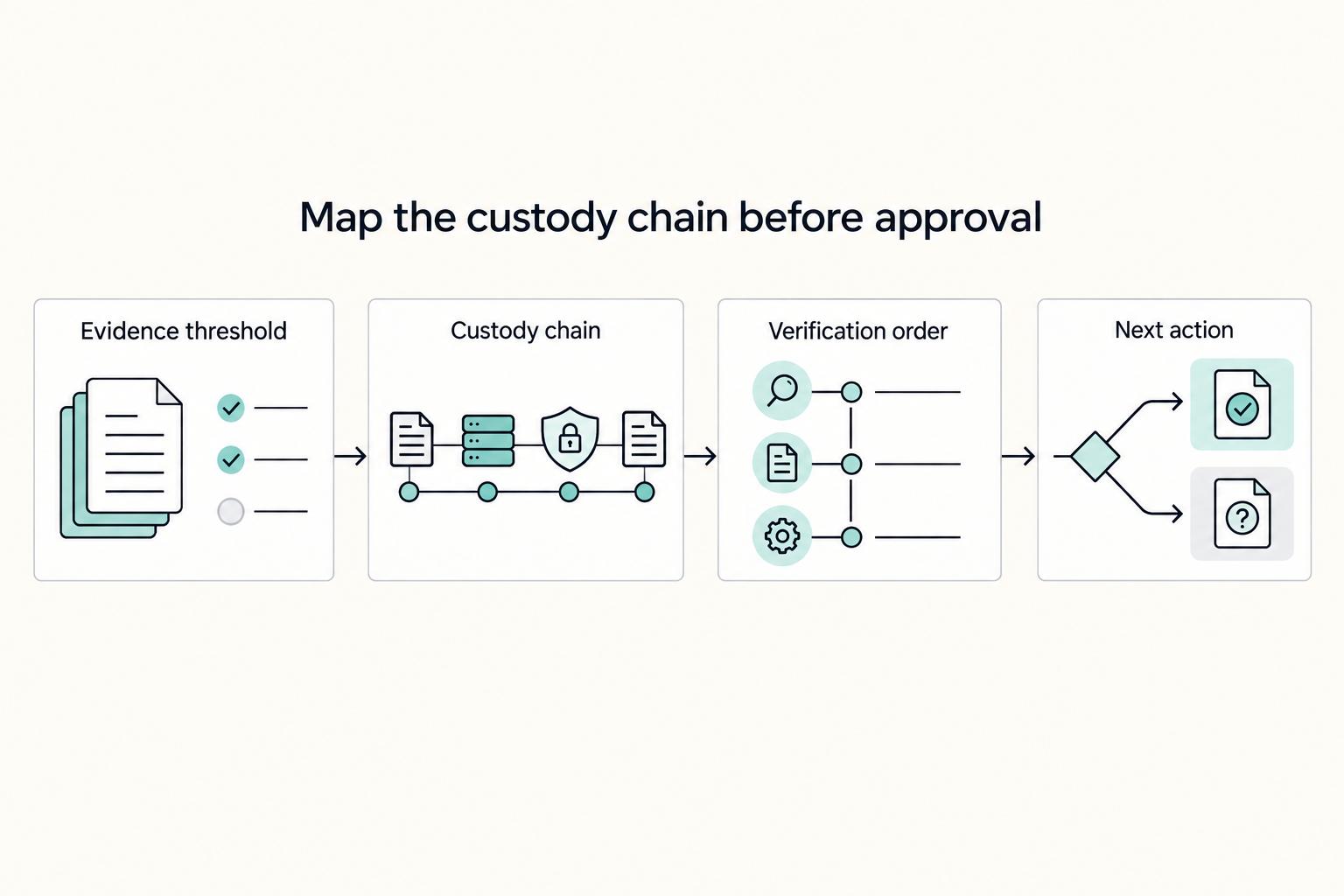
Start by screening the best user interview transcription tools on trust gates before features: confirm a written DPA path when needed, verify SOC 2 Type II evidence, and review data-use wording tied to training or service improvement. Then map recording, upload, storage, and sharing handoffs so access boundaries and retention controls are explicit. Compare convenience, speed, and cost only after those checks pass.
Your Client's Data Is Your Biggest Asset - and Your Biggest Liability#
Treat tool selection as a data-custody decision first. Before you look at speed, price, or editing features, know where interview data goes, what the vendor can do with it, and how you will prove you checked.
Minimum evidence before approval#
Set a simple evidence bar before you approve any vendor, and keep:
- the contract terms or terms of service you reviewed
- a policy or security page confirming DPA availability for EU or UK participant data and SOC 2 Type II evidence
- your own saved note or screenshot of the storage, sharing, and access settings you plan to use
That is your minimum defensibility check. You are proving that you verified these points, not that you assumed them.
Map the custody chain first#
Risk changes at each handoff, so review the full lifecycle before you compare features. For each stage, note what can go wrong, what you must verify, and what record you will keep.
| Stage | What can go wrong | What you must verify | What documentation you should retain |
|---|---|---|---|
| Recording | You collect personal or sensitive interview information from the start | Whether EU or UK participant data is involved and whether a DPA is available before upload | A note on participant jurisdiction and DPA readiness |
| Upload | Files enter the vendor platform and may fall under broad data-use language | Terms reviewed for words like "train" or "improve" before upload | Saved terms or screenshots of the clauses you checked |
| Storage | Transcripts can become records in some contexts, and errors can misquote or omit key detail | How storage and handling terms are documented for your use case | Policy page or settings capture showing your storage/handling choices |
| Sharing | Exposure increases with each transfer | Who can access, export, or receive transcripts, and what checks you completed | A handoff note showing recipients and processing checks |
Verify in this order#
Start before upload. If EU or UK participant data is involved, confirm DPA availability first. If that is unclear, pause vendor approval.
| Step | Focus | What to verify |
|---|---|---|
| 1 | DPA availability | If EU or UK participant data is involved, confirm DPA availability first; if that is unclear, pause vendor approval |
| 2 | Data-use terms | Read the data-use terms and check for language like "train" or "improve"; if the wording is broad or unclear, treat it as a real risk flag |
| 3 | Storage and handling | Confirm storage and handling terms in a place you can save; transcripts can become discoverable records in some contexts |
| 4 | Access boundaries | Set access boundaries before you distribute transcripts, summaries, or recordings; if you cannot explain how the file was processed and what checks you completed, the handoff is not ready |
Then review the data-use terms for language like "train" or "improve." If the wording is broad or unclear, treat it as a real risk flag.
Next, confirm storage and handling terms in a place you can save. Transcripts can become discoverable records in some contexts, so quality and handling both matter.
Finally, set access boundaries before you distribute transcripts, summaries, or recordings. If you cannot explain how the file was processed and what checks you completed, the handoff is not ready.
What you do next#
Only compare speed or price after these trust and risk checks pass. Use this evidence pack as your starting point for the due-diligence checklist in the next section so you can screen every vendor the same way. For a step-by-step walkthrough, see Best Usability Testing Tools for Freelancers in 2026.
Why Your Transcription Tool Is a Compliance Landmine, Not a Productivity Hack#
A transcription tool is not just a convenience purchase. It is a data-custody decision, and the exposure is real. If a vendor cannot meet your minimum evidence bar, do not compare speed, editing features, or price yet.
Step 1. Set a minimum bar you can verify#
Your interview files often combine three risk areas at once: client IP, participant PII, and sensitive context. That means your baseline should be evidence you can retain, not marketing claims.
| Control area | What to verify | Acceptable evidence | If evidence is missing |
|---|---|---|---|
| Security attestation | Vendor can show SOC 2 Type II | Current trust/security documentation you reviewed and saved | Do not shortlist yet |
| Data residency terms | Vendor fits your data sovereignty needs | Binding terms, policy language, or contract text you can retain | Escalate for clarification before approval |
| DPA availability | DPA is available before upload when EU/UK participant data is involved | DPA availability confirmed in writing or in contract flow | Pause upload and approval |
| Data lifecycle terms | Data use, retention, deletion, and sharing are clearly explained | Terms or policy screenshots covering those points | Treat as unresolved risk |
Use a simple test: can you show what you checked, where you found it, and when you verified it?
Step 2. Map each handoff before upload#
Handoffs are where exposure widens. For every stage, confirm access scope, retention and deletion handling, and who is responsible for each step.
- Recording: who can access the raw file, where it starts, and who owns it right after capture
- Upload: which account uploads, whether terms were reviewed for words like "train" or "improve," and whether access stays limited to the right people
- Storage: where transcripts live, what retention and deletion handling exists, and who owns cleanup
- Sharing: who receives links or exports, whether scope stays narrow, and who can explain processing steps and checks completed
If a handoff has no clear owner, accountability is already weak.
Step 3. Confirm data-use terms before upload#
Review terms for language like "train" or "improve" before you upload interview files. If data-use, retention, deletion, or sharing wording is broad or unclear, flag it for escalation and carry that risk into the next due-diligence step.
Storage risk is not only about exposure. If a transcript misquotes someone or drops key detail, it can create liability instead of saving time.
We covered this in detail in Best Dictation Software for Writers Who Need Better ROI and Data Control.
Run every vendor through the same evidence log and decision rule#
Run every vendor through the same evidence log and the same decision rule. If you cannot save, date, and recheck the supporting document for a claim, mark it unresolved.
| Objective | Evidence to collect | Claim is unresolved when |
|---|---|---|
| Confirm security controls are described in verifiable documents | Current security or trust documentation you reviewed and saved | The claim is verbal, undated, or too generic to map to the service you would use |
| Confirm critical handling requirements are documented | Contract text, policy language, or written clarification you can retain | Requirements appear only in marketing copy or conflict across documents |
| Confirm any required contract path exists before upload | Written confirmation in the contract flow before any file is sent | Required terms are discussed only after signup or after upload |
| Confirm data use, retention, deletion, and sharing terms | Saved terms or policy screenshots covering those topics | Language is broad, unclear, or inconsistent across materials |
Step 1. Build your evidence log before you compare tools#
Build the log before the demo starts. Begin with the control claim you need proven, then record the document that supports it, the vendor-side owner, and your review status. Keep the format consistent so you can reuse it across vendors.
| Claim | Source document | Owner | Review status |
|---|---|---|---|
| What must be true | Policy, contract, trust doc, or written reply | [Role/team] | Pass, Flag, Escalate, or Open |
Before you trust a source, do a basic authenticity check: confirm the domain and HTTPS connection, and .gov for official U.S. government sources. If you rely on a published record, log traceable metadata such as journal, date, volume/pages, or DOI, not just a page title. Also treat a database listing as discovery, not endorsement.
Step 2. Apply pass, flag, or escalate from document quality#
Score the documents, not the demo. Pass only when the claim is supported by current, specific, internally consistent written evidence. Flag the vendor when evidence is partial or documents conflict on key terms. Escalate when a required claim is missing in writing, or when the source cannot be authenticated.
Step 3. Write the decision note before vendor comparison#
Write the decision note before anyone starts arguing about features. For each vendor, document what you reviewed, what remains unresolved, and why the status is go, no-go, or hold. Add the follow-ups required, the owner for each follow-up, and the exact condition that must be cleared before any interview file is uploaded.
If a risk is still open, record it plainly instead of smoothing it over. Save document versions, screenshots, and review dates so your trail stays defensible if wording changes later.
This is not legal advice and does not guarantee a compliance outcome. What it does give you is a clear, reusable decision record. Once you have each vendor in that format, you can compare transcription tools on fit, process, and accuracy handling.
For related workflows, see The Best Tools for Repurposing Content. Want to turn this checklist into a repeatable approval workflow? Start with Gruv docs to map policy gates, audit records, and handoffs.
Vetting the Contenders: A Risk-Based Review of Top Transcription Tools#
Pick the tool family before you pick the brand. AI services, human or hybrid services, and integrated repositories can all work, but they create different handoffs and contract checks.
| Tool family | Best-fit use case | Required compliance evidence | Common failure mode | Decision signal |
|---|---|---|---|---|
| AI-powered services | You need fast draft transcripts and low-friction intake | Trust/risk documentation, SOC 2 Type II for shortlist screening, clear data use/retention/deletion/sharing terms, DPA path before upload for EU/UK participant data | Speed-first adoption with unclear language like "train" or "improve," or unclear handoffs | Approve only when upload path, terms, and contract path are clear in writing; Hold if unclear; Reject if required evidence is missing |
| Human or hybrid services | You need reviewed output because quality errors would materially hurt decisions | Same core evidence, plus clear written sharing and deletion coverage for additional handoffs | More exposure points from extra handoffs and unclear sharing/deletion coverage | Hold until sharing and deletion coverage are clear; Reject if those controls cannot be documented |
| Integrated repositories | You want transcription, storage, tagging, and analysis in one workflow | Same core evidence, plus clear documentation of data use/retention/deletion/sharing across connected steps and exports | Hidden downstream handoffs in connected tools or exports | Approve only when the full chain is documented; Hold or Reject when downstream processing is not visible |
Step 1. Choose AI-powered services only after you map intake and terms#
Use this category when speed is truly required. First, map where files enter, move, and get shared. Each handoff increases exposure.
Before upload, review the terms for words like "train" or "improve." If the data-use, retention, deletion, or sharing language is too broad to explain clearly, put the vendor on hold. For EU or UK participant data, confirm a DPA path before upload. For shortlisting, require SOC 2 Type II evidence.
Step 2. Use human or hybrid services when reviewed quality is worth the extra handoffs#
Choose this route when transcript errors could misquote participants or drop key detail. In some contexts, transcripts can become discoverable records, so quality and handling both matter.
Run a fast handling check: who can handle files, and how sharing and deletion are documented for each handoff. If those controls are unclear, mark the vendor as hold or reject for sensitive interviews.
Step 3. Pick an integrated repository only when the full chain is visible#
This model fits when transcription is one part of a broader research process. But a single qualitative-research tool may not cover every step end to end, so many teams still use a specialized stack.
The main risk here is hidden handoffs. Check how data moves through connected tools or exports, and whether data use, retention, deletion, and sharing are clearly documented across that chain. If that chain is not visible in current documentation, do not assume the all-in-one setup is lower risk.
No category is automatically safe. Choose the option whose current documentation and controls best match your interview sensitivity and how your team actually works. If you want a deeper dive, read Value-Based Pricing: A Freelancer's Guide.
Your Final Decision: An Investment in Trust, Not a Subscription Expense#
Make the decision in the same order you would defend to a client or reviewer: trust and risk gates first, then fit and convenience as the tie-breaker. If a tool cannot produce the documents, it is not ready for interview data.
- Clear documentary gates before any upload.
For EU or UK participant data, treat a processor-contract path aligned to Article 28 as a hard gate. Require written evidence for DPA availability, SOC 2 Type II proof, data-use restrictions, deletion scope, retention policy, and subprocessor transparency. Save an evidence pack of PDFs or screenshots with URLs and effective dates, not verbal confirmations.
- Resolve policy conflicts before approval.
SOC 2 Type II supports control assurance over time, but it does not answer model-training permissions by itself. Check terms, privacy pages, and help docs for language like "train" or "improve," and escalate if those sources conflict. Confirm deletion and retention coverage for recordings, transcripts, and closed-account behavior, and reject vague retention language.
- Use process fit only after gates pass.
When tools pass the same trust checks, compare workflow fit and operational controls. If none passes, stop and escalate instead of accepting convenience risk. For your next step after approval, see How to conduct effective user interviews. If a client or internal reviewer needs a second pass, contact Gruv.
| Tool | Pass | Flag | Escalate |
|---|---|---|---|
| Otter | Enterprise agreement references DPA appendices; public subprocessor page; states AI service providers do not use customer data to train or improve their models | Trash auto-deletes after 30 days; custom retention minimum is 24 hours, so verify plan-level controls | Require the exact contract route and current policy set before upload for regulated or client-restricted work |
| Descript | Public SOC 2 Type II statement; public subprocessor list; help article says current production AI models use no user data | Terms say content may be used to train or improve models unless opted out; SquadCast saved recordings may remain 60 days after account closure | If training use is prohibited or Article 28 paperwork is required before upload, hold approval until written terms and contract path are confirmed |
| Happy Scribe | Public security page says SOC 2 Type II and GDPR; privacy policy says it will return or destroy personal data in content at relationship end; model-improvement contribution is user-selectable | Public subprocessor transparency was not clearly evidenced in the reviewed sources | If subprocessor detail or a clear DPA route is required before upload, pause until support or legal provides it |
If your rollout spans multiple countries and you need a clear compliance path before go-live, talk to Gruv.
Frequently Asked Questions
Do you need a DPA for interview transcription?
If you handle participant data through a processor, do not upload anything until a written contract is in place. Under UK GDPR, that contract is required whenever a controller uses a processor. Proceed only after you confirm the vendor's DPA or contract path and your client accepts it. If that contract path is unclear, escalate to legal or get client-side approval before upload.
What is the lowest risk way to transcribe sensitive interviews?
Use the option with the fewest handoffs and the clearest written limits on data use. Verify SOC 2 Type II evidence, published subprocessors, and retention and deletion terms, including delete-or-return coverage at contract end where processor-contract terms apply. Escalate if data-use language is broad, for example if it is tied to service "improvement," if subprocessors are not visible, or if file-access rules are unclear.
How accurate are AI transcripts in real interview conditions?
Treat accuracy claims as directional, not as final approval criteria. Descript says accuracy can reach up to 95% with clear audio, and also says results vary by recording quality, accents, background noise, and mic placement. Before you proceed, test one representative interview and review a short sample for dropped terms, misheard product names, and errors that would change your conclusion. If those appear, hold the tool and retest or switch categories.
Is speaker labeling really that important?
Yes, because your decisions depend on quotes being tied to the right person. Proceed only after you test speaker labeling on overlap-heavy audio and confirm attribution stays correct. For tools like Otter, run a before-and-after test by tagging a few paragraphs per speaker, then escalate if attribution is still unreliable for panel or interruption-heavy interviews.
Should you choose real time transcription or wait for post call processing?
Use real time only when speed changes your next action, not just for convenience. Before enabling live capture or integrations, verify the same checks as any upload: DPA status where needed, SOC 2 Type II evidence, data-use limits, sharing defaults, and retention and deletion controls. Escalate to security or the client when live notes will be broadly shared or pushed into additional tools.
Is offline transcription the safer choice?
It is safer only if you can verify that no cloud upload happens at any step. Based on the evidence reviewed here, Otter and HappyScribe are cloud-based, so do not assume local-only processing in this shortlist. If your client requires no third-party upload, pause and use a verified local option outside this list or get written approval for a cloud processor. | Interview scenario | Safest tool path | What you must verify before upload | | --- | --- | --- | | High-confidentiality interviews | Fewest-handoff path with clear contractual controls | Written processor contract or DPA where required, SOC 2 Type II evidence, published subprocessors, delete-or-return terms where applicable, and explicit data-use limits | | Routine user research | AI service can be acceptable when documentation is current and clear | SOC 2 Type II evidence, privacy/data-use terms, retention/deletion controls, and subprocessor visibility | | Speed-critical workflows | Real-time transcription only when timing affects decisions | All standard checks above, plus sharing defaults and integration handoff visibility | | Offline preference | Verified local-only workflow, or no upload until verified | Proof of local processing, no hidden sync/upload, and client approval for strict requirements |
Try a related tool
Researched and edited by the Gruv editorial team. Gruv builds cross-border billing, payouts, and finance-operations software for global businesses.
Sources
Includes 4 external sources outside the trusted-domain allowlist.
- pmc.ncbi.nlm.nih.gov/articles/PMC8432276trusted
- pmc.ncbi.nlm.nih.gov/articles/PMC7083584trusted
- tiffin.edu/wp-content/uploads/AI-Tools-with-Description...trusted
- gruv.ai/blog/the-best-tools-for-transcribing-user-in...external
- ico.org.uk/for-organisations/uk-gdpr-guidance-and-resou...external
- perkinscoie.com/insights/update/rise-popularity-ai-transcrip...external
- userinterviews.com/blog/best-qualitative-research-toolsexternal
Educational content only. Not legal, tax, or financial advice.
Related Posts

Value-Based Pricing for Freelancers Under Real Payment Risk
Value-based pricing works when you and the client can name the business result before kickoff and agree on how progress will be judged. If that link is weak, use a tighter model first. This is not about defending one pricing philosophy over another. It is about avoiding surprises by keeping pricing, scope, delivery, and payment aligned from day one.
The Best Tools for Repurposing Content
If your content process keeps taking time from client work, you are already paying an admin tax. It shows up in the hours you spend planning topics, recording or drafting, editing, formatting for different channels, writing captions, scheduling posts, and keeping the whole thing moving again next week. That is non-billable work pulling attention away from paid delivery.
How to Conduct Effective User Interviews
If you want a practical answer to **how to conduct user interviews** for client work, split the job in two. Use the first call to test fit and reduce scope risk. Then, once the work is signed, use deeper interviews to understand the problem well enough to recommend action without guessing.