
Quick Answer
Start with a pilot notebook in Notion `Settings` → `Import`, then scale only after you verify note counts, attachments, and internal links. Keep Evernote as the reference copy during the transition, and create independent ENEX backups plus HTML exports when available so you can spot-check content outside the importer. For larger estates near or above ~5,000 notes, split work into notebook-level batches instead of attempting a single full-account transfer.
Moving from Evernote to Notion works best when you treat it like a controlled migration, not a simple feature swap. If your notes support client work, billing, or operating documents, the goal is to protect the original record, move in small batches, and rebuild only what you will actually use.
The way to keep it under control is to work in three phases: secure your notes, transfer them in controlled batches, and turn the result into a workspace you will actually run from.
Phase 1: De-Risk the Migration and Ensure Zero Data Loss#
Assume the first import will be imperfect. In Phase 1, your job is to reduce uncertainty before you touch live business notes.
1. Audit your notebooks by business risk, not by size#
Do not start with the biggest notebook. Start with the notebook whose failure would hurt the least, then work upward. Before you import anything, review Notion's official import path on desktop or web, not mobile. Check what imports, what does not, and any stated limitations. That step prevents a lot of false confidence.
Use a simple tiering sheet and assign an owner for both the source content and the post-import check. Keep it practical:
| Tier | Business impact | Owner | Dependency risk | Migration method | Validation owner |
|---|---|---|---|---|---|
| Tier 1 | Active client delivery, billing support, operating docs you use now | Named business owner | High, because other work depends on it being accurate | Import only after pilot succeeds, in small notebook batches | You, or the person who relies on it daily |
| Tier 2 | Reusable research, reference material, pipeline notes, internal knowledge | Named owner or contributor | Medium, because useful but not time-critical | Import after Tier 1 is validated | Same owner, with spot checks by end user |
| Tier 3 | Old projects, inactive notes, long-tail archive | Usually no active owner | Low for day-to-day work, but may matter for recordkeeping | Retain in place or migrate later | One person signs off that archive is isolated |
Use a simple rule: if a notebook supports current delivery, money, or contractual obligations, it is Tier 1. If it is useful but not urgent, it is Tier 2. If it exists mostly for history or possible future reference, it is Tier 3.
2. Build backup copies before you run the importer#
Use Notion's official importer as your primary transfer path. Launch it from Settings → Import, where you choose specific Evernote notebooks and click Import. That is your transfer method, not your only protection. Before you begin, keep an independent backup copy of your source notes, and keep a format you can quickly review, such as HTML, when your export workflow supports it. Here is a compact way to think about the options:
| Option | Format | What it preserves for planning purposes | Best use | Known limits |
|---|---|---|---|---|
| Official Notion importer | Direct import via Settings → Import | Notebook-level transfer into Notion pages, with notes landing as items in a list database | Primary migration path | No progress bar or status tracking; Evernote rate limits can cause long backoffs; images inside notes may need cleanup after import |
| Independent backup export | Your available export format(s) | Separate copy of source material outside the importer run | Recovery copy and fallback evidence pack | Do not assume every backup format is directly importable into Notion |
| HTML files (when available) | .html | Human-readable copy you can open and spot-check | Visual verification and cleanup reference | Not ideal for structured reorganization |
Two checks matter here: first, store backups somewhere separate from the machine you are migrating on. Second, spot-check them. Open a few files, confirm the expected notebook exports exist, and make sure your critical note titles are present. If you have anything close to or above ~5,000 notes, do not treat it as one job. Split it into notebook-level batches and define a pilot scope first.
3. Normalize names and map Evernote structure to final destinations#
Decide where your notes should end up before you import them. Notion brings Evernote notebooks in as pages, and the notes inside land as items in a list database. That is useful because each imported note can then be moved elsewhere inside Notion.
| Evernote pattern | Map to in Notion | Guidance |
|---|---|---|
| Notebook with repeatable records | Database | Target a Notion database |
| Tag used for status, type, or topic | Property | Plan a matching property |
| Tag that links records across contexts | Relation | Plan a matching relation |
| Old material you must keep but do not actively use | Archive | Move toward an archive |
Use that mapping before you import so cleanup stays intentional.
This is also the right time to fix names. A notebook called "Misc" tells you nothing when it shows up in the Notion sidebar. A notebook called "Client Acme" or "Knowledge Tax" gives you an immediate destination and makes post-import review much cleaner.
For stale content, make an explicit retain-or-migrate-later decision. If notes must be kept for tax, contractual, or other policy reasons, isolate them into an archive group and keep the original source intact until your policy or advisor confirms the retention rule. Do not delete anything on the assumption that a future import will be perfect.
Phase 1 done. Move to transfer only when these four checks are true:
- Backup copies exist, are stored separately, and have been spot checked
- A pilot notebook has been chosen and kept low risk
- Notebook names and tag meanings have been normalized for Notion destinations
- Archive material has been isolated, with "retain" and "migrate later" decisions recorded
Related: The Best Note-Taking and Knowledge Management Apps for Freelancers. If you're planning to migrate from Evernote to Notion, browse Gruv tools.
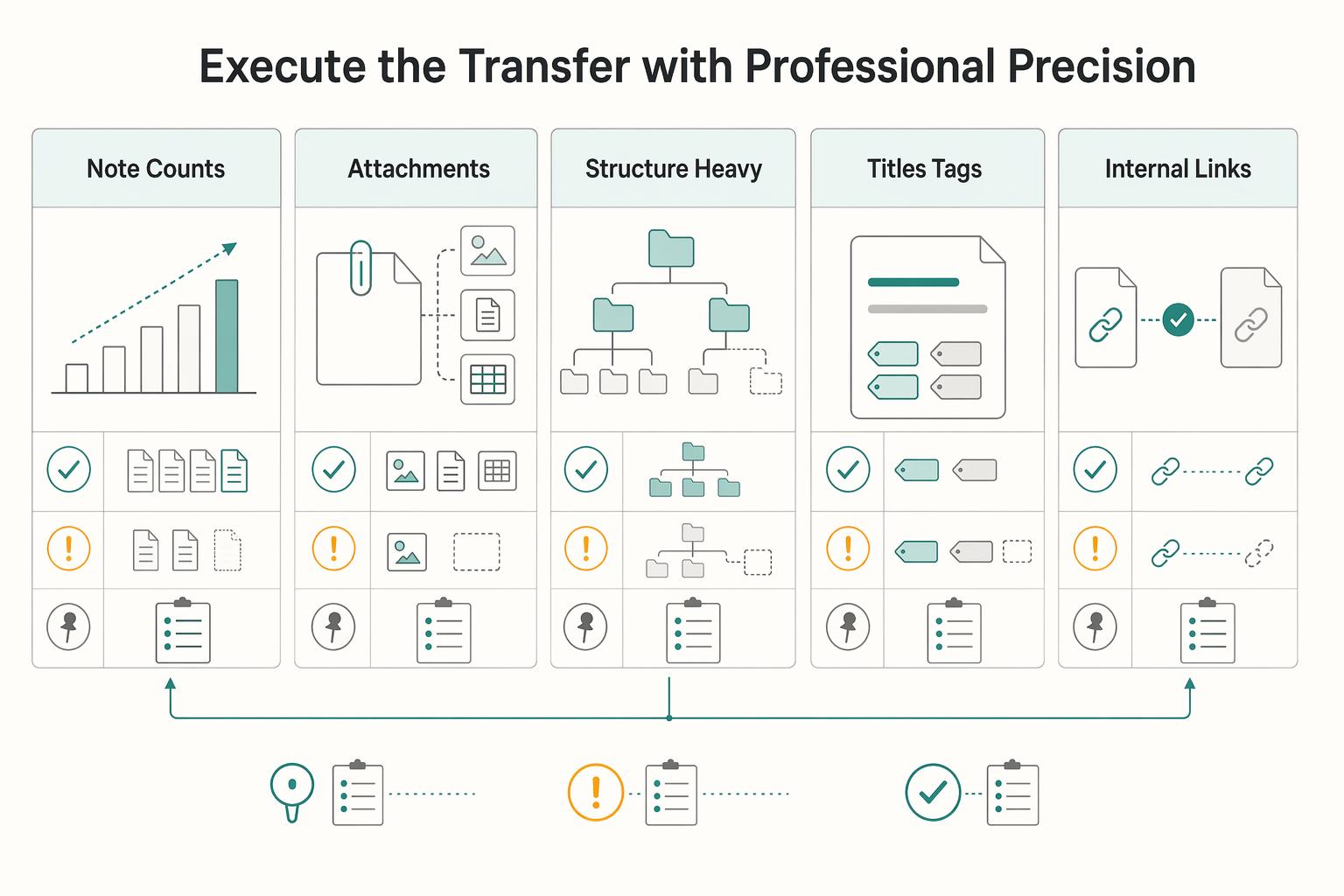
Phase 2: Execute the Transfer with Professional Precision#
Run a pilot-first migration: start with the official importer, switch to notebook-level ENEX exports when a batch needs tighter control, and keep parallel use for holdouts that do not move cleanly.
| Check | Review |
|---|---|
| Note counts | Compare source and destination note counts for that notebook or batch |
| Attachments | Open a sample of attachments, including at least one business-critical file |
| Structure-heavy notes | Review structure-heavy notes for formatting drift and readability |
| Titles, tags, dates, or mapped properties | Check whether they behaved as expected |
| Internal links | Mark internal-link breaks and label status as relinked, partially relinked, or deferred |
| Path | Setup effort | Control level | Common failure points | Best-fit use case | Recovery step if it fails |
|---|---|---|---|---|---|
| Official importer first pass | Low | Medium | Flaky connectivity can interrupt sync/import behavior; post-import cleanup may be needed | Low-risk pilot notebook, then clean notebooks in small batches | Pause rollout, compare source vs imported batch, then retry only that notebook |
| Notebook-level ENEX fallback | Medium | High | More manual handling, slower cleanup, stale exports if not refreshed | Larger or attachment-heavy notebooks, or any batch where you want tighter checkpoint control | Re-export that notebook to fresh ENEX and HTML, then re-import from the refreshed export set |
| Parallel use for holdouts | Low | High protection, lower speed | Version drift between apps, unclear source of truth | Notebooks that still depend on Evernote-specific behavior or remain unstable after import | Freeze one source of truth, log the holdout, and revisit after the main migration |
- Choose one path for one pilot notebook. Keep the scope narrow first. If you want speed, run the importer. If you need more control, prepare fresh exports before you touch that notebook.
- Follow a Step 1 / Step 2 / Step 3 runbook. Step 1: import one low-risk test notebook. Step 2: verify it is usable, not just present. Step 3: move higher-priority notebooks in controlled batches, not one bulk account-wide push.
- Run the same QA checklist after every batch, using the checks above.
Plan for three recurring issues from the start: link repair, formatting cleanup, and holdouts. Keep a relink queue, a reformat queue, and a holdout list so failures stay contained and re-import triggers stay clear. If a notebook still works better in parallel use, treat that as a controlled decision, not a failed migration.
Phase 3: Rebuild Imports Into Working Databases You Run Day to Day#
After QA passes, treat your imported notebooks as a staging layer and rebuild around a few working databases you can run from day to day.
1. Consolidate imports into three databases you will maintain#
Start from the actual import structure: Evernote notebooks come in as pages, and notes inside those pages come in as items in a list database. Build Projects, Clients, and Knowledge Base as your operating layer, then move notes over in controlled batches.
| Common Evernote note type | Destination database | Key properties to track | Relation link to add |
|---|---|---|---|
| Client meeting notes | Clients | Last contact, Next contact, Status | Related Projects |
| Project briefs and deliverable notes | Projects | Status, Due date, Owner | One Client, plus related Knowledge Base items |
| Research clips, references, SOP notes | Knowledge Base | Topic, Status, Source | Related Projects where relevant |
| Proposals, scope, contract notes | Projects or Clients | Status, Date, Priority | Link client first, then active project if applicable |
Use a quick verification loop after each move: confirm the original imported page is still visible, open the moved note in its destination database, and test at least one attachment or image. Some images may need cleanup after import, so visible does not always mean complete.
2. Apply P.A.R.A. as an operating rule, not a folder rebuild#
Use P.A.R.A. inside your databases instead of recreating a notebook maze. The goal is clean active work, searchable history, and predictable archive behavior.
| P.A.R.A. category | Where it lives in this setup | How to keep active vs archived clean |
|---|---|---|
| Projects | Projects database | Use a status workflow to separate active from archived work |
| Areas | Usually Clients for ongoing responsibility | Keep relationship records active even between projects; archive inactive ones by status/view |
| Resources | Knowledge Base database | Keep references searchable; archive stale items through status |
| Archives | Archive views inside each database | Hide from daily views, keep available for retrieval |
Keep one simple rule: when work is no longer active, change the status and let views handle visibility. Do not delete imported notebook pages immediately; keep them until you verify relations, attachments, and representative notes. This is especially important on large migrations, since reliability is documented up to about ~5,000 notes and larger imports may fail.
3. Build one dashboard that supports daily decisions#
Your Command Center should answer "what needs action now?" with linked views, not more storage.
| Item | Done when |
|---|---|
| Projects, Clients, and Knowledge Base | Live and contain real migrated notes |
| Core relations | Work on active records |
| Command Center views | In place and usable daily |
| Inbox capture path and archive rule | Active |
| Linked view | Required properties | Filter logic | Decision it supports |
|---|---|---|---|
Active Projects (Projects) | Status, Due date, Client | Active statuses only | What must move this week |
Client Follow-ups (Clients) | Next contact, Status | Due or overdue follow-ups | Who needs a response now |
Inbox Triage (Knowledge Base) | Status (inbox/processed) | Inbox only | What still needs sorting or action |
| Import Cleanup Queue (relevant DB) | Cleanup/QA flag, Status | Flagged for review | What still needs post-import cleanup |
Definition of done for this phase:
Projects,Clients, andKnowledge Baseare live and contain real migrated notes.- Core relations work on active records.
Command Centerviews are in place and usable daily.- One inbox capture path and one archive rule are active.
If those checks pass, you have moved beyond import and into a system. For a deeper build-out, see A Guide to Notion for Freelance Business Management.
Conclusion: You Haven't Just Switched Tools - You've Upgraded Your Operation#
If you handled this move in phases, you did more than change note-taking apps. You now control three things that matter in practice: a protected original record, a migration process you have tested, and a setup you can keep refining as you work.
- Protected data
You kept Evernote as the reference copy while exporting independent ENEX backups, which helps keep cleanup from turning into a data-loss scare. That matters even more when migrations get messy at scale. Keep the backup, keep the originals, and do not archive anything until your spot checks pass.
- Validated migration process
You did not assume the first import was correct just because it finished. You treated parallel use as a practical transition and checked whether key notes and attachments landed the way you expected. That is how you build confidence, especially when imported formatting or file placement still needs cleanup. If a new batch lands in a way that feels chaotic, stop reorganizing and re-check the source before you compound the mess.
- Connected workspace
You are no longer trying to recreate an Evernote notebook tree exactly as-is. The real upgrade is operational: better links between notes and active work, with room to adjust structure as you go. Post-migration cleanup is part of the process, not a sign you failed the move.
After the move, keep a simple stabilization routine. Keep your backups until you are confident in the new system, and run periodic spot checks after ongoing imports. Do that, and you will reduce uncertainty about where critical information lives.
For a step-by-step walkthrough, see How to Implement the 'PARA' Method in Notion. Need help planning your migration? Talk to Gruv.
Frequently Asked Questions
Is it safe to move from Evernote to Notion?
Usually, yes, if you treat Evernote as the original record until your checks are done. Export an ENEX file first, import one low-risk notebook from Notion’s Import option, and make sure the notebook appears as a page with notes as individual database items. If that pilot looks wrong, stop there, keep the originals untouched, and retry with a smaller batch or a fresh export instead of cleaning up a bad full import.
What usually transfers cleanly, and what needs manual cleanup?
The structure is often usable, but imported notes may not look identical to Evernote. Validate by opening representative notes directly, not just by relying on search, since some subpages may be harder to find in Quick Find. If an important note looks off, flag it in your Import Cleanup queue and fix it before you archive anything in Evernote. | Item | What usually comes across | What you should check | What to do if it goes wrong | | --- | --- | --- | --- | | Notebook structure | Notebooks appear as hierarchical pages | Verify each selected notebook shows up where expected | Re-import that notebook before reorganizing | | Notes | Notes appear as individual database items | Open a sample set and compare content and layout | Clean up the note manually in Notion | | Formatting | Often usable, not identical | Review dense formatting and visual structure | Queue the note for manual cleanup | | Handwritten note searchability | Verification needed | Test a sample after import if search matters | Keep those notes out of the move, or scan them in another app before importing | | Encrypted note handling | Verification needed | Test a representative note before moving sensitive material | Keep sensitive notes out of the move until verified |
How long does the migration take?
It depends mostly on how many notebooks you move and how much cleanup the notes need after import. Measure one notebook from import through QA, not just the import click itself. If the job starts dragging or stalls, split it into smaller batches and keep the move phased.
Can you migrate just one notebook?
Yes, and that is the right way to start. Import only the notebook you want to test, then confirm the selected notebook appears as a hierarchical page and its notes appear as separate items. If that small test fails, do not scale up yet. Retry with a smaller batch or a fresh export.
How should you organize imported notes after the move?
Keep the first pass simple. Leave the imported structure in place until validation is done, then group notes into a small set of categories that match how you actually work. If a note has no clear home, leave it in a cleanup queue rather than forcing it into the wrong place.
Should you clean up Evernote before you migrate?
Yes, but keep the cleanup practical. Look for notebooks you no longer need, confusing names that will make import selection messy, and obvious clutter you know you will never use. If cleanup starts turning into a major redesign, pause and migrate one notebook first so you learn what actually needs attention.
Will changes in Notion affect the original notes in Evernote?
No. Edits you make after import do not change the content still stored in Evernote. Check a few imported notes against the originals so you know which copy you are treating as current during the transition. If you spot mismatches, keep Evernote as the reference copy until you finish validation.
Try a related tool
Researched and edited by the Gruv editorial team. Gruv builds cross-border billing, payouts, and finance-operations software for global businesses.
Sources
Includes 6 external sources outside the trusted-domain allowlist.
- pmc.ncbi.nlm.nih.gov/articles/PMC6630869trusted
- scholarworks.waldenu.edu/cgi/viewcontent.cgitrusted
- dev.to/dev_tips/obsidian-notion-logseq-the-note-tak...external
- discussion.evernote.com/forums/topic/150242-evernote-vs-notionexternal
- discussion.evernote.com/forums/topic/129212-anyone-else-thinking-of-...external
- fastcompany.com/90942377/how-to-export-your-evernote-notes-t...external
- forensiksoft.com/blog/export-evernote-to-notionexternal
- github.com/vzhd1701/enex2notionexternal
Educational content only. Not legal, tax, or financial advice.
Related Posts

Value-Based Pricing for Freelancers Under Real Payment Risk
Value-based pricing works when you and the client can name the business result before kickoff and agree on how progress will be judged. If that link is weak, use a tighter model first. This is not about defending one pricing philosophy over another. It is about avoiding surprises by keeping pricing, scope, delivery, and payment aligned from day one.
The Best Note-Taking and Knowledge Management Apps for Freelancers
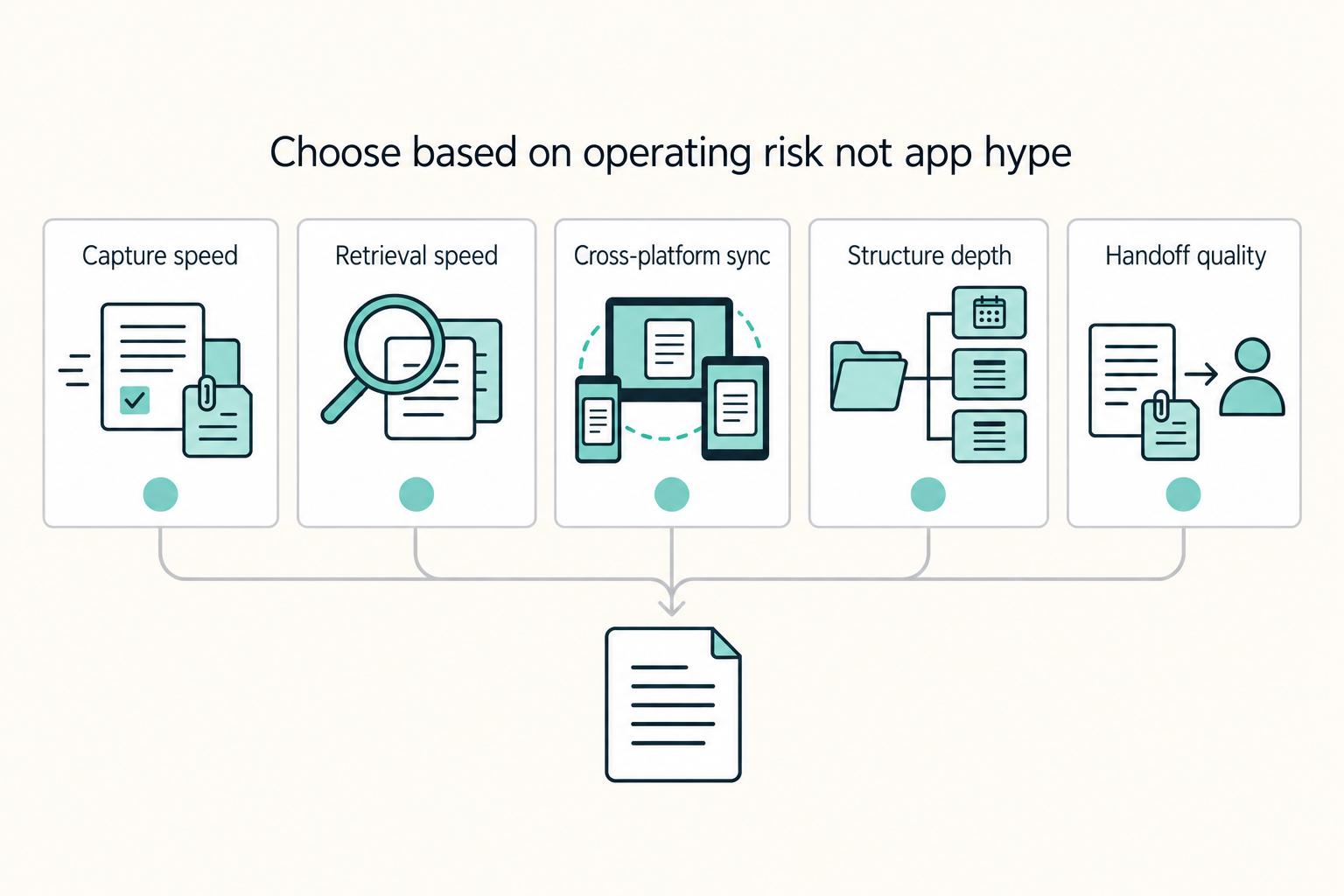
Make this decision in one sitting, then move on. One primary note app, used as the default place for client decisions, follow-ups, and reference notes, does more to cut missed details, messy handoffs, and tool churn than another week of comparing screenshots ever will.

A Guide to Notion for Freelance Business Management
If your workspace feels busy but fragile, you do not need more pages. You need one connected system. Treat your freelance business like a business-of-one and use Notion as the control layer that connects client decisions, delivery, and billing in one place.