
Quick Answer
Start by testing tools against evidence needs, not storage convenience. For the best legal document management tools, run a real contract through draft, approval, signature, and retrieval, then confirm you can export user identity, timestamps, version changes, and sharing events. Use FRE 901 as a practical check: a folder and timestamp alone may fail when authenticity is challenged. Keep evaluating until one system reliably shows who did what and when.
Use Legal Defensibility as the Standard for Mindset, Process, and Tools#
If your contracts, SOWs, and IP files are spread across different tools, you are exposed when a dispute or audit turns into a request for proof. The real risk is not clutter. It is whether your records can stand up as evidence.
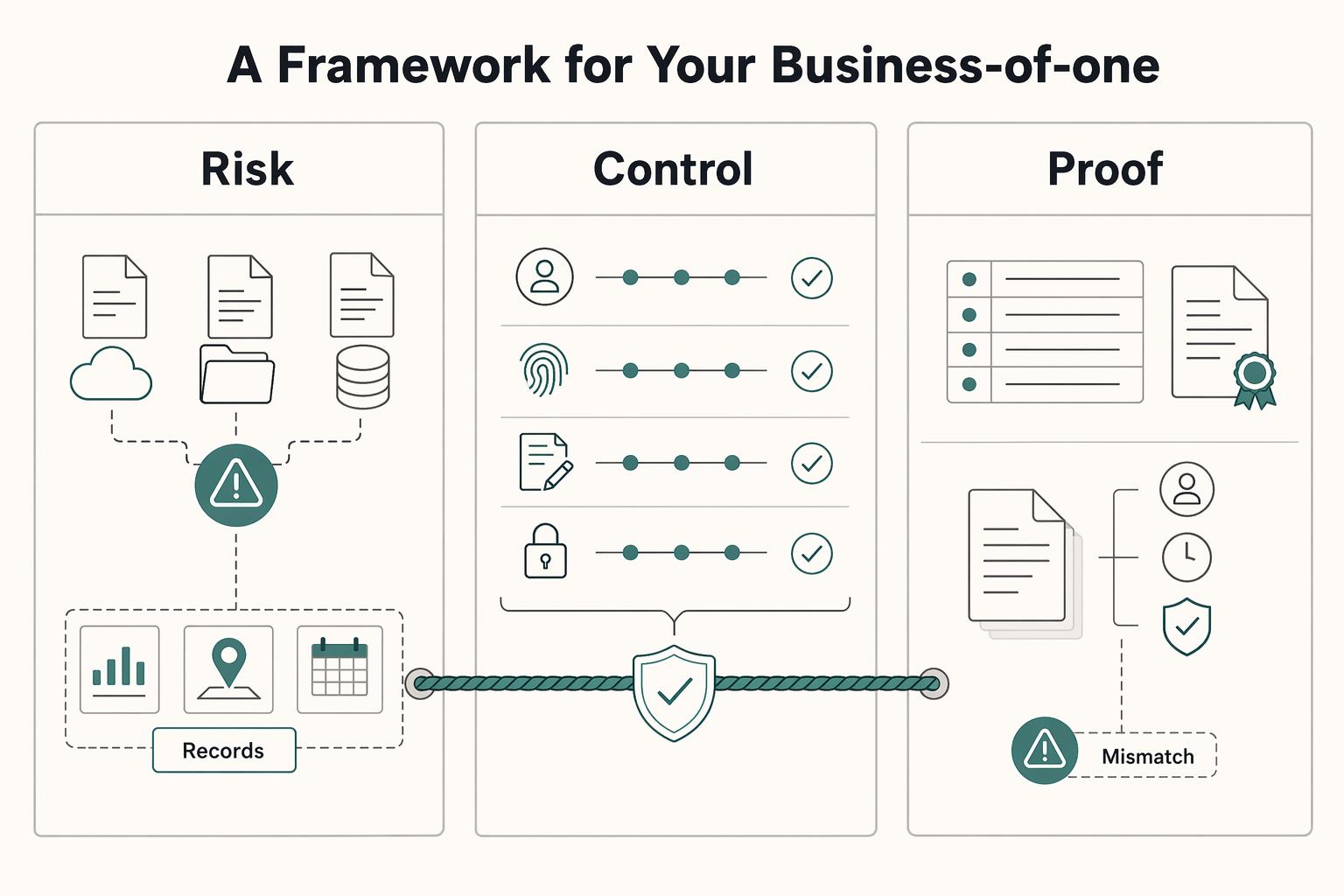
When you evaluate the best legal document management tools, use legal defensibility as the standard, not basic storage security alone. You need to show what a record is, who handled it, who accessed it, what changed, and whether its integrity was preserved. In U.S. federal evidence practice, authentication under FRE 901 is part of that standard, so a folder plus timestamp may not be enough on its own.
Use this article as a risk and operations framework, not a feature parade. You are choosing a setup that can support chain-of-custody tracking, access logging, and record integrity when it matters.
-
Mindset. Treat key documents as evidence, not just files. Contracts, amendments, approvals, and final deliverables should be stored in a way that lets you later prove authenticity and history.
-
Process. Define how records enter your system, how versions are preserved, and how access is tracked over time. A defensible process is repeatable. Overwrites, approval trails trapped in email, or logs that can be altered are warning signs.
-
Tool fit. Compare products only after mindset and process are clear. Evaluate whether the tool supports capture, storage, processing, security, and access control in day-to-day work. Prioritize preserved version history, granular permissions, searchable records, and logs protected from unauthorized access or deletion. If you handle personal data, integrity and confidentiality controls matter too.
By the end, you should have a practical way to assess your current stack and a clear path to make it more defensible. Related: A Guide to VAT for UK Freelancers.
Pillar 1: The Mindset: Why Your Cloud Storage Isn't Legally Defensible#
A general cloud drive can store files, but that does not automatically give you a defensible record. For important documents, a practical standard is simple: can you show who acted, what changed, when it changed, and how that history is controlled?
That is the shift that matters. Document management is governance and control, not just storage. When you compare tools, treat contracts, SOWs, approvals, and IP assignments as records you may need to reconstruct later, not just files you need to save.
1. An activity feed is not the same as usable evidence#
A basic activity feed may show that a file existed. In a dispute, that may not be enough. What you need is a usable timeline across upload, review, approval, version changes, sharing, and access.
Before you commit to any tool, run one practical test: export the history for a real document and check whether you can clearly see:
- user identity
- timestamps
- version changes
- sharing and access events
- download events, if available
If that trail is split across email, chat, and drive links, reconstruction gets slow and error-prone. That is also how shadow repositories form in Slack, inboxes, and personal drives.
2. Sharing controls should reduce risk before anything goes wrong#
Access controls are daily risk controls, not advanced settings you only touch after a problem. Use least-privilege sharing by default and tighten access based on document sensitivity. Where your tool allows it, apply these controls immediately:
view onlyinstead of edit access when review is enough- expiring access for temporary collaborators
- restricted download for sensitive material
- watermarking for files likely to be forwarded
Think in layers. Permissions, expiry, download restrictions, watermarking, and logging should reinforce each other. Default sharing settings alone are usually too thin for sensitive records.
3. Data location may be a buying decision in cross-border work#
If you work across borders, data residency and transfer settings may belong in your buying checklist. Requirements vary by contract and jurisdiction, so confirm details directly in vendor documentation. Ask directly:
- where documents are stored
- whether you can select a storage region
- who can change transfer or region settings
- whether those changes are logged
If your work is fully domestic and your contracts do not impose location requirements, this may be lower priority. If you handle international client data, it may need to be an upfront decision.
4. If the tool is hard to use, governance will break#
A strong control model fails fast when people avoid the system. The practical question is whether the platform combines search, versioning, workflow, auditability, and integrations without adding so much friction that people go back to inboxes and local files. Set your basic information architecture early too. Without a clear folder structure, naming rules, and permission boundaries, flexibility turns into sprawl.
| Buyer criterion | Why it matters | What to verify |
|---|---|---|
| Audit-log integrity | You need a clear event history for reconstruction | Can you export document-level events, and what controls limit ordinary user or admin log changes? |
| Permission granularity | Least privilege reduces accidental exposure | Are view only, restricted download, expiring access, and watermarking available? |
| Retention controls | Records lose value if they can be removed at the wrong time | Are retention rules available, and who can change them? |
| Policy enforcement | Rules fail when they depend on memory | Can admins centrally enforce sharing defaults and external-access policies? |
| Data residency and transfer controls | Cross-border work may depend on where and how data moves | Where is data stored, who controls transfer settings, and are changes logged? |
| Search, versioning, and usability | Unusable tools create shadow repositories | Can you find contracts quickly, recover prior versions, and keep work inside the system? |
The operating standard is simple: treat key documents as records that may face scrutiny, not files sitting in a folder. Once that standard is clear, the next step is to build a process that keeps every critical document inside a reliable record trail. If you want a deeper dive, read Value-Based Pricing: A Freelancer's Guide.
Pillar 2: The Process: Architecting an Audit-Proof Workflow#
Once a document needs to live in a defensible record trail, your process has to make each handoff visible and repeatable. The goal is straightforward: keep one controlled record, with context attached, from intake through archive.
1. Use a filename template that still works outside your system#
Your naming convention should still make sense when a file is downloaded, emailed, or moved across platforms. Use one reusable pattern:
[ClientOrCounterparty]_[MatterOrProject]_[DocumentType]_[YYYY-MM-DD]_[Status]
This stays readable, sorts cleanly by date, and remains platform-independent. Keep the structure stable so search stays reliable and your team does not drift into personal naming habits.
A quick contrast helps:
- Good:
ClientName_ProjectName_DocumentType_2026-03-25_PendingApproval.pdf - Bad:
final contract newest USE THIS.pdf
If filenames are carrying version history like final, final2, or latest, your workflow may already be splitting into parallel records.
2. Treat versioning as one live record, not many "final" files#
A strong pattern is one source of truth for each live document. Versioning should capture the history inside that record so you can see who changed it and when. In some Microsoft 365 libraries, the last 500 versions are saved by default.
For active drafting, require check-out where available so one person edits at a time until check-in. Pair that with an approval-state workflow so teams can distinguish pre-approval content from approved content. That helps you avoid parallel "final" copies that conflict later.
Run a quick test on a real contract before rollout. Confirm that you can view editor identity, timestamps, version history, and approval state in one place.
3. Build a metadata taxonomy you can actually run#
Folders tell you where a document lives. Metadata tells you what it means. Start with a compact taxonomy you will actually maintain every week:
| Field | What to store | Why it matters |
|---|---|---|
| Workflow status | Tool-specific states (for example: Draft, Pending approval, Executed, Active, Expired, Archived) | Keeps handoffs and reporting visible |
| Document type | NDA, MSA, SOW, Change order, Invoice | Supports filtering and reporting by record category |
| Owner | Person accountable after execution | Supports obligation tracking and follow-up |
| Governing law | Governing law selected in the contract | Helps with legal interpretation and downstream review |
| Key obligation dates | Effective date, expiration date, renewal date, notice date | Drives reminders and status logic |
If a workflow depends on a current legal or tax threshold, add that field only after you verify the threshold for the specific jurisdiction and year.
4. Make retention and archive rules explicit#
Retention should be explicit, because records move through a lifecycle whether you manage that lifecycle or not. The common structure has 3 phases: creation, maintenance and use, and disposition. Reflect that in your process with a defined archive step, tighter access controls, and clear retention instructions.
Do not apply one default retention period to every document. Retention depends on document type, jurisdiction, and business need, so your schedule should spell out what is temporary, what is permanent, and how long each class is kept.
5. Use this intake-to-archive checklist#
A workable process does not need to be complicated, but it does need to be consistent. Use this checklist to keep the record chain intact:
- Capture: Save the document in your controlled repository first, not in inboxes or chat threads.
- Classify: Apply the filename template and required metadata fields.
- Review: Keep edits in one live file, use check-out and check-in where available, and move approvals through status states.
- Execute: Store the executed version in the same record chain.
- Retain: Assign retention rules and confirm owner accountability.
- Archive: Move completed records out of active workspaces while preserving version history and audit trail.
For a step-by-step walkthrough, see The Best Project Management Tools for Small Agencies. Before you lock in your naming rules and metadata tags, create a consistent contract baseline with this freelance contract generator.
Pillar 3: The Technology: Choose Tools by Where Your Work Breaks#
Once your process is stable, choose technology based on where your work actually breaks, not on brand positioning. This framework does not assume DMS beats CLM, or the reverse, so treat that split as a working hypothesis and test it against your workflow, volume, and risk profile.
1. Start with failure mode, not feature count#
Feature lists are useful only after you identify the failure you need to fix. Use three signals first: how disciplined your current workflow is, how many agreements you handle, and how costly errors are when records or approvals are missed.
If your recurring issue is record control, finding the latest signed file, keeping versions straight, and limiting access, start with document-control checks. If your recurring issue is contract operations, drafting from templates, routing approvals, and tracking post-signature dates, evaluate contract-focused workflow support in parallel. The decision rule is simple: buy for the stage where work fails most often.
2. Use one scorecard across every vendor demo#
Do not let each vendor define success for you. Before any demo, run the same criteria on the same sample documents. Use your own files in the test: one draft agreement, one executed agreement, and one scanned attachment.
| Criterion | What to verify in a live pilot |
|---|---|
| Audit-log access | Can you review and export who changed what, when, and on which record? |
| Permissions | Can access be set and updated by role, team, or matter without workarounds? |
| Approval workflows | Can approvers, status, and handoffs be tracked inside the platform? |
| Renewal tracking | Can key contract dates be stored and surfaced consistently? |
| Search/OCR | Can the system retrieve terms from scanned PDFs, not just filenames? |
| Integrations | Are core integrations documented and testable in your flow? |
| Export/portability | Can you export documents and metadata in a format you can reuse? |
3. Run a compatibility checklist before rollout#
Rollout can fail at the handoff points, even when the demo looks strong. Confirm these connections early so people do not fall back to inboxes and local files:
- E-signature: signature status should flow back to the record you keep.
- Accounting: executed agreements should map to the client or billing workflow you actually use.
- Workspace suite: Google Workspace or Microsoft 365 editing and sharing should not create parallel records.
- API/webhooks: automation paths should be documented and testable, not just promised.
Then pressure-test contract operations in practical terms. Decide who can edit templates, how clause updates are controlled, where obligation dates live after signature, and which client portal sharing settings admins can enforce.
If AI features are part of the pitch, ask whether the workflow uses traditional AI or generative AI, because review expectations differ. That checkpoint matters. In a 2025 legal industry report, 31% of lawyers reported using legal generative AI at work and 45% reported engaging with it daily.
4. Treat shortlist brands as test candidates, not conclusions#
Brand names can help you build a shortlist, but they should not decide the outcome. Keep the comparison neutral and process-based.
- Shortlist 2-3 tools.
- Run one real contract cycle in each: draft, review, approve, sign, store, search, export.
- Score only recurring weekly actions, not edge-case demos.
- Choose the option that reduces manual handling while preserving control and traceability.
You might also find this useful: The Best Log Management Tools for SaaS Businesses.
What Your Setup Should Prove, Find, Track, and Share#
The standard here is practical, not theoretical. Your setup should hold up in real work, not just in a demo. You should be able to prove what happened, find records quickly, track key dates, and share files with control.
- Audit history you can use in a dispute
When a client challenges a clause, approval, or signed version, filenames are not enough. You need a document trail from creation to completion, and ideally a change log that shows who changed what and when. In your pilot, confirm that you can review that history and retrieve it when needed, not just view it inside the tool.
- Searchable records when time matters
Search is operational, not cosmetic. You should be able to retrieve executed agreements, amendments, and attachments quickly, especially when a client, accountant, or regulator asks for records. If you handle UK GDPR access requests, the response window can be within one month of receipt, so test search and retrieval speed before rollout.
- Renewal visibility before dates slip
Missed dates usually look small until they become expensive. Reminder workflows can track contracts renewing or expiring within the next 90 days, or trigger exactly 7 days before an MSA expires. If you cannot filter by key fields like owner, status, and date, your deadlines are still living in memory.
- Controlled sharing based on document risk
Sharing should match document sensitivity. View-only links with Block download can remove options to download, print, or copy, which helps with drafts, pricing schedules, and sensitive attachments. Treat this as a strong control, not a complete one, and pair it with access reviews and a clear record of who received what.
In practice, this works as one operating model: mindset sets the standard, process defines the handoffs, and the tool enforces them consistently. The next step is straightforward. Review your current contracts and storage habits, then see whether you can produce signed versions, renewal dates, sharing controls, and activity history on demand. We covered this in detail in The Best Project Management Tools for Freelance Designers.
When you are ready to connect your legal-document workflow to compliant money movement and traceable operations, review the implementation paths in Gruv Docs.
Frequently Asked Questions
Is Google Drive or Dropbox enough for your client contracts?
They can work for basic storage and sharing, but storage is passive. A storage-only setup may not give you the change tracking you need, so confirm what version history, activity history, and export options you can actually use. If you cannot quickly show who changed a file, when it changed, and which version was sent, you still have an evidence gap.
Should you choose a CLM or a legal DMS?
Start with the workflow you need the tool to own. If your priority is matter-centric organization, search, version visibility, and access control, a legal DMS is often the cleaner fit. If your priority is contract lifecycle workflow, evaluate options against that need and ask each vendor the same questions about workflow ownership, exportable audit evidence, and permission granularity.
What is the difference between document storage, document management, and CLM in plain English?
Document storage is mainly a place to save and retrieve files. Document management is active: it adds controls like version history, search, and check-in/check-out to reduce conflicting edits. CLM tools are generally evaluated by how well they support your contract lifecycle workflow, not just file storage.
Do you need a lawyer-specific tool like Clio if you are not a lawyer?
Not necessarily. Lawyer-focused tools can fit if you run your work in a matter-centric structure, but they may be unnecessary if your main need is straightforward contract handling. In a trial, test whether you can find one signed agreement quickly and verify the latest version and editor without relying on folder memory.
What are the first three steps you can take this week?
First, centralize active contracts so they are not split across attachments, personal drives, and unclear folders. Second, set one filing and naming rule you will follow consistently and verify that it works against your current documents. Third, pick one rollout checkpoint you can measure this week, such as search success rate or the percentage of emails filed to the right matter.
How do you roll this out without creating a mess?
Roll out in phases instead of one big migration. Define filing conventions before import, migrate active agreements first, and train by role so each person knows exactly where to save, search, and share. After launch, track adoption with practical checks like search success rate and the percentage of emails filed to the correct matter.
What security feature matters most?
Do not rely on one checkbox. What matters is audit history, version visibility, and granular permissions working together, because access control alone may not close evidence gaps. If a vendor claims an “immutable audit trail,” verify what you can review and export in practice.
How does a professional setup protect your IP when you share drafts or pricing?
Use the least access needed for each recipient. For proposals, SOWs, or pricing appendices, confirm permission settings before sending and keep the activity history for the shared file. Treat these controls as risk reduction, then keep a record of the exact version you sent.
Try a related tool
Researched and edited by the Gruv editorial team. Gruv builds cross-border billing, payouts, and finance-operations software for global businesses.
Sources
- archives.gov/records-mgmt/bulletins/2015/2015-04-appendix...trusted
- archives.gov/about/records-scheduletrusted
- cisa.gov/audiences/small-and-medium-businesses/secure...trusted
- csrc.nist.gov/pubs/sp/800/92/r1/ipdtrusted
- csrc.nist.gov/glossary/term/chain_of_custodytrusted
- directives.doe.gov/terms_definitions/records-lifecycletrusted
- ecfr.gov/current/title-21/chapter-I/subchapter-A/part...trusted
- fjc.gov/publications/amendments-federal-rules-practi...trusted
Educational content only. Not legal, tax, or financial advice.
Related Posts

Value-Based Pricing for Freelancers Under Real Payment Risk
Value-based pricing works when you and the client can name the business result before kickoff and agree on how progress will be judged. If that link is weak, use a tighter model first. This is not about defending one pricing philosophy over another. It is about avoiding surprises by keeping pricing, scope, delivery, and payment aligned from day one.

VAT for UK Freelancers Without Filing Surprises
If you want a low-stress approach to **vat for uk freelancers**, start with an HMRC-first baseline. Think of compliance as a series of decisions backed by records, not a setting inside your invoicing tool.

The Freelance Payment Penalty: A Modeled Audit of Platform Fees, FX Spreads, and Payout Delays
The money rarely disappears through a single, easy-to-spot fee. The real loss is stacked. A marketplace takes its commission, a processor adds a charge for international cards, a bank or payment company converts the currency at a spread, a platform holds the funds before release, and a wire sheds a little to intermediaries on the way in. Each layer looks defensible on its own, but the worker feels the combined result as a smaller deposit and a later payday.