
Quick Answer
Build your shortlist around operating fit, not feature count. The best lead generation tools for b2b saas are the ones that keep source context, ownership, and next action visible inside your CRM while supporting a documented Legitimate Interest workflow for outbound. In practice, that means choosing tools you can verify with test records, then keeping a lean setup where prospecting, inbound capture, and follow-up triggers work without manual re-entry.
Don't Just Pick Tools. Build Your Lead Generation Operating System.#
If you came here looking for the best lead generation tools for b2b saas, start one step earlier. The real decision is not which app has the longest feature list. It is which operating model you can run every week without turning lead generation into distracting, labor-intensive admin work.
That shift matters because the market is too crowded for feature shopping to tell you much on its own. Zapier's March 2, 2026 roundup covers 20+ tools, and Sparkle points to 500+ lead generation tools listed on G2. For an independent B2B SaaS operator, an off-the-shelf tool is only a starting point. You need connected tooling that fits how you work, plus a few clear rules around ownership, data flow, and checkpoints.
| Approach | Setup effort | Data quality | Compliance control | Daily maintenance burden |
|---|---|---|---|---|
| Tool collection | Fast to start, uneven to expand | Can become inconsistent when tools are disconnected | Harder to consistently trace source, owner, and next step | More manual follow-up and cleanup |
| System | More upfront definition | More consistent when fields and handoffs are defined | Easier to review source, owner, and next step before outreach | Lower ongoing drag, but only if connections stay maintained |
Use this article in three parts.
-
Foundation: Define the records and rules first. Decide where leads enter, who owns each stage, and what must be present before a contact moves forward. A simple verification check helps at the start: source, owner, and current stage.
-
Engine: Pick the lean stack that moves data between capture, prospecting, and your CRM. The key question is handoff clarity. If a form or chatbot captures a lead, you should know exactly where it lands and what follow-up it triggers.
-
Output: Measure whether the stack produces qualified conversations, not just more names. A common failure mode is letting lead generation become distracting, labor-intensive work as tool count grows.
You might also find this useful: How to Set Up an Affiliate Program for Your SaaS Product.
Compliance Checks to Run Before You Compare Features or Pricing#
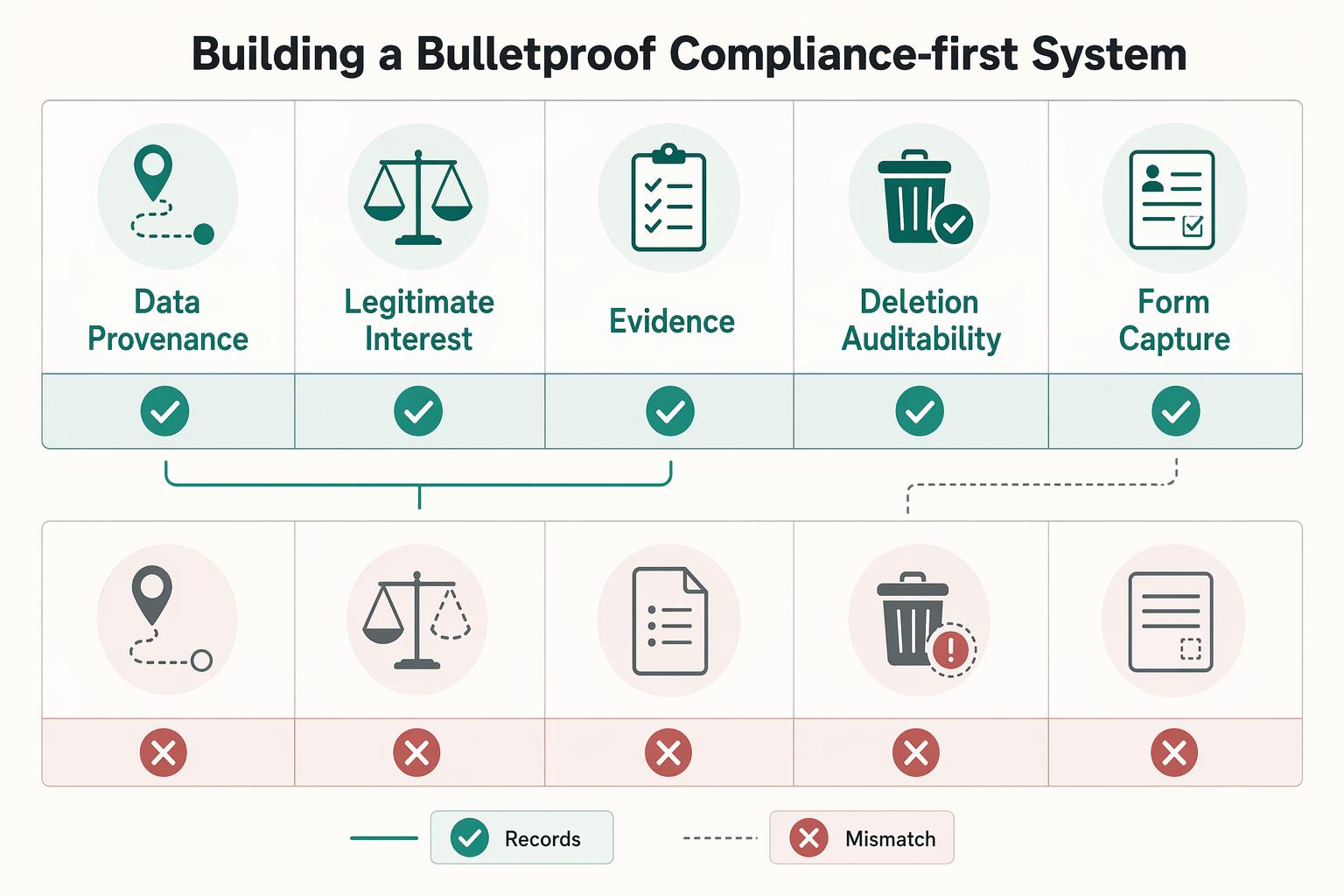
Compliance is your operating requirement, not a cleanup step. If a tool cannot show where a contact came from, what rationale or consent you captured, and how you can export or delete that record, it should not make your shortlist.
| Check | What to confirm | Key record |
|---|---|---|
| Data provenance | Source context stays visible after sync to your central CRM | Source, capture point or provider, and source/owner/stage fields survive in CRM |
| Legitimate Interest workflow | ICP and relevance rationale are logged for each prospect | Role + company profile, source, reason for outreach, and context signal |
| Inbound form evidence | You can prove what the person saw, what they selected, and when it happened | Source page, timestamp, submission path, notice, consent action |
| Deletion and auditability | Export, suppression, deletion, and re-sync behavior work in one-contact tests | Record does not silently reappear through form or prospecting sync |
Use this filter before you compare features or pricing. You are choosing records you can defend and maintain, not just names you can message.
- Check data provenance first
A lead tool is only useful if source context stays visible after sync to your central CRM. You need the source, capture point or provider, and enough context to explain why the record exists.
Create one test contact and confirm source survives in the CRM fields you keep, such as source, owner, and stage. If source is overwritten or hidden in a vendor-only view, you are creating admin cleanup and weak audit records later.
- Run outbound as a documented Legitimate Interest workflow
For outbound, replace "this feels relevant" with a repeatable note format you can use. Define your ICP, including industry, company size, role, and business problem, then log your relevance rationale plus source and processing context for each prospect.
Keep entries short and consistent. Example structure: role + company profile, source, reason for outreach, and context signal. First-party signals like pricing-page visits, demo requests, and content downloads can strengthen context on your own properties; externally monitored events can be logged as third-party context.
This is mainly about relevance discipline before volume. If legal wording or jurisdiction-specific criteria are unclear, keep the requirement pending counsel and jurisdiction verification before using it in the workflow.
- Treat inbound forms as evidence, not just capture
Inbound is where you control notice, consent flow, and CRM handoff. The key check is simple: can you prove what the person saw, what they selected, and when it happened?
| Setup area | Risky setup | Compliant setup |
|---|---|---|
| Form capture | Form submits only name and email | Form also stores source page, timestamp, and submission path |
| Notice language | Generic notice buried elsewhere | Clear form-level notice, with legal wording pending counsel and jurisdiction verification |
| Consent capture | Preselected boxes or one catch-all field | Explicit action recorded per communication type, with unchecked default requirement pending counsel and jurisdiction verification |
| Suppression handling | Unsubscribes live only in the email tool | Suppression status syncs back to CRM and blocks re-import |
| Proof-of-consent retention | No record beyond list add | Consent record includes timestamp, form version, and evidence-pack location; retention rule pending counsel and policy verification |
Test your own form twice and verify those fields arrive in CRM. If all you get is an email on a list, you do not have an auditable trail.
- Dry-test deletion, export, and auditability before purchase
Before committing, run one-contact tests for export, suppression, deletion, and re-sync behavior. Confirm the record does not silently reappear through form or prospecting sync.
A central CRM helps reduce silos only if control actions travel with the record across tools. If suppression works in one tool but not another, your process is still fragile.
Only tools that pass these checks should enter your stack comparison in the next section. If any vendor claim depends on legal specifics you have not confirmed, keep it pending counsel, official guidance, vendor documentation, or internal policy verification before use.
For a step-by-step walkthrough, see The Best CRMs for a B2B SaaS Sales Team.
Your Engine: The Lean, Integrated Stack to Eliminate the 'Admin Tax'#
Keep this decision rule: after compliance, a tool stays only if it removes manual handoffs into your CRM. Feature-heavy stacks often look strong in demos, then add admin work when tools do not connect cleanly.
| Layer | Job | Examples |
|---|---|---|
| CRM | Acts as the source of truth for source, owner, status, and next action | One CRM such as HubSpot or Pipedrive |
| Outbound data source | Passes prospecting records into the CRM with usable context | Apollo.io, ZoomInfo, and LinkedIn Sales Navigator; prefer native and bidirectional connections |
| Inbound capture | Creates or updates CRM records automatically and triggers follow-up | Forms, landing pages, and schedulers; no manual re-entry |
Your lean stack needs three layers, each with a minimum integration job:
- CRM as the source of truth
Use one CRM, such as HubSpot or Pipedrive, where source, owner, status, and next action live. If you still have to open multiple apps to understand what to do next, the handoff is not complete.
- Outbound data source for prospecting
Apollo.io, ZoomInfo, and LinkedIn Sales Navigator fit here when they pass records into the CRM with usable context. Prefer connections you can verify as native and bidirectional, and treat one-way or middleware-based flows as higher-monitoring paths.
- Inbound capture for hand-raisers
Forms, landing pages, and schedulers should create or update CRM records automatically and trigger follow-up without manual re-entry. If submissions still require inbox triage or copy-paste, you are still paying admin tax.
| Stack option | Integration depth | Data sync reliability | Workflow automation support | Operational overhead |
|---|---|---|---|---|
| CRM + outbound source with native bidirectional sync | Strong when verified in your environment | Higher confidence because updates can move both ways | Strong for owner/stage/task handoffs | Lower after setup |
| CRM + outbound source via Zapier or other middleware | Medium | Depends on mapping quality and run-history monitoring | Useful for simple triggers; can be fragile on complex updates | Medium due to monitoring and replays |
| CRM + disconnected export/import workflow | Weak | Low; fields drift and data ages quickly | Minimal | High due to repeated manual cleanup |
Run an admin tax audit#
Map the path from prospect found or form submitted to follow-up task created, then run four checks:
- Mark every manual touchpoint, including export/import, copy-paste, cleanup, duplicate merge, and manual task creation.
- Assign one automation owner per handoff.
- Test one outbound record and one inbound record, and confirm source context, owner, stage, and next step in the CRM.
- Define fallback steps for sync failures so records are recovered without duplicate creation.
Implementation checkpoint#
Move to the next section only when both test paths produce one clean CRM record, no duplicate creation, and a clear follow-up trigger. If reliability depends on Zapier task history, inbox alerts, or memory, your stack is not lean yet. Related: What is the Difference Between a Registered Agent and a Virtual Mailbox?.
Your Output: Attracting High-Value Clients, Not Just More Leads#
Once your stack is running cleanly, focus on lead quality first. If you do not filter out no-fit leads early, a full pipeline can still drain time and margin. A strong CPL alone does not guarantee profitable outcomes.
| Category | Represents | Scoring note |
|---|---|---|
| Fit | Service alignment | In consultative or high-effort sales, weight fit above pure activity |
| Buyer role | Authority | Buyer role reflects authority |
| Intent | Meaningful engagement | Intent reflects meaningful engagement |
| Friction | Weak signals | Friction subtracts points for weak signals |
You need three controls: early disqualification, intent-based nurture, and scoring tied to how you deliver.
- Define no-fit rules before outreach starts
Start with disqualification, not persuasion. In your CRM and prospecting workflow, set five no-fit checks before first touch: industry, buying role, budget fit, urgency signals, and delivery fit.
If a prospect is outside your delivery model, has no buying influence, or shows no practical urgency, mark them no-fit and exclude them. Lead scoring works better when your starting list already reflects fit, behavior, and engagement.
| Pipeline trait | High-volume pipeline | High-fit pipeline |
|---|---|---|
| Targeting logic | Broad list building, often optimized for record count | Narrow targeting based on fit and buying relevance |
| Follow-up effort | More chasing to sort weak leads from real opportunities | Fewer conversations, with higher expected value |
| Conversion readiness | Mixed intent and authority | Better alignment of role, need, and likely action |
| Sales-cycle drag | More stalled deals from poor fit | Less drag because mismatches are filtered earlier |
Audit this with your recent leads: tag why each one stalled, closed, or was ignored, then move repeated no-fit reasons into your front-end filters.
- Route nurture by intent, not by source
After disqualification, run an intent-based path so automation handles capture, follow-ups, and segmentation without treating every lead the same.
- New lead: Send confirmation plus one relevant next step; trigger window pending internal policy verification.
- Engaged lead: When repeated activity or a strong intent signal appears, assign an owner and move to a more specific sequence; engagement threshold pending internal policy verification.
- Dormant lead: After inactivity, reduce frequency, send a relevance check, then pause or recycle; dormant threshold pending internal policy verification.
If behavior changes, the path should change.
For paid channels, do not optimize only for form submissions. That tends to attract people likely to fill forms, not necessarily buy. One lead can be worthless or worth 1 or 10 000 USD. Send qualification data back to ad systems through a Conversion API feedback loop so optimization can shift toward qualified outcomes. CRM scoring and qualification data can sync to platforms such as LinkedIn and GA4.
- Score leads against your service model, then govern the score
Use weighted categories that match your delivery reality: fit, buyer role, intent, and friction. Fit reflects service alignment, buyer role reflects authority, intent reflects meaningful engagement, and friction subtracts points for weak signals.
In consultative or high-effort sales, weight fit above pure activity. High activity from a low-fit lead is still expensive.
Keep scoring accurate with governance:
- Score decay interval pending internal policy and outcome-data verification
- Handoff cutoff pending internal policy and sales outcome verification
- Review cadence pending internal policy verification
Validate rules against outcomes. If low scorers are closing, adjust fit weights. If high scorers are stalling, tighten intent signals.
Tools can generate more leads, but your quality logic decides whether your pipeline is useful. For a related decision framework, see Value-Based Pricing: A Freelancer's Guide.
You Don't Need More Tools, You Need an Operating System#
Your results come from a connected system, not a bigger app stack. If you cannot quickly see who came in, where they came from, who owns the record, and what happens next, you still have disconnected apps.
Your system is simple: CRM + data source + outreach workflow + automation + compliance controls working together. When these parts are connected, you can verify progress in daily operations: fewer manual handoffs, cleaner records, clearer ownership, and faster follow-up. When they are not connected, routing breaks down, lead fit drops, follow-up slows, and reports can look active without improving outcomes.
Use that same logic for final tool decisions. Do not choose by brand preference alone. Go back to the earlier comparison criteria/table and pick for system fit: CRM sync quality, data controls, and fit with how you prospect. The right choice is the setup that holds across the full chain, not the longest feature list.
- Map your current path: List every tool that touches a lead, from first visit or list pull to follow-up. Run 1 test lead and confirm source, timestamp, owner, and next action appear correctly in your CRM.
- Give each tool 1 job: Keep one system for record management, one for data sourcing, one for outreach, and one for automation so overlap is obvious.
- Document handoffs: Write what happens after 1 form fill, 1 reply, or 1 enrichment event. Keep 1 dominant conversion objective per page or campaign cycle.
- Remove duplicate steps: If you enter the same company, status, or owner twice, fix the handoff before adding another tool.
- Set a review cadence: Once a week, sample 5 recent leads for data quality, ownership, and follow-up speed. If low-fit leads keep appearing, tighten routing or qualification first.
We covered this in detail in How to Use LinkedIn Sales Navigator for Freelance Lead Generation.
Frequently Asked Questions
What is a simple lead generation stack for a one-person B2B business?
Start with the three parts in the Engine: one CRM, one prospecting source, and one inbound form. Choose your prospecting source based on integration reliability, data controls, and whether verified contact data writes cleanly into your CRM. Before you commit, send one test lead through the full path and confirm source, timestamp, owner, and next action all land correctly.
How do I ensure my B2B lead generation is GDPR compliant?
Treat this as Foundation work, not a vendor checkbox. Requirements vary by jurisdiction, so legal basis, notice copy, opt-out process, and deletion handling must be verified with counsel, official guidance, and internal policy for each channel before use. Confirm your system actually stores the consent or opt-out fields your process depends on.
How do I build a lead generation system instead of just collecting tools?
Use the article's three-part test: Foundation protects data handling, Engine moves records without manual re-entry, and Output filters for fit and intent. If you cannot open the stack on Monday morning and know exactly who to call, email, and research, you still have disconnected apps, not a working setup.
What is the most important factor when choosing a B2B lead gen tool?
Start with integration depth. Some 2026 roundups list 23 tools, while others compare 15 platforms across six dimensions, so rank position alone is not a buying rule. Score each option on three things: CRM sync quality, data control options, and whether it fits the way you already prospect.
Do I really need a CRM if I am a one-person business?
Yes, if you want the Engine and Output layers to hold up. A spreadsheet can store names, but a CRM keeps status, ownership, and next actions usable across your workflow. The common failure mode is gradual: good leads stall when the next action is unclear.
How can I use automation without sounding like a robot?
Automate handoffs, reminders, enrichment, and basic follow-up timing, but keep message quality under human review. B2B SaaS deals often need multiple touches because several stakeholders assess risk, budget, and long-term fit, so generic sequences can turn cold fast. Check reply quality and bounce patterns regularly, because poor data quality can hurt pipeline before outreach even starts.
Try a related tool
Researched and edited by the Gruv editorial team. Gruv builds cross-border billing, payouts, and finance-operations software for global businesses.
Sources
Includes 8 external sources outside the trusted-domain allowlist.
- activemarketing.com/blog/b2b-marketing/7-essential-b2b-marketing...external
- adsfox.com/lead-qualificationexternal
- beanstalkconsulting.co/playbooks/best-lead-generation-automationexternal
- directiveconsulting.com/blog/top-4-b2b-lead-generation-tools-to-grow...external
- factors.ai/blog/best-lead-generation-toolsexternal
- growthspreeofficial.com/blogs/5-best-b2b-saas-lead-generation-expert...external
- gruv.ai/blog/the-best-tools-for-lead-generation-for-...external
- ledgerup.ai/resources/top-quote-to-cash-software-2026-th...external
Educational content only. Not legal, tax, or financial advice.
Related Posts

Value-Based Pricing for Freelancers Under Real Payment Risk
Value-based pricing works when you and the client can name the business result before kickoff and agree on how progress will be judged. If that link is weak, use a tighter model first. This is not about defending one pricing philosophy over another. It is about avoiding surprises by keeping pricing, scope, delivery, and payment aligned from day one.

Registered Agent vs Virtual Mailbox and How to Split Mail Correctly
If you want a setup that still works once filings, notices, and everyday mail all start arriving at once, split the job now. Put legal notice intake in one channel and routine correspondence in another. Name a primary owner and a backup for each before your first filing, and decide how escalation works the moment a legal notice arrives.
How to Set Up an Affiliate Program for Your SaaS Product
This is not a small marketing experiment. You are taking on a sales channel that touches payouts, attribution, partner trust, and margin. If you run it solo, every vague rule and every edge case comes back to you.