
Quick Answer
The best Excel financial modeling tools depend on your stage and risk. Start with Excel's built-in auditing features, then use Operis OAK or Modano to strengthen structure and error checking, Macabacus or UpSlide to automate formatting and presentation links, and @RISK or Python when you need Monte Carlo simulation, scenario analysis, and automated data work.
As an elite professional operating as a business-of-one, you face a unique paradox. Your expertise is your greatest asset, but you are also your own biggest bottleneck. To scale your impact and command premium rates, you cannot simply work harder; you must build a system. You need a command center that mitigates risk, accelerates output, and elevates your strategic value.
This is not about finding a magic-bullet tool. It is about strategically layering capabilities as your business matures. This three-tier framework is your blueprint for evolving from a skilled operator into an indispensable advisor, transforming your financial modeling from a source of liability into your most powerful competitive advantage. If you need to connect this tooling choice to your commercial model, see Value-Based Pricing: A Freelancer's Guide.
Tier 1: The Foundation - Building an Auditable Model That Withstands Scrutiny#
Any compelling narrative built on a weak foundation is a liability waiting to happen. Before you can accelerate, you must be secure. This tier is not about speed; it's about mitigating your single greatest risk: a flawed model that shatters your credibility and exposes you to professional and financial damage. The goal here is to build an auditable, structurally sound model that can withstand intense scrutiny from clients, investors, or regulators. This is your defense.
How do you prioritize structural integrity over speed?#
A defensible model begins with a consistent, logical structure. The temptation to blend inputs, calculations, and outputs on a single sheet is a common shortcut that creates massive long-term risk. Best practice - and your best defense - is to enforce a strict separation. For a practical template when modeling for a raise, use How to Create a Financial Forecast for a Funding Round:
- Inputs: A dedicated sheet for all key assumptions and drivers. This is the only place hard-coded numbers should exist.
- Calculations: The engine room where the logic happens, pulling exclusively from the inputs sheet.
- Outputs: Polished, presentation-ready summaries, charts, and tables for stakeholders.
This separation makes your logic transparent and easy to audit. For mission-critical models, an Excel add-in like Modano goes a step further by programmatically enforcing a standardized, best-practice structure from the start. It uses a modular approach, allowing you to build complex models from pre-audited components, making disorganized work nearly impossible.
Why should you embrace ruthless model auditing?#
Every complex model has errors - the only question is whether you find them or your client does. Your most valuable tool is the one that finds your mistakes before anyone else does. As Madoff-whistleblower Harry Markopolos warned, "Numbers can't lie, but the people who create those numbers can and do." While his focus was on fraud, his wisdom is a stark reminder of the constant potential for unintentional error.
This is why dedicated model auditing tools are your insurance policy against the "unknown unknowns." Software like Operis OAK is a gold standard for deep forensic analysis, providing powerful tools to trace dependencies, compare versions, and map your model's entire architecture in ways native Excel simply cannot. It is a direct investment in professional risk mitigation.
Which native Excel risk-mitigation features matter most?#
Before you spend a dollar, however, you must master the powerful auditing tools already built into Excel. They are your first line of defense. Microsoft documents formula-auditing workflows such as displaying relationships between formulas and cells, which is useful for consistent model reviews.
- Trace Precedents and Dependents: These are the most essential tools for visually untangling your model's logic. Trace Precedents shows you every cell that feeds into your selected formula, while Trace Dependents shows you every cell that is affected by it. Mastering these commands (Shortcuts:
Ctrl+[for precedents,Ctrl+]for dependents) allows you to follow the data flow and spot incorrect links instantly. - Go To Special (F5): This is your secret weapon for a rapid model health check. Press
F5(orCtrl+G), click 'Special,' and you can instantly select all cells that are Constants. This is the fastest way to verify that no hard-coded numbers are lurking where formulas should be - a classic source of catastrophic errors. It's a simple, powerful check that should be part of your routine.
Tier 2: The Accelerator - Achieving Professional Velocity & Scale#
With a secure foundation established, you can confidently shift your focus from defense to offense. This tier is for the professional whose time is their most valuable - and finite - asset. The objective is to ruthlessly automate low-value, repetitive tasks and produce client-facing outputs that project the authority and polish of a much larger firm. This isn't about cutting corners; it's about strategically investing in tools that convert administrative time into high-impact, billable work.
Calculate the ROI of an All-in-One Suite#
For a solo operator, a subscription to a complete productivity suite like Macabacus or UpSlide can feel like a significant expense. You must reframe this not as a cost, but as a direct investment in your own efficiency. The calculation is simple: if a tool saves you just five non-billable hours a month - time otherwise spent on mind-numbing formatting, chart creation, and manual updates - it has likely paid for itself many times over.
| Metric | Monthly Value | Annual Value |
|---|---|---|
| Hours Saved (Conservative Estimate) | 5 hours | 60 hours |
| Your Billable Rate | $150 / hour | $150 / hour |
| Value Generated | $750 | $9,000 |
| Cost of Tool (Approx.) | $30 | $360 |
| Net Profit Generated | $720 | $8,640 |
This is the disciplined financial thinking you apply to your clients' businesses; it's time to apply it to your own. If you want the same discipline in reporting cadence, use The Best Financial Dashboards for Tracking Business KPIs.
Standardize Your Brand for Unquestionable Professionalism#
Your deliverables are a direct reflection of your brand. Inconsistent formatting or amateurish charts can subtly undermine the credibility you've worked so hard to build. A key function of these accelerator tools is to enforce brand consistency. A tool like UpSlide, for example, excels at creating a centralized library of on-brand charts, tables, and templates that can be deployed with a single click. This ensures every model, report, and presentation you deliver carries the same polished, professional aesthetic, reinforcing client trust and validating your premium positioning.
Automate Tedious Linking to Eliminate Errors#
One of the most frequent and reputation-damaging errors occurs between your spreadsheet and your presentation. A last-minute data change in Excel that doesn't get manually updated in the final PowerPoint is a classic, avoidable mistake. Tools like Macabacus and UpSlide create strong, reliable links between your Excel model and your Word or PowerPoint documents. This allows you to update every chart and table in your entire report with a single click, completely eliminating the risk of embarrassing copy-paste errors and saving you from frantic, last-minute revisions.
Leverage Advanced Charting for Clearer Storytelling#
In the end, your financial model is only as good as your ability to communicate its insights. Moving beyond Excel's default chart options is critical for telling a clear and compelling financial story. The advanced charting tools within Macabacus, for instance, allow you to quickly build sophisticated visuals that are difficult and time-consuming to create manually, such as:
- Waterfall Charts: To clearly illustrate the positive and negative drivers between two values (e.g., EBITDA to Net Income).
- Football Field Charts: To display valuation ranges from different methodologies on a single, compelling graphic.
- Gantt Charts: To professionally visualize project timelines and dependencies.
Mastering these tools transforms your role from simply presenting data to delivering powerful, persuasive narratives that drive client decisions. For example, clear bridge logic in your charts makes it easier to explain core metrics in plain language, as in What Is EBITDA and How to Calculate It.
Tier 3: The Strategist - Gaining Predictive Insight & Automating Your Edge#
With a secure, efficient, and professional workflow established, you can improve your role from a high-performing operator to a true strategic advisor. This tier is about embracing uncertainty, automating your data pipelines, and building models that don't just answer questions, but anticipate them. This is how you create an unassailable competitive edge and become an indispensable partner to your clients.
Model Uncertainty with Monte Carlo Simulation#
The real world is not a single number. A traditional model that produces a single-point forecast - "next year's revenue will be $5.2 million" - is precise but dangerously fragile. It communicates a false sense of certainty. As a strategist, your role is to help clients understand the range of possibilities and the likelihood of each.
This is where Monte Carlo simulation becomes one of the most powerful tools in your arsenal. Using an Excel add-in like @RISK, you can replace static assumptions with probability distributions.
- Instead of: "Component cost will be $10.50."
- You model: "Component cost is most likely to be $10.50, but based on supply chain volatility, there's a 20% chance it could be as high as $12.00 and a 10% chance it could be as low as $9.75."
By running thousands of these randomized scenarios, you move beyond a brittle forecast to a rich, probabilistic view of the future. You can now confidently answer the critical questions: What are the actual odds of hitting our target? What is the probability we might lose money on this venture? This is the language of strategic decision-making.
Pair Python with Excel to Automate Tedious Data Work#
For many finance professionals, the rise of Python can feel like a threat to their hard-won Excel expertise. This is the wrong frame. The truly strategic move is not to abandon the spreadsheet but to supercharge it. Treat Python as your powerful data engine and Excel as your flexible, intuitive command center. The combination is unbeatable.
Python, with its vast collection of libraries, is uniquely suited to automate the most tedious parts of your workflow:
- Data Acquisition & Cleaning: Write simple scripts to automatically pull data from company databases, public APIs, or messy legacy spreadsheets. Use libraries like Pandas to clean and standardize thousands of rows of inconsistent data in seconds.
- Complex Calculations: Offload heavy statistical analysis or machine learning tasks to Python, letting it run in the background before feeding the clean, summarized results back into your model.
With recent integrations, you can now run Python scripts directly within Excel, combining its computational power with the spreadsheet's familiar interface. Microsoft documents this workflow in Get started with Python in Excel, and Python's data stack is covered in pandas documentation. This workflow allows you to spend less time on low-value data janitorial work and more time on high-value strategic analysis.
Build a "What-If" Switchboard for Instant Scenario Analysis#
The ultimate sign of command over your model is the ability to answer any "what-if" question your client poses, instantly. Building a dedicated "Inputs" or "Scenarios" sheet is the key. This "switchboard" centralizes all of your model's key drivers into one place, controlled by simple toggles.
Create drop-down menus that allow any user to instantly flip the entire model between different states:
- Economic Scenarios: Switch between 'Recession,' 'Base Case,' and 'High Growth' assumptions.
- Operational Scenarios: Toggle between 'New Product Launch,' 'Aggressive Marketing Push,' or 'Cost Reduction Focus.'
- Financing Scenarios: Instantly see the impact of raising 'Series A Funding' versus 'Bootstrap' assumptions.
When a client asks, "What happens to our cash flow if inflation rises and our lead growth slows?" you simply select the appropriate settings from your switchboard. The entire model updates in real time. This transforms your model from a static report into a dynamic decision-making tool, demonstrating a level of preparation that builds immense trust.
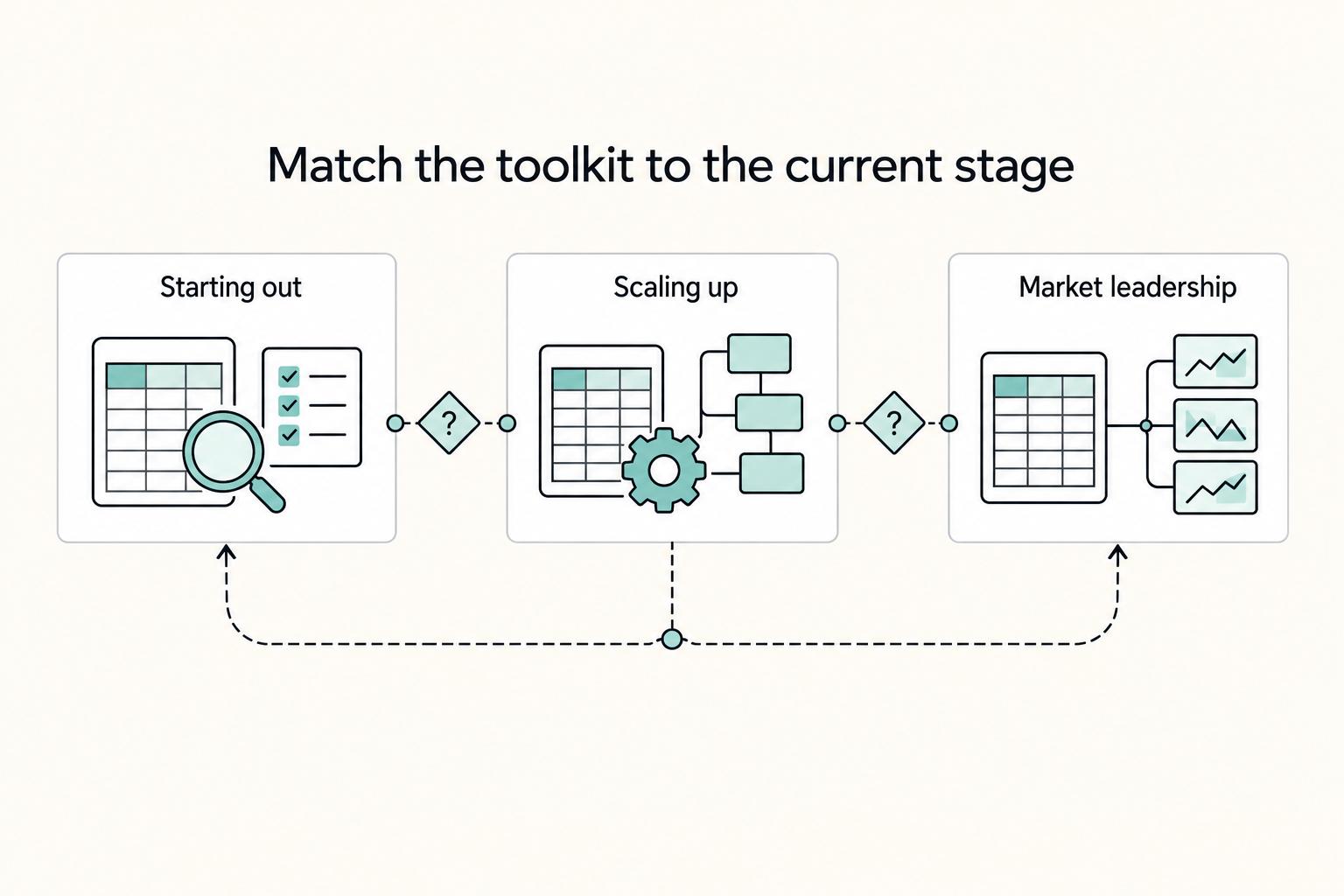
Choosing Your Tier: Match Your Toolkit to Your Current Stage#
You don't need every tool at once. Adopting a tool that's too advanced for your immediate needs is just as counterproductive as using one that fails to mitigate your real-world risks. Use this framework to make a deliberate choice that aligns your toolkit with your current reality.
| Stage | Focus | Main issue | Tool direction |
|---|---|---|---|
| Starting Out | Tier 1 | Catastrophic model error and credibility risk | Master Excel auditing tools first; add a dedicated auditing tool like Operis OAK for high-stakes work |
| Scaling Up | Tier 2 | Non-billable time spent formatting, checking consistency, and linking data to presentations | Use a productivity suite like Macabacus |
| Leading the Market | Tier 3 | Need to model uncertainty, automate analysis, and provide strategic counsel | Use @RISK for Monte Carlo simulation or integrate Python into the workflow |
Starting Out (Focus: Tier 1)#
Your overriding goals are survival and credibility. Your greatest vulnerability is not a slow workflow; it's a catastrophic model error that damages your reputation with a key early client. Before investing in software, master the native auditing tools inside Excel. Learn to trace precedents and dependents in your sleep. Use 'Go To Special' to hunt down hidden hard-coded numbers. These skills cost nothing but time and form the bedrock of good modeling hygiene.
Once you begin producing models for high-stakes work - fundraising, M&A, or critical capital projects - a dedicated auditing tool becomes your first vital investment. An add-in like Operis OAK, an industry standard for model auditing, is your insurance policy. It allows you to stress-test your logic and find flaws in ways native Excel cannot, providing the assurance you need to defend your work under scrutiny.
Scaling Up (Focus: Tier 2)#
You have a steady stream of client work, and your reputation is solid. Now, your biggest bottleneck is you. Non-billable time spent on formatting charts, checking consistency, and manually linking data to presentations is time you can't bill for. This is the inflection point where the ROI for a productivity suite like Macabacus becomes undeniable.
Reframe the subscription from a cost to an investment in billable hours. If the software costs $400 per year and your billable rate is $150 per hour, you only need to save just under three hours of administrative work over the entire year for the tool to pay for itself. Given that most users report saving hours per week, the return is immediate and substantial. At this stage, your focus is maximizing billable output and projecting a polished, scalable brand.
Leading the Market (Focus: Tier 3)#
You are no longer just delivering a spreadsheet; you are providing strategic counsel. Your clients are paying for your foresight and judgment. This is where you invest in tools that model uncertainty and provide predictive insights.
Investing in advanced tools like @RISK for Monte Carlo simulations allows you to quantify risk and move beyond a single-point forecast to a probabilistic understanding of the future. It's how you confidently answer, "What are the real odds of us hitting this target?" Alternatively, integrating Python into your workflow automates complex data acquisition and analysis, freeing you to focus on the high-level strategic narrative. This capability to model future uncertainty is what solidifies your position as an indispensable advisor and allows you to command premium fees.
Conclusion: Layer Capabilities as Your Business and Risks Evolve#
In the end, the choice between specific add-ins is less important than the strategic thinking that informs the decision. Stop thinking in terms of "tools" and start thinking in terms of capability. Your goal is not to find the add-in with the most features, but to build a reliable, efficient, and intelligent system for managing your Business-of-One.
The tiered framework is your blueprint for building that system - a progressive journey of layering capabilities as your business matures and your risks evolve. As you scale, pair this stack with operating discipline from Time Management for Freelancers so tooling gains become consistent execution.
- You begin with the Foundation, where your primary capability is risk mitigation. This is the concrete and steel that ensures everything else you build is stable and can withstand scrutiny.
- Next, you add the Accelerator, building the capability for professional velocity. By automating low-value tasks, you are not just buying back time; you are manufacturing professionalism and scaling your capacity to deliver high-value work.
- Finally, you ascend to the Strategist tier, where the core capability is predictive insight. This is the definitive move from service provider to trusted advisor, allowing you to answer the questions your clients haven't even thought to ask yet.
Each layer supports the next. Without a solid foundation, speed is just a faster way to get to the wrong answer. Without professional velocity, you'll never have the time to develop strategic insights. By strategically layering your tools, you transform your spreadsheets from a source of anxiety into your most powerful asset. You build more than a model; you build a command center for confident, CEO-level decision-making that drives your business forward.
Frequently Asked Questions
Is Macabacus worth it for a single freelancer or consultant?
Yes, if you regularly create client-facing reports, presentations, and valuations. The article frames Macabacus as an investment in billable hours, noting that at $400 per year and $150 per hour, saving about three hours of administrative work over the year makes it profitable. For many consultants, it can pay for itself within the first project.
What is the best financial modeling tool for auditing and error checking?
It depends on the level of scrutiny. For deep, forensic analysis in formal audits or transaction due diligence, Operis OAK is the industry standard. For day-to-day model hygiene and catching critical errors before they reach a client, Macabacus is usually sufficient.
How do I build a defensible financial model?
Build it around three pillars: structural integrity, audibility, and scenario analysis. Keep inputs, calculations, and outputs separate, and use Modano if you want a standardized structure from the start. Make every number traceable with Excel's auditing tools, then stress-test assumptions with best-case, base-case, and worst-case scenarios or @RISK.
Can Python replace Excel for financial modeling?
No. Python is best used alongside Excel for data acquisition, cleaning, and complex analysis, while Excel remains the better environment for flexible scenario testing and communicating results to stakeholders.
What is the best free Excel add-in for financial modeling?
There is no strong case for relying on a free add-in for critical modeling work. Free tools may help with niche productivity tasks, but using them for key functions like auditing is a false economy. Paid tools matter because they improve risk mitigation and defensibility.
What's the difference between Macabacus and UpSlide?
Macabacus is stronger in deep Excel functionality, model auditing, and advanced charting. UpSlide is stronger in brand consistency, presentation automation, and reporting efficiency. Choose Macabacus if you spend most of your time building and stress-testing models, and choose UpSlide if polished, brand-compliant reporting is the bigger priority.
Researched and edited by the Gruv editorial team. Gruv builds cross-border billing, payouts, and finance-operations software for global businesses.
Sources
Includes 3 external sources outside the trusted-domain allowlist.
Educational content only. Not legal, tax, or financial advice.
Related Posts

Value-Based Pricing for Freelancers Under Real Payment Risk
Value-based pricing works when you and the client can name the business result before kickoff and agree on how progress will be judged. If that link is weak, use a tighter model first. This is not about defending one pricing philosophy over another. It is about avoiding surprises by keeping pricing, scope, delivery, and payment aligned from day one.
The Best Bank Accounts for Freelancers in Germany
Pick the account that protects cashflow and keeps records clean when client behavior gets messy, not the one with the nicest app.
How to Create a Financial Forecast for a Funding Round
Treat your forecast as a system first and an investor document second. If it does not help you decide hiring pace, spending, and cash runway in the near term, it is not ready yet. Three terms matter here: