
Quick Answer
Use a phase-based stack, not a single app, when choosing the best user journey mapping tools. Start with a Diagnostic Map in a collaborative board to align on real friction, shift to a Shared Reality Map to control scope during delivery, then finish with a Validated Impact Map backed by analytics evidence. This sequence helps you win projects, reduce rework, and report outcomes with clearer proof.
Stop Reviewing Tools. Start De-Risking Your Business.#
If you work solo, your biggest threat is unmanaged risk, not the board itself. It is choosing an approach that burns time, creates project chaos, and quietly turns paid work into unpaid effort. The best user journey mapping tools matter only when you use them inside a process that protects scope and gives you proof at the end.
| Risk | What it causes | Map response |
|---|---|---|
| Scope creep | Slow expansion of project requirements that can turn a profitable engagement into unpaid labor | Shared Reality Map; treat requests outside the map as formal change orders |
| Wasted hours from tool-first shopping | Wasted hours and project chaos | Start with a Diagnostic Journey Map, then choose tools that support that process |
| Weak proof of outcomes | A polished map is not evidence | Validated Impact Map with before-and-after data to show business impact |
De-risking does not mean adding process for its own sake. It means three practical things: set a clear scope boundary, make business pain tangible early, and define measurable outcomes instead of vague "insights." When your bandwidth is tight, that shift matters because your time is your most valuable asset. This article is built to control three risks:
- Scope creep
This is the slow expansion of project requirements, and it is the fastest way to turn a profitable engagement into unpaid labor. The answer here is the Shared Reality Map, a visual contract you create at the start. If a request is not on that map, treat it as a formal change order, not a casual add-on.
- Wasted hours from tool-first shopping
Chasing the "best" tool without a system is a good way to waste hours and create project chaos. The practical fix is to start with a Diagnostic Journey Map that makes business pain tangible, then choose tools that support that process.
- Weak proof of outcomes
A polished map is not evidence. The answer here is the Validated Impact Map, which closes the project with before-and-after data so you can show business impact instead of asking the client to "feel" the value.
What you'll leave with is a practical way to choose tools after the work is defined, not before:
- A 3-step framework built around a Diagnostic Journey Map, Shared Reality Map, and Validated Impact Map
- A way to use mapping as an operating method, not a creative exercise
- Clear checkpoints for boundaries and outcome proof before you ever compare tools
If you want a deeper dive, read The Best Tools for Virtual Whiteboarding and Brainstorming.
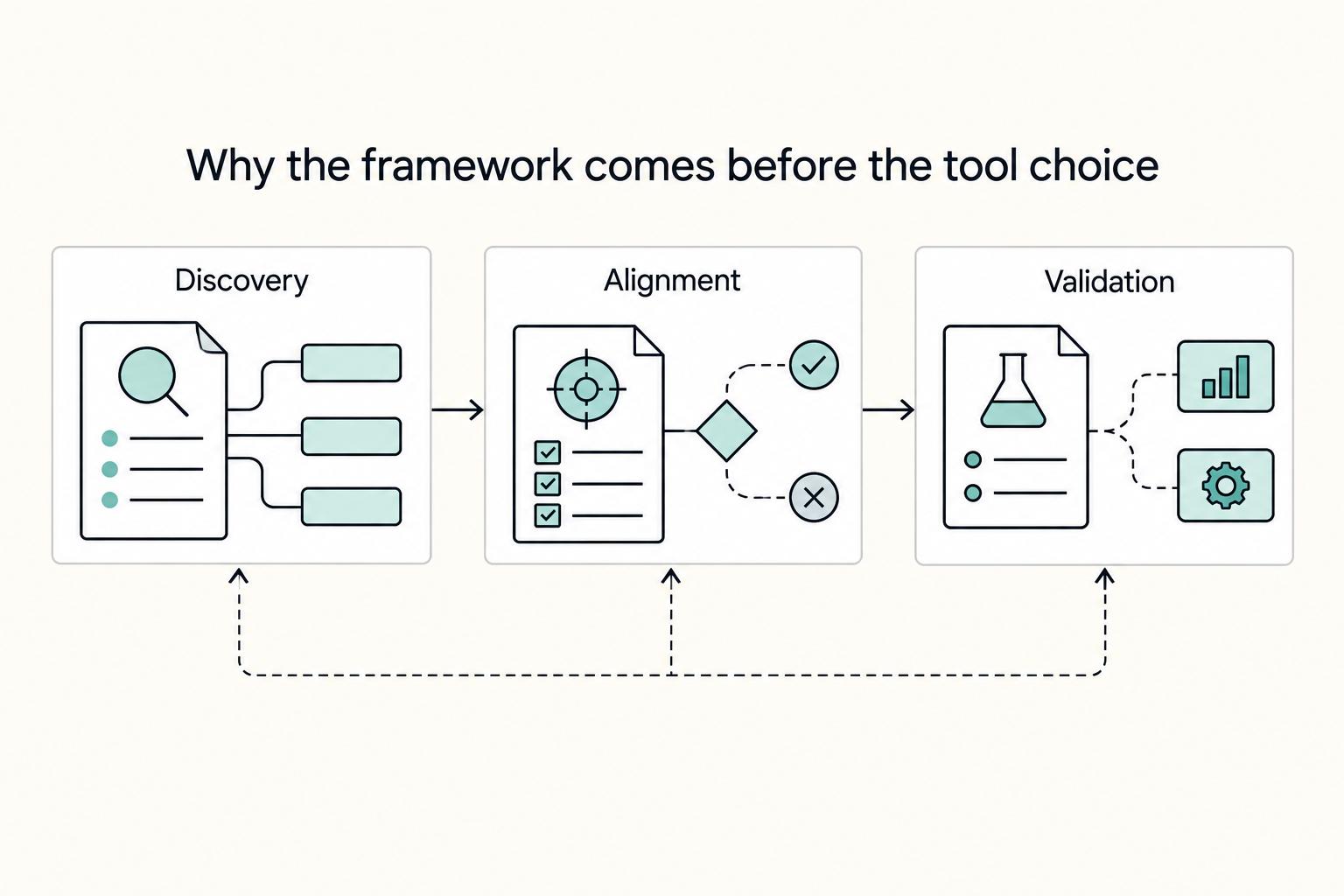
Why the framework comes before the tool choice#
For a business-of-one, the framework is what protects you: align on the problem first, validate in a small test second, and scale only after that. This sequence keeps you out of tool-first chaos and helps protect margin, time, and delivery quality.
- Diagnose the business problem before you pick tools
Start in strategist mode: define what is going wrong, for whom, and which decision is blocked. If you cannot state the problem in one sentence and name the decision owner, pause before opening any mapping app.
- Set tool criteria by stage so each tool has one job
Treat this as governance, not feature shopping. A single board trying to do discovery, decision sign-off, and proof usually creates clutter and weak traceability.
| Stage | Primary job | What to capture |
|---|---|---|
| Discovery | Surface reality | Interview notes, friction points, assumptions |
| Alignment | Lock decisions | In-scope/out-of-scope boundaries, decision owner, sign-off |
| Validation | Prove outcomes | Before/after signals and the evidence you will report |
- Treat each map as an asset with one purpose
Your Diagnostic Journey Map supports proposal alignment, your Shared Reality Map supports scope control, and your Validated Impact Map supports post-project proof. If assumptions, exclusions, decision dates, and approved version are missing, the map is not an asset yet.
- Connect empathy work to business outcomes
Do not stop at a neat, linear story or satisfaction alone. Use a simple chain: pain point -> user behavior -> business KPI, then define how you will check both after delivery (for example, an experience signal plus a business metric like churn risk or customer lifetime value).
With this sequence in place, tool choice becomes a controlled decision, not the starting point. For a step-by-step walkthrough, see The Best Tools for Business Process Mapping.
Step 1: Win Higher-Value Clients with a 'Diagnostic Journey Map'#
Run this as a repeatable pre-sales workflow: diagnose one customer route, confirm project fit, then hand off a scoped proposal. The goal is not a polished artifact. It is a shared diagnosis you can scope and price responsibly.
| Proposal block | What it includes |
|---|---|
| Scope boundaries | Included persona/route and explicit exclusions for now |
| Assumptions | Unknowns written plainly, for example "Current threshold pending source or business-record verification." |
| Recommended workstreams | Prioritized friction areas, each with a next action, owner, and target date when available |
- Set the diagnostic target before the workshop
Start with one persona and one route. A journey map represents a single route, so keep the session narrow. If helpful, pick the route by choosing the most relevant journey category right now: purchasing/onboarding, own/use, support/maintenance, or renewal.
- Co-create the map live and leave with explicit outputs
Use a collaborative whiteboard format (sticky notes, timer, clear facilitation) so you can capture real language quickly. End the session with four outputs on the board: persona focus, journey stages, key friction points, and business-impact hypotheses linked to those friction points. Before closing, force prioritization. You cannot fix everything at once, so ask the buyer to mark which moments are most likely to drive effort and investment decisions.
- Add a lightweight qualification check before scoping
Use the same workshop to test readiness, not just gather insights. Confirm who owns the next decision and agree on a target completion date for the next activity or deliverable. If ownership or timing stays vague, treat that as a delivery risk and reflect it in your scope and assumptions.
- Convert findings into a proposal handoff
Translate the map into three proposal blocks: scope boundaries, assumptions, and recommended workstreams. Scope boundaries: included persona/route and explicit exclusions for now. Assumptions: unknowns written plainly (for example, "Current threshold pending source or business-record verification."). Recommended workstreams: prioritized friction areas, each with a next action, owner, and target date when available.
For tool choice in Step 1, prefer whiteboard-first tools when speed and live collaboration matter. Move to more structured mapping environments later when you need tighter records and approvals. The point is to match the tool to this phase, not force one platform across the whole engagement.
Use this diagnostic output to support value-based pricing: anchor your fee to the diagnosed business problem and the outcome metric you plan to track, not to the workshop itself. Keep claims cautious and measurable, and avoid promising a lift you cannot verify. If you want a deeper pricing method, Value-Based Pricing: A Freelancer's Guide is the right companion piece.
Once this proposal is accepted, the next map has a different job: controlling delivery and validation, as covered in The best tools for 'Usability Testing'.
Step 2: Eliminate Scope Creep with a 'Shared Reality Map'#
Right after kickoff, use the map as a delivery control document, not a workshop artifact. Build one shared future-state map that keeps scope, ownership, and acceptance checks visible so decisions stay tied to agreed outcomes.
| Checklist item | What to capture | Section note |
|---|---|---|
| Confirm scope in one current map version | What is in scope now, what is out of scope for now, and what still needs verification | Carry forward the same persona and journey route from Step 1 |
| Map the future-state flow before execution | Intended stages, key touchpoints, expected user actions, and sections for data, insights, and metrics where available | Supports practical product and customer decisions, not just discussion |
| Assign owners for stage-level decisions | One clear owner for each stage or decision point | If ownership is unclear, dependencies and blockers usually stay unclear too |
| Set acceptance criteria and change governance | What completion looks like for each agreed stage and a change log for new requests | Review new requests against the map before approval |
Use this implementation checklist:
- Confirm scope in one current map version
Carry forward the same persona and journey route from Step 1. Mark what is in scope now, what is out of scope for now, and what still needs verification. A reusable template helps you keep the structure consistent instead of rebuilding it from scratch.
- Map the future-state flow before execution
Define the intended stages, key touchpoints, and expected user actions. Include standard sections for data, insights, and metrics where available so the map supports practical product and customer decisions, not just discussion.
- Assign owners for stage-level decisions
Set one clear owner for each stage or decision point. If ownership is unclear, dependencies and blockers usually stay unclear too.
- Set acceptance criteria and change governance
For each agreed stage, record what completion looks like. Then track new requests in a change log and review them against the map before approval. A reusable prompt for client conversations: "Which agreed stage does this request change, what outcome should improve, and what timeline or scope tradeoff does it create now?"
| Vague update | Map-anchored update |
|---|---|
| "Design is moving well." | "Stage 2 is complete against the agreed acceptance criteria." |
| "We're waiting on feedback." | "The next milestone is blocked by approval on the onboarding-stage owner decision." |
| "A few extras came up." | "Two new requests affect the support stage and are logged for review against current scope." |
For tools, stay in collaborative whiteboards while the journey is still being shaped live. Move into a structured mapping platform when version traceability, reusable templates, and stakeholder accountability become the priority.
For this step, define a minimum artifact set for your project: map version for sign-off, change log, and meeting cadence notes that mark unresolved thresholds as pending source or business-record verification.
When this map is working, scope discussions become clearer and more consistent, which sets you up for Step 3: proving impact. This pairs well with The best tools for 'Visual Collaboration' with remote teams.
Step 3: Prove Your Undeniable ROI with a 'Validated Impact Map'#
Your goal here is to prove what changed, not just show what was delivered. Build your Validated Impact Map as an audit trail: friction observed, behavior signal measured, intervention shipped, and business impact reported against KPIs agreed at the start.
Many teams stop at a cleaner map or positive workshop feedback and call that impact. Keep your standard tighter: trace one clear change path with evidence.
- Define the measurement chain before implementation
Start with 1 to 3 success signals tied to real moments of truth, not a broad goal like "better UX." Write each chain in plain language: journey friction -> user behavior signal -> business metric. Example: "confusing first 15 minutes of setup -> fewer users complete team invite -> lower activation rate." If a target is not verified yet, label it directly: "Current threshold pending source or business-record verification."
- Capture baseline evidence before anything changes
Take a baseline before launch, redesign, or any major intervention. Do the same when a key metric drops unexpectedly. Use one evidence pack: current map, event or funnel export (visits, clicks, conversion events), and a small set of qualitative records (interview notes, call excerpts, or session replays). Pair quantitative and qualitative inputs so you can show both pattern and cause, and do not force behavior into a strictly linear path if users loop or re-enter stages.
- Log each intervention with its validation source
For every shipped change, record what changed, where, and how you will validate it. Use evidence categories, not mandatory tools: qualitative replay/interview evidence plus quantitative event tracking/CRM evidence. Fullstory and Heap can fit those categories if they are already in the client stack, but they are examples, not requirements. Keep observation, intervention, and evidence source separate to reduce hindsight bias.
| Observation | Intervention | Evidence source | Business impact statement |
|---|---|---|---|
| Confirm the current setup drop-off threshold from your product analytics or business records | Reduced steps and clarified onboarding copy | Event export + 3 replay/interview examples | "Higher setup completion is expected to support activation. Confirm delta after the agreed measurement window." |
| Support contacts cluster around dashboard navigation | Reworked labels and entry points for top tasks | Support-tag review, call notes, post-change event path | "Lower friction here should reduce repeat support demand and improve retention signals." |
| Upgrade CTA is missed at a critical touchpoint | Moved CTA to a clearer stage in the journey | Click events, CRM stage movement, sales feedback | "Improved discovery should strengthen conversion quality. Validate against the agreed pipeline metric." |
- Report outcome deltas, then package the retention handoff
Compare post-change results to the same KPI definitions and evidence sources used in the baseline. Keep reporting sober: tracked impact, calculated returns where client data exists, and direct relevance to business outcomes like conversion quality, churn, or CLV. Deliver one client-ready recap with the annotated impact map, KPI delta summary, and evidence appendix (exports, clips, notes). That package supports renewal conversations, follow-on scope, and future case-study approval without overstating what the data proves.
With this evidence chain in place, tool choice becomes simpler: pick tools by job, not hype. Need the full breakdown? Read The best tools for creating 'Flowcharts' and 'Diagrams'.
The Solo Consultant's Toolkit: Mapping the Right Tool to the Right Job#
Choose tools by phase, not preference. For a solo consultant, the most reliable stack is the one that matches each phase of work across four checks: collaboration speed, structure control, evidence quality, and client readiness.
Use this lens when you compare journey mapping tools: pick what helps you complete the next job clearly, without creating handoff risk or forcing clients into tools they will not use.
Win the client with speed and low friction#
For diagnosis, a whiteboard is usually the right first tool. You need live collaboration and fast edits more than a polished system.
FigJam fits this stage when real-time participation matters and you need low friction in the room. The tradeoff is structure: if you keep building in one board, it can become hard to audit.
Miro fits the same early-phase job for initial brainstorming. The practical boundary is clear: whiteboards help you move fast early, while more structured platforms fit later delivery. Before you send a proposal, check that the board clearly separates assumptions, evidence, and decisions.
Manage the project with more structure than a whiteboard gives you#
Once work starts, move from speed to control. This is where specialized journey-mapping software can be the better choice for creating, managing, and sharing a durable map.
UXPressia is a clear example of the dedicated-platform category and is noted for real-time-data integration. That helps when your map needs to stay usable beyond workshops. The tradeoff is adoption risk if the client team will not work inside the platform.
Lucidchart is positioned as strong for collaboration plus integrations. It can be a middle path when you need more structure than a whiteboard but do not want heavy platform overhead. The risk is still handoff: a well-structured map fails if it lives only with you.
Prove ROI with evidence, not prettier maps#
For validation, mapping tools are not enough on their own. You need evidence showing where users convert and where they drop off.
Mouseflow is positioned for identifying drop-off points, which makes it useful in the ROI phase. More broadly, tools with User Flows and Funnels let you inspect exact paths and define key conversion paths. A practical check: confirm you can track a path from landing-page view to sign-up confirmation before you promise a before-and-after story.
PowerPoint matters for adoption. It is positioned as easy to access, which can help final stakeholder handoff. Use it as the presentation layer, not as the evidence source.
| Tool | Ideal use case | Strengths | Limitations | Solo-consultant fit |
|---|---|---|---|---|
| FigJam | Live diagnostic workshop | Real-time collaboration | Can become messy as scope grows | Strong for early sales and discovery |
| Miro | Initial brainstorming and shared sketching | Flexible whiteboard format | Weak structure control if unmanaged | Strong if you enforce labels and versioning |
| UXPressia | Formal project map with more structure | Dedicated mapping approach; real-time-data integration noted | Adoption risk if clients resist another platform | Good for delivery after scope is set |
| Lucidchart | Structured maps with collaboration and integrations | Collaboration plus integrations | Can still become consultant-only if client habits differ | Good middle option between whiteboard and specialist platform |
| Mouseflow | Drop-off analysis and validation | Helps identify drop-off points | Not a journey map deliverable by itself | Strong evidence layer for ROI proof |
| PowerPoint | Final stakeholder handoff | Easy access and adoption | Not suitable as source of truth | Useful as presentation layer only |
Use one stack per engagement to avoid tool sprawl and keep deliverables audit-ready.
- Pick one collaboration tool, one structured delivery tool (if needed), and one evidence tool.
- Validate one evidence path early, such as landing-page view to sign-up confirmation, using flows or funnels.
- Decide before kickoff where the final client artifact will live so the map, KPI summary, and evidence appendix stay together.
You might also find this useful: The best tools for transcribing 'User Interviews'.
Conclusion: From Tool User to Indispensable Partner#
Keep the same logic all the way through. You do not become more useful by memorizing a 20-tool roundup or chasing a "best tools" label. You become easier to trust when each map changes a specific part of the engagement and gives the client fewer places to guess.
- Diagnostic Map
Start here to change the sales conversation. Instead of pitching deliverables, you guide the prospect through their current customer journey and separate observed friction from assumptions. The key check is clarity early: before you send a proposal, make sure pain points, evidence gaps, and your interpretation are labeled distinctly. If they are blended together, you are still selling opinion, not diagnosis.
- Shared Reality Map
Use this to control the project after kickoff. Journey mapping has no single standard format, which is exactly why your map must lock the agreed stages, actors, touchpoints, and open questions in one visible place. The point is scope control: when a request changes the path rather than clarifies it, treat it as new scope. If you skip that checkpoint, client alignment can weaken and rework risk usually increases.
- Validated Impact Map
Finish with a narrower proof path, not a broad story about all of UX. A critical user journey is narrower by design, which can make before-and-after review more credible when the evidence is clear. The deciding factor is evidence: check that one path can actually be traced in analytics before you claim impact. If the data is patchy, fix tracking and narrow the claim.
For your next engagement, do these three steps in order. Run a live Diagnostic Map, convert it into a Shared Reality Map at kickoff, then track one critical path in a Validated Impact Map. Pick tool type by stage across the three common categories, and recheck vendor pages before committing because features and pricing change. That sequence will not remove every risk, but it can reduce avoidable misunderstandings, support better delivery decisions, and give you a repeatable way to do solid work.
Related: A guide to 'User Journey Mapping'. Want to sanity-check your tool stack? Talk to Gruv.
Frequently Asked Questions
How do you use a journey map to win freelance projects?
Start with a Diagnostic Map in one live working session, not a polished deliverable you build alone. Your job is to help the prospect see their current customer path, the biggest friction points, and the evidence gaps in one view so you create common ground early. Before you send the proposal, check that assumptions, observed pain points, and recommended actions are clearly separated on the map. If a prospect cannot tell what is fact versus interpretation, your sales artifact is already too vague to support a strong scope.
What are the best user journey mapping tools for a solo consultant?
Do not look for one winner. Pick by project stage, because a useful split is often three categories: whiteboards for the Diagnostic Map, dedicated mapping platforms for the Shared Reality Map, and analytics tools for the Validated Impact Map. In practice, that means lightweight whiteboarding tools when speed matters, dedicated mapping platforms when the map needs to evolve over time, and analytics tools when you need behavior evidence. A common tradeoff is that faster collaboration can mean less structure, while stronger structure can raise adoption risk if clients will not open the tool after kickoff.
How do you prove ROI with journey mapping?
You prove ROI when your Validated Impact Map connects one business path, one friction point, and one measurable outcome instead of making broad claims about the whole experience. Build that map from multiple evidence inputs, because journey maps are stronger when they combine primary research, product analytics, and desk research rather than workshop opinion alone. A practical checkpoint is to verify one path you can actually observe, such as entry page to sign-up confirmation, before you promise a before-and-after story. If you cannot trace that path in your data, narrow the claim and fix the tracking before you report impact.
Should you use free journey map templates?
Yes, but use them as scaffolding, not as proof that you understand the client. A template is helpful for getting to a first draft quickly, yet the map only becomes useful when you replace generic stages with this client’s real touchpoints, pain points, and opportunities in a unified view. Before you present it, label what came from interviews, what came from analytics, and what is still a working assumption. If you skip that cleanup step, the template will save a little setup time and cost you credibility later.
How do you stop scope creep with a journey map?
Use the Shared Reality Map as the agreed reference for what the project covers and what it does not. Journey mapping is meant to create a shared vision among team members, so the map should show the approved stages, actors, key moments, and open questions in a way both you and the client can point to during review. There is no hard and fast rule for how many journey maps you should create, which is exactly why you should resist spinning up a new map for every request and instead maintain one living artifact with periodic updates. When a new ask appears, check whether it fits the current map. If it changes the agreed path or adds a new part of the experience, treat it as new scope and price it that way.
Try a related tool
Researched and edited by the Gruv editorial team. Gruv builds cross-border billing, payouts, and finance-operations software for global businesses.
Sources
Includes 4 external sources outside the trusted-domain allowlist.
- pmc.ncbi.nlm.nih.gov/articles/PMC12254989trusted
- repository.arizona.edu/bitstream/handle/10150/624555/azu_etd_15419_...trusted
- repository.library.northeastern.edu/files/neu:4f186m68n/fulltext.pdftrusted
- surpriseaz.gov/1197/District-5-Newsletterstrusted
- aakashg.com/customer-journey-mapping-examplesexternal
- agilesherpas.com/blog/ai-transformationexternal
- canva.com/graphs/roadmapsexternal
- cemantica.com/customer-experience-blog/customer-journey-ma...external
Educational content only. Not legal, tax, or financial advice.
Related Posts

Value-Based Pricing for Freelancers Under Real Payment Risk
Value-based pricing works when you and the client can name the business result before kickoff and agree on how progress will be judged. If that link is weak, use a tighter model first. This is not about defending one pricing philosophy over another. It is about avoiding surprises by keeping pricing, scope, delivery, and payment aligned from day one.
The Best Tools for Virtual Whiteboarding and Brainstorming
If your client struggles to join the board, if the session stalls while you explain basic controls, or if nobody knows who owns the final output, they will not experience that as a software issue. They will experience it as your judgment call. Choosing among the best virtual whiteboarding tools is less about feature bragging rights and more about avoiding visible mistakes you could have screened out before the client ever saw the board.
Client Journey Mapping: From Inquiry to Payment and Handoff
If you work solo, a client [journey map](https://www.nngroup.com/articles/journey-mapping-101) should do more than describe how a client feels. It should help you control how work starts, moves, gets approved, and gets paid. In standard UX, a journey map shows the steps a person takes to reach a goal. In a service business, that same structure can become an operating tool for spotting where payment timing, scope clarity, handoff friction, and admin steps break down.