
Quick Answer
Run a three-step check before choosing: verify asset-level license terms, test one real download in your editor, and compare total operating cost. In the current comparison, Pexels is a practical baseline, while Shutterstock and Pond5 are useful shortlist tests rather than automatic winners. Use one 4K file and one Full HD file to confirm timeline and export behavior. If rights language is unclear for client handoff, drop that option and move to your backup.
Choose the right stock video site without license surprises#
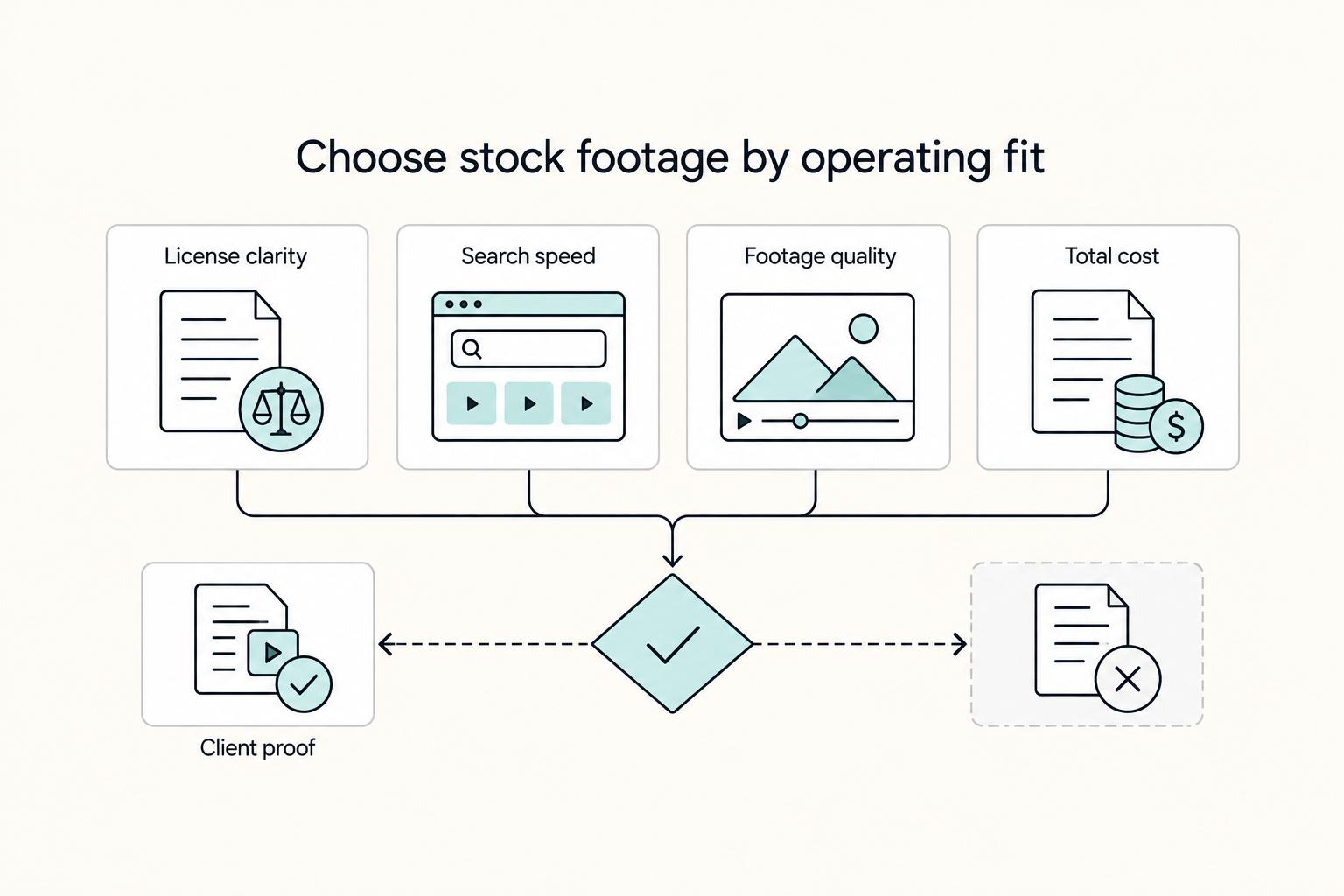
Choose a site based on three things: license clarity, workflow fit, and total cost. Treat this as a buying decision, not a popularity contest. For working creators, the test is straightforward: can you understand the license, get usable footage quickly, and justify the cost if a client asks about it later?
The goal is not to crown one universal winner. It is to help you make one clean pass through the options and leave with a short, defensible shortlist built around the three things that actually affect delivery risk.
- License clarity
Start here. If the commercial-use terms are fuzzy, it is not a serious option for client work. Even royalty-free footage can still carry restrictions around resale or commercial use, and free libraries vary more than many creators expect. In practice, "free" can mean free with attribution, free for personal use only, free up to a certain quality level, or genuinely free. Pexels is a useful example: the available evidence says most videos are under the Pexels License and can be used for free, including commercial projects. But "most" is not "all," so your real checkpoint is still the asset-level license page.
- Workflow fit
A cheap or free clip becomes expensive if it slows search or falls apart in your edit. Current projects often need at least HD or 4K footage, so this guide keeps format readiness in view instead of treating every library as interchangeable. We do have one grounded workflow detail for Pexels: it offers a large collection of high-quality videos and includes filters for vertical video discovery. We also have a broad signal that Shutterstock has a massive library. For Pond5, Artlist, Motion Array, Storyblocks, and Artgrid, the source evidence is thin, so this guide uses unknown instead of pretending we verified search quality, download formats, or client-transfer terms.
- Total cost, not headline cost
Price matters only after you account for reuse rights, search time, and replacement risk. A royalty-free license is commonly described as a one-time payment that allows repeated use without extra per-use fees. But that still does not answer whether a given clip fits your specific commercial use case. The usual failure mode is simple: you choose based on sticker price, skip the terms check, and end up re-editing later because the actual usage scope was narrower than you assumed.
One note on evidence quality: where a source excerpt is partial or not operational, including the partial No Film School excerpt in our research set, this article flags the gap. If we cannot support a claim about a platform's license details, pricing structure, or client-use permissions, we will not guess.
If you want a deeper dive, read Value-Based Pricing: A Freelancer's Guide.
Who this list is for and the criteria that actually matter#
This list is for independent professionals who deliver paid client work and need terms they can verify and defend later. If you're browsing for personal or hobby use, this framework is probably stricter than you need.
| Criterion | What to check |
|---|---|
| License clarity | Can you find clear, current terms for your intended commercial use and client delivery? |
| Redistribution rights limits | Do the terms clearly state what can and cannot be handed off to a client? |
| Download formats | Are the file types and resolutions you need available for your actual workflow? |
| Search quality | Can you get to a usable clip fast enough for real project timelines? |
| Total cost | Does the full cost (plan or clip fee, review time, and replacement risk) still make sense for client work? |
Use the same scorecard for every platform, and mark any unverified point as unknown instead of assuming. In practice, that means checking:
- License clarity
Can you find clear, current terms for your intended commercial use and client delivery?
- Redistribution rights limits
Do the terms clearly state what can and cannot be handed off to a client?
- Download formats
Are the file types and resolutions you need available for your actual workflow?
- Search quality
Can you get to a usable clip fast enough for real project timelines?
- Total cost
Does the full cost, including plan or clip fee, review time, and replacement risk, still make sense for client work?
Use a blunt gate: if terms are unclear for client delivery, eliminate the platform and move on, even if pricing looks attractive. The same gate applies throughout this guide, and where evidence is thin, the answer stays unknown. You can also read The Best Video Editing Software for Freelancers.
Quick comparison of the top stock video sites#
Most platform-specific decisions are still Unknown in this guide, so use this as a shortlist filter, not a final pick.
| Site | Best for right now | Pricing model | Likely strengths | Likely constraints | 4K stock video | Full HD clips | Download formats notes | Confidence |
|---|---|---|---|---|---|---|---|---|
| Pexels | Zero-budget baseline test | Unknown; confirm on the platform site | Quick baseline before paid options | License scope, client handoff rights, and format detail are not verified here | Unknown | Unknown | Verify resolution and file type on the asset page before client use | Low |
| Shutterstock | Benchmark test against another candidate | Unknown; confirm on the platform site | Useful comparison anchor for search speed and first usable result | Treat pricing, rights detail, and file options as unconfirmed until you check the platform site | Unknown | Unknown | Check an actual sample file, including container, codec, and resolution | Low |
| Pond5 | Project-specific shortlist test | Unknown; confirm on the platform site | Practical side-by-side search candidate | No verified operational detail here on license terms or format readiness | Unknown | Unknown | Do not assume specs from brand familiarity | Low |
| Artlist | Single-library trial test | Unknown; confirm on the platform site | Easy to keep or cut after one real project test | Confirm terms, pricing, and format details on the platform site | Unknown | Unknown | Confirm asset-level download options, not only plan copy | Low |
| Envato | Separate product-line review | Unknown; confirm on the platform site | Prompts you to verify the exact product, not just the parent brand | Brand-level assumptions can hide different license states | Unknown | Unknown | Confirm which product you are using before relying on terms | Low |
| Motion Array | Editor-side compatibility smoke test | Unknown; confirm on the platform site | Good for direct import testing in your normal NLE | Licensing detail and practical file specs are not confirmed | Unknown | Unknown | Test one download in your real timeline before committing | Low |
| Storyblocks | Same-day search comparison test | Unknown; confirm on the platform site | Useful when turnaround speed matters | No verified detail here on pricing, rights, or download formats | Unknown | Unknown | Save asset URL plus terms snapshot for any test clip | Low |
| Artgrid | Additional live footage check | Unknown; confirm on the platform site | Worth screening as another serious candidate | Verify platform-specific operational details on the platform site | Unknown | Unknown | If grading latitude matters, verify source options on asset pages | Low |
| Envato Elements | Review separately from the parent brand | Unknown; confirm on the platform site | Helpful as its own entry in your decision process | Do not assume it matches sibling offerings | Unknown | Unknown | Confirm product terms at download time and keep a screenshot | Low |
The main takeaway is the consistently low-confidence pattern. We have a Jonny Elwyn comparison updated in January 2026 and a Wrapbook page dated January 1, 2025, but the excerpts remain high level. Wrapbook also states its post is informational and should not be relied on for legal, accounting, or tax advice.
If a cell you care about is Unknown, run two checks before you shortlist a platform for client work: confirm the actual asset download options, then save your evidence, including clip URL, clip ID if shown, terms view, and check date. Jonny Elwyn also notes that some libraries may offer original ungraded camera files; treat that as a feature to verify on specific assets, not an assumed platform default.
If you are on a deadline, do not rely on a single source with unknown pricing and unknown format readiness. Keep one primary option and one backup until sample downloads confirm fit. You can also read The Best Podcast Hosting Platforms for Beginners.
Best stock video sites by creator scenario#
Start with the scenario, then verify at clip level. If you need broad variety fast, begin with Shutterstock and Pond5 as your first live-search tests. If your budget is hard-capped, test Pexels first, then compare that result with Envato paths before you commit.
The main constraint here is evidence depth: for most platforms, pricing, rights scope, and exact file options are not verified here. So treat each platform as a shortlist candidate, not a guaranteed winner, until you confirm one real asset page and one sample download.
Match the platform to the scenario#
| Platform | Best for | Key pros | Key cons | Concrete use case |
|---|---|---|---|---|
| Pexels | Hard-capped budget path test | Gives you a baseline to compare against paid routes | No excerpt-backed detail here on rights, resolution options, or file types | Run one live search and one sample download, then decide if you need a paid fallback |
| Shutterstock | Broad-variety-fast shortlist | Useful first candidate when speed to a usable clip matters | Pricing, rights detail, or download options not verified here | Time one search and inspect one sample file in your editor before relying on it |
| Pond5 | Mixed projects where per-clip buying may fit | Strong side-by-side candidate when monthly volume is uneven | Do not assume format or rights fit without clip-level checks | If you need one hero stock shot, compare this branch against a subscription branch |
| Artlist | One-library trial for premium-facing edits | Artlist explicitly markets "Get unlimited stock footage" and shows a "4K+" filter | That alone does not confirm the exact rights or source options your job needs | For a color-sensitive project, verify asset-level download options before approval |
| Envato | Product-path review when teams say "we use Envato" | Keeps the evaluation focused on the exact product actually in use | One unified terms or pricing state across products not verified here | Confirm the exact product account first, then test one real asset workflow |
| Motion Array | Editor compatibility smoke test | Practical candidate for import-and-render testing in your NLE | Licensing detail or practical file specs not confirmed | Pull one sample clip into your real timeline before making it a core source |
| Storyblocks | Repeat-use subscription branch to test | Reasonable candidate when turnaround is more important than deep browsing | Confirm rights, pricing, and formats on the platform site | Test repeated download and documentation steps on a real weekly workflow |
| Artgrid | Premium footage branch to screen for commercial work | Worth a live check when finishing latitude matters | Not enough here to confirm source options or license fit | Validate the exact asset page before you lock it into client delivery |
| Envato Elements | Separate subscription-style branch | Helps you evaluate this line on its own terms | Terms and download conditions still need clip-level confirmation | Test one recurring-deliverable scenario and archive your proof of terms |
Use these decision rules to save time#
Use a two-branch shortlist: a likely subscription branch, such as Storyblocks, Artgrid, or Envato Elements, and a per-clip branch, such as Pond5. Then compare both against your actual monthly clip volume. If you only need a few assets, per-clip flexibility may be the safer operating path; if volume is steady, a subscription branch may be easier to run.
Keep one quality checkpoint in every scenario: some libraries can lean toward quantity over quality, and 4K, 6K, or RAW needs can change your choice. Before you make a final selection, confirm the exact asset page details, download one sample, and save the asset URL plus terms snapshot for your records.
You might also find this useful: Best Teleprompter Apps for Video Recording in 2026.
Free vs paid and subscription vs per clip#
Choose the buying model before the brand, because model mismatch is usually what creates avoidable cost and rework.
Here is the grounded baseline: stock-video sites often mix free and paid choices, so treat free vs paid and subscription vs per clip as two separate decisions. Then verify the exact asset page and current terms before you use clips in client delivery.
| Model | Typical examples in this comparison | Where it helps | Main risk | Verify before you commit |
|---|---|---|---|---|
| Free library | Pexels | Useful for rough cuts and budget-capped starts | Smaller library can increase search time; one non-sponsored creator comparison also flagged random frame rates | Resolution, frame rate, and timeline fit |
| Paid subscription | Artlist, Motion Array, Storyblocks, Artgrid, Envato Elements | Useful when you pull footage repeatedly | Fixed cost is harder to justify when usage drops; terms still need asset-level checks | Download-time terms, re-download steps, and clip tracking |
| Per clip | Pond5, Shutterstock options where applicable | Useful when you need only a few specific shots | Replacements after QA or revisions can erase per-clip savings | License page, download options, and replacement availability |
| Mixed path | Free first, then paid for approved finals | Useful for uneven workloads | Placeholder and final-rights mixups | URL, clip ID if shown, and terms snapshot for each selected clip |
Two rules that prevent overspending#
If your monthly clip volume is unpredictable, avoid locking into a high fixed subscription too early. Test one real need across a per-clip option and a subscription option, then decide from your own workflow.
If client revisions are frequent, favor the platform you have personally tested for re-download and license lookup clarity. The current grounding does not support naming a universal "fastest" option, so run that test yourself before you standardize.
Hidden-cost checkpoints#
Most overruns come from three places: search time, re-edit risk from license mismatch, and replacement work when clips fail QA. A creator comparison also called out a weird licensing system for Envato Elements, which is a practical sign to check current terms carefully before delivery use.
For a reliable decision, run one clip end to end and save the evidence pack: asset URL, clip ID if available, and terms snapshot.
Related reading: Best YouTube Keyword Research Tools for Client-Focused Channels.
License checks before you use any clip in client work#
Treat licensing as a go/no-go check before delivery, not as cleanup after the edit. For each clip, confirm that the exact terms at download clearly allow your intended commercial use, because some uses require permission or payment.
A 2021 filmmaker roundup makes the core workflow clear: read the license before downloading, and verify whether use is personal or commercial. Most avoidable problems start when that check gets skipped.
Use this four-point check before you publish#
If any point is unclear, replace the clip or get written clarification before delivery.
| Check | What to verify | Stated action |
|---|---|---|
| Commercial-use fit | Check that the clip is explicitly usable for the type of client project you are delivering | If terms only indicate personal use, or commercial use is not clear, do not use that clip |
| Rights language for delivery | Review the terms for redistribution, attribution, and client handoff language before publish | If the wording around use, sharing, or distribution is vague, escalate instead of assuming coverage |
| Evidence capture per selected asset | Save the asset URL, clip ID if shown, download date, and a screenshot or PDF of the license page and visible terms version or plan label | Store it in the project folder so you can prove what you relied on |
| Ambiguity rule | If license wording is ambiguous | Replace the clip or get written clarification before delivery |
- Commercial-use fit
Check that the clip is explicitly usable for the type of client project you are delivering. If terms only indicate personal use, or commercial use is not clear, do not use that clip.
- Rights language for delivery
Review the terms for redistribution, attribution, and client handoff language before you publish. If the wording around use, sharing, or distribution is vague, escalate instead of assuming coverage.
- Evidence capture per selected asset
For each approved clip, including from Pexels, Shutterstock, Artlist, or Envato, save the asset URL, clip ID if shown, download date, and a screenshot or PDF of the license page and visible terms version or plan label. Store it in the project folder so you can prove what you relied on.
- Ambiguity rule
If license wording is ambiguous, replace the clip or get written clarification before delivery. Roundups are useful for research, but they are not your legal permission source; even Wrapbook's January 1, 2025 post says it is not legal, accounting, or tax advice.
The usual problem is predictable: a clip gets treated as usable, then rights questions show up late and force rework. Clear terms plus saved proof prevent that scramble.
Keep your video-rights workflow aligned with your audio-rights workflow. For a consistent process across both, see A Guide to Music Licensing for Video Projects. This pairs well with our guide on Best Storyboarding Software for Freelancers Who Need Clean Handoffs.
The 30 minute test before you commit to a platform#
Run one hands-on pre-commit test before you pay or standardize on any library. The goal is simple: confirm workflow fit in your real editing stack, not in a feature list.
| Test | What to do | What to watch for |
|---|---|---|
| Search test | Run three searches from active projects on Pexels, Shutterstock, and one subscription candidate such as Artlist or Motion Array using real brief terms such as subject, mood, and framing | How quickly you reach the first clip you would actually use and how confident you feel in the on-page license context |
| Download test | Download sample assets in the formats you actually need and import them into your normal editor; keep the asset URL, clip ID if shown, download date, and visible plan label with the media file | Restrictive trials, watermarks, usage credits, or export-quality limits |
| Resolution and export test | Test one 4K clip and one Full HD clip from each contender in a normal sequence, then export with your usual preset | Render, relink, or quality issues in your standard export path |
- Search test
Run three searches from active projects on Pexels, Shutterstock, and one subscription candidate such as Artlist or Motion Array. Use real brief terms like subject, mood, and framing, then score how quickly you reach the first clip you would actually use and how confident you feel in the on-page license context.
- Download test
Download sample assets in the formats you actually need and import them into your normal editor. Keep the asset URL, clip ID if shown, download date, and visible plan label with the media file so the test stays traceable. Watch for free or freemium friction early: restrictive trials, watermarks, usage credits, or export-quality limits can block real use.
- Resolution and export test
Test one 4K clip and one Full HD clip from each contender in a normal sequence, then export with your usual preset. If clips preview fine but cause render, relink, or quality issues in your standard export path, treat that platform as a weak fit.
Score each platform on four points: search speed, download fit, render behavior, and license confidence. Then choose one primary source and one backup. Treat price or first-order promos as secondary to repeatable results.
For a step-by-step walkthrough, see The Best AI Writing Assistants for Freelancers.
Mistakes that cause re-edits, takedowns, or margin loss#
The fastest way to lose time and margin is simple: if you cannot prove what you licensed, for which use, and under which terms, you usually pay for rework later.
- Using Reddit buzz as a license decision
Reddit or r/videography can help you find options, but it cannot validate license fit for client delivery. Secondary liability doctrines are judge-developed, and contributory infringement can involve knowingly inducing, causing, or materially contributing to infringement. Use social chatter as a shortlist, not as commercial-use proof.
- Copying YouTube rankings without matching your own edit economics
A ranking video can help you build a shortlist, but your real risk and cost depend on your clip volume, revision cycle, and replacement speed. Content ID-style enforcement can surface uses later and trigger notices or monetization or removal choices. Treat enforcement risk as an operational reality, not a one-time upload check.
- Letting personal-use assumptions bleed into paid client work
If a clip was selected under a personal-use assumption, do not ship it in paid work without clarification or replacement. Secondary liability depends on underlying direct infringement, so client deliverables raise the stakes quickly. Personal-use shortcuts in commercial edits are a common path to re-edits.
- Skipping redistribution checks and archive proof
If redistribution terms are unclear, pause and resolve them before delivery. Keep an internal record for each asset: URL, clip ID, download date, plan label, and the terms version you relied on. Without that archive, a later proof request can turn into unpaid admin, rushed replacement edits, and avoidable trust loss.
Pick one site today and document your choice#
Choose one primary site and one fallback today, then document the decision so you can defend it later without redoing the whole evaluation.
- Primary site
Choose the platform that gave you the fastest path to a usable clip and the clearest commercial-use terms in your test. Prioritize the combination that matters in real work: plan options, library quality, and license clarity.
- Fallback site
Pick a backup that covers your primary site's weak spot, not just your second-favorite brand. If your primary is a free library, use a fallback that reduces ambiguity around watermarks, download limits, or commercial-use restrictions. Before you lock it in, run one preview download, watermarked where offered, to confirm the workflow is usable.
- Evidence pack
For each delivered project, save a simple record for every clip used:
- platform name
- clip ID or asset URL
- license terms snapshot or screenshot
- download date
- plan label used at the time
- Re-test rule
Set a fixed review point and rerun the same three checks each time: one real search, one license check, and one download test. This keeps your choice valid as pricing, catalog depth, and terms change.
Need the full breakdown? Read Best Video Conferencing Tools for Freelancers in Client Meetings.
Frequently Asked Questions
What is the best stock video site for beginners on a budget?
Pexels is a strong budget starting point. One source says most videos are under the Pexels License and can be used for free, including commercial projects, and another 2026 comparison describes the library as simple to use with no attribution required. Still, check the clip page before you download because free libraries can also include limits, watermarks, or assets that are not cleared for every commercial use.
Which stock video sites are strongest for professional client work?
For client delivery, a strong option is the one that lets you prove exactly what you licensed and under which terms, not the one with the loudest reputation. If a platform makes it hard to save the clip ID, license page, and terms version, treat that as a red flag.
When should I move from free libraries like Pexels to paid platforms?
Move when free starts costing you time or creating doubt. Common triggers can include repeated client revisions, harder search needs, or running into usage constraints, download limits, or watermark issues that some free sites still impose. If you are delivering paid work every week, that admin burden can be a sign to evaluate paid options.
What should I check in a stock footage license before client delivery?
Check commercial-use scope, attribution requirements, and any limits on redistribution or handing work off to a client. Save an evidence pack with the asset URL, clip ID, download date, plan label, and a screenshot of the terms you relied on. If the language is fuzzy, replace the clip or get written clarification before export, and keep your video and audio rights process aligned with A Guide to Music Licensing for Video Projects.
Is subscription or per-clip pricing better for freelancers with uneven workloads?
It depends on your real clip volume and workflow. If your monthly usage swings a lot, per-clip buying can be easier to control. A subscription can make more sense when you download often enough that search speed, re-downloads, and revision rounds matter more than fixed monthly cost. The mistake is locking into a plan before you know your actual usage.
Which platforms are most likely to have both 4K stock video and Full HD video clips?
Do not assume resolution coverage from brand familiarity alone. One free source in this research set, Dareful, is described as all 4K, which is useful if you want room to crop, but that does not confirm broad Full HD availability across every library you are comparing. The practical check is simple: run a real search, confirm available download sizes, and test one 4K file and one 1080p file in your editor before you commit.
How do I compare Shutterstock, Pond5, Artlist, Envato, and Motion Array without bias?
Use the same three tests on all of them: one real client search, one license check, and one download test. Score each platform on time to first usable clip, license clarity, available resolutions, and how easy it is to archive proof for later. That will tell you more than any “best stock video sites” roundup built from Reddit buzz or affiliate rankings.
Try a related tool
Researched and edited by the Gruv editorial team. Gruv builds cross-border billing, payouts, and finance-operations software for global businesses.
Sources
- acquisition.gov/afars/appendix-aa-table-contentstrusted
- copyright.gov/ai/Copyright-and-Artificial-Intelligence-Par...trusted
- desales.edu/policiestrusted
- pharmacy.ca.gov/laws_regs/lawbook.pdftrusted
- pmc.ncbi.nlm.nih.gov/articles/PMC12827332trusted
- uscode.house.gov/view.xhtml;jsessionid=2EB93FF43F888BA492D073...trusted
- uspto.gov/sites/default/files/documents/copyrightwhite...trusted
- web.law.duke.edu/cspd/papers/pdf/ipcasebook_chap-14.pdftrusted
Educational content only. Not legal, tax, or financial advice.
Related Posts

Value-Based Pricing for Freelancers Under Real Payment Risk
Value-based pricing works when you and the client can name the business result before kickoff and agree on how progress will be judged. If that link is weak, use a tighter model first. This is not about defending one pricing philosophy over another. It is about avoiding surprises by keeping pricing, scope, delivery, and payment aligned from day one.

The Best Video Editing Software for Freelancers
**Choose the best video editing software based on the workflow you can repeat under pressure, not the tool that looks most impressive on YouTube.** You are the CEO of a business-of-one, and your editor is part of your delivery infrastructure. When a client changes scope, sends a new batch of footage, or asks for "one more revision," your editor stops being a creative playground and becomes a system you either trust or fight.
Music Licensing for Video Projects Without Scope Mistakes
On a client project, you are not just choosing background music. You are managing delivery risk and legal risk. For **music licensing for video**, start with three checks: what your Statement of Work (SOW) says, who the license holder of record is, and whether the license actually covers this project's use.