
Quick Answer
Choose based on function, not hype: the best standing desk converters are the ones that stay stable with your real load, let you set a workable keyboard position, and look controlled on camera. Before buying, verify current specs, watch a full movement demo with sound, and run your own loaded typing check at full height. If motion, noise, or cable pull interrupts normal work, reject that model.
Your Desk Isn't Furniture - It's Your Business's Cockpit#
Use three practical checks for any standing desk converter: whether it protects your gear, supports your workflow, and looks steady on calls. This guide uses that lens.
| Pillar | What to examine | Key question |
|---|---|---|
| Asset protection | What the unit needs to hold and how stable it feels with your actual gear, not an empty desktop | Whether it supports your working setup without making the workspace feel risky |
| Productivity uptime | How well it fits the way you work across seated tasks, standing tasks, and repeated transitions | Whether it supports your flow instead of creating friction you may avoid after week one |
| Professional presence | How your setup appears on video calls and how cleanly it handles the visible parts of your work | Whether it looks controlled and dependable when clients can see it |
Your setup is more than home office decor. It is often the surface holding your laptop, monitor, keyboard, notes, camera frame, and your core work time.
That matters even more when you work for yourself. You may take client calls from this setup, do long focus blocks at it, and need it to behave consistently on ordinary days and deadline days.
A converter that looks tidy in a product photo can still be the wrong fit if it clashes with your equipment, disrupts your typing posture, or looks shaky on camera. Use these three pillars to judge any option before you buy:
- Asset protection
Start with what the unit needs to hold and how stable it feels with your actual gear, not an empty desktop. The key question is whether it supports your working setup without making the workspace feel risky.
- Productivity uptime
Look at how well it fits the way you work across seated tasks, standing tasks, and repeated transitions. The key question is whether it supports your flow instead of creating friction you may avoid after week one.
- Professional presence
Check how your setup appears on video calls and how cleanly it handles the visible parts of your work. The key question is whether it looks controlled and dependable when clients can see it.
Before you compare options, write down your current gear, how often you are on calls, and the tasks that take most of your time. That simple checkpoint keeps you from buying for looks first. The next sections use the same three-part test to turn vague shopping criteria into a practical decision process.
Pillar 1: Is Your Converter an Asset Protector or a Liability?#
Use this rule first: if you cannot verify a converter with current documents and clear policy terms, treat it as a risk and keep shopping.
| Area | Must-have signal | Red flag |
|---|---|---|
| Documentation | Accessible manual/specs | Missing manual/spec details |
| Assembly and support | Clear assembly method; stated support channel | Vague build language |
| Policies | Clear warranty terms; clear return terms | Policy terms that are hard to find before checkout |
| Product evidence | Seller documentation and demo footage with setups similar to yours | Only lifestyle renders |
What matters most in this pillar is not styling. It is whether you can confirm, in writing, that the unit matches your setup and remains supportable after purchase.
- Verify the source before you trust the claim
Product pages can change, so treat them as a starting point, not final proof. FederalRegister.gov explicitly says its web page is not the official legal edition, points readers to the printed PDF, and flags a newer correction dated 05/31/2024. Apply the same habit here: save the current manual, spec sheet, assembly instructions, warranty terms, and return policy before you buy.
- Treat X-lift, Z-lift, and post-and-base as labels to verify, not automatic answers
This section does not include grounded evidence to rank these designs for safety. So instead of assuming one label is better, confirm how the specific model behaves in the seller's own documentation and demo footage with setups similar to yours.
- Use a must-have checklist and a red-flag checklist
Must-have signals: accessible manual/specs, clear assembly method, stated support channel, clear warranty terms, and clear return terms. Red flags: only lifestyle renders, missing manual/spec details, vague build language, or policy terms that are hard to find before checkout.
- Run a pre-purchase stability scorecard you can test quickly
- Spec check: confirm current dimensions, rated load, and assembly details in official docs. - Demo-video check: watch full up/down movement and look for visible bounce or shift. - Loaded-use review scan: prioritize reviews from setups close to yours. - Return-policy check: confirm return/restocking terms before ordering.
- Future-proof with your own load plan and saved records
Add up your current equipment load, then include realistic near-term additions, and compare that to the model's latest published rating right before purchase. This section has no grounded universal capacity buffer, so use the manufacturer's current documents as the controlling reference. Keep screenshots or PDFs from order day. IRS Publication 946's "check for future developments" reminder (IRS.gov/Pub946) reflects the same practical habit: verify again before you rely on specifics.
If documentation is thin, your risk is higher. If verification is easy and complete, trust is easier to earn.
Pillar 2: Calculating the True Cost of Downtime: Ergonomics & Workflow Integrity#
Downtime here is usually workflow friction, not a dramatic failure. If posture changes or height transitions keep interrupting your work, the converter is costing you time. After Pillar 1, treat this pillar as a fit-and-flow check you can verify before and after purchase.
- Run a practical fit test before you compare prices
Start with your current setup and ask one question: can you place your screen and typing position where you can work comfortably through a normal day without constant adjustment? For many buyers, the first checkpoint is whether the keyboard position can sit at or below desk level for their preferred typing posture. Then verify how much independence you get between monitor and keyboard positioning, because fixed movement can create tradeoffs you may not want. If this cannot be confirmed in a current manual, dimensioned image, or full demo video, treat the fit as unverified. Key differentiator: documented fit evidence, not generic ergonomic language.
- Use lift style as a verification decision, not a hype decision
Category-wide performance verdicts for manual, gas spring, or electric mechanisms are not established. Use this table as a buyer checklist and confirm each point with current documentation and a real full-cycle demo.
| Lift style | Transition effort | Interruption risk | Noise | Maintenance expectations |
|---|---|---|---|---|
| Manual lift | Verify how much hands-on effort a full transition requires in a real demo. | Check whether transitions can happen quickly enough for your workflow. | Request live audio in a real transition video. | Confirm tightening, adjustment, and parts-support guidance in current docs. |
| Gas spring | Verify behavior under realistic load in an unedited full-range demo. | Check for movement behavior that could interrupt active work. | Request live audio in a full up/down cycle. | Confirm any adjustment steps and replacement support terms. |
| Electric | Verify controller placement, power routing, and full-range movement in real use. | Check whether transitions can happen without extra repositioning steps. | Request live audio in a full up/down cycle. | Confirm controller/motor support details in current docs. |
Key differentiator: a mechanism you can verify against your actual work pattern.
- Protect your flow after setup
Once installed, make transitions predictable so they do not steal focus.
- Save or mark your working positions so changes are repeatable. - Check cable slack at full movement range, not just at seated height. - Test typing stability during real tasks; if movement disrupts input, fix or return while support options are open. - Schedule transitions at natural task boundaries instead of mid-flow. - Confirm current ergonomic guidance from an authoritative source before relying on it.
Keep the same documentation trail from Pillar 1 - listing, manual, warranty, and setup photos - so any mismatch is easy to resolve. Key differentiator: routine posture changes that support workflow instead of interrupting it.
Pillar 3: How Your Converter Looks and Sounds on Client Calls#
If your setup looks shaky or distracting on camera, it weakens trust even when the ergonomics are fine. After fit and workflow checks, make sure your converter helps you look steady and prepared in everyday calls, demos, and recordings.
Base this decision on seller evidence and your own real-use test.
- Run the video call wobble test
- Before you buy: watch one continuous demo that includes active typing, not only a staged height change. - What to observe: monitor stability at low, mid, and high positions, then during normal keyboard use. - After setup: join a test call, turn your camera on, type normally, and do one full seated-to-standing change. - Deal-breaker: visible frame shake during routine typing or movement that would interrupt a live demo.
Key differentiator: proof of visual stability in real motion, not polished marketing footage.
- Prioritize visible trust signals over generic "looks good" claims
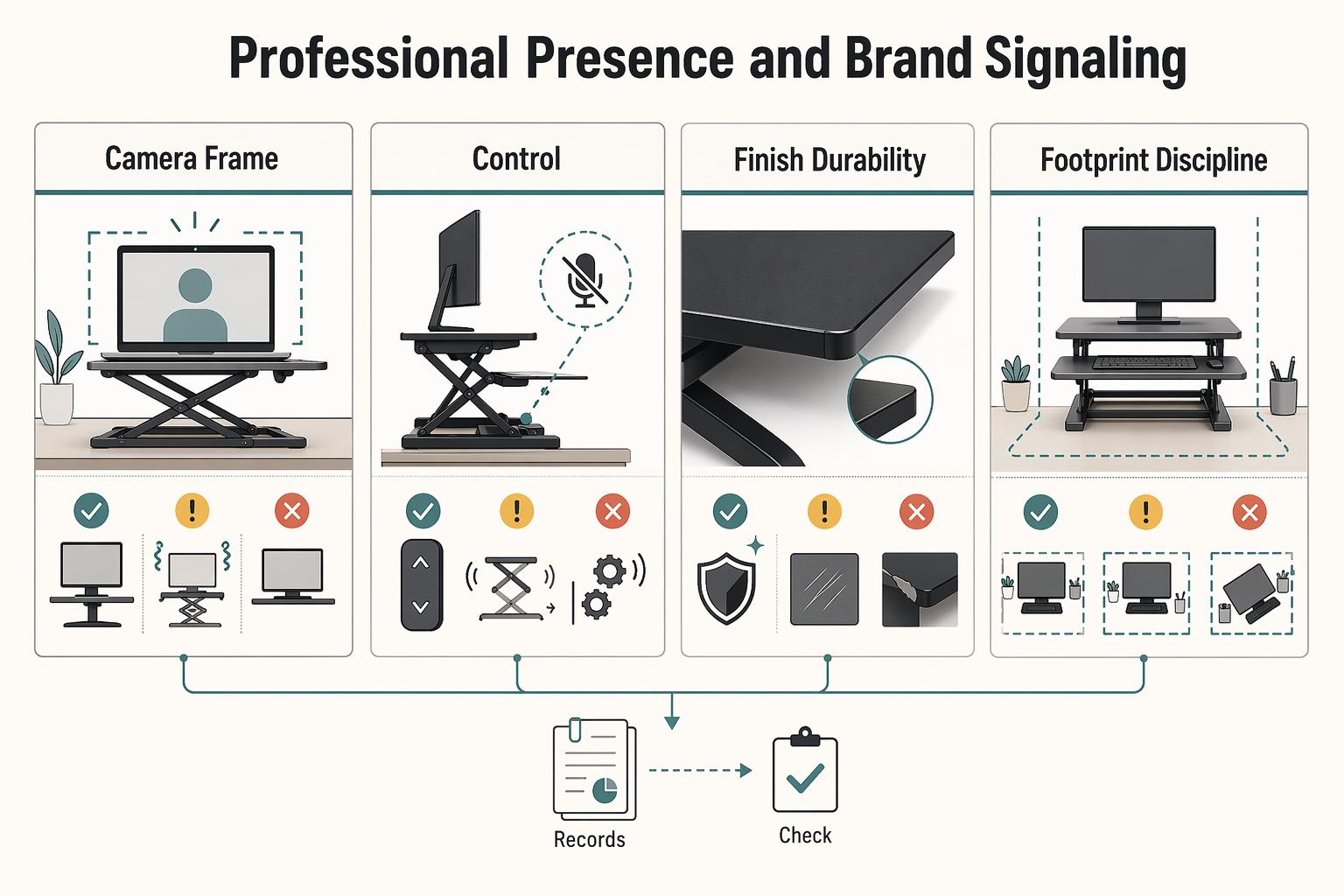
| Trust signal | What reads as controlled | What creates distraction |
|---|---|---|
| Camera frame cleanliness | Only intentional tools in frame | Edge clutter, drifting papers, random accessories |
| Cable control | One defined cable path behind or under the unit | Hanging cords, crossing lines, visible slack near hands |
| Finish durability | Consistent surface appearance under normal lighting | Obvious wear patterns that pull attention on camera |
| Footprint discipline | Setup stays inside a predictable desk zone | Overhang, crowding, or gear spilling into frame |
Check listing photos, then compare with owner setup photos when available. A unit can look clean when empty and become visually noisy once real cables and accessories are added.
Key differentiator: a loaded setup that still looks organized on camera.
- Treat adjustment sound as a meeting decision point
Compare manual, gas-spring, and electric options using actual demo audio and your own recorded test call. Focus on whether the sound profile works in your normal meeting flow, not on mechanism labels alone. Confirm the adjustment noise level with the provider before you buy. If a height change forces you to mute, pause, or apologize during client-facing calls, treat that as a practical fail.
Key differentiator: adjustment noise that fits your real call environment.
- Use a quick pre-call consistency checklist
- Align camera height to your usual eye line. - Keep a fixed background boundary. - Route cables through one repeatable path and confirm slack at standing height. - Reset the platform to your standard call layout before joining.
This is what makes your setup look intentional every time, not improvised.
The Verdict: Top Converters Matched to Your Main Risk#
There is no single winner here. The right converter is the one that best handles your main risk: instability at standing height, ergonomic strain, on-camera distraction, or a cramped desk footprint.
Use this as your filter before brand preference: marketed load capacity is not the same as real-use stability, wobble tends to increase with height, and repeated adjustments can introduce drift over time.
| Model | Best-for use case | Standout strengths | Tradeoffs | Ideal setup profile | Verification notes |
|---|---|---|---|---|---|
| VertDesk | Stability-first priority | Strong candidate when steady monitor behavior during standing typing matters most | Stability-oriented builds can feel bulky on shallow desks; marketed load claims do not prove low wobble | External monitor setup where platform control matters more than minimal footprint | Ask for one continuous typing demo at low/mid/high positions. If you use third-party stability scoring, treat 7+ as directional only. Confirm current capacity, specs, availability, and warranty details with the provider before buying. |
| Ergotron WorkFit-S | Ergonomic adjustability | Relevant finalist when long typing blocks and posture flexibility are the deciding factors | More adjustment options only help if you actually tune keyboard and monitor position | Long work sessions with frequent sit/stand switching | Confirm fit with your real desk and posture, not seller photos alone. Run a 20 to 30 minute seated/standing typing check before committing. Confirm current capacity, specs, availability, and warranty details with the provider before buying. |
| FlexiSpot M7 | Call-ready presentation | Practical shortlist option when clean transitions and visual steadiness on calls matter | Quiet or smooth footage may not match your room acoustics or mic pickup | Client-facing workflow with regular height changes | Request a full up/down clip with live sound, then repeat on a recorded call in your own setup. Check cable slack and monitor shake under normal load. Confirm current capacity, specs, availability, and warranty details with the provider before buying. |
| VariDesk Essential | Compact footprint | Sensible choice when space discipline and quick setup are higher priorities than maximum range | Smaller platforms can limit mouse room, accessories, and cable routing | Narrower desk where the converter must stay inside a predictable zone | Measure desk depth first, then test full daily layout (keyboard, mouse, charger, webcam cables). Small platforms can look tidy when empty but crowd quickly. Confirm current capacity, specs, availability, and warranty details with the provider before buying. |
How to choose between finalists#
If you are deciding between two models, run the three-pillar check one more time:
| Pillar | Keep | Do not keep |
|---|---|---|
| Pillar 1 (asset protection) | The option that stays more controlled at your full standing height | The one with the bigger marketed load number |
| Pillar 2 (uptime) | The one you can use for 20 to 30 minutes seated and standing without obvious wrist or shoulder strain | The one that causes obvious wrist or shoulder strain |
| Pillar 3 (presentation) | The one that avoids visible shake, cable clutter, and adjustment noise on a recorded call | The one that adds visible shake, cable clutter, or adjustment noise you would need to manage mid-meeting |
If the two finalists still tie, choose the one that asks less from your desk depth and less from your daily reset discipline. You might also find this useful: The Best Desk Chairs for Long Hours of Work.
Conclusion: Your Workstation Isn't an Expense - It's Your Most Critical Investment#
If you want a final buying lens, come back to the same three questions: will it protect your gear, preserve your working posture, and keep you looking steady on calls?
-
Asset protection. Treat a converter as load-bearing equipment, not decor. Put your actual monitor, keyboard, mouse, and any webcam or dock on it, raise it to full height, and type normally. The deciding detail is what happens under real load. If the screen shakes, the base shifts, cables pull tight, or the contact points look likely to mark your desk over time, reject it. Keep one hard spec in view too: a listed 33 lb capacity can get tight with a monitor-heavy setup, and one reviewed model also had limits with many monitor arms.
-
Ergonomic adjustability. Buy the adjustability your body needs, not the feature list that looks best on a product page. The key differentiator is keyboard positioning: some converters still lack negative tilt, which can leave you choosing between bent wrists and raised shoulders. Your immediate test is simple. After one seated block and one standing block, you should not need to shrug, reach, or cock your wrists up to work.
-
Professional presence. Your setup should look steady on calls, and any lift noise should be acceptable for your environment. Record one full raise-and-lower cycle with your mic on, then watch for visible wobble and listen for noise you would not want picked up mid-meeting. Also check motion path and desk fit. Some Z-lift converters arc outward, while others move straight up and down, and one reviewed unit was specifically noted as secure on 24-inch-deep desks.
For a final yes or no, confirm four things in order: it stays stable at full height, it gives you real ergonomic adjustment, it moves in a way your room and mic can tolerate, and it fits your desk depth, monitor layout, and cable path.
The best choice is the one that clears those checks in your space, with your gear. If one cannot, move up to a full standing desk. If it can, finish the setup with the right ergonomic office accessories. Related: The Best Ergonomic Gear for Your Remote Work Setup. Want help with your specific setup? Talk to Gruv.
Frequently Asked Questions
Should you keep your current desk or replace it?
A standing desk converter is often the lower-hassle option when you already have a desk you like and do not want to replace. Pick a converter if your existing desk is solid and you want sit-stand capability fast. Pick a full desk if your current desk is already too shallow, crowded, or messy, and verify current pricing before you buy.
Do you need more ergonomic adjustment?
Keyboard-position flexibility matters more than fancy marketing. An adjustable keyboard tray or other independent keyboard positioning can give you more room to tune wrist and shoulder posture than a fixed platform. This matters most for long typing blocks, frequent sit-stand switching, and anyone who already notices strain from a flat keyboard position.
Is your setup simple or monitor-heavy?
Check whether the unit raises your monitor, keyboard, and mouse together in one motion, and whether it supports your monitor arrangement and cable routing. A dual-monitor example in one review specifically called out support for dual 24-inch monitors and a grommet hole, which is the kind of practical detail worth verifying. This matters most if you use external monitors, webcams, chargers, and other gear that can tug or bind during height changes.
Are converters stable enough for expensive equipment?
They can be, if you treat stability as a live check instead of a spec-sheet promise. Load your actual monitor, keyboard, and mouse, raise the unit to full standing height, and type normally. If the screen shakes, the base shifts, or cables pull tight at the top, reject it.
How do you judge lift smoothness and noise?
Watch or record one full up-and-down movement with your real setup on it. Some reviewed models are described as smooth and quiet because of gas-lift hardware, but your room and your mic are what count. If motion looks jerky or the sound is obvious on a recorded call, that is a real workflow cost.
What ergonomic feature should you care about first?
Start with keyboard-position flexibility, not just maximum height. A fixed relationship between screen and keyboard can force you into a compromise posture, while an adjustable keyboard tray gives you more tuning room. Your check is simple: after a short seated and standing typing block, you should not need to shrug your shoulders or bend your wrists up to work.
Is a converter a better buy than a full standing desk?
Choose a converter when your current desk is worth keeping and you want less hassle than replacing the whole thing. Choose a full desk when you need a complete reset of your setup. If you are leaning that way, compare the tradeoffs with The Best Standing Desks for a Home Office.
How much should you trust roundup sites and brand recommendations?
Use them to build a shortlist, not to make the final call for you. One roundup published on 02 Feb 2026 says it tested 10 converters and had over 40 in its testing room, which is useful context, but it also includes an affiliate disclaimer and says the publisher sells some reviewed products. Cross-check at least one independent 2026 editorial roundup, then read the warranty, return, and support terms yourself before buying.
Try a related tool
Researched and edited by the Gruv editorial team. Gruv builds cross-border billing, payouts, and finance-operations software for global businesses.
Sources
- billingsmt.gov/DocumentCenter/View/53701/COMPLETE-COB-EMPLO...trusted
- cms.gov/files/document/r9p241.pdftrusted
- congress.gov/bill/119th-congress/senate-bill/1071/text/eahtrusted
- courts.ca.gov/sites/default/files/courts/default/2024-10/t...trusted
- courts.michigan.gov/492fc4/siteassets/publications/benchbooks/cr...trusted
- faa.gov/documentlibrary/media/order/order_jo_7900.5e...trusted
- farmingdale.edu/courses/index.shtmltrusted
- federalregister.gov/documents/2024/04/24/2024-08309/risk-managem...trusted
Educational content only. Not legal, tax, or financial advice.
Related Posts

Value-Based Pricing for Freelancers Under Real Payment Risk
Value-based pricing works when you and the client can name the business result before kickoff and agree on how progress will be judged. If that link is weak, use a tighter model first. This is not about defending one pricing philosophy over another. It is about avoiding surprises by keeping pricing, scope, delivery, and payment aligned from day one.
The Best Ergonomic Gear for Your Remote Work Setup
**Treat your ergonomic remote work setup as operating infrastructure, not a comfort splurge.** When posture breaks down, delivery quality and scheduling usually break down right after. Start by setting a baseline that protects your body and your business before you compare products.

The Best Standing Desks for a Home Office
Treat this as a durable business purchase, not a roundup-driven impulse buy. To reduce the odds of replacing a desk next year, follow a simple sequence: shortlist by how you actually work, separate directional claims from facts you can verify, then run pass/fail checks before you pay.