
Quick Answer
Start with control devices, then protection sensors, then comfort automation. For the best smart home devices for airbnb, prioritize a PMS-connected smart lock, an occupancy-aware thermostat workflow, and privacy-safe monitoring with explicit disclosures. Keep tools centralized in one control surface, test fallback handling for access and alerts, and track before-and-after indicators so each addition proves operational value instead of adding extra app overhead.
Introduction: Moving Beyond Gadgets to a System of Control#
The best smart home devices for airbnb are the ones that give you reliable control. Novelty is not the point. Access, climate, alerts, and guest handoffs should work without constant manual fixes. If you are still bouncing between apps, texting door codes by hand, or hoping each handoff goes smoothly, you may not have an operating setup yet. You may have a pile of gadgets.
That distinction matters because a device-by-device approach can leave important operational needs unaddressed. A smart device can improve the guest experience, save time, and reduce hassle, but only if it fits a larger control model. Use this article with a simple three-layer lens:
- Control: who gets in, when, and how reliably. The clearest checkpoint is your entry flow. If a guest can enter by code instead of waiting for a key handoff, you have removed a major friction point.
- Protection: how quickly you spot problems and act. This layer is about reducing blind spots before a small issue becomes a bigger one.
- Profitability: which tools actually save time or support a better guest experience. The test here is practical value, not novelty.
We will use that lens to compare four parts of the stack: access control, climate control, monitoring, and automation. The format is comparison first, then implementation checkpoints and red flags. If you are upgrading an existing setup, start with access control, tighten protection next, and add convenience only after those two layers are stable.
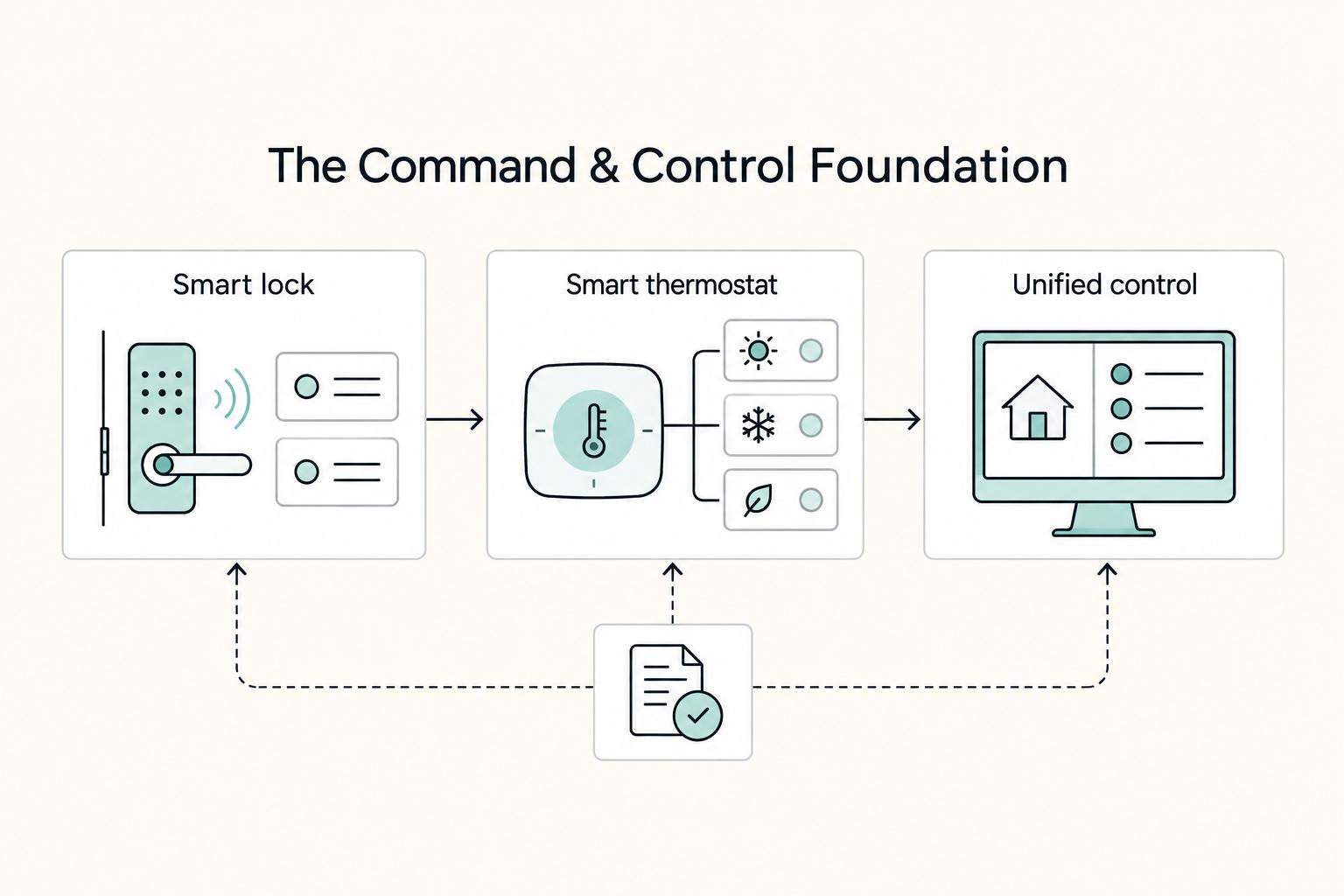
Layer 1: The Command & Control Foundation#
Start here: if control is fragmented, optimization will stay fragile. Build this layer around three pillars, in order: a PMS-integrated smart lock, an operating workflow for climate control, and one dashboard as your control surface.
| Setup option | Integration quality | Operational risk | Management effort |
|---|---|---|---|
| Standalone devices with separate apps | Low. Devices run independently with no shared trigger source. | High. You are more likely to react late to missed handoffs, wrong settings, or missed alerts. | High. Multiple apps and manual updates stay in your daily loop. |
| Partial integration through a hub or bridge app | Medium. Some workflows connect, but with extra handoffs. | Medium. Better than isolated tools, but blind spots can remain. | Medium to high. You still need to monitor cross-tool automations. |
| PMS-led integrated setup with one dashboard | High. Booking data can drive access and climate from a single source of truth. | Lower. Risk is not gone, but repetitive work and human-error exposure are reduced. | Lower. Fewer manual handoffs and duplicate checks. |
1. Smart lock#
If you only fix one thing first, fix entry. The lock should follow booking status through your PMS, not your memory.
| Lock check | What to confirm |
|---|---|
| Connectivity | Wi-Fi connectivity |
| Integration | Direct PMS integration depth, not a copy-paste code workflow across apps |
| Fail-safe operations | A manual backup path, battery warnings, and a clear process for issuing and removing staff access |
If any of those answers is vague, keep looking. Your operating checkpoint is simple: keep the calendar as the single source of truth.
2. Smart thermostat#
Treat the thermostat as an operations tool, not a feature list. Your goal is a repeatable workflow for arrival comfort, vacancy energy control, and guest comfort exceptions.
Set and use:
- One arrival mode to prepare comfort before check-in.
- One vacancy mode so an empty unit is not conditioned like an occupied one.
- One guest override rule that allows comfort adjustments without turning every request into permanent manual drift.
When comfort complaints come in, run a sequence: check whether the property is still in vacancy mode, adjust remotely, then log the exception so you can spot recurring setup issues.
3. Unified control#
Make ownership explicit: one owner, one dashboard, one alert priority model. This is how you stop juggling apps and start running a system.
Implement in this order:
- Assign a system owner.
- Map core automations around booking confirmed, check-in, checkout, and vacancy.
- Prioritize alerts so entry-blocking or stay-disrupting issues surface first.
- Remove redundant apps that create duplicate notifications or conflicting settings.
This will not eliminate every issue, but it shifts you from reactive clicking to visible, repeatable control.
Related: The Pros and Cons of Short-Term vs. Long-Term Rentals.
Layer 2: The Asset Protection Shield#
Once access and climate run from one source of truth, your next job is risk reduction. Work in sequence: secure and document the perimeter, add privacy-safe interior detection, then keep records strong enough for disputes, claims, and compliance reviews.
1. Perimeter coverage#
Treat exterior cameras and doorbells as evidence tools first. A video doorbell such as a ring doorbell can help you verify arrival problems, unauthorized extra visitors, and damage timing, but only if placement and disclosure are handled correctly.
| Perimeter item | Requirement |
|---|---|
| Device placement | Place recording devices only where they cover entry points or exterior perimeter areas, then verify current platform rules and local law before installation |
| Guest disclosure | Disclose every exterior camera and doorbell in both your listing and house rules, using plain location language |
| Disclosure records | Save date-stamped screenshots of those disclosures and keep the exact wording |
| Incident log | Keep date, alert time, what the device showed, what message you sent, and outcome |
| Airbnb lockbox | Install it in a secure but accessible spot, provide photo-based instructions, and rotate codes between stays |
| Backup access plan | Keep a backup access plan ready |
Work through the first four items before you install anything.
Apply the same discipline to backup entry. If you use an Airbnb lockbox, install it in a secure but accessible spot, provide photo-based instructions, rotate codes between stays, and keep a backup access plan ready. That protects you when a guest arrives late, including edge cases like an 11pm arrival after delays.
2. Interior monitoring without recording#
Inside the property, prioritize detection over surveillance. Noise, smoke, carbon monoxide, and water alerts are high-value because they can shut down operations, damage the unit, or trigger neighbor complaints.
Protect the line between detection and recording. A privacy-safe monitor should detect conditions such as sustained noise or pooled water without capturing private conversations or video. For platform wording, do not rely on memory; check the live policy text before you publish the disclosure.
Document each device in plain language: what it detects, what it does not detect, and whether it records anything. Vague disclosure creates trust risk, even when the hardware is privacy-safe.
| Device type | Risk covered | Privacy impact | False-alert risk | Operational burden |
|---|---|---|---|---|
| Exterior camera or video doorbell | Entry disputes, unauthorized visitors, perimeter events | Higher than passive sensors because it records | Depends on motion zones and notification settings | Medium: footage and disclosures need ongoing review |
| Noise monitor | Parties, neighbor complaints, occupancy misuse | Lower when it detects levels instead of recording content | Depends on thresholds and placement | Medium: alerts require follow-up |
| Water leak sensor | Flooding, appliance leaks, water damage | Very low | Depends on placement and moisture source | Low to medium |
| Smart smoke or CO detector | Fire, smoke, and air-safety events | Very low | Depends on maintenance and environmental triggers | Medium: every alert is urgent |
3. Response and documentation#
Alerts protect you only when ownership and escalation are defined in advance. Set one alert owner and a written escalation order, then route alerts by event type.
| Alert type | Escalation order |
|---|---|
| Noise | Owner first, then guest message, then local contact if the issue continues |
| Leak | Owner first, then the local contact best positioned to reach the unit quickly |
| Smoke or CO | Highest priority, with a prewritten plan for on-site check, emergency contact decisions, and guest relocation steps |
Write this down before the first alert hits.
Close each incident with documentation. Notify your insurance carrier about installed protective devices, keep a device inventory by room or zone, align rental terms and house rules with what is actually installed, and preserve the paper trail. Your defensible record should include inventory, disclosure text, screenshots, purchase records, maintenance notes, and incident logs.
Layer 3: The Profitability Engine#
Add this layer only after Layers 1 and 2 are stable. From here on, each upgrade should do one of two jobs: reduce a recurring cost or remove guest friction you can defend in pricing. If a device adds another app, another failure point, or more attack surface without a clear margin case, skip it.
- Use a margin filter before you buy
Start from the integrated system you already trust, not isolated gadgets. A smart lock is a cyber-physical device tied to external control, and that control also expands attack surface. In one study of five commercially available locks, every device reviewed had at least one vulnerability, so do not build revenue-layer automations around entry until backup access, incident logging, and manual override are already working. Set your proof inputs before purchase. Track only what can show before-and-after change: utility bills, lockout calls, after-hours guest messages, review mentions, and pricing test notes. If you cannot name the input, it is not a business upgrade yet.
| Upgrade | Primary economics | Inputs to track | Benchmark status |
|---|---|---|---|
| Smart thermostat scheduling | Cost reduction | Utility bills, vacant-hours setpoints, guest overrides | Benchmark not specified; compare against your own baseline |
| Smart lock for self check-in | Cost reduction plus labor reduction | Lockout incidents, late-arrival support, backup code use | Benchmark not specified; compare against your own baseline |
| Welcome lighting or arrival scene | Revenue lift | Review mentions, check-in complaints, pricing test notes | Benchmark not specified; compare against your own baseline |
| Digital concierge device | Labor reduction plus possible revenue support | Repetitive guest questions, response-time burden, troubleshooting messages | Benchmark not specified; compare against your own baseline |
- Build welcome automation as a reliable workflow
Treat welcome automation as an operations flow, not a gimmick: trigger, guest-facing effect, fallback behavior, and manual override. Use a simple trigger such as the check-in window or a valid unlock event from the same dashboard. Keep the guest-facing effect modest and useful: entry lights on, climate set to an arrival range, optional extras only. Reliability comes from fallback. If unlock does not fire, lights should still run on schedule. If a platform link breaks, you or a local contact should be able to run the scene manually. Re-test this flow after turnover so a single cloud hiccup does not become a dark check-in and a support thread.
- Keep the digital concierge narrow and benefit-first
Use digital concierge tools for three high-impact jobs: self-service property info, house-rules reminders, and routine troubleshooting. Cover the basics guests repeatedly ask for: Wi-Fi access, parking, quiet hours, thermostat basics, and simple appliance help. Keep setup privacy-safe with a guest-only profile, no personal payment/account data, and placement in a common area. Position these features by outcome, not gadget name:
| Smart feature | Guest benefit | Operations benefit |
|---|---|---|
| Keyless self check-in | Smoother late arrivals | Fewer key handoff and lockout issues |
| Arrival scene (lights + climate) | More comfortable first 10 minutes | Fewer check-in complaints and less manual intervention |
| Digital concierge for basics | Faster answers without waiting | Lower repetitive message volume |
If you manage 3 or more listings, expect some vendors to shift to quote-based pricing, so keep your own cost and message-volume baselines before demos.
Implementation order for this layer: self-service info first, simple arrival scenes second, and higher-complexity multi-device automations last.
You might also find this useful: The Best Software for Managing Short-Term Rentals.
Conclusion: Add Devices in a Set Order, Then Review Them Routinely#
The useful mindset shift is simple: you are not buying gadgets for fun. You are making operating decisions in a set order. Follow the three-layer logic from this article and you get clearer control first, better protection second, and only then the upgrades that improve margin or guest experience.
-
Control first. Start with the devices that remove the biggest day-one risk: access and temperature control. A smart lock gives you remote access control and temporary access codes that begin at check-in and expire at check-out, which is a better starting point than physical keys that can be lost or copied for as little as £3. The test is not the feature list. It is whether you can verify entry with guest access logs and still issue or revoke access if an automation fails.
-
Protection second. Add monitoring only after you review current platform guidance and your own disclosure text. The important point here is consistency: the device you install, the location a guest can see, and the wording in your listing and house manual should all match before go-live. The risk can be process, not hardware: an undisclosed camera, a vague description, or a privacy choice you cannot explain when a guest asks questions.
-
Profitability third. Once control and protection are stable, add upgrades that reduce friction or avoid waste. A smart thermostat is a practical example because you can adjust it remotely and reduce energy use when the unit is unoccupied. The deciding factor is proof. Track one before metric and one after metric so you can see whether the upgrade lowered costs, improved reviews, or just added another subscription.
Your final checkpoint is operational, not motivational. Aim for clear visibility across the tools you use. Keep a documented device and disclosure policy. Review logs, battery status, subscriptions, and guest-facing failures on a routine cadence you will actually maintain.
Frequently Asked Questions
What should you check in Airbnb’s current camera and recording-device policy?
Check the live policy text, not a recap article, before you publish or refresh the listing disclosure. The main issue is disclosure discipline. That means listing each recording device, noting its general location, and avoiding hidden placement that can make guests feel watched. Verify the current policy page, then update your listing disclosure and house manual in the same sitting.
Are noise monitoring devices worth using in a short-term rental?
They can be useful for early warning, but privacy implications should be part of the buying decision from the start. Check what data the device collects and how alerts are generated before you install it. Verify current platform policy language before publishing, then document the device type, where it will sit, and the disclosure text you plan to use.
How should you calculate ROI for smart devices?
Do not rely on one neat formula and call it done. A better test has four parts: cost savings such as fewer utility spikes, revenue lift you can defend with reviews or pricing tests, subscription drag from apps or monitoring plans, and maintenance effort such as battery swaps, support tickets, and troubleshooting time. Build the sample scenario from your own property numbers before you buy. Pick one before metric and one after metric for each device, then review the result after 30 to 60 days.
How do you automate check-in and check-out without creating lockout risk?
Use keyless entry smart lock access codes tied to booking dates so guests can enter during their reserved window and the codes deactivate after checkout. What matters most is the fallback. If the booking sync fails, you still need a manual way to issue or revoke a code, plus a backup access method because physical keys can be lost, misplaced, or duplicated. Run a full arrival test with a real check-in window, a non-host phone, and your backup access method before you trust it with guests.
What should you look for in a smart lock for remote management?
Ignore brand-led claims and check operating reliability first: stable integration with your PMS or message flow, a clear offline fallback, readable access logs, and support quality that holds up when something breaks on a weekend. On the security side, the U.S. Cyber Trust Mark can be a useful checkpoint because the FCC label includes a QR code to a product registry, but the program is voluntary under PS Docket No. 23-239, so no label does not automatically mean no security. Ask the vendor for screenshots of access logs, written fallback steps, and support contact details before you buy any smart lock.
Do you need to disclose a doorbell camera to guests?
Verify the current policy text before you publish or refresh the disclosure. As a practical baseline, treat a doorbell camera as part of the same recording-device review as any exterior camera, and keep placement visible so guests can clearly see it on arrival. Cross-check this answer with your camera disclosure, then update the listing so device type and location are described consistently.
What is the biggest mistake people make when buying the best smart home devices for airbnb?
They buy for features first and operations second. The real test is whether the device reduces a real cost, removes a recurring guest friction point, and still works when Wi-Fi, a cloud link, or an app permission fails. For every device on your shortlist, write down the trigger, the guest-facing effect, the fallback, and the manual override before you spend anything.
Try a related tool
Researched and edited by the Gruv editorial team. Gruv builds cross-border billing, payouts, and finance-operations software for global businesses.
Sources
- csl.fiu.edu/wp-content/uploads/2023/05/iot_platforms_sur...trusted
- docs.fcc.gov/public/attachments/DOC-400674A1.pdftrusted
- nist.gov/system/files/documents/2024/01/23/Draft%20Io...trusted
- people.cs.uchicago.edu/~grantho/papers/asiaccs2016-smartlock.pdftrusted
- pmc.ncbi.nlm.nih.gov/articles/PMC8647513trusted
- tncourts.gov/sites/default/files/docs/odr_-_journal_of_di...trusted
- upcommons.upc.edu/server/api/core/bitstreams/b986c65e-acc9-47b...trusted
- usfca.edu/arts-sciences/programs/graduate/data-science...trusted
Educational content only. Not legal, tax, or financial advice.
Related Posts

Value-Based Pricing for Freelancers Under Real Payment Risk
Value-based pricing works when you and the client can name the business result before kickoff and agree on how progress will be judged. If that link is weak, use a tighter model first. This is not about defending one pricing philosophy over another. It is about avoiding surprises by keeping pricing, scope, delivery, and payment aligned from day one.
The Pros and Cons of Short-Term vs. Long-Term Rentals
You are probably not chasing the biggest headline revenue number. You want rent that arrives, stays collected, and does not turn into a second job or a cross-border tax headache. For an owner living internationally, the real choice between a short stay and a long-term lease is about risk first. Which model gives you lower compliance exposure, less remote operating drag, and more cash left after fees, taxes, and reporting?
The Best Software for Managing Short-Term Rentals
If you own or manage a short-term rental, your job is not just answering guest messages and turning over a property. You are managing an income-producing asset. The real work is protecting cash flow, reducing operating mistakes, and making sure one missed detail does not turn into a booking issue or a compliance problem.