
Quick Answer
Pick routes that protect delivery first, then layer in scenery. For "best road trips for digital nomads usa," the article favors a basecamp pattern with weekly stay-or-skip checks, using options like Pacific Coast Highway, Blue Ridge Parkway, Route 66, and a Santa Fe-Taos loop only when each next stop is verified for internet and backup workspace. If the next leg is uncertain, hold your current base and move later.
Start Here if You Want Scenic Routes Without Work Disruptions#
If your trip still has to support real work, scenery is not your first filter. The best U.S. road trips for digital nomads are the ones you can keep running without missed meetings, broken deep-work days, or constant rebooking.
- Built for people who still have deliverables
This list is for remote professionals, not vacationers doing a one-off drive across the United States. If your week includes client calls, upload-heavy tasks, or work that cannot slip, you need routes that leave room for predictable routines, not just photogenic stops.
- Route ideas plus operating rules
A lot of road-trip content gives you either city roundups or personal travel stories. That can help with inspiration, but it is weak decision support when you are trying to balance drive days with actual output. One U.S. roundup lists 7 routes and includes reality checks where they matter. Here, you get both: where to go and how to keep the route from consuming your workweek.
- Weekly stay-or-skip checkpoints
The practical move is to reassess each leg before you drive, not after you arrive. Before any move, verify that the next stop has your minimum work setup: confirmed lodging internet, plus at least one fallback such as a good coffee shop with fast internet or a public library. If that evidence is thin, stay put another night or reroute. A skipped stop is often the smart call, not a failure.
That matters more than most people expect. City-based remote work often gives you faster internet and coworking options, but it can also raise cost pressure. Scenic, lower-density areas may feel like the point of the trip. Yet they can create the worst kind of friction: not dramatic enough to cancel the leg, but bad enough to break your work rhythm.
The red flag is vague confidence. A host saying the Wi-Fi is "usually fine" is not a work plan. Your evidence pack for each week should include recent lodging reviews, cancellation terms, and one nearby backup place where you could work the same day if the primary setup fails.
That may sound strict, but the alternative is worse. In another remote-work travel context, weak signal meant driving 45 minutes each way just to stay connected. Do not assume a scenic stop in the U.S. will create that exact problem, but treat the failure mode seriously. For this kind of trip, the route matters less than your rule: if the next stop cannot support your work basics, you skip it.
Choose Your Route With Clear Filters Before You Book Anything#
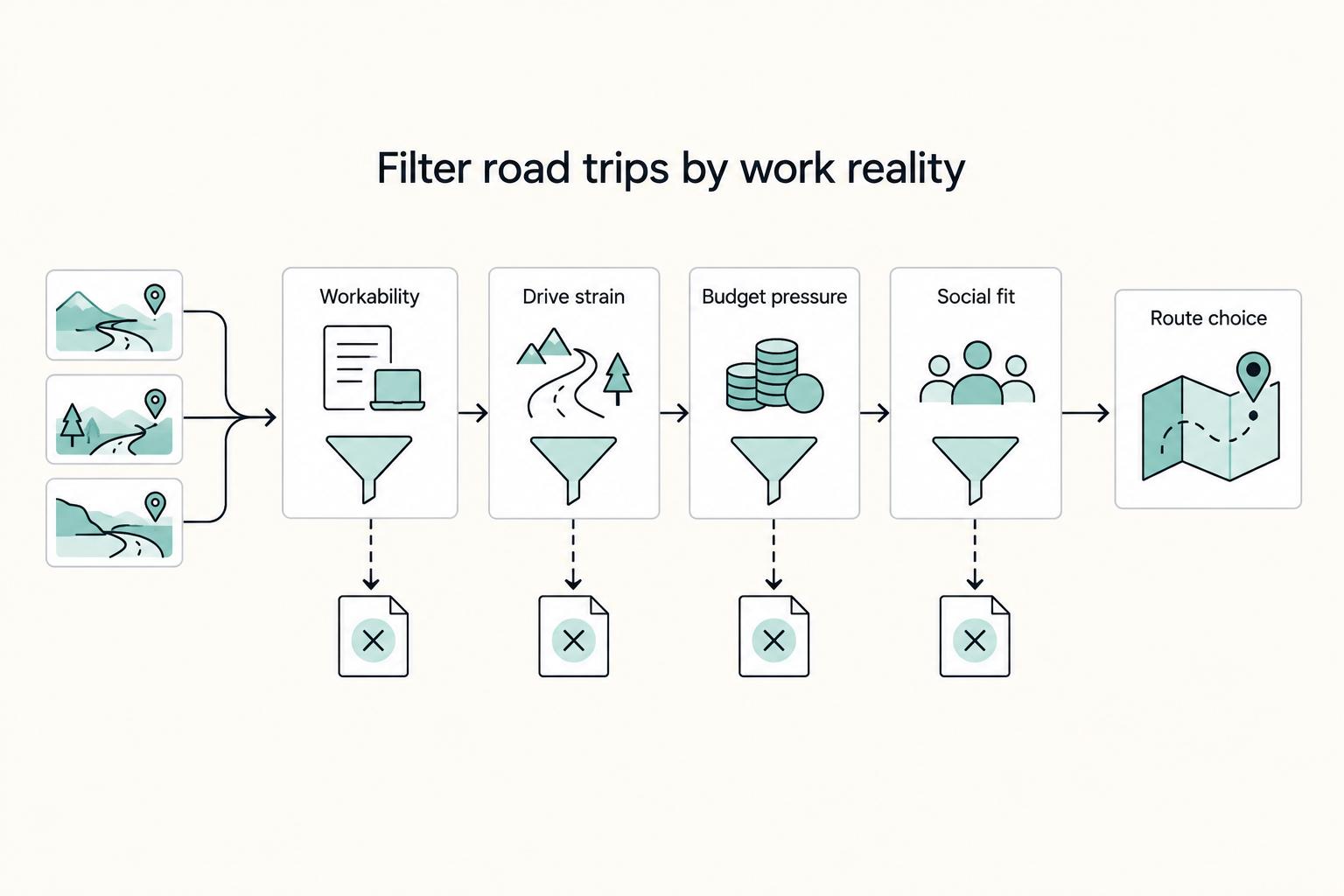
Choose your route only after it clears four filters: workability, drive strain, budget pressure, and social fit.
| Filter | What to check | Article note |
|---|---|---|
| Workability | Recent lodging internet feedback; host Wi-Fi details; one same-day backup place to work | Use a base-heavy pattern and treat long scenic runs or Route 66 as occasional transfer legs if uninterrupted work blocks are your priority |
| Drive strain | Move frequency; buffers between scenic legs | Frequent transitions can create more friction than a single long drive; reduce move frequency and leave wider buffers between scenic legs |
| Budget pressure | Route resilience; rebooking risk; cancellation flexibility; backup options | These can matter as much as sticker price when plans change |
| Social fit | Current country; upcoming destination; work flexibility | Place and schedule shape social options; remote areas near U.S. National Parks may require more intentional planning |
- Workability
If uninterrupted work blocks are your priority, use a base-heavy pattern and treat long scenic runs or Route 66 as occasional transfer legs. Before booking, confirm recent lodging internet feedback, host Wi-Fi details, and one same-day backup place to work.
- Drive strain
In the United States, frequent transitions can create more friction than a single long drive. If your week is meeting-heavy, reduce move frequency and leave wider buffers between scenic legs so travel does not overtake work time.
- Budget pressure
Check route resilience, not just headline nightly rates. Rebooking risk, cancellation flexibility, and backup options can matter as much as sticker price when plans change.
- Social fit
If community is part of your plan, choose routes with that in mind. Fairytrail's matching signals include current country, upcoming destination, and work flexibility. The practical reminder is that place and schedule shape social options; remote areas near U.S. National Parks may require more intentional planning.
Make your transport posture decision early: car-first routing, or mixed routing with rail-assisted hops such as Amtrak segments. That choice affects where you can base, how tightly you can book, and how disruptive reroutes feel when a stop does not hold up.
Compare the Best U.S. Digital Nomad Road Trips at a Glance#
Use this table to choose an operating model, not to crown a winner. Route-specific U.S. nomad evidence is still thin, especially for connectivity reliability.
| Route | Best for | Likely pros | Likely cons | Ideal stop cadence | Who should avoid this route | Known unknowns |
|---|---|---|---|---|---|---|
| Pacific Coast Highway | Scenery-first travel with planned fallback cities | Easier recovery if you anchor work weeks in larger hubs with stronger remote-work basics and coworking options | Cost pressure can rise if you rely on last-minute changes | Base-heavy: work weeks in fallback cities, scenic transfer legs between | Travelers who need very low-cost, fully last-minute plans | Route-specific internet reliability between scenic stops is not well evidenced |
| Blue Ridge Parkway | Slower travel where scenery is the main value | Works better when you keep buffers and avoid constant moves | Hard to assume each stop is work-ready without prechecks | Longer stays, fewer transitions | Readers with daily call-heavy schedules and no backup tolerance | Thin route-level reporting on stop-by-stop workability |
| Kancamagus Highway | A short scenic segment inside a broader plan | Useful as a compact add-on to a stable base strategy | Weak as a standalone work-trip backbone | Short leg from a stronger base | Anyone expecting every stop to function like a full office week | Very limited nomad-specific evidence on workspace and Wi-Fi consistency |
| San Juan Skyway | Intentional, low-transition travel with pre-verified stays | Can fit a deep-focus rhythm when each stop is validated in advance | A single weak booking can create bigger disruption | Longer base stays with preplanned moves | People with non-negotiable live-meeting reliability every day | Sparse, consistent evidence on property-level reliability across the route |
| Route 66 | Culture-forward trips with planned reset weeks | Flexible if you treat work weeks and transfer legs differently | Easy to drift into logistics-heavy travel if you move too often | Fixed office weeks, lighter transfer legs | Travelers who need uniformly dependable setup at every stop | Long-corridor quality variance and limited consistent workability evidence |
| Santa Fe-Taos base loop | Focused, low-transition routines | Simpler base-loop rhythm can protect work focus | Fewer reroute options if one stay underdelivers | Longer base stays with short loop days | Readers who want broad coworking choice and instant reroutes | Internet/workspace quality appears highly stop-specific, not route-proven |
If two routes tie, choose the one with fewer long drive days and more fallback cities. In practice, that often favors California hub access over remote mountain corridors when your calendar is deadline-heavy.
Also keep expectations realistic: one firsthand account says U.S. nomad coverage is less discussed in forums/videos, and source views on affordability are mixed. A separate personal account of about 2 months and about 2500 miles shows long U.S. road stretches are possible, but that pace does not automatically fit meeting-heavy workweeks.
Pacific Coast Highway Is Best for Balanced Scenery and Urban Work Backups#
This route works best when you want coastal scenery without letting your workweek drift out of control. The practical play is base-heavy planning: use larger city stays for heavier work, and treat scenic legs as lighter movement days rather than full office days.
Long-haul road trips get operationally complex quickly. As you cross states, laws, weather, toll systems, time zones, and driving rules can change, so re-check assumptions at each border instead of assuming the next stretch will run like the last one.
- Best fit
Use this route if your month mixes calls, deep work, and occasional deadline spikes, and you want room to pause and reset instead of driving constantly.
- Best operating pattern
Keep a slower cadence with fewer transitions. If your entry point is near San Diego, use that as a logistics choice, cluster meeting-heavy and upload-heavy work into larger-city base days, and keep transit days for lighter admin or offline tasks. Avoid vacation-style pacing: a central-California example with 5 day trips in 6 days shows how fast movement can crowd out delivery focus.
- Main risk and checkpoint
The common failure mode is assuming a scenic stop can support a full workweek. Before you leave a base, verify the next stay with a current in-unit speed test, recent Wi-Fi review mentions, cancellation timing, parking details, and one same-day fallback option in a larger nearby city. If that pack is incomplete, treat the stop as scenery, not as a work anchor.
If a high-stakes week is coming, simplify on purpose: skip extra detours, add a night in the larger coastal base, and keep driving to one clean transfer day. Related: The Best RVs and Campervans for Digital Nomads.
Blue Ridge and New England Scenic Loops Work Best for Seasonal, Slower Travel#
These loops work best when you travel slowly and treat seasonality as a planning constraint, not a side detail. If you can hold longer stays and limit weekly moves, you get the scenic upside without putting your workweek under constant pressure.
- Blue Ridge Parkway
Use Blue Ridge as a live-through corridor, not a fast checklist route. One framing runs from Shenandoah to Great Smoky Mountains, and the practical advantage is pace: longer bases, fewer rushed transitions, and better control of work days.
A key planning check is route status. The source specifically flags Blue Ridge Parkway repairs, so check the next leg before departure and move later if closures or detours would break your week.
- New England extension
If you continue northeast, pair White Mountain National Forest, the Kancamagus Highway, and Coastal Maine as one slower extension. The same New England example calls it the best fall road trip, highlights October, and describes spending weeks between Stowe, the White Mountains, and the Maine coast.
That is the right operating model here: a multi-week loop with fewer transitions, not constant one-night stops.
- Two-location week model
Keep the week simple: settle in, work, and move once at most. Put heavy calls and deadline work on non-drive days, and use transfer days for lighter tasks. Remote workers are explicitly described planning long U.S. trips while still working weekdays, and this pattern is what makes that sustainable.
Santa Fe, Taos, and San Juan Skyway Are Best for Creative Deep-Work Blocks#
Choose this route only if you want fewer, longer stays and can run a stricter planning process before each move. The route-specific evidence here is limited, so treat this as a style-based option, not a high-confidence reliability pick for meeting-heavy weeks.
Most of what surfaced here is off-target for remote-work planning: a State.gov cookie-policy page and motorcycle touring content built around short trip formats, including 2-day and 5-day examples. The practical takeaway is simple: do not copy fast touring pacing into a normal client workweek.
Use a base-in, base-out operating model for each leg:
- Pick one primary town and one contingency town before checkout day.
- Confirm the next stay in writing the night before you move; if not, switch to the contingency.
- Put heavy calls and upload-sensitive work on non-drive days, and use transfer days for lighter tasks.
You can still use Santa Fe, Taos, and the San Juan Skyway in this structure, but run them as stable base weeks plus a planned scenic transfer, not as constant motion. For a step-by-step walkthrough, see The Best International SIM Cards and eSIMs for Digital Nomads.
Route 66 Works for Culture-Heavy Trips if You Protect Work Weeks#
Route 66 is a strong culture-first trip if you lock in fixed office weeks and keep transit stretches for lighter work. At almost 2,500 miles across eight states, this corridor rewards narrative travel, but it is not built for equally focused work at every stop.
| Phase | Best use | Guardrail |
|---|---|---|
| Chicago office week | Start with a true office block in Chicago, where the route begins | Before checkout, verify the next stay with written Wi-Fi confirmation, recent guest comments on signal quality, desk photos, and a saved cancellation deadline |
| Roadside culture stretch | Use diner, neon-sign, and small-town segments for lighter tasks only: inbox cleanup, expense sorting, planning, async drafts, and calls you can reschedule | Avoid stacking one-night stops and losing prime work hours to check-in, parking, and setup |
| Sparse segment rule | Keep city resets for fixed office weeks, and move only when your calendar is light | Do not put live-call days on arrival-day uncertainty; one Mojave account reports 99°F heat and another 200 miles to civilization |
- Chicago office week
Start with a true office block in Chicago, where the route begins, instead of launching straight into sightseeing. The goal is to stabilize your work before the trip starts fragmenting. Before checkout, verify the next stay with written Wi-Fi confirmation, recent guest comments on signal quality, desk photos, and a saved cancellation deadline.
- Roadside culture stretch
Use diner, neon-sign, and small-town segments for lighter tasks only: inbox cleanup, expense sorting, planning, async drafts, and calls you can reschedule. Route 66 is known for nostalgic Americana, not proven route-wide remote-work consistency. The usual miss is stacking one-night stops and losing prime work hours to check-in, parking, and setup.
- Sparse segment rule
Keep a hard rule for long, sparse legs: do not put live-call days on arrival-day uncertainty. One Mojave account in the Route 66 corridor reports 99°F heat and another 200 miles to civilization, which is enough to justify conservative scheduling. Keep city resets for fixed office weeks, and move only when your calendar is light.
Urban Basecamp Hybrids Beat Constant Driving for Most Full-Time Remote Workers#
For full-time remote work, a basecamp-plus-loop pattern is usually more reliable than constant driving, especially if missed meetings are costly.
- Use the missed-meeting rule to plan your route.
Build your trip around stable city work blocks, then add short scenic loops only on lighter calendar days. Avoid putting live-call blocks on move days, because checkout, traffic, parking, check-in timing, and arrival setup can erase your work window fast.
- Run New Orleans and the Florida Keys as separate rhythms, not one rolling deadline trip.
Treat New Orleans as a true anchor week, then use the Florida Keys corridor as a lighter segment after priority work is already done. This keeps the culture and scenery without asking every stop to perform like an office.
- Use Dallas, Fort Worth, and San Antonio River Walk when you want urban redundancy.
This chain works when you need multiple fallback cities instead of nonstop movement. Lock in your core work block in one city, then shift when major meetings are complete.
- Build one evidence pack per leg, then add cross-border finance reminders.
Before each departure, keep three items ready: lodging cancellation terms, one coworking fallback, and one next-city backup stay. If you handle cross-border finances, add compliance checkpoints: FBAR and Form 8938 are separate filings. FinCEN states that a United States person with a financial interest in, or signature authority over, foreign financial accounts must file an FBAR when filing conditions are met. IRS Form 8938 is for specified foreign financial assets above the applicable threshold and is attached to your tax return; IRS also notes a baseline $50,000 aggregate-value trigger for certain U.S. taxpayers, with higher thresholds for some filers, including some joint filers and taxpayers residing abroad. If no income tax return is required for the year, IRS says Form 8938 is not required.
Pick One Route and One Operating Rule Before You Leave#
The most reliable plan is to pick one route style you can actually work through, then follow one rule for when to stay put.
| Decision | What to set | Why |
|---|---|---|
| Primary corridor | Choose one drivable loop or corridor and commit to it first | West Coast trips range from 10 days to 14 days, 21 days, or 1 month, so one corridor gives cleaner decisions when you need to shorten, delay, or reroute |
| Backup city chain | Set a real backup sequence of major cities before you leave | Urban stops usually give stronger remote-work continuity because coworking options and digital communities are easier to find, with better odds of stable internet and power |
| Workability checklist | Check current road/access status, confirm next-stop work setup, confirm drive time for your week, and keep one fallback location ready | Reality checks include Highway 1 conditions in Big Sur or repair/access updates on Blue Ridge Parkway |
- Pick one primary corridor
Choose one drivable loop or corridor and commit to it first. West Coast trips can be structured in very different ways, with examples ranging from 10 days to 14 days, 21 days, or 1 month, so pace matters as much as scenery. One corridor gives you cleaner decisions when you need to shorten, delay, or reroute.
- Choose one backup city chain before departure
Set a real backup sequence of major cities before you leave. Urban stops usually give you stronger remote-work continuity because coworking options and digital communities are easier to find, with better odds of stable internet and power. This keeps scenic travel workable because you already know where to reset if a stop does not hold up.
- Set one non-negotiable workability checklist
Keep it short and use it every week: check current road/access status, confirm next-stop work setup, confirm drive time for your week, and keep one fallback location ready. Reality checks matter in practice, including route-specific status checks such as Highway 1 conditions in Big Sur or repair/access updates on Blue Ridge Parkway. If fatigue or conditions make driving unsafe, do not push the move.
If you want the safest first run, use a basecamp hybrid: hold longer in a work-friendly city, then layer in shorter scenic segments once your routine is stable. The goal is repeatable movement, not constant movement.
Frequently Asked Questions
What are the best U.S. road trips for digital nomads who still need reliable workweeks?
For most full-time remote workers, a practical choice is not the most scenic route but the route with more fallback cities. Pacific Coast Highway is a common shortlist route, and city-anchor plans usually give you more ways to recover a workweek than constant long moves. If missed meetings are expensive, choose office weeks in bigger hubs and treat scenic segments as the reward, not the structure.
How long should I stay in each stop to avoid turning the trip into constant logistics?
There is no single ideal stay length, and you should be suspicious of anyone who gives one. A practical rule is this: if every move forces you to rebuild your desk, test internet, shop for basics, and still make calls the same day, you are moving too often. Keep drive legs manageable too. One traveler used an 8-hour cap, which is a helpful ceiling to test against, not a universal rule.
How do I choose between scenic routes like Blue Ridge Parkway and productivity friendly city anchors?
Choose a scenic route when scenery is the point and your calendar can tolerate slower movement. Choose city anchors when your week has live calls, upload-heavy work, or deadlines that cannot slip. A good checkpoint is whether you have one verified backup stay and a clear plan for where you will work before checkout day. If not, the scenic option is probably asking too much of your workweek.
Is Pacific Coast Highway or Route 66 better for first time digital nomad road trippers?
Pacific Coast Highway and Route 66 both appear in common U.S. road-trip shortlists. For a first run, pick the option that lets you keep drive legs manageable and build in more reset days between moves. Route 66, from Chicago to Santa Monica, can still be a strong choice, but covering ground while working full weeks adds pressure. If you are new to this, cluster hard work in larger stops and keep the route flexible.
When should I skip a planned stop and stay put for another week?
Stay put when the current place is working and the next one is still a question mark. That means your internet is stable enough, the lodging is quiet enough, and your calendar just got heavier than expected. The failure mode is moving because the itinerary says so, then discovering on arrival that the property is noisy or the setup is weak and you already passed the cancellation window.
How do I plan around higher U.S. costs and car dependency without losing the travel experience?
Accept upfront that the United States can be expensive for nomading, and it may not match cheaper global options on cost. The answer is not to cram in more stops to "get value." Instead, use lower-cost cities when you can, reduce unnecessary mileage, and build the trip around fewer paid transitions, because fuel, lodging churn, and car-first travel can compound quickly.
Try a related tool
Researched and edited by the Gruv editorial team. Gruv builds cross-border billing, payouts, and finance-operations software for global businesses.
Sources
Includes 2 external sources outside the trusted-domain allowlist.
- academia.edu/37374927/BREAKING_DOWN_METHODOLOGICAL_BARRIE...trusted
- fincen.gov/report-foreign-bank-and-financial-accountstrusted
- irs.gov/businesses/corporations/do-i-need-to-file-fo...trusted
- irs.gov/forms-pubs/about-form-8938trusted
- snap.berkeley.edu/project/9274006trusted
- state.gov/report/custom/eeec75fd4atrusted
- airstreamclub.org/sites/default/files/2021-08/BB%2009-2021%20S...external
- aol.com/articles/route-66-turns-100-travelers-050125...external
Educational content only. Not legal, tax, or financial advice.
Related Posts

The 2026 Global Digital Nomad Visa Index for 50+ Countries
Start with legal fit, not lifestyle filters. The practical order is simple: choose a route you can actually document, then decide where you want to live. That single change cuts a lot of wasted comparison work and stops you from falling in love with places that were never a real filing option.
The Best RVs and Campervans for Digital Nomads
If you're searching for the **best rvs for digital nomads**, do not start with brand hype or dealer roundups. Start with your workday. The wrong layout will cost you every day, even if the rig looks great on the lot.
The Best Hiking Trails in the US National Parks
The right pick from the **best hiking trails us national parks** list is the one that fits the job you need it to do. Decide that first, and you can cut most of the noise before you compare routes. Here, "return on time invested" is just a planning lens: what you get back for the hours spent researching, driving, hiking, and recovering. "Jobs-to-be-Done" is a simple way to define what this hike needs to do on this trip.