
Quick Answer
Choose the best power station for rv work by mapping your real load first, then filtering models by both Wh and rated W. Check simultaneous demand, confirm startup headroom for any motor or compressor device, and validate how you will recharge between work blocks. Before buying, confirm manual-level details for port outputs, inverter disclosure, and any pass-through behavior you depend on.
Your RV Isn't for Vacation. It's Your HQ. Is Your Power Supply Mission-Ready?#
If you work from your rig, your power setup is not a camping accessory choice. It is an operations decision. The risk is straightforward: interrupted client calls, lost work sessions, unstable internet, and a scramble for charging ports when your laptop, phone, hotspot, and other gear all need power at once.
| Priority | Article guidance | What to verify |
|---|---|---|
| Reliability | Start with battery and charging safety, not marketing wattage | Favor clear first-party charging support and avoid mix-and-match accessories unless compatibility is explicit |
| Compatibility | A large battery does not help if the ports do not match your work gear | Check the exact output list, especially USB-C PD, AC output, and your charging brick requirements |
| Expandability | Your needs rarely stay still | Review the 200-500Wh, 500-1000Wh, 1500-6000Wh, and 6000Wh+ ranges and ask whether a smaller class will box you in as gear grows |
If you came here looking for the best power station for rv, reset your buying lens first. Some recreational buyers prioritize convenience: lights, small appliances, occasional charging. You need something different. Start with one question: can the unit support paid work consistently, connect cleanly to the devices you actually use, and grow with your setup instead of forcing an early replacement?
- Reliability first
Start with battery and charging safety, not marketing wattage. A March 26, 2025 CPSC corrections memo in a micromobility lithium-ion battery rulemaking context cites hazards such as thermal runaway and recategorizes some incidents into an aftermarket battery/charger hazard pattern. The practical takeaway for you is simple: favor setups with clear first-party charging support, and avoid mix-and-match accessories unless compatibility is explicit.
- Compatibility second
A large battery does not help if the ports do not match your work gear. Product listings already span everything from charging a single phone to multiple laptop charges, and some specifically call out USB-C Power Delivery (PD) ports for rapid charging. The decision point here is verification. Check the exact output list before you buy, especially USB-C PD, AC output, and your charging brick requirements.
- Expandability third
Capacity bands matter because your needs rarely stay still. Retail filters commonly separate units into 200-500Wh, 500-1000Wh, 1500-6000Wh, and 6000Wh+ ranges, with RV/Van treated as a distinct use case. The useful question is not whether you can make a smaller class work today, but whether it leaves you boxed in as your internet gear, desk setup, or recharge needs grow.
Next, run through the safety checks, port requirements, and evidence points worth confirming before you trust any recommendation. For a separate gear-buying example, see The best 'Microphones' for voiceovers and podcasting.
The Non-Negotiables: Why Your Business Demands Professional-Grade Power#
For work-from-RV reliability, four checks are non-negotiable: battery chemistry, continuous output and inverter disclosure, RV integration, and USB-C details. If a listing is vague on any of them, verify in official specs or skip it.
| Check | Long-term durability | Buying confidence | Device fit | Replacement risk | Workflow friction |
|---|---|---|---|---|---|
| LiFePO4 disclosed with cycle-retention data | Stronger long-term case when "Life Cycles (to 80%+)" is published (for example, 3,000+) | Better buying confidence when chemistry is named and thermal-management details are documented | Neutral by itself | Lower than unclear listings | Neutral |
| Lithium-ion or chemistry unclear | Confirm the current spec from the product documentation | Confirm the current spec from the product documentation | Neutral by itself | Higher when retention data is missing | Neutral |
| Continuous output and inverter type disclosed | Neutral | Better confidence than surge-led listings | Better fit for laptops, routers, displays, and call setups | Lower than vague AC claims | Less troubleshooting |
| RV outlet and USB-C details disclosed | Neutral | Fewer adapters can reduce connection points | Better fit for direct charging and rig integration | Lower if you are not relying on ad hoc adapters | Lower |
- Battery chemistry and retention disclosure
Start here, because battery quality can determine whether you get a durable tool or an early replacement. One reviewer (updated December 2025) described an early unit that cost about $350, stopped holding charge after around a year, and could drop from full to dead within 24 hours. For your setup, that is avoidable downtime. Prioritize LiFePO4 when possible, then confirm cycle-retention disclosure (for example, "Life Cycles (to 80%+)"). If chemistry and retention data are both missing, treat the model as higher replacement risk. Before buying, also read the written warranty terms and any published thermal-management details.
- Honest AC output and inverter quality
Focus on sustained performance, not peak marketing numbers. Continuous output is the number that maps to real work blocks, and one reviewer explicitly prioritized it over surge claims. That matches RV reality: once you are off shore power, you are responsible for every watt your rig needs. Check your simultaneous load, such as laptop charging, router/hotspot, display, and small accessories, then validate continuous output in watts. For sensitive electronics, use this quick checklist:
- Continuous AC output covers your combined live load with headroom. * Inverter type is explicitly listed in the manual or full specs. * Your charger bricks and plugs match the outlets you will actually use.
- RV integration that reduces cable failure points
"RV/Van" labeling is not enough; clean integration is what matters. You want a setup that avoids adapter chains, loose extension leads, and constant re-routing during the workday. Physical specs matter here. One example unit lists 2,048 Wh capacity, 2,400 W continuous output, and 28.3 kg (62.4 lbs). That can work well if it stays in place, but it adds friction if you need to move it often for outlet or solar access. Validate cable paths, placement, and day-to-day usability before you buy.
- USB-C delivery that matches your actual devices
USB-C clarity reduces clutter and adapter dependence in a compact workspace. But you need exact USB-C PD specs, not generic "fast charge" language. Confirm port count and output against your laptop, phone, and hotspot requirements. If your laptop normally uses a higher-wattage USB-C charger, verify the station supports it before assuming single-cable charging.
Before moving to the tier framework, run every shortlisted model through this screen:
- Chemistry is named (preferably LiFePO4) and cycle-retention data is disclosed.
- Continuous output is clearly published and checked against your live load.
- Inverter type is explicitly listed in official specs or the manual.
- RV connection details are clear, including any required adapters.
- USB-C PD details match your actual charging needs.
If you want a deeper setup comparison, read The Best RVs and Campervans for Digital Nomads.
The Uptime Framework: Which Tier of Power Resilience Does Your Business Require?#
Pick the tier that matches your real work pattern and outage tolerance, not the biggest unit. The goal is dependable uptime with the least extra weight, setup complexity, recharge dependency, and overbuy risk.
A requirements-first approach is grounded in how resilience planning is documented: NREL Technical Report NREL/TP-7A40-72586 was revised in January 2020, with added clarification on requirements definition and expanded testing detail after feedback. Use that same discipline here: define the job first, then verify current technical documents before you buy.
| Tier | Typical workflow supported | Recharge strategy | Expandability path | Who should avoid this tier |
|---|---|---|---|---|
| Tier 1 | Backup-only workdays for core office gear. Confirm the actual capability with a field test or the product documentation. | Primarily recharge on hookups between sessions; optional secondary charging only if documented. | Limited unless official docs confirm supported expansion. | Anyone who is regularly off-grid or expects partial rig continuity. |
| Tier 2 | Regular off-grid work blocks with a fuller desk setup. Confirm the actual capability with a field test or the product documentation. | Planned recharge rhythm between work blocks, based on documented inputs and real conditions. | Prioritize units with a clearly documented add-on path. | Anyone who rarely leaves hookups or wants minimal setup overhead. |
| Tier 3 | Whole-rig continuity for work plus selected RV loads. Confirm the actual capability with a field test or the product documentation. | Treat recharging as an operating plan, not a casual top-up. | Modular expansion only when compatibility and installation docs are explicit. | Anyone whose main need is laptop-and-connectivity backup. |
Tier 1: Backup-first#
Choose Tier 1 when your main risk is short outages, unstable hookups, or occasional remote work sessions. This tier is usually the cleanest fit if you want protection without carrying unnecessary capacity.
Confirm specific model options in current product documentation. Why this fits: lower complexity and lower overbuy risk when your workload is mostly backup-oriented.
Tier 2: Off-grid regularly#
Choose Tier 2 when off-grid work is routine, not occasional. The key decision is recharge reliability between work blocks, not just stored capacity.
Confirm specific model options in current product documentation. Why this fits: stronger day-to-day resilience if your recharge workflow is realistic and repeatable.
Tier 3: Whole-rig continuity#
Choose Tier 3 only when your business case includes keeping selected RV systems running alongside your workspace. This tier can solve the right problem, but it usually carries the highest weight, setup effort, and cost of overbuying.
Confirm specific model options in current product documentation. Why this fits: broader continuity goals, provided your expansion and recharge plan is fully documented.
Keep an evidence pack for any finalist: current manual, supported accessories, expansion documentation, and recharge requirements. If sales copy and technical docs conflict, treat that as a stop sign.
You might also find this useful: The Best Power Adapters and Converters for Global Travel.
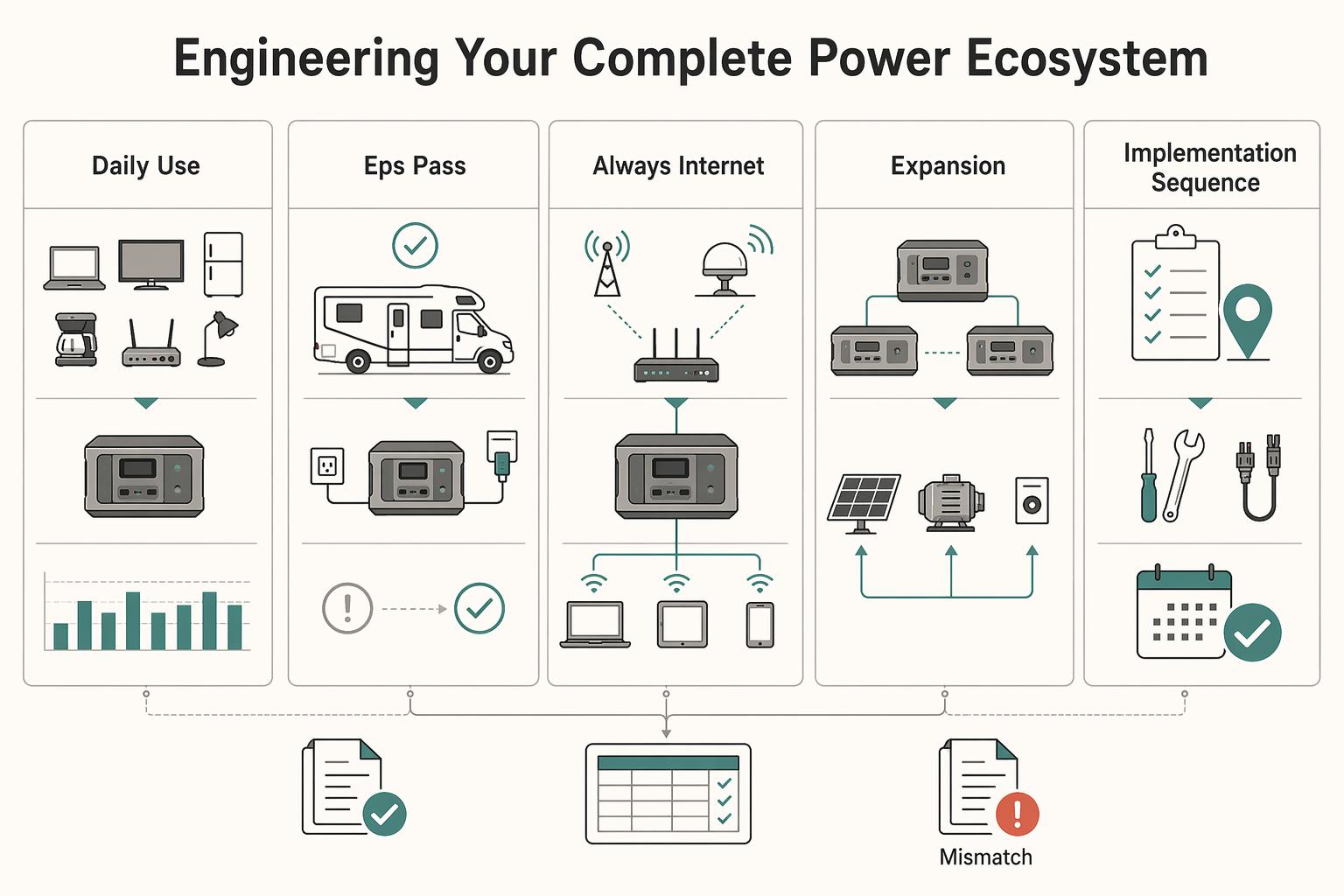
Beyond the Box: Engineering Your Complete Power Ecosystem#
A dependable setup is a matched system, not just a bigger battery: storage, charging inputs, failover behavior, and internet continuity that you have actually verified.
| System element | What to verify | Practical note |
|---|---|---|
| Daily use vs. daily refill | List must-stay-on devices, estimate daily use from labels or meter readings, and confirm supported charging inputs in current product documentation | Size charging around actual parking and weather conditions, not ideal conditions |
| EPS/pass-through path | Verify what happens during power loss and power return with your own setup | Check for resets, dropped connections, output interruptions, or unstable restart behavior |
| Always-on internet stack | Keep a primary connection and a ready backup hotspot/router path on protected power | Test the handoff and validate startup order, cabling access, and whether backup can come online immediately |
| Expansion | Confirm compatibility in current manuals/accessory docs and check fit and routing in your RV | Treat technically supported but impractical placement or cabling as a no-go |
| Implementation sequence | Audit load, size charging, validate failover, then test in the field | Keep current manual/spec pages, compatibility docs, and your own test notes |
- Match daily use to daily refill
Start with your real workday load. List the devices that must stay on, estimate daily use from their labels or meter readings, then size charging around your actual parking and weather conditions, not ideal conditions. Confirm supported charging inputs in current product documentation before you buy or install anything, and confirm the current output range in the same documentation.
- Use an EPS/pass-through resilience checklist
Treat "EPS," "pass-through," and "backup" as labels, not guarantees. Verify what happens during power loss and power return with your own setup, and keep only critical work devices on the protected path. Check for resets, dropped connections, output interruptions, or unstable restart behavior before you rely on it during client work.
- Build an always-on internet stack
Use a primary connection and a ready backup path on protected power, rather than relying on a single link. If Starlink is your primary, keep a backup hotspot/router path configured and test that handoff under real conditions. Validate practical failure points such as startup order, cabling access, and whether backup can come online immediately.
- Expand only when compatibility and layout both pass
Expansion is usually better than replacement only when your current unit still fits your output and port needs. Assume network lock-in until compatibility is confirmed in current manuals/accessory docs, then check fit and routing in your RV before purchasing add-ons. If the battery is technically supported but impractical to place or cable cleanly, treat that as a no-go.
- Run a four-step implementation sequence
Audit load, size charging, validate failover, then test in the field. Keep a simple evidence pack: current manual/spec pages, compatibility docs, and your own test notes. If a source is only a retailer summary or unclear document display text, do not use it as your engineering baseline. For a related breakdown, see The best 'notebooks' and 'pens' for writers.
The Final Calculation: Your Power Station's True ROI#
Buy only when your worksheet still works under conservative assumptions and a real outage test does not break your workday.
| ROI input | What to verify in your docs/tests |
|---|---|
| System buy-in | Current base unit price from official docs |
| Solar input | Current panel price and supported input compatibility |
| Integration add-ons | Required cables, adapters, mounts, storage hardware |
| Monthly charging mix | Shore power cost, plus generator/vehicle-fuel charging if used |
| Ongoing upkeep | Accessory maintenance/replacement and support uncertainty reserve |
Use this as a total-cost-of-ownership check, not just a box-price check. Portable setups can be simpler than older installed banks that often ran $4,000+, but add-ons and operating mix can still move your real cost fast.
Then factor in the downtime lens tied to your workflow: revenue at risk per missed deliverable, rescheduling overhead, and client trust impact, with values you confirm against your own workflow. Treat known failure patterns as decision signals: a laptop at 5% during a client presentation, or a station near 20% on day three, is operational risk, not noise.
Green-light only if all are true:
- your worksheet still works with conservative refill assumptions
- your evidence pack includes current manual pages, compatibility pages, and field-test notes
- you have a monthly data-insights checkpoint to review actual usage and cost
- one avoidable outage would cost more than your remaining system uncertainty
If any item fails, keep sizing and testing before you buy. Related: The Best Portable Power Banks for Digital Nomads.
Frequently Asked Questions
How big should your station be for work from an RV?
Separate stored energy from power delivery. Estimate your daily load in Wh from device labels, charger ratings, or a one-day test, then match that against storage capacity. Check your peak simultaneous draw in W against rated output. If anything has a motor or compressor, verify starting watts too, because startup can require about 1.5 to 2x rated output.
Which setup usually fits your use case?
Use the table below as a filter, then confirm exact specs in current manuals and product pages. It is better to match by work pattern than to chase a brand-first list of the best power station for RV use. | Use case | Storage capacity (Wh) | Rated output (W) | Starting-watts check | Recharge options | Expandability | | --- | --- | --- | --- | --- | --- | | Workday only | Size for one full workday with margin | Cover your normal simultaneous device load | Verify any motor/compressor startup demand | Wall charging may be enough; extra paths can add flexibility | Usually optional if load is stable | | Mixed travel and work | Size for daily work plus variable travel days | Cover peak combined loads | Check startup headroom before buying | Multiple recharge paths can make day-to-day use easier | Useful if demand may grow | | Multi-day off-grid | Plan for multi-day energy needs and recharge windows | Confirm output supports full concurrent use | Do not skip startup checks for motor loads | Confirm available recharge paths and realistic recharge pace | Important if future load growth is likely |
Do you really need LiFePO4?
Do not rely on chemistry labels alone. Compare manufacturer documentation for warranty terms, operating limits, and your expected usage pattern, then choose accordingly.
Do you need pure sine wave, pass-through or UPS behavior, and solar input compatibility?
Treat pure sine wave, pass-through or UPS behavior, and solar-input specs as model-specific checks: confirm the manual language and test critical workflows before relying on them.
Is a power station different from a solar generator?
In this guide, a portable power station is the combination of a rechargeable battery and a DC-AC inverter. Do not assume a universal technical definition covers how every seller uses the term "solar generator"; confirm exactly what is included in the package.
Power station or gas generator?
A power station is a strong fit for quieter off-grid power when your loads stay within the unit's ratings and you can plan around recharge time. A generator may still be considered when runtime and load needs outpace battery capacity or recharge availability. The practical tradeoff is quiet operation versus longer high-load endurance.
What buying mistake causes the most regret?
Confusing capacity with output. A spec like 3600Wh / 3600W shows why you need to read both sides of the slash. One tells you how much energy is stored, and the other tells you how much power can be delivered at once. Another common miss is skipping a realistic recharge plan check before purchase.
What should you verify before you buy?
Verify the exact model against your real use, not the marketing summary. At minimum, confirm your daily Wh, your peak W, and any starting-watts loads. Then check how the unit connects to your setup, which recharge options it supports, and whether your likely recharge path can keep up with use. If your workflow depends on pass-through or UPS-style behavior, confirm the current manual explicitly documents it and validate with a real test.
Try a related tool
Researched and edited by the Gruv editorial team. Gruv builds cross-border billing, payouts, and finance-operations software for global businesses.
Sources
- cdn.toledo.oh.gov/uploads/documents/Plan-Commission/TMZC/TMZC-...trusted
- cpsc.gov/s3fs-public/Package-Corrections-to-Draft-Pro...trusted
- deforestwi.gov/DocumentCenter/View/86/Chapter-15-Zoning-Cod...trusted
- docs.nlr.gov/docs/fy19osti/72586.pdftrusted
- documents.fresno.gov/WebLink/DocView.aspxtrusted
- dot.ca.gov/-/media/dot-media/programs/research-innovati...trusted
- federalregister.gov/documents/2025/12/05/2025-22014/the-safer-af...trusted
- files.culpeperva.gov/Document_Center/Government/Planning_Communit...trusted
Educational content only. Not legal, tax, or financial advice.
Related Posts

Value-Based Pricing for Freelancers Under Real Payment Risk
Value-based pricing works when you and the client can name the business result before kickoff and agree on how progress will be judged. If that link is weak, use a tighter model first. This is not about defending one pricing philosophy over another. It is about avoiding surprises by keeping pricing, scope, delivery, and payment aligned from day one.
The Best RVs and Campervans for Digital Nomads
If you're searching for the **best rvs for digital nomads**, do not start with brand hype or dealer roundups. Start with your workday. The wrong layout will cost you every day, even if the rig looks great on the lot.

The Best Portable Power Banks for Digital Nomads
**Protect client delivery risk first, then optimize for convenience and price.**