
Quick Answer
The best national park stay for remote work is the one you can verify for internet, secure for sensitive tasks, and manage for state tax exposure. Before booking, get a current speed test screenshot and use 25 Mbps download and 5 Mbps upload as a screening baseline. Then set a 3-tier connection plan, default sensitive work to your personal hotspot, and track every workday in each state.
Beyond the Scenery: A Business Continuity Plan for Working from a US National Park#
If you want park access without risking client delivery, data security, or a messy multi-state paper trail, do the operational work before you book. The right park stay is not just the one with the best view. It is the one you can work from without increasing the risk of missed meetings, exposed sensitive work on weak networks, or avoidable compliance headaches.
| Pillar | Decision question | Key differentiator |
|---|---|---|
| Connectivity | Can the location support your actual workday? | Verification: use the Speed Test Screenshot Rule and ask for a host-provided speed test before booking; baseline 25 Mbps download / 5 Mbps upload |
| Security and professionalism | Can you handle sensitive work without relying on risky shared networks or a noisy setup? | Default behavior: your secure personal hotspot should be the first choice for client work, not rental or public Wi-Fi |
| Compliance | Does the stay create admin work you are prepared to manage? | Documentation: track every workday in each state and bring in a tax professional for extended stays |
Use this article as a 3-pillar filter, not a travel roundup:
- Connectivity
Decide whether a location can support your actual workday. Use the Speed Test Screenshot Rule and ask for a host-provided speed test before booking, with at least 25 Mbps download / 5 Mbps upload as your baseline.
- Security and professionalism
Decide whether you can handle sensitive work without relying on risky shared networks or a noisy setup. Default to your secure personal hotspot for client work, not rental or public Wi-Fi.
- Compliance
Decide whether the stay creates admin work you are prepared to manage. Track every workday in each state and bring in a tax professional for extended stays rather than guessing later about tax nexus liabilities.
A practical way to use the rest of this guide is simple:
- Assess location fit using proof, not listing copy.
- Set continuity safeguards with a 3-tier connectivity setup: verified Wi-Fi, personal hotspot, and one pre-vetted fallback site.
- Validate compliance steps by keeping a workday log from day one.
That sequence is what turns a scenic stay into one you can actually work from. If you want a deeper dive, read our digital nomad visa comparison guide.
Pillar 1: The Connectivity Scorecard#
Use a verification-first checklist before you book: host proof, independent map check, and fallback confirmation. If a stay fails any one of these checks, remove it from your shortlist.
1. Get host proof first, then score fit by your work type#
Apply the Speed Test Screenshot Rule every time. Do not rely on "high-speed internet" listing copy; ask for a current screenshot from the property Wi-Fi showing both download and upload.
Keep or reject based on evidence:
- Keep: host provides a clear, current screenshot you can evaluate.
- Reject or hold: host avoids the request, sends unclear or old proof, or gives only vague assurances.
Then compare the verified result to your real workload, not a generic claim. Use the thresholds below once you have them verified:
- Video calls and live collaboration: Confirm the current minimum download and upload speed against your video tool's stated requirements.
- Large file transfer or cloud-heavy work: Confirm the current minimum speed against your tools' stated requirements, with extra weight on upload stability.
- Async tasks (writing/admin/light research): Confirm the current minimum speed against your tools' stated requirements, plus a confirmed backup.
2. Run an independent map check for your backup layer#
A host screenshot captures one point in time. Independently check carrier coverage maps for the gateway town or area you will use for hotspot backup.
Use this as a decision gate:
- If map coverage looks usable, keep the stay in review.
- If map coverage looks weak, require stronger primary proof or a stronger Tier 3 fallback.
- If both host proof and map check are weak, skip the booking.
3. Confirm your 3-tier failover plan before arrival#
Use a 3-tier connectivity system with clear switch triggers:
- Tier 1: Verified rental Wi-Fi for normal work when performance is stable.
- Tier 2: Personal secure hotspot when rental Wi-Fi becomes unstable, upload drops below your working minimum, or you are handling sensitive client work.
- Tier 3: Pre-vetted coworking/library backup when Tier 1 and Tier 2 cannot support a fixed meeting or delivery window.
Confirm Tier 3 before you travel so it is usable when needed, not just theoretical.
| Option | Reliability | Security | Setup effort | Outage resilience |
|---|---|---|---|---|
| Rental Wi-Fi | Reliable only after host proof | Weaker for sensitive work than personal hotspot | Low | Weak alone |
| Personal mobile hotspot | Strong backup when map check is viable | Preferred for sensitive client work | Medium | Good against rental outages |
| Coworking/library fallback | Variable; pre-vet before relying on it | Shared environment; use caution | Higher | Strong final layer |
Pack for likely failures, not ideal conditions:
- Must-have: hotspot device (or hotspot-capable phone), charging cables, and a power bank.
- Nice-to-have: portable power station (if outage risk is a concern), signal booster (if you depend heavily on cellular backup), secondary monitor (if it materially affects delivery speed).
For a broader outdoor-work comparison, see The Best Digital Nomad Cities for Outdoor Enthusiasts.
Pillar 2: The Secure & Professional Workspace#
A stable connection is only the baseline. You also need a workspace that keeps calls professional, protects sensitive work, and holds up when something goes wrong.
Before you book#
Treat the workspace as part of the booking decision. Ask for the same speed-test screenshot from Pillar 1, plus current photos of the actual work area and camera background. If the setup cannot support professional calls, it is not a fit, even when Wi-Fi meets 25 Mbps download / 5 Mbps upload.
If you plan to use coworking near a gateway town, verify the network and the room, not just the brand. Confirm the network is password-protected and at least WPA2 or higher. If a tour or trial pass is available, run speed tests at different times of day; in coworking guidance, 50-100 Mbps is commonly treated as a risk flag for serious remote work, but your workload is still the final standard.
| Workspace option | Privacy | Reliability | Professionalism on calls | Setup friction |
|---|---|---|---|---|
| Rental setup | Varies by room layout and house rules | Good only after host proof | Good if noise and background are controlled | Low |
| Coworking booth | Usually stronger | Better when the site has redundant lines | Strong for client-facing calls | Medium |
| Library room | Decent, but shared rules apply | Varies by branch and booking rules | Solid when reserved correctly | Medium |
| Vehicle fallback | Weak for privacy and comfort | Backup only | Poor for long or high-stakes calls | High |
Before you work#
Use a quick call-ready audit before important meetings. For each item, mark Pass or Fail:
| Audit item | Pass when | If fail |
|---|---|---|
| Sound control | You can limit noise and use a noise-canceling mic | Move the meeting or switch locations |
| Camera background | The background looks intentional and non-distracting | Move the meeting or switch locations |
| Lighting | Your face is clearly visible without harsh backlight | Move the meeting or switch locations |
| Interruption risk | Interruptions are unlikely during the call window | Move the meeting or switch locations |
If any item is Fail, move the meeting or switch locations.
Security and continuity controls#
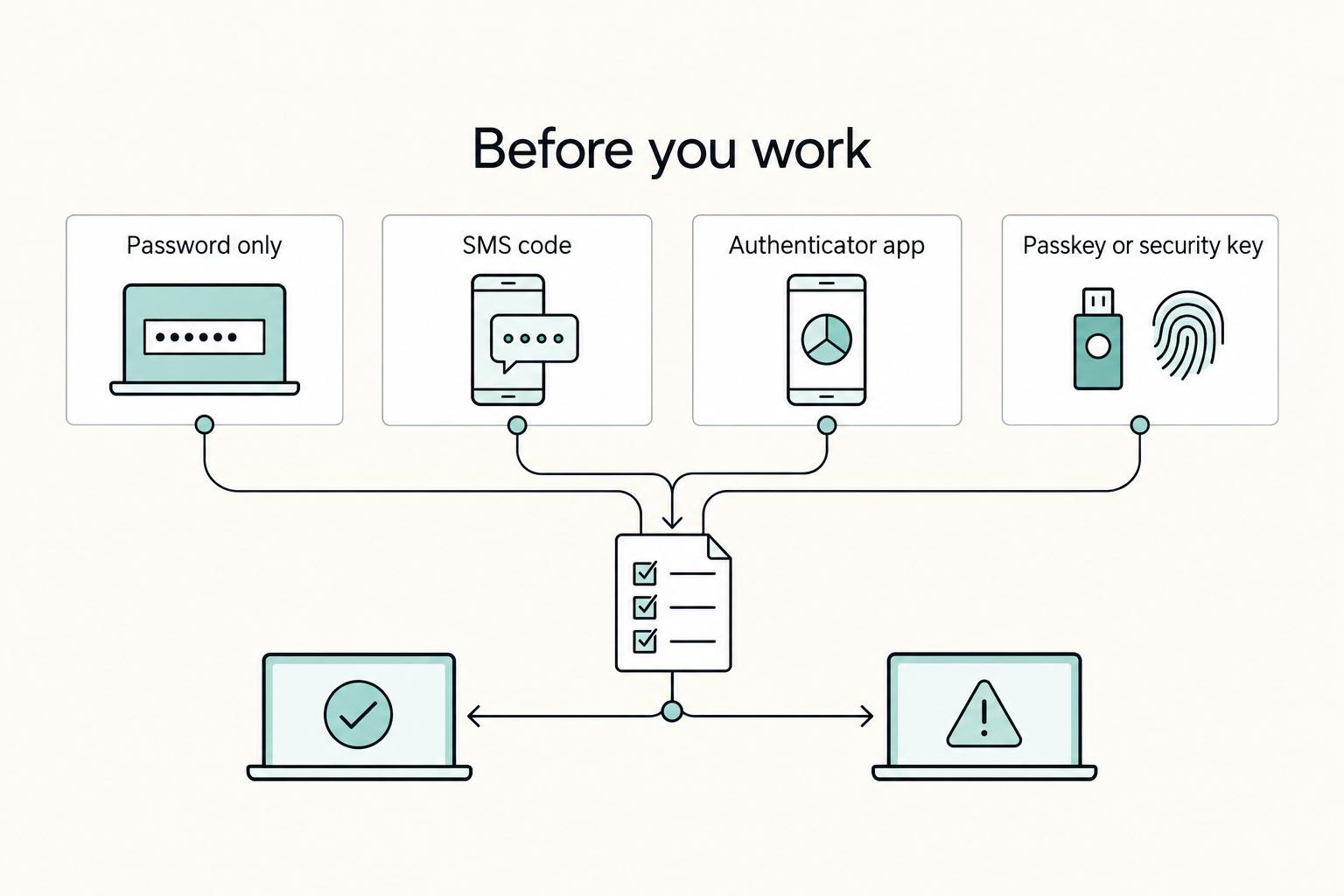
Keep the trust model simple: treat unknown networks as untrusted. Route sensitive client work through a controlled connection, typically your personal secure hotspot rather than rental or public Wi-Fi.
Before departure, verify policy requirements for the work you handle; the required company security checks should come from current employer or platform records.
Then lock in continuity basics so routine failures do not stop your week: current mail, device replacement, and document-handling requirements should be verified from the relevant service records before use. You might also find this useful: A Guide to Finding Campgrounds with Wi-Fi in the US.
Operational Assessment: Top 5 National Park 'Workstations'#
Use this table as a resilience filter, not a scenery ranking. Shortlist two or three options, then run the same pre-booking checks on each: a host speed test screenshot, minimum 25 Mbps download / 5 Mbps upload, and a 3-tier continuity stack (primary Wi-Fi, personal hotspot, and one pre-vetted backup site).
| Gateway base | Connectivity proof to collect first | Workspace and backup-location access | Seasonality and cost-pressure profile | Best fit if checks pass |
|---|---|---|---|---|
| Rocky Mountain NP / Estes Park | Request a current speed test screenshot from the exact unit. | Confirm a same-day fallback site you can reach if the rental setup fails. | Validate timing disruptions and budget pressure before booking. | Hybrid schedules with clustered meeting blocks and room for one recovery day. |
| Zion NP / Springdale | Confirm your critical tasks can run from the rental, not from transit or public areas. | Test whether your hotspot can carry sensitive work when shared networks are not acceptable. | Validate timing disruptions and budget pressure before booking. | Frequent travel days if your calendar does not depend on last-minute call locations. |
| Great Smoky Mountains NP / Asheville | Verify internet proof and practical access to nearby services that support a full workday. | Pre-select at least one backup room, desk, or quiet site before arrival. | Validate timing disruptions and budget pressure before booking. | High call volume when missed meetings are hard to absorb. |
| Grand Teton NP / Jackson | Check that your budget still supports redundancy, not just lodging. | Confirm private, call-ready workspace and a backup option for failures. | Validate timing disruptions and budget pressure before booking. | High-stakes client work only if continuity costs are fully covered. |
| Acadia NP / Bar Harbor | Ask for internet proof tied to your actual stay window, not older screenshots. | Build a backup plan for changing hours, weather, and rental noise. | Validate timing disruptions and budget pressure before booking. | Deep-focus async work when occasional relocation or rescheduling is acceptable. |
Choose based on continuity tolerance, not destination appeal. If you have near-zero disruption tolerance, prioritize the gateway where you can verify the strongest same-day fallback infrastructure. If your schedule is mostly async, you can accept more uncertainty as long as sensitive work stays on your personal secure hotspot. For longer stays, track every day worked in that state, because even short stays can create tax exposure.
This pairs well with our guide on The Best Road Trips for Digital Nomads in the US.
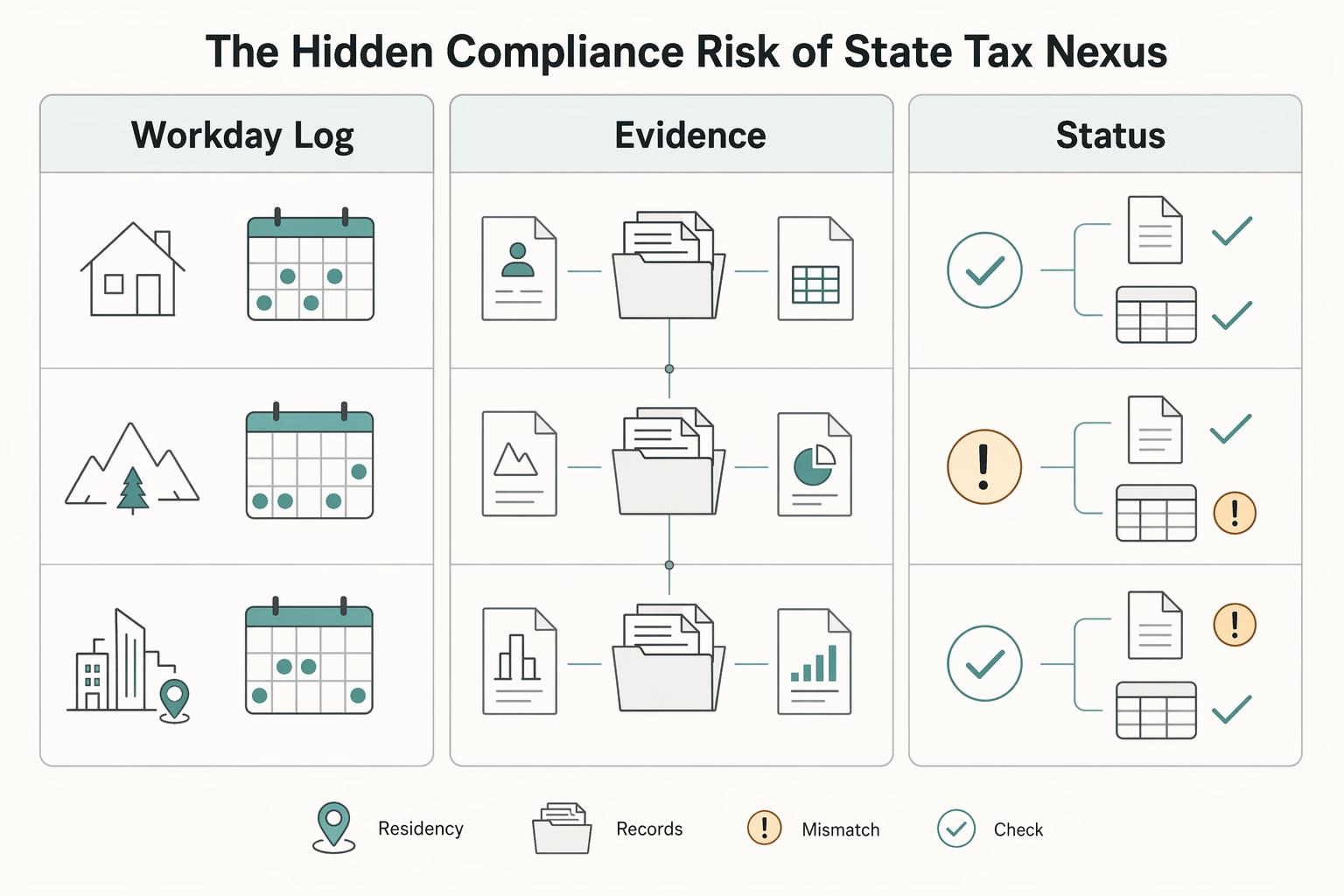
Pillar 3: The Hidden Compliance Risk of State Tax Nexus#
Your location choice can create state tax obligations, even on short work stays, so treat tax nexus as a planning workflow, not a guess.
| Checklist item | What to keep or confirm |
|---|---|
| Workday log | Date, state, work location, full/partial day, and work performed |
| Location evidence | Lodging invoices, calendar entries, receipts, and related records |
| Status check | Payroll vs contractor status and whether cross-state work changes reporting or withholding |
| Record retention | Store records in one folder with a weekly review and month-end check |
- Define your work pattern before the trip
Start with how you will earn income in each state, because exposure depends on your setup and how that income is earned. A W-2 employee, an independent contractor, and a founder on payroll can face different filing and withholding paths. If you will physically perform services in a state, document that assumption early.
- Map likely exposure before any extended stay
For each target state, verify: residency tests, day-count rules with current thresholds, source-of-income treatment, and employer withholding triggers. Do not apply one rule of thumb across all states. If the stay may be extended, escalate to a qualified tax advisor before arrival.
- Document assumptions while decisions are fresh
Keep a dated note of what you checked, what you concluded, and what still needs confirmation. Include whether you expect filing, withholding changes, or advisor review. This creates a clean record if you need to revisit decisions later.
- Run a lightweight compliance routine during travel
Track each workday by state, exact work location, full vs partial day, and income type for that period. Review weekly, then run a month-end reconciliation when you are moving across states. The common miss is tracking where you slept instead of where you worked.
Use the checklist above to keep the process manageable.
The objective is not to avoid travel. It is to reduce filing surprises with a repeatable process that protects continuity while you move. For the connectivity side of that setup, we covered more in The Best International SIM Cards and eSIMs for Digital Nomads.
Your Freedom, Fortified#
If you want a reliable work stay near a park, focus on three things in order: verify infrastructure, secure your routine, and track compliance.
- Verify before you pay
Ask for a verifiable speed test screenshot before you book, not a general claim about "fast Wi-Fi." Use 25 Mbps download / 5 Mbps upload as your screening baseline, then set your 3-tier plan: lodging Wi-Fi, personal hotspot, and one pre-vetted recovery location in the gateway town.
- Secure the workday you actually have
On arrival, test from the exact place you will take meetings. For sensitive client work, default to your personal hotspot and keep rental or public Wi-Fi for low-stakes tasks. Keep your call setup ready (headset, cables, backup location), because a dropped call can damage trust, not just productivity.
- Track state exposure as you go
Log each workday by date, state, and address, and keep supporting records with it (lodging invoices, calendar entries, receipts). Even short stays can create tax nexus exposure, so longer or repeated stays should trigger a check-in with a qualified tax professional; current state rule triggers must be verified from official state records before use.
Execution checklist
- Before you book: get the speed test screenshot, confirm the 3-tier connection plan, save one recovery site.
- While onsite: run a live test on arrival, use your hotspot for sensitive work, verify your call location at meeting time.
- Before you move states: update your workday log, file receipts and lodging records, and confirm whether a tax check-in is needed.
Infrastructure check, security routine, compliance check-in. Follow that order, and you can work with confidence instead of guesswork. For a step-by-step walkthrough, see The Best Co-Working Spaces for Digital Nomads.
Frequently Asked Questions
How should you plan internet and cell service for a park trip?
Plan for three separate layers: accommodation Wi-Fi, your personal hotspot, and one off-site fallback in the gateway town. Validate each one before departure by checking the provider or carrier for the exact location, then run a live test on arrival. Treat visitor center or lodge Wi-Fi as convenience only, not part of your core work setup.
Is it legal to work remotely while staying near a national park?
It can be, depending on where you are physically working and your personal tax situation. Track your work location by date, state, and address, and confirm the current state tax rules that may apply. Keep lodging invoices, calendar entries, and receipts, and review the facts with a qualified tax professional.
What gear actually belongs on your must-pack list?
Must-have gear includes a laptop power setup you trust, a personal hotspot path you control, a headset for calls, and the chargers and cables to keep everything powered. Situational gear includes a portable power station, solar if you are camping or working from a vehicle, and a second monitor if your job really needs it. Your backup tier is a car charger, spare cable, downloaded files, and an offline copy of your schedule and directions.
Can you rely on Wi-Fi inside the park?
Usually not for your core workday. Use park or lodge Wi-Fi only for low-stakes tasks, and keep sensitive work on a connection you control. In practice, the gateway town often matters more because it is more likely to offer usable hours, seating, and privacy.
How should you handle important client calls?
Treat important calls as a site test, not a hope. Use a private location with tested signal at the actual meeting time, and move to a library study room or coworking booth in the gateway town if you need more predictable acoustics. Your vehicle is a backup only after you confirm lighting, audio, and battery life.
Do you need reservations or special timing plans before arrival?
Sometimes, yes, and it varies by park and by specific road or attraction. The article notes that Acadia's Cadillac Mountain summer drive-up access requires a reserved time slot, and the Cadillac North Face Trail example can mean a very early start that affects your workday. On camping trips, make a visitor-center stop part of your arrival routine so you can confirm which campgrounds are open.
Try a related tool
Researched and edited by the Gruv editorial team. Gruv builds cross-border billing, payouts, and finance-operations software for global businesses.
Sources
Includes 6 external sources outside the trusted-domain allowlist.
- scholarship.law.ufl.edu/cgi/viewcontent.cgitrusted
- gruv.ai/blog/the-best-national-parks-for-digital-nom...external
- indino.org/post/the-most-inspiring-locations-for-remote...external
- npca.org/articles/11205-8-travel-tips-from-national-p...external
- thedetoureffect.com/blog/digital-nomad-guide-southern-utahexternal
- uncubate.co/blog/coworking-space-for-digital-nomads-guideexternal
- worldpackers.com/articles/best-national-parks-in-the-usaexternal
Educational content only. Not legal, tax, or financial advice.
Related Posts

The 2026 Global Digital Nomad Visa Index for 50+ Countries
Start with legal fit, not lifestyle filters. The practical order is simple: choose a route you can actually document, then decide where you want to live. That single change cuts a lot of wasted comparison work and stops you from falling in love with places that were never a real filing option.
Best Nomad Cities for Hiking Without Relocation Surprises
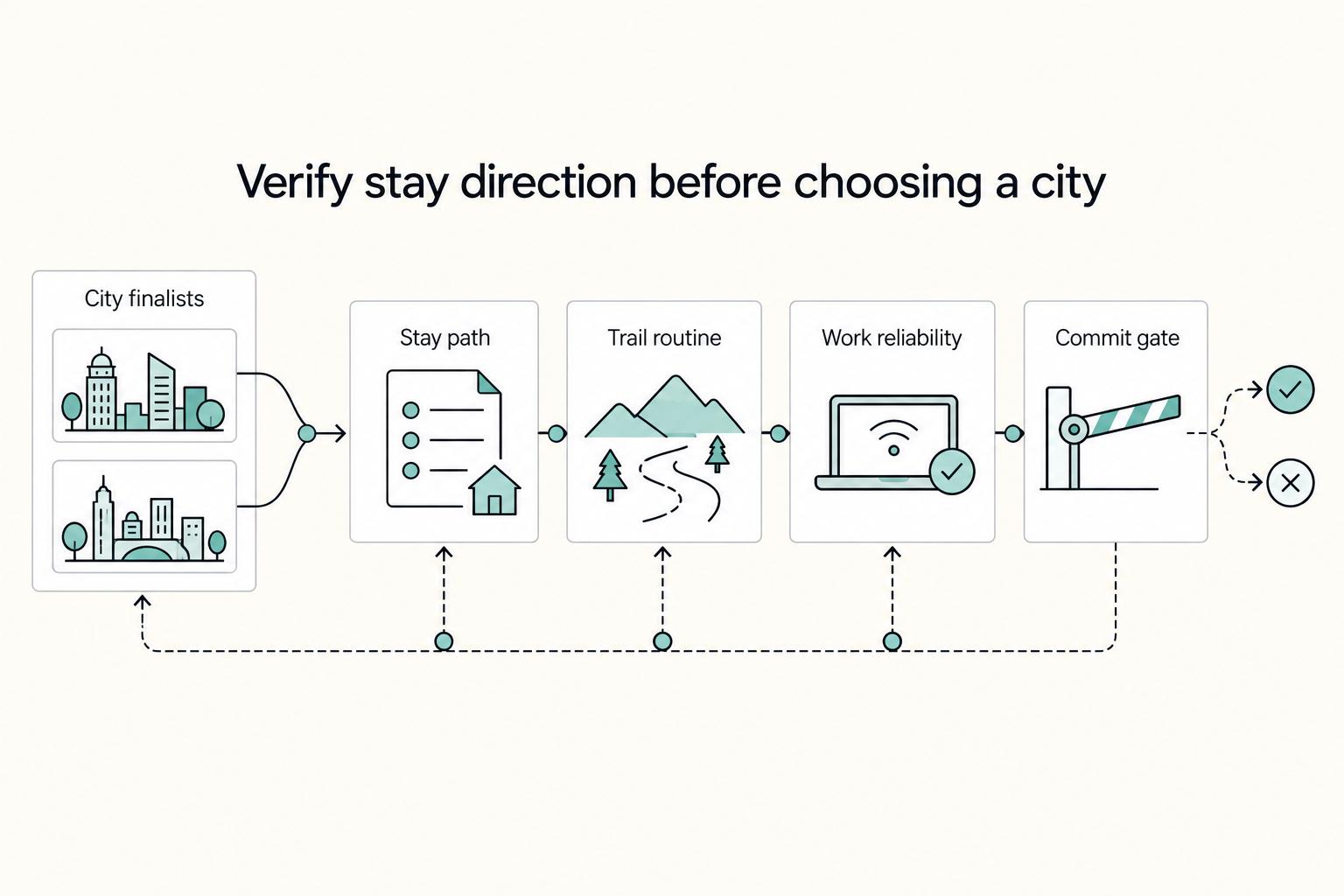
Treat this choice like an operating decision, not a travel mood. The right base is the one where your workweek and your trail routine can both hold without constant exceptions, catch-up days, or admin spillover.
How to Work Reliably From Campgrounds With Wi-Fi in the US
If you treat campground WiFi as part of your production setup, you are taking on delivery risk you do not control. Campground-specific performance and security should not be assumed, so the practical move is to treat both as unknown before deadline-dependent work.