
Quick Answer
Start with Stripe Invoicing for the direct billing-to-payment path. Zoho Invoice documents a Stripe integration, but trial its fee and payout exports. Wave is a separate invoicing/payment alternative unless current Wave support confirms your new account can connect to your existing Stripe account.
Best invoicing apps with Stripe for freelancers and small teams in 2026#
The best invoicing apps with Stripe are not the ones with the prettiest templates or the longest feature list. The right choice is the one that makes late payment less likely, cuts time spent chasing status updates, and reduces the chance that you discover too late that a payment failed, was disputed, or got held for review.
There is no universal winner: a freelancer sending a few invoices and a small team closing several payment accounts need different records. Compare an invoice’s client-facing payment path, overdue reminders, failed-payment visibility and month-end export before choosing a stack.
Billing software should create invoices, accept the payment method your clients use and show what is still owed. The operational handoff matters: a paid invoice, processor payment, fee and bank payout should trace to one another. Use this guide with four checks:
- Cashflow first: Favor tools that make it easier to collect on time, see outstanding balances clearly, and remove avoidable friction at checkout.
- Operational detail over hype: You need a side-by-side shortlist, decision rules, and a pre-send checklist you can actually reuse.
- Failure handling counts: Pay attention to chargeback exposure, payment-review holds, failed payments, and client terms that create collection risk.
If you only send a few bills a month, simplicity still matters, but not at the cost of visibility. In trial, you should be able to confirm what your client sees when they open the payment request, whether bank transfer and card options work the way you expect, and where status changes actually appear. A clean email is not enough if you still need three tools and a spreadsheet to confirm whether money is coming in.
A product page does not prove the workflow in your account or market. Before switching, test a sent invoice, an unpaid reminder, a failed payment and the export you would use to reconcile a month.
That thread runs through the rest of this guide. The goal is not to find a number one app. It is to help you choose a Stripe-connected billing setup that keeps accounts receivable cleaner, the payment path clearer, and surprises smaller.
How to pick the right Stripe invoicing app for your risk profile#
Pick for your biggest failure mode, not template polish. This section is for freelancers, creators, and small teams that rely on Stripe for predictable accounts receivable. If you need an ERP rollout or finance architecture first, you are solving a different problem than choosing invoicing software.
Score these four non-negotiables#
| Checkpoint | What to confirm | Grounded detail |
|---|---|---|
| Stripe integration depth | Billing status, payment status, payout visibility, and fee visibility in one workflow | US standard domestic card price is 2.9% + 30¢, with add-ons of 0.5% for manually entered cards, 1.5% for international cards, and 1% for currency conversion |
| Automated reconciliation | Trace one paid invoice to the Stripe payment and then to the payout in your actual export workflow | Red flag: "paid" status with unclear fee lines, exceptions, or payout timing |
| Bank transfer plus card support | Use the payment mix your clients actually use and confirm country-specific pricing | Stripe's standard NZ Payments pricing lists 2.65% + NZ$0.30 for domestic online cards and 3.5% + NZ$0.30 for international online cards; Stripe support dates the international reduction to 1 May 2026 |
| Dispute and chargeback handling | Test failed cards, delayed payouts, disputes, and what evidence you can pull | Stripe groups payments risk into credit risk, fraud risk, and account takeovers |
- Stripe integration depth
Check whether the app shows billing status, payment status, and payout visibility in one workflow. Check fee visibility too: Stripe's US standard domestic card price is 2.9% + 30¢, with add-ons of 0.5% for manually entered cards, 1.5% for international cards, and 1% for currency conversion. If that trail is hard to see, margin leakage is easy to miss.
- Automated reconciliation
If bookkeeping drag is your main pain, prioritize this over design. Confirm that one paid invoice can be traced cleanly to the Stripe payment and then to the payout in your actual export workflow. A common red flag is "paid" status with unclear fee lines, exceptions, or payout timing.
- Bank transfer plus card payment support
Use the payment mix your clients actually use. Do not assume one global Stripe rate: pricing varies by country and product. For standard online Payments pricing in New Zealand, Stripe lists 2.65% + NZ$0.30 for domestic cards and 3.5% + NZ$0.30 for international cards. Stripe support dates the international-card reduction to 1 May 2026. Check your own account schedule.
- Dispute and chargeback handling
Assume some risk remains and test the ugly path early. Stripe groups payments risk into credit risk, fraud risk, and account takeovers, and says this risk cannot be fully eliminated. Verify what happens on failed cards, delayed payouts, and disputes, including what evidence you can pull.
If late payment is your biggest issue, prioritize reminders and a clear client payment page. If month-end cleanup costs more, prioritize payment-to-payout reconciliation and export quality. See Stripe Payment Links for invoicing for a simpler collection path.
Quick comparison table of top Stripe-compatible invoicing options#
For a currently documented Stripe-account connection, compare Stripe Invoicing with Zoho Invoice’s Stripe integration. Wave is a separate invoicing/payment alternative here: current first-party material reviewed for this article does not establish that a newly opened Wave account can connect the reader’s existing Stripe account. Check eligibility directly before treating it as a Stripe-connected option.
| Option | Best for | Setup speed | Stripe-native depth | Automated reconciliation | Invoice and export records to test | Failure visibility, retry behavior, and held or disputed payments | Verification checkpoint in trial | Known limitation |
|---|---|---|---|---|---|---|---|---|
| Stripe Invoicing | Teams already on Stripe that want the shortest billing-to-payment path | Usually fastest if Stripe is already live | Highest confidence in this table because pricing and payment rails are Stripe-native. Stripe publishes country-specific pricing, including 2.9% + 30¢ for US domestic cards and 0.8% ACH Direct Debit with a $5.00 cap | Strongest candidate for direct billing-to-payment matching, but still confirm payout-timing visibility in the views and exports you use | Invoice, payment, fee and payout identifiers in the export used for bookkeeping | Public pricing is transparent; exact retry and dispute handling should still be tested in your account. Confirm what changes when a payment is failed, held, or disputed | Run three tests: one card payment, one bank transfer or ACH path, and one failed payment. Confirm hosted pay-page behavior, guest payment behavior, and whether payout timing is visible without extra reporting work | Confirm international payout-cost detail directly with the provider |
| Zoho Invoice + Zoho Books | Small teams that may need billing plus stronger accounting structure than billing-only tools | Usually more setup because there are more moving parts | Zoho documents connecting a Stripe account to Zoho Invoice and enabling Stripe on an invoice; confirm availability in your country and account | Main reason to trial it, but prove sync, fee lines, and payout matching in your own ledger | Invoice status, Stripe payment reference, fee and accounting export through the configured Zoho workflow | Failure visibility and retry behavior were not confirmed in the reviewed public material for this section. Ask what happens to billing, payment, and accounting status when a charge fails or is disputed | Run the same three-test set and inspect both the billing layer and books layer for status drift | More surfaces to reconcile means more chances for status mismatch if setup is loose |
The practical split: Stripe Invoicing keeps the invoice and payment in one provider; Zoho Invoice adds a separate billing layer that has a documented Stripe connection. Test whether its reports carry the fee and payout references you need. Stripe pricing varies by account country and payment method, so use the dated schedule for your own market rather than one global rate.
In trial, prioritize proof over polish. Ask each vendor to show the exact screen or export where you can trace billing status, payment status, Stripe fee impact, and payout timing. If they cannot show that in a live demo or test account, assume you will rebuild that paper trail yourself when a payment is late or disputed.
If you use Stripe Connect to send payouts to connected accounts, pricing model choice is a real checkpoint. Under "Stripe handles pricing," the platform does not incur additional account, payout-volume, tax-reporting, or per-payout fees. Under "You handle pricing," Stripe lists $2 per monthly active account and 0.25% + 25¢ per payout sent.
That is not the standard solo-freelancer setup, but if you collect on behalf of others, it is a material cost and risk input.
Stripe Invoicing#
If you already run payments in Stripe, Stripe Invoicing is usually the shortest path from invoice creation to payment with minimal integration overhead. It works best when you want faster collections and simpler accounts receivable operations, not deeper ERP-style finance controls.
Stripe says you can create and send invoices in minutes with no code, and customers pay through a Stripe-hosted invoice page. It also frames the product around accounts receivable automation, including automatic reminders, AI-powered dunning, and reconciliation support.
In practical terms, Stripe highlights:
- Card and bank transfer payment options in the invoice flow
- A self-serve portal where customers can view, pay, and manage invoices
- Invoicing in 25+ languages and 135+ currencies
Stripe also reports that 87% of Stripe invoices are paid within 24 hours. Treat that as a Stripe platform statistic, not a guarantee for your specific business.
The core tradeoff is month-end depth. If you need ERP-style reporting, complex revenue controls, or broader finance views across entities, Stripe Invoicing alone may not be enough, and you may still need separate accounting tooling.
Best fit: solo creators and small teams sending recurring client invoices who want billing and payment activity in one Stripe workflow. If you also plan to use Stripe Payment Links, verify that path separately; Stripe-hosted invoice pages are supported here, but Payment Links are not established as an invoicing feature.
Related reading: How to Automate Invoicing with Stripe for a Webflow Site.
Wave#
Wave is an alternative when you want lightweight invoicing and Wave’s own payment flow. It is not included in the Stripe-connected shortlist because current setup eligibility for connecting a new Wave invoicing account to an existing Stripe account was not verified from first-party account instructions.
Wave positions its online payments flow around getting paid faster with minimal setup, lower fees, and faster processing times. That fits freelancers and small service businesses that need a clear billing path more than a complex finance stack.
Where Wave earns a look#
Wave is strongest if you are budget-sensitive and want to keep admin overhead low. If you are still building your process, a lightweight setup can matter more than having every reporting view on day one.
For payment-cost context, use Stripe as a benchmark reference point. Stripe says its standard model has no setup fees, monthly fees, or hidden fees, and its US pricing page lists 2.9% + 30¢ per successful domestic card transaction. Stripe also lists 0.8% for ACH Direct Debit with a $5.00 cap. These are Stripe benchmarks, not Wave fees.
The tradeoff to be honest about#
Keep the scope clear: trial Wave as a separate invoicing and payment route. If connecting your own Stripe account is mandatory, ask Wave support for current account- and country-specific setup steps before choosing it.
What to verify before you commit#
Test Wave as an alternative before rollout:
- Send one trial invoice and verify the supported online-payment methods in your account.
- Compare Wave’s own current fees with your Stripe account pricing in the same country.
- Export one paid invoice and verify how payment fees and bank settlement reconcile.
- If your existing Stripe account is required, obtain current Wave setup eligibility in writing before migration.
If you serve multiple regions, validate standard Payments pricing and your own account schedule by country before you set rates. Stripe's New Zealand page lists 2.65% + NZ$0.30 for domestic cards; its separate support notice dates the international-card reduction to 1 May 2026.
Zoho Invoice with Zoho Books#
If you want Stripe-enabled invoicing inside a broader tool network, this is a strong option to test. Zoho Invoice advertises 55+ integrations, and it explicitly says its Stripe integration can collect one-time and recurring payments from multiple countries. That is the core supported value here.
Why it earns a look#
This fits small teams that need simple client-facing invoices but do not want to stay in a single-tool setup forever. Zoho Invoice also lists other payment gateway options, including Zoho Payments and PayPal. On the same integrations page, Zoho says Zoho Payments supports cards and ACH (available upon request), and PayPal supports cards, BNPL, and Venmo.
If you are considering Zoho Books for bookkeeping, Zoho Invoice is a practical front-end candidate to validate with real workflows before rollout.
The tradeoff to respect#
The added flexibility means more setup decisions than Stripe Invoicing alone. What's supported here is Stripe collection and a broad integrations catalog, but that does not confirm specific Zoho Books sync behavior, reconciliation flows, or month-end outcomes. Do not assume those details; test them directly.
What to verify before rollout#
- Send one one-time invoice and one recurring invoice with Stripe connected, then confirm payment status updates where your team actually works.
- Validate your real country mix. Zoho says Stripe collection works across multiple countries, not every market.
- Keep a small evidence pack after payment (invoice number, customer, date paid, status) so you can compare billing output with your records.
- If you plan to pair with Zoho Books, run a live mini-pilot before migration and check for record clarity after payment.
When to choose Stripe Invoicing versus a third-party app#
Start with Stripe Invoicing when speed, fewer integration points, and predictable fee math are your top priorities; move to a third-party layer only if it clearly reduces your reporting and recordkeeping burden in practice.
| Scenario | Pricing detail | Scope |
|---|---|---|
| US domestic cards | 2.9% + 30¢ | Page example for domestic card payments |
| US ACH Direct Debit | 0.8% with a $5.00 cap | Page example for bank-based payments |
| US international cards add-on | 1.5% | Possible add-on to the base example |
| US currency conversion add-on | 1% | Possible add-on to the base example |
| NZ domestic cards | 2.65% + NZ$0.30 | Page example |
| NZ international cards | 3.5% + NZ$0.30 | Standard online Payments price after 1 May 2026; verify account schedule |
| NZ currency conversion extra | 2% | Applies when currency conversion is required; verify account schedule |
| Connect under "You handle pricing" | $2 per monthly active account and 0.25% + 25¢ per payout sent | Include if connected accounts or downstream payouts are part of the workflow |
| Connect under "Stripe handles pricing" | No additional account, payout-volume, tax-reporting, or per-payout fees | Stripe states the platform does not incur these fees under this model |
- Choose Stripe Invoicing first when you want the fastest setup and one place to track invoice status. Stripe's standard model is pay-as-you-go with no setup fees, monthly fees, or hidden fees.
- Choose a third-party app only when you can show that the extra layer improves month-end accuracy and handoffs enough to justify more setup and process overhead.
Before you decide, compare your real payment mix instead of assuming one universal fee:
- US page examples: 2.9% + 30¢ domestic cards, 0.8% ACH Direct Debit with a $5.00 cap, plus possible add-ons like 1.5% for international cards and 1% for currency conversion.
- NZ standard online Payments examples: 2.65% + NZ$0.30 domestic cards, 3.5% + NZ$0.30 international cards after 1 May 2026, and 2% extra when currency conversion is required.
If connected accounts or downstream payouts are part of your workflow, include Connect pricing in the decision. Under "You handle pricing," Stripe lists $2 per monthly active account and 0.25% + 25¢ per payout sent; under "Stripe handles pricing," Stripe states the platform does not incur additional account, payout-volume, tax-reporting, or per-payout fees.
Use a live test before rollout: run 3 invoices (one card payment, one bank transfer, one failed payment) and confirm end-to-end status clarity from sent to paid/failed. If your team cannot quickly see what happened and what to do next from a repeatable workflow, keep the setup simpler.
For a step-by-step walkthrough, see How to use 'Stripe Invoicing' to set up a recurring retainer with a client.
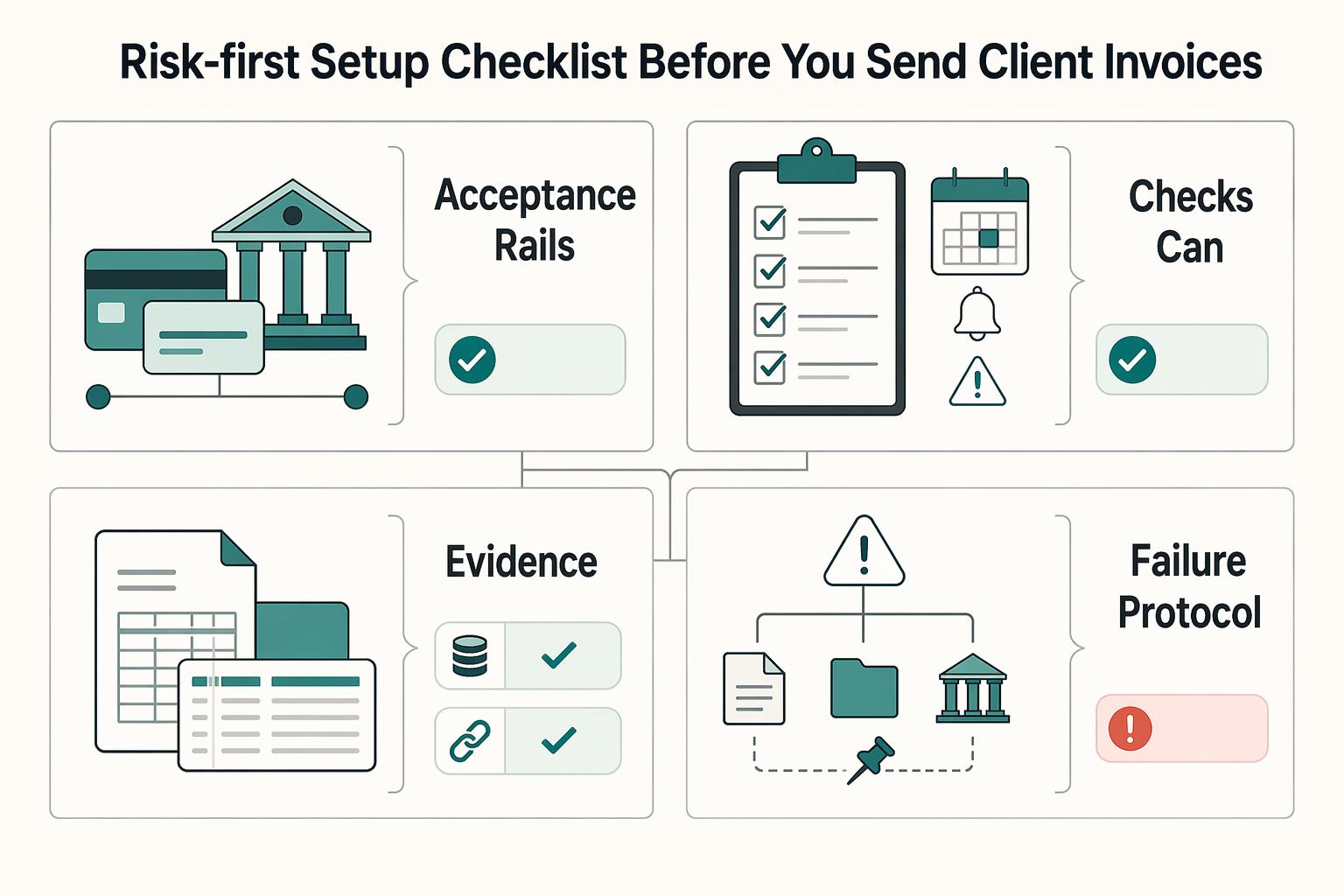
Risk-first setup checklist before you send client invoices#
Even a strong Stripe-connected invoicing setup will not protect cashflow if your terms, records, and exception handling are unclear. Once you choose Stripe Invoicing or a third-party layer, lock these four items before you send a live bill.
| Setup area | What to lock | Go-live check |
|---|---|---|
| Acceptance rails and invoice terms | Choose card payment, bank transfer, or both, then set due date, reminder timing, late-fee policy, and dispute steps | Check one draft invoice and confirm payment method, due date, and contact instructions are visible in one place |
| Checks that can delay or interrupt payment | Identify onboarding or compliance checks that can hold payment and document who owns each step | Run one end-to-end test from invoice sent to payment outcome and note every point where status can stall outside the invoicing screen |
| Tax and records pack | Keep invoice, payment, fee and payout records exportable; handle any contractor tax-document workflow separately | Assign ownership for tracking and export review before volume grows |
| Failure protocol | Define a response path for payment failure, disputes, and payment holds with trigger, owner, client communication step, evidence to save, and escalation timing | Keep named owners so follow-up does not slow down when an exception happens |
- Freeze your acceptance rails and invoice terms
Set your payment rails first: card payment, bank transfer, or both. Then set repeatable terms your team will use every time: due date, reminder timing, late-fee policy, and dispute steps. Stripe says invoices can be created and sent in minutes with no code, so speed is useful, but only after the rules are in place.
Before you go live, check one draft invoice and confirm payment method, due date, and contact instructions are all visible in one place. If your team has to reconstruct terms from old emails during a nonpayment or dispute, the setup is not ready.
- Map checks that can delay or interrupt payment
Identify any onboarding or compliance checks that can hold payment, and document who owns each step. The key is operational clarity: who reviews flags, where records are stored, and how the client is updated if payment timing changes.
Run one end-to-end test from invoice sent to payment outcome and note every point where status can stall outside the invoicing screen. If no single owner is named for follow-up, fix that before volume grows.
- Build the invoice and records pack before volume grows
As an invoice sender, keep client identity, invoice terms, payment method, fee and payout references in a retrievable export. If a client asks you to provide a W-9 or W-8 as the payee, route that request to your tax adviser; collecting those forms from contractors is a different payer-side workflow.
If your small team also pays contractors, design that payer-side tax-document and reporting workflow separately. Do not use an invoice-app shortlist as proof that W-9 collection, TIN matching or 1099 filing is included. For this buying decision, test whether invoice, payment and fee records export cleanly.
- Write a failure protocol with named owners
Define a short response path for payment failure, disputes, and payment holds before they happen. Keep it practical: trigger, owner, client communication step, evidence to save, and escalation timing.
Automation helps only when the exception path is as clear as the normal path. If ownership is shared and unclear, follow-up slows down and risk rises.
Choose for risk reduction, then optimize for convenience#
Choose the tool that reduces your main failure mode first, then optimize for convenience.
- If late payment is the problem, pick the shortest path from invoice to payment.
Focus convenience on the buyer step: make the payment action obvious and status easy to read. If your current setup already sends invoices quickly, avoid switching just for a longer feature list. Send one normal invoice and confirm you can clearly see open, paid and overdue states. If you cannot tell whether a client ignored the invoice or payment got stuck, the extra features have not solved your collection problem.
- If reconciliation drag is the problem, prioritize a single source of truth over invoice polish.
The key check for Stripe Invoicing, Zoho Invoice, or any synced stack is whether sales, fees and refunds match accurately without manual rebuilds at month end. Validate mapping, not just feature checkboxes. Your evidence pack should clearly show the billing record, payment status, fees, refunds and a usable export.
- If dispute exposure or operational complexity is rising, review on a fixed cadence and upgrade before failures pile up.
Treat cadence as an operating habit. As volume or multi-currency needs grow, check whether transaction recording and exports still support a timely close. If manual entry is creeping back in or exception handling is slowing down, test a broader stack against those actual failures before switching.
Frequently Asked Questions
What is the best invoicing app with Stripe for freelancers?
There is no universal winner. Stripe Invoicing is the direct starting point; Zoho Invoice is a documented Stripe-connected option for teams that need another billing layer. Compare Wave separately as an alternative payment route until current account connection eligibility is confirmed.
Should I use Stripe Invoicing or an app that integrates with Stripe?
Use Stripe Invoicing first if you want to keep invoicing and payment collection in Stripe. A separate app can make more sense when you need stronger accounting context or other records around the bill, but each added sync creates another place for status confusion. One concrete pricing detail matters here: Stripe Invoicing Starter is 0.4% per paid invoice and Plus is 0.5% per paid invoice, and Stripe says that pricing applies to one-time invoices only.
Which Stripe-compatible invoicing tools are best for reducing late payments?
Pick the option that makes the client's payment step obvious and overdue status hard for you to miss. In practice, your trial should answer three things: can the client pay from the billing page without friction, can you see whether it is open or paid on one screen, and do failed or delayed payments show up clearly enough for same-day follow-up. If you cannot tell the difference between "client ignored it" and "payment got stuck," late-payment work will pile up fast.
What features matter most if I invoice international clients with Stripe?
The biggest checkpoint is whether you need true e-invoicing, which Stripe defines as sending or receiving invoices in a standardized, machine-readable electronic format. Stripe says Stripe Billing and Stripe Invoicing do not directly generate or send e-invoices, and that country requirements vary. If local rules require that format, you should review Stripe App Marketplace partner options before you switch.
How should I compare Wave, Zoho Invoice, and Stripe Invoicing if I care about cashflow risk?
Compare them on visibility and evidence. In a trial, check how each tool exposes overdue invoices, failed payments, holds, disputes, fees and bank-transfer status. If cashflow risk is the issue, the better app is the one where you can prove what happened to a bill in minutes.
What should I verify in a trial before switching my invoicing stack?
Send three test bills: one paid normally, one left unpaid, and one that simulates a failure or exception. Then confirm the exact evidence pack you would need later: number, customer name, payment status, payout visibility, and an export you can actually use at month end. Also check a small pricing detail before rollout: Stripe says users are charged for invoicing only when an invoice is paid through Stripe, and Starter no longer includes the old 25 free invoices per month that ended on November 1, 2023.
Try a related tool
Researched and edited by the Gruv editorial team. Gruv builds cross-border billing, payouts, and finance-operations software for global businesses.
Sources
Includes 4 external sources outside the trusted-domain allowlist.
- stripe.com/invoicingtrusted
- stripe.com/pricingtrusted
- support.stripe.com/questions/lower-pricing-for-new-zealand-card...trusted
- support.stripe.com/questions/stripe-invoicing-pricingtrusted
- support.waveapps.com/hc/en-us/articles/8608273571092-Charge-a-cus...external
- waveapps.com/compare/wave-vs-stripe-paymentsexternal
- zoho.com/uk/invoice/help/online-payments/stripe.htmlexternal
- zoho.com/uk/invoice/integrationsexternal
Educational content only. Not legal, tax, or financial advice.
Related Posts

Value-Based Pricing for Freelancers Under Real Payment Risk
Value-based pricing starts with the client’s expected benefit and willingness to pay. It still needs a deliverable, scope and payment agreement you can perform. Use a discovery phase when the benefit or effort is too uncertain to support a defensible quote.
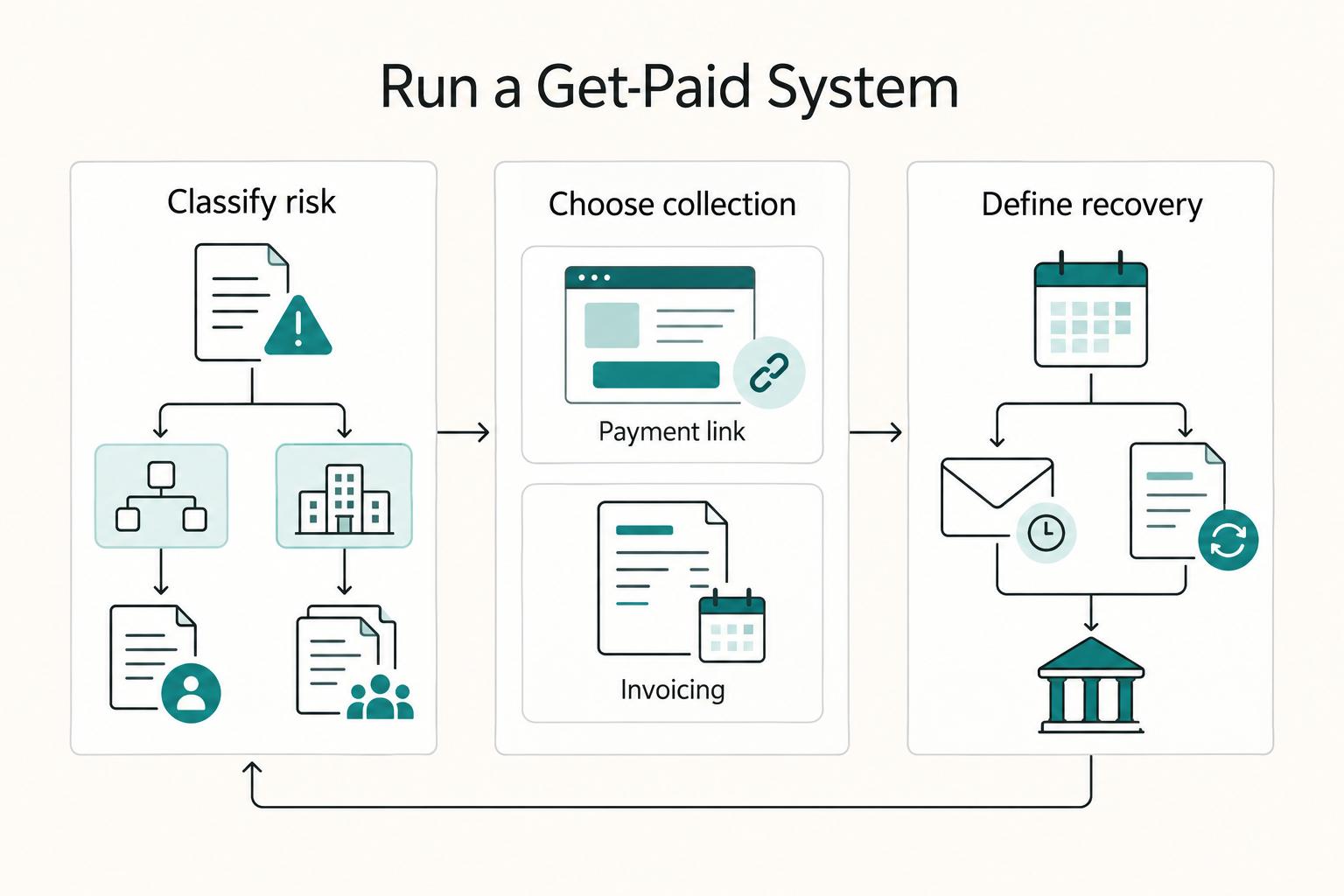
How to Use Stripe Payment Links for Easy Invoicing
**Use Stripe Payment Links for shareable checkout and Stripe Invoicing for customer-specific billing. Verify the actual payment state before releasing work at the agreed milestone.**

The Freelance Payment Penalty: A Modeled Audit of Platform Fees, FX Spreads, and Payout Delays
The money rarely disappears through a single, easy-to-spot fee. The real loss is stacked. A marketplace takes its commission, a processor adds a charge for international cards, a bank or payment company converts the currency at a spread, a platform holds the funds before release, and a wire sheds a little to intermediaries on the way in. Each layer looks defensible on its own, but the worker feels the combined result as a smaller deposit and a later payday.