
Quick Answer
There is no single best headless CMS for every business. The right choice depends on control, scalability, total cost of ownership, and vendor risk. Strapi fits control-first teams that can own operations, Contentful fits teams that want managed convenience, and Sanity suits teams that want a managed middle path. Before deciding, confirm API fit and export of content and models to JSON.
Your CMS Isn't Just a Tool - It's Your Business's Foundation. Choose Accordingly.#
You are not choosing a content editor. You are choosing a business dependency. It affects how fast you can move, how well your content travels across channels, and how much friction you absorb when requirements change. If you are choosing a headless CMS for your business, start with fit and risk, not feature count.
| Axis | Question | Risk to watch |
|---|---|---|
| Control | How much autonomy do you need over structure, integrations, and day-to-day operation? | More ownership can reduce dependence on someone else's constraints. |
| Scalability | Does the platform still fit when content has to serve more than one touchpoint, such as a site plus an app or another frontend? | The real risk is discovering too late that scaling your use case is awkward. |
| TCO | What is the real cost once you include setup time, maintenance, and ongoing integration effort? | A low entry price does not always reflect day-to-day operating effort over time. |
| Vendor Risk | What are you depending on, and how easily can you leave? | If launch issues or later changes expose platform constraints, that becomes your problem fast. |
In 2026, there are multiple serious options that can handle core requirements. The harder question is which one fits how you actually operate. A platform that feels easy early on can turn into drag later. That usually shows up when you add another channel, need cleaner integrations, or have to scale the same content model across more touchpoints.
This guide is built to help you get to a defensible shortlist and a clear reason for every platform you keep or reject. We will score options across four axes. Then we will narrow them with comparison tables and a decision matrix, so your final call is based on evidence, not a polished demo.
- Control: How much autonomy do you need over structure, integrations, and day-to-day operation? Managed convenience reduces hands-on work. More ownership can reduce dependence on someone else's constraints.
- Scalability: Does the platform still fit when content has to serve more than one touchpoint, such as a site plus an app or another frontend? The real risk is not traffic bragging rights. It is discovering too late that scaling your use case is awkward.
- TCO: What is the real cost once you include setup time, maintenance, and ongoing integration effort? A low entry price does not always reflect day-to-day operating effort over time.
- Vendor Risk: What are you depending on, and how easily can you leave? Before you shortlist anything, verify the API type, integration quality, and the vendor's own stated best-fit use case. If launch issues or later changes expose platform constraints, that becomes your problem fast.
Axis 1: How Much Control Do You Really Need? The Autonomy vs. Convenience Spectrum#
Start with this filter: is your core work creating content, or managing servers? If your business depends on publishing speed and predictable delivery, managed SaaS is usually the safer starting lane. If you want full autonomy and can absorb operational ownership, self-hosting can fit.
The deciding question is not feature count. It is ownership of the ugly jobs when something breaks. Before you commit to any platform, check:
- Who runs hosting and incident response?
- Who handles updates and backup verification?
- How exposed are you to vendor roadmap changes?
- Can you export both content and models to JSON?
Over a 3 to 5 year horizon, this choice affects more than your monthly bill. A weak fit can lock you into tooling that is hard to scale, increase hidden maintenance work, and create expensive unplanned rebuild risk if a vendor changes direction.
- Managed SaaS (Contentful or Sanity as reference points)
This lane prioritizes convenience and reduces day-to-day infrastructure burden. Your work stays focused on modeling and implementation, while your main risk is dependency on provider decisions and migration pain later. Treat managed as reduced ops, not zero due diligence: confirm responsibilities and validate JSON export before committing.
- Self-hosted open source (Strapi as the anchor)
This lane prioritizes autonomy. You gain control, and you also own more of the operational load when issues happen. It only works if you actually have the capacity for ongoing maintenance and recovery work, not just initial setup.
- Managed Strapi option (Strapi Cloud as a boundary case)
Treat this as a scope check, not an automatic middle ground. What matters is whether it removes enough operational work while keeping the flexibility you need. Verify the responsibility split and confirm JSON export readiness the same way you would with any option.
| Option | Operating lane | Control level | In-house capability needed | Lock-in checkpoint | First thing to verify |
|---|---|---|---|---|---|
| Contentful | Managed SaaS | Lower than self-hosted | Content modeling, integrations | Export content and models to JSON | Responsibility split for operations and incidents |
| Sanity | Managed SaaS | Lower than self-hosted | Content modeling, integrations | Export content and models to JSON | Responsibility split for operations and incidents |
| Strapi | Self-hosted open source | Higher | Infrastructure, deployment, recovery discipline | Export content and models to JSON | Update and backup ownership |
| Strapi Cloud | Managed Strapi option | Depends on service scope | App work plus boundary validation | Export content and models to JSON | Exact managed vs. customer responsibilities |
If time is tight, ops depth is limited, or downtime risk is costly, start with managed SaaS. If control is your priority and you can support maintenance without harming client delivery, self-hosted is viable. If you want an in-between model, verify the split in writing before you decide.
Axis 2: Will Your CMS Grow With You or Hold You Back? A Framework for Future-Proofing#
If you want a CMS that lasts, validate growth risk before you commit. The practical test is simple: can it keep working as your channels expand, your delivery load changes, and your operating needs evolve over the next 3-5 years without forcing a rebuild.
Run a small proof of concept around failure points, not feature tours.
1. API scalability#
Judge scalability by API performance and omnichannel readiness, not traffic-limit headlines alone. In your proof of concept, test how content delivery behaves when multiple workflows run together, then confirm how your CDN supports global delivery in that setup.
Before you commit, verify:
- API behavior under realistic delivery load
- Whether your content delivery path stays reliable as usage grows
- How CDN-backed delivery fits your publishing flow
2. Omnichannel portability#
Future-ready content should move across channels while staying consistent. Your proof of concept should confirm that your model supports reuse across current and planned channels, instead of locking content into one page shape.
Before you commit, verify:
- Content can be delivered headlessly to multiple channels
- Editors can maintain consistency without unnecessary duplication
- Your structure supports future integrations without a full rebuild
3. Exportability and lock-in risk#
Portability is not complete unless you can leave cleanly. Add a hard checkpoint before selection: confirm you can export both content and models in JSON.
| Checkpoint | What to confirm | Why it matters later |
|---|---|---|
| API scalability | Performance under real delivery patterns | Reduces hidden growth bottlenecks |
| Omnichannel portability | Consistent content across channels | Prevents channel-by-channel rework |
| Content/model exportability | Full export to JSON | Lowers vendor lock-in risk |
| Proof of concept | Real workflow validation before commitment | Catches risks before migration cost spikes |
Treat this axis as a risk screen, not a vendor popularity contest. A weak fit here can slow growth and increase business risk even when early demos look strong.
Axis 3: What is the True Cost of Your Headless CMS? Calculating Total Cost of Ownership (TCO)#
Price your shortlist like an operator, not a shopper: TCO = platform fee + implementation cost + maintenance cost + downtime risk. A low subscription can still be the expensive option once you include ownership time and incident exposure.
| Cost bucket | What to count | Note |
|---|---|---|
| Platform fee | Verified current plan fee | A low subscription can still be the expensive option once you factor in ownership time and incident exposure. |
| Implementation cost | Discovery, content migration, schema setup, frontend integration, editor onboarding, and rework when requirements change | Collect the same evidence before scoring: verified current plan fee, estimated implementation hours, migration scope, integration count, and whether docs, transparent pricing, and a free tier or sandbox are available for due diligence. |
| Maintenance cost | Patching, backups, monitoring, incident response, and upgrade testing | If ownership is unclear, assume the work is yours until proven otherwise. |
| Downtime risk | Impact on revenue, client trust, and recovery hours when content delivery or publishing fails during a launch | SLA language can help, but it does not replace your recovery plan. |
- Implementation cost
Count more than build hours: discovery, content migration, schema setup, frontend integration, editor onboarding, and rework when requirements change. For each platform, collect the same evidence before scoring: verified current plan fee, estimated implementation hours, migration scope, integration count, and whether docs, transparent pricing, and a free tier or sandbox are available for due diligence. Red flag: the demo feels fast, then the model needs refactoring as soon as you add another channel.
- Maintenance cost
This is where operating model becomes real cost. In vendor-managed cloud setups, providers typically cover core hosting, uptime, security patching, and core updates. With open-source, self-hostable tools, more of that burden shifts to you. For each option, write down exactly who owns patching, backups, monitoring, incident response, and upgrade testing. If ownership is unclear, assume the work is yours until proven otherwise.
- Downtime risk
Do not use a generic outage number. Run one concrete scenario: content delivery or publishing fails during a launch. Estimate impact on revenue, client trust, and recovery hours, then compare that scenario with the provider commitments on your verified plan and your own response process. SLA language can help, but it does not replace your recovery plan.
| Platform | Implementation drag to score | Maintenance owner to confirm | Downtime questions |
|---|---|---|---|
| Contentful | Migration effort, model fit, integration rework | Usually more vendor-managed at the core, plus your app and integrations | What support and recovery path applies on your verified plan? |
| Sanity | Studio customization, training, migration effort | Shared ownership depending on customization depth | What fails first in your stack: Studio, APIs, or frontend? |
| Strapi | Setup, hosting, migration, refactors | You or your host for most operational tasks | Who responds first, who fixes it, and how long does rollback take? |
Use this table to score cost drivers, not just sticker price. It is a stronger filter than asking which platform looks cheapest today.
Axis 4: Who Do You Trust? De-Risking Your Choice of Vendor and Platform#
Trust this decision only when your exit path and ownership model are clear before you sign.
- Portability first
Start with lock-in risk. Your non-negotiable checkpoint is verifying that you can export your content and models in a standard format like JSON before commitment. Use a small trial and confirm the export works with your real structure, not just a sales promise.
- Test the decision on a real horizon
Judge the platform over 3 to 5 years, not just launch month. A weak choice can look fine early, then turn into lock-in and hidden maintenance burden as you grow.
- Pick your trust profile deliberately
Managed SaaS usually gives more operational peace of mind. Self-hosting gives more control, but it also puts more operational burden on you. Neither is "safer" by default; the safer choice is the one where responsibilities are explicit and realistic for your team.
- Pressure-test the worst case
Ask one hard question before committing: if the vendor changes direction or disappears, can you migrate without a catastrophic, unbillable rebuild? If the answer is unclear, your risk is still too high.
| Due-diligence check | What to verify before signing | Why it matters |
|---|---|---|
| Exit path | Export of content and models in JSON | Reduces lock-in risk |
| Ownership fit | Managed convenience vs self-hosted control | Prevents surprise operational load |
| Time horizon | Decision still holds over 3-5 years | Exposes hidden maintenance risk |
| Failure scenario | Practical migration path if vendor direction changes | Lowers rebuild risk |
That framework will not tell you who to trust blindly, but it will show what you still need to verify before you commit. Related: How to Calculate ROI on Your Freelance Marketing Efforts.
The Decision Matrix in Action: Professional Briefings on Top Platforms#
There is no universal winner here. The right choice is the tradeoff profile you can run over the next three to five years across Control, Scalability, TCO, and Vendor Risk.
Strapi#
Choose Strapi when control is your top priority and you are prepared to own operations. A self-hosted path gives you high autonomy, but it also puts patching, backups, monitoring, incident response, and recovery on your side. That is why TCO cannot be reduced to software cost alone: unbillable maintenance time and downtime risk can outweigh a low sticker price. Lower vendor dependency can still turn into business risk if ownership is unclear.
Contentful#
Choose Contentful when you want managed convenience and less infrastructure responsibility. The tradeoff is lower platform freedom in exchange for operational simplicity. Evaluate cost over three to five years, not just monthly fees, because dependency can grow as your models and workflows settle into one vendor. Before committing, verify that your content and models can be exported in JSON so your exit path is real, not assumed.
Sanity#
Choose Sanity when you want a managed option that sits between full autonomy and fixed SaaS constraints. The key decision is how much customization you introduce and who owns it over time. Keep TCO tied to team time as well as subscription spend. As customization grows, re-check exportability early so migration effort does not become a surprise later.
| Platform | Best fit | Control lens | Scalability lens | TCO lens | Vendor risk lens |
|---|---|---|---|---|---|
| Strapi | Control-first teams that can run operations | Highest autonomy through self-hosting | Depends on your architecture and operational execution | Software cost can look low while maintenance and downtime risk rise | Lower classic lock-in, higher operational ownership risk |
| Contentful | Teams prioritizing managed convenience | Less control than self-hosting | Managed model reduces infrastructure burden on your team | Subscription is only part of true cost over 3 to 5 years | Higher dependency, so export checks are mandatory |
| Sanity | Teams wanting a managed middle path | Between self-hosted autonomy and fixed managed constraints | Judge by API performance and omnichannel readiness, not traffic limits alone | Team-time tradeoffs can matter as much as plan cost | Risk increases if customization outpaces tested exportability |
Next step: shortlist two options, score both against the four axes, then run one hard checkpoint before final selection: confirm content and model export in a workable format like JSON.
For a step-by-step walkthrough, see The Best Code Editors for Web Developers in 2026.
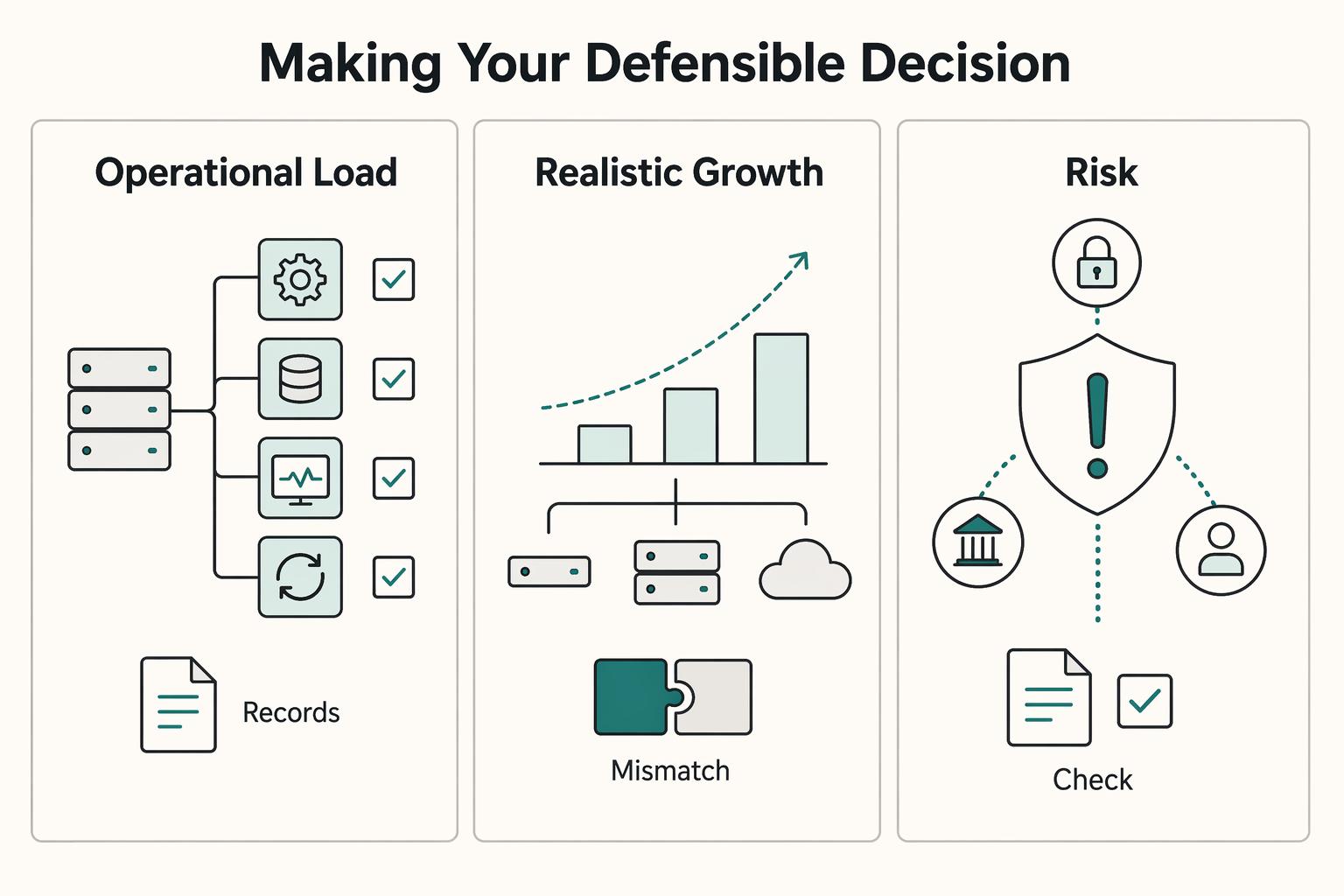
Making Your Defensible Decision#
Make the final call the same way you would approve any business infrastructure decision: score each option on Control, Scalability, TCO, and Vendor Risk, then choose the one you can defend operationally. If a platform only works on paper when you ignore operating load or exit risk, treat that as a no-go.
| Decision area | Ask | Verify |
|---|---|---|
| Operational load | Who will run this after launch? | Patching, backups, monitoring, and recovery |
| Realistic growth path | What change is most likely next? | More channels, more editors, or higher publishing volume |
| Governance tied to publishing risk | What breaks if publishing is delayed or a change goes live incorrectly? | RBAC with least privilege, system-enforced workflow gates from draft through publish, and audit-ready change history that shows who changed what and when |
- Operational load
Ask: Who will run this after launch? If that is you, include patching, backups, monitoring, and recovery in the decision. Self-hosting can give you more control and cost clarity; managed cloud can reduce ongoing operational burden.
- Realistic growth path
Ask: What change is most likely next? Buy for the growth you can name now, such as more channels, more editors, or higher publishing volume. A poor fit here can compound debt across workflow, integration, and security.
- Governance tied to publishing risk
Ask: What breaks if publishing is delayed or a change goes live incorrectly? Before committing, verify governance in the product: RBAC with least privilege, system-enforced workflow gates from draft through publish, and audit-ready change history that shows who changed what and when. Faster publishing without enforced controls increases risk.
Use this checklist before deciding:
- Write down your assumptions about channels, traffic, and editor access.
- Log trial red flags, especially weak permissions or unclear export paths.
- Define your exit requirements, including content and media metadata.
- Assign one clear owner for ongoing operations, whether that sits with your team or at the vendor boundary.
Pick one primary platform and one fallback, then validate both with the four-axis matrix before implementation.
Frequently Asked Questions
What is the difference between Strapi and Contentful for a business?
Strapi fits businesses that want self-hosting and can own patching, backups, monitoring, and recovery themselves or through a partner. Contentful fits teams that want a SaaS operating model with less infrastructure responsibility. The main tradeoff is direct control versus ongoing operating responsibility over time.
What is the true cost of a headless CMS?
Use total cost of ownership, not sticker price. Count subscription or hosting, implementation time, ongoing maintenance, and the business cost of downtime or delayed publishing. A self-hosted option can look inexpensive until non-billable hours go into server care, while a managed option can reduce maintenance drag but raise recurring fees.
Is a headless CMS a more secure choice for my business?
Not by default. Headless separates content management from frontend delivery, but security responsibilities still need to be defined clearly. With SaaS, confirm what the vendor covers versus what remains with your team. If you self-host, you also own server patching and operational hardening.
How do I avoid vendor lock-in with a headless CMS?
Test the APIs and test export before you sign or build deeply into the platform. Confirm programmatic access for your core content and verify what export is actually available while your content set is still small. Your exit path has to be clear early.
Which headless CMS is best for a single professional's portfolio website?
For a brochure-style portfolio that mainly shows services and rates, headless is often more complexity than you need. If you still want it because you plan to publish to multiple device types or grow into a larger content operation, a managed SaaS route usually keeps maintenance lower than self-hosting. Verify current solo-plan pricing, API limits, and editor features before deciding. Strapi makes more sense when running the stack yourself is a deliberate choice rather than an accidental side job.
Do I need a developer to use a headless CMS?
In most cases, yes for the initial build, because a headless CMS stores content separately from the frontend that displays it. Someone still has to handle content modeling, frontend integration, deployment, and later changes to schemas or API usage. The payoff is flexibility across channels, but it also means more development work than a coupled CMS.
Researched and edited by the Gruv editorial team. Gruv builds cross-border billing, payouts, and finance-operations software for global businesses.
Sources
Includes 4 external sources outside the trusted-domain allowlist.
- dartslab.jpl.nasa.gov/References/pdf/AVT-ET-194-ALL_final.pdftrusted
- snap.berkeley.edu/project/10053261trusted
- snap.berkeley.edu/project/9274006trusted
- tiffin.edu/wp-content/uploads/AI-Tools-with-Description...trusted
- brightspot.com/cms-architecture/headless-cms/headless-cms-t...external
- cocoon.agency/headless-cms/faqsexternal
- dotcms.com/blog/cms-platforms-that-let-marketing-teams-...external
- enonic.com/resources/guides/how-to-choose-the-right-cms...external
Educational content only. Not legal, tax, or financial advice.
Related Posts

Value-Based Pricing for Freelancers Under Real Payment Risk
Value-based pricing works when you and the client can name the business result before kickoff and agree on how progress will be judged. If that link is weak, use a tighter model first. This is not about defending one pricing philosophy over another. It is about avoiding surprises by keeping pricing, scope, delivery, and payment aligned from day one.
How to Calculate ROI on Your Freelance Marketing Efforts
If you want ROI to help you decide what to keep, fix, or pause, stop treating it like a one-off formula. You need a repeatable habit you trust because the stakes are practical. Cash flow, calendar capacity, and client quality all sit downstream of these numbers.

Webflow for Freelance Designers Who Want Predictable Client Work
If you want **webflow for freelance designers** to pay like a business rather than a string of one-off builds, you need three things working together: a way to accept only the right projects, a repeatable delivery path, and controls for the moments when scope and risk start drifting. By the end of this guide, you should have a practical way to qualify leads faster, run one clear approval path, and reduce the chance of mid-project expansion quietly hurting your margin.