
Quick Answer
Start with one goal and one app type, then test it for a week before expanding your stack. The best fitness apps for freelancers are the ones you can execute during deadline weeks, travel days, and low-energy periods without heavy setup. Use the Energy, Focus, and Resilience framework to pick your first tool, and check weekly whether sessions completed, work quality stability, and recovery trends are improving. If the app does not change decisions or behavior, switch formats instead of adding more tools.
Your Body is Your Business: Why Elite Freelancers Need a Performance Operating System, Not a Workout App#
If you are looking for the best fitness apps for freelancers, start with business outcomes, not app-store hype. The right app can help you protect delivery energy, decision quality, and consistent execution across the week.
Use a Personal Performance System as your filter. This is not a medical framework. It is a practical weekly loop: plan what you need, run a routine you can actually keep, review what happened, and adjust for next week.
WHO defines burn-out as a syndrome from chronic workplace stress that has not been successfully managed, and limits it to the occupational context. CDC gives you a clear baseline: at least 150 minutes per week of moderate activity plus 2 days per week of muscle-strengthening work. If your setup does not help you work toward that baseline, it is not supporting your business as well as it should.
| System | What you manage | Business impact | Best-fit app category |
|---|---|---|---|
| Energy | Weekly movement, strength, physical stamina | Can support steadier output across the week | Structured workout app with short sessions |
| Focus | Stress regulation, mental clarity, sleep-support habits | Can support clearer decisions and more usable deep-work blocks | Mindfulness or meditation app, or a workout service that includes it |
| Resilience | Recovery habits and signs of overload | Can support consistency during heavy workloads | Simple all-in-one routine or a small mixed stack |
One avoidable mistake is overbuilding your stack too early. If you add too many tools at once, the tracking overhead can outweigh the benefit. Start with the system that is limiting your work most, pick one tool category, and review it weekly with a few checkpoints.
In the next sections, you'll choose tools by Energy, Focus, and Resilience. Then you'll combine them into a stack you can maintain without turning your routine into another job.
You might also find this useful: The Best Calendar Apps for Freelancers Who Juggle Multiple Projects.
The Energy System: Training That Survives a Changing Schedule#
Your Energy System should protect output, not look impressive on paper. If a workout app cannot help you train between calls, at home, or in a hotel room with very little setup, it is not doing its job.
In this framework, your Energy System is your capacity for deep work and for handling the physical drag of a sedentary, high-pressure career. When it drops, revenue and reputation can take a hit quickly. Evaluate apps by Return on Time Invested (ROTI), not by feature count.
Use ROTI as your selection filter#
ROTI is about getting the most useful physical return from the time and attention you actually have. Use these four checks before you commit:
| Check | What to verify | Why it matters |
|---|---|---|
| Session format | On-demand sessions for unpredictable days, or a plan you can pause and resume after travel or deadline weeks | A format you can sustain is easier to keep |
| Setup friction | Changing, clearing space, finding equipment, choosing a class, and getting set up | Lower friction usually wins over time |
| Travel suitability | Current bodyweight filters, small-space options, and internet or download behavior inside the app | You need a no-gym fallback |
| Consistency support | Saved sessions, simple progression, reminders, and quick repeat paths | This reduces decisions and lowers the risk of decision fatigue over time |
- Session format
If your days are unpredictable, on-demand sessions are usually easier to sustain than rigid schedules. If you prefer structure, choose a plan you can pause and resume after travel or deadline weeks.
- Setup friction
Count startup cost honestly: changing, clearing space, finding equipment, choosing a class, and getting set up. Lower friction usually wins over time.
- Travel suitability
You need a no-gym fallback. Before you rely on any app while traveling, verify current bodyweight filters, small-space options, and internet or download behavior inside the app.
- Consistency support
Favor features that reduce decisions: saved sessions, simple progression, reminders, and quick repeat paths. The risk is not just a weak library. It is decision fatigue over time.
A fast pre-subscription test helps. Try to find one short session, one strength session, and one travel fallback. If that already feels clumsy, consistency may break under real work pressure.
Compare by schedule reality, not app-store ranking#
Use this table as a practical comparison frame. Treat the product details as checks to confirm in the app before you depend on them.
| App | Schedule-fit check | Equipment check | Access check | Keep if... |
|---|---|---|---|---|
| Nike Training Club | Validate during travel-heavy weeks and inconsistent windows | Verify current no-equipment or bodyweight options in app | Verify current internet or download behavior before trips | Setup stays fast when travel changes your day |
| FitOn | Validate during mixed home and travel weeks | Verify current bodyweight or small-space options in app | Verify current access constraints before hotel use | Session choice feels low-friction and repeatable |
| Peloton App | Validate for structured weekly planning | Verify current equipment split in app | Verify current offline or access behavior before relying on travel use | Guided classes actually improve your consistency |
| Apple Fitness+ | Validate for calendar-based routines | Verify current equipment requirements by class type | Verify current access constraints and device dependencies | The format is consistent enough for repeat execution |
If you use third-party rankings, favor recency and transparency. One 2026 roundup reports testing more than 70 workout apps. Some review publishers also disclose affiliate commissions. That context helps when you weigh recommendations.
When the gym disappears#
Travel disruption is normal, so your fallback should be automatic. Choose one no-gym backup app from your shortlist and run this protocol:
- Before travel, save three sessions: one short cardio option, one bodyweight strength option, and one mobility option. Re-check current filter labels because they can change.
- When gym access fails, start a saved session immediately: do not browse from zero. Browsing friction can turn into missed sessions.
- After the trip, review compliance: if execution dropped, reduce friction next time with shorter sessions or simpler bodyweight choices.
Keep the chain unbroken, even with a smaller session. For a broader travel system around sleep, food, and movement, read How to Stay Healthy and Fit While Traveling.
Use wearable data to adjust, not obsess#
Wearable data matters only if it changes today's training choice. If readiness or recovery signals are below your normal baseline, or strain is already elevated, downshift to lighter training, walking, or mobility. If recovery is strong and recent load is manageable, use that window for a harder session.
Treat readiness and strain as decision prompts, not scores to chase. If you see a multi-day pattern of declining readiness during high work stress, reduce intensity and support recovery first.
For a related walkthrough, see The Best Meditation and Mindfulness Apps for Freelancers.
The Focus System: Managing Your Mind Like a Tier-1 Asset#
Your focus quality shows up directly in client-facing work: how fast you restart after interruptions, how clearly you think, and how consistently you finish important tasks. Use one mental-fitness tool for three repeatable moments: before deep work, after context switching, and during pressure spikes.
Before you subscribe, run a friction check. Open the app and start one useful session in under 30 seconds. If you have to browse every time, consistency usually drops.
| Tool | Best use case | Session style | Onboarding friction | When it fits your schedule |
|---|---|---|---|---|
| Calm | Pressure moments and settling in before focused work | In-the-moment calming tools (Panic SOS, Body Scan, breathing exercises) | Medium. Set up 1 to 2 go-to sessions first. Calm's web page shows a 14-day trial, then $79.99/year; verify regional pricing. | Best when you want one app for reactive calming and regular check-ins |
| Headspace | Quick resets after context switching and short pre-work focus blocks | 3-minute resets through longer sessions, with 1,000+ guided meditations and sleep content | Low to medium. Short-session entry points are easy to use on busy days. Headspace currently lists $69.99/year (14 days free) or $12.99/month (7 days free); verify region and platform. | Best when your day has small gaps between meetings, edits, and admin |
| Othership | Fast state shifts during pressure moments | Music-driven breathwork from 60 seconds to 60 minutes | Low for quick use. New Premium users can start with a free trial. | Best before a tough call, after conflict, or during end-of-day shutdown |
Before deep work and after context switching#
A high-value use case is a short reset before proposals, contract review, or a build block after interruptions. Headspace is a strong fit when you need fast entry points. Calm works well if you want broader calming options and pre-saved favorites.
Avoid tool sprawl. Pick one app for two weeks, save one short session, and attach it to one trigger like "after lunch" or "right after my last morning call."
Use sleep data to set next-day workload#
If recovery is low, your day may feel slower and less focused. Oura frames Readiness Score on a 0-100 scale. Published bands include 85+ (Optimal), 70-84 (Good), and under 70 (Pay Attention). Oura Help also shows a four-band version with 60-69 (Fair), so verify current in-app labels before relying on exact cutoffs.
| Band | Label | Work planning move |
|---|---|---|
| 85+ | Optimal | Consider scheduling your hardest cognitive work first |
| 70-84 | Good | Keep the plan but reduce optional switching and run a short reset before starting |
| Under 70 | Pay Attention | Consider protecting output with editing, admin, and calls instead of forcing a long creative sprint |
Use simple decision rules:
- If you are in the top band, consider scheduling your hardest cognitive work first.
- If you are in the middle bands, keep the plan but reduce optional switching and run a short reset before starting.
- If you are in the lower bands, consider protecting output with editing, admin, and calls instead of forcing a long creative sprint.
Use Tags as a review loop, not a control lever. Tags do not directly change daily scores. They help you spot trends between habits and your Sleep, Readiness, and Activity scores.
During pressure moments#
Pressure moments are specific: before a difficult email, right after a tense client call, or when you feel your pace spike. Calm's in-the-moment tools and Othership's short breathwork sessions fit this window and can be easier to execute than a vague plan to "meditate more."
A simple weekly focus protocol#
Keep this simple enough to survive a busy week:
- Choose one tool. Calm, Headspace, or Othership is enough for a weekly test.
- Define one trigger. Example: before deep work, after every two meetings, or before high-pressure calls.
- Review once a week. Ask: Did focus quality improve? Did work consistency improve? If not, reduce friction with a shorter session or a clearer trigger.
If you want a deeper dive, read Value-Based Pricing: A Freelancer's Guide.
The Resilience System: Your Proactive Defense Against Burnout#
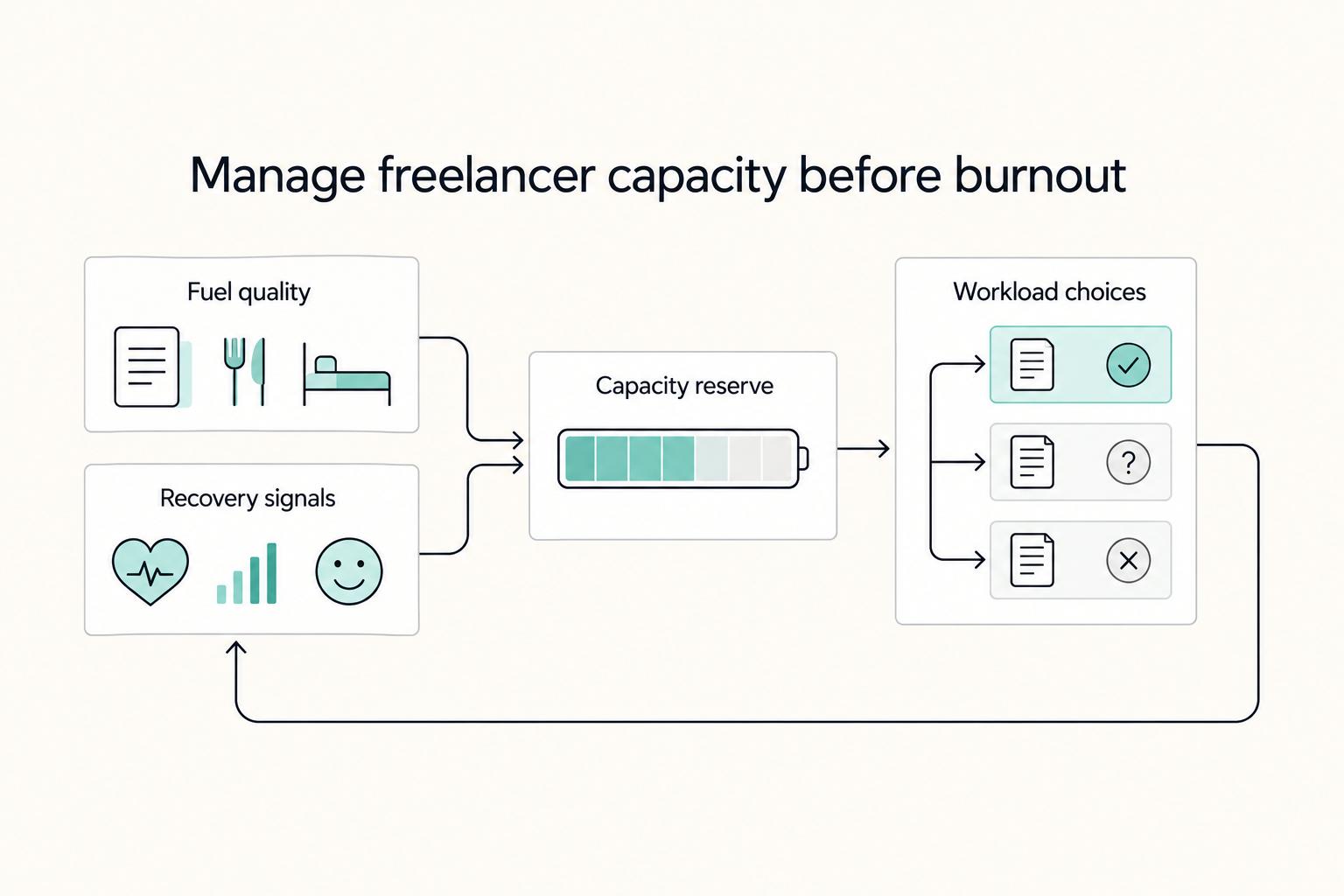
For freelancers, burnout is a business risk because your personal capacity is a core asset. Your resilience system should change your week before exhaustion changes your work. Inside your Personal Performance System, that means three practical levers: fuel quality, recovery signals, and workload decisions.
| Lever | What to review | Action |
|---|---|---|
| Fuel quality | Logging friction in a real workweek, how trustworthy entries feel, how quickly you can log imperfect meals, and whether the detail helps you spot low-quality days | Run a one-week test including one meal out and one rushed day |
| Recovery signals | Whether the morning signal is available before you plan your day, and trend direction across sleep, training, travel, alcohol, illness, or late client work | Use the signal only if it changes your calendar; verify current in-app documentation before using any cutoff |
| Workload decisions | Energy notes, food consistency, recovery trends, and days where work felt sharp vs fragile | Adjust next week's training intensity and work sequencing before fatigue compounds; remove one stressor for a week if the pattern repeats |
This is different from in-the-moment reset tools. Here, you are watching weekly patterns so you can decide when to push, when to hold, and when to reduce load early.
- Fuel quality
Use nutrition tracking to support steady energy and clearer thinking, not aesthetics. If you are choosing between MyFitnessPal and Cronometer, pick the one you will still use when you are tired, traveling, and eating outside your normal routine.
| App | What to test during a normal week | Keep if... | Drop if... |
|---|---|---|---|
| MyFitnessPal | Logging friction for a normal breakfast, drinks, and one restaurant meal | You can log quickly and stay consistent on messy days | Search and logging friction make you skip entries |
| Cronometer | Logging friction for a normal breakfast, drinks, and one restaurant meal | You can log quickly and stay consistent on messy days | Search and logging friction make you skip entries |
Focus on the same criteria for both. Check how trustworthy entries feel, how quickly you can log imperfect meals, and whether the level of detail helps you spot low-quality days. Run a one-week test in a real workweek, including one meal out and one rushed day.
- Recovery signals
If you use wearables like Oura or WHOOP, they are useful only if their signals change your calendar. The goal is to catch declining recovery or accumulating strain early enough to protect delivery quality.
Use two checks:
- Confirm the morning signal is available before you plan your day.
- Compare trend direction with the last several days of sleep, training, travel, alcohol, illness, or late client work.
Treat score-based cutoffs as unresolved until you verify the current in-app documentation for the wearable you use.
- Workload decisions
When recovery drops or strain builds, protect delivery quality first. Keep training lighter, move demanding creative work to your best energy window, batch admin, and reduce optional context switching.
Run this weekly loop:
- Review one week of energy notes, food consistency, and recovery trends.
- Mark days where work felt sharp vs fragile.
- Adjust next week's training intensity and work sequencing before fatigue compounds.
- If the same pattern repeats, remove one stressor for a week: late work, travel-day training, inconsistent meals, or stacked calls.
The best tool is the one that helps you make earlier, clearer decisions with less guesswork. Related: How to Integrate Calendly with Your Website.
If your burnout risk is mostly admin overload, Gruv's free invoice generator can help simplify billing and protect your recovery time.
Your Body is Your Business: Build Your Performance Stack Today#
Start this week with a small stack test: choose one system, choose one tool, and track outcomes that matter to your work. You are not looking for a universal winner. You are looking for a setup you will actually use and that fits your week.
There is no single agreed "best app overall." Different reviewers name different winners, even after testing more than 70 apps in one case and examining over 50 services in another. Use that as a reminder to match the tool to your needs, not to keep browsing forever.
| Goal | Best app type | What to measure weekly | When to switch |
|---|---|---|---|
| Build stamina for deep-work blocks | Guided workout app that fits your schedule, preferred coaching style, and workout modality | Sessions completed, afternoon energy dips, consistency of planned deep-work blocks | You keep skipping because the format, coaching style, or setup does not fit |
| Keep training consistent during travel or busy weeks | Workout app that matches your equipment access and time constraints | Sessions completed during travel weeks, skipped sessions due logistics, time-to-start each session | Your routine depends on gear or setup you do not reliably have |
| Strengthen recovery habits | Habit-support app or coaching workflow you can follow consistently | Sleep consistency, perceived readiness, days you followed your planned routine | The data does not change your next week's decisions |
- Choose one system. Start with the area that is costing you the most right now: energy, focus, or resilience.
- Choose one tool. Use a Return on Time Invested lens, then check coaching style, workout modality, equipment access, and budget before you commit.
- Track outcomes weekly. Use three practical signals from your table. Keep the tool if they trend in the right direction. If not, switch app type and keep the same goal.
For your next review cycle, make one commitment: pick one goal, schedule your first week, and log those three signals before changing anything else.
We covered this in detail in Best To-Do List Apps for Freelancers Who Need Operational Control.
After you choose your fitness stack, tighten the rest of your workflow with Gruv tools so your weekly operations stay manageable.
Frequently Asked Questions
How do you choose the right app fast?
Start with your constraint, not your wishlist: device first, then session format, then travel reliability. Choose Apple Fitness+ if you want Apple-native, short sessions and downloaded workouts. Choose Peloton App One if class variety matters most and App One limits still fit you. Choose Nike Training Club if you want flexible no-equipment training on your own schedule. Check current local pricing before you subscribe, since listed prices can vary by region.
What if you want no-equipment workouts only?
Choose only from apps that explicitly support equipment-optional or bodyweight sessions, then test in the setting you actually use most. Apple Fitness+ states sessions can be done with or without equipment. Peloton says no equipment is required for app classes. Nike Training Club includes bodyweight sessions with and without equipment. If a workout plan depends on gym access, treat it as a bonus plan, not your default plan.
How do you stay consistent while traveling?
Set up travel access before you leave so you are not dependent on hotel connectivity. Apple Fitness+ supports downloaded workouts for offline use, and Peloton lets you preload classes to reduce data and Wi-Fi dependence. Peloton also notes you still need an active internet connection when starting a preloaded class so it counts toward your profile. For more travel-specific routines, use this guide on staying healthy and fit while traveling.
What should you do if your schedule is unpredictable?
Use the CDC baseline as your weekly target, then split it into smaller blocks you can actually keep. Aim for 150 minutes/week of aerobic activity and muscle-strengthening work on at least 2 days/week. If your calendar is unstable, use chunking, for example 30 minutes x 5 days. If a full session gets squeezed out, do a shorter session the same day, because some activity is still better than none.
Are trackers actually worth it for you?
Keep a tracker only if it changes your next decision. Evidence suggests app and tracker use can produce modest activity gains. One review in healthy adults reported a small-to-moderate effect corresponding to about 1850 steps daily, so expect nudges rather than guaranteed outcomes. If the data helps you adjust training load or session intensity, it is useful. If it does not change your behavior, skip it.
Try a related tool
Researched and edited by the Gruv editorial team. Gruv builds cross-border billing, payouts, and finance-operations software for global businesses.
Sources
- cdc.gov/physical-activity-basics/guidelines/adults.htmltrusted
- cdc.gov/physical-activity/features/boost-brain-healt...trusted
- hhs.gov/sites/default/files/workplace-mental-health-...trusted
- losmedanos.edu/catalog/13-14CatalogLMCV2.pdftrusted
- nccih.nih.gov/health/anxiety-and-complementary-health-appr...trusted
- pmc.ncbi.nlm.nih.gov/articles/PMC12858923trusted
- scad.edu/sites/default/files/PDF/scad-2025-2026-acces...trusted
- who.int/news/item/28-05-2019-burn-out-an-occupationa...trusted
Educational content only. Not legal, tax, or financial advice.
Related Posts

Value-Based Pricing for Freelancers Under Real Payment Risk
Value-based pricing works when you and the client can name the business result before kickoff and agree on how progress will be judged. If that link is weak, use a tighter model first. This is not about defending one pricing philosophy over another. It is about avoiding surprises by keeping pricing, scope, delivery, and payment aligned from day one.

How Remote Professionals Stay Healthy During Long Stays Abroad
Use this sequence before workload, housing, and travel friction make health tasks harder to execute. If you are traveling for months, treat this as four pass-fail gates. A gate is closed only when you have a written output you can verify.

How to Integrate Calendly with Your Website
Start with a simple three-step launch sequence: choose the embed path that fits the page, lock in your real availability, then validate the booking flow before you publish. That turns a Calendly embed into a client-facing booking process, not just a design element on the page.