
Quick Answer
Build your off-grid setup as three distinct tiers, not one "best" gadget. Start with hardened everyday devices for normal operations, add a two-way satellite messenger for outages, and keep a separate PLB only for true rescue events. This structure reduces hesitation under stress because each tool has one job. Before departure, verify legality with the relevant embassy and run a real message drill so your plan works when networks fail.
Beyond Gadgets: A 3-Tiered Communication Resilience Framework for the Global Professional#
If you are trying to solve everyday communications, network outages, and life-threatening rescue with one device, you are setting yourself up for failure. A better model is simpler: give each layer one job, know when to switch to it, and judge it by the outcome it is supposed to produce.
| Tier | Purpose | Primary tool type | Trigger condition | Main failure mode |
|---|---|---|---|---|
| 1 | Daily communications under normal conditions | Your everyday phone and laptop setup | Normal travel, work, and local calling | Location data may still be incomplete or not practical enough for responders |
| 2 | Outage coordination and status updates | Separate degraded-network communication channel | Cellular, WiFi, or local internet is down or overloaded | Networks can still be too congested or damaged for reliable calling |
| 3 | Life-threatening rescue | Dedicated emergency rescue channel | Serious injury, immediate danger, no workable local path to help | One purpose only, with little room for nuance or logistics |
Tier 1 is your default layer. On ordinary days, your first line is still the gear you already carry. In the US, wireless providers are required to deliver location information with 911 calls, and dispatchable location is defined as a validated street address plus in-building detail like floor or room/apartment number. That helps, but it is not magic. The FCC also notes concerns that some vertical location data may not be practical enough for responders, and it proposes independent validation for technologies used to meet location-accuracy requirements. Assume normal calling can still break down at the worst moment.
Tier 2 starts when the grid is degraded, not when you are dying. This layer is for command and control: letting people know where you are, what changed, and what you need next. That distinction matters because congestion is real. The GAO describes GETS and WPS as priority calling programs for cases where telephone networks are congested or damaged. That is your reminder that "service available" and "communication possible" are not the same thing.
Tier 3 is your last resort. Use it only when the outcome you need is rescue, not coordination. If you are comparing emergency communication options, use the next sections as a checklist: harden Tier 1 first, add a true outage channel for Tier 2, and keep Tier 3 separate so your rescue option is never confused with your logistics tool.
Related: The Best Portable Wi-Fi Hotspots for Travelers.
Tier 1: Make Your Devices and Access Reliable Under Pressure#
Tier 1 is your daily risk layer: secure what you already carry so routine exposure, device loss, or account lockout does not stop your operations. Before you compare more hardware, make your phone, laptop, messaging, and document access reliable under pressure.
| Step | Who | Outcome |
|---|---|---|
| Secure the device | You own this | Baseline device controls are active before you need them |
| Standardize sensitive coordination | You + key contacts | Fewer preventable leaks from channel drift |
| Build and test your digital dead drop | You + trusted contact | You keep access when hardware fails |
Use one standard for every control: it should strengthen confidentiality, integrity, or availability, and you should be able to recover without the same device that failed.
| Control | What it protects | What it does not protect | Minimum setup standard |
|---|---|---|---|
| VPN | Helps reduce local network exposure on public WiFi | Stolen hardware, weak account recovery, or sending information to the wrong person | Installed on each travel device and tested before travel |
| Full-disk encryption | Helps protect data stored on a lost or stolen device | Information exposed from an unlocked device or compromised account | Confirm enabled on every device you carry |
| Secure messaging | Helps reduce routine exposure during sensitive coordination | Poor channel discipline, screenshots, or wrong-recipient errors | Choose one encrypted channel your core contacts will actually use and test it |
| Document vault | Keeps critical records available if primary hardware is gone | Recovery failure if access depends on the lost device | Store encrypted copies and verify retrieval from a secondary device |
- Secure the device (you own this)
Turn on full-disk encryption and set up VPN access on each travel device, then verify both on the hardware in your bag. Outcome: your baseline device controls are active before you need them.
- Standardize sensitive coordination (you + key contacts)
Pick one encrypted channel for sensitive operational messages and document the recovery steps you have verified for that channel. Make sure your inner circle uses that channel consistently. Outcome: fewer preventable leaks from channel drift.
- Build and test your digital dead drop (you + trusted contact)
Store encrypted copies of critical records in a separate vault you can access without your primary device. Run one retrieval test from a secondary device, then record the trusted contact, escalation rule, and review interval you will use. Outcome: you keep access when hardware fails.
Treat vendor lists and roundups as informational, not due diligence. Independently verify onboarding and support, implementation steps and timeline, and the update or issue-resolution process, then re-check your setup through assurance and testing. If you want a deeper dive, read Value-Based Pricing: A Freelancer's Guide.
Tier 2: Your "Grid-Down" Channel for Command and Control#
Use Tier 2 as your continuity channel when cellular, Wi-Fi, and local internet fail. This tier is for coordination, not final-resort rescue. The goal is to keep client updates, team direction, and incident decisions moving while disruption is still manageable.
Start with a messenger#
For this tier, start with a dedicated two-way satellite messenger. Use a messenger-first approach for logistical control before escalation; Tier 3 is a different job.
If your main need is short operational updates, routing changes, and check-ins with trusted contacts, a messenger is usually the better baseline. If field voice calls are truly core to your operation, a satellite phone can be an added specialist tool.
| Option | Best fit | Discretion | Battery workflow | Two-way messaging reliability | Companion app dependence |
|---|---|---|---|---|---|
| Satellite messenger | Continuity coordination when normal networks fail | Typically lower-profile use | Works best as a standby device when charged and tested before departure | Built around short two-way exchanges for status and decisions | Often stronger with a phone companion, so test what works device-only |
| Satellite phone | Voice-first field communication | More noticeable in use | Needs stricter charging discipline if call use is expected | Messaging can be secondary to voice workflows | Core calling is often less app-dependent, but your contact workflow may still rely on phone access |
Choose the tool you can operate under stress with minimal fiddling. These systems still require operator skill, and too much setup complexity is its own failure mode.
Build the operating pattern before you travel#
Run one live drill before each trip: power on, send a test message, confirm the reply path, and verify your exact contact list. Keep that list tight and role-based so incoming messages trigger action instead of confusion.
This is how Tier 2 protects continuity in practice: you can still send a client status update, coordinate a team change, and make a go/no-go call when local networks are down.
Treat legality like a pre-trip gate, not an afterthought#
Before you travel, verify satellite messenger legality with the destination embassy. Do not rely on old trip notes or secondhand reports. Legal status can change, so revalidate before every trip.
| Check | What to do | Note |
|---|---|---|
| Jurisdiction check | Confirm destination and transit countries, not just the final stop | Legal status can change, so revalidate before every trip |
| Permitted-use check | Confirm whether possession, import, and personal use are allowed | Current permitted-use requirement pending official jurisdiction verification |
| Registration or permit step | Complete any prior approval, registration, or permit before departure | Retain confirmation |
| Border-entry prep | Carry device details and proof set | For example: model, serial number, ownership record, and any approval documents you received |
- Jurisdiction check
Confirm destination and transit countries, not just the final stop.
- Permitted-use check
Confirm whether possession, import, and personal use are allowed. Where rules vary by use case, mark the current requirement as pending official jurisdiction verification until an official source confirms it.
- Registration or permit step
If prior approval, registration, or a permit is required, complete it before departure and retain confirmation.
- Border-entry prep
Carry your device details and proof set, for example: model, serial number, ownership record, and any approval documents you received.
Use risk zones only as a planning caution, not as a permanent truth. Recheck each trip so your backup channel stays operational instead of becoming a compliance issue. You might also find this useful: How to Get Reliable Internet for Van Life.
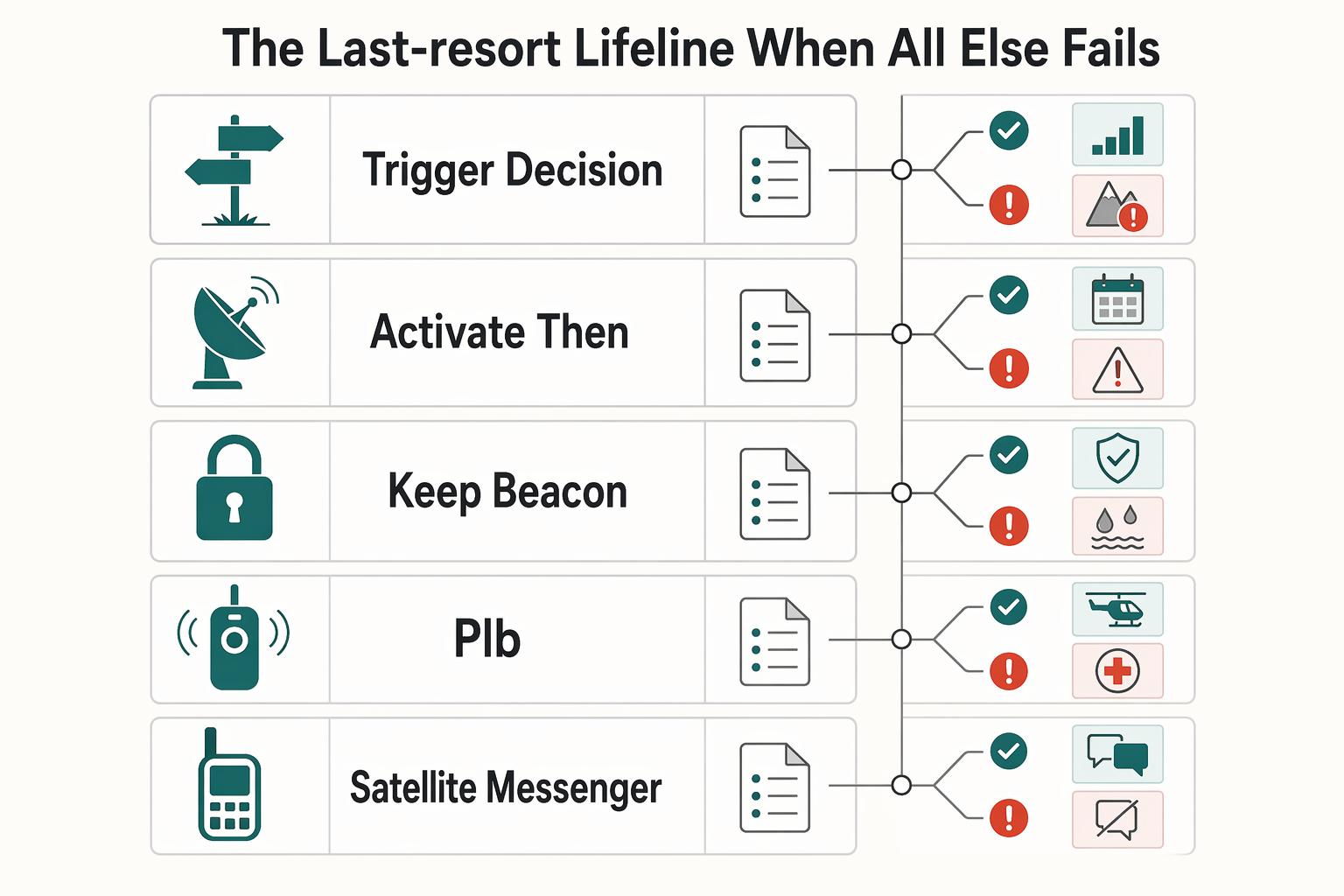
Tier 3: The Last-Resort Lifeline When All Else Fails#
Use Tier 3 only for rescue. If you can still coordinate timing, pickup, or next steps, stay in Tier 2 with your two-way satellite messenger. Switch to a PLB only when the risk is immediate and life-threatening.
| Stage | What to do | Key detail |
|---|---|---|
| Trigger decision | If delay could cost a life, activate the PLB | A Personal Locator Beacon is a separate, one-way device for life-or-death rescue signaling |
| Activate, then change your priorities | Follow the beacon's emergency instructions exactly and position it for the best chance to transmit | Stay put unless immediate danger forces movement, make yourself easier to locate, and conserve remaining phone or messenger battery for secondary use if available |
| Keep the beacon boring and ready | Confirm registration status, check battery and serviceability dates against manufacturer guidance, and run self-tests only as allowed | Store the PLB where you can reach it quickly with one hand |
- Trigger decision
A Personal Locator Beacon (PLB) is a separate, one-way device for life-or-death rescue signaling. It is not a tool for updates or back-and-forth coordination. If delay could cost a life, activate the PLB.
- Activate, then change your priorities
Follow the beacon's emergency instructions on the device and in its manual exactly. Position it for the best chance to transmit. After activation, treat this as a rescue event: stay put unless immediate danger forces movement, make yourself easier to locate, and conserve remaining phone or messenger battery for secondary use if available.
| Tool | Message type | Alert path | Dependency risks | Best use |
|---|---|---|---|---|
| PLB | One-way distress alert | Dedicated rescue alert process for official response | No two-way clarification from your side; registration and device readiness matter | Immediate, grave danger when rescue is the goal |
| Satellite messenger SOS | SOS inside a two-way messaging device | SOS request handled within the device's service path | More operator friction if the device, phone pairing, power, or legal use status fails | Serious trouble where two-way coordination may still help |
- Keep the beacon boring and ready
For this tier, reliability matters more than features. Before each trip, confirm registration status under the applicable rules, check battery and serviceability dates against manufacturer guidance, and run self-tests only as allowed. Mark any unresolved registration or self-test requirement as pending official jurisdiction or manufacturer verification. Store the PLB where you can reach it quickly with one hand.
Last-resort readiness checklist#
- Confirm your PLB registration record is current and matches the device serial details.
- Check battery, serviceability markings, and self-test status against manufacturer guidance, and mark any unresolved requirement as pending manufacturer or official jurisdiction verification.
- Carry it on your body or in a top-access location you can reach under stress.
- If your destination embassy says a satellite messenger is restricted, do not force a workaround; keep each tool in its lane and reserve the PLB for genuine rescue.
For a step-by-step walkthrough, see The Best Asynchronous Communication Tools for Remote Teams.
Conclusion: Finish the Protocol Before You Compare Devices#
The takeaway is simple: stop looking for one gadget and finish your protocol. The end state is concrete. In your routine layer, you keep access to accounts, contacts, and your digital dead drop. When cellular, Wi-Fi, and local internet disappear, you still have a way to send status and coordinate. In a true emergency, you have a separate rescue lane.
-
Own the 3-tier plan. Write your personal protocol down as 3 escalating layers, not a vague intention to "stay connected." Note who receives your check-ins, what counts as a missed check-in, and when you move from routine communication to off-grid communication to rescue. The point is to match the tool to the threat instead of relying on a single "best" device and inheriting a single point of failure.
-
Give each device one job. Your Tier 2 tool is a two-way satellite messenger for logistical control when normal infrastructure is gone. Your Tier 3 tool is a separate one-way Personal Locator Beacon for life-or-death rescue. That role split matters under stress because it removes hesitation: you are not trying to negotiate logistics with a rescue tool, and you are not treating routine coordination like an SOS.
-
Finish the pre-trip checks before departure or renewal. Verify satellite messenger legality with the destination embassy before you travel. That is not paperwork theater. Unauthorized possession can lead to legal consequences, including fines or arrest. Then confirm your contacts, message plan, and document access are current, so a lost or confiscated phone does not break your response.
If you are still comparing devices, do it against this checklist. Finalize your personal protocol first, then review the device comparison details before you buy or renew anything.
Frequently Asked Questions
What is the difference between a PLB and a satellite messenger?
Device capabilities vary, but a practical planning split is this: keep a distress lane for true emergencies and a messaging lane for coordination when regular channels fail. If you still need to explain, reroute, check in, or ask for help without triggering a full rescue response, you are still in coordination territory. The practical choice comes down to what you need to send, what it depends on, and what is most likely to fail first under stress. | Tool type | Message capability | Network dependency | Common failure points | |---|---|---|---| | PLB | Emergency distress signaling (confirm exact device behavior before travel) | Confirm the device's network dependency with the manufacturer before travel | Untested setup, stale battery checks, unclear role in your plan | | Satellite messenger | Global messaging for coordination and status updates (device-dependent) | Depends on the device's satellite service path and your setup | Dead battery, untested setup, unclear escalation triggers | | Two-way radio | Instant short-range team communication | Short-range performance depends on local conditions and setup | Limited range, wrong channel or talk group, no long-distance reach, uncharged spare units |
Can you travel internationally with a satellite phone or messenger?
Maybe, but treat legality as a pre-trip verification task, not a rumor check. Requirements can vary by jurisdiction and can change, so confirm the current rules from official sources before you pack. If any step is unclear, mark the requirement as pending official jurisdiction verification and do not rely on memory or forum posts. The failure mode here is simple: the device works technically, but you create a compliance problem before you even leave the airport.
How do I create an emergency communication plan?
Keep it short enough that you will actually use it. Before travel, set one primary contact, one backup contact, your check-in schedule, your emergency contact list, your preset messages, and the power and protection items each device needs. If you use team radios, pre-define talk groups and keep charged spares ready. Then map the triggers: Tier 1 means normal phone channels, Tier 2 means regular networks are down so you use your satellite messaging lane for status and coordination, and Tier 3 means immediate danger so you switch to your rescue lane. If you travel often, rehearse it quarterly so your contacts know when to escalate and what a missed check-in actually means.
What is the best emergency communication device without a subscription?
Usually, that is the wrong first filter. A better rule is to carry at least two devices, with one high-tech option and one low-tech backup, because no single gadget covers every category well. Build a layered kit by function instead of relying on one tool for everything. If your priority is routine updates, alerts, or logistics, judge devices by communication function first and only then verify the current service model.
Do I need a license for these devices?
Do not assume yes or no across every device and country. Requirements are jurisdiction-specific and can change, so verify the current rules before departure. Where those rules depend on location, mark the requirement as pending official jurisdiction verification. The useful result is having that answer written down before departure, not trying to remember it at check-in or at the border.
Is a Garmin inReach or a ZOLEO better?
Neither is automatically better, and this is one place where product details can change. Treat this as a setup-verification decision: confirm what your exact device and configuration can do, what your plan depends on, and whether your current service setup fits how you actually travel. The red flag is buying either one and never testing the exact send, receive, contact, and emergency steps before the trip. If you want one rule for choosing among the best emergency communication devices, pick the option whose failure points you can live with, then test that exact setup before you need it.
Researched and edited by the Gruv editorial team. Gruv builds cross-border billing, payouts, and finance-operations software for global businesses.
Sources
- csrc.nist.gov/CSRC/media/Projects/risk-management/800-53%2...trusted
- dfps.texas.gov/Doing_Business/documents/Information_Securit...trusted
- docs.fcc.gov/public/attachments/DOC-410028A1.pdftrusted
- docs.fcc.gov/public/attachments/FCC-03-322A1.pdftrusted
- dodcio.defense.gov/Portals/0/Documents/Cyber/DoD_Enterprise_ICA...trusted
- ffiec.gov/sites/default/files/media/press-releases/201...trusted
- gao.gov/assets/a294384.htmltrusted
- nrc.gov/docs/ml1104/ml110490119.pdftrusted
Educational content only. Not legal, tax, or financial advice.
Related Posts

Value-Based Pricing for Freelancers Under Real Payment Risk
Value-based pricing works when you and the client can name the business result before kickoff and agree on how progress will be judged. If that link is weak, use a tighter model first. This is not about defending one pricing philosophy over another. It is about avoiding surprises by keeping pricing, scope, delivery, and payment aligned from day one.

The Best Portable Wi-Fi Hotspots for Travelers
If you are trying to buy the **best portable WiFi hotspot** for paid travel work, treat it as an operations decision, not a gadget decision. Route fit comes first, plan terms come second, and hardware comes third. That order helps you avoid the most expensive mistakes.
How to Get Reliable Internet for Van Life
If you earn through your connection, "good enough" is not just a budget choice. It's a business continuity decision. Treat your road internet the same way you treat invoicing, backups, or contracts. If it fails at the wrong moment, the damage can be larger than the monthly bill.