
Quick Answer
Choose the best e-signature software for freelancers by testing one real contract flow end to end: final-version control, signer routing, and downloadable evidence. A strong option lets you export the executed PDF plus a completion certificate or audit log, then store both together for fast retrieval. Move to a paid tier when plan limits or missing verification options weaken your documentation, especially on cross-border engagements.
Before the Signature: Settle Scope, Payment, Rights, and Disputes#
Your signing tool will not rescue a vague contract. Before you compare platforms, make sure the agreement says what you will deliver, when payment is due, when rights transfer, and where disputes will be handled.
1. Scope that can actually be measured#
If a third party cannot tell whether the work is complete without asking what you meant, the scope is too loose. Use a Statement of Work to spell out deliverables, included revision rounds, required client inputs, and the acceptance or completion standard.
Write it in direct terms: "You will receive the agreed deliverables, with a defined number of revision rounds included. Requests outside scope require separate written approval." If you skip that detail, scope creep can arrive as a string of "small tweaks" that turns into unpaid work.
2. Payment terms tied to real triggers#
Payment terms should leave no room for interpretation. State the amount, currency, invoice timing, and the exact event that triggers payment. "On completion" only works if completion is already defined in the SOW.
Use event-based language tied to named milestones or phases. Also align your ownership language with payment timing, so there is no argument about whether rights transferred before final payment cleared.
3. IP ownership with an explicit transfer moment#
Under U.S. copyright law, the author generally owns the work initially, with an exception for qualifying works made for hire. A transfer of copyright ownership or exclusive rights generally requires a writing signed by the rights owner or authorized agent; that rule does not cover every nonexclusive permission. Check existing assignments and licenses before promising rights to a client.
If both parties agree, assignment of project rights can take effect after cleared payment. State that condition expressly, identify any background materials you retain, and define the client license needed to use them with the deliverables. Payment does not automatically determine ownership.
| Clause | Purpose | Minimum language to include | Common freelancer mistake |
|---|---|---|---|
| Scope / SOW | Defines what is being bought | Deliverables, revision count, client inputs, acceptance standard | Listing only a broad service name |
| Payment | Creates a clear due event | Amount, currency, invoice timing, payment trigger | Using "on completion" without defining completion |
| IP ownership | Defines the rights each party receives | Background materials, deliverable ownership or license, and any agreed payment condition | Assuming payment alone determines ownership |
| Governing law | Chooses which law applies | "This agreement is governed by the laws of [jurisdiction]" | Omitting jurisdiction |
| Forum selection | Chooses where disputes are heard | "Disputes will be brought in [court/forum/location]" | Naming law but not venue |
4. Verify cross-border clauses by client location#
For cross-border work, do not send the contract until you have checked governing law, forum selection, and signature enforceability for that document type. Governing law chooses which substantive law applies. Forum selection identifies where disputes are heard. These clauses are often enforced, but not in every case.
| Jurisdiction | Baseline rule | Noted limits or conditions |
|---|---|---|
| U.S. | Electronic records are generally not denied legal effect solely because they are electronic. | Check transaction exclusions, applicable state law and consent requirements for legally required consumer disclosures. |
| EU | Electronic signatures cannot be denied legal effect solely because they are electronic or not qualified. | Qualified electronic signatures have handwritten-equivalent effect under eIDAS; document and transaction requirements still matter. |
| England and Wales | Electronic signatures can execute documents when the signer intends to authenticate. | Authority and document formalities still apply; some documents require witnessing or other steps. |
Keep these contract fields marked pending until the jurisdiction check is complete:
Governing law: pending jurisdiction check.Venue/forum: pending venue and forum check.Electronic signature consent/formality: pending contract-specific check.
Before you send, run one quick QA pass:
- Confirm the file name and version are final.
- Confirm each payment trigger maps to a defined project event.
- Confirm IP transfer language states exactly when rights move.
- Confirm governing law and forum name a real jurisdiction and venue.
- Confirm your signing flow generates an audit trail if disputed (some self-signed flows do not).
Once the contract is settled, preserve the same version through signing and handoff.
Keep the signing version and its evidence together#
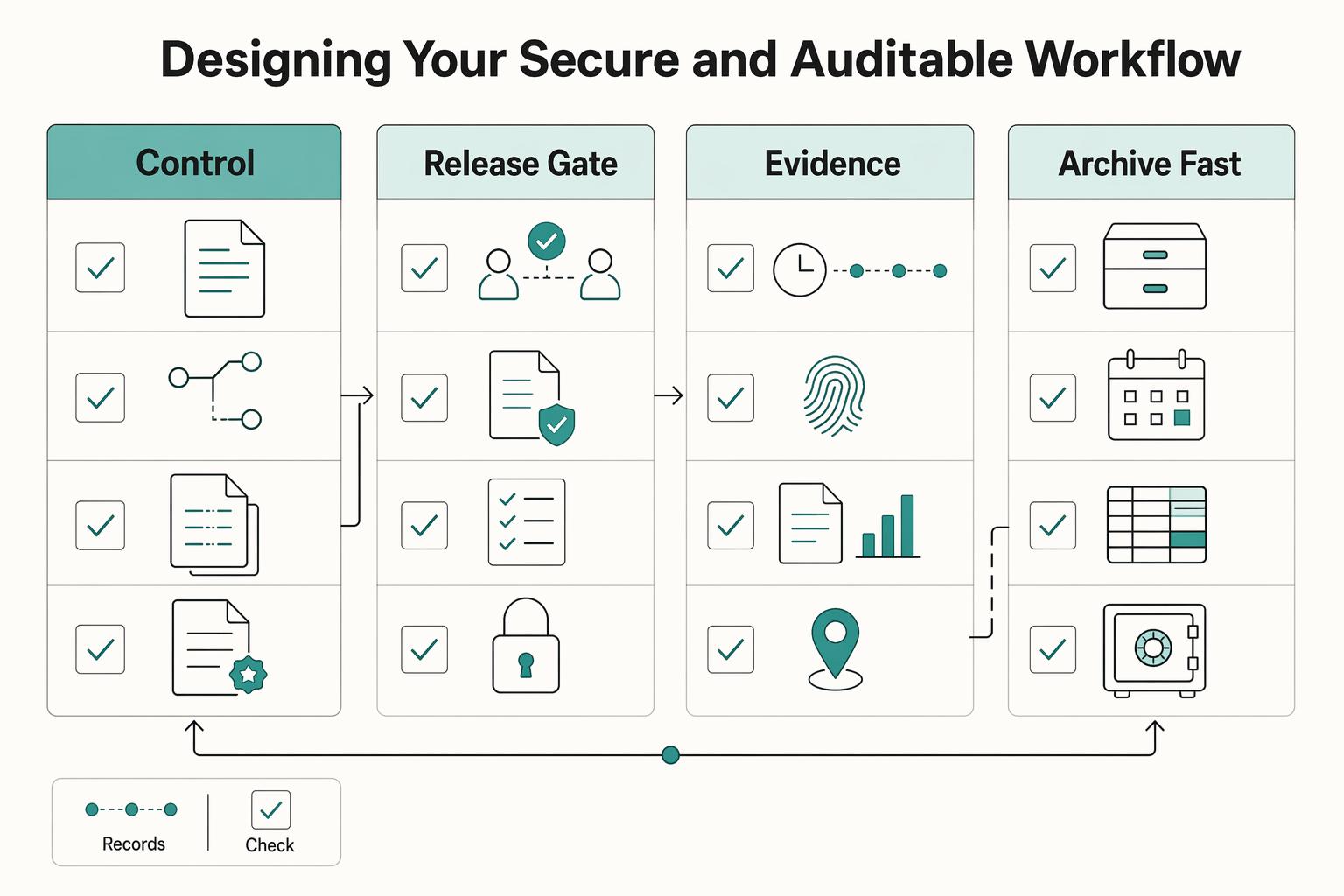
A reliable signing process is simple, but it has to be consistent. Control the final draft, separate approval from signature, capture the evidence, and archive it so you can retrieve it later without digging through email.
- Control the final draft before signing starts.
Version drift is where avoidable disputes begin. Keep one working draft, label each negotiated update clearly - for example v1.0, v1.1, v1.2 - and mark a single final version for signing. Before you send it, confirm the filename and version, then re-check that scope, payment triggers, and other key terms still match the last agreed text.
- Separate approval from signature.
Treat negotiation and signature as different steps. Get written approval on the final text, then send that exact file through your platform. If the platform includes document tracking, use it to monitor status, for example sent, viewed, or completed. That status history is useful later if a signing dispute turns into a question about where the process stopped.
- Capture an evidence bundle, not just a signed PDF.
An event record helps establish what happened in the platform. Email addresses, IP addresses and timestamps do not by themselves establish a person’s legal identity or authority to bind a client.
| Evidence artifact | What it helps establish | When you rely on it most |
|---|---|---|
| Version history log | Which draft became the signing copy | A claim that terms changed before signature |
| Completion certificate or event record | That the document moved through platform events | A dispute about whether signing actually occurred in the workflow |
| Status tracking history | Where the document was in the workflow | A question about where the process stopped |
Verification checklist. Use it to verify the record, not just to tick boxes.
- Before sending, match the file to the approved version and confirm recipient authentication and record settings.
- After completion, download the executed agreement and its event record.
- Archive both with the approved version in a secure, retrievable client folder.
- Archive for fast retrieval, not passive storage.
If retrieval is slow, your archive is not doing its job. Keep the executed contract and its evidence together in one place. A simple structure like Clients/ClientName/ProjectName/Contracts/Executed/ is usually enough if you apply it consistently. Use searchable filenames and centralized, secure storage so the file set is easy to locate later. The practical standard is simple: when a client or reviewer asks, you should be able to pull the exact agreement and supporting records quickly.
With that process in place, platform choice becomes easier. You are not looking for the flashiest tool. You are looking for the one that lets you prove what happened and export the record cleanly. You might also find this useful: The Best Proposal Software for Freelancers and Agencies.
The Toolkit: Choosing an E-Signature Platform for Risk Mitigation#
Compare the records and settings available on the plan you would buy. A brand name alone does not establish stronger identity verification or legal assurance.
Run a test with another recipient using your required authentication and signing order. Complete the flow, download the executed PDF and supporting record, and check that both identify the same document and participants. A self-sign test cannot establish how an external recipient is authenticated.
Risk decision matrix#
| Platform | Records to test | Settings and limits to confirm |
|---|---|---|
| DocuSign | Executed file and Certificate of Completion | Recipient authentication, signing order and envelope allowance on the selected plan. |
| PandaDoc | Executed PDF with signature certificate; signed signature or initial fields are needed for certificate generation | Template fields, signing order, recipients and annual versus monthly billing. |
| Dropbox Sign | Executed documents and audit trail for completed signature requests; Just Me has no audit trail | Access-code or text-message authentication availability and signature-request allowance. |
Match the platform to your risk profile#
Choose based on the type of dispute you are most likely to face and the records you need to retrieve fast.
- Check DocuSign’s recipient and record settings.
Consider DocuSign if its available recipient-verification and routing settings match your needs. Verify their plan availability and export the executed file with its Certificate of Completion.
- Pick PandaDoc when template discipline is strong.
It can work well when your document flow is standardized, but template setup matters because certificate generation depends on signed signature or initial fields.
- Check Dropbox Sign’s request and authentication settings.
Consider Dropbox Sign if its request limits and available access-code or text-message authentication suit your workflow. Completed external signature requests include an audit trail; the Just Me self-sign flow does not.
A minimum viable compliance checklist#
Use this as a verification pass, not a box-ticking exercise.
| Check | What to confirm | Note |
|---|---|---|
| ESIGN (15 U.S.C. 7001) | Transaction is in scope and records are not denied effect only because they are electronic; for required consumer writings, confirm affirmative consent handling. | Pending transaction-specific requirement check. |
| UETA alignment | Governing state requirements and that both parties agreed to transact electronically. | Pending state-specific requirement check. |
| eIDAS alignment | Required signature level for country and contract type for EU-facing contracts. | Pending country and contract-type requirement check. |
| Evidence export check | You can download and archive the executed agreement plus the supporting record outside the platform account. | Certificate of Completion, audit trail, or signature certificate. |
Keep unresolved notes marked pending until you confirm the current requirement for the transaction and jurisdiction involved.
Free vs. paid and the total cost of risk#
Free tiers can be enough for occasional signing, but they stop being practical when you need stronger controls or more throughput. Upgrade when missing features would weaken your evidence, slow execution, or force rework.
| Platform | Example published allowance | Counting or billing condition |
|---|---|---|
| Dropbox Sign Free | 3 signature requests per month | A single request can contain multiple documents; resets every30 days from signup. |
| PandaDoc Free | 60 documents per year | Confirm recipient and feature limits for your flow. |
| DocuSign Personal | 5 envelopes per month | Compare the actual selected plan; envelope and request units differ. |
If you want a deeper dive, read Value-Based Pricing: A Freelancer's Guide. Before you commit to a platform, standardize your terms first so your signature workflow starts from the same baseline each time: Build a reusable freelance contract template.
Treat Signing as a Full Close-Out Process#
If you want cleaner approvals, fewer avoidable delays, and records you can defend later, treat signing as a full close-out process, not a final click. The right platform helps you preserve the final contract version, control the signing flow, export evidence, and store the full record together.
When your contract process is locked, make collection just as consistent by sending clean invoices tied to signed scope: Create your next client invoice.
Frequently Asked Questions
What should you confirm in a contract before you send it for signature?
Send only a final, internally consistent version. Before you send, confirm the parties and core terms are aligned, then lock that exact file as the signing copy. A common mistake is sending a draft with tracked changes, mismatched terms, or edits after sending, which can create avoidable disputes later.
Can you use an e-signature with international clients?
Usually yes, but treat cross-border signing as a jurisdiction check, not a blanket yes. Verify which framework applies to your deal, for example ESIGN in the US or eIDAS in the EU, and confirm the required conditions before relying on the signature. A common mistake is assuming one method is automatically valid across every country, contract type, and regulated document.
Which platform is the better fit for your risk level and record needs?
Compare the plan you would actually use: external-recipient authentication, routing, document templates, limits and downloadable evidence. PandaDoc suits a proposal-and-signature workflow; Dropbox Sign offers a limited free request allowance; DocuSign offers envelope-based plans. Test those requirements rather than choosing from a brand ranking.
How do you build a signing process you can trust later?
Use a repeatable checklist: finalize one clean version, send it for signature, and archive the executed file with its audit record as soon as it is complete. Prefer a process that keeps signing and post-signature handoff clear so work does not stall or become manual right after signature. A common mistake is treating signature as the finish line and leaving onboarding, invoicing, and storage to ad hoc follow-up.
Are electronic signatures legally binding for freelancers?
Often yes, but legal effect depends on meeting the required conditions for your transaction and jurisdiction. Use a reputable platform and retain tamper-evident records, because the audit trail is your practical proof of who signed and when. A common mistake is hearing "legally binding" and skipping the specific conditions needed for a record you can defend later.
Is it worth paying for software, or can you stay on a free plan?
Pay when your volume or evidence requirements outgrow plan limits. Compare your normal monthly contract or proposal volume against document or envelope caps, because envelope-based pricing can become a real operating constraint as activity increases. A common mistake is waiting until a cap or dispute forces an upgrade, then rebuilding your process under pressure.
Try a related tool
Researched and edited by the Gruv editorial team. Gruv builds cross-border billing, payouts, and finance-operations software for global businesses.
Sources
Includes 2 external sources outside the trusted-domain allowlist.
- commission.europa.eu/system/files/2023-03/Instructions%20for%20QE...trusted
- copyright.gov/title17/92chap2.htmltrusted
- ec.europa.eu/digital-building-blocks/sites/spaces/DIGITAL...trusted
- eur-lex.europa.eu/eli/reg/2014/910/oj/engtrusted
- law.cornell.edu/uscode/text/17/204trusted
- law.cornell.edu/uscode/text/15/7001trusted
- ecom.docusign.com/plans-and-pricing/esignatureexternal
- gov.uk/government/publications/electronic-execution...external
Educational content only. Not legal, tax, or financial advice.
Related Posts

Value-Based Pricing for Freelancers Under Real Payment Risk
Value-based pricing starts with the client’s expected benefit and willingness to pay. It still needs a deliverable, scope and payment agreement you can perform. Use a discovery phase when the benefit or effort is too uncertain to support a defensible quote.

VAT for UK Freelancers Without Filing Surprises
For a UK-established freelancer, VAT begins with the value and location of supplies, not profit or a marketplace tax setting. Check whether registration is compulsory, establish the effective date, then connect invoices, digital records and VAT returns.

The Freelance Payment Penalty: A Modeled Audit of Platform Fees, FX Spreads, and Payout Delays
The money rarely disappears through a single, easy-to-spot fee. The real loss is stacked. A marketplace takes its commission, a processor adds a charge for international cards, a bank or payment company converts the currency at a spread, a platform holds the funds before release, and a wire sheds a little to intermediaries on the way in. Each layer looks defensible on its own, but the worker feels the combined result as a smaller deposit and a later payday.