
Quick Answer
Yes - best desk lamps are worth buying when they solve measurable problems in your setup. Start by fixing screen glare, uneven desk coverage, and flat call lighting, then verify specs: published CRI or Ra, adjustable Kelvin or CCT, and flicker or TLM disclosure. A $300 option is sensible only if your before-and-after notes show better focus blocks and steadier video presence under the same workload; if your logs stay unchanged, keep your current lamp.
Stop Buying Desk Lamps. Start Investing in Professional Lighting Instruments.#
If you earn your living at a desk, your lamp is operating equipment, not decor. It is an asset when it improves screen visibility, task comfort, and call presence, and a liability when it adds glare, awkward posture, or uneven lighting.
| Filter | What it covers | Grounded detail |
|---|---|---|
| Performance quality | Helps you see the task clearly without fighting your screen | CRI on a 1 to 100 scale and CCT in Kelvin; 2700-3600 K is generally recommended for indoor general and task lighting |
| Adjustability for task context | Supports screen work, paper review, and late-day admin | The lamp should be repositioned or tuned to reduce glare and support the task in front of you |
| Professional presentation | Supports video-call appearance | Zoom guidance favors indirect lighting, less than 20 foot-candles on displays, and 20-30 foot-candles on faces |
You can usually spot a weak setup in daily work before you read a spec sheet. Screen reflections, eye strain during long screen sessions, dry eyes, headaches, and neck or shoulder tension can signal that your workstation setup, including lighting and glare, is forcing you to compensate. In practice, lighting friction shows up first in comfort and screen usability.
Performance quality#
Start with one question: does the light help you see the task clearly without fighting your screen? We will get to the concrete measures later. That includes CRI on a 1 to 100 scale and CCT in Kelvin. For indoor general and task lighting, 2700-3600 K is generally recommended.
Adjustability for task context#
Your lighting needs change across screen work, paper review, and late-day admin. If the lamp cannot be repositioned or tuned to reduce glare and support the task in front of you, it is already creating avoidable friction.
Professional presentation#
Your desk lamp is also part of your video-call setup. Zoom guidance favors indirect lighting with good face coverage, including less than 20 foot-candles on displays and 20-30 foot-candles on faces. Use that as the lens for this guide: evaluate a desk lamp through three filters, performance quality, adjustability, and on-camera presentation. With that frame in place, the next step is practical: identify where your current setup may already be adding strain.
For a step-by-step walkthrough, see The Best Standing Desk Converters for a Flexible Workspace.
The Hidden Risks: Is Your Current Lighting Costing You Billable Hours?#
Possibly. You may notice patterns in your workflow before you compare products. If your setup feels fine for short bursts but your focus, comfort, or wind-down routine seems worse over longer work blocks, treat lighting as one operating variable to review, not just a style choice.
| Checkpoint | What you may notice | Quick check |
|---|---|---|
| Flicker and color fidelity | White paper looks dull, skin tones look flat on calls, or colored notes are harder to separate | Compare a printed page, your hand, and colored objects under your desk light versus daylight or another room light; take one photo from your seated position |
| Circadian timing mismatch | Late-evening desk use feels overstimulating, you stay unusually alert, or you keep extending bedtime with one more task | For 3-5 days, log your last desk-work time, where the light was aimed, and how alert you felt an hour later |
| Brightness mismatch | You pull paper closer to the monitor, lean in to read notes, or repeatedly change display brightness | Check whether your screen is much brighter than your desk surface or documents; use the setup-state table as triage |
That caution is practical. A June 2006 U.S. Department of Energy article summarized a Pacific Northwest National Laboratory report. It noted that compact fluorescent lamps were introduced in the 1970s and could cut lighting energy use by one-half or more versus incandescent replacements. Even so, they faced adoption barriers and took more than 30 years to gain widespread recognition. The point here is not compact fluorescents. It is that strong efficiency claims and heavy promotion do not guarantee fast or universal adoption. That evidence does not establish medical, circadian, CRI, brightness, or billable-hours thresholds, so treat the checks below as practical observations, not proof. Before you shop, run a quick self-audit across three practical checkpoints.
1. Flicker and color fidelity#
Start by asking whether the light helps you judge detail quickly and comfortably. If white paper looks dull, skin tones look flat on calls, or colored notes are harder to separate, your setup may be adding visual friction.
What you notice can be subtle. You may reread short passages, zoom in more often, prefer window light for paper review, or feel immediate relief when you move to another workspace. That pattern does not prove flicker or color-rendering issues, but it is a useful signal to investigate.
Quick check: compare the same printed page, your hand, and a few colored objects under your desk light versus daylight or another room light. Take one photo from your seated position, note the bulb or lamp model, and test whether dimming makes the problem better or worse.
2. Circadian timing mismatch#
Check timing, not just brightness. A lamp that feels productive in the morning may feel overstimulating during late-evening admin.
At work, this can show up as behavior. You finish a short night session and still feel unusually alert. You may have trouble winding down or keep extending bedtime with "one more task." Lighting is only one factor, but if this pattern repeatedly tracks with late desk use, it may be worth adjusting.
For 3-5 days, log your last desk-work time, where the light was aimed, and how alert you felt an hour later. You are not looking for a perfect study. You are looking for a repeatable pattern.
3. Brightness mismatch#
One pattern to check is contrast imbalance, not total darkness. If your screen is much brighter than your desk surface or documents, your eyes may be adapting constantly between zones.
Typical signs are practical. You may pull paper closer to the monitor, lean in to read notes, repeatedly change display brightness, or feel better as soon as you stop switching between screen and paper. That does not prove a medical effect, but it can flag an uneven visual environment. Use this table as triage, not a formal standard.
| Setup state | What you notice at work | Possible issue to test | First experiment (heuristic) |
|---|---|---|---|
| Ambient only | Room feels bright enough, but paper review is still slow | General lighting may support navigation more than detail work | Recheck where light actually lands on the desk from your seated position |
| Screen bright, task area dim | Squinting, leaning in, pulling documents toward screen | High contrast between monitor and task zone | Try balancing monitor brightness, then test localized task lighting |
| Task light too narrow or harsh | Hot spots, glare on glossy surfaces, hard shadows | Distribution problem, not just low output | Test angle, distance, and diffusion before increasing intensity |
| Overhead glare plus task light | Screen reflections, shiny desk patches, uneven face lighting on calls | Competing sources may reduce clarity | Remove reflections first, then simplify active light sources |
If two or more patterns match your day, carry those symptoms into the next section so you can judge lamps against clear criteria instead of guessing by looks or price. Related: The Best Ergonomic Gear for Your Remote Work Setup.
Three Specs to Check Before You Buy a Desk Lamp#
Buy on three specs, in this order: desk-surface illuminance and distribution, color quality and control, then temporal stability and glare control. That order keeps your decision tied to focus stability, visual comfort, and end-of-day energy instead of design hype.
This priority is practical because workplace-lighting guidance is performance-oriented: visual comfort, performance, and safety. A lamp can look premium and still underperform at your desk. The test is simple: can you read, review, and stay on camera comfortably for long work blocks without adding friction?
| Metric | Strong signals | Weak signals | What to look for in product listings |
|---|---|---|---|
| Surface illuminance and distribution | Clear task-coverage description, beam spread, or measured light on the desk; dimming that keeps coverage even | Large lumen claim without desk-coverage detail; hotspot-heavy photos; narrow bright head | Illuminance or coverage data, arm or head adjustability, dimming range, Lighting Facts brightness info |
| Color quality and control | CRI or Ra published, with newer color data such as Rf when available; stated Kelvin or adjustable CCT range | Marketing terms only such as "natural" or "daylight"; no CRI or Ra; fixed cool tone with no evening flexibility | CRI or Ra, Rf if listed, Kelvin value or adjustable range, Lighting Facts light appearance |
| Temporal stability and glare control | Flicker or TLM disclosure, diffuser or indirect-light design, minimal harsh reflections in images | "Flicker-free" with no method details; exposed bright LEDs; glossy demo shots with obvious glare | Flicker or TLM statement, dimming behavior notes, diffuser details, return policy, user photos showing reflections |
Surface illuminance and distribution#
Start here, because brightness on the box is not the same as usable desk light. Illuminance is the amount and distribution of light on a surface. DOE reference points are 30-50 footcandles for most home and office work and 200 footcandles or more for detailed work.
When you review listings, look past lumen claims. Lumens describe output, not whether light lands evenly across your actual work area. Coverage diagrams, desk-surface measurements, and clear photos of arm and head geometry are stronger evidence.
If options conflict, choose even coverage over peak brightness when you move between screen and paper. Slightly lower output with better distribution can create less strain than a brighter point source with hot spots.
Color quality and control#
Next, confirm the lamp can render color faithfully and adapt across your day. CRI or Ra is still widely used in listings and uses a 1-100 scale, but CRI alone is not complete proof of color quality.
Check two things. First, confirm that the listing publishes CRI or Ra instead of hiding behind vague labels. Second, compare the Kelvin or CCT range to the way you actually work, especially if your schedule includes both daytime focus blocks and evening wrap-up. Explicit Kelvin values are more useful than labels like "cool white" or "daylight."
If options conflict, choose control over headline specs for mixed schedules. For day-plus-evening use, adjustable CCT and dimming can be more useful than a fixed-output lamp with a slightly better single-number color claim.
Temporal stability and glare control#
Then make sure the light stays visually stable and does not create reflections. CIE defines temporal light modulation, or TLM, as measurable light change over time, and flicker-related disclosure is a legitimate procurement question.
Check whether "flicker-free" is backed by method details, dimming behavior, or measurable TLM or flicker data. If a listing is vague, treat the claim as unverified and ask support before you buy.
If options conflict, prioritize diffusion and glare control over aggressive bare-LED styling. Glare and reflections make viewing harder, and the same choice can improve your video-call lighting in the next section. Before you purchase, run this checklist:
- Save the product page, spec sheet, and any Lighting Facts image so you can compare brightness, energy cost, life, light appearance, and wattage side by side.
- Confirm you have real data for desk coverage, CRI or Ra, Kelvin or CCT range, and flicker or TLM disclosure. If any of it is missing, ask support before checkout.
- Review user photos for hot spots, exposed bright diodes, and monitor reflections, including dimmed-use scenarios.
- If two lamps are close, choose the one with better diffusion and adjustable color control to reduce tradeoffs at the desk and on camera.
You might also find this useful: The Best Gear for a Portable Home Office.
Projecting Authority: How Your Lighting Becomes a Video Call Asset#
Your call lighting should make you look clear, balanced, and comfortable, not overproduced. Once the specs are right, focus on three setup choices: placement, light quality, and glare control.
1. Use it as your key light#
Your desk lamp can serve as the main light your camera reads first. The goal is a balanced visual field with readable facial detail and minimal direct glare.
Use your camera preview to check the setup. Adjust lamp height and angle until facial shadows look balanced rather than heavy. If overhead light creates harsh contrast or deep shadows, reduce it and let the desk lamp carry more of the load. Once you get a clean result, save a reference screenshot so you can repeat it quickly.
2. Prioritize color fidelity over marketing language#
For video calls, color quality matters alongside brightness. A lamp with high CRI (over 95) and adjustable color temperature can give you more reliable color on camera.
If a listing uses terms like "natural" or "daylight" without CRI data, treat that as missing evidence. Color-temperature control can also help when ambient light shifts through the day and introduces a color cast. If you take calls in changing lighting conditions, choose control you can adjust over fixed output you cannot.
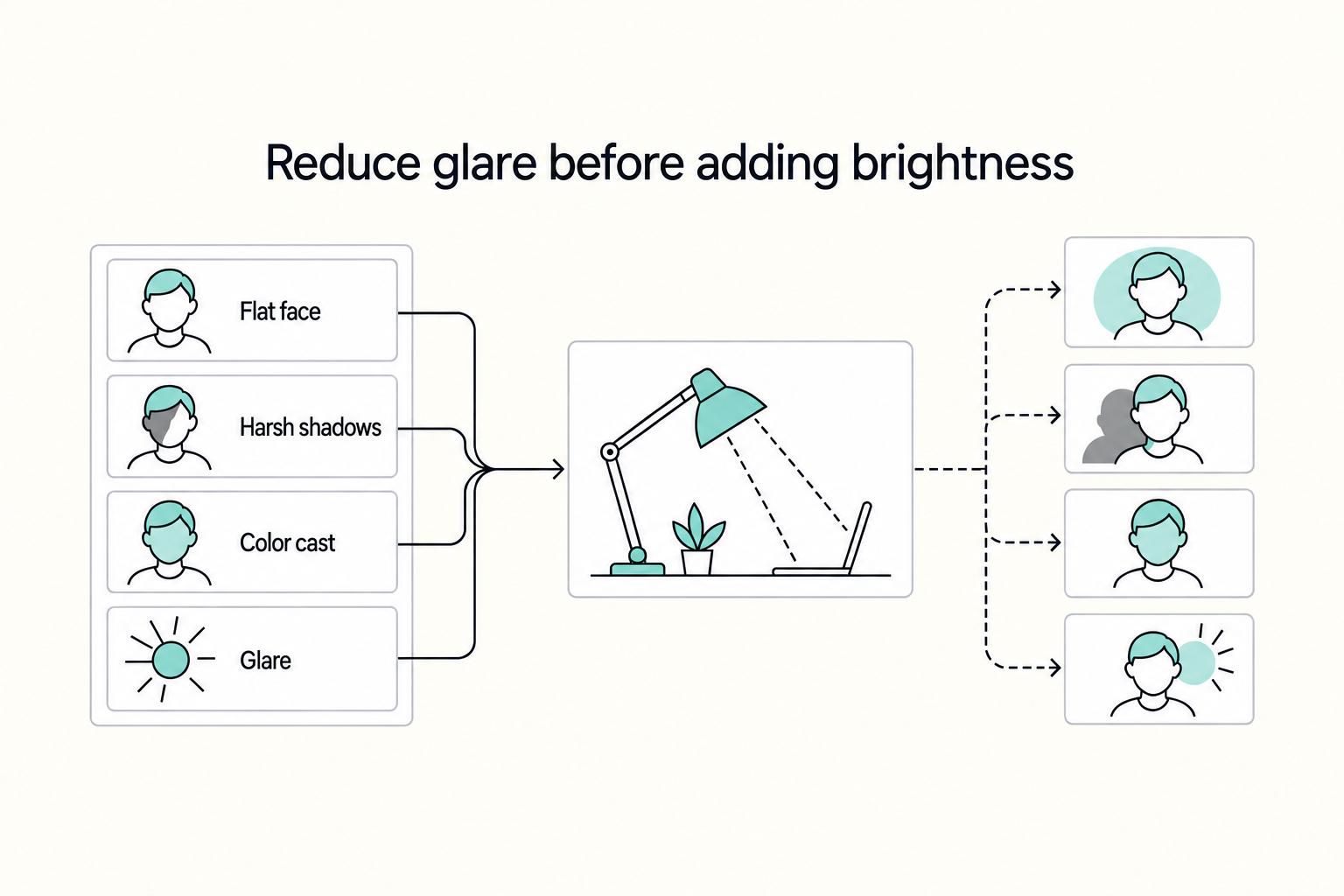
3. Reduce glare before adding brightness#
Controlled light is usually more useful on calls than raw intensity. Adjusting or softening light can help reduce harsh contrast and direct glare, improving comfort and on-camera clarity.
Check this both in product images and in your own preview. Watch for hotspots, reflections in glasses, and bright spill on monitor edges. If your eyes feel overworked, treat that as a setup issue to fix, not just an appearance issue to ignore.
| Video-call outcome | Likely lighting cause | Immediate correction |
|---|---|---|
| Flat face | Visual field is uneven | Reposition light and rebalance until facial detail is readable |
| Harsh shadows | Harsh contrast from placement or overhead light | Reposition or soften light, and reduce overhead influence |
| Color cast | Color-temperature mismatch or weak color fidelity | Use high-CRI light, adjust color temperature, or remove competing light |
| Glare | Bright source aimed into eyes, glasses, or screen | Re-aim or reposition lamp until direct glare is minimized |
Before important calls, run this quick check:
- Open camera preview and confirm your face is evenly readable.
- Check eyes, glasses, and monitor for direct glare.
- Compare on-camera color to what you see in the room. Adjust color temperature or competing lights if needed.
- Save a screenshot of the final setup so you can repeat it quickly.
This pairs well with our guide on The Best Calendar Apps for Freelancers Who Juggle Multiple Projects.
Calculating the ROI: Why a $300 Lamp Can Be Your Best Investment This Year#
Treat this as a business decision, not a style upgrade. If a $300 lamp helps you work with fewer interruptions and gives you a more consistent call setup, it may be worth it. If those changes do not show up in your day, it is probably not the right investment for you.
Based on the available excerpts, there is no verified desk-lamp benchmark for payback period, percent return, recovered-focus-time gains, durability, or warranty advantage. Treat those inputs as unknown until you verify them in your own setup.
1. Start with a simple ROI formula#
Use this fill-in model first: hourly value × recovered focus time × period.
| Formula part | Article definition |
|---|---|
| Hourly value | Your billable rate, or your own internal value per working hour |
| Recovered focus time | Time you believe you got back after changing your setup |
| Period | The window you are evaluating, such as a month or a quarter |
Run a before-and-after check instead of estimating from memory. Track your current setup, then track the new setup over the same kind of work and schedule. If the pattern does not change, do not force the ROI story.
2. Assumptions check before you estimate payoff#
Keep the estimate honest before you start assigning value. If the underlying assumptions are weak, the payoff number will be weak too. Use this quick check:
- Workflow fit: Are your core tasks long, desk-based, and concentration-heavy?
- Task timing: Do you do important work when your current lighting setup feels weakest?
- Fatigue pattern: Do your slowdowns appear during desk sessions, not just after dense meeting blocks?
- Setup quality: Is placement reducing glare and harsh shadows, or creating them?
- Control use: Will you actually use brightness and color controls, or leave one setting all day?
If these assumptions are weak, keep your ROI estimate conservative.
3. Compare ownership, not just price#
Price is the easy number. Ownership is where bad purchases show up. Before you buy, collect proof you can verify: spec sheet, warranty terms, return policy screenshot, and invoice path. If key details are missing, treat that as a risk signal.
| What to compare | Budget option | Mid-range option | Premium option |
|---|---|---|---|
| Ownership model | Verify total ownership path, not just checkout price | Verify support and service process | Verify support and service process |
| Durability signals | Verify materials, hinge feel, cable stress points | Verify the same checks after repeated adjustments | Verify the same checks and any published build details |
| Warranty quality | Verify exact coverage, exclusions, claim steps | Verify exact coverage, exclusions, claim steps | Verify exact coverage, exclusions, claim steps |
| Replacement friction | Verify shipping time, return flow, downtime impact | Verify shipping time, return flow, downtime impact | Verify shipping time, return flow, downtime impact |
4. Treat client perception as possible upside, then test it#
Better call lighting may improve how consistent and prepared you appear, but it is not guaranteed revenue. Treat it as upside, then test it.
On your next five important calls, keep camera angle and background fixed. After each call, log three items: visual consistency, your own energy level, and whether the conversation felt easier to move forward. If those signals improve, count that as support for the purchase alongside your focus-time math.
If you want a deeper dive, read Value-Based Pricing: A Freelancer's Guide. Before you buy, estimate the after-tax cost of your workspace upgrade with the Home Office Deduction Calculator.
Close the Decision on Risk, Productivity, and Presence#
Your shortlist should be enough to make a decision. Buy like the person who has to deliver under this light every day, not like a shopper reacting to price tags and feature badges.
The clearest way to close the decision is to test the lamp against the same three pressures that shaped the rest of this guide: risk, productivity, and professional presence.
Risk mitigation#
Decision question: will this lamp lower setup risk or add new fit and reliability issues? Buying criterion: verify desk fit and a published claim of steady output, such as "flicker-free illumination." Measure before you buy. A larger light bar or a longer arm can improve coverage, but on limited desk real estate, oversized hardware becomes a placement problem.
Productivity maximization#
Decision question: can you change settings quickly as your tasks change? Buying criterion: prioritize practical control you will actually use, such as multiple color temperatures, presets, or a wireless remote. A common mistake is buying for brightness alone, then leaving the lamp on one setting all day because adjustment is inconvenient.
Professional presence#
Decision question: will this setup help you appear clear on calls without making daily desk use harder? Buying criterion: choose adjustable, broad coverage you can verify in your pre-call preview and normal desk position. Tradeoffs matter here. One vendor frames this tradeoff directly: softboxes can create beautiful light, but may be hot, bulky, and hard to live with for everyday desk work.
| Decision lens | Common mistake | Better standard |
|---|---|---|
| Risk mitigation | Buying on price or star rating alone | Verify published dimensions, fit, and steady-output language you can confirm through specs and reviews. |
| Productivity maximization | Treating "bright enough" as the whole job | Prefer controls that reduce switching friction: presets, remote access, and multiple color-temperature options you will use. |
| Professional presence | Buying for looks or studio-style hype | Choose adjustable coverage you can confirm in a real video preview and daily working position. |
Run a one-day audit before you upgrade: one focus block, one video call, and one evening wrap-up. Note the first failure you see, whether that is fit, hard-to-change settings, or on-camera lighting, then fix that first. This keeps tradeoffs explicit and can improve professional reliability over time.
We covered this in detail in The Best Desk Chairs for Long Hours of Work.
When you finish your lighting upgrade, use the Gruv Tools library to tighten the rest of your solo-business operating setup.
Frequently Asked Questions
Are expensive desk lamps worth it for work?
They are worth it when they fix a real problem in your setup, not just when they look better on paper. If you notice glare, poor visibility, or eye discomfort during long screen sessions, better lighting can be a practical comfort and risk-reduction upgrade. Treat the benefits as possible, then validate them with a before-and-after check in your normal workflow.
What light color should you use?
Use adjustable settings instead of one fixed number for every task. DOE describes 2700-3600 K as generally recommended for many indoor general and task uses, with 3600-5500 K in the cooler range and 2700-3000 K in the warmer range. In practice, cooler light often helps contrast during detail-heavy work, while warmer light may feel better for evening wrap-up.
Can a desk lamp improve your video calls?
It can, but results usually depend on placement and testing. Set your lamp to light your face without adding glare to your screen, then run your app's pre-call video check. In Zoom and Google Meet, built-in lighting adjustments can reduce how much hardware correction you need in an already decent room.
What does CRI mean, and how much should you care?
CRI is a 1-100 scale for how colors shift under a light source compared with a reference at a similar color temperature. It is useful, but it is not a complete measure of light quality by itself. If you see only a CRI claim, verify the rest of the basics too, including dimming behavior, diffusion, and any published flicker or TLM details.
What matters more, adjustability or light quality?
Start with light quality, then add enough adjustability to place the lamp correctly for your desk. Even good hardware underperforms if placement creates reflections or uneven lighting. A practical check is whether you can light your keyboard or notebook clearly without introducing monitor glare.
Which extra features are actually useful?
Dimming is usually the first feature to prioritize because it helps you match lamp intensity to room and screen brightness across the day. Next, confirm a real safety certification mark in product details, such as UL or another NRTL-recognized path, rather than relying on marketing images alone. Convenience add-ons are optional if they do not compromise stability, space, or lamp-head performance.
Try a related tool
Researched and edited by the Gruv editorial team. Gruv builds cross-border billing, payouts, and finance-operations software for global businesses.
Sources
- archive.cdc.gov/www_cdc_gov/niosh/emres/longhourstraining/li...trusted
- catalog.cornell.edu/ecornell-catalog-coursestrusted
- ccaurora.edu/wp-content/uploads/2023/06/CCA-Guidelines-06...trusted
- courts.ca.gov/system/filestrusted
- energy.gov/energysaver/lighting-principles-and-termstrusted
- energy.gov/eere/ssl/articles/compact-fluorescent-lighti...trusted
- energystar.gov/sites/default/files/asset/document/Light%20B...trusted
- ftc.gov/business-guidance/resources/ftc-lighting-fac...trusted
Educational content only. Not legal, tax, or financial advice.
Related Posts

Value-Based Pricing for Freelancers Under Real Payment Risk
Value-based pricing works when you and the client can name the business result before kickoff and agree on how progress will be judged. If that link is weak, use a tighter model first. This is not about defending one pricing philosophy over another. It is about avoiding surprises by keeping pricing, scope, delivery, and payment aligned from day one.
The Best Ergonomic Gear for Your Remote Work Setup
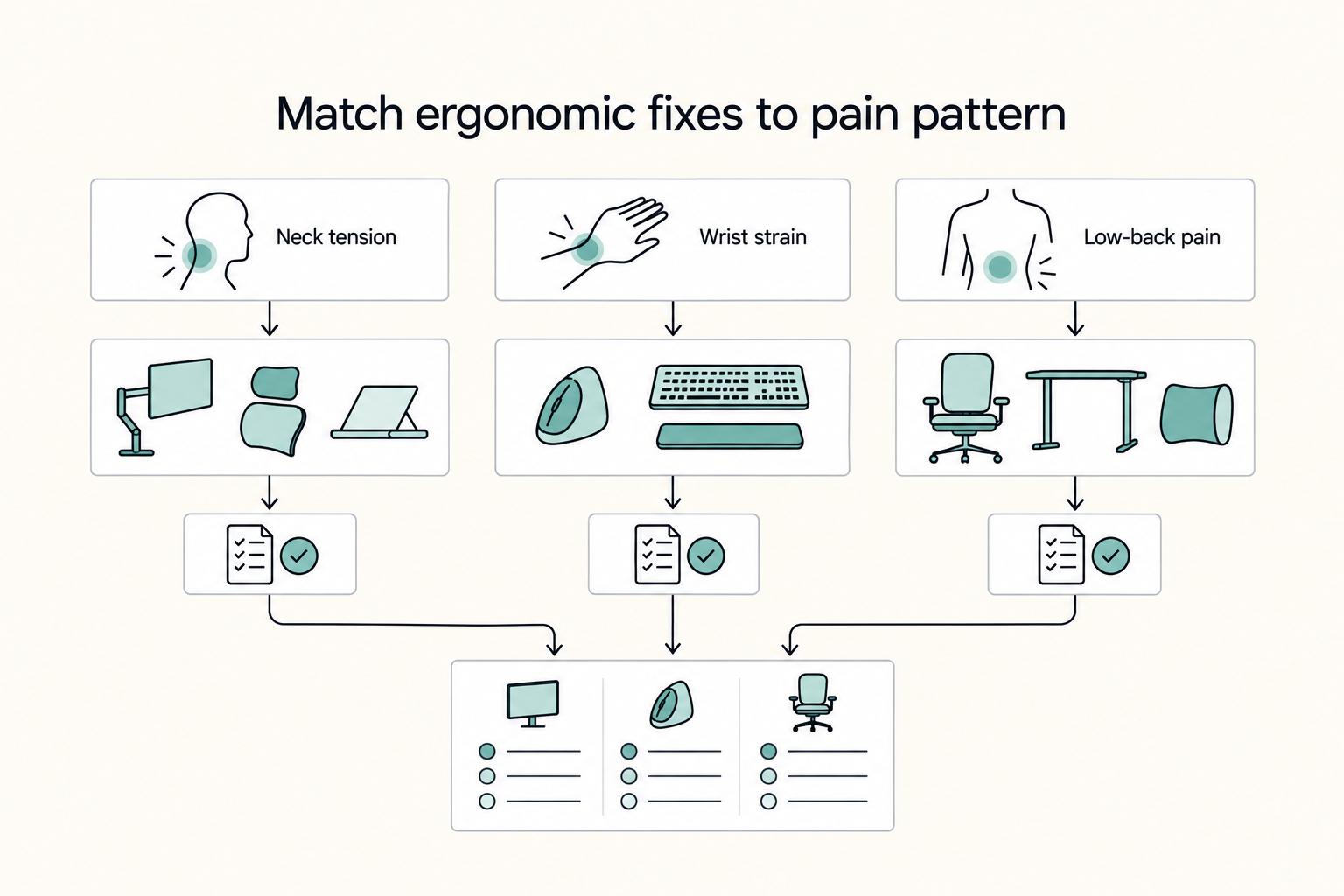
**Treat your ergonomic remote work setup as operating infrastructure, not a comfort splurge.** When posture breaks down, delivery quality and scheduling usually break down right after. Start by setting a baseline that protects your body and your business before you compare products.

The Best Gear for a Portable Home Office
Portable-office gear decisions are not directly tested in this guide, so use this as a practical framework rather than a proven standard.