
Quick Answer
Start with a fit audit, then buy only after written support checks pass. For best desk chairs, use hard checkpoints from your trial sit: feet flat at a usable seat height, a two-to-three-finger gap behind the knee, relaxed shoulders with arm support, and stable lumbar contact across typing, reading, and calls. Complete the purchase only when the seller documents the exact configuration, return steps, and warranty claim path in writing.
For a Business-of-One, your capacity for deep, focused work is a revenue asset. Every tool you buy should either protect that capacity or increase it. The chair you spend thousands of hours in each year usually gets treated as an afterthought, and that is a business mistake.
A premium ergonomic chair is not just furniture. It is equipment you use every day to protect focus, reduce strain, and lower the risk of physical downtime. The mindset shift is simple: stop buying like a consumer and start evaluating the chair like an operator. This guide walks through that decision with the rigor it deserves.
Phase 1: The Performance Audit: Defining Your Operational Requirements#
Start with fit, not brands. This phase is a pre-purchase fit audit, not a shopping round. The output should be a one-page chair spec sheet you can use to screen product pages and any trial sit. That is how you narrow the field without guessing.
| Audit area | What to note | Decision impact |
|---|---|---|
| Work session pattern | Longest uninterrupted seated blocks, task switching, and when discomfort appears first | Helps decide whether dynamic support and recline behavior are must-haves or nice extras |
| Dominant input motion | Whether your day is pointer-heavy or alternates between typing, reading, and video calls | Determines whether arm width, arm height, and recline stop settings are core requirements |
| Adjustment range | Seat height for flat feet or a footrest and seat depth with 2 or 3 finger widths behind the knee | Turns comfort into pass-fail criteria you can screen on a spec sheet or during a trial |
OSHA is clear that a well-designed, appropriately adjusted chair is an essential part of a safe and productive computer workstation. It also recommends trying different chairs before you buy. The goal here is simple: identify the adjustments you actually need, then treat any missing adjustment or failed fit check as a red flag, not a minor compromise.
- Map your work session pattern
Start with how long you stay seated before posture quality drops. Note your longest uninterrupted blocks, whether you switch tasks often, and what discomfort shows up first. Mayo Clinic points to common seated-work complaints such as neck and back pain and sore wrists and shoulders, so write down when those show up: after 45 minutes, after two hours, only on call days, only on editing days, and so on. Your session pattern helps you decide whether dynamic support and recline behavior are must-haves or nice extras.
- Map your dominant input motion
A chair that works for mostly keyboard work can feel wrong for heavy mouse work, even if both look premium. If your day is pointer-heavy, arm support may matter more than most buyers expect. A simple Mayo Clinic check helps here: your armrests should help keep elbows close to your body and shoulders relaxed. If you alternate between typing, reading, and video calls, recline control can matter more because you need support in more than one posture. Your movement profile determines whether arm width, arm height, and recline stop settings are core requirements. For example, Steelcase Gesture lists clear width between armrests at 305 to 560 mm, armrest height above the seat at 197 to 307 mm, and a recline range with three angle stop settings plus an upright back lock.
- Map the adjustment range you need
This is where you turn comfort into pass-fail criteria. Seat height should allow your feet to rest flat on the floor or on a footrest. Seat depth should support your thighs without pressing into the back of your knees. Steelcase's seat-depth check is practical here: look for a gap of 2 or 3 finger widths between the seat edge and the back of your knee. This converts vague comfort claims into screening rules you can verify on a spec sheet or during a trial.
| What you measure or check | Exact chair spec to verify | Why it matters | Example specs to compare | Trial period checkpoint |
|---|---|---|---|---|
| Floor to back of knee when seated | Seat height range | Helps feet rest flat and supports stable seated posture | Aeron Size B: 14.8" to 22.8"; Gesture: 415 to 518 mm | Sit fully back. If feet do not rest flat at any setting, reject it or plan for a footrest |
| Lower back to 2 or 3 finger widths behind knee | Seat depth range or seat slide | Prevents seat-edge pressure behind the knees | Gesture usable seat depth: 395 to 460 mm | You should have 2 or 3 finger widths behind the knee when seated upright |
| Seat surface to elbow with shoulders relaxed | Armrest height and width adjustability | Helps keep shoulders relaxed and forearms supported | Aeron arm height: 7.5" to 11.5"; Gesture arm width: 305 to 560 mm, arm height: 197 to 307 mm | Type for a focused work block. If shoulders creep up or elbows flare, arm fit is off |
| Back shape and torso fit | Lumbar adjustability, backrest contour, available sizes | Backrest should conform to natural spinal curve | Aeron comes in 3 sizes, A, B, and C | Sit for a short and longer session. If you keep shifting to find low-back contact, lumbar fit is not there |
| Task switching needs | Recline tension and stop settings | Supports upright work and easier posture changes | Gesture has 3 recline angle stop settings and upright back lock | Test upright typing, slight recline reading, and full recline call posture without losing support |
Two operator habits can help you avoid bad purchases. First, keep an evidence pack with your measurements, screenshots of the manufacturer spec page, and short notes from a shorter and longer sit test. Second, use a checklist mindset. CDC/NIOSH says "No" responses on a workstation checklist indicate potential problem areas that need further investigation. Treat your chair trial the same way.
Aesthetics still matter, just later. If two chairs both fit your spec sheet, then appearance, material finish, and camera presence can break the tie for your home office. Do not reverse that order. A chair that looks authoritative but misses your seat depth, arm range, or lumbar fit is still the wrong asset.
Once you know the fit requirements, you can look at cost with a much clearer head. If you want to expand the rest of your setup at the same time, see The Best Ergonomic Gear for Your Remote Work Setup.
Phase 2: The Investment Thesis: Justifying the Cost with Long-Term ROI#
Use a buy-or-no-buy worksheet, not sticker price alone. Your decision should come from three verified inputs: total ownership cost, usage intensity, and the cost of lost work if the chair fails your day.
| Decision area | What to verify | Decision check |
|---|---|---|
| Ownership cost worksheet | Verified price, shipping, assembly, replacement-part assumptions, expected years of use, return policy, and current warranty terms | If support terms are unclear before purchase, your downside risk increases |
| Real workload | Whether your day is closer to four-to-six-hour focus blocks or eight-plus-hour days | Spend more only when the extra controls map directly to your spec sheet |
| Downtime threshold | Your own revenue at risk for one disrupted day or one week of reduced output | Use your income pattern, not generic ROI claims |
| Tax treatment | Invoice, payment proof, a short business-use note, and current local rule details confirmed with a qualified local professional | Good records help; assumptions about rules do not |
For a Business-of-One, focused capacity is the asset. That is why this purchase belongs in business-asset logic, not casual furniture spending.
| Path | Ownership cost view | Adjustability depth to verify | Warranty/support checkpoint | Likely replacement or interruption risk |
|---|---|---|---|---|
| Low-cost | Verify current price plus shipping, assembly, and earlier replacement risk | Confirm Phase 1 must-haves: seat depth, arm range, lumbar range | Verify current warranty terms and who handles claims | Higher for four-to-six-hour sessions or longer, especially if heat or comfort breakdown appears early (a common foam failure point) |
| Mid-tier | Verify current price, paid add-ons, and parts access | Verify fuller fit controls: seat depth, lumbar range, arm movement for your task mix | Verify current warranty terms, return window, and parts process | Moderate if fit is strong and your daily sessions are not pushing endurance limits |
| Premium | Verify current price across a longer ownership horizon | Verify deeper tuning you will actually use: 4D armrests, recline controls, and size options where offered | Verify current warranty terms and service workflow before purchase | Lower when you regularly work eight-plus-hour days and the chair clearly matches your spec sheet |
- Build your ownership-cost worksheet
Use the verified price, then add shipping, assembly, replacement-part assumptions, and expected years of use. Save the return policy and current warranty terms in the same note. If support terms are unclear before purchase, your downside risk increases.
- Match spend to your real workload
Four-to-six-hour focus blocks and eight-plus-hour days are different endurance demands. Longer sessions expose weak materials and shallow adjustability faster. Spend more only when the extra controls map directly to your spec sheet.
- Set your downtime threshold
Estimate your own revenue at risk for one disrupted day or one week of reduced output. If that number is near or above the tier price gap, the cheaper path may carry more business risk. Use your income pattern, not generic ROI claims.
- Handle tax treatment as compliance, not sales copy
Keep the invoice, payment proof, and a short business-use note in your records. Then confirm deduction or depreciation treatment under your current local rules with a qualified local professional. Good records help; assumptions about rules do not.
Once your worksheet is complete, the purchase path matters as much as the model. For pricing logic you can apply across other business decisions, see Value-Based Pricing: A Freelancer's Guide.
Phase 3: Verify the seller, the offer, and the purchase path#
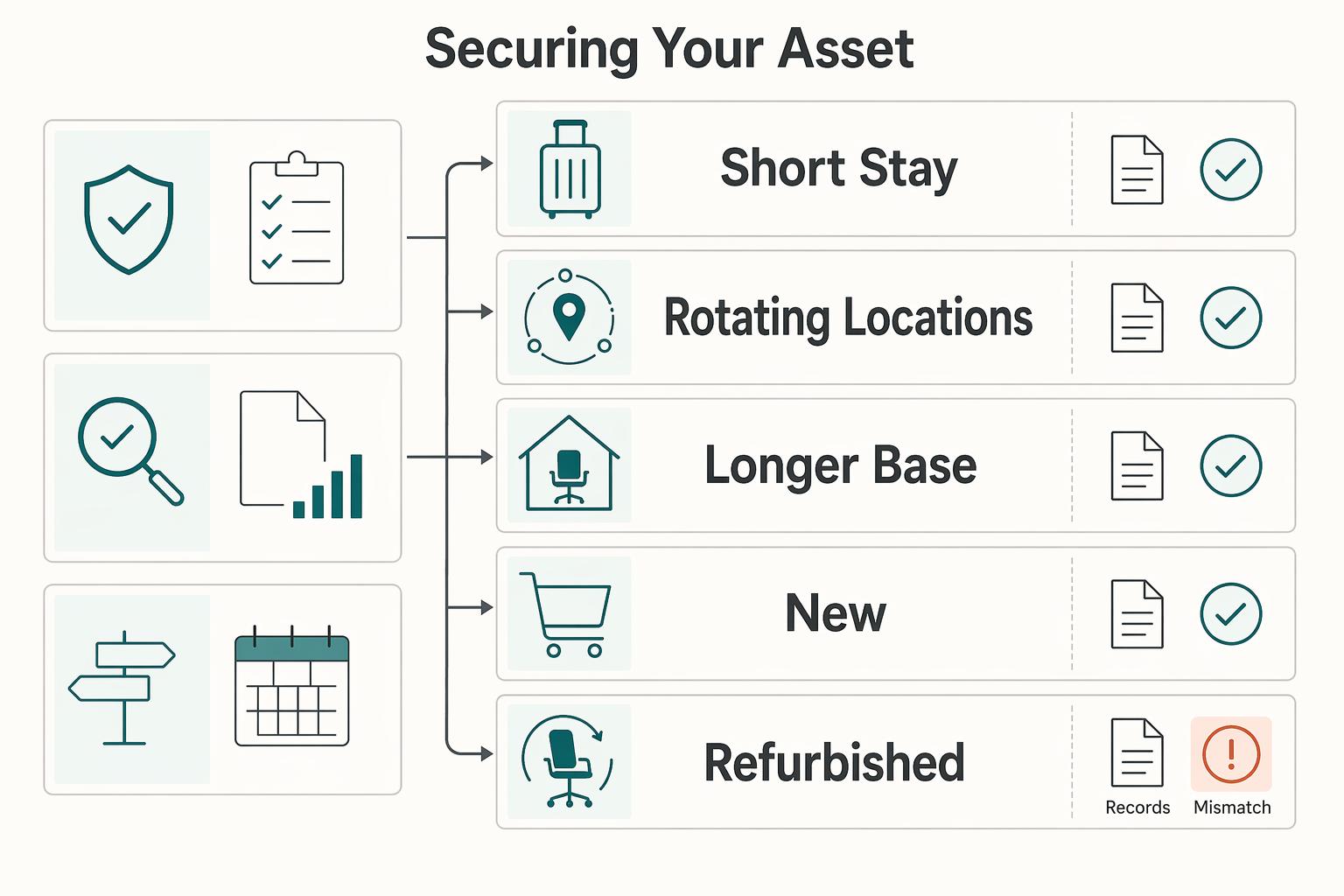
Run this phase as a procurement checklist: verify the seller, verify the offer, then choose the purchase path that fits how you actually work.
| Location pattern | Recommended path | Priority |
|---|---|---|
| Short stay | Use portable support accessories and rely on local seating | Convenience-first |
| Rotating locations | Prioritize coworking or furnished spaces that can confirm chair quality in advance | Predictability-first |
| Longer base | Buy locally when you have enough time to receive, test, and resolve issues before your next move | Serviceability-first |
- Choose new vs. refurbished with a verification sheet
Do not decide on upfront price alone. Compare only what you can document before payment.
| Option | What you verify before paying | What to record |
|---|---|---|
| New | Current price, written warranty scope, return terms, support channel | Record verified expected lifespan |
| Refurbished | Current price, written warranty scope, refurbishment process, replaced-parts documentation, return terms, support channel | Record verified expected lifespan and possible resale recovery |
If a refurbished listing is vague on replaced parts, condition grading, or post-sale support, treat the lower price as added risk.
- Vet the seller before comparing checkout totals
Start with legitimacy checks. If you use public procurement pages as a baseline, the GSA office furniture NSN page is a useful category reference, and it includes category artifacts such as Ergonomic Seating (PDF, 1 MB). It does not validate a private seller, but it reinforces a core control: share sensitive information only on official, secure websites.
| Seller type | Warranty scope to confirm | Parts authenticity check | Refurbishment transparency | Return terms to document | Post-sale support check |
|---|---|---|---|---|---|
| Manufacturer direct | Save the written warranty page with the exact SKU | Confirm invoice variant matches listing variant | Not applicable unless open-box is disclosed | Screenshot policy before payment | Confirm support portal/email before checkout |
| Authorized dealer | Confirm whether dealer or maker handles claims | Get written configuration/parts confirmation | Ask how open-box or floor models are labeled | Save listing and quoted terms in writing | Confirm who provides replacement parts |
| Refurbisher/reseller | Confirm what is covered, by whom, and claim path | Request documentation for replaced parts | Require process details plus condition photos | Get exact return steps in writing | Send a pre-sale support question and verify response quality |
If the seller will not answer basic support and condition questions in writing, do not buy.
- Pick the path that fits your location pattern
- Short stay: Use portable support accessories and rely on local seating when your stay is too short to justify buy/store/resell overhead.
- Rotating locations: Prioritize coworking or furnished spaces that can confirm chair quality in advance; ask specifically about seating quality, not just "desk setup."
- Longer base: Buy locally only when you have enough time to receive, test, and resolve issues before your next move.
When this strategy fits: convenience-first on short stays, predictability-first on rotating schedules, and serviceability-first on longer bases.
- Apply final risk controls before and after delivery
Keep a real trial and adjustment window. On delivery day, document carton condition, labels, wear points, controls, arm pads, casters, and any model or serial tags, then compare them against your saved listing, warranty page, and order confirmation. If fit or function fails, escalate in writing on the seller's documented support channel with photos, video, and your saved terms.
Once fit, channel, and support risk are controlled, your shortlist should narrow fast. For a step-by-step walkthrough, see The Best Standing Desk Converters for a Flexible Workspace.
The Gruv Index: Vetted Assets for the Global Professional#
Use this shortlist to pick a chair you can fit, test, and support over time. Start with Aeron, Gesture, and Series 1, then run the lumbar fit check before your return window closes.
Across every tier, apply one rule first: prioritize adjustability and a real trial path. If a seller cannot confirm configuration, warranty route, and return terms in writing, you are evaluating seller risk, not chair quality.
| Model | Best if your priority is... | Fit and adjustability | Thermal comfort | Warranty and return check | Refurbished reliability | Current price |
|---|---|---|---|---|---|---|
| Herman Miller Aeron | Sustained deep work with precise size matching | Sizes A/B/C; size B is designed to fit a broad range; PostureFit SL is an option to verify; A is tested/warranted to 300 pounds and under, B/C to 350 pounds and under | 8Z Pellicle is positioned as breathable | 12-year, 3-shift warranty; verify return terms for your exact order because official Herman Miller pages conflict | Mixed secondary market quality; verify size, parts, and support path before buying used | $1,460.00 to $2,585.00 |
| Steelcase Gesture | Long-term ROI through posture range | Steelcase positions it for a wide range of people and postures; height-adjustable lumbar support; 360-degree arms | Verify current upholstery and heat-retention tradeoff before purchase | Limited 12-year parts/labor warranty; Steelcase Store shows a 30-day return path in the contiguous U.S.; unauthorized-seller purchases can create claim risk | More reliable when remanufactured through a documented process with testing and new components | Verify current price band before purchase |
| Steelcase Gesture | Video-heavy client work with frequent posture shifts | Same Gesture fit strengths; useful when you switch between keyboard and speaking postures | Verify current upholstery and heat-retention tradeoff before purchase | Same Gesture warranty and return checks apply | Same Gesture resale and refurbishment checks apply | Verify current price band before purchase |
| Steelcase Series 1 | Mid-range value with known support terms | Positioned as an ergonomic entry point; weight-activated controls | Verify current seat/back material configuration before purchase | Limited 12-year parts/labor warranty; Steelcase Store 30-day return path in contiguous U.S. | Better as new unless a used seller documents parts and condition clearly | $530 |
| Branch Ergonomic Chair Pro | Lower upfront spend if you will verify details yourself | Verify current lumbar, seat-depth, and arm-adjustment details before purchase | Verify current material and breathability details before purchase | Branch states coverage is for new purchases from Branch or authorized sellers and requires registration within 7 days of receipt | Prefer new-only unless resale includes full parts and support documentation | $499.00 shown, $449.10 with save shown |
- Herman Miller Aeron. Best if your priority is sustained deep work.
Choose Aeron when fit precision is your first filter. Use official size guidance before checkout, and confirm the exact lumbar configuration on the order. Who should skip it: skip if you cannot verify size and lumbar in writing before payment, or if you strongly prefer a cushioned seat over mesh.
- Steelcase Gesture. Best if your priority is long-term ROI.
Choose Gesture when your day spans typing, reading, reclining, and device switching. The arm range and lumbar adjustability reduce mismatch risk if you test them during the return period. Who should skip it: skip if you only want mesh-forward thermal feel, or if you are buying secondhand without documented seller provenance.
- Steelcase Gesture. Best if your priority is video-heavy client presence.
Choose Gesture when calls dominate your calendar and you need stable arm support across different speaking and keyboard postures. If you buy through Steelcase Store in the contiguous U.S., the stated 30-day return path gives you a practical test window. Who should skip it: skip if you need a smaller, lower-cost chair footprint first.
- Steelcase Series 1. Best if your priority is mid-range value.
Choose Series 1 when you want a lower entry cost with visible policy support from a major manufacturer. It is a practical option when you do not need Gesture-level posture range. Who should skip it: skip if you already know you need maximum arm motion or the broadest fit envelope.
The non-negotiable feature is still adjustable lumbar support. Use this checklist during trial and setup:
- During trial: adjust lumbar until it fills your lower-back curve without forcing your torso forward.
- During setup week: test your real work postures (typing, reading, video calls), and confirm lower-back support remains stable across all three.
- Before return cutoff: document hot spots, numbness, lower-back fatigue, and control issues in writing; save photos of tags, controls, and wear points; escalate through the seller's documented support channel before day 30 where applicable.
- For Aeron specifically: confirm which Herman Miller return policy page governs your order, since official pages conflict on whether performance seating includes a $99 return shipping fee or a broader 30-day return promise.
You might also find this useful: The Best Standing Desks for a Home Office.
Conclusion: Make the Executive Decision#
If a chair cannot support your body through a normal workday and give you a clear path for returns or warranty service, it is not a smart buy. Treat this as a business decision, not a style choice. You are buying for comfort stability, focus continuity, and lower strain risk you can verify in daily work.
- Uptime
You need a chair that lets you work a full session without constant fidgeting, perching forward, or standing up just to reset your back. OSHA is clear that a well-designed, appropriately adjusted chair is an essential part of a safe and productive workstation. It also says you should try chairs before purchase. What matters is proven fit under your actual tasks, not a long feature list.
- Performance
Good seating does not magically make you more productive, but bad seating can quietly tax your attention all day. Mayo Clinic notes that chair height, posture, and equipment spacing all affect comfort, so test typing, reading, and video calls during any in-home trial or return window. The point is whether the chair disappears into the background of your work instead of becoming something you manage.
- Risk mitigation
CDC and NIOSH define ergonomics as fitting work to the worker to reduce injury risk, which is the right lens for this purchase. That means checking body fit and support details before you buy. If you are looking at an Aeron, use Herman Miller's height and weight size reference instead of guessing. Then verify the support path in writing, because warranty and return terms can vary by brand and purchase channel, and may vary by region. For example, Herman Miller cites many 12-year parts-and-labor warranties with exceptions, while return terms can differ across its store pages. Steelcase Store lists 30 days for new and unused returns.
Your decision checkpoint is simple: confirm fit, adjustability range, support policy, and the exact return path before you pay. Then go back to the comparison matrix and choose by your work pattern and body-fit needs, not brand prestige alone. Place the order only after those checks are documented.
For another workspace comfort angle, see The Best Desk Lamps for a Productive Workspace.
Frequently Asked Questions
What is the real ROI on a premium chair?
ROI is real only if the chair fits you and stays supportable over time. Price by itself tells you very little, so compare support, design, and value, not just the checkout total. Only buy when the seller can show the exact configuration, return path, and warranty channel in writing.
Can you write off a desk chair as a business expense?
Maybe, but you need local verification. Tax compliance has real cost, time, and burden. Tax treatment can vary by jurisdiction and business-use facts, so keep this neutral and confirm details with a credentialed tax professional. Save your invoice, proof of payment, and business-use notes now, then ask how current local deduction rules apply to your case.
Is a refurbished Herman Miller or Steelcase chair worth it?
It can be, if the seller proves what “refurbished” actually means. A key risk is a vague listing with no serial photo, no replaced-parts record, and no meaningful return option. Ask for model-tag photos, a written refurbishment checklist, warranty terms, and current market pricing verification before you pay.
What matters most if you work 10+ hours a day?
Fit and adjustability matter more than any one-size-fits-all claim. The practical checkpoints are height, recline, armrest position, and lumbar support, because a chair that only works in one posture can fail in real use. During your trial, test typing, reading, and video calls. If you get a lower-back hot spot or start perching forward, send it back.
Try a related tool
Researched and edited by the Gruv editorial team. Gruv builds cross-border billing, payouts, and finance-operations software for global businesses.
Sources
- bisbeeaz.gov/DocumentCenter/View/8472/City-Code-Updated-M...trusted
- cdc.gov/niosh/ergonomics/about/index.htmltrusted
- cdc.gov/niosh/media/pdfs/Computer-Workstation-Checkl...trusted
- dir.ca.gov/dosh/dosh_publications/easerg2.pdftrusted
- etd.ohiolink.edu/acprod/odb_etd/ws/send_file/sendtrusted
- gsa.gov/buy-through-us/purchasing-programs/requisiti...trusted
- osha.gov/etools/computer-workstations/components/chairstrusted
- osha.oregon.gov/OSHAPubs/checklists/ergonomics-workstations.pdftrusted
Educational content only. Not legal, tax, or financial advice.
Related Posts

Value-Based Pricing for Freelancers Under Real Payment Risk
Value-based pricing works when you and the client can name the business result before kickoff and agree on how progress will be judged. If that link is weak, use a tighter model first. This is not about defending one pricing philosophy over another. It is about avoiding surprises by keeping pricing, scope, delivery, and payment aligned from day one.
The Best Ergonomic Gear for Your Remote Work Setup
**Treat your ergonomic remote work setup as operating infrastructure, not a comfort splurge.** When posture breaks down, delivery quality and scheduling usually break down right after. Start by setting a baseline that protects your body and your business before you compare products.

The Best Standing Desks for a Home Office
Treat this as a durable business purchase, not a roundup-driven impulse buy. To reduce the odds of replacing a desk next year, follow a simple sequence: shortlist by how you actually work, separate directional claims from facts you can verify, then run pass/fail checks before you pay.