
Quick Answer
Choose the CRM that proves your real workflow in trial, not the one with the longest feature list. For a real estate agent, the right fit keeps one contact timeline from inquiry to close, shows consent and opt-out history, and enforces next-owner handoffs without manual cleanup. Run a live test with calls, messages, document changes, and stage updates, then verify you can do the same core actions from your phone before you commit.
The Best CRM for a Real-Estate Agent? You're Asking the Wrong Question.#
If you start with "what is the best crm for real estate agents," you will probably compare demos, feature grids, and pricing pages before you define what your business actually needs. That is backwards. A CRM is not just a contact database. It is where your leads, follow-ups, campaigns, client communication, and day-to-day visibility either stay organized or start slipping.
There is no universal best option. The better question is: what does your CRM need to do for you every single day, at your current stage, with your current budget, and inside your actual sales process? That is the filter to use throughout this article.
- Protect
Start by asking whether the platform keeps conversations, tasks, and client history in one place instead of scattered across inboxes, notes, and texts. What matters here is record clarity. If you cannot quickly verify what happened, who owns the next step, and where a lead stands, the tool is already creating friction.
- Systematize
Next, look at whether it fits how you actually work, not just how it looks in a polished demo. What matters here is adoption. Solo agents and small teams usually need something affordable, easy to use, and quick to implement. Growing teams need lead assignment, pipeline visibility, and integrations.
- Profit
Finally, check whether the tool helps you follow up consistently without pushing you into a bloated stack. The financial fit matters more than the feature count. A common failure pattern is spending $400 to $800 per month on complicated tools and automation before the next deal is even closed.
A practical checkpoint before any demo: write down the few jobs your CRM must handle every day, then judge each platform against that list. In the next sections, we will use that filter to evaluate platforms in real estate tech and lead management without getting distracted by shiny features. Related: The Best CRMs for Freelancers to Manage Client Relationships.
Pillar 1: Protect Your License - Is Your CRM a Shield or a Liability?#
Use protection as your first pass/fail filter. If a CRM cannot produce a clean, reviewable record of what was said, sent, approved, changed, and acknowledged, it is a liability regardless of how strong the automation looks.
This first filter also prevents expensive churn. Many agents switch systems because they evaluate features first, then discover later that records are incomplete, permissions are too broad, or consent handling depends on manual notes.
Make the audit trail non-negotiable#
For E&O readiness, test whether the platform can reliably capture four record types in your real workflow: communications, consent history, document versions, and activity logs. You should be able to review these records by contact and by date without piecing them together from multiple tools.
| Trial action | Record to review | Fail if |
|---|---|---|
| Create a lead | Lead creation event in the full history | Events are fragmented, manual-only, or hard to tie to one person and one timeline |
| Send a message | Message thread in the full history | Events are fragmented, manual-only, or hard to tie to one person and one timeline |
| Log a call note | Timestamped note in the full history | Events are fragmented, manual-only, or hard to tie to one person and one timeline |
| Upload and replace a document | Visible document history | Events are fragmented, manual-only, or hard to tie to one person and one timeline |
| Change ownership | Ownership change in the full history | Events are fragmented, manual-only, or hard to tie to one person and one timeline |
| Update consent | Consent history in the full history | Events are fragmented, manual-only, or hard to tie to one person and one timeline |
Contemporaneous documentation matters because disputes are decided on records, not memory. A timestamped note, the related message thread, and visible document history do not guarantee an outcome, but they give your broker, insurer, or counsel concrete evidence to evaluate.
In a trial account, run one end-to-end test: create a lead, send a message, log a call note, upload and replace a document, change ownership, and update consent. Then open the full history. If events are fragmented, manual-only, or hard to tie to one person and one timeline, treat that as a fail.
Treat TCPA and RESPA as design checks#
This is a workflow check, not legal advice.
For TCPA, verify that your process can record consent status, source, date, and unsubscribe history, and that automation can block outreach when consent is missing or unclear. Check current consent and outreach requirements against official legal guidance, broker policy, and vendor records before using this workflow.
For RESPA, verify that referral-related communication and related disclosures/documents can be kept in a reviewable file instead of scattered across texts, inboxes, and side spreadsheets. Check any current referral-related rule or disclosure requirement against official legal guidance, broker policy, and contract records before using this workflow.
Use a pass or fail grid in the trial#
| Control | Why it matters | How to verify in trial account | Red flag if missing |
|---|---|---|---|
| Security and outbound email controls | Client data and sender trust both sit inside the CRM. Some platforms also enforce verified sending domains for user-authored email. | Upload a sample file, review access controls, and test outbound sender/domain restrictions in the trial. | Access is overly broad, or outbound identity controls are weak or unclear. |
| Permission levels | Access should follow role as you add assistants or team members. | Create a limited user and test view, edit, export, and delete permissions. | Roles are too coarse, or practical least-privilege setup is not possible. |
| Auto-logging for communications | Manual logging is the first process to break under workload. | Connect core channels, run a test interaction, and confirm it appears automatically on the contact timeline. | Important activity appears only if entered by hand. |
| Consent controls | Outreach risk increases when consent lives in memory or free-text notes. | Add and remove consent on a test contact and confirm visible history plus automation behavior. | No clear date/source/history, or opt-out status does not reliably stop outreach. |
A lightweight CRM can pass this pillar if records are clear and controls are dependable. A larger platform can fail if logging, permissions, or consent handling only work after heavy customization. Once these protection controls pass, move to the next pillar and assess scalability and workflow fit. We covered this in detail in How to Structure a US LLC for Investing in Foreign Real Estate.
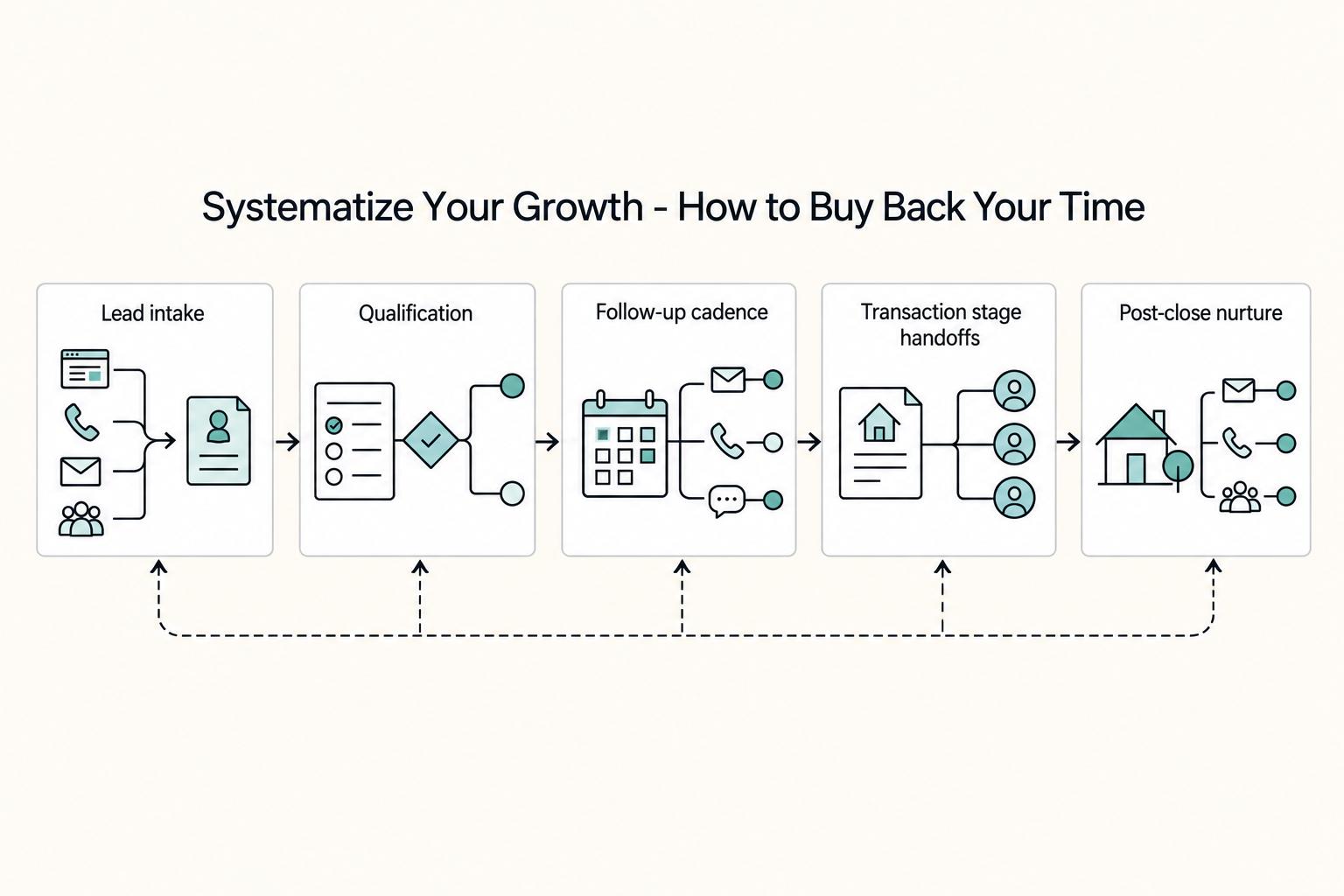
Pillar 2: Systematize Your Growth - How to Buy Back Your Time#
After your records are defensible, the next question is simple: does your CRM remove repeat work, or just store it? If follow-up still depends on memory, mood, or a notes app, growth stays uneven. Sustainable growth comes from systems, not willpower.
A practical real estate crm turns your client journey into visible, assigned, trackable actions. A five-minute daily review works only when the work is already queued clearly.
Map the work you want the CRM to run#
| Stage | CRM setup | Key point |
|---|---|---|
| Lead intake | Create one contact, one source tag, one owner, and one next task | If a lead can enter without an owner or due date, it will stall |
| Qualification | Maintain timeline, location, budget range, and financing status | The goal is usable sorting and reminder logic, not more admin |
| Follow-up cadence | Define day 0, day 1, and day 7 by lead type and test auto-created daily tasks and calendar entries | Manual task setup each time is a warning sign |
| Transaction stage handoffs | Require current stage, next deadline, open issue, and owner | Most handoff failures happen when the next action is missing |
| Post-close nurture | Run a dated long-tail plan for check-ins, referrals, and anniversary outreach inside the CRM | Consistency matters more than volume |
- Lead intake
Every new inquiry should create one contact, one source tag, one owner, and one next task. If a lead can enter without an owner or due date, it will stall.
- Qualification
Use a short field set you will actually maintain (for example: timeline, location, budget range, financing status). The goal is usable sorting and reminder logic, not more admin.
- Follow-up cadence
Define what happens on day 0, day 1, and day 7 by lead type. Then test whether the CRM can auto-create daily tasks and calendar entries; if intake still requires manual task setup each time, that is a warning sign.
- Transaction stage handoffs
When a record changes stage, require four items: current stage, next deadline, open issue, and owner. Most handoff failures happen when stage updates but the next action is missing.
- Post-close nurture
Run a dated long-tail plan for check-ins, referrals, and anniversary outreach inside the CRM. Consistency matters more than volume.
Compare for fit, not feature theater#
Use the same live tests across your shortlist so adoption, not marketing copy, drives the decision.
| Criteria | Why it matters | Follow Up Boss trial question | kvCORE trial question |
|---|---|---|---|
| Workflow automation depth | Cuts manual follow-up work | Does a new lead trigger a task or calendar event without hand entry? | Does a new lead trigger a task or calendar event without hand entry? |
| Lead routing flexibility | Reduces assignment bottlenecks | Can you route by source, agent, or rule you control? | Can you route by source, agent, or rule you control? |
| Task accountability | Surfaces dropped handoffs | Can you view overdue tasks by person and by stage? | Can you view overdue tasks by person and by stage? |
| Ease of adoption | Determines day-to-day use | Can a teammate learn the daily view in one sitting? | Can a teammate learn the daily view in one sitting? |
Avoid a one-size-fits-all lead plan. If your business mixes referrals, internet leads, and sphere follow-up, each path needs its own cadence and ownership rules.
Before committing, run five operational checks in a trial account: permissions, routing logic, templates, team visibility, and export readiness. Create a limited user, route a test lead, trigger a saved template, verify manager visibility on task completion, and export contacts plus activity history.
Mobile is the final gate. In your real deal flow, test whether you can open a contact, review history, add a note, update status, assign the next task, and confirm ownership from your phone. Any mobile gap here becomes a response-time and consistency bottleneck.
Once your workflow is repeatable and adopted, move to Pillar 3 and test the business result: is this setup improving margin and client lifetime value?
Pillar 3: Maximize Your Profitability - Beyond the Next Commission Check#
If your CRM only helps you chase the next deal, it stays a cost center. Treat profitability as two measurable outputs: client lifetime value you retain and admin time you recover.
| Review stage | Check each week | If weak, do this |
|---|---|---|
| Lead to appointment | Response speed, unassigned leads, and overdue first tasks | Fix routing and auto-create first-contact tasks |
| Appointment to active client | Stage aging and missing qualification fields | Reduce required fields and make the next task mandatory at stage change |
| Closed to repeat/referral | Whether closed clients entered long-tail nurture in the same week | Add a post-close workflow with owner, segment tag, and first follow-up date |
Use your own CRM data for this check, not vendor claims. If you cannot pull these inputs cleanly, that is a profitability risk because attribution will stay guesswork.
| Worksheet input | Where to pull it in your CRM | How to interpret it |
|---|---|---|
| Closed business by source | Pipeline reports plus source fields on closed records | If you cannot separate repeat/referral from other sources, attribution is too weak to guide spend. |
| Repeat and referral contacts | Tags, relationship labels, source history | Confirm the current benchmark from your CRM records; if this grows without matching closings, nurture is not converting. |
| Admin time recovered | Task/activity reports; auto-created vs manually created tasks | Confirm the current benchmark from your CRM records; if follow-up still depends on manual task entry, projected savings are inflated. |
| Partner-generated opportunities | Partner tags/source labels mapped to pipeline stages | Confirm the current benchmark from your CRM records; if partner activity is visible but inconsistent, tighten owner rules and next-task requirements. |
A common failure pattern is flawed buying criteria, then clunky day-to-day use or missing fit, then another migration. Before you commit, test export quality for contacts, source tags, stage history, and activity history. If that evidence pack is incomplete in trial, your reporting will be incomplete later.
| Profitability capability | Follow Up Boss | kvCORE / BoldTrail | What to verify in trial |
|---|---|---|---|
| Attribution visibility | Verify in trial | Verify in trial | Can you trust source-to-close reporting for repeat and referral channels? |
| Pipeline reporting depth | Verify stage aging, source filters, owner filters | Positioned as end-to-end lifecycle; verify stage views and filters in your workflow | Can you isolate bottlenecks instead of only reading top-line totals? |
| Lifecycle automation fit | Verify segment-based follow-up logic in your process | Positioned as integrated website + CRM with behavior-trigger signals; verify your required triggers live | Can the system trigger timely next actions instead of relying on bulk blasts? |
Build your referral engine as a working operating model across three segments: past clients, active sphere, and strategic partners. For past clients, automate anniversary check-ins and value touches. For active sphere, schedule recurring outreach and route engagement back to the contact owner. For strategic partners, track partner activity and require a next step after each introduction. Where your setup supports behavior signals (like a site revisit or saved property), use those triggers for immediate follow-up.
Run the same weekly RevOps review so changes compound:
- Lead to appointment
Check response speed, unassigned leads, and overdue first tasks. If leads stall early, fix routing and auto-create first-contact tasks.
- Appointment to active client
Check stage aging and missing qualification fields. If updates are inconsistent, reduce required fields and make the next task mandatory at stage change.
- Closed to repeat/referral
Check whether closed clients entered long-tail nurture in the same week. If they did not, add a post-close workflow with owner, segment tag, and first follow-up date.
Use your Pillar 1, 2, and 3 results together before choosing a platform. Pick the CRM that protects records, runs daily execution, and makes profitability visible, not the one with the lowest sticker price or longest feature list. For a deeper pricing lens, read Value-Based Pricing: A Freelancer's Guide.
Putting It All Together: Which 'Operating System' is Right for Your Business Archetype?#
Choose your CRM by your current operating constraint, not by feature volume. Your best fit depends on whether you are primarily solving for Protection, Systematization, or Profitability, and that filter is more reliable than comparing any platform as the default best crm for real estate agents. If you misclassify your constraint, you raise the odds of another failed rollout and another switch.
1. If you win on trust and discretion, you are a Protection-first solo agent#
Your priority is keeping a complete, defensible communication record without adding friction to client service. Your core risk is fragmented history across inboxes, texts, notes, and reminders.
Your non-negotiable is a contact-level defensible audit trail. In demos, ask to see one contact from first inquiry through close, then confirm communication history is captured automatically in one timeline. If history depends on manual notes, Pillar 1 is weak.
2. If you are building consistency across people, you are a Systematization-first team lead#
Your priority is consistent execution even when you are not personally driving each step. Your core risk is workflow drift across agents and handoffs.
Your non-negotiable is automation that enforces next actions, not optional task creation. In demos, ask what happens after lead assignment, after appointment set, and after close. If stages can stall without required follow-up or clear ownership, Pillar 2 is weak.
3. If you run the business as a portfolio of tools and outcomes, you are a Profitability-first broker#
Your priority is reliable visibility across the business, not just inside one system. Your core risk is disconnected tools that force manual stitching, duplicate entry, and weak attribution.
Your non-negotiable is integration readiness with your broader real estate tech stack. In demos, ask how data moves between CRM, analytics, lead generation, pipeline management, and routine task workflows. If the CRM cannot act as the center of that environment, Pillar 3 is weak.
| Archetype | Best fit if... | Watch-out | Required capability |
|---|---|---|---|
| Protection-first solo agent | Your business depends on trust, discretion, and complete records | Communication history is scattered or manually logged | Automatic, contact-level audit trail of client communications |
| Systematization-first team lead | You need consistent execution across agents and handoffs | Work stalls when someone misses the next task | Automation that assigns, tracks, and advances follow-up |
| Profitability-first broker | You need one operating view across multiple business tools | Reporting is stitched together by hand across disconnected systems | Integration readiness plus clear cross-system visibility |
How to choose#
- Identify your current archetype based on today's constraint, not future ambition.
- Validate that choice against Pillars 1-3: record protection, workflow consistency, and profitability visibility.
- Shortlist tools that prove audit-trail visibility, workflow enforcement, and integration readiness in live demos.
You might also find this useful: The Best CRMs with Sales Pipeline Features for Freelancers.
Your Business Is an Asset - Choose a CRM That Treats It That Way#
Your CRM choice is an operating decision, not a feature-shopping exercise. If your records are scattered, handoffs are inconsistent, or your data cannot move cleanly, your workload stays fragile.
- Resilience
Start by checking whether your records stay usable under pressure. In the demo, open one contact and verify communication history, timestamps, and a clear activity trail you can inspect without piecing things together from inboxes or memory. If continuity depends on manual copy-paste, you should expect avoidable surprises.
- Scalability
Growth is mostly a handoff problem before it becomes a hiring problem. Verify that leads from your website, social channels, and portals land in one place, that ownership can be reassigned cleanly, and that the system connects with your MLS and calendar. Also ask about implementation, customization, and import/export format, because teams often need to adapt their process to the software's workflow assumptions.
- Value
Real value comes from daily use and decisions you can act on. A contact-list-only tool is usually too thin if you need one system for lead management, communication, listings, and transactions. Check whether reports answer practical questions (for example, lead source, stage, and last-contact visibility) and whether you can export what you need.
| Pillar | Must-have now | Must-have before growth |
|---|---|---|
| Resilience | Inspectable contact activity history | Access/permission model that supports handoffs |
| Scalability | Central lead capture across channels | Repeatable ownership transfer and export-ready data |
| Value | Reports your team will use every day | Reporting depth that still works as volume and team complexity increase |
Choose the platform that fits your current operating model and your likely handoff or expansion path. If you want the best crm for real estate agents, prioritize record quality, transferability, and usable reporting, then compare cost to expected return. Verify any vendor performance or ROI benchmark against current vendor, contract, and source records before using it. This pairs well with our guide on The Best CRM for Independent Consultants.
Frequently Asked Questions
How do you check compliance risk without overclaiming what a CRM can do?
Do not ask whether a CRM is “compliant.” Ask to see one contact from first inquiry to close and verify whether email, text, and call history are captured without manual data entry. If the record depends on copied notes, or if the team cannot explain how record history is captured and who can view it, treat that as a real risk.
What should you verify for consent and communication controls?
Look for a clear place on the contact record for consent status, communication preferences, and opt-out history, and ask for a live walkthrough of how those fields are handled. Ask the vendor to show how an opt-out is recorded, how it appears to users, and whether you can export that history if needed. Do not rely on broad legal claims here. Verify the current legal context separately.
How should you evaluate ROI without getting trapped by monthly pricing?
Start with adoption, not feature count. If setup takes a week, it probably will not get used. Then compare annual cost against follow-up consistency and reporting visibility you can actually act on. Migration support matters more than people admit, so ask whether import is self-serve or whether a done-for-you import service handles mapping and contact cleanup.
Should you buy differently if you are solo now but may add people later?
Yes, but do not overbuy too early. If you are solo, mobile use and simple daily upkeep matter because you work from your car, open houses, and coffee shops, not a desk. If you expect a team, verify lead routing and agency-wide pipeline visibility now, because a common failure mode is paying more per user later while still lacking manager-level reporting visibility.
What matters more: lead flow or nurturing past clients?
It depends on how your business actually wins. If your business is referral and repeat heavy, a pure pipeline-first tool may be the wrong shape for your work. Published stats on referrals and repeat business vary, so confirm the latest market data before leaning on any one number. In practice, ask whether the CRM supports engagement cadences based on relationship priority, not just deal stage, across a database that may grow from 200 to 2,000 contacts.
Try a related tool
Researched and edited by the Gruv editorial team. Gruv builds cross-border billing, payouts, and finance-operations software for global businesses.
Sources
Includes 5 external sources outside the trusted-domain allowlist.
- clame.nyu.edu/index.jsp/E1D1G7/316444/RealEstateAgentGuide...trusted
- sec.gov/Archives/edgar/data/1855747/0001193125212170...trusted
- snap.berkeley.edu/project/9274006trusted
- andreagordon.com/blog/real-estate-success-in-five-minutes-a-dayexternal
- bemorerelatable.com/blog/best-crm-for-realtorsexternal
- blog.buffini.com/from-chaos-to-control-systemize-your-busines...external
- evinciblesolutions.com/top-10-crm-software-for-real-estateexternal
- forbes.com/advisor/business/software/best-real-estate-crmexternal
Educational content only. Not legal, tax, or financial advice.
Related Posts

Value-Based Pricing for Freelancers Under Real Payment Risk
Value-based pricing works when you and the client can name the business result before kickoff and agree on how progress will be judged. If that link is weak, use a tighter model first. This is not about defending one pricing philosophy over another. It is about avoiding surprises by keeping pricing, scope, delivery, and payment aligned from day one.

Best CRM for Freelancers Who Need Reliable Client Follow-Up
If your client work is solid but your admin lives across email, notes, calendar alerts, and a spreadsheet, your CRM choice will succeed or fail on operations, not features. That is why so much advice on the **best crm for freelancers** misses the real issue. The main risk is not choosing a tool with too few buttons. It is choosing one that looks polished in a demo but still lets follow-ups slip when work gets busy.

The Best CRMs with Sales Pipeline Features for Freelancers
If your follow-up lives across email, a notes app, calendar reminders, and memory, the issue is not effort. It is control. You do not need the **best crm with sales pipeline** on paper. You need a tool you will update in the moment and review regularly, because that is what keeps deals moving.