
Quick Answer
There is no single best editor for every freelance web developer. VS Code fits flexible, client-specific workflows if you can manage extensions and profiles well, WebStorm suits larger or compliance-heavy projects that benefit from built-in depth, and Sublime Text works for speed-first workflows that rely more on external tools. Choose by testing real client work through productivity, professionalism, and protection.
For a freelance professional, the code editor is not a minor preference. It is the factory floor of your business of one, a core asset that shapes profitability, client trust, and your ability to keep operating well under pressure. Every minute spent fighting your tools, hunting for context, or repeating work that could be automated is time you cannot bill.
That is why editor optimization is not a luxury. It is part of running the business well. The most useful way to judge it is through three lenses:
- Productivity: How does your editor increase billable output and your effective hourly rate?
- Professionalism: How does your setup help you fit into client teams and earn trust quickly?
- Protection: How does your development environment reduce risk for both your business and your clients?
Look at your editor this way and it stops being a passive text box. It becomes an active part of how you create value, keep work moving, and avoid preventable mistakes.
Part 1: The Productivity Engine#
If you want your editor choice to improve profit, judge it by the repeat work it removes from your week. The right setup does not need to be universal or flashy. It needs to shorten common edits, support reliable debugging, and help you get to a reviewable commit with less cleanup.
Project fit matters more than editor loyalty. In practice, IDE selection depends on project requirements, and a multi-IDE setup can make sense when client work varies. For web development work, that usually means matching the tool to the shape of your client load instead of forcing one app into every job.
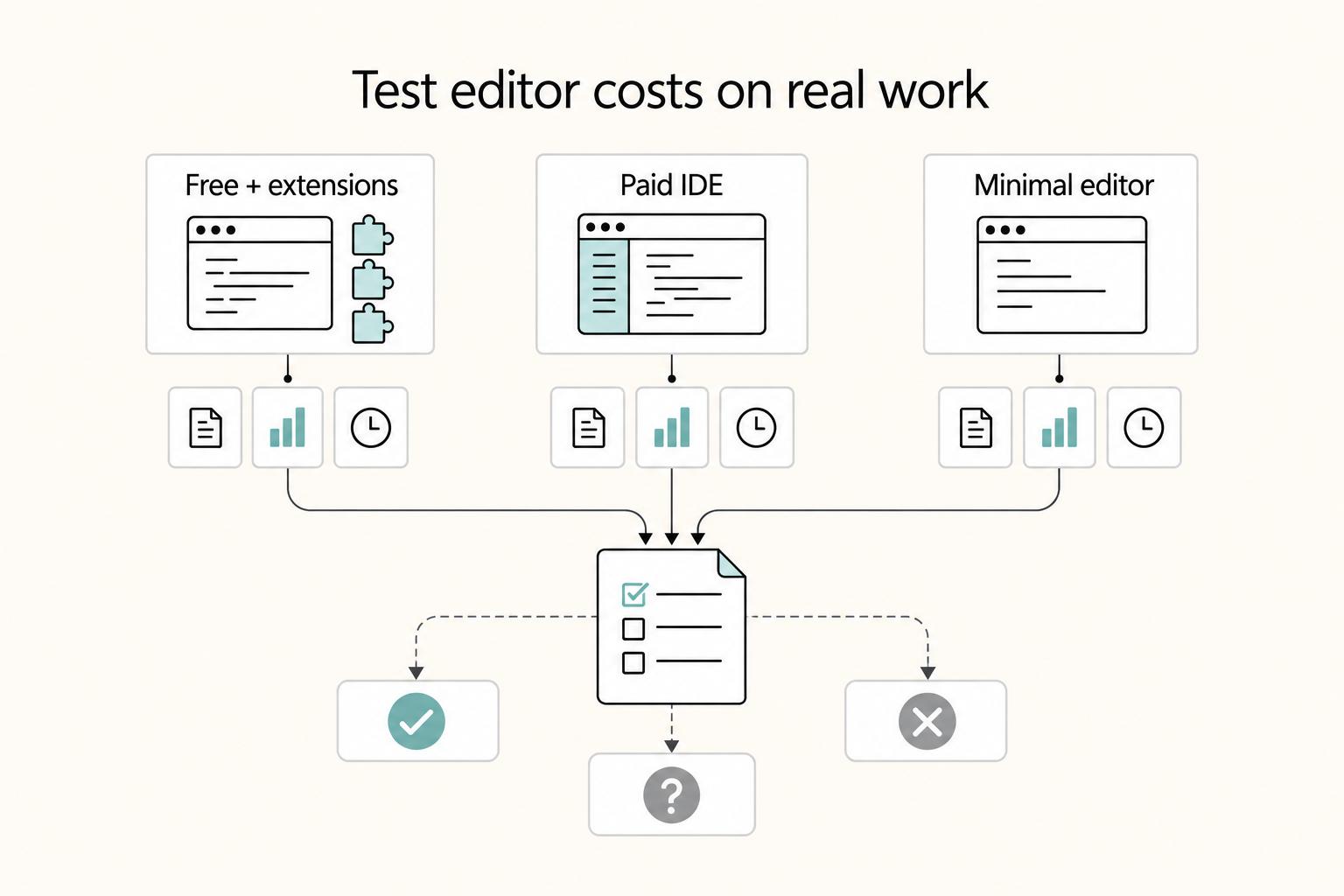
Price the setup, then test it on real work#
The editor versus IDE distinction matters most when your projects get larger and you spend more of the day inside one codebase. A code editor is built to make writing and editing easier, faster, and more accurate. An IDE brings a broader toolset, with core functions that include editing, testing, and debugging. That extra depth can help, but only if it reduces friction in the work you actually do.
| Setup | Typical fit | Cost input | Main productivity gain | Hidden cost to watch |
|---|---|---|---|---|
| Free editor + paid AI add-on | Mixed client work, low upfront spend, heavy plugin use | Editor: free; AI add-on: current plan price pending vendor/source-record verification. | Flexible workflow and fast iteration when configured well | Extension upkeep, prompt habits, and rule tuning take time |
| Paid IDE | Larger web apps, more debugging, more work in one place | IDE: current plan price pending vendor/source-record verification. | Editing, testing, and debugging closer together, with less tool switching | Subscription cost and learning curve |
| Minimalist editor | Small sites, quick fixes, low-resource machines, fast startup preference | Editor: current plan price pending vendor/source-record verification. | Lightweight performance for focused edits and short sessions | More manual steps once projects get complex |
For a simple breakeven check, compare monthly tool cost against your billable rate divided by 60. You do not need a perfect ROI model. You need to know whether the setup removes enough friction from real client tasks to justify the cost and upkeep.
Before you commit, run one grounded test: use your top two options on an actual client repo, or a close internal stand-in, then compare what you learn with practitioner feedback and broader review sampling. That mirrors the hands-on plus review-based approach used in editor roundups. It is usually more useful than picking based on screenshots or hype alone.
Use refactoring and debugging where mistakes are expensive#
Refactoring earns its keep when it lowers rework risk in tasks you already do, especially changes that touch many files. When tool support handles those changes instead of manual find and replace, you can reduce avoidable cleanup work.
After any automated refactor, run one explicit verification pass before review. Search for old symbols or names while the context is still fresh. If issues survive into review, delays can become the bottleneck. A common failure mode is a large PR sitting for days; context fades and frustration rises.
The same discipline helps during debugging: use reproducible checks and verify key conditions before treating a change as a fix.
Let AI draft, but keep judgment and tracking with you#
AI helps most when it removes draft work and repetitive edits. For high-risk logic and client-specific rules, you still need human review.
| Situation | Recommended focus |
|---|---|
| Most of your week is large-app maintenance | Prioritize tooling that keeps editing, testing, and debugging close together |
| You dislike maintenance overhead | Prefer fewer extensions and more built-in capability |
| You need billable output quickly | Choose the option you can validate on a real repo this week, not the one with the highest customization ceiling |
For a couple of weeks, track accepted versus rejected suggestions in a simple note, commit tag, or PR comment. You do not need a formal scorecard. You need evidence about fit. Does the assistant help on your recurring task mix, or does it mostly generate edits you end up rewriting? Also watch setup overhead. Some productivity tooling only pays off after you invest time tuning rules and habits.
If you need a quick decision rubric, use this now:
- If most of your week is large-app maintenance, prioritize tooling that keeps editing, testing, and debugging close together.
- If you dislike maintenance overhead, prefer fewer extensions and more built-in capability.
- If you need billable output quickly, choose the option you can validate on a real repo this week, not the one with the highest customization ceiling.
For a step-by-step walkthrough, see The Best PDF Editors for Freelancers.
Part 2: The Signal of Professionalism#
Your editor setup signals professionalism when it helps client teams review, run, and continue your work without extra translation. Most clients do not care which tool you prefer. They care whether your output is consistent, predictable, and handoff-ready.
| Handoff item | Requirement |
|---|---|
| Setup steps | Reproducible setup steps from clone to local run |
| Scripts | Consistent scripts for dev, build, lint, and test |
| Commit history | Readable commit history with meaningful messages |
| Run and test commands | Clear run and test commands in README or project notes |
| Editor setup | Client trust impact | Handoff quality | Maintenance burden |
|---|---|---|---|
| Default install | Can work for solo delivery, but gives a weaker signal on shared repos | Inconsistent if behavior depends on personal habits | Low |
| Standardized team profile | Clear signal that you can align to team conventions | More consistent formatting and routine tasks | Medium |
| Fully documented workspace | Strong signal for longer engagements and multi-developer continuity | Most reproducible setup and day-to-day execution | Medium to high |
Team alignment stack
The practical move is to turn personal preferences into shared repo behavior. Use a small stack: .editorconfig, formatter/linter config, workspace settings, and pre-commit hooks. The goal is simple: another developer clones the repo, saves a file, and sees the same formatting and baseline checks you see.
Validate this from a clean profile or machine, not from your tuned environment. If formatting changes unexpectedly or lint checks fail without clear setup steps, review friction is already in the workflow.
First-week navigation
Professionalism shows up in your first week, when you need to trace feature flow, map dependencies, and find likely ownership quickly. In this context, the editor-versus-IDE distinction matters: a code editor is primarily focused on editing, while an IDE is a broader environment that can include debugging and project management tools.
Use a simple execution test on each assignment: where does the request enter, what does it affect, and who likely owns this area? If your tool has limited built-in debugging, compensate with disciplined project search and explicit run steps so you can still move cleanly from code path to validation.
Handoff-ready delivery
Handoff quality starts before your last commit. The standard is continuity: can the client team run, test, review, and extend your work after you exit?
Keep this checklist in-repo before the engagement closes:
- Reproducible setup steps from clone to local run
- Consistent scripts for dev, build, lint, and test
- Readable commit history with meaningful messages
- Clear run and test commands in
READMEor project notes
A polished setup helps, but your operating discipline is the real signal. Better handoffs also make pricing and scope conversations easier to defend; revisit that in Value-Based Pricing: A Freelancer's Guide. You might also find this useful: The Best Project Management Tools for Freelance Developers.
Part 3: Your Editor as a Shield: Mitigating Client Risk#
Your editor setup is part of your client-risk surface, not just a personal preference. To build trust, document how you handle extensions, prompts, secrets, and outbound data so your controls are repeatable instead of improvised.
| Baseline step | What to verify |
|---|---|
| Separate client profile or workspace | Verify it opens cleanly |
| Extensions for that client's repo | Approve only the minimum extensions needed |
| Telemetry and AI-tool settings | Document them and note the verification date |
| Client secrets | Keep them out of global editor settings, snippets, and shared histories |
| Repository-specific settings | Store them with the project, not in your universal defaults |
| Local security check and CI dependency checks | Run one local security check in the editor and confirm CI covers dependency checks |
| AI-generated code | Define what requires human review before commit |
Treat every extension as a client-risk decision.
Install an extension only when you can explain why it is needed, what it can touch, and why it belongs in this client context.
| Extension type | Trust signal | Verification action | Reject condition |
|---|---|---|---|
| Formatter or linter | Clear, narrow purpose tied to repo standards | Test on a non-client or throwaway repo first and confirm it only changes expected files | It rewrites code unexpectedly or conflicts with the repo's committed config |
| AI coding assistant | Clear review policy for generated code and prompts | Confirm where prompts or code may be sent, then record the client decision | You cannot explain what leaves the machine or who reviews generated output |
| Security scanner | Findings are understandable and fit your stack | Run it on a sample branch and check whether results are practical | It floods you with noise you will ignore or duplicates a stronger approved control |
| Convenience extension | Specific time-saving use on this client | Read the extension page and check what access it requests | It needs broad access that is hard to justify for a minor feature |
Create a real client boundary, not just a cleaner home screen.
A client boundary only works if it changes behavior: one client, one isolated editor context, one approved extension set, and repo-specific settings stored with that project rather than in global defaults. When you switch clients, switch context fully.
Keep secrets out of global snippets, synced settings, and reusable prompt history. The common failure mode is usually not dramatic; it is an avoidable mix-up, like the wrong token in the wrong terminal or one client's context leaking into another repo.
Turn telemetry into a client-policy checklist.
Treat telemetry and sharing controls as a checklist you verify per client project. Cover the editor, extensions, and integrated AI tools: telemetry status, data-sharing status, approved use, and last verification date.
One checkpoint matters here: where a tool offers opt-out preferences, the flow may require both selecting the opt-out choice and saving preferences. In your notes, mark the setting path as pending until you verify it against the product or provider source records.
Put AI use under governance, not vibes.
The core question is governance: "AI is writing code. Who's governing it?" Since "vibe coding" entered the conversation in February 2025, the practical issue is not whether you use AI, but whether you review, test, and trace what it produces.
The tradeoff is speed versus confidence. A practitioner report says AI-assisted tools can do unexpected things; in one 90-minute workshop, a generated app "turned out to be a mess." The same report also showed AI improving generated test code by removing duplicate interactions, adding assertions, and abstracting steps into page objects. Use AI for drafts and scaffolding, then apply human review before commit.
Use layered security checks instead of trusting the editor alone.
In-editor checks are useful, but they are only one layer. A stronger model combines in-editor scanning, dependency or security checks in CI, and pre-commit or pre-push gates where your team chooses to enforce them.
Review your baseline regularly as standards change over time. What matters most is alignment: your local checks, CI checks, and commit gates should reinforce the same stop conditions.
For every new client project, apply this minimum secure baseline and record when you verified it:
- create a separate client profile or workspace and verify it opens cleanly
- approve only the minimum extensions needed for that client's repo
- document telemetry and AI-tool settings, then note the verification date
- keep client secrets out of global editor settings, snippets, and shared histories
- store repository-specific settings with the project, not in your universal defaults
- run one local security check in the editor and confirm CI covers dependency checks
- define what AI-generated code requires human review before commit
Related: How to Choose a Tech Stack for Your SaaS Product.
Part 4: The 2026 Editor Showdown: A Business Analysis#
Choose your editor as an operating decision, not a preference debate. In 2026, the useful shift is from autocomplete hype to workflow architecture, so your decision should come from three checks: capability on real work, maintenance cost over time, and client-risk tolerance.
A March 2, 2026 roundup notes that teams often get stuck choosing tools at project start, so use a short matrix before you switch.
| Business criterion | VS Code | WebStorm | Sublime Text |
|---|---|---|---|
| Setup overhead | Verify how many extensions, tasks, and settings you need before day-1 delivery | Verify how much of your normal flow works before extra plugins | Verify what work stays outside the editor for linting, testing, and debugging |
| Refactoring depth | Run one real refactor test (for example, auth or routing) and log what is native vs extension-driven | Run the same test and log what is native vs plugin/config-driven | Run the same test and log what remains manual or external |
| Debugging maturity | Test your actual breakpoint + run/debug path on one active repo | Test the same repo and same path | Test the same repo and include external tools you rely on |
| Extension risk surface | List every approved add-on and why it is needed for this client | List required plugins and client justification | List packages/plugins and client justification |
| Team standardization fit | Check whether another person can reproduce your setup from notes | Check whether your setup can be documented with minimal exceptions | Check whether others can follow your workflow with any required external tooling |
| Long-term maintenance load | Track break/fix time and config drift for 2 weeks | Track update friction and exceptions for 2 weeks | Track maintenance effort inside and outside the editor for 2 weeks |
VS Code#
Best fit: solo rapid delivery, if you can enforce one client, one profile, and one approved extension list. Trial it on one active project and count what you truly need to code, debug, test, and ship. If extension count and upkeep keep growing, optimize your current setup before adding more tooling.
WebStorm#
Best fit: compliance-heavy client work, when you want a workflow you can explain and document clearly. Use one concrete refactor scenario (for example, a legacy auth cleanup) and record what worked natively, what needed configuration, and what failed. Before standardizing, verify current plan pricing and AI feature availability directly.
Sublime Text#
Best fit: performance-first specialist workflows, when responsiveness is a top constraint and you accept more external tooling where needed. Test your largest repo and most difficult real files instead of relying on old anecdotes. A 2017 lag discussion is useful as a warning pattern, not as a 2026 benchmark.
Use a low-risk migration pattern: trial one active project, define success criteria before day 1, keep your previous editor config untouched, and document extension approvals plus telemetry/AI settings. If velocity or quality is down for more than a week, optimize your current stack; if outcomes are stable or better with lower maintenance/risk, switch deliberately.
If you want a deeper dive, read How to Calculate ROI on Your Freelance Marketing Efforts.
Your Editor Is a Strategic Decision#
Your editor choice is an operating decision, not a taste decision: the fit can change your productivity, code quality, and daily development experience. The practical goal is balance. A tool that is too simple can become an obstacle as your work gets more complex, while a tool that is too complex too early can slow you down.
Use this rubric#
| Decision lens | VS Code | WebStorm | Sublime Text |
|---|---|---|---|
| Work type | Use it as a trial candidate when you want to evaluate real workflow fit in a live repo, not by reputation. | Prefer this lane when you want to test a fuller IDE path instead of a lighter editor path. | Prefer this lane when a lighter editing workflow is the priority. |
| Client expectations | Keep it only if your setup stays explainable and repeatable during client delivery. | Keep it only if the added IDE depth helps more than it complicates your process. | Keep it only if your external tools and plugin choices still keep delivery clear and consistent. |
| Risk tolerance | Fit is stronger if you are comfortable owning setup choices and ongoing checks. | Fit is stronger if your risk preference favors a more complete IDE-style environment. | Fit is stronger if you accept that more controls may live outside the editor. |
For Sublime Text, a few grounded specifics matter: it is listed as cross-platform (Windows, Mac, Linux), supports a wide plugin network, and one 2026 roundup lists it at $99 USD with three years of updates.
How to choose now#
- Test all three options on one active client project, not a sample repo.
- Classify each option first (lighter editor vs fuller IDE) so complexity fit is explicit.
- Record only three outcomes per option: where you moved faster, where code quality felt stronger, and where process friction increased.
- Choose the one that gives the best balance for your current work, then standardize on it for the next delivery cycle.
We covered this in detail in Best No-Code Tools for Freelancers Who Need Clean Handoffs.
Frequently Asked Questions
Is WebStorm worth the cost for a freelance developer?
It can be worth it if professionalism, clearer documentation, and lower setup ambiguity matter more than maximum flexibility. Test it on one active paid project, then compare one real refactor and one debugging session against your current setup before deciding.
How do I secure VS Code for professional client work?
Use a client-specific profile or workspace, approve only the minimum extensions, and keep repo-specific settings with the project. Verify telemetry and AI settings, review each extension's purpose, and make sure credentials, snippets, and settings do not cross clients before the first commit.
What is the best code editor for large, complex web applications?
Start by trialing a language-targeted IDE such as WebStorm on the same repo and tasks you use in VS Code. It matters most when project navigation, debugging, and project-wide changes affect your productivity, so test one real auth, routing, or data-model change and compare where the tool helps or stays manual.
What is the main difference between VS Code and WebStorm?
VS Code is better when you want to assemble a flexible environment yourself, while WebStorm gives you more capability in place from the start. The practical tradeoff is setup effort versus built-in depth, so compare extensions, debugging, and refactoring on one repo.
Is Sublime Text still relevant in 2026?
Yes, if speed and low interface friction are your priority and you accept that some tasks may happen outside the editor. It fits focused coding and file work better than all-in-one workflows, so test it on your largest repo and hardest files before deciding.
Can AI code assistants replace the need for a powerful IDE?
No. AI can speed up drafts, tests, and summaries, but it does not replace manual review, testing, or inspection of security-critical logic. Native integration may help adoption without guaranteeing deeper analysis quality, and the article notes that many PR summaries were descriptive rather than analytical.
Try a related tool
Researched and edited by the Gruv editorial team. Gruv builds cross-border billing, payouts, and finance-operations software for global businesses.
Sources
Includes 8 external sources outside the trusted-domain allowlist.
- automationpanda.com/category/developmentexternal
- cloudbees.com/blog/5-code-editors-for-web-application-and-...external
- elegantthemes.com/blog/resources/best-code-editorsexternal
- emergent.sh/learn/claude-code-vs-cursorexternal
- geeksforgeeks.org/blogs/best-ide-for-web-developersexternal
- kodus.io/en/best-developer-productivity-toolsexternal
- manus.im/blog/best-ai-tools-for-code-reviewexternal
- medium.com/coding-nexus/not-cursor-claude-or-vscode-thi...external
Educational content only. Not legal, tax, or financial advice.
Related Posts

Value-Based Pricing for Freelancers Under Real Payment Risk
Value-based pricing works when you and the client can name the business result before kickoff and agree on how progress will be judged. If that link is weak, use a tighter model first. This is not about defending one pricing philosophy over another. It is about avoiding surprises by keeping pricing, scope, delivery, and payment aligned from day one.
How to Calculate ROI on Your Freelance Marketing Efforts
If you want ROI to help you decide what to keep, fix, or pause, stop treating it like a one-off formula. You need a repeatable habit you trust because the stakes are practical. Cash flow, calendar capacity, and client quality all sit downstream of these numbers.
How to Choose a Tech Stack for Your SaaS Product
**Choose your SaaS tech stack by business risk first, then pick frameworks your team can ship and run without heroics.** If you are building independently, that fear is rational. You can launch fast, then pay for it later through rework and slower delivery once customers depend on you.