
Quick Answer
Choose the best brand guideline templates based on where decisions happen: PDF for fixed client-facing reference, Figma for active design execution, and Notion for an internal operating hub. Then make the system usable by adding a named owner, version marker, and source link, and enforce those rules during proposal, kickoff, and feedback. The template format matters less than whether people can find current assets and follow one approval path.
Your Brand Guide Isn't a Creative Project - It's a Critical Business Asset#
Treat your brand guide like an operating document, not a design exercise. If it is vague, buried in an old PDF, or missing from the places people actually work, you end up with inconsistent client-facing materials, slower production, and extra rework.
| Reference | Primary use | Grounded difference |
|---|---|---|
| Brand guidelines | Set verbal and visual standards across channels | Should govern proposals, client portals, design files, and internal docs |
| Style guide | Show what the brand looks like | Narrower than what most businesses need |
| Broader operating guide | Help people decide what to make, how to phrase it, and what is off-brand before review | Often more useful in real work than a style guide |
- A rule book, not a mood board
Brand guidelines are standards for how your business shows up verbally and visually across channels. In practice, that means the guide should govern what appears in proposals, client portals, design files, and internal docs, not just showcase logos and color swatches. What matters is control. The moment a contractor, VA, copywriter, or developer touches your materials, you need a documented reference that keeps the output cohesive.
- A style guide is narrower than what most businesses need
People often use style guide and brand guidelines interchangeably, but a broader guidelines document is usually more useful in real work. A style guide tells people what the brand looks like. A broader operating guide helps them decide what to make, how to phrase it, and what is off-brand before work gets sent for review.
- Usability decides whether the guide works
A common failure mode is not that the guide is missing. It is that the guide exists and nobody uses it because it lives in an old PDF no one can find. Use a simple checkpoint: can the right person access it quickly, share it easily, and trust that it is current enough for real work?
A single-document reference can work well if it is detailed, updated, and written for creators. That is the lens for the rest of this article. We will judge templates by governance, consistency, and execution support, not visual polish alone. Related: How to Create a Brand Style Guide for a Client.
Why Your 'Brand Guide' is Failing (And How a 'Brand OS' Protects Your Profit)#
If your guide cannot settle decisions in proposals, handoffs, and approvals, it is not doing its job. You need a usable Brand OS: clear rules, a clear owner, and a clear escalation reference for decisions the document does not cover.
Most failures look routine, not dramatic. A contractor grabs the wrong logo, a proposal uses different colors than your site, or a client says "make it feel more premium" and no one can point to a standard. Teams go looking for the latest logo and find seven conflicting versions, or the brand book sits in a SharePoint PDF only three people know how to use. Under deadline, that turns into shortcuts, workarounds, and avoidable revision churn.
- Risk control
A weak guide leaves room for interpretation. Your designer, VA, and copywriter can all believe they are "on brand" while still producing mismatched outputs. A Brand OS reduces that ambiguity with approved assets, usage rules, and one escalation reference for edge cases, so handoffs rely on standards instead of memory.
- Pricing confidence
Consistency does not automatically increase rates, but it does create trust signals you control. When your proposal, kickoff deck, client portal, and invoice follow the same standards, you look easier to buy from. That first impression is defensible because your decisions are repeatable, not improvised.
- Fewer unpaid revisions
Unpaid revisions often start as vague feedback and expand because no shared rule exists. When your system names the decision owner and escalation reference, approvals get faster and subjective loops lose momentum. You can respond with: "This follows the approved rule; if we want to change the rule, we escalate."
| Common client request | Brand OS response | Business impact |
|---|---|---|
| "Can we use the other logo file?" | "Use the approved primary logo from the current asset folder. Archived variants are not client-facing. Confirm variant names in the asset index." | Fewer mismatches across proposal, deck, and final delivery files. |
| "Can we make this blue feel stronger?" | "Use the approved primary color for this use case. Confirm the exact swatch or hex in the guide before changing it." | Less visual drift and fewer approval loops driven by preference. |
| "Can we make this copy sound more premium?" | "Use approved tone examples and messaging rules. If this case is not covered, escalate to the owner or fallback reference." | Faster approvals and less unpaid rewriting. |
Use one practical governance check: can someone outside your head find current assets, apply the rules, and know who decides when the rule is unclear? If not, you do not have a taste problem. You have a governance problem: rules, owner, escalation reference.
If you want a deeper dive, read Value-Based Pricing: A Freelancer's Guide.
The 3 Pillars of a Brand OS: Assets, Usage Rules, Voice#
Your template only works when the decisions are already defined. In this Brand OS framework, you lock three layers: the assets, the usage rules, and the voice.
Before you document those layers, do one strategy checkpoint: write your purpose, vision, mission, and values. If positioning is unclear, your narrative and outputs drift, and reviews become subjective.
| Pillar | What to lock | Common failure if missing | What improves when enforced |
|---|---|---|---|
| Visual Integrity | Logo, color, type, current asset source | Old files and close-enough substitutions | Cleaner approvals and more consistent output |
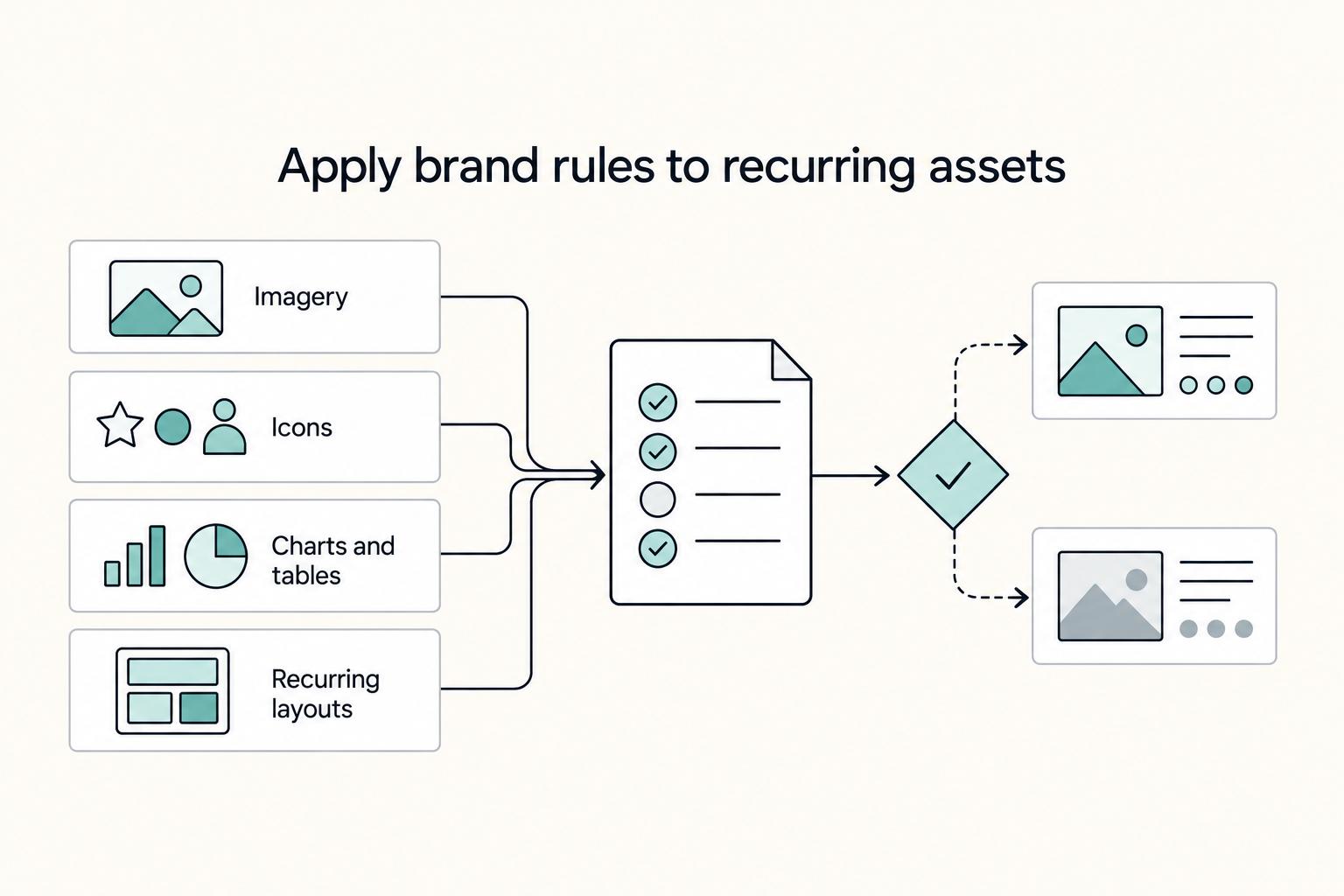
| Application & Context | Rules for imagery, icons, charts, layouts, recurring use cases | Touchpoints feel unrelated even with the right logo | Better cohesion across proposals, social assets, deliverables, and handoffs |
| Voice & Personality | Tone rules, core messages, editorial choices, content themes | Messaging gets scattered and revisions stay subjective | Easier delegation and faster copy decisions |
1. Visual Integrity#
Start by locking what people grab first: approved logo files, active color palette, and type choices. This is the layer your proposal decks, social assets, client deliverables, and handoff files rely on most.
A practical anchor is a Visual Identity Checklist. Keep it operational: approved logo versions, where files live, active colors, active fonts, and what misuse looks like in your context.
Minimum viable standard: One current asset folder, one page of approved logo variants plus misuse examples, one color reference for live channels, one type hierarchy (headline/body/caption), and one named owner for replacements or updates.
Run a quick test: ask someone to update one proposal cover, one social tile, and one client-facing PDF using only the guide. If they still need to ask which file is current, this pillar is not locked yet.
2. Application & Context#
This is the pillar that makes outputs feel consistent after they leave the asset page. You can use the right logo and still ship work that feels off if imagery, icon sets, charts, or layouts are inconsistent.
| Element | What to document | Minimum standard |
|---|---|---|
| Imagery | How imagery should look in your real workflow | One short image-style note |
| Icons | How iconography should look in your real workflow | One icon-consistency rule |
| Charts and tables | How charts and tables should look in your real workflow | One chart/table style example |
| Recurring layouts | How repeat-use layouts should look in proposal decks, social assets, client reports, and handoff files | One approved example for each recurring asset type |
Sequence matters: strategy before templates, then usage rules before production. Document how imagery, iconography, tables, and repeat-use layouts should look in your real workflow: proposal decks, social assets, client reports, and handoff files.
Minimum viable standard: One approved example for each recurring asset type, one short image-style note, one icon-consistency rule, one chart/table style example, and one folder of reusable references.
If every deliverable still needs taste-based cleanup, your rules are too implicit.
3. Voice & Personality#
If the visuals are stable but the messaging keeps changing, this is the gap. You need written guidance for how you sound, what you emphasize, and which phrases define your offer. A Brand Voice Questionnaire can help force those choices.
| Element | What it covers | Minimum standard |
|---|---|---|
| Tone descriptors | How you sound | Three tone descriptors with 'not that' contrasts |
| Offer description | Which phrases define your offer | One approved offer description |
| Editorial style | Editorial choices | One short editorial style note |
| Content pillars | What to emphasize in published content | 2-4 content pillars if content is part of your workflow |
| Approved examples | Examples from real emails, deck copy, or social captions | 2-3 approved examples |
If you publish content, define 2-4 content pillars before planning or drafting. That keeps messaging focused instead of scattered. Pair those pillars with tone rules and a short glossary of client-facing terms so proposals, captions, emails, and instructions sound like one business.
Minimum viable standard: Three tone descriptors with "not that" contrasts, one approved offer description, one short editorial style note, 2-4 content pillars (if content is part of your workflow), and 2-3 approved examples from real emails, deck copy, or social captions.
Validate this pillar by comparing your proposal intro, one recent social post, and one onboarding email. If they sound like different people, your voice is still habit, not standard. We covered this in detail in The Best Notion Templates for Freelancers.
Choosing Your Chassis: The Right Template for the Job#
Choose your chassis by how people will use the guide day to day, not by which format looks nicest. You need one format that people can find, trust, and follow as the latest version.
Treat this section as operating policy: assign ownership, show a visible version/date, and keep one clear source of truth so outdated guidance does not keep circulating.
| Chassis | Best fit | Maintenance effort | Collaboration behavior | Version-control risk | Client-facing authority | When it breaks | Handoff requirement |
|---|---|---|---|---|---|---|---|
| PDF (Canva or InDesign) | Formal reference for proposals, kickoff docs, and scoped deliverables | Reissue and redistribute when standards change; archive prior exports | Strong for review and approval; limited for live editing | Older exports can keep circulating if version/date is unclear | High when you need a fixed attachment to project documents | Teams keep using downloaded copies without checking the latest file | Cover/footer with version + update date + owner + source-of-truth link, plus approved logo use, exclusion-zone guidance, and misuse examples |
| Figma | Active design execution where rules must sit close to production files | Keep components, styles, and usage notes aligned in one maintained system | Good for live collaboration during production | Drift appears when library assets and written rules diverge | Useful in delivery workflows; may still need a fixed summary for formal approvals | People "fix" brand rules ad hoc inside live files | Published guide file with named current library, usage notes, and a quick verification task someone else can complete without guessing |
| Notion | Internal operating hub for rules, examples, links, and repeat templates | Maintain page structure, links, and embedded assets so the hub stays current | Good for cross-functional context sharing | Duplicate pages and stale links can create "which one is current?" confusion | Strong internally; pair with fixed export when a formal artifact is required | The workspace becomes a document dump with no latest-version marker | Home page that points to current PDF/Figma source, asset location, voice rules, and recurring templates (including creative brief templates where used) |
- PDF deliverable in Canva or InDesign
Use this when you need a controlled, client-facing artifact you can attach to proposals, onboarding, or scope documents. It fails when the guide is treated as living guidance but the PDF is not reissued, so old files keep getting reused. Before you roll it out: Owner: the designated owner | Review cadence: the agreed review cadence | Source of truth: the primary folder or link.
- Figma for active design execution
Use this when brand rules need to stay close to real production work. It fails when components, styles, and written rules stop matching, and the team starts making local fixes that create inconsistent output. Before you roll it out: Owner: the designated owner | Review cadence: the agreed review cadence | Source of truth: the file or library link.
- Notion as the internal brand hub
Use this when you need one place for visual rules, writing guidance, examples, and operating templates. It fails when pages duplicate, links age out, and nobody can tell which guidance is current. Before you roll it out: Owner: the designated owner | Review cadence: the agreed review cadence | Source of truth: the workspace URL.
For a step-by-step walkthrough, see The best 'Creative Brief' templates.
Put the Guide to Work at Proposal, Kickoff, and Feedback#
Your guide only works when you use it at decision points, not when it sits in a folder. Put it to work in three places: proposal, kickoff, and feedback.
| Step | Where it lives | What artifact to share | What risk it prevents |
|---|---|---|---|
| Proposal | Proposal, SOW, or cover email | Current guide link with version/date/owner | Early scope decisions based on personal preference instead of approved rules |
| Kickoff | Shared hub, kickoff deck, or approved PDF | Single source-of-truth link, approval path, and key-rule summary | Mismatched logos, off-brand colors, and conflicting tone across contributors |
| Feedback enforcement | Comment thread, revision log, or change-request doc | Rule reference, compliant alternative, and exception note if needed | Uncontrolled revisions, misalignment, and avoidable delays |
- Put it in the proposal
Trigger: You send the proposal or SOW. Action: Add the current guide link and state that deliverables will be reviewed against that version. Include version/date, owner, and source-of-truth location so everyone works from one reference.
Expected client behavior: they review the guide before approval and flag known exceptions early. Reusable template: "The approved brand guide for this project is [link], version [date/version]. Work will be reviewed against this document unless we approve a written exception in [change-request process]."
- Make kickoff the formal handoff
Trigger: Scope is approved and production starts. Action: Walk the team through the approved source of truth and name who can approve exceptions. Cover logo usage guidance, writing/copy rules, resource links, and the escalation contact.
Expected client behavior: they confirm the approval path and route conflicts to the named approver. Reusable template: "The approved brand reference is the hub, PDF, or Figma link. Brand exceptions require approval from the named approver. If a request conflicts with the guide, we pause and confirm before changes."
- Enforce it inside feedback loops
Trigger: Feedback conflicts with an approved rule or comes from someone outside the approval path. Action: Reference the rule, offer one compliant option, and log an exception request if they still want the change.
Expected client behavior: they choose the compliant option or approve an exception through the agreed process. Reusable template: "This request conflicts with the approved logo, color, or tone rule in the referenced source link. We can proceed with the compliant version, or log a change request for the approver. Compliant alternative: the compliant option."
Use this consistently to keep brand decisions aligned and reduce confusion from conflicting logos, colors, or tone. You might also find this useful: A guide to creating 'Brand Guidelines' for a client.
Your Brand Isn't Just a Logo - It's Your Most Valuable Asset. Protect It.#
Your guide only works if you use it in real decisions, not after the work is done. Call it a Brand OS if you want, but keep it practical: it is your decision system for approving assets, handling feedback, and keeping outputs consistent when choices are not obvious.
- Define decisions, not just visuals.
Start with audience, purpose, owner, and version date. A guide for internal review should read differently from one shared with a client, and a file without ownership or a current date quickly turns into guesswork.
- Convert taste debates into rule checks.
When you choose imagery, set headline styles, or review a last-minute client request, check the written rule first. If feedback conflicts with the guide, cite the section and treat it as an exception until the named approver signs off.
- Make it usable this week.
Keep the structure easy to scan, use readable body text, and avoid formatting that slows review. Basic readability choices, including legible fonts at 10-12 point, make the guide easier to use. If you start from a template, verify the prefilled examples before you share it, since template content can be outdated.
Apply this now: document the rules, set one review workflow, and run three approval checkpoints (draft, revision, final). That gives you a more reliable way to reduce subjective revision loops, delegate with less back-and-forth, and deliver more consistently. This pairs well with our guide on The Best Software for Creating Case Studies.
Frequently Asked Questions
What should a working brand guide include?
Start with five core rule areas: logo usage, color palette, typography, imagery style, and tone of voice. Those areas give you a practical baseline before you polish layout or switch templates.
Do I need a style guide, full brand guidelines, or a brand book?
Use a brand style guide when you mainly need visual rules such as fonts and colors. Use brand guidelines when you need standards for how the brand should represent itself in digital products. Use a brand book when you also need deeper brand story and strategy.
Which format should I choose: PDF, Figma, or Notion?
The grounded comparison here is limited: digital guidelines are generally easier to access, update, and share than PDFs. A strict best-fit matrix for PDF vs Figma vs Notion is not established by this evidence, so choose the format your team will keep current and actually use.
How does a guide actually reduce revision loops and make delegation cleaner?
A guide can work as a single source of truth, which helps teams align marketing, content, and product work to shared standards. Without clear guidelines, teams can drift into inconsistent visuals and messaging across channels.
How do I enforce it with clients without turning every comment into an argument?
Keep feedback anchored to the documented rules and point to the relevant section when comments conflict. Consistent use of one shared guide can reduce repetitive back-and-forth and keep decisions tied to agreed standards.
Are free templates good enough, or should I pay for one?
Grounding here does not show that paid templates are inherently better than free ones. A template is good enough if it clearly captures the five core rule areas and stays easy to use and maintain.
How detailed should your guide be if you work solo?
Do not assume solo operators need a different minimum scope than teams. Start with the same five core rule areas, then add detail where it helps keep outputs consistent.
Try a related tool
Researched and edited by the Gruv editorial team. Gruv builds cross-border billing, payouts, and finance-operations software for global businesses.
Sources
Includes 2 external sources outside the trusted-domain allowlist.
- assets.publishing.service.gov.uk/media/68bec95444fd43581bda1c86/The_writing_f...trusted
- brand.vt.edu/content/dam/brand_vt_edu/downloads/FINAL%20B...trusted
- identity.unc.edu/wp-content/uploads/sites/885/2019/08/UNCCH_B...trusted
- northwestern.edu/brand/editorial-guidelines/style-guidetrusted
- success.uark.edu/academic-initiatives/writing-guides.phptrusted
- ysph.yale.edu/about-school-of-public-health/communications...trusted
- acquia.com/glossary/developing-brand-guidelinesexternal
- atlassian.com/software/confluence/resources/guides/how-to/...external
Educational content only. Not legal, tax, or financial advice.
Related Posts

Value-Based Pricing for Freelancers Under Real Payment Risk
Value-based pricing works when you and the client can name the business result before kickoff and agree on how progress will be judged. If that link is weak, use a tighter model first. This is not about defending one pricing philosophy over another. It is about avoiding surprises by keeping pricing, scope, delivery, and payment aligned from day one.
How to Create a Brand Style Guide for a Client
If you work alone, your guide does not need to be a full brand book. It should work as a control document. Standardize the few choices that keep coming up so your proposals, reports, invoices, decks, and delegated work look and sound like they come from the same business.
How to Create Brand Guidelines a Client Can Trust
If your proposal uses one logo lockup, your invoice uses another, and your client deck sounds like it came from a different business, you create doubt you do not need. Most clients will not call it out directly, but inconsistency can weaken recognition and trust. That is why inconsistent branding is not just a design issue. It is an operating issue.