
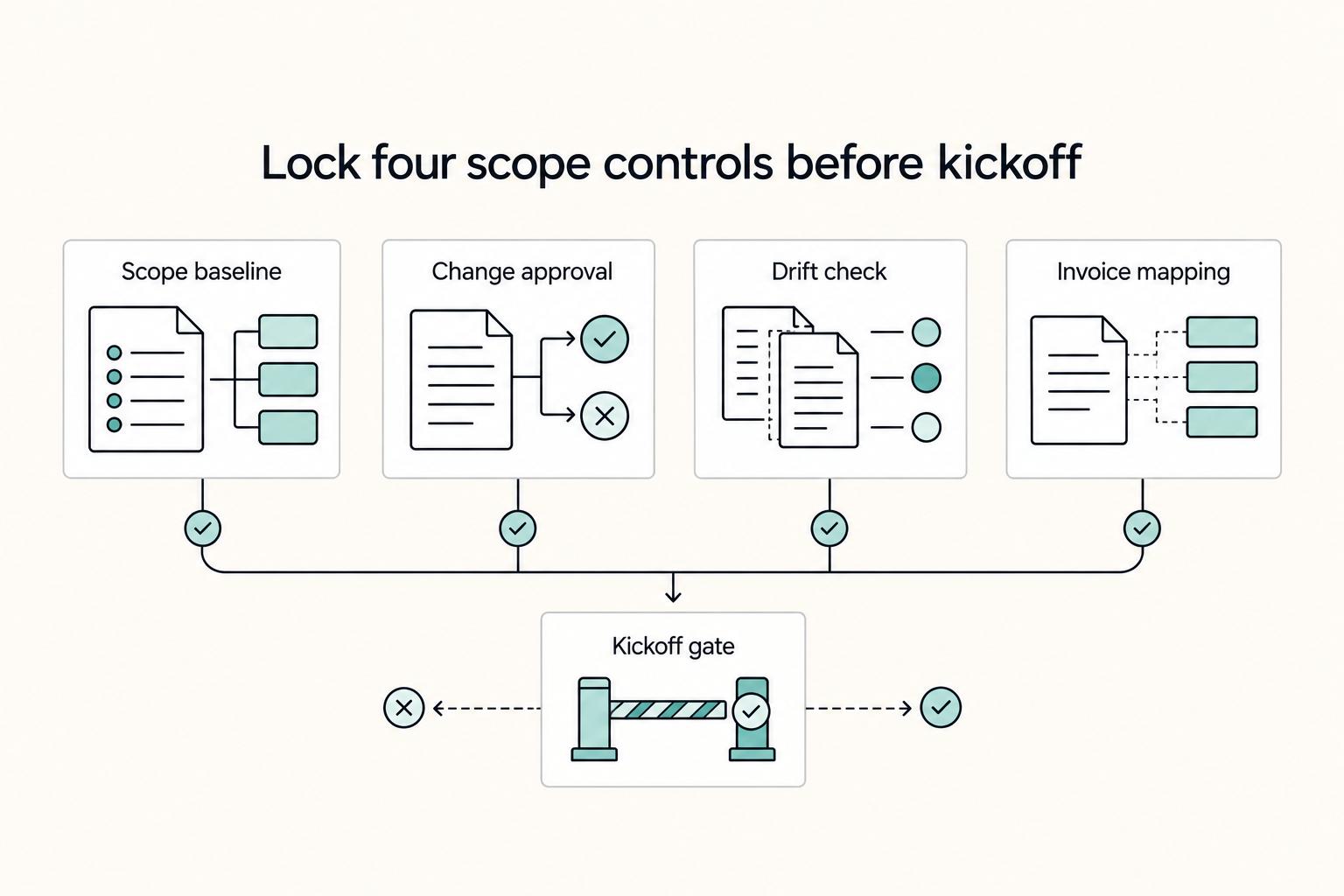
Quick Answer
Compare each request with agreed deliverables, revision allowances and acceptance criteria. Perform corrections already owed, and agree scope, price and timing for actual additions before starting them. Keep approvals linked to invoices, while billing advances, earned time and milestones at their agreed triggers.
Stop Scope Creep Before It Eats Your Margin#
For a large branding project, compare each request with the agreed deliverables, revision allowance and acceptance criteria before starting it. Corrections and revisions already owed remain in scope. Price and schedule genuinely additional work through the agreed change process.
A request for a second logo concept may be included in the proposal, an extra concept beyond its allowance, or a correction of a concept that missed the brief. Check which it is before charging. Likewise, feedback from a new stakeholder is not automatically new scope; assess whether it changes the agreed direction or outputs.
| Control point | Weak default | Protected workflow |
|---|---|---|
| Scope boundary | Broad brief, vague deliverables, no stated exclusions | Written scope lists in-scope items, out-of-scope items, and clear acceptance rules for each deliverable |
| Change path | Requests handled in chat or calls as they appear | Every net-new request gets an impact review, then documented approval with fee and timeline effect |
| Proof trail | Scattered messages and unclear version history | Redlined drafts, dated revisions, a clean draft both sides concur on, and approvals linked to invoices |
Before work starts, lock four basics in writing:
- Define what is in scope and out of scope
- Assign clear client-side approval authority
- Obtain the agreed written authorization before starting additional work.
- Keep approvals and dated revisions in one traceable record
Keep a current scope version, a completion test and the relevant approval evidence for each deliverable. Those records help explain a disputed request. Missing paperwork does not by itself mean no agreement exists; authorized emails, conduct and other records may establish commitments under applicable law.
You might also find this useful: How Freelancers Prevent Scope Creep Without Slowing Client Deals.
What Is Scope Creep in a Branding Project and Why Does It Escalate?#
Scope creep is not any change. It is unplanned scope expansion after work starts, without matching updates to timeline, budget, or resourcing. In branding projects, it escalates when boundaries are unclear and teams treat extra work as a normal revision.
Keep the baseline explicit and usable:
- Project scope: all work required to complete the approved project baseline.
- Scope statement (typically in the SOW): the scope boundary document; set it before production and use it as the comparison point for new requests.
- Creative brief: intent, audience, and direction; align it during planning so strategy does not keep shifting in execution.
- Acceptance criteria: the completion test for each deliverable; agree it before execution so "done" is verifiable.
- Change order (controlled change path): log request, assess impact, approve, then replan.
| Signal of drift | Common team mistake | Required control action |
|---|---|---|
| "Can we also..." requests after kickoff | Treating chat asks as routine revisions | Log the request and compare it to approved scope and acceptance criteria |
| New stakeholder feedback changes direction | Folding strategy shifts into existing revision rounds | Pause and run a formal impact review before more design work |
| Missing or vague completion standards | Arguing taste instead of checking agreed standards | Clarify the existing agreement; use a change order only where both sides agree the scope is changing |
Use this rule:
- If the ask changes an existing in-scope item within agreed review rounds, treat it as a revision and continue normal execution.
- If the ask adds a new output, for example extra concepts, audience variants, or new collateral, treat it as a net-new deliverable and route it through formal change control.
- If the ask changes the brief itself, for example audience, positioning, or message hierarchy, treat it as a strategy change and route it through formal change control.
Triage in this order: log the request, compare it with the baseline, classify it, assess impact, then obtain required authorization for added work. A second audience version not included in the brief needs a change decision; fixing the agreed version does not become extra work merely because it takes longer than estimated.
For a request outside the agreed baseline, hold the proposed addition while its impact is reviewed. Continue unaffected work already owed. PMI’s scope-control discussion supports making additions explicit; it does not create a contractual right to suspend an entire project.
This pairs well with our guide on How to Write a Scope of Work for an AI Development Project.
Build a Scope Boundary Matrix That Clients Can Approve Fast#
Build a scope boundary matrix beside the proposal, SOW and creative brief. It should summarize the agreement rather than replace or silently amend it. Specify how conflicting documents are resolved and who has authority to accept changes.
Each row should define what is included, what is excluded, who approves, what counts as acceptance evidence, and what triggers formal change control.
| Deliverable | In scope | Out of scope | Owner / approver | Acceptance evidence | Change-order trigger |
|---|---|---|---|---|---|
| Brand strategy summary | One final strategy document aligned to the approved brief direction | New research track, new audience segment, or repositioning after brief approval | Your team drafts; named client approver signs off | Final document delivered; approver confirms in writing it matches the approved brief direction | Any change to audience, positioning, or research scope |
| Visual identity package | The exact identity outputs listed in the SOW and final file package | Sub-brand identity, extra concept route, motion assets, or packaging design | Design lead prepares; named client approver accepts | Files delivered in the listed formats; approver confirms the package matches the approved concept and file list | Request for additional concept routes, new brand architecture, or a new asset class |
| Launch asset set | Only the channels, formats, and assets explicitly listed in the SOW | New channel rollout, extra format families, extra audience variants, or localization | Production lead prepares; client marketing owner approves | Final assets delivered in listed formats for named channels | Any added channel, format family, audience version, or localization request |
If a row is not testable, rewrite it. Broad labels create debate; specific acceptance evidence lets you verify completion without taste-based arguments.
Use this short triage path#
- Classify as an included revision/correction, new deliverable or changed strategy.
- Map it to the matching matrix row and check the approved acceptance evidence.
- If it fits the row, execute as a revision. If it changes the row, route it through a formal change request or change order with written authorization before work starts.
For a late stakeholder request, check whether it fits the agreed work. Obtain required authorization before doing an addition; continue included revisions and necessary corrections without inventing a new approval gate.
Which Contract Clauses Actually Control Scope Risk?#
Your scope matrix sets the boundary, but the contract controls what happens when that boundary is crossed. If the contract does not define triggers, required records, and approval authority, scope risk quickly becomes payment, timeline, and ownership risk.
Use this practical control map: for each clause, define the trigger, the documentation, and who must approve before affected work continues.
| Clause area | Trigger + required documentation + approver | If clause is present | If clause is missing |
|---|---|---|---|
| SOW scope statement and document control | Trigger: conflicting proposal, brief, SOW or email. Record the agreed document precedence and resolution. Obtain acceptance from authorized signatories/approvers, not every stakeholder. | You can anchor decisions to one approved scope record, which reduces interpretation disputes. | Drafts and old emails get treated as commitments, and payment or timeline disputes start early. |
| Change Order mechanics | Trigger: net-new deliverable, added audience, added format, or strategy shift. Documentation: written change details with added work, fee impact, schedule impact, and linked matrix row. Approver: named client approver + your project lead. | Additions become explicit pricing and scheduling decisions. | "Small" requests accumulate and push the project over budget and behind schedule. |
| Liability and indemnity allocation | Trigger: third-party claim, client-provided materials issue, or loss-allocation dispute. Documentation: claim notice + source materials involved. Approver: business owner or counsel before accepting added obligations. | Risk is allocated before conflict, so one incident is less likely to consume the project. | A scope issue can expand into open-ended exposure arguments. |
| IP transfer or licence | Specify final outputs, drafts, source files, pre-existing assets, third-party licences and any agreed payment condition. Obtain the formalities required for the rights granted. | Rights follow the agreed grant; in the US, copyright ownership transfer generally needs signed writing under 17 USC 204. | Delivery or payment alone does not settle ownership of every asset. |
| Confidentiality and data duties | Trigger: client shares confidential information, customer data, or tool access. Documentation: confidentiality or data-handling terms + approved handling instructions. Approver: authorized client contact before new data use or subcontractor access. | Handling duties are clear before work expands. | New security or handling requirements appear mid-project and silently expand scope. |
| Disruption handling and termination rights | Trigger: blocking event or client delay that prevents approvals. Documentation: written notice + timeline or delivery impact record. Approver: contract signatory or named manager. | You have a defined path to extend, suspend, or end affected work. | Your team absorbs delay without schedule relief or a clean exit path. |
Keep the agreed proposal/SOW, scope matrix, authorized acceptance, decision notes and change records together. A signature is useful evidence and may be required for particular terms, but missing a formal SOW is not proof that authorized emails or conduct created no commitments.
Off-scope request workflow#
When a client says, "Can you just include it," use this script tied to contract artifacts:
- Classify the request against the signed scope statement and matrix.
- Issue written change details covering added work, schedule impact, and fee impact.
- Hold the proposed addition while the change decision is pending; continue unaffected work already owed.
- Resume after the named approver authorizes the change and records are updated.
One final risk control: contract enforceability varies by jurisdiction, so for cross-border work or unfamiliar governing law, get local legal review before kickoff.
When Should You Say Yes Through a Change Order and When Should You Say No?#
Use the same intake workflow for every request, and do not start new work until the decision is documented against your current scope baseline.
- Log the request details, the reason for the request, and the expected impact on cost, timeline, and resources.
- Check fit against the current SOW scope, the affected deliverable, and its acceptance criteria.
- Classify the request as
yes (goodwill),approve via change order,defer, orno. - Execute included work normally; begin additional work after the required authorization and actual agreed prerequisites.
| Request signal | Decision | Required documentation | Execution status |
|---|---|---|---|
| Included correction or revision within the agreed scope | Perform the work already owed | Link feedback and the relevant acceptance criterion | Do not charge an extra fee or invent a new gate |
| Optional small addition voluntarily absorbed | Goodwill exception | State exactly what is added at no charge and any agreed timing effect | Obtain required acceptance; do not silently expand future allowances |
| Adds a deliverable, audience, format, revision cycle, or otherwise changes scope, timeline, budget, resources, or approval path | Approve via change order | Updated scope statement, fee and timeline adjustments, dependencies and assumptions, and a named authorization trail | Hold affected work until approval is complete |
| Useful request, but not required for the current milestone or not feasible within current capacity | Defer | Deferred item logged for a later phase and linked to the current SOW | Do not execute in this phase |
| Conflicts with agreed priorities, breaks the approved direction, or cannot get required approval | No | Written decline tied to the current scope boundary | Continue only in-scope work |
Use short, direct client language for each branch: "Happy to add this through a change order once we confirm cost and timing." "This is a strong next-phase item; I want to protect the current milestone first." "I can't include this in the current scope without changing the approved plan."
For any approved change, treat this as the operational minimum before execution: update scope, record fee and timeline effects, capture dependencies and assumptions, and log named authorization. This protects delivery and trust, and helps keep the project from expanding indefinitely through constant additions.
For repeated off-scope pressure, restate the proposed addition and its cost/timing, then use the agreed escalation path. Any suspension of work already owed must satisfy applicable law, contract rights and required notice/cure steps; an internal scope flag is not sufficient.
How Do You Protect Cash Flow and Compliance in Cross Border Branding Work?#
Align approval and the actual agreed payment trigger before starting additional work. A required advance may precede work; earned time or a completed milestone may be billed when due. Do not convert an admin checklist or unrelated tax filing into a universal payment or delivery block.
In cross-border work, document the actual contracting party, invoice currency, fee allocation, due dates and dispute path. A payment route does not settle those contract questions.
| Control | Minimum contract language | Failure mode if missing | Your enforcement action |
|---|---|---|---|
| Upfront deposit and milestones | Agree any advance, milestone/time billing, due dates and lawful late-payment remedies; no universal deposit percentage applies. | You carry delivery costs before cash arrives and then chase payment across borders. | Apply the actual advance trigger; for overdue obligations follow required notice/cure before lawful suspension. |
| Change-linked billing | State that net-new work needs written approval confirming scope, compensation, and timeline updates. | Extra deliverables get absorbed informally and are not billed cleanly. | Authorize the addition and bill at its agreed trigger; an invoice need not always precede all work. |
| Currency and payout terms | Name invoice currency, payout rail, fallback payment method, and who carries conversion differences. | Exchange-rate moves reduce margin, or payment stalls when one rail fails. | Verify payment-detail changes independently; trace uncertain payments and confirm cancellation/return before requesting a replacement. |
| Dispute resolution clause | Include governing-law or dispute-handling language in the written contract. | Cross-border disputes become slower and more ambiguous. | Use applicable contract remedies while preserving urgent/statutory deadlines and mandatory rights. |
Use this decision flow for every cross-border change request:
- Confirm the actual contracting party and authorized requester; a parent or affiliate is not automatically the debtor.
- Identify documents actually required for the transaction and who supplies them; keep later tax filings on their own calendar.
- Check the agreed advance or milestone trigger and any overdue notice/cure requirements.
- Obtain the change authorization required by the agreement, record scope/price/timing, then start the additional work.
Keep responsibilities explicit:
- You own: client screening, contract controls, change-order gating, and pause or resume decisions.
- The client supplies correct contracting/billing details and documents actually required for this transaction; unrelated tax filings are not blanket prerequisites.
Use a precise client message: “This requested launch package adds outputs beyond the current scope. I will send its price, schedule and dependencies for the named approver’s written acceptance. We will continue the agreed work while the addition is pending.” Add a deposit or document requirement only when it actually applies.
We covered this in detail in How to Write a Change Order for a Freelance Project.
Want a quick next step? Try the SOW generator.
Run One Dispute Path and One Dated Record Stack#
Your safest move is to run one dispute path and one dated record stack every time, so disagreements stay about documents, not memory. This is an alignment playbook you can apply consistently, not legal advice. The point is not to prescribe a universal choice between governing law, jurisdiction, and arbitration. It is to keep your documents aligned so you do not create avoidable conflicts.
| Clause | When you use it | What you keep aligned in the master agreement and SOW | Main operational tradeoff |
|---|---|---|---|
| Governing law | When your signed contract names which law interprets the contract | Keep the same law named across documents and remove conflicting boilerplate in later forms | One interpretation path is cleaner, but mixed wording creates ambiguity fast |
| Jurisdiction | When your signed contract routes disputes to court | Keep venue language consistent across the master agreement, SOW, and client-side paperwork | The forum is clear if documents match, but side-paper conflicts can derail routing |
| Arbitration | When your signed contract routes disputes to arbitration | Keep trigger language, process wording, and carve-outs consistent across all signed documents | A single alternate forum can simplify escalation, but split clauses create forum conflict |
Keep one required record stack for every scope decision#
Link scope and change records to the relevant invoice or next-phase decision. Issue advances, earned-time and milestone invoices at their agreed trigger, even when later deliverables are still in review.
- Current SOW version (file name + saved date)
- Written approval (approver + date)
- Change order ID + current status
- Acceptance criteria mapped to the specific deliverable
- Invoice ID linked to the approved SOW version or change order
If billing support is unclear, reconcile the agreed work, payment trigger and available approval evidence promptly. Preserve statutory invoice/payment deadlines and bill the supported undisputed amount when due; missing an internal link should not indefinitely stop ordinary billing.
Escalate in one channel, not five#
When a dispute starts, run this sequence in order:
- Freeze unapproved work and keep approved work clearly separated.
- Send a written contested-items summary with dates, document names, and the exact approval gap.
- Use the agreed dispute process and notice requirements, preserving urgent and statutory rights.
- Keep all decisions, attachments, and status changes in one timestamped log.
Run a weekly go/no-go checklist with the client#
Before any next-phase release, confirm all four points:
- Open requests are listed and status-tagged.
- Acceptance status is confirmed against stated criteria.
- Invoices are matched to approved scope artifacts.
- The meeting closes with an explicit go/no-go decision.
An unresolved item holds the affected addition or dependent release, not automatically every task or invoice. Continue obligations already owed unless lawful agreed suspension rights apply.
Related reading: A guide to using Notion 'Databases' for freelance project management.
Run the 30 Minute Scope Control Workflow Before Your Next Kickoff#
Run this workflow before you send the proposal, so scope, change control, and billing are aligned in writing before kickoff. Your goal is to lock four decisions: what you are selling, how changes get approved, how you detect drift, and how invoices map to approved scope.
If a line item lacks acceptance criteria, a clear approval path, and a document trail, it is not ready to sell.
| Step | Decision to make | Document to update | Go/No-Go gate |
|---|---|---|---|
| Step 1 (0-8 min) | Define in-scope, out-of-scope, and optional items. Confirm acceptance criteria for each deliverable. | SOW draft, scope boundary matrix, acceptance criteria notes | No-Go if any deliverable is vague or cannot be accepted against a written standard |
| Step 2 (8-15 min) | Define revision vs change order, and who can approve extra work. | SOW change-control section, change log template, approval path | No-Go if you do not have a written pause rule and a named approval route |
| Step 3 (15-23 min) | Define how planned effort will be compared to actual effort by task category. | Estimate sheet, task categories, time-tracking setup, internal variance note | Review variance and its cause before accepting additions; an overrun does not automatically permit stopping owed work |
| Step 4 (23-30 min) | Define how invoices, acceptance records, and scope records will match. | SOW version label, acceptance record, change order ID field, invoice template | No-Go if an invoice cannot point to the exact SOW version and any approved change order ID |
A 15% effort variance can be an illustrative internal review trigger, not an industry or legal standard. Eight estimated hours versus twelve actual hours is a 50% overrun. Check whether the cause is extra client scope, included correction or your estimate before asking for a change fee.
Worked example: a $12,000 branding package lists two initial concept routes, two consolidated revision rounds, final logo formats and a 20-page guide. At $8,000 estimated delivery cost, contribution before overhead/tax is $4,000 (33.3%). An added packaging set costs $1,200 and is quoted at $1,800, moving total fee to $13,800 and cost to $9,200: contribution $4,600, still 33.3%. Absorbing it without changing the fee leaves $2,800 (23.3%). That arithmetic supports pricing an actual addition; it does not justify charging for correcting the original deliverable.
Non-negotiable rules#
Use these as hard gates:
- Before a new engagement or proposed addition, document the scope and required authorization. Missing a formal record does not erase existing agreements or obligations.
- Agree acceptance criteria for new deliverables; clarify missing criteria for existing work without automatically stopping obligations already owed.
- Review material estimate overruns before taking on additions; continue in-scope obligations and distinguish estimation error from a client change.
- Map each invoice to agreed work and its billing trigger; preserve statutory deadlines and supported undisputed billing.
For cross-border work, resolve conflicts between the master agreement, SOW and procurement terms through agreed changes, not unilateral deletion. Check applicable payer forms and tax deadlines separately. An unresolved general tax checklist is not automatically a reason to delay an invoice or payment.
Midstream request script#
If a client asks for an extra launch package after work starts, use this escalation sequence:
- Pause added work. Acknowledge the request, but do not start it in chat or the next round.
- Classify the request against agreed deliverables and criteria. Extra effort, stakeholders or urgency alone do not prove additional scope.
- Issue a change order. Record scope, budget, timeline impact, and the change order ID.
- Require written approval. Save dated approval with the live SOW version.
- Resume only after records align. Update billing records so the next invoice points to approved scope documents.
Before sending, resolve unclear deliverables, approval authority and billing triggers. Treat the 30-minute pass as a first review for a large branding project; stakeholder, IP and contract decisions may need more time.
Frequently Asked Questions
What is scope creep in a branding project?
Treat it as uncontrolled expansion beyond the original plan. The warning sign is simple: new tasks or deliverables appear, but your timeline, budget, or approvals do not change with them. Your next step is to compare the ask against the current documented scope, not against memory.
What should be in a branding SOW if you want fewer scope fights?
Your SOW should define deliverables and limits around scope, budget, and timelines, plus who approves changes. Keep one current version as the reference document. When a new request appears, decide whether it fits the defined scope or needs to be logged and approved with timeline and budget updates.
How do you handle an out-of-scope request without turning it into a relationship problem?
Acknowledge the request, but do not start the work in the same message. Tell the client you will assess scope, timeline, and budget impact, then route it through the agreed approval path. Log the decision and update the plan before work starts. The failure mode is extra work moving forward without proper documentation, approvals, or resources.
When do you treat something as a revision versus a change order?
Included revisions and corrections remain owed, even if they require extra effort. Additional outputs or a changed brief need an impact review and the agreed change authorization. Time overruns alone do not prove the client changed scope.
What clause lets you pause work when invoices are unpaid?
Use a valid agreed suspension/termination provision that defines the overdue-payment trigger, required notice, cure period and affected work. Follow those steps and applicable law before pausing obligations already owed; a scope checklist does not create the right.
How should you think about governing law, forum, arbitration, and enforcement path in cross-border work?
Governing law determines the law used to interpret the agreement; jurisdiction identifies the court forum; arbitration is a distinct dispute process. Align the actual provisions and any exceptions across documents, check order of precedence, and assess cross-border enforcement with appropriate local advice.
What is the fastest weekly check to keep scope, approvals, and billing aligned before the next phase starts?
Run the same four checks every week before you release the next phase. Confirm the current scope document is still the live reference, mark each new request as approved, rejected, or waiting in the change log, make sure approved additions are reflected in timeline and budget, and hold any unapproved additions until that documentation is complete.
Try a related tool
Researched and edited by the Gruv editorial team. Gruv builds cross-border billing, payouts, and finance-operations software for global businesses.
Sources
Includes 1 external source outside the trusted-domain allowlist.
Educational content only. Not legal, tax, or financial advice.
Related Posts

The Freelance Payment Penalty: A Modeled Audit of Platform Fees, FX Spreads, and Payout Delays
The money rarely disappears through a single, easy-to-spot fee. The real loss is stacked. A marketplace takes its commission, a processor adds a charge for international cards, a bank or payment company converts the currency at a spread, a platform holds the funds before release, and a wire sheds a little to intermediaries on the way in. Each layer looks defensible on its own, but the worker feels the combined result as a smaller deposit and a later payday.

How to Respond to a Subpoena for Business Records
Move fast, but do not produce records on instinct. If you need to **respond to a subpoena for business records**, your immediate job is to control deadlines, preserve records, and make any later production defensible.

A US Expat's Guide to Investing in UCITS ETFs to Avoid PFIC Issues
The real problem is a two-system conflict. U.S. tax treatment can punish the wrong fund choice, while local product-access constraints can block the funds you want to buy in the first place. For **us expat ucits etfs**, the practical question is not "Which product is best?" It is "What can I access, report, and keep doing every year without guessing?" Use this four-part filter before any trade: