
Quick Answer
Give each edit a named owner, current version and review deadline with timezone. Consolidate client notes in Frame.io and preserve original instructions. Confirm the authorized milestone decision, assess added scope against the agreement and verify V4 Share controls before sending media.
A distributed editing team needs a shared record of the cut, revision notes, decision owner and next handoff. Frame.io can hold media feedback and version context; keep the agreement, project tasks and billing records linked so a review status does not stand in for scope, authority or payment.
Set review responsibilities before the first draft. One producer consolidates client feedback, each editing task has an owner, and the team knows which version is current. Across time zones, record an explicit review deadline and handoff rather than assuming everyone saw the latest notification.
Use Frame.io for version-specific review, classify changed scope before assigning additional work, and check sharing controls before sending a link. The procedures below are proposed operating practices; payment triggers, acceptance and delivery duties must follow the actual agreement.
Part 1: Keep a Clear Review and Approval Record#
The record has to start before the first review round. The strongest move is simple: decide in writing who can give official feedback and approvals, where that feedback must live, and how approvals are recorded.
Frame.io V4 documents Status values such as Needs Review, In Progress and Approved. Those are asset metadata, not automatic proof that an authorized client accepted a milestone. Keep the approving person, exact deliverable and decision text with the status, especially where approval affects billing.
Set the rule during onboarding#
Agree who may approve which deliverables and how review instructions will be consolidated. Put that process in the service agreement and kickoff notes. If instructions arrive by email, chat or a call, retain the original and confirm their meaning in the review record. Do not declare them legally ineffective simply because they arrived outside Frame.io; apply the agreement and resolve conflicting instructions before editing.
Make the rule visible in three places so client behavior matches the agreement:
| Place | What to include |
|---|---|
| Contract clause | Add it in the section covering revisions, approvals, and client responsibilities. Name the authorized approver or say "Client's designated reviewers listed in writing." |
| Kickoff language | “Please add revision notes on the current version. Our designated contact confirms the milestone decision and any unresolved items.” |
| Review communications | "For the record, please add all notes and approvals on the current review link." |
A practical checkpoint here is access. Before each round, confirm that the right stakeholders can open the current review link and that you are not sending a stale version. A lot of confusion starts with the wrong link, not bad intent.
Keep review behavior clean#
When a stakeholder texts a change or mentions it on a call, copy a faithful summary into the current version’s record and ask the authorized contact to confirm it. Preserve the original message and who sent it. If timing or authority is disputed, assign the producer to resolve it rather than silently ignoring the request.
| Feedback channel | What it establishes | Required action |
|---|---|---|
| Current-version comment | A request with visible version context; authority still depends on the agreement | Confirm interpretation, scope and assigned owner |
| Status such as Approved | An asset state; verify who made the actual milestone decision | Record the authorized decision and exact version before triggering its agreed next step |
| An original instruction or approval to preserve | Link or summarize it in the review record and confirm ambiguity | |
| Chat or DM | A message whose authority and meaning need checking | Retain the original, identify sender and confirm with the designated contact |
| Call | A spoken discussion requiring a reliable recap | Send a written recap and ask the contact to confirm scope, version and decision |
If the client writes “looks good,” ask what is approved: the exact cut, included deliverables, outstanding revisions and next milestone. On a public Share, a commenter’s entered name and email are not the same as independently verified approval authority. Confirm consequential sign-off with the designated contact through the agreed channel.
Close out with an evidence package#
At milestone approval and final delivery, save the exact version reference, decision and supporting notes. Frame.io V4 supports comment exports in CSV or plain text and a Print Comments view. Exports reflect the active filters: check them before capturing a complete internal record, and keep internal comments out of client-facing packages.
| Evidence item | Details saved |
|---|---|
| Final approved version | Exact asset/version ID, file name and link or retained file reference |
| Screenshots or exports | Decision text, timestamp with timezone and authorized approver confirmation |
| Comment thread | Relevant comments and original off-channel messages, with export filters checked |
| Change-order confirmation | Any related change-order confirmation |
| Invoice or delivery message | Tied to that approval |
Store those items together and label the folder so you can find it quickly. Use a consistent approval-record name that includes the client, project, milestone, and approval date. When you send a change order or invoice, attach or reference that package. A short note is enough: "Attached is the approval record for this milestone, including reviewer comments and the captured approval date."
Keep a readable copy outside the live review link using appropriate access and retention controls. A folder that always shows the latest cut is insufficient to identify the version approved last week. Retain the version or asset ID, file name and relevant technical metadata with the dated decision.
Related: How to Manage a Software Project in ClickUp with a Remote Team.
Part 2: Anchor Scope, Then Classify Every Later Request#
Anchor scope to the written deliverables and an identified baseline cut. A cut alone does not define every promised output or revision allowance. Confirm duration, aspect ratios, source assets, export specifications, included rounds and the approver before assessing later requests.
A polish request may fit the agreement; a new format, story direction or finish requirement may require extra work. Check the included rounds and correction obligations before labeling a request chargeable. Confirm codec, source quality, color/VFX requirements, file size and backup capacity before promising a finish the captured material cannot support.
Classify the request before you edit#
Use three internal labels consistently in your review threads:
| Label | When it applies | Next step in Frame.io |
|---|---|---|
| In-scope revision | Within the agreed outputs, rounds and correction obligations | Confirm your interpretation in-thread and include it in the next version |
| Net-new request | Adds a new output, variant, or workstream not in the original deliverable | Estimate the added work; obtain authorized written scope/price/timing agreement before starting the add-on |
| Strategic pivot | Changes direction, audience, message, structure, or technical expectation | Confirm the changed objective and its effect on the existing work; continue or revise obligations as agreed |
Then check the request against the usual signals:
| Signal | Revision included | Assess a change order when |
|---|---|---|
| Intent | Same outcome, tighter execution | New outcome or materially changed direction |
| Effort shift | Work stays within current cut/assets | Additional work exceeds the included scope; do not charge separately for corrections already owed |
| Deliverables | Same agreed outputs | Adds outputs or variants |
| Timeline impact | Fits current plan | Moves delivery or reprioritizes the plan |
| Technical assumptions | Fits current source-material limits | New finish expectations beyond current assumptions |
Make scope changes easy to prove later#
Use clear baseline and version names, and retain the precise asset/version reference. Version Stacks organize uploaded revisions, but the newest view can change as versions are added. For each request, record the summary, scope status, next step and confirmation; an old approval must not migrate to a new cut by assumption.
Use this reusable response structure:
- Acknowledge the request
- Mark scope status (in scope / add-on / pivot)
- Propose the path (next revision vs. change order)
- Ask for explicit confirmation before work starts
Hand off out-of-scope work to tasks and billing#
When a request is out of scope, use the same handoff checklist every time:
- Copy the Frame.io review link/thread into your task system.
- Record the version label and scope status (add-on or pivot).
- Attach the estimate, change order, or invoice draft.
- Wait for explicit client confirmation before assigning edit time.
- Link final delivery back to the billing record.
For scheduling editor and client handoffs across time zones, see How to Manage Time Zones With Clients Without Being Always On.
Example: assign a revision and price an added format#
Hypothetical agreement: a 60-second 16:9 commercial, two consolidated revision rounds and a $2,000 fee with a $600 deposit. On version V03, a title correction at 00:18 is assigned to editor A for the next included round. A new 9:16 cut is an extra output; estimate $300 and one additional working day, then obtain the authorized change confirmation before assigning editor B. If accepted, total fees are $2,300 and $1,700 remains after the deposit. Keep that financial change beside the version and task references.
For the next handoff, the producer records “V03 title correction, editor A, ready by 14:00 UTC; producer review at 15:00 UTC; client notes due 17:00 UTC.” These are illustrative internal dates to agree with the team and client. A later upload does not inherit V03 approval; verify the new cut and unresolved notes before the next milestone.
Part 3: Implement a Tiered Security Protocol#
Keep internal production access separate from external review. In V4, new external links are Shares; Review and Presentation links are legacy types. Choose the actual controls available in your account, then check the intended recipient view. A public link or shared passphrase can be forwarded and is not a named-recipient access list.
| Sharing mode | Use | Main exposure | Controls to verify |
|---|---|---|---|
| Project/team access | Editors and producers building assets | Overbroad access to production material | Role permissions, approved project membership and dormant-user removal |
| V4 Share for review | External review of selected media | A public URL/passphrase can be forwarded; folder content can change | Selected assets, passphrase/expiry where supported, version visibility, comments/downloads and closure owner |
| V4 Secure Share where supported | Named-recipient review of sensitive media | Incorrect invitations or requirements beyond available controls | Enterprise Prime support, Manage Access recipients and current client policy; legacy Presentation is not a separate V4 security tier |
Tier 1: Lock the internal vs external boundary#
Give production staff the project permissions they need and share only selected review-ready media with external viewers. V4 supports internal comments hidden from external Share reviewers; select the right comment mode before posting. Sharing a folder can expose its contents and later additions, so inspect the selected media rather than relying on a folder name such as “client-safe.”
Tier 2: Run a pre-send checklist every time#
Before you send any external review, run the same checklist:
- Confirm that the selected assets and folder contents are intended for those reviewers.
- Check actual V4 Share controls; use approved named access where required and supported.
- Set supported passphrase and expiry intentionally, or agree a suitable alternative if required controls are absent.
- Check commenting, downloads and all-version/latest-version visibility.
- Assign one owner to close or disable access after the agreed review window.
- Inspect the recipient view and verify that production assets or internal comments are not exposed.
Recheck a link after adding media or a new version. Confirm whether it shows all versions or only the newest and whether download settings changed. Disabling access cannot recall copies already downloaded; it controls further access through that link.
Tier 3: Tighten controls for sensitive prerelease assets#
For a sensitive prerelease cut, confirm the client’s required access policy, recipient scope and supported watermarking controls. Frame.io’s Secure Sharing guide specifies Enterprise Prime support for named access. A lower-resolution preview and watermark can reduce exposure but do not prevent all capture or prove who leaked a file. If the available controls do not meet the requirement, agree another approved sharing method before sending.
- Preserve known link, version, timestamp and access evidence.
- Contain the exposed access through the appropriate authorized incident process.
- Notify the client contact and internal lead with confirmed facts and unresolved questions.
- Preserve the record, including any known prior downloads; avoid promising recall or attribution.
Do not overpromise attribution or legal outcomes in the first response window; focus on containment, records, and clear communication.
You might also find this useful: How to Manage a Remote Team of Subcontractors.
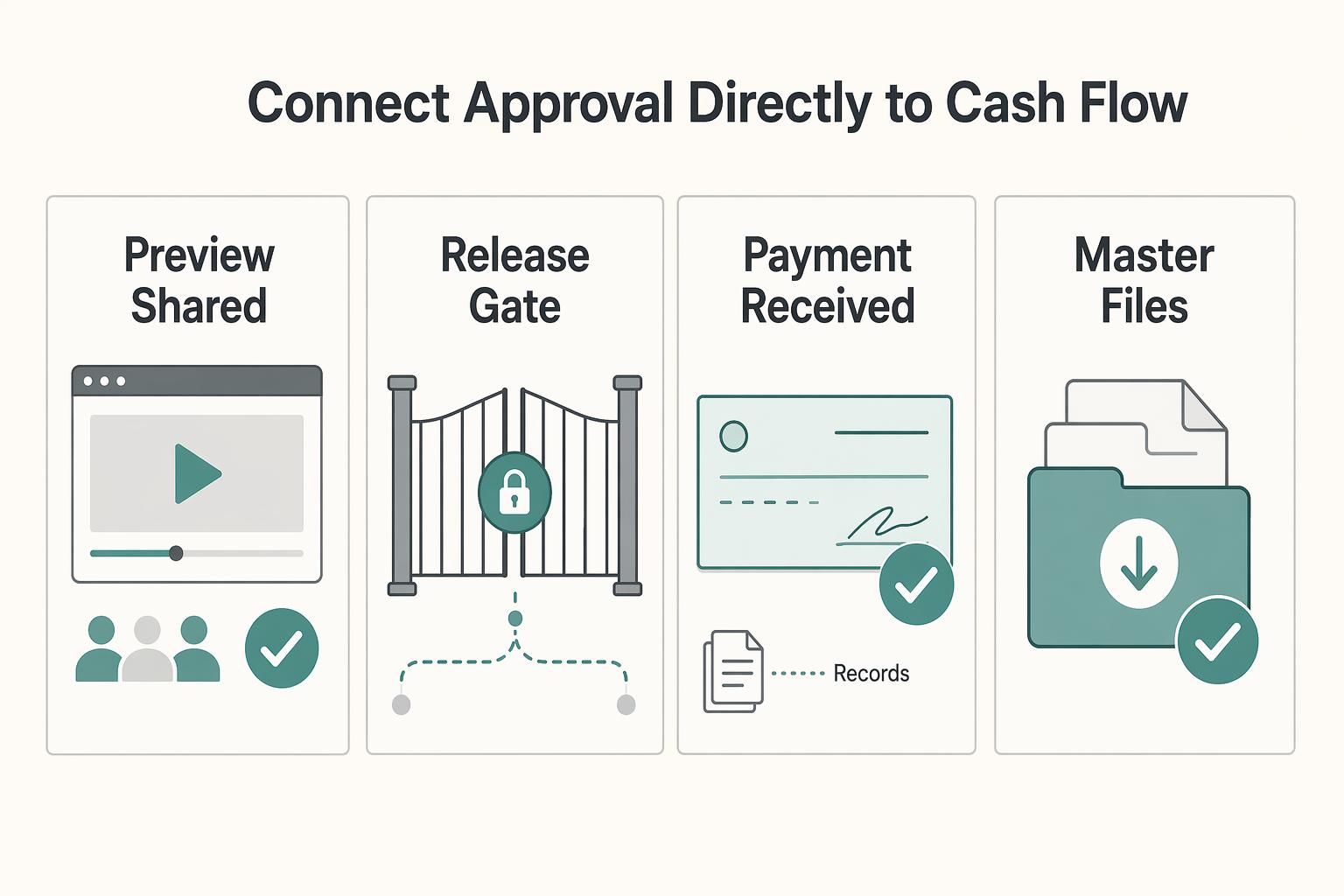
Part 4: Connect Approval Directly to Cash Flow#
Connect review and billing through the agreed milestone terms. Approval may trigger an invoice, while another project may bill by deposit, date or delivery. Require payment before master release only where that is an agreed condition; an internal checklist cannot override a delivery duty or authorize unilateral withholding.
Use this approval-to-billing checklist:
- Owner: assign billing and delivery owners, plus a backup.
- Verify approval: confirm the approval is for the final deliverable, not a preview or older version.
- Capture proof fields: project ID, deliverable name, approver identity, approval timestamp, and where the approval record is stored.
- Billing action: draft/send the correct milestone invoice and schedule status-aware follow-up under the agreed terms.
- Payment terms: confirm the payment trigger, due date, and release conditions before using this workflow.
| Delivery state | What is unlocked |
|---|---|
| Preview shared | Client reviews the identified media under the selected settings |
| Milestone approved | Verify the authorized decision and any agreed billing/delivery trigger |
| Invoice sent | Track due date, remaining balance and any dispute; apply actual delivery terms |
| Client payment confirmed | Allocate the amount to the invoice; check the agreed release condition, not only a status label |
| Provider payout pending or settled | Reconcile provider/bank records separately; do not collect a paid invoice again |
| Masters delivered | Record exact files/version, authorized recipients, delivery date and remaining obligations |
Use a reusable invoice block so every invoice points to the same audit trail:
Final deliverable approved for this project. Approval record retained in Frame.io with the project ID, approver, approval timestamp with time zone, and deliverable file or version name.
For urgent release, partial payment or procurement delay, first check the contract’s delivery and payment conditions. If a different arrangement is needed, record the authorized parties’ written agreement, which files will be delivered and when the remaining payment is due. Internal permission alone does not amend the client agreement. Do not substitute a preview for an already owed master without an agreed basis.
Payment example: the $1,700 remaining invoice receives a $1,000 part-payment, leaving $700 due. If the provider settles $980 after a $20 fee, record $1,000 client receipt and $20 expense; the fee is not extra client debt. Another $700 client payment can clear the invoice, subject to refunds or disputes. A pending bank payout does not mean the client owes the paid amount again. Release the specified assets according to the actual agreement.
A supported V4 notification or integration can prompt an internal task or invoice draft. Confirm the exact event, permissions and current version before relying on it; this guide does not establish a working billing integration. Use project/milestone/invoice references to avoid duplicate invoices, and keep a human check for changed approvals or uncertain action outcomes.
For coordinating work across client projects, see How to Use Asana's 'Portfolio' Feature to Manage Multiple Agency Clients.
Prepare the Next Review and Delivery Handoff#
Before the next round, confirm the current cut, consolidated notes, edit owner, reviewer deadline and sharing settings. Keep scope and billing records linked so the team can tell whether a request is authorized, whether an invoice is due and which delivery obligation comes next.
In day-to-day work, that should look like this:
- Audit trail: keep every approval and note attached to the relevant asset version, with timestamps and versioning in place. In your closeout record, keep the project ID, deliverable name, approver, approval timestamp, and the technical metadata that matters if a file is questioned later: timecode, resolution, frame rate, codec, and aspect ratio.
- Scope control: review requests against agreed outputs, revision rounds and correction duties; obtain authorized agreement for additional scope.
- Security and handoff discipline: you verify who gets access and what file they are actually reviewing. Codec choice matters here because higher-quality codecs usually mean larger files, which affects storage and backup planning. If you are pushing very large browser transfers, retries and failed uploads can become a failure mode to plan for.
- Payment and delivery: record the contractual invoice trigger and master-release condition, plus client receipt and provider/bank status separately.
What to do next:
- Standardize your approval record template and include those metadata fields.
- Define how your team labels revisions versus change requests.
- Decide your codec, storage, backup, and transfer approach before production starts.
- Write the actual invoice trigger and contractual master-file delivery condition into the handoff.
If your next bottleneck is the wider remote team stack around review and delivery, read The Best Tools for Creative Collaboration with Remote Teams. If you want a deeper dive, read The Best Video Editing Software for Freelancers.
Frequently Asked Questions
Can Frame.io comments be used as legal proof of client approval?
Comments and exported review records can help explain what happened, but their legal weight depends on the facts and agreement. Save the original messages, exact version, decision, timestamp and approving person. A status label or entered commenter name alone does not verify authority. Confirm unclear off-channel instructions and preserve them rather than treating them as automatically invalid.
What is the most secure way to share a client's pre-release commercial?
Share only the intended media using controls that meet the client’s agreed policy. Verify available passphrase, expiry, comments/download settings and version visibility; public links can be forwarded. Named-recipient Secure Sharing has specific Enterprise Prime support. If your account cannot meet the requirement, agree another approved channel. Lower resolution or disabled downloads do not prevent all copying.
What is the best workflow for managing multiple editors and a single client?
Assign a producer to consolidate client notes, name each edit owner and review deadline with timezone, and share the exact current version. Use timecode comments for precise fixes and range-based comments for a scene. Keep internal notes private and confirm conflicts with the authorized client contact. Record the next editor’s task, source/version and delivery expectations at each handoff.
How do I connect Frame.io approvals to my invoicing system?
Use the actual agreement to decide when to invoice and when masters are due. Save project, milestone, deliverable/version, approver and timestamp references. Draft or send the invoice through a supported workflow, then reconcile client payment separately from provider payout. Payment-before-release is a contractual condition to agree, not a universal consequence of Frame.io approval.
Try a related tool
Researched and edited by the Gruv editorial team. Gruv builds cross-border billing, payouts, and finance-operations software for global businesses.
Sources
Includes 2 external sources outside the trusted-domain allowlist.
Educational content only. Not legal, tax, or financial advice.
Related Posts

Value-Based Pricing for Freelancers Under Real Payment Risk
Value-based pricing starts with the client’s expected benefit and willingness to pay. It still needs a deliverable, scope and payment agreement you can perform. Use a discovery phase when the benefit or effort is too uncertain to support a defensible quote.

The Best Video Editing Software for Freelancers
**Choose the best video editing software based on the workflow you can repeat under pressure, not the tool that looks most impressive on YouTube.** You are the CEO of a business-of-one, and your editor is part of your delivery infrastructure. When a client changes scope, sends a new batch of footage, or asks for "one more revision," your editor stops being a creative playground and becomes a system you either trust or fight.
The Best Tools for Creative Collaboration with Remote Teams
As the CEO of your business-of-one, you're not here for vibes; you're here for a repeatable system you can run.