
Quick Answer
IT agency resource planning is how small IT agencies allocate the right people and time to client work so delivery stays profitable and predictable. Start with a spreadsheet-based capacity view in hours, separate planning from scheduling, and run a weekly allocation review plus a monthly pipeline-to-capacity check. Anchor everything to a SOW, track risks and dependencies, and log allocation changes so tradeoffs are explicit and defensible.
Resource planning is how small IT agencies stop getting surprised (and start operating like pros)#
If you run a small shop, resource planning gives you more control over delivery quality, margins, and cash flow when reality hits. The goal is to replace "tribal knowledge + a calendar" with a lightweight system you can run while juggling Sales, Delivery, and Ops.
Resource planning is deciding what resources you need, when you need them, and how you will use them. In agency workflow terms, you translate pipeline and active work into specific people-hours. Then you make explicit tradeoffs before scope shifts and stalled approvals force them on you.
Here's the operator-level difference:
| Without planning (reactive) | With planning (early) |
|---|---|
| You discover conflicts on Monday morning. | You surface conflicts ahead of time. |
| "Everyone is busy" but margins still slip. | You tie project allocation to estimated hours and actual capacity. |
| Bench management happens by accident. | You decide where to hold slack, and why. |
| Cash flow surprises you (late invoices, delayed starts). | You model start dates, dependencies, and billing timing. |
What this is (and what it is not)#
Resource planning is not a fancy calendar and not a moral judgment about "productivity." It is a decision tool. You use it to answer: Who does what, by when, and what breaks if that assumption changes?
Capacity planning sits alongside it. You aim to keep the right people on the right projects at the right time. This matters most when one senior engineer holds all the context, or when a contractor disappears mid-sprint.
Start with a few consistent artifacts and a weekly rhythm#
You do not need heavyweight tooling to start. You need a few consistent artifacts and a weekly rhythm.
Common artifacts include:
- Intake questions that force clarity on scope, timeline, and dependencies before you quote.
- A skills and coverage view (who can do what, and who backs them up).
- A capacity view in hours (work hours, allocated hours, and what remains).
- A short risk list you revisit weekly (approvals, access, waiting on client, vendor lead times).
Tie those artifacts to your Statement of Work (SOW) and to payment reality (invoice timing, deposits, and how long you can float costs) so you protect margins instead of arguing about them later.
And when compliance enters the picture, stay conservative. KYC (Know Your Customer) and AML (Anti-Money Laundering) regulations aim to prevent financial crime, and KYB (Know Your Business) is used to verify business entities. Jurisdictions interpret and enforce these expectations differently. Confirm requirements with your bank, payments provider, or counsel instead of guessing.
What is IT agency resource planning (and what isn't)?#
IT agency resource planning is the discipline of identifying and allocating the right people (and their time) to client work so you can deliver efficiently and profitably. To run a lightweight system instead of relying on tribal knowledge, you need shared definitions. Most small teams accidentally mix planning, scheduling, and reporting inside a PSA. Then they argue with screenshots instead of fixing the plan.
At the simplest level, treat "agency resource management" as the umbrella term: planning, scheduling, and optimizing how your team is allocated across client projects for efficient delivery and profitability. Resource planning sits inside that umbrella. It focuses on identifying, organizing, and allocating the people, skills, tools, time, and budget needed to complete a project successfully.
Planning vs scheduling (stop faking precision in your PSA)#
Planning answers what should happen and what you will trade off. Scheduling answers exactly when it happens on the calendar. Scheduling is the calendar layer: the when and how of resource usage.
In a 1 to 10 person shop, you do both. Label them explicitly in your PSA (or in Float) so nobody confuses a rough allocation with a locked commitment.
| Concept | What question it answers | Operator example |
|---|---|---|
| Resource planning | What work, who owns it, and roughly when | "Priya owns the firewall migration next week, with 10 to 14 hours reserved." |
| Resource scheduling | What day and time blocks | "Tue 1pm to 4pm: firewall cutover." |
| Capacity planning | Do we have enough resources to meet demand | You check whether the team has the skills and hours to meet project demand. |
| Demand planning | What demand do we expect | You project future demand. Your pipeline can inform this, but do not treat it as guaranteed delivery. |
The metrics that keep you honest#
Utilization helps, but it does not run the business by itself.
- Billable hours are hours you charge to a client.
- Non-billable hours keep the business running but do not map to an invoice.
- Billable utilization measures the percentage of available hours spent on client-billable work.
- Throughput is the number of work items you actually finish over a given period.
- Bench time is time when people are not deployed to billable work. Treat it as a signal. Check whether it comes from missing dependencies, slow client inputs, or how work is being sequenced and prioritized.
Guardrail: if you cannot explain your plan in plain language - who does what, roughly when, what triggers Change Control, and how you verify Acceptance Criteria - you do not have a plan you can run. You have vibes.
The small-agency mental model: a 5-gate system you can defend later#
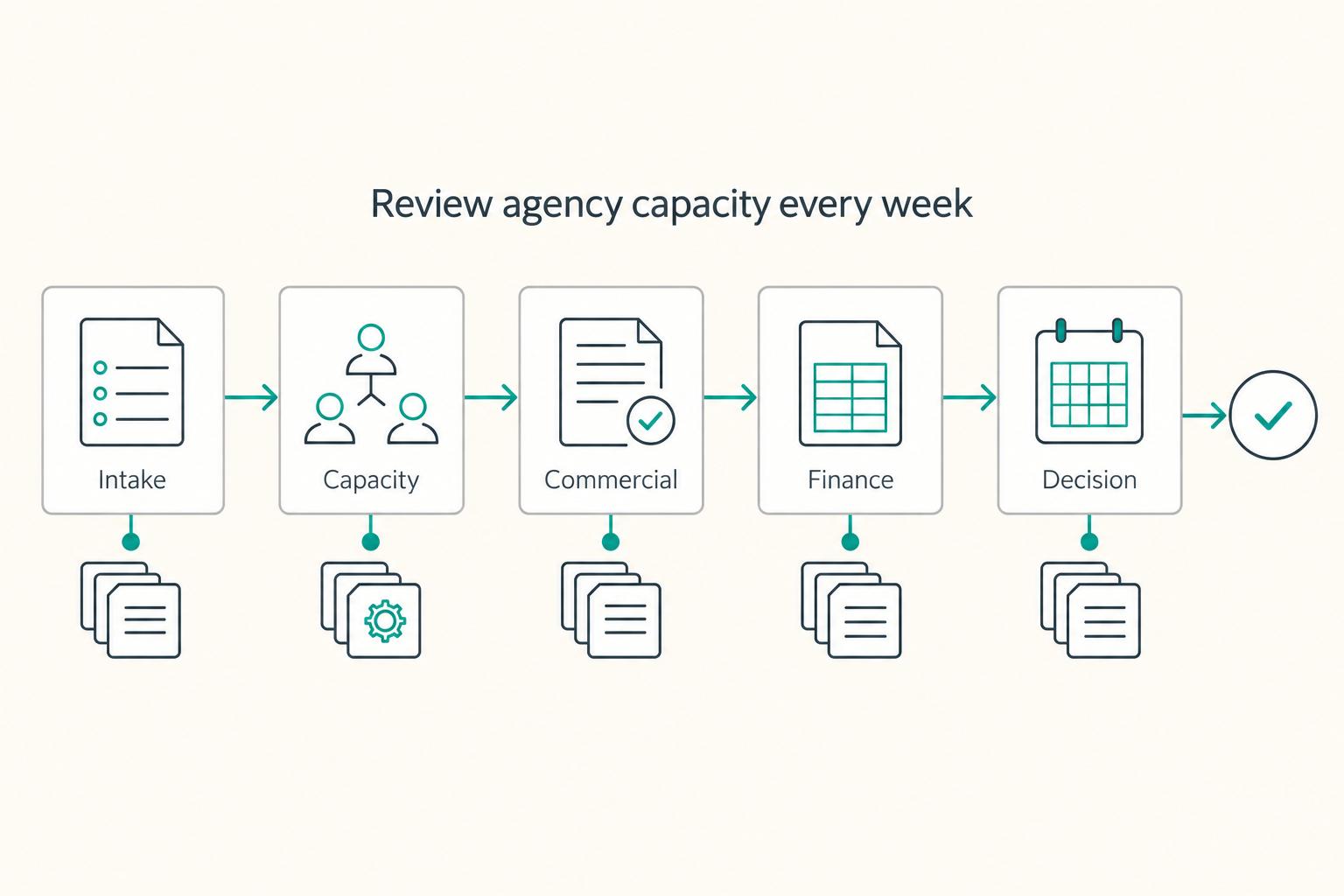
Use a simple decision-gate system so every resource call leaves a paper trail, a rationale, and a clear owner. Once you separate planning from scheduling, you need a repeatable way to say "yes," "not yet," or "no" before you commit scarce capacity.
A gate (tollgate) is a standardized control point where you review a phase and approve or reject moving forward. Even if every opportunity looks "good," you still have limited capacity to execute. Gates help you control intake so you do not commit capacity you do not have.
The 5 gates (operator version) + what to check#
You can name these however you want. Keep the intent consistent and make each gate answer one question.
| Gate | The question you must answer | What you check (examples you can reuse) |
|---|---|---|
| Intake | Do we understand what we're agreeing to? | Scope summary, environments, dependencies, client access needs, security and compliance considerations, success criteria draft |
| Capacity | Can we staff this with the right skills? | Skills-based capacity (React, DevOps, Solutions Architect), bench management plan, coverage for PTO, single points of failure |
| Commercial | Do the terms match the delivery reality? | Payment terms, milestone triggers, rate validity (especially contractor rates) |
| Delivery | Can we ship without chaos? | Project allocation, buffers, escalation path, critical path roles, handoffs |
| Finance | Can we cash-flow the plan? | Invoice schedule, tools and subscription costs tied to delivery, delivery-related expenses |
Your "source of truth" page (one per project)#
Resource management breaks when details are scattered across Slack, inboxes, and someone's memory. Create one shared project page as the single source of truth for the plan, assignments, and progress tracking.
Attach the Statement of Work (SOW) as the anchor document. A SOW defines scope, deliverables, timelines, and responsibilities between parties. That makes it the cleanest reference when the client says, "That wasn't included."
On that same page, keep a lightweight risk register next to the SOW. Keep it short and update it regularly.
- Technical risk: unclear architecture, migration complexity, brittle legacy systems
- Dependency risk: client approvals, access to repos, credentials, procurement delays
- Payment risk: late pay history, long net terms, disputed milestones
You "finish" resource planning when you can answer, without scrambling: (1) who is allocated, (2) what gets deprioritized if reality changes, and (3) which agreement/process governs the change. That is how you run a defensible agency workflow, not vibes.
How do you calculate capacity for a small IT agency without lying to yourself?#
Calculate capacity by converting "hours on the calendar" into "hours you can actually deliver," then validate it regularly against reality. Once you have gates and a source of truth, you need a capacity number you can defend when sales pressure shows up and project allocation gets political.
Start with availability, not hope. Account for vacations, meetings, and focus time. Do not assume all working hours stay usable.
One practical way to run this is a spreadsheet with three lines per person:
- Availability hours (calendar): weekly working hours minus known time off.
- Focus factor (reality check): focus factor = velocity / capacity. In plain terms, it converts "available hours" into "shippable hours."
- Non-project commitments (guaranteed drain): recurring work you will do even if no client project exists.
A concrete starting example: a developer "has 40 hours per week," but with a 0.7 focus factor, "their actual capacity would be 28 hours." If you lack history, pick a starting assumption you can live with, then calibrate it based on recent actual output and interruptions.
The drains you must subtract (use your own list, but make it explicit)#
Do not hand-wave non-project work. List it and subtract it. You do not need an industry-approved list. You need honesty.
Your buckets might include things like:
- Client support and incident work
- Internal operations
- Presales and discovery
If you do not subtract these, you risk "planning" dangerously close to 100% utilization. As professional services guidance puts it: "The fastest way to kill a professional services firm is to push for 100% utilization."
Plan by skill, then probability-weight your pipeline#
Skills-based planning beats headcount planning because it answers the real question: do you have the competencies and knowledge you need, not just "three humans."
Use a simple matrix like this (example lanes):
| Skill lane | Weekly shippable hours | Already allocated | Remaining | Notes |
|---|---|---|---|---|
| React (senior) | 28 | 28 | 0 | Headcount looks free, skill capacity is not |
| DevOps/on-call | 20 | 12 | 8 | Protect incident buffer |
| QA/release | 10 | 6 | 4 | Batch releases, avoid thrash |
Finally, forecast demand in hours, not just revenue. A weighted pipeline model applies probability multipliers based on likelihood of closing. Translate each opportunity into "lead hours" weighted by win probability, then staff only what your remaining skill lanes can actually absorb.
What should your weekly/monthly/quarterly cadence look like in a 1-10 person shop?#
Run a lightweight, repeatable cadence that surfaces decisions while they still feel small. Once you can calculate real capacity, your job shifts to protecting it with a routine. The routine should catch allocation risk, pipeline drift, and scope creep before they blow up your delivery dates.
The simplest safe default mirrors how many agencies already operate: weekly for near-term control, monthly for staffing versus demand, and quarterly for strategic re-planning. Keep it boring. Boring scales.
The minimal cadence (and what "good" looks like)#
Use this as your resource planning backbone for resource management, project allocation, and bench management:
| Cadence | Primary decision | Inputs you need | Outputs you must leave with |
|---|---|---|---|
| Weekly | "What changes this week, and who moves?" | Current allocations, active project status, upcoming deadlines | Updated allocations, flagged risks, named owners, dated follow-ups |
| Monthly | "Can delivery absorb what sales thinks will close?" | Pipeline assumptions, rough effort ranges, start-date assumptions | A capacity vs demand view, clear decisions on what can start (and what can't), resourcing options |
| Quarterly | "Where do we stay fragile, and what do we do about it?" | Recurring bottlenecks, missed expectations, delivery friction points | A short list of strategic adjustments and operating priorities for the next cycle |
A practical agenda template: start with categories that force reality into the open - RAG status, blockers, risks, dependencies, decisions needed, asks, action items with owners and due dates. This structure stops "we talked about it" from masquerading as execution.
Also, do not skip the weekly touchpoint. Do it even if "the team" is just you and two contractors.
Assign owners, even if you wear all the hats#
Even if the same name appears in every row, assign a named owner for each input:
| Review item | What to confirm |
|---|---|
| Pipeline hygiene | Probabilities, start dates, and whether the SOW assumptions still match reality |
| Delivery sequencing | Estimates, acceptance criteria clarity, and what slips if something new starts |
| Ops and cash timing | Invoicing schedule, margin impact, and whether contractor payouts remain feasible |
| Client dependency check | Credentials, approvals, environments, and any access prerequisites that can stall work |
| Contract change check | Confirm you still operate inside scope; if not, trigger change control before you "fix it quickly" by reallocating people |
Keep a single change/allocation log as your audit trail. At minimum, capture what changed, the date identified, status, and priority - plus approvals and implementation status. Where relevant, include approval date and a responsible party. If timelines move, record the updated timeline. This habit saves you when a tight SOW turns into a blame spiral.
The operational artifacts competitors skip: templates you can copy today#
If you want resource planning to survive real weeks, not perfect weeks, you need a few boring artifacts that force decisions into writing. Once you've set your cadence, these templates give the process something concrete to run on, even when you feel busy, reactive, and underpowered.
Copy today: the five artifacts that keep your agency workflow honest#
Use this as your starter kit. Keep each artifact to one page or one tab. If it grows, you lost the plot.
| Artifact | What it prevents | What to include (safe defaults) |
|---|---|---|
| Demand intake form (1 page) | "Sure, we can start Monday" lies | Scope summary, target timeline, required environments/access, client readiness checklist, compliance prompts (as needed), estimate range, estimate confidence (High/Med/Low), known dependencies |
| Skills matrix (lightweight grid) | Single points of failure you only discover during an outage | A grid with people vs skills/competencies, a simple proficiency scale (1-3 or 1-5), notes for coverage gaps and SPOF risk |
| Capacity calculator (spreadsheet-first) | Double-booking and accidental bench management | A tab per person: weekly available hours, PTO, non-project commitments. A rollup view: available time vs committed time |
| Weekly resource review agenda (copy/paste) | Meetings that "feel productive" but change nothing | RAG status, blockers, risks, dependencies, decisions needed, action items with owners and due dates. Add a standing check: "Does this change require formal approval or documentation?" |
| Mini risk register | Surprise delays you could have named earlier | Risk name/description, likelihood, impact, owner, response/mitigation, review date |
Two execution details matter more than the template:
- Make dependencies practical. Don't stop at "waiting on client." Capture what's needed, who owns it, and, when you know it, when it's expected - so dependencies can be managed instead of silently stalling work.
- Track skill-capacity, not just hours. Your rollup should show capacity in the key skill areas you sell, not only total hours, because hours alone fail when one person holds a critical capability.
Definition of Done for a resource plan (so you can defend it later)#
Call your plan "done" when you can point to:
- A completed intake for each active demand item.
- A current allocation view (who does what, when).
- A visible buffer or stated assumption (so "overbooked" shows up as a decision).
- A simple change log for allocation changes (description, date identified, status, priority).
That set of artifacts turns planning into a repeatable system, not a memory test.
Contractors and cross-border realities: how to plan so you can pay people on time (and sleep at night)#
Contractor-heavy planning only works if you plan for onboarding lead time and cash timing, not just "available hours." With templates and cadence in place, this keeps staffing and payouts from turning into a weekly fire drill.
Treat contractors like a mini supply chain (lead time + terms + ramp)#
Contractor resourcing changes the math because you do not control two critical constraints: when someone can truly start and when money becomes safely spendable.
Document these items against the Statement of Work (SOW) start date:
| Setup item | What to document |
|---|---|
| Lead time tasks | Contractor agreement signed, payment profile created, client access provisioned, internal tool access provisioned, kickoff scheduled |
| Ramp assumptions | Week 1 output expectations, for example "50% delivery capacity while they learn the repo and environments" |
| Commercial protections | Rate lock for a defined period, or a minimum commitment (hours per week or a minimum term), if negotiated |
| Payee details verified | Where required by your provider, country, or program |
| Payout method selected and tested | Primary method, plus a documented backup if a payout fails or returns |
| Data minimization | Capture only what you truly need, store it only in the right system, and use masked views in internal trackers |
If you negotiated a rate lock for a defined period or made a minimum commitment, write it down. Otherwise margin can evaporate when scope shifts and the contractor rightfully renegotiates.
Build a payout-readiness gate (and minimize PII like a pro)#
Before you promise dates to a client, run a "payout readiness" checklist. This sounds like admin. In practice, it protects productivity and bench management.
Payout readiness checklist (safe defaults):
- Payee details verified (where required by your provider, country, or program). Do not assume one process works everywhere. KYC, KYB (who you do business with), and AML expectations vary by jurisdiction and program.
- Payout method selected and tested: primary method, plus a documented backup if a payout fails or returns.
- Data minimization: PII is personal data. Capture what you truly need, store it only in the right system, and avoid pasting sensitive details into docs and chat. Use masked views in internal trackers (for example, last 4 digits, not full identifiers).
Classification risk stays jurisdiction-specific. Do not "template your way" into misclassification. A local accountant or lawyer can give you a safe confirmation path. Keep a written onboarding checklist per country so your agency workflow stays consistent even when the rules do not.
Tie staffing to cash timing explicitly. Track invoice milestones and payment terms, then add real-world timing friction. Cutoff times, weekends, bank holidays, and payout returns/retries can all add business-day delays.
Gruv's operational model fits here: policy gates plus traceability (request → references → ledger entries → exports), plus payout status tracking and reconciliation exports/artifacts (where enabled). You spend less time asking "where is the money?" when delivery is already running hot.
PSA vs resource planning tools: what to use now, and what to upgrade to later#
Use the simplest tool that lets you run a stable weekly allocation cadence tied to your SOW and Change Control, then upgrade once the process holds. After contractor onboarding and payout timing, the next risk sits in tooling. The usual mistake is buying software to "fix" resource management before you can describe your agency workflow.
Consider starting spreadsheet-first if staffing decisions still live in Slack and memory. A spreadsheet can force clarity: capacity, project allocation, and who owns the decision.
Templates are a practical starting point. Use them until you can answer, every week, "what changed, why, and who approved it" without drama.
Know the boundaries so you don't build a Frankenstack#
A PSA (Professional Services Automation) tool typically aims to cover the full service-delivery lifecycle: project planning and resource allocation, time tracking, billing, and performance reporting.
A resource planning tool focuses more narrowly on allocations and capacity. That narrower focus can beat a PSA when you primarily need cleaner bench visibility, scenario planning, or faster reallocation - depending on the product.
Here's a practical decision frame for agency resource planning:
| Option | Best when | Watch-outs |
|---|---|---|
| Spreadsheet (or Smartsheet) | You need clarity and a weekly rhythm more than automation | Version control, manual audit trail, easy to "fork reality" |
| Resource planning tool (ex: Float, Runn) | You need cleaner capacity views and fewer allocation mistakes | Integration sprawl if time tracking and billing live elsewhere |
| PSA suite (ex: Productive.io, Scoro) | You want projects, time, and billing closer together | Can take more setup; may feel heavy for very small teams |
Examples (not prescriptions): Float markets "Resource Management, Planning & Scheduling Software." Runn markets "real-time resource management and forecasting software." Productive calls itself "Agency Management & Professional Services Automation Software." Scoro positions as "Professional services automation software for consultancies, agencies, IT and A&E firms."
Evaluation criteria that keep small agencies safe#
Use decision-grade criteria, not feature bingo:
| Criterion | What to verify |
|---|---|
| Process fit first | Map SOW start dates and Change Control approvals into the tool without workarounds |
| Reconstructable history | Export enough data to reconstruct allocation decisions during a dispute, including who changed what and when, even if approval happens outside the tool |
| Small-team ergonomics | Roles and permissions stay simple, and reports answer utilization, bench, and upcoming conflicts without an admin |
| Placeholders without lying | Model "future DevOps contractor" as a placeholder without inflating actual utilization, and verify this in a trial |
| Country and program variation | Confirm what your provider enables by market and program before hardcoding payouts, virtual accounts, or tax document flows into your workflow |
The "30 minutes a week" resource planning checklist (and your next best step)#
Treat this as a lightweight system for resource planning, not a one-time planning event. With the core questions answered (capacity, utilization, bench management, cadence), the goal is a repeatable ritual. It should turn new work into a clean project allocation decision you can defend later.
Your safe default is two reviews and a visible workflow. First, a weekly allocation review to reconcile what changed (scope, people, deadlines) and make explicit tradeoffs. Second, a monthly pipeline-to-capacity review to compare likely demand against real capacity so you stop "discovering" conflicts mid-sprint.
Capacity stays simple: resource capacity is the amount of work your resources can take on in a given period, and you can measure it in hours, person-days, or FTE.
Keep your workflow visible with clear stages (use whatever labels fit your shop). If work cannot pass a stage, it does not get scheduled. That rule protects productivity and makes bench management intentional instead of accidental.
One-page checklist (paste this into your ops doc)#
Use this as your decision log and your risk check in one place:
| Stage | Check | What "done" looks like |
|---|---|---|
| Intake | Intake form completed | Scope, dependencies, constraints (if applicable), estimate confidence recorded |
| Capacity | Capacity confirmed by skill | Named coverage for React, DevOps, Solutions Architect review time (not just "we have 2 devs") |
| Commercial | Contract basics confirmed | SOW aligns to Acceptance Criteria, Change Control trigger stated |
| Finance | Billing plan confirmed | Milestone payments mapped to deliverables (milestone payments tie to deliverables, not hours). Invoice workflow owner assigned |
| Decision | Allocation decision logged | Who approved, what changed, why. Date-stamped note for future you |
Practical next steps (today, not "someday")#
- Build version 1 in a spreadsheet. Start with a tab for demand (projects and milestones) and a tab for supply (hours by person and skill).
- Schedule the recurring review. Block time weekly. Invite only the people who can change the plan.
- Add one "commercial reality" line to every proposal. State what triggers Change Control and list the client dependencies you require before delivery starts.
- If you operate cross-border, document your process. Keep a checklist for the info you collect and the steps you run, and confirm country-specific requirements with appropriate local guidance (rules vary by jurisdiction).
Frequently Asked Questions
What is resource planning in an IT agency?
Resource planning in an IT agency is deciding who does what, when, and at what capacity so you can deliver client work without burning the team or missing deadlines. Float describes agency resource management as "the process of planning, scheduling, and optimizing how your agency's team members are allocated across client projects to ensure efficient delivery and profitability." In operator terms: you run a regular resource management ritual that turns your SOW and change requests into a defensible project allocation plan.
How do you calculate capacity for a small agency?
Calculate capacity by starting with available hours, then subtracting the hours you already owe to non-delivery work. Per person, take weekly working hours, subtract PTO/holidays, subtract internal commitments (sales calls, management, QA, support), and only then allocate the remainder to client projects. Keep it honest by tracking constraints explicitly instead of pretending everyone stays 100% billable.
What is a good utilization target for a small IT agency?
No single target fits every agency or role. AgencyAnalytics cites an "optimal utilization rate" range of 80 to 90% for most professional services, while Ravetree describes 60% billable utilization as a "gold standard for profitability." Runn also warns that targets vary by role, so set different targets (and expectations) for delivery versus leadership.
What is bench management and why does it matter?
Bench management often means actively managing unallocated capacity so it does not silently turn into margin loss or delivery risk. It matters because bench time can show up as either a problem (no pipeline, bad forecasting) or a strategic buffer (handoffs, training, pre-sales support). Treat it like a visible line item in your agency workflow, not an awkward surprise.
How far ahead should agencies plan resources?
Plan in layers instead of picking one "correct" horizon. Use a near-term plan you can commit to (based on signed SOWs), and a longer-range forecast you label as tentative (based on pipeline odds). The rule: the further out you look, the more you rely on placeholders and ranges, not promises.
What's the difference between a PSA and resource management software?
A PSA (Professional Services Automation) tool aims to run service operations more broadly. SaaSAdviser frames PSA as software to help service-oriented companies "handle their operations more effectively." A resource management tool stays tighter on scheduling and capacity, which Dayshape describes as planning, scheduling, and allocating resources to maximize value.
How do cross-border payments affect resource planning?
Cross-border payments can affect resource planning because cash timing and payout friction can change staffing risk. If you hire contractors internationally, keep your staffing plan resilient to payment timing uncertainty, and avoid plans that require perfect payment timing to succeed. Operationally, tie new allocations to clear client payment terms and your own payout workflow so productivity doesn't outpace cash.
Try a related tool
Researched and edited by the Gruv editorial team. Gruv builds cross-border billing, payouts, and finance-operations software for global businesses.
Sources
Includes 6 external sources outside the trusted-domain allowlist.
- float.com/resources/agency-resource-managementexternal
- moonshot.partners/blog/best-resource-management-tools-for-it-a...external
- productive.io/resources/agency-resource-managementexternal
- productive.io/blog/resource-planning-guideexternal
- scoro.com/blog/agency-resource-managementexternal
- scoro.com/blog/agency-resource-managementexternal
Educational content only. Not legal, tax, or financial advice.
Related Posts

The Freelance Payment Penalty: A Modeled Audit of Platform Fees, FX Spreads, and Payout Delays
The money rarely disappears through a single, easy-to-spot fee. The real loss is stacked. A marketplace takes its commission, a processor adds a charge for international cards, a bank or payment company converts the currency at a spread, a platform holds the funds before release, and a wire sheds a little to intermediaries on the way in. Each layer looks defensible on its own, but the worker feels the combined result as a smaller deposit and a later payday.

How to Respond to a Subpoena for Business Records
Move fast, but do not produce records on instinct. If you need to **respond to a subpoena for business records**, your immediate job is to control deadlines, preserve records, and make any later production defensible.

A US Expat's Guide to Investing in UCITS ETFs to Avoid PFIC Issues
The real problem is a two-system conflict. U.S. tax treatment can punish the wrong fund choice, while local product-access constraints can block the funds you want to buy in the first place. For **us expat ucits etfs**, the practical question is not "Which product is best?" It is "What can I access, report, and keep doing every year without guessing?" Use this four-part filter before any trade: