
Quick Answer
To write seo-friendly blog posts, run a repeatable workflow: lock search intent and CTA, choose one primary keyword, build a SERP-first outline, draft answer-first sections, and align core on-page elements naturally. Then apply QA gates for intent, clarity, and trust before publishing. Treat each post like an asset by monitoring performance and making focused updates instead of rewriting everything.
Build SEO-friendly posts as repeatable assets that satisfy a real searcher#
Build SEO-friendly posts as repeatable assets: satisfy a real searcher fast, package the answer for search results, and route the reader to a clear CTA. When you're staring at a blank page, you need a workflow that removes guesswork and leaves an audit trail you can improve over time. Think of this as operations for on-page optimization and content writing, not "writing for an algorithm." If you run a business-of-one, you need your blog to behave like an asset you can run on a system.
Here's the operator-grade SOP to run every time you want SEO-friendly blog posts without keyword stuffing or vague "tips."
The workflow (intent to monitoring) with outputs you can verify#
| Stage | What you do | Output you can point to (audit trail) | Quick verification |
|---|---|---|---|
| Intent | Define the reader's moment of need and the next action | One-sentence intent + one CTA | You can answer: "Who is this for, and what should they do next?" |
| Keyword | Pick one primary term, collect supporting phrases | Primary keyword + secondary list | The phrasing matches how people actually search |
| Structure | Build a search-first outline | H2s that mirror common sub-questions | The outline reads like a checklist, not an essay |
| Draft | Write answer-first sections | Step-by-step body copy | Each section starts with a direct answer, then steps |
| On-page placement | Align key terms with key on-page elements naturally | Clear title/headings + a clean opening | Nothing sounds forced when you read it out loud |
| QA gates | Check intent, clarity, and trust signals | A short QA checklist | You can explain what you did and why |
| Publish | Ship with internal links and CTA placement | Live post + CTA | The CTA is easy to find at the right moment |
| Monitor | Watch queries and iterate | Notes, updates, new variants | You know what to change next, based on data |
Example: you publish a "how to" post that gets found but doesn't convert. Do not rewrite everything. Adjust the CTA so it matches the reader's stage (template, inquiry, consult). Tighten the first screen so it delivers the steps immediately. Then re-check your title and headings for clean alignment.
Dual optimization: humans first, extractability always#
You do not need two separate articles, one for humans and one for generative AI platforms. You need answer blocks: direct question, direct answer, short steps, and one "when this won't work" edge case. Use structured elements such as tables, checklists, and frameworks so machines can lift clean summaries while humans still get clarity.
If your end goal includes better leads, pair this playbook with How to Use SEO to Attract High-Quality Freelance Clients and keep your blogging tied to a business outcome, not vanity traffic.
Prerequisites: What to Prep Before You Write (the 20-minute setup that prevents 80% of rework)#
Prep a one-page mission and a lightweight research stack before you draft, so you can write with fewer reversals. A quick setup locks key decisions early and helps keep the intent and angle from drifting mid-draft.
| Prep item | What to decide | Grounded details |
|---|---|---|
| One-page mission | Intent plus CTA | Use the template: "This post is for [reader] who [situation]. By the end, they can [outcome]. The next step is [CTA]." |
| Research stack | Choose one and move | Start with quick, free inputs like search suggestions as you type, the questions and phrasing you see on results pages, and the terms your customers use in emails, calls, and support threads. |
| Brief doc | Force early decisions | Set a working headline, core deliverable, must-include points, and not-in-scope. |
| Governance default | Trust, claims, disclosure | Decide what needs a source, what's clearly your firsthand stance, and your disclosure policy for affiliate links. |
Step 1: Write the "one-page mission" (intent plus CTA)#
Define the post's job in plain language. You will use this to make every content decision: what to include, what to cut, what to link, and what to promise.
- Target reader: Who, specifically?
- Moment of need: What just happened that made them search?
- Single next action (CTA): Choose one: download, inquiry, consult, demo, or email reply.
Copy/paste mission template: "This post is for [reader] who [situation]. By the end, they can [outcome]. The next step is [CTA]."
Example: if your CTA is "consult," write tighter, higher-trust copy that proves judgment. If your CTA is "download," structure the post around a checklist or template and place it earlier.
Step 2: Open a research stack (choose one and move)#
You do not need a big stack. You need enough signal to map real queries and choose language that matches how people describe the problem.
Start with quick, free inputs like:
- Search suggestions as you type
- The questions and phrasing you see on results pages
- The terms your customers use in emails, calls, and support threads
Use these inputs to collect phrasing, not to justify stuffing. You are matching the reader's wording and intent, not chasing an abstract score.
Step 3: Create a brief doc that forces early decisions Decide these before drafting so the page stays coherent:
- Working headline: what you're promising, in plain language
- Core deliverable: steps, checklist, framework, examples, or a template
- Must-include points: the minimum set of answers the post has to cover
- Not-in-scope: what you're explicitly not trying to solve in this post
Step 4: Set your governance default (trust, claims, disclosure) Set a house rule for trust and claims: what needs a source, what's clearly your firsthand stance, and what you will not claim without evidence. If you include affiliate links, add a disclosure policy and keep the language clean and explicit.
What is the searcher actually trying to do (and what will make them bounce)?#
Align your post to search intent first, because keyword optimization alone does not help if your page does the wrong job. Before you draft, validate the reality you'll compete in. This section turns "I think this is helpful" into "this matches what Google is showing for this query."
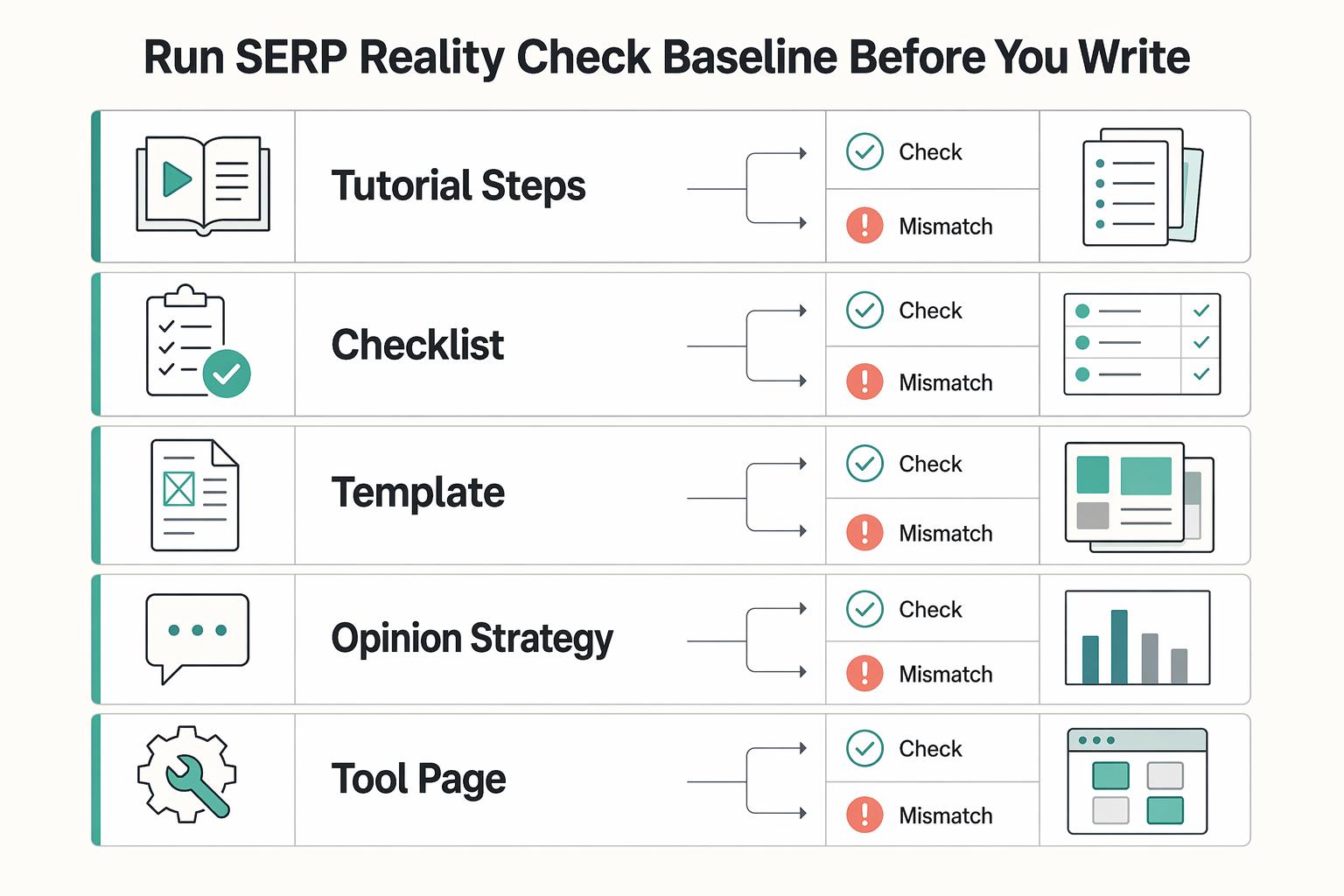
Step 1: Run a SERP reality check (baseline before you write)#
Search your primary keyword in Google and audit what the top results actually deliver. Do not label them by industry. Label them by format and promise.
Use this quick classification, then decide what you will match and what you will improve:
| What the top results do | What the searcher likely expects | Your safe default response |
|---|---|---|
| Tutorial (steps) | "Show me how." | Lead with a step sequence and verification checks. |
| Checklist | "Make sure I didn't miss anything." | Offer a copy/paste checklist plus examples. |
| Template | "Give me a starting point." | Provide a fill-in template and a "when to use" note. |
| Opinion/strategy | "Help me choose an approach." | State a point of view, then back it with a process. |
| Tool page | "Help me execute faster." | Include a workflow and decision criteria, not just tips. |
Verification: if your post format fights the dominant SERP pattern, for example if you publish an essay where everyone else publishes a checklist, you will need to answer clearly and efficiently right away or you risk losing readers.
Intent map move (fast): scan the SERP for repeated questions and phrasings. Treat them as scope clues, not mandatory headings.
Step 2: Write the intent sentence, then design an answer-first lead (and define "done")#
Write one plain-language sentence that describes the dominant intent: "The searcher wants to ____ so they can ____." Then build your opening around that intent so the reader gets a clear answer fast, not a keyword-stuffed warmup.
Examples:
- If the query starts with "how to", consider promising a sequence of steps, not a history lesson.
- If the query starts with "best", consider promising selection criteria plus recommendations. Tell them how you judge, then what you pick.
Example: you want to target "write SEO-friendly blog posts," but the SERP is mostly checklists. Lead with a checklist-style promise, then explain your process after you deliver the steps.
Define what "done" means in intent terms: what question you will answer, and what the reader will be able to do immediately after they finish the post.
If you want the CTA to drive client work, pair this with How to Use SEO to Attract High-Quality Freelance Clients.
How many keywords should one blog post target (without diluting focus)?#
Target one primary keyword per blog post, then use closely related phrasing as support instead of asking one page to do multiple jobs. Once you have intent, lock the focus so your outline, H1, and on-page elements all point in one direction. This is how you make SEO-friendly posts that feel clear to humans and unambiguous to search engines.
The "one primary keyword" safe default (and why it works)#
Treat keywords, in SEO terms, as "what people enter into search engines," and pick one phrase that captures the core problem your post solves. Oyova's guidance stays clean: "Each page should target only one primary keyword." That discipline helps you avoid splitting focus across multiple angles and keeps your promise crisp.
Treat everything else as secondary phrasing. Use synonyms, question forms, and long-tail variants to improve clarity and coverage, not to chase "keyword density." Heroes of Digital calls out how "some resources harp about 'keyword density'," and warns that writers can "over-optimize their content and end up getting penalised." You do not need to chase a specific density number. You need focus plus useful structure.
Decide: add a second keyword, or split into two posts?#
Use this operator rule: one post equals one intent. If a second term asks for a different outcome, split it.
| If the second keyword... | You should... | Why this stays safe |
|---|---|---|
| Changes the searcher's intent | Write a separate post with its own H1 and URL | You avoid forcing two topics into one page |
| Matches the same intent in different words | Keep it as a secondary variant | You support keyword optimization without muddying the promise |
Example: you draft a post to "write SEO-friendly blog posts," then you feel tempted to also target "SEO copywriting tips." If the results you see for each query lean toward different types of answers, split it. Do not cram both into one H1.
Step 1: Choose the primary keyword. Pick the clearest phrase that matches intent and your deliverable.
Step 2: Build a compact secondary set. Pull a small list of close variants from your keyword research process, then sanity-check that the phrasing matches how real searchers talk about the topic.
Step 3: Place keywords in high-value fields, not everywhere. Write around the problem first. Then confirm your primary phrase appears naturally in key on-page elements, such as your page title and URL, where appropriate. Verification: if your draft reads awkward out loud, remove repetitions and keep the primary keyword where it counts.
Build a SERP-First Outline That's Easy for Humans and Machines to Parse#
Build your outline from what already wins in Google SERPs, then add an operator gap such as an SOP, QA rubric, or monitoring plan so your post reads cleanly and extracts cleanly. With one primary keyword locked, structure does the heavy lifting. This is how on-page SEO supports your writing instead of turning it into keyword theater.
Step 1: Scan the top results and pull repeated H2s#
Open Google, search your primary keyword, and scan the top results like an editor. Pull the H2s you see repeated so you can spot patterns quickly. Then turn those patterns into outline decisions.
- List recurring SERP formats: checklists, step sequences, tool lists, examples, templates, "mistakes to avoid."
- Pull question language from SERP features (where available): if you see People Also Ask boxes and related searches, promote repeats into your own H2s.
- Define your differentiator: most posts stop at "write good content." You will ship an SOP, a QA rubric, and a post-publish monitoring plan.
Yoast puts the operating model plainly: "It is not just about placing keywords in the right spots." Treat that as your guardrail. You win by matching intent with a clean structure, not by forcing phrasing. When it comes to what "SEO-friendly" looks like in practice, prioritize trustworthiness, machine-readability, answer-first structure, and topical authority.
| What you see in the SERP | What you add | Why it matters |
|---|---|---|
| Steps, but no governance | SOP + QA checklist | Creates repeatability for blogging |
| Examples, but no standards | Pass/fail rubric (clarity, intent, on-page fields) | Reduces "looks good to me" publishing |
| Tips, but no follow-through | Monitoring plan (what you'll check after) | Turns one post into an asset |
Step 2: Draft for extractability, then bake in conversion#
Write headings that say exactly what the reader gets. Then make the first paragraph under each heading stand on its own.
| Element | What to do | Grounded detail |
|---|---|---|
| H2s | Use short, specific H2s | Prefer "Write the title tag in this format" over "Title tag tips." |
| First lines under each heading | Start with answer-first lines | Make the first couple of sentences function as a mini-answer. |
| Key headings | Add brief summaries | Do this for skim readers and cleaner extraction. |
| Mid-post CTA | Match it to the reader's stage | Offer a template or checklist while they still build understanding, or a consult or an internal guide when they already compare options. |
- Use short, specific H2s. Prefer "Write the title tag in this format" over "Title tag tips."
- Start sections with answer-first lines. Yoast frames the goal as answering "clearly and efficiently," so make your first couple of sentences function as a mini-answer.
- Add brief summaries under key headings. Do this for skim readers and cleaner extraction. The win is clarity.
Then place a mid-post CTA that matches the reader's stage. If they are still building understanding, offer a template or checklist. If they are already comparing options, offer a consult or an internal guide. One clean next step beats a desperate footer.
Example: you outline a post on SEO-friendly blog posts. Halfway through, you add a "QA gate" checklist and a simple monitoring plan. That single move becomes your differentiator, and it gives readers a reason to save, share, or act.
If you want a natural next step for the right audience, link to How to Use SEO to Attract High-Quality Freelance Clients.
Where should you place your target keyword (and where should you avoid it)?#
Put your target keyword in your headline (H1), first paragraph, and at least one subheading, then use it naturally in the body without overdoing it. With your outline set, weave the keyword in where it signals relevance without turning your writing into repetition.
Step 1: Use the high-value placement list (in priority order)#
Start with the placements readers and systems notice first. Semrush frames the goal well: choosing a target keyword should "help both search engines and AI systems understand what your content is about and when to surface it to users." Use that as your decision filter. Clarity beats density.
| Placement (check in this order) | What it does | Safe default |
|---|---|---|
| H1 (headline) | Establishes the topic on the page | Use the phrase naturally, or a close variant that reads clean. |
| First paragraph | Confirms intent fast | Include it if it fits the sentence. If it sounds clunky, rewrite the sentence or use a close variant. |
| At least one subheading (H2/H3) | Reinforces relevance and structure | Use it in a descriptive subheading where it truly belongs. |
| Body copy (lightly) | Supports the topic without repeating yourself | Mention it where it helps meaning, then move on. Avoid forcing repeats. |
Step 2: Run a snippet-ready on-page checklist (placement over repetition)#
Follow the University of Illinois guidance as your baseline: "That keyword should appear naturally in your headline, your first paragraph, [and] at least one subheading." Turn that into an operator checklist:
- Write for clarity first. Then confirm the keyword appears naturally in H1, the opening paragraph, and one descriptive subheading.
- Keep it readable. Use short paragraphs, 2 to 3 sentences max, and clear subheadings (H2s/H3s) so humans and Google can make sense of it.
Example: you draft a post targeting "write SEO-friendly blog posts." Your H1 uses the exact phrase, but the first paragraph turns clunky when you force it in. Keep the H1. Rewrite the intro or use a close variant.
Anti-stuffing QA (what "too much" looks like):
- Read a paragraph aloud. If it sounds weird, rewrite for meaning.
- If you're "doing SEO" by repeating the same phrase instead of adding information, you've crossed the line.
- Keep your focus on one main keyword or phrase, and let the rest of the language serve the reader.
How do you optimize for Google and AI Overviews without writing two separate articles?#
Write one human-first article with an answer-first structure, then add a light clarity layer that makes your expertise and trustworthiness obvious. Once your on-page basics line up, the body has one job: answer the query clearly and efficiently in a way that reads cleanly in SERPs and holds up in AI-style summarization.
Operator workflow: one draft, two surfaces#
Step 1: Draft in answer-first blocks, not essay flow. Use a repeatable unit that's easy to read and easy for systems to interpret: direct question, direct answer, short steps, edge cases. This matches how humans skim and can make key lines easier to extract, without you guessing at proprietary system behavior.
Step 2: Make definitions explicit once, early. Use short, plain-language meanings you reuse consistently. If you say "Google Search Console," keep saying "Google Search Console," not "that analytics tool." This reduces topic drift and makes the post easier to follow.
Step 3: Add legible judgment (trustworthiness without fluff). Yoast frames the bar clearly: "In the AI era, an SEO-friendly blog post is written with search intent first, answering a user's question clearly and efficiently." Prove you understand tradeoffs. Add two micro-sections inside the relevant step:
- When this won't work: Name the scenario where your advice breaks (scope, intent mismatch, compliance limits).
- What I'd do instead: Give the safer fallback so the reader can still move.
Step 4: Build a couple of liftable sentences on purpose. Young Urban Project puts the 2026 priority bluntly: "it's about clarity, intent, and real usefulness." Convert that into quotable rules that improve skim readability and on-page clarity at the same time.
Examples + quotable rules (copy/paste)#
Here's a before/after you can model:
| Element | Before (vague) | After (clear, extractable) |
|---|---|---|
| Meta title | Blog SEO Tips for Better Content | Write SEO-Friendly Blog Posts: A Step-by-Step On-Page SEO Checklist |
| H1 | How to Write Better Blogs | How to Write SEO-Friendly Blog Posts (Without Keyword Stuffing) |
Example: readers keep asking "where do I put the keyword?" Add a short answer block that starts with that exact question. Then list the placements and one edge case, when forcing the phrase hurts readability.
Two quotable lines to bake in:
- Optimize for understanding first. If a skimmer gets it fast, search engines and AI summarizers are more likely to as well.
- One term, one name, one meaning. Consistent entities tend to beat clever synonyms.
If you want to connect this to acquisition, pair this section with How to Use SEO to Attract High-Quality Freelance Clients.
Pre-Publish QA Gates + Publish + Post-Publish Monitoring (your audit-ready SOP)#
Run a simple QA, publish with a distribution checklist, then monitor performance signals so you can iterate without guessing. This is the finish line most people skip. It is also where a post becomes an asset you can improve.
Step 1: Run the 3-gate QA (intent, on-page fields, trust)#
Treat this like a release checklist. If you want consistency, you need a QA path you can repeat, delegate, and audit later.
| Gate | What you check | Pass criteria (safe default) |
|---|---|---|
| Gate 1 (Intent) | First screen, promise, and step visibility | The first screen answers the query plainly and shows a clear path (steps, sections, or a quick "here's what you'll do"). You sanity-check that you actually cover the user's core questions. |
| Gate 2 (On-page fields) | H1, URL, title tag (meta title), meta description | All four align to the same intent, read naturally, and avoid spammy repetition. You keep keyword optimization clean, not loud. |
| Gate 3 (Trust) | Sources, date context, author stance | You cite what you referenced, label time-sensitive guidance, and state your recommendation clearly, not "it depends" everywhere. |
Example: if your reader wants a direct answer but your first screen starts with a long story, you fail Gate 1. Rewrite the opening so it answers the question immediately and makes the next steps obvious.
Step 2: Publish, distribute, and monitor (so the post becomes an asset)#
Publish with a minimum distribution standard you run every time, not on hope. Add internal links to genuinely relevant pages, including a pillar page if you have one. Add external references when they genuinely support your claims. Place a primary CTA early enough that it's easy to find, and a secondary CTA near the end. If you want the acquisition path, link to How to Use SEO to Attract High-Quality Freelance Clients.
| Signal | Adjustment | Grounded example move |
|---|---|---|
| Getting shown but not earning clicks | Refine the title and description to match intent | Clearly promise the deliverable: checklist, template, or SOP. |
| People leave fast | Tighten the opening and add a short step list | Use question-style subheads that match what readers are trying to solve. |
| Results are slow | Improve internal linking and sharpen topical focus | Re-check title tag and H1 alignment. |
Then monitor what actually happens in search and adjust based on what you see:
- Track basic search visibility and engagement signals for the URL.
- Watch for query or intent drift, what people seem to expect when they land on the page.
- Log a few updates you will test next: title tag, headings, examples, or a clearer opening.
Build iteration into the process. One operator-grade reminder from a scaling playbook: "a repeatable system: clear use cases, minimal-friction workflows, tight prompts, and metrics." Apply that mindset to content writing. Your "metrics" become the signals you review consistently.
Recovery plan (common mistakes):
- Getting shown but not earning clicks: refine the title and description to match intent and clearly promise the deliverable (checklist, template, SOP).
- People leave fast: tighten the opening, add a short step list, and use question-style subheads that match what readers are trying to solve.
- Results are slow: improve internal linking, sharpen topical focus, and re-check title tag and H1 alignment.
Conclusion: Run This Like an Operator - One Repeatable Workflow, Every Time#
Consistent SEO content is less about "secret" on-page tricks and more about running a repeatable system. Treat every post like a small product: get clear on what it's for, ship it cleanly, then use what you learn to improve the next one.
Lock in the part most people skip: governance. Governance means deciding, in advance, what "publish-ready" looks like, how you QA it, and when you come back to refresh it. That is how content writing becomes an asset library instead of a pile of one-off drafts.
Operator mindset: system first, tools second#
Automation can help with formatting and publishing, but it cannot rescue a fuzzy promise. Use tools to speed up repetitive tasks only after you commit to clear intent and honest, useful copy.
Example: you publish a post, then your search performance data suggests people are seeing it but not choosing it. Do not rewrite the whole article. Tighten the promise in the headline and opening so it's clearer what the reader will get.
| Amateur loop | Operator loop |
|---|---|
| Write, publish, hope | Decide, publish, review, refresh |
Copy/paste checklist (publish-ready)#
- The post has a clear purpose and a clear reader
- The opening quickly answers the core question
- The structure is easy to scan and matches the promise
- The draft is edited for clarity, accuracy, and tone (no fluff, no overclaims)
- Links and references are included where they genuinely help the reader
- A next step is included that matches the reader's intent
- Pre-publish QA is done using your defined "publish-ready" standard
- A review/refresh moment is scheduled based on your workflow
If you want the acquisition layer next, use this workflow to build a pipeline: How to Use SEO to Attract High-Quality Freelance Clients.
Frequently Asked Questions
How do I write an SEO-friendly blog post step by step?
Lock the post’s job first (intent plus CTA), then match the format readers expect in search results, then draft in clear answer blocks. Yoast frames the standard plainly: “In the AI era, an SEO-friendly blog post is written with search intent first, answering a user’s question clearly and efficiently.” Pull repeated sub-questions you see people asking around the topic, then run your QA gates before you publish. For the acquisition angle, pair this workflow with How to Use SEO to Attract High-Quality Freelance Clients.
How many keywords should one blog post target?
Target a single search intent, then use related phrasing to support it. When you chase multiple intents at once, you dilute the page’s job and the writing starts to feel scattered. Keep keyword optimization subordinate to clarity.
Where should I place my target keyword for the best SEO impact?
Place it where it helps a human confirm they landed on the right page, and keep the phrasing natural. Yoast explicitly warns that “It is not just about placing keywords in the right spots.” In practice, make sure your main page elements and opening make the same promise, then stop forcing repetitions.
How do I avoid keyword stuffing while still ranking in Google SERPs?
Read the paragraph out loud. If it sounds like repetition with no added meaning, rewrite for meaning. Keep the keyword where it genuinely helps label the topic.
How do I optimize content for both Google and AI Overviews?
Write with search intent first, and answer the question clearly and efficiently in well-structured blocks. Yoast’s definition points you there: prioritize intent, clarity, and efficiency over mechanical placement.
What are the most important on-page SEO elements: H1, title tag, URL, or meta description?
Treat them as a system that should tell the same story, not as a single “most important” lever. Jacquie Budd notes, “Google pretty much dominates the search engine market,” so it makes sense to keep these elements aligned with what your page is actually delivering. Here’s a practical way to think about them: | Element | Primary job | Operator-grade check | |---|---|---| | title tag | Set expectations | Matches the query and the on-page opening | | meta description | Frame the click | States the deliverable (checklist, steps, template) | | URL | Provide context | Stays short, descriptive, and stable | | H1 | Confirm the topic | Mirrors the promise in plain language |
How do I use Google Search Console to improve an existing blog post?
Use it as your reality check, then make one focused change at a time. This guide does not cite a specific Google Search Console workflow, so follow Google’s documentation and treat any insight as a hypothesis you must validate. If you want a content lever that often pays back, tighten the page so it answers common questions cleanly, because SUSO Digital notes, “If done well, FAQ sections can provide users with all the answers they might need, which Google will want to rank.”
Try a related tool
Researched and edited by the Gruv editorial team. Gruv builds cross-border billing, payouts, and finance-operations software for global businesses.
Sources
Includes 5 external sources outside the trusted-domain allowlist.
- contentmgt.web.illinois.edu/2025/07/28/how-to-write-seo-friendly-blog-po...trusted
- contentmgt.web.illinois.edu/2025/07/28/how-to-write-seo-friendly-blog-po...trusted
- reusser.com/insights/blog/5-actionable-steps-to-write-se...external
- trysight.ai/blog/how-to-write-seo-friendly-blog-postsexternal
- yoast.com/seo-friendly-blog-postexternal
- yoast.com/seo-friendly-blog-postexternal
- youtube.com/shorts/Coof3uSsIZ8external
Educational content only. Not legal, tax, or financial advice.
Related Posts

How to Use SEO to Attract High-Quality Freelance Clients
**Build your *seo for freelancers* around qualified leads, not raw traffic: tighten who you target, what you prove, and how you gate inquiries.** You're the CEO of a business-of-one. Your marketing job isn't "get more attention." It's "get the right work, predictably, without turning your calendar into a sorting machine."

A Guide to Creating a 'Digital Will' for Your Online Assets
**Treat your digital assets and online accounts like a business continuity control, because losing access can stall operations when timing matters.** Digital assets can include social accounts, messages, and cloud-stored documents, and even basic questions like "What will happen to your Facebook account when you die?" are not always operationally clear in the moment.
The Best Coworking Retreats for Digital Nomads
A coworking retreat is only worth booking if it can support real work, real deadlines, and real compliance obligations. When a retreat gets the basics wrong, the cost shows up quickly in missed client delivery, compliance exposure, and admin drag that eats the week you meant to spend producing.