
Quick Answer
Start with one clear master guide that covers check-in, Wi-Fi, house rules, emergency contacts, and core appliance instructions, then publish aligned versions in your Airbnb pages, House Manual, and any backup copy. Build sections in guest task order, not by theme, and keep failure steps short enough to use under stress. Test it on a phone before each stay. If guests can complete arrival and basic in-stay tasks without messaging you, your airbnb welcome book is working.
Write an Airbnb welcome book that runs your property like a business#
Treat your airbnb welcome book as an operating document, not a hospitality extra. Its job is simple: put stay-critical answers in one place so guests can handle common tasks without waiting on your messages.
That scope matters. A guide is not your brand story, a scrapbook, or a place to dump every idea you have about the area. It is a single guest-facing document that helps people arrive, settle in, use the property correctly, and handle common problems with less confusion. Keep that standard, and you can reduce repetitive Q&A while making the stay more consistent as you get busier.
Step 1 Define the job first#
Start by defining what the guide must help a first-time guest do. The minimum bar is practical, not decorative. Guests should be able to get in, connect to Wi-Fi, understand the house rules that actually affect the stay, use core amenities and appliances, and find the right contact or next step if something goes wrong.
A useful checkpoint is the first-hour test. Could someone who has never seen the property arrive late, enter, get online, and avoid breaking a house rule using only your guide? If the answer is no, you are still missing operational content.
This is also where scope boundaries help. Property type changes what belongs inside. A simple studio with self check-in may need a short, phone-friendly guide with access steps, internet details, and a few appliance notes. A larger house with parking instructions, multiple doors, or more equipment will usually need more detail. You do not need one universal template because there is no universal property.
Step 2 Choose what belongs and what does not#
Once the job is clear, decide what information is settled enough to publish. Guests need one place for check-in instructions, Wi-Fi details, emergency contacts, appliance guides, safety information, and relevant local recommendations. Clear navigation matters too. A table of contents, tabs, or clickable links help people find answers quickly instead of texting you from the driveway.
Format is a separate decision. There is no universal rule that digital always beats print, or that a printed binder always feels better. The real tradeoff is operational: digital is easier to update, while printed or handcrafted versions can feel more personal and help when a guest is already inside the home. If your setup changes often, digital usually lowers the risk of stale instructions. If you want an in-unit fallback, a printed backup may earn its place.
One caution here: third-party advice on welcome books can be useful, but it is not Airbnb policy. Keep your decisions tied to your property and your guests, not someone else's template.
Step 3 Define success before you draft#
Success is not that the guide looks nice. Success is that a guest can complete key tasks without messaging you for basic clarification. Use the table below as your first publishable standard.
| Area | Your guide should let guests |
|---|---|
| Check-in | Self-serve arrival and entry without missing steps |
| Wi-Fi | Find the network name and password fast |
| House rules | See the few rules that affect noise, visitors, parking, trash, or checkout behavior |
| Appliances and amenities | Use the thermostat, TV, hot water, locks, or other core items without guesswork |
| Edge cases | Handle late arrival, lock trouble, connectivity issues, or a safety concern with a clear next step |
A practical verification step is to open the guide on your own phone and try to find each answer in under a few taps or one quick scan. If you have to remember details from your inbox, camera roll, or notes app, the guide is not doing its job yet.
A clear red flag is fragmented instructions. When check-in steps live in one message, Wi-Fi in another, and appliance help only exists in your head, guest friction is much more likely.
That same business mindset helps you decide how much effort to invest in the property overall. If you are still weighing your operating model, read The Pros and Cons of Short-Term vs. Long-Term Rentals.
Choose your format before you write a single page#
Pick your format based on your priority: fastest usable launch, highest flexibility for changing details, or fastest design polish. The real decision is maintenance, not style.
A welcome book works when guests can find practical answers in one place and those answers stay current. Clear guidance for entry, exit, Wi-Fi, house rules, and local basics can reduce repetitive messages, but static files create risk once details change.
Compare the three workable paths#
| Format path | Best fit | Update burden | Risk of stale instructions |
|---|---|---|---|
| Airbnb-native pages such as your House Manual or Arrival Guide | You want a simple first version and one clear source of guest instructions | Lower when you keep updates in one place | Moderate if details are split across messages, notes, and print copies |
| Canva or Hostfully digital guide | You need more structure for a more complex stay and details that may change | Moderate, because edits and republishes still need an owner | Lower when guests rely on the live version |
| Printable or PDF template from Etsy | You want design polish quickly or an in-home backup | Higher after launch, because each change requires manual replacement | Highest after sharing or printing, since it becomes a static resource |
Design quality matters, but version reliability matters more. Digital and print can both work if the instructions are clear and useful; the issue is that PDF and printed copies cannot be updated in real time for current guests.
Choose with a practical decision tree#
Start with complexity. If your stay can be explained in short, clear steps, Airbnb-native pages are usually enough for a strong first release. If your setup needs more structured troubleshooting or layered instructions, a flexible digital format is often easier to maintain.
Then check change frequency. If access details, local recommendations, or amenity instructions change often, prioritize a live digital format. If changes are rare, a printed backup can still be useful.
Then check capacity. If no one can reliably maintain multiple formats, do not run multiple formats. Conflicting instructions across in-app pages, messages, and print are exactly what creates guest confusion.
If you use an Etsy or Canva template, treat it as layout help, not finished operations copy. Rewrite it to match your real task order, your actual rules, and the same wording guests see in your listing channels. Vendor guidance can help, but it is not Airbnb policy.
Lock the reading context and update owner#
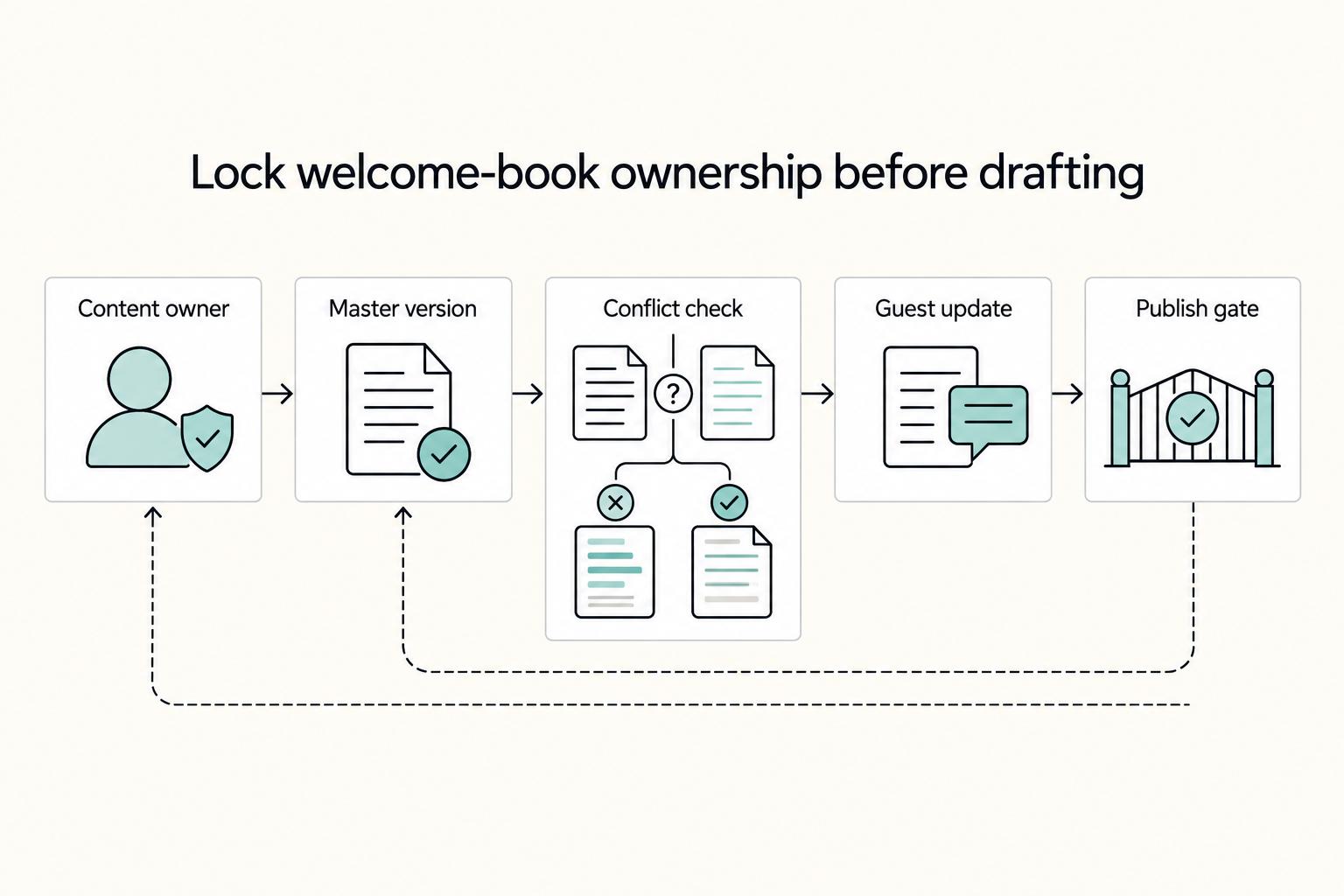
Before drafting, decide where guests will read the guide and who owns updates. Name one owner and one update workflow for each live format.
Run a maintenance test before publishing: if one key detail changes tomorrow, for example Wi-Fi or access steps, who updates each format, in what order, and how fast? If that workflow is unclear, reduce formats until it is clear.
Related: A Guide to Getting Your First Five-Star Review on Airbnb and The Pros and Cons of Short-Term vs. Long-Term Rentals.
Gather prerequisites and source material before drafting#
Treat this as pre-draft quality control for your welcome book: if your inputs are stale or inconsistent, you will scale confusion instead of clarity.
Step 1 Collect the non-negotiables#
Capture the few items guests need to complete a stay without messaging you: check-in and check-out policy, house rules, Wi-Fi details, and emergency contacts. Then assign one canonical source to each item before you draft.
| Non-negotiable | Canonical source |
|---|---|
| Check-in and check-out policy | one approved policy location (for example, your House Manual policy page) |
| House rules | one current rules page |
| Wi-Fi details | one verified network source (not multiple copied versions) |
| Emergency contacts | one verified contact sheet |
Run one verification pass: can a first-time guest arrive, enter, connect, follow rules, and know who to contact from these inputs alone? If not, finish this step before writing.
Step 2 Gather property instructions in guest task order#
Organize property-specific instructions by guest actions, not by room or device, so guests can solve problems in sequence.
- Arrival: parking, building entry, smart lock or key code steps, unit-finding details
- In-stay use: thermostat, TV, appliances, trash, laundry, shared-space rules
- Issue handling: lost access, Wi-Fi outage, power or water issues, urgent contact path
Keep arrival directions step-by-step and practical. If local rules affect what you can promise, verify wording against local government sources before finalizing, because STR requirements can change and some areas may require permits, fees, or taxes. If you are still choosing your operating model, review The Pros and Cons of Short-Term vs. Long-Term Rentals.
Step 3 Set the handoff before drafting#
Before writing starts, lock three controls: one owner, one versioning method, and one conflict-resolution check. The owner approves updates, the versioning method keeps one current master, and the conflict check resolves mismatches across every guest-facing format before drafting.
Use this pre-draft readiness checklist:
- Every non-negotiable has one canonical source
- Arrival, in-stay, and issue-handling instructions are complete
- Compliance-sensitive wording has been verified against local primary sources
- One owner is responsible for updates
- One current master version is identified
- Guidebook, House Manual, and backup formats are aligned
Related reading: How to Use Scrivener to Write and Organize a Book.
Draft the minimum viable welcome book in the right order#
Publish a usable first version before you spend time on design polish. If a guest can arrive, get inside, get online, follow house rules, and check out without messaging you, version one is doing its job.
Build from guest risk, not template order#
Use this build sequence:
- Arrival-critical pages: check-in steps, parking, building access, key or smart lock instructions, Wi-Fi, and the fastest way to reach help
- In-stay support pages: thermostat, TV, kitchen basics, trash, laundry, shared-space rules, and an Emergency Info page
- Departure and extras: checkout checklist, FAQs, neighborhood tips, restaurant picks, and other nice-to-have recommendations
Many templates include broad coverage, and one example advertises 37 Pages Included. Treat that as a page menu, not a day-one requirement.
Use a blunt must-have filter#
For each page, ask two questions: what breaks if this page is missing, and what does your operation depend on this page getting right?
| Page type | Priority now | Why |
|---|---|---|
| Safety, access, rules, damage-prevention pages | Must-have | Missing details create immediate friction or preventable issues |
| Hospitality polish and local recommendations | Nice-to-have | Useful, but not required for core guest tasks |
A polished binder in 8.5 x 11 inches or A4 (21cm x 29.7 cm) is still weak if critical instructions are hard to find.
Make every page operational#
End each page with the same three-line block:
- What to do
- Where to find it
- Who to contact
Use one consistent format so guests can scan fast. Example: What to do: Enter code, then press lock icon. Where to find it: Front door keypad. Who to contact: Primary host number in the Guidebook.
Then run two checks:
- No-host-message test: can a first-time guest complete the task without messaging you?
- Channel-consistency check: compare Guidebook, House Manual, and backup copy so the action steps match for core items like access, Wi-Fi, and checkout.
Once the core works, add polish. Clear arrival and checkout instructions usually improve the guest experience faster than design upgrades.
For a practical follow-up, see A Guide to Getting Your First Five-Star Review on Airbnb.
Add safeguards for failures guests actually face#
A good welcome book should help guests resolve problems fast, with fewer host messages, when the stay goes off script. Write for a stressed guest on low battery and weak signal: short steps, one clear next action, and no extra reading.
Keep high-risk recovery instructions first: access issues, lock or device issues, connectivity issues, and safety incidents. Many complaints come from expectation gaps, so your goal is clarity and alignment, not longer policy text.
Keep failure steps short enough to use under stress#
Use the same sequence in your House Manual, Arrival Guide, and backup guide: one self-fix step, one contact step, one escalation step.
| Situation | Guest action now | If that fails |
|---|---|---|
| Late arrival or can't get in | Recheck entry point, door code, and building access step in the Arrival Guide | Message host in the booking app; keep phone and backup-contact timing pending until the response/escalation window has been verified for use |
| Lock or smart device problem | Retry once using the listed step; check visible battery or power status | Call host phone; keep backup-contact or manual-entry timing pending until the escalation window has been verified for use |
| Wi-Fi or connectivity issue | Confirm network name and password, then restart once | Message host if still offline; use backup guide for checkout and emergency contacts |
| Safety incident | Follow the first safety instruction and leave the area if needed | Call emergency services first if urgent, then notify host when safe |
This works only if each row is usable from a lock screen or printed binder. Avoid long troubleshooting trees.
Set one handoff rule and repeat it everywhere#
Use one ladder across all guest-facing formats: message first for non-urgent issues, call when access or basic use is blocked after the handoff point you have verified, and contact emergency services first for urgent safety events. Leave the exact response and escalation windows pending until you verify them against current host operations, platform/source records, and emergency/safety rules, then use that same wording in every channel.
Turn house rules into enforceable actions#
| Issue | Guest action | Host follow-up |
|---|---|---|
| Quiet-hours concern | Reduce noise now; contact host if there is a shared-space or neighbor issue | Log report time and send the next step or warning if needed |
| Extra visitors | Do not invite unbooked guests without approval; message host first | Confirm approval or refusal in writing in the booking thread |
| Property damage | Report damage as soon as it happens; send photos if safe | Acknowledge, document, and keep evidence organized |
Do not frame your damage page as guaranteed coverage. The Airbnb Host Guarantee may offer property-damage protection up to $1 million USD, but it is not insurance, and claim-submission requirements still apply. Keep your instruction practical: report promptly and share photos. Keep that distinction in mind before you finalize the page.
Before publishing, run one cross-channel consistency check across House Manual, Arrival Guide, backup guide, and listing details. Entry method, network name, phone numbers, backup contacts, photos, and amenity details should match so guests do not get conflicting instructions.
For better message handling after disruption, see A Guide to Getting Your First Five-Star Review on Airbnb.
Make local recommendations useful instead of generic#
Local recommendations work when they help a guest decide fast, not when they read like a long favorites list. To reduce repeat questions, organize recommendations by the guest moment and keep each entry short and comparable.
Start with the guest moment#
Group recommendations by what the guest is trying to solve right now: arrival, first night, or in-stay needs. Guests usually scan by moment, not by category.
Use a curated mix of restaurants, shops, attractions, and hidden gems, but keep each group focused on practical decisions. A short, scannable list is more useful than a long list with vague descriptions.
If you want the recommendations to support reviews, keep them tied to real guest friction points, not generic "top picks" (see A Guide to Getting Your First Five-Star Review on Airbnb).
Use the same fields for every entry#
Make each recommendation easy to compare by using the same fields each time:
- time to reach in plain wording (walk, drive, short ride)
- whether booking is usually expected
- an operating-hours caveat when timing matters
- a simple accessibility note you have verified
- a quick "best for" cue
Write entries like decision aids, not ads. If you cannot verify a detail, leave it out or label uncertainty clearly. Stale venue details create confusion faster than they create value.
Place each recommendation where the question appears#
Put time-sensitive recommendations in the channel guests already use during check-in, then repeat where needed.
| Guest question | Show it first | Repeat in |
|---|---|---|
| "How do I get from arrival point to the area?" | Arrival Guide near check-in/access steps | Digital guest guide local section |
| "Where can I get essentials tonight?" | Arrival Guide near Wi-Fi/parking/setup info | Printed backup copy (if used) |
| "Where can I eat after check-in?" | Check-in or first-night guidance | Digital guest guide local section |
Keep this placement rule across channels, not just in one document. Use the broader local section for lower-urgency recommendations, and keep arrival flow focused. If you are deciding how much effort to invest in local recommendations versus longer-stay guidance, this tradeoff framework helps: The Pros and Cons of Short-Term vs. Long-Term Rentals.
Publish across channels guests will actually use#
Your operating goal is simple: guests should get the same answer no matter where they look. When key details are inconsistent or hard to find, guests message you instead of solving it themselves.
Keep one master source, then publish aligned versions across the channels you use, including Airbnb pages, your House Manual, and any digital or printed copy. Include the core stay tasks guests repeatedly look for: entry and exit steps, Wi-Fi, parking, checkout, house rules, and essential in-stay notes.
Use this sync rule to prevent version drift:
- keep the same section titles in every format (
Check-in,Wi-Fi,House rules,Checkout,Local recommendations) - update every version in the same edit cycle whenever one item changes
Before each stay, run a quick guest-journey check:
- open each channel on a phone
- find entry, Wi-Fi, and checkout in seconds
- confirm the answers match across every version
If guests still need to message you for basics like Wi-Fi, trash, or checkout time, fix channel placement and consistency before adding more content. For adjacent playbooks, see A Guide to Getting Your First Five-Star Review on Airbnb, The Pros and Cons of Short-Term vs. Long-Term Rentals, and How to Create a Freelance Client Welcome Packet That Actually Protects You.
Maintain and update your book on a fixed cadence#
Run your welcome book as a repeatable system, not a one-time sprint: keep a scheduled review rhythm, then make same-day edits after any operational change so repeated guest questions drop instead of compounding.
Keep it simple and scalable. Assign one update owner, edit one master version first, then sync the same instructions across Host Guidebook, House Manual, Arrival Guide, and your printed copy in one pass.
Use this maintenance checklist each cycle:
- test entry flow, including locks, keypad batteries, and backup access
- verify Wi-Fi and streaming instructions are still accurate
- confirm a first-time guest can complete entry, Wi-Fi, house basics, and checkout from a phone
- check that every channel uses matching wording for the same task
When friction appears, treat it as a rewrite priority. If guests keep asking the same thing, update that step immediately, then move it higher in the section order so it is easier to find.
| Trigger / source of friction | Update to make | Channels to sync | Expected outcome |
|---|---|---|---|
| Repeated check-in confusion | Rewrite pre-arrival and entry steps in plain task order | Host Guidebook, House Manual, Arrival Guide, printed copy | Fewer arrival-time messages |
| Repeated Wi-Fi questions | Tighten Wi-Fi and streaming steps and placement | Host Guidebook, House Manual, Arrival Guide, printed copy | Faster self-serve setup |
| Repeated checkout misses | Clarify checkout steps as a short sequence | Host Guidebook, House Manual, Arrival Guide, printed copy | Fewer checkout clarifications |
A lightweight change log is enough if it captures date, what changed, and the friction trigger. Over time, that log shows which edits actually reduce messages and where your next cleanup should start. For adjacent playbooks, see A Guide to Getting Your First Five-Star Review on Airbnb and The Pros and Cons of Short-Term vs. Long-Term Rentals.
Use this copy-paste checklist before your next check-in#
Use this as a pass/fail check: a first-time guest should be able to arrive, stay, and check out without messaging you for basics.
- Set one source of truth. Pass if you can name the version you update first (Airbnb listing content or your separate digital guide) in one sentence.
- Verify the operational minimum is published. Pass if check-in steps, Wi-Fi, house rules, check-out instructions, emergency contacts, and appliance/safety instructions are all live and easy to find.
- Add one escalation flow for common failures. Pass if each issue path shows: first self-fix step, how to contact you, and where to find backup/emergency details.
- Place local recommendations intentionally. Pass if guests can find area tips quickly, whether they are in the welcome book or kept separate from the House Manual.
- Run a phone-based cross-channel check. Pass if the same instructions match across your listing, digital guide, and any printed copy, including Airbnb's Arrival guide -> House manual path.
- Assign update ownership and log changes. Pass if one person owns edits and you keep a dated note whenever access, Wi-Fi, rules, contacts, or appliance details change.
Next step: apply this checklist, then improve guest outcomes with A Guide to Getting Your First Five-Star Review on Airbnb.
Frequently Asked Questions
What is an airbnb welcome book?
It is a usability tool, not a decorative extra. Its job is to pull scattered stay instructions into one clear guest experience so people can self-serve instead of messaging you for basics. If guests have to hunt for critical details, the guide is already underperforming.
What should it include first?
Start with what guests need in the first ten minutes after arrival. That usually means the property address, your contact details, check-in steps, Wi-Fi, emergency contacts, house rules, and any appliance or access instructions they are likely to need right away. A clear table of contents, tabs, or clickable links also matter because guests need to find answers fast.
Should I start inside Airbnb or build a separate digital guide?
Pick the format you can publish accurately the fastest and update with the least friction. Digital versions are convenient and easier to edit, so they can be a practical starting point. The deciding question is not which tool looks better, but whether you can keep the same instructions consistent across the listing page, booking flow, guest email journey, arrival guide, and any in-home copy.
Is a printed copy still worth having?
Yes, if you treat it as a complement rather than the only source of truth. A printed version can add a personal touch and help guests who are already in the property, especially if you leave it somewhere obvious. Printed copies can go stale when key details change, so keep them aligned with your current digital information.
What pages should go live before my first guest checks in?
Publish the pages that prevent arrival friction first: check-in instructions, Wi-Fi, address, host contact details, emergency contacts, house rules, and must-know appliance or access instructions. Local recommendations can follow once the essentials are solid.
How should I choose between Canva, Hostfully, and Etsy templates?
Use a simple selection test: publish speed, update ease, and cross-channel consistency. If a template looks polished but makes edits slow, or makes it hard to keep rules aligned with the listing page, booking flow, guest emails, and arrival guide, it is not helping operations. Choose the option you will actually keep current.
How often should I update the guide?
There is no verified universal schedule. Review it regularly, and make immediate edits whenever access steps, Wi-Fi, contact details, house rules, emergency contacts, or appliance instructions change. A good checkpoint is to open it on a phone and confirm a first-time guest could get through arrival without messaging you.
Try a related tool
Researched and edited by the Gruv editorial team. Gruv builds cross-border billing, payouts, and finance-operations software for global businesses.
Sources
Includes 4 external sources outside the trusted-domain allowlist.
- cga.ct.gov/RR/related/20251125_2026%20Connecticut%20Sta...trusted
- cppa.ca.gov/regulations/pdf/rm2_pre_comments_27_52.pdftrusted
- fema.gov/sites/default/files/documents/fema_pa_pappg-...trusted
- sec.gov/Archives/edgar/data/1559720/0001193125202948...trusted
- bemyguest.to/blog/airbnb-peak-season-preparation-month-by...external
- edit.org/blog/host-pack-templatesexternal
- etsy.com/listing/1493842842/welcome-book-airbnb-host-...external
- goguidebook.com/blog/create-a-free-airbnb-welcome-book-multi...external
Educational content only. Not legal, tax, or financial advice.
Related Posts

Thailand's Long-Term Resident (LTR) Visa for Professionals
For a long stay in Thailand, the biggest avoidable risk is doing the right steps in the wrong order. Pick the LTR track first, build the evidence pack that matches it second, and verify live official checkpoints right before every submission or payment. That extra day of discipline usually saves far more time than it costs.
How to Get Your First Five-Star Review on Airbnb
If you want better Airbnb reviews, reduce surprises first. For many high-achievers, managing a property creates a familiar kind of anxiety: the low-grade fear that one missed detail will turn into a visible, costly problem. In a career role, that might mean a missed deadline or a flawed report. In short-term rentals, it often shows up as a negative review that sits in public and affects both reputation and revenue.
The Pros and Cons of Short-Term vs. Long-Term Rentals
You are probably not chasing the biggest headline revenue number. You want rent that arrives, stays collected, and does not turn into a second job or a cross-border tax headache. For an owner living internationally, the real choice between a short stay and a long-term lease is about risk first. Which model gives you lower compliance exposure, less remote operating drag, and more cash left after fees, taxes, and reporting?