
Quick Answer
Keep the clean original, add a visible name, logo or PROOF label to a copy, adjust opacity and placement, then export and inspect the exact file before sending. Use saved presets for repeat work and retain the sent version. Apply payment or release restrictions only when they match the existing agreement.
Choose a watermark that labels the file clearly#
Reframe the watermark as an asset-control decision#
If you are figuring out how to watermark creative work for clients, start with the business moment, not the graphic. A watermark can do more than look artistic. It can label what the file is in your process: a preview, a proof, a review copy, or a public sample.
That framing matters because clients do not just see an image. They see a signal. On a design preview, a clear mark can tell them the file is for feedback, not deployment. On a photographer's gallery, it can signal authorship and control. Adobe also frames watermarking as a way to guard work against unauthorized use while helping viewers identify the creator and where to go to license it.
Use the mark consistently to signal file status and creator identity. The recipient still needs a clear delivery message stating whether they are reviewing a draft or receiving usable final files.
Choose the right kind of mark for the client moment#
Match the mark style to the client moment.
A decorative mark is usually your name, company name, or logo placed subtly in a corner. Adobe specifically points to both text watermarks and logo or brand mark versions. This works when your main goal is authorship and brand recognition.
For review copies, some creators choose a more prominent mark that stays visible when the file is viewed small or forwarded internally. Its job is to say "review copy," not "look at my logo."
Opacity, size and position determine whether the mark works. Canva supports these controls. Start with a sample export, view it at thumbnail size and on a phone, then check both mark visibility and the client's ability to judge the work.
Common failure modes are straightforward. A tiny low-opacity corner mark may disappear after a crop. A heavy centered mark can make review harder.
Set boundaries when you send proofs#
Watermarking can help with ownership signaling and deterrence, but it does not replace copyright registration, contract terms, or licensing language. It also does not guarantee that nobody will misuse the file. Treat it as one layer of control, not the whole protection plan. If you need the legal side, pair this with registration and ownership basics such as How to Copyright Your Creative Work as a Freelancer.
| Type | Guidance |
|---|---|
| Say | Attached are watermarked proofs for review and approval. |
| Say | Final production files are delivered separately once the project handoff is complete. |
| Keep | The exact exported proof you sent, with the client email thread, so you can show what version was shared. |
| Do not imply | The watermark alone creates legal ownership, blocks all unauthorized use, or defines the client's license. |
| Do not imply | Removing the mark, by itself, settles payment or rights transfer. |
Use this micro-checklist when sending files:
The Tiered Watermark System: A Decision-Making Framework#
Use three tiers to distinguish public samples, client proofs and confidential review copies. These are workflow choices, not legal protection levels. The settings below are editorial starting points, not verified universal standards; a bright image or dense chart may require different contrast and placement.
Classify the file by where it will travel#
- Tier 1, Portfolio mark: Use when the file is public or semi-public and your goal is attribution.
- Tier 2, Client proof mark: Use during review and approval to label the file as a proof and discourage premature production use.
- Tier 3, Confidential mark: Use when the file includes sensitive strategy, pricing, or high-value draft material and your goal is controlled circulation.
Match each tier to the client action you need#
| Tier | Decision trigger | Intended audience | Allowed client use | Removal condition | Handoff point to contract/payment workflow | Suggested starting settings, then test |
|---|---|---|---|---|---|---|
| Tier 1 Portfolio | Public or semi-public sharing | Public viewers, prospects | Viewing and reference only unless separately agreed | Removed only when you intentionally deliver a clean licensed version | Keep separate from payment-release workflow | Name or logo near a corner; try 10–20% opacity and roughly 15% of image width. Increase contrast if unreadable. |
| Tier 2 Proof | Active review, revisions, approval | Client reviewers/approvers | Review and feedback only | Removed when your agreed final-delivery trigger is met | Tie to approval + final payment/release terms | PROOF — FOR REVIEW across a meaningful image area; try 20–30% opacity without obscuring feedback-critical details. |
| Tier 3 Confidential | Sensitive proposal/strategy/pricing circulation | Named recipients only | Restricted internal review only unless authorized | Removed only when you intentionally issue a clean final/signed version | Tie to acceptance/signature/restricted release terms | CONFIDENTIAL — NAMED RECIPIENT REVIEW on each relevant page; try 20–30% opacity. Pair with restricted access; the label cannot restrict access itself. |
Before sending, keep status cues consistent across the watermark text, filename, and delivery message, and retain the exact exported file plus message thread for your records.
Use this short selection flow before every send#
- Identify the audience: public viewers, project reviewers, or named recipients only.
- Set allowed use: reference, review, or restricted internal circulation.
- Set the clean-file trigger: approval, signature, final payment, or another contract milestone.
- Verify consistency: watermark label, filename, and delivery message all match.
- Save your record: exported version and delivery thread.
For cross-border work, this tiering helps with expectation-setting and evidence of what you shared, but enforceability still depends on governing law and your contract terms (covered in the legal section).
Build a repeatable watermark and export workflow#
Create approved assets once, use the right tool for each format, inspect the exported copy, then send. A saved preset can reduce repetition; it does not guarantee correct file selection or remove the final check.
Create one approved source for every tier#
Use one shared source for watermark assets so every send uses the same approved files. Keep one current file per tier, add a version label in the filename, and keep a backup in a separate location you control. If multiple people handle exports, use role-based access in your own process so only approved owners can replace master watermark files.
Use this governance checklist:
- versioned watermark files for Portfolio, Proof, and Confidential tiers
- consistent naming that includes tier and version
- controlled edit permissions for master files
- one backup location outside your working folder
- a short internal note for when each tier is allowed and what unlocks a clean delivery
Apply the mark in the tool that handles your file#
For a single image in Canva, open a copy of the design, upload your logo or add a text label such as PROOF — FOR REVIEW, then resize and position it over the image. Adjust transparency until both the mark and the underlying work are readable. Download a review copy and open that downloaded file to verify the mark. Keep the unmarked original separately; do not overwrite it.
For photo batches in Lightroom Classic, open Edit > Edit Watermarks on Windows or Lightroom Classic > Edit Watermarks on macOS. Choose Text or Graphic, set opacity, size, inset and anchor, and save a named preset such as Client-proof-v1. Use that watermark in your export workflow and check representative light and dark photos. A preset is reusable configuration, not evidence that every export is correct.
| Asset type | Automation option | Setup effort | Repeatability | Common failure mode |
|---|---|---|---|---|
| Images | Lightroom Classic watermark preset, or a marked Canva design copy | Low to medium | Reusable settings; inspect each batch | Wrong preset or unreadable mark on a different background |
| Design previews | Marked review template or application export action | Medium | Depends on application and document layout | Manual overrides or accidentally sending the clean source |
| Video previews | Separate review sequence with an overlay | Medium | Reusable overlay; inspect exported start, middle and end | Clean sequence exported or overlay missing from some frames |
| Documents | Word source watermark or Acrobat post-export watermark | Low to medium | Reusable source template or multiple-file application | Old PDF or incomplete page range sent |
Before rolling out broadly, run a two-project pilot and track basic signals: turnaround time, export mistakes, and whether clients correctly read file status.
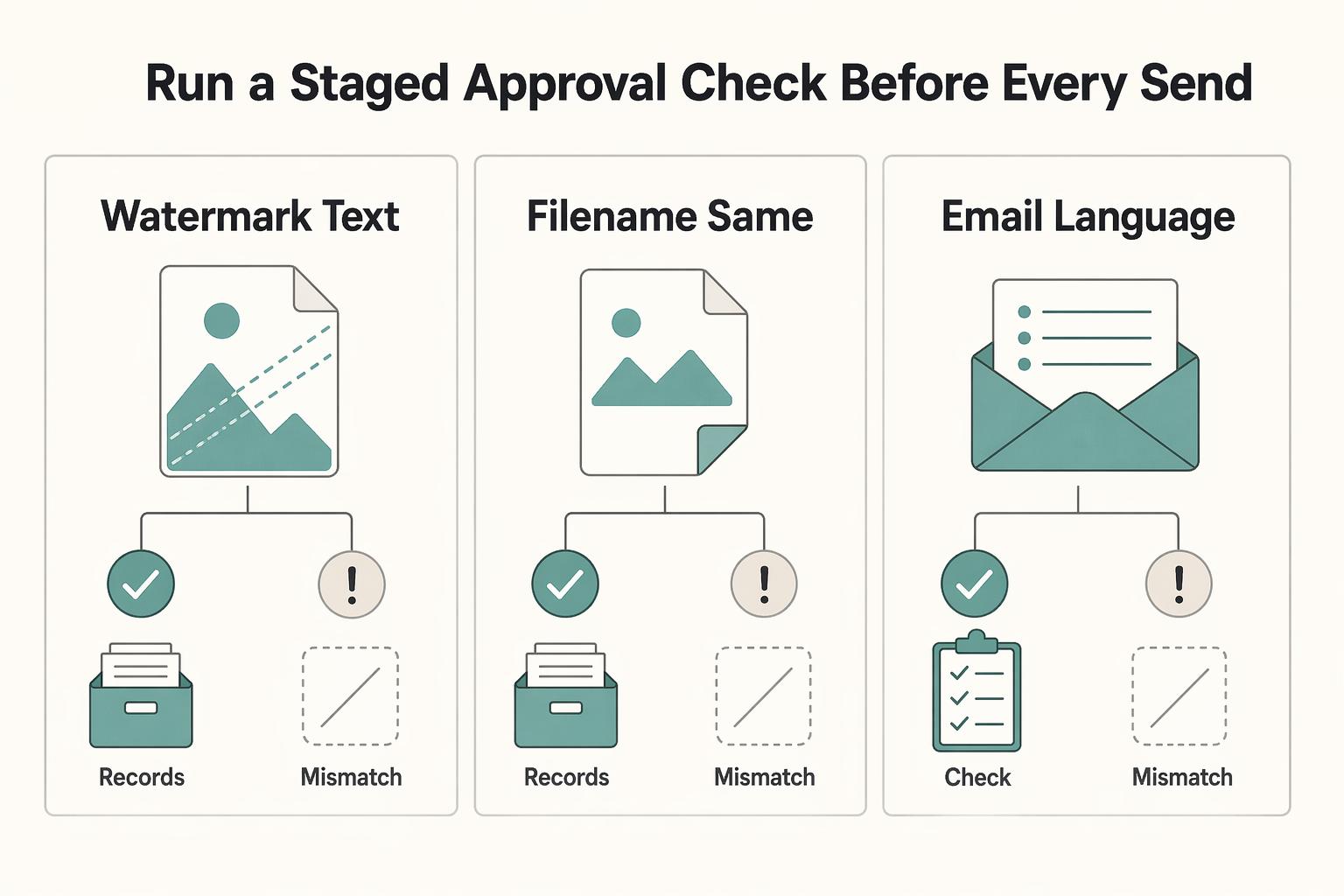
Run a staged approval check before every send#
Before sending, check the output rather than trusting the preset. Inspect the exact file name and version, all document pages or a representative image batch, and whether the mark covers information the client must assess.
| Check | Must match |
|---|---|
| Watermark text | The selected tier |
| Filename | That same tier |
| Email language | The file status |
Before sending, confirm:
- watermark text matches the selected tier
- filename matches that same tier
- email language matches the file status
Avoid the common failure points: manual one-off edits, inconsistent opacity/placement, exporting the wrong tier, and skipping the final preview. Save the exact exported file and message thread so your delivery record is clear.
Consistent labels and records support your release process. They do not technically prevent copying or enforce payment terms.
For a step-by-step walkthrough, see How to Write a Scope of Work That Protects Delivery and Payment.
Watermark PDF proposals and reports without blocking review#
For a proposal or report, first decide whether the recipient is receiving a review copy or an agreed usable deliverable. Sensitive pricing or strategy may warrant restricted sharing, but it does not automatically make every PDF a proof. A watermark labels status; access controls determine who can open a shared link.
| Route | Best use case | Editability tradeoff | Client review impact |
|---|---|---|---|
| Watermark at source | The proposal or report will go through multiple revisions | High editability before export | Consistent proof label across drafts |
| Watermark post-export | Source document is done and you need a review PDF quickly | Medium; you may need to reapply after updates | Fast, simple review flow |
| Flattened preview | A visual proof where editing is unnecessary | Can reduce easy object editing but not copying | May reduce search, selection and accessibility; preserve an accessible review route |
Apply post-export watermarking for near-final review copies#
In Acrobat on desktop, open a review copy of the PDF and select Edit, then Watermark > Add in the left pane. Choose a text source for PROOF or CONFIDENTIAL, set opacity, rotation, size and position, and check the page range in the preview. Select OK and save a separately named review file. Open that saved copy and scroll every page. Reapply and recheck after any replacement PDF export.
Add watermarking in the source file for active draft cycles#
In supported desktop versions of Microsoft Word, select Design > Watermark > Custom Watermark. Choose Text watermark and enter the status label, or Picture Watermark for an image, then select OK. Export the marked draft to PDF and verify the output, especially section breaks and pages with different layouts. Keep the clean final source separately and remove the proof label only for the agreed final release.
Use flattened previews and access controls deliberately#
A flattened visual preview can make simple object editing harder, but it does not prevent screenshots, cropping, forwarding or AI-assisted removal. Rasterizing a text PDF may harm accessibility, search and annotation. Use it only where a visual proof is appropriate and provide an accessible review route. For sensitive circulation, use a sharing service's actual recipient access, expiry and revocation controls where available; a CONFIDENTIAL label or PDF permission flag is not equivalent.
Before you send, verify:
- Check watermark visibility and readability on every page.
- Check the filename and visible details for information that should not be forwarded.
- Confirm sharing permissions restrict access to the intended recipients where required; label instructions alone do not impose that restriction.
- Keep text readable and accessible; check that the chosen preview format permits the feedback you need.
If collaborators or recipients are in multiple jurisdictions, keep labeling and version control consistent across copies, then handle enforcement expectations in your contract and licensing terms. Watermarking is one layer, not a replacement for legal and contractual controls.
Connect proof labels to agreed ownership and release terms#
The contract sets the allowed use and delivery obligations; the watermark helps communicate them. Define the review and final-release process before sharing proofs, rather than trying to add new restrictions after approval.
Put proof status into your agreement#
In your MSA or SOW, define these points in plain language:
| Agreement point | Definition |
|---|---|
| Draft status | Proofs, mockups, concepts, and review PDFs may be delivered with visible proof markings or preview restrictions. |
| Usage limits | Agree what review recipients may do, including whether publication, production, broader sharing or model training is allowed. A unilateral label does not amend existing rights. |
| Ownership reservation | State ownership and license terms for your work, client-supplied material and third-party assets. Work-for-hire rules or an assignment can change ownership; sending a clean file does not itself decide it. |
| Release condition | State when final files are due and any agreed approval or payment condition. Apply the actual contract; do not impose a new hold through the watermark or invoice. |
Keep the MSA, SOW and delivery messages consistent. An invoice can refer to agreed release terms; it should not silently introduce a new restriction. For cross-border work, ownership, governing law and enforcement may need jurisdiction-specific review.
Track the agreed clean-file release milestone#
| Stage | What you send or do | What to verify |
|---|---|---|
| Preview delivery | Watermarked draft or proof PDF | Mark is visible on every page/asset and still readable on different backgrounds |
| Approval checkpoint | Client approves the exact version in writing | Approval record matches the filename/version you sent |
| Payment checkpoint, if agreed | Record invoice and payment status | Issuing an invoice is not payment. Verify the specified release condition; follow delivery obligations if no payment hold was agreed. |
| Final release | Deliver the approved clean version when due | Check the actual final deliverables, formats, license and delivery date; removal of a proof mark alone does not transfer rights. |
| Evidence retention | Store records together | Keep sent versions, approvals, invoice, payment confirmation, and delivery note |
For visibility, test before sending. A 20-30% opacity range can be a practical starting point, but it is a usability choice, not a legal requirement.
Keep an evidence pack and know the limit#
Watermarking can support proof and takedown documentation, but it does not replace registration strategy, licensing terms, or legal counsel. Keep a simple evidence pack: marked files sent, timestamps, approvals, invoice/payment records, and any screenshots of unauthorized use.
In the United States, copyright generally arises automatically when an original qualifying work is fixed. A watermark is not what creates that protection. Ownership, registration, licensing and remedies are separate questions. Keep source files and creation records as well as the sent proof; a logo on someone else's work does not establish that you own it.
Avoid these mistakes:
- Using a proof label without agreeing permitted use and the final-delivery milestone.
- Sending a clean version before the agreed release point without recording the exception.
- Trying to add a new payment hold through an invoice or watermark after the contract is agreed.
- Losing version records or keeping only the watermark asset instead of the exact sent export.
Send a clearly labeled proof and keep the delivery record#
Choose the status tier, apply the mark with a saved tool setup where useful, and inspect the exact export. Tell the client what action you need and when final files are due. A repeatable process is more useful than a watermark that looks impressive but leaves those questions unanswered.
For example, a designer sends Client-A-homepage-v3-PROOF.pdf for layout approval, with the message below. The contract says clean final files are due after approval and the agreed final-payment checkpoint. The client approves v3; the designer checks that checkpoint, exports the same approved version without the proof label, and records delivery. If the contract instead requires delivery on approval regardless of payment, follow that obligation.
A versioned preset or template keeps settings repeatable, while the saved export and delivery message show what was actually sent.
Suggested delivery wording: "Attached is v3, a watermarked proof for layout review. Please send feedback or confirm approval by Friday. Final files will be delivered under the release terms in our signed agreement." Replace the timing and milestone with your actual agreement.
Before sending, confirm the mark type matches the asset, the file is the intended exported review version, readability is intact and the delivery message matches the agreed use.
Start with one exported sample. If the mark disappears on a bright background or blocks the design at review size, adjust contrast or placement before using the setup for a batch.
Frequently Asked Questions
Does a watermark legally protect your work?
A watermark can signal attribution or review status and support a record of what was shared. It does not guarantee protection or create ownership. In the United States, copyright generally arises automatically when an original qualifying work is fixed; the mark is not required for that protection.
Should your watermark be your logo or your name?
Use whichever clearly identifies you as the creator. Including your name or logo can help establish creator identity and support brand recognition. Just use it consistently.
How do you choose between visible and invisible watermarking?
Use a visible mark when the client needs to see attribution or proof status. Invisible watermarking is a separate technical approach: validate detection, survival through exports and your recordkeeping before relying on it. Neither approach guarantees that a file cannot be copied.
Can watermarks be removed, and what makes one stronger in practice?
Watermarks can be cropped, edited or removed, including with automated tools. Place a visible mark across a meaningful area without hiding review details, inspect the export and keep the exact sent version. Flattening can reduce easy object editing but does not make removal impossible.
How should you watermark a PDF proposal or document?
In Acrobat desktop, select Edit > Watermark > Add, choose text, set appearance and position, apply to the intended pages and save a separate review copy. In supported desktop Word versions, use Design > Watermark > Custom Watermark before exporting. Open the saved PDF and inspect every page.
Will a watermark make you look unprofessional to serious clients?
Professionalism depends on execution. A watermark that clearly identifies the creator while staying visually subtle tends to feel intentional; one that overwhelms the design feels distracting.
How should proof marks connect to contracts, approvals, and invoices?
Agree proof use, approval and final delivery in the contract, then use matching file labels and messages. Apply any payment hold only if it was agreed; an invoice alone does not create a new restriction. Clarify ownership and licensing separately, using Work for Hire vs Assignment of Rights where relevant.
What single pre-send check catches the most mistakes?
Open the exact exported file you are about to send. Check its version, mark, readability and page coverage, then retain that export with the delivery message. Store the reusable watermark asset separately from the evidence of what the client received.
Try a related tool
Researched and edited by the Gruv editorial team. Gruv builds cross-border billing, payouts, and finance-operations software for global businesses.
Sources
Includes 5 external sources outside the trusted-domain allowlist.
- copyright.gov/help/faq/faq-general.htmltrusted
- adobe.com/products/photoshop/watermark-design.htmlexternal
- canva.com/features/watermark-photosexternal
- helpx.adobe.com/lightroom-classic/desktop/workspace/using-wa...external
- helpx.adobe.com/acrobat/desktop/edit-documents/add-backgroun...external
- support.microsoft.com/en-au/word/use-a-custom-watermarkexternal
Educational content only. Not legal, tax, or financial advice.
Related Posts

Work for Hire vs Assignment of Rights for Freelancers
A freelance agreement is not just about price and scope. It decides who controls the rights in the work. If the ownership language is loose, rights can move earlier than you expect, cutting down your control once the work is delivered or used.

How to Copyright Your Creative Work as a Freelancer
In the United States, copyright protection generally begins when original human-created expression is fixed, such as saving an illustration or written draft. You do not need a client contract or registration to create that protection. Client ownership and registration are separate questions: decide which rights the client receives, record who created the work, and register an accurate claim using the appropriate procedure.

The Freelance Payment Penalty: A Modeled Audit of Platform Fees, FX Spreads, and Payout Delays
The money rarely disappears through a single, easy-to-spot fee. The real loss is stacked. A marketplace takes its commission, a processor adds a charge for international cards, a bank or payment company converts the currency at a spread, a platform holds the funds before release, and a wire sheds a little to intermediaries on the way in. Each layer looks defensible on its own, but the worker feels the combined result as a smaller deposit and a later payday.