
Quick Answer
In Toggl Track, verify billing model, billable rates, labor costs, currency and dates, then inspect Detailed entries, Summary work mix and the Premium Profitability model. Reconcile other costs and collections separately. Use complete fee cycles, classify extra scope under the agreement and compare client contribution with recorded approval/payment behavior. If your interface is Focus/2.0, use its different fixed-fee allocation rules.
The Profitability Audit: Three Pillars and the Decisions They Support#
Use this audit to make three decisions: whether your pricing is working, which clients or project types to repeat, and whether your workload is sustainable.
Toggl Track’s Profitability Report compares calculated revenue with tracked labor cost. Use it to investigate pricing and delivery effort, then reconcile invoices, fees and cash separately. The report is a management model, not proof that a client has paid or a complete accounting profit statement.
A profitability audit is different from basic time logging:
| View | Focus | Inputs | Decisions enabled |
|---|---|---|---|
| Detailed Report (time-entry view) | Hours and entries | Time entries | Time-entry audit, billable-hour checks, invoice prep |
| Profitability audit | Revenue, cost, profit, and work mix | Time entries, billable rates, labor costs, project/client/tag structure | Pricing updates, client/project selection, staffing and budgeting choices |
This walkthrough uses the Toggl Track interface with Reports → Detailed, Summary and Profitability. Billable rates require Starter or above; labor costs, fixed-fee projects and Profitability require Premium or the applicable Enterprise access. Confirm your workspace’s plan and permissions before following the steps.
Run the audit in three pillars, each with one outcome and one primary signal:
- CFO pillar
Outcome: find margin leakage. Primary signal: profit plus billable vs non-billable mix by project, client, or tag.
- Risk pillar
Outcome: identify client work that consumes effort without enough return. Primary signal: client-level profitability, then Detailed Report entries when you need proof at the time-entry level.
- CEO pillar
Outcome: protect workload sustainability. Primary signal: where hours cluster across projects and non-billable buckets over time.
Toggl also documents a newer Focus/2.0 Reporting interface. Its fixed-fee revenue is prorated over active project days, whereas Track documents recurring fees multiplied by periods in the report range. Check which interface you have; do not combine their navigation or partial-period assumptions. Use the Focus profitability formulas if your workspace has that interface.
Choose one client and one completed project for the first audit. Record the currency, billing model, date range, rounding setting and included entries before comparing any charts. A filtered or differently rounded view should not be mistaken for the complete invoice population.
Related: How to Manage Project Profitability for Your Agency.
The Foundation: Set the Structure Before You Report#
If you want this data to drive decisions, set the structure first. Without a clear profit model and a consistent setup, reporting stays reactive.
| Step | Focus | Key practice |
|---|---|---|
| 1. Define your profit model | Profit model | Document assumptions and review them on a fixed cadence |
| 2. Standardize project initiation | Kickoff setup | Define success, key deliverables, and budget sub-items |
| 3. Stop rebuilding the process every time | Workflow consistency | Use one repeatable setup framework |
| 4. Keep reporting tied to the model | Reporting discipline | Review results against the same model and kickoff artifacts |
Step 1: Define your profit model before execution#
Write down revenue, delivery labor and additional direct costs separately. For hourly work, Toggl revenue uses billable hours × the applicable billable rate. Tracked cost uses all tracked hours × the applicable labor rate, including non-billable effort when it is included in the report. For fixed-fee work, use the configured fee model and reconcile it to the agreed fee and period.
Keep two controls in place:
- Document the assumptions you will use across projects.
- Review those assumptions on a fixed cadence so reporting stays comparable over time.
Step 2: Standardize project initiation#
Treat initiation as a required setup stage, not a quick handoff. At kickoff, define:
- what success looks like
- the key deliverables (final outcomes and milestones)
- the budget broken into sub-items
For example, a $3,000 fixed-fee project might budget 40 delivery hours and 10 coordination/review hours. At an illustrative internal labor cost of $40/hour, the 50-hour plan has $2,000 labor cost and $1,000 contribution before other costs. These are planning assumptions, not Toggl defaults or market rates.
Step 3: Stop rebuilding the process every time#
Use one repeatable project setup: assign the client, project currency and billing model; create delivery/review tasks if your plan supports them; set rates; and define tags such as admin, scope-creep and rework. Give each tag a short definition so ordinary included revisions are not mislabeled as unpaid extras.
Step 4: Keep reporting tied to the model#
In Track, set a workspace member’s labor cost from Members → Cost, or a private project member’s cost from Projects → Team. A project-member cost overrides the workspace-member cost. Use the effective-date options for changes deliberately: applying a new cost to all data changes historical comparisons. Toggl’s labor-cost guide explains the precedence and date choices.
| Area | Basic setup | Profitability-ready setup |
|---|---|---|
| Profit model | Implicit or undefined | Documented before execution |
| Project initiation | Minimal setup | Success definition, deliverables, and budget sub-items defined upfront |
| Workflow consistency | One-off project setups | Repeatable structure used across projects |
| Reporting visibility | Activity logs only | Results interpreted against the same model and setup artifacts |
| Decision quality | Reactive interpretation | More strategic, structure-based decisions |
You are ready for Pillar 1 when:
- your profit model is documented and current
- kickoff notes consistently include deliverables and budget sub-items
- teams use a repeatable setup instead of rebuilding process from scratch
- reporting can be explained against the same model and initiation assumptions
For a software comparison before changing systems, see time tracking for billable hours. Keep the same audit definitions when comparing exports.
Pillar 1: Find Margin Leaks and Decide What to Change#
Review admin, change work, payment costs and rework as distinct causes of margin leakage. Each needs entry-level evidence and a different response in pricing, scope or delivery.
| Cost signal | Track it as | Where to review | Next move |
|---|---|---|---|
| Admin tax | Non-billable support work, especially admin and client communication, with consistent tags | Summary Report weekly, then Profitability Report monthly | Adjust pricing or packages; tighten communication cadence; or price in more management overhead |
| Scope creep | scope-creep tag plus an SC description, or a dedicated change-work task | Detailed entries, then task/tag cost patterns | Classify the request under the agreement; obtain approval for genuinely additional work |
| Fee erosion outside reported profit | Reported profit in Toggl plus adjusted profit in a closeout sheet or finance note | Processor and bank settlement records | Reprice, change payment method, or reassess client fit |
| Rework | rework entries with clear descriptions | Detailed Report, then Profitability Report by task, project, client, or tag | Fix briefs or handoffs, or tighten revision and response rules |
Step 1: Measure admin tax before it becomes a pricing blind spot#
Tag admin and client coordination on the project that caused it, even when it is non-billable. In Track, open Reports → Summary, select the same period and project, and compare total hours with billable hours. Then use Profitability to assess labor cost. Organisation-wide admin needs its own allocation rule outside the direct project total.
Action loop
- Track: tag admin-heavy entries as you log them.
- Find: review weekly in Summary Report, then monthly in Profitability Report views.
- Decide: if admin is spread across clients, adjust pricing or packages; if it clusters, tighten your communication cadence or price in more management overhead.
Check a sample week in Detailed: project, duration, description, tag and billable status. If 40 billable hours and 10 non-billable hours are logged, billable share is 40 ÷ 50 = 80%. Adding five missing admin hours changes it to 40 ÷ 55 = 72.7%. A falling share is an investigation signal, not automatic permission to bill those hours.
Step 2: Make scope creep reviewable the day it appears#
If you wait until closeout to mark scope creep, you can lose the evidence you need. Log it when the request arrives, not later. Use one repeatable rule: apply scope-creep and start descriptions with SC | ..., or route it to a dedicated change-work task if that fits your project method.
Action loop
- Track: create or edit the entry before you start the extra work; set billable status per your contract rule.
- Find: use Detailed Report for entry-level proof, then Profitability Report totals by task or tag.
- Decide: distinguish an included revision or correction from genuinely additional scope; agree any additional price and timing before doing that new work, while continuing existing obligations.
Keep review conversations anchored in evidence: original deliverables, tagged entries, and the current estimate position. That protects margin and keeps client conversations clearer.
Step 3: Capture fee erosion outside reported profit#
Treat Toggl profit as calculated revenue less tracked labor cost. Processor fees, software, subcontractor invoices and other costs not represented in the chosen labor rates need a separate reconciliation. Cash collection is another view: an unpaid invoice can leave modeled profit positive while available cash remains low.
Action loop
- Track: keep reported profit in Toggl and adjusted profit in your closeout sheet or finance note.
- Find: pull processor and bank settlement records for actual fees.
- Decide: if a payment route repeatedly compresses margin, reprice, change payment method, or reassess client fit.
For the $3,000 example, suppose actual work reaches 60 hours at $40: labor is $2,400 and modeled contribution is $600, or 20%. If actual processor/FX fees are $90 and separately unallocated direct costs are $110, adjusted contribution is $400, or 13.3%. Do not subtract those costs again if they are already included in a loaded labor rate. If only $1,500 has been collected, keep the outstanding $1,500 visible separately from both contribution measures.
Step 4: Measure rework where it starts#
Tag avoidable rework and describe its cause. Keep necessary quality corrections distinct from extra client-requested scope. A tag measures effort; it does not decide whether the client owes another fee.
Action loop
- Track: log rework entries with clear descriptions.
- Find: inspect entries in Detailed Report, then compare totals by task, project, client, or tag in Profitability Report.
- Decide: if rework clusters by task type, fix briefs or handoffs; if it clusters by client, tighten revision and response rules in the next scope.
For Track recurring fixed-fee projects, Reports multiplies the fee by the billing periods within the range, while the Project Dashboard shows the per-period fee. Inspect the displayed fee when using partial periods or filters, and use the full fee cycle for comparisons. The fixed-fee guide describes the report/dashboard distinction.
| Input | In Toggl reported profit | In your adjusted profit review |
|---|---|---|
| Revenue from billable rates or fixed fee | Yes | Yes |
| Labor cost from tracked hours and cost rates | Yes | Yes |
| Admin, scope-creep, and rework hours if tracked | Yes, through time cost and revenue impact | Yes |
| Payment processor fees | Not a separate input in the documented revenue-minus-labor-cost formula | Use actual settlement fees; avoid double counting loaded costs |
| FX, software, subcontractor and other direct costs | Only captured to the extent represented in configured rates/model | Add costs not already counted; document allocation and currency |
| Fixed-fee timing effect on short date windows | Can distort interpretation | Check date range against fee cadence |
Before moving to Pillar 2, run this CFO checkpoint list:
- Confirm labor costs are set correctly so tracked hours produce meaningful cost data.
- Check one recent project in Detailed Report and verify
admin,scope-creep, andreworktags are consistent. - Review fixed-fee projects on a date range that matches fee cadence, not an arbitrary short window.
- Keep one closeout evidence pack: original scope, tagged time entries, invoice amount, and actual processor or FX fee records.
Keep the original scope and approved changes with the time export. A closeout record should explain both the hours spent and whether any additional work was authorised.
The payment fee comparison tool can estimate fees for an amount and currency pair. Reconcile its assumptions to actual settlement records; calculate the full project contribution and overhead allocation in your closeout worksheet.
Pillar 2: Are Your Best Clients Secretly Your Riskiest? (The Chief Risk Officer Pillar)#
Compare clients by contribution for a consistent period, then review documented payment and approval friction. Larger revenue can coincide with lower contribution and greater delivery effort.
If you use Agency Gross Income (AGI) as an internal measure, define it explicitly—for this audit, invoice revenue less identified pass-through purchases. Separate delivery labor and other costs without counting them twice. This management adjustment does not decide gross-versus-net accounting presentation or change what an invoice legally represents.
Step 1: Build a simple client scorecard#
Keep the scorecard simple enough to maintain. Use one row per client with two lanes: profitability signals from tracked time and behavior signals from your operating records. Keep the lanes separate so you can tell whether a client is financially strong, operationally risky, or both.
For profitability, reuse the Pillar 1 inputs: delivery profit, delivery margin, admin-heavy time, scope-creep, and rework. For behavior, track what you can verify consistently: payment behavior, communication overhead, approval friction, and process adherence.
Use a small documented scale rather than an unfinished scoring placeholder. For example, record approval friction as 0 = one clear decision owner and timely approval; 1 = occasional clarification; 2 = repeated delays or conflicting approvers. Keep payment evidence separately as days overdue and follow-up count. These are your management categories, not a Toggl risk score or a validated default weighting.
Spot-check one client against entries and invoice/approval records. Use required fields for dates, source references and scoring definitions. Tag-filtered views can overlap: one entry may carry both admin and rework, so do not add their totals unless you deduplicate entry IDs.
Step 2: Compare client quality, not client size#
For an illustrative comparison, Client A invoices $10,000, with $5,000 pass-through purchases and $4,000 delivery labor: defined AGI is $5,000 and delivery contribution $1,000, or 20% of AGI. Client B invoices $6,000 with no pass-throughs and $3,600 labor: contribution is $2,400, or 40%. Before other costs, B contributes more despite the smaller invoice. Compare like periods and currencies before using this result.
| Client profile | Revenue view | Risk-adjusted profitability view | Operating risk signals | Portfolio action |
|---|---|---|---|---|
| Large account with heavy pass-through spend | Looks largest on invoices | AGI is lower than top-line revenue; delivery margin is pressured by admin and rework | Slow payment follow-up, frequent approval churn | Reprice or redesign scope before renewal |
| Mid-size retainer with clean delivery | Not the largest top line | Stable delivery profit and margin | Predictable approvals, low communication overhead | Retain and protect |
| Small project with frequent extras | Lowest top-line revenue | Profit can erode as change work accumulates | Repeated scope changes, unclear feedback ownership | Tighten scope and guardrails, then reassess |
This is the key shift: revenue rank and portfolio quality rank are not always the same.
Step 3: Choose the right portfolio action#
Avoid a simple keep-or-drop call. Match the action to the pattern in your scorecard.
| Action | Profitability cue | Operating cue |
|---|---|---|
| Retain | Healthy delivery margin | Low operating friction |
| Reprice | Real delivery effort is underpriced | Workable relationship |
| Redesign scope | Value exists | Approvals, revisions, or change handling need tighter structure |
| Exit | Weak profitability | Repeated risk patterns continue after terms and pricing are adjusted |
Base portfolio decisions on the defined scorecard and its source records. A negative margin may reflect missing time, a changed rate or a mismatched fee period rather than a client problem. Resolve those data issues before renegotiating.
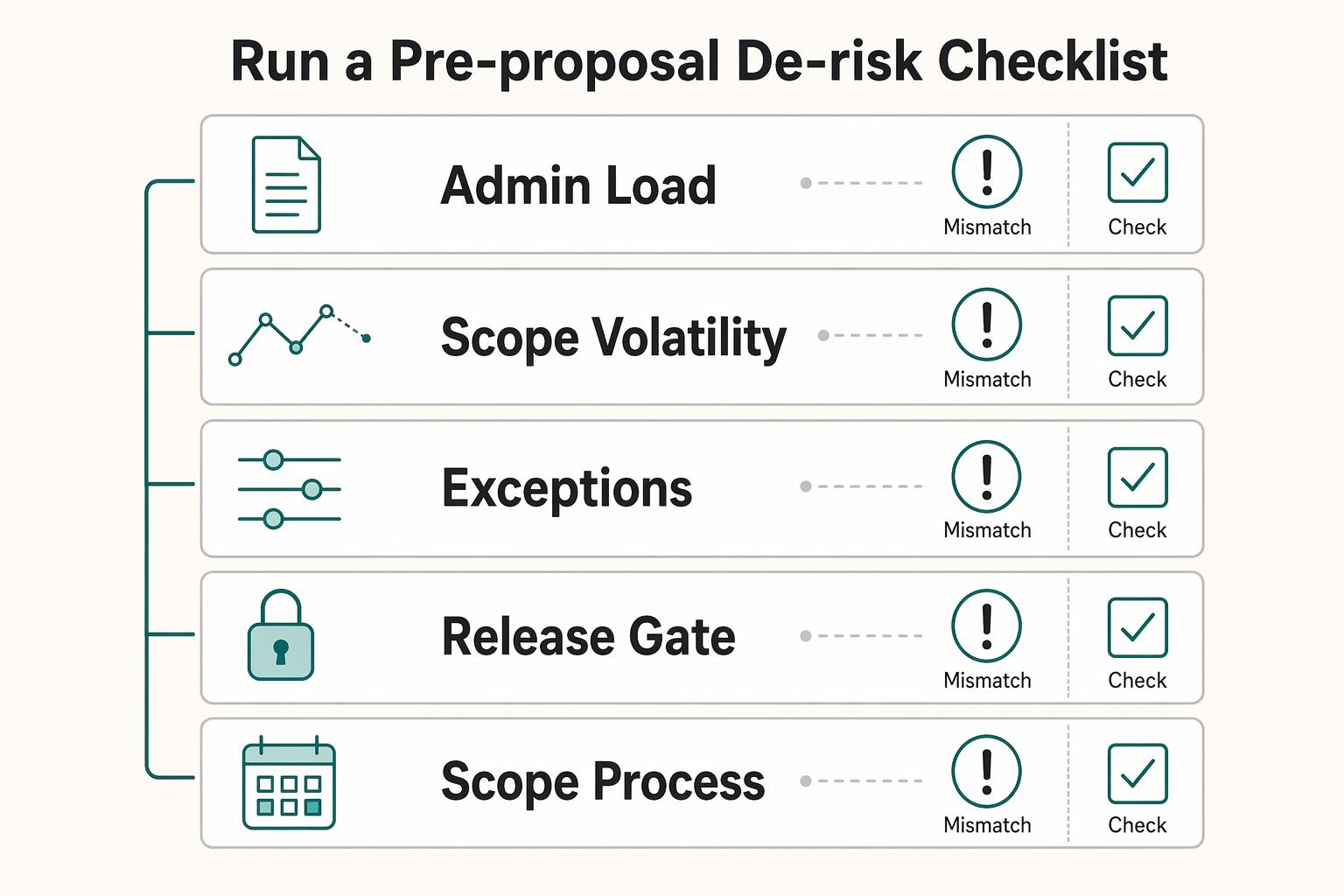
Step 4: Run a pre-proposal de-risk checklist#
The best time to fix repeat risk is before the next proposal goes out. Before any renewal, retainer, or follow-on scope, use prior project data to set terms for the next cycle.
Check these five items:
- Admin load: did coordination and support consume more effort than expected?
- Scope volatility: how often did
scope-creepappear, and how early? - Payment behavior: did invoices require repeated follow-up or exceptions?
- Communication overhead: were approvals slow, unclear, or overly multi-layered?
- Scope and process guardrails: which boundaries need to be clearer in the next SOW, proposal, or invoice schedule?
Before renewal, specify coordination allowance, included revisions, approval owner and change process. A useful capacity test is arithmetic: at 60 hours per cycle, adding a second similar client requires another 60 available hours, not just another invoice. If available capacity is only 40 hours, reduce scope, change timing or secure delivery capacity before promising both.
Once your portfolio is both profitable and operationally safer, move to Pillar 3 and ask a harder question: which projects still leave you with enough attention to lead well?
Use value-based pricing when setting the next proposal’s price. Keep its value discussion separate from the actual cost and effort evidence collected here.
Pillar 3: Weigh Energy Drain Alongside Delivery Profit#
After the money and client-risk review, add a personal workload check. Energy labels are subjective notes, not a built-in Toggl profitability metric or an objective measure of another person’s performance. Compare your own recurring patterns with delivery effort before deciding what to change.
Step 1: Label energy when you log time#
If you want this signal to be useful, keep it simple. Use each time entry as the base record. When you stop the timer, or when you log later in Manual Mode, add one energy label to the entry description. If you want faster filtering later, add the same label as a tag.
Keep one fixed format:
Energy-HighEnergy-NeutralEnergy-Drain
Use these as decision labels, not journal entries. High means demanding work that still leaves you sharper. Neutral means routine but manageable work. Drain means the task lowers focus, patience, or judgment quality.
Step 2: Track repeatable drain patterns and choose a response#
Do not stop at "this felt bad." Look for the recurring pattern, then apply the matching fix in the next cycle.
| Pattern | What to look for in entries | Practical next-cycle response |
|---|---|---|
| Feedback loops | Repeated short review, reply, and revision entries on the same deliverable | Set a tighter review flow and a clear approval owner |
| Revision churn | Energy-Drain entries recurring with rework or scope-change activity | Tighten revision boundaries and move extra changes into paid requests |
| Context switching | Many small entries across multiple clients or tasks in the same day | Batch similar work and reduce same-day project switching |
Many short entries can suggest fragmented work, but can also reflect logging style or a genuinely varied role. Test a change—for example, one shared review window—and compare the next cycle’s interruptions, total hours and your own energy notes. Do not infer a universal productivity loss from entry count.
Step 3: Run a weekly review checklist#
A weekly review only works if the cadence stays fixed. Use the same sequence each time so the conclusions stay evidence-based.
- Open Detailed for the chosen period and project; inspect entries with your energy tags.
- Use Summary to compare project/client and task/tag groupings available in your plan, keeping the same date range and currency.
- For a supported advanced view, filter Client AND Energy-Drain AND (rework OR scope-creep), using an OR group for the last pair. Spot-check included entries; avoid metric filters in an invoice-total export.
- Compare the selected hours with the complete project cost/revenue view; label the slice so it is not mistaken for the whole project.
Premium/Enterprise users can use Profitability for the configured revenue/cost model. Without that access, use available Detailed/Summary time exports and calculate agreed revenue, labor and additional costs in a worksheet. Paid billable-status/rate and advanced-filter features are not all available on Free.
- Spot-check billable status and rate precedence: workspace, workspace member, project, project member, then task-specific rate. The most granular configured rate wins. Billable rates apply only to billable entries. Starter rate changes affect past data; Premium/Enterprise offers historical-rate controls, so save dated comparison exports and choose effective dates deliberately.
Step 4: Classify each project and act#
Once you have both money and energy signals, classify each project and choose the least disruptive fix first.
| Financial result | Cognitive result | Risk signal | Default action |
|---|---|---|---|
| Strong | High or neutral | Sustainable delivery pattern | Keep |
| Strong | Drain | Good margin with leadership or attention drag | Redesign first, then reprice if drain persists |
| Weak | High or neutral | Work feels good but may be subsidized | Limit or keep only with a clear strategic reason |
| Weak | Drain | Margin pressure plus repeated stress signal | Plan an orderly exit under the agreement if a realistic scope/pricing fix fails |
When money and energy conflict, try a reversible change first: one approval owner, fewer review windows or clearer revision boundaries. If effort remains underpriced, renegotiate future scope or rates. Ending work still requires the agreement’s notice, handoff and payment terms; a private scorecard does not cancel existing duties.
A personal workload note can help select a workflow experiment. Verify the result in the next cycle rather than treating one difficult week as a permanent client classification.
Conclusion: Make Three Decisions Each Cycle From One View#
The point of this audit is not better reporting for its own sake. It is to make three decisions each cycle: protect margin, catch risk early, and keep your workload sustainable.
Pull those signals into one view for the same period, then assign one action to each active project.
| Data signal | What it indicates | Your next move |
|---|---|---|
| Margin is holding | Pricing, scope, and delivery mix are supporting profit | Keep the model and protect the delivery conditions that support it |
| Risk signals are rising | Client behavior or project structure is adding avoidable drag | Tighten terms, scope, or approval flow before the next cycle |
| Energy drain is repeating | Work may still pay, but it is getting expensive to lead | Redesign batching, review ownership, or workflow before taking on more |
When signals conflict, use fixed tradeoff rules. If margin is strong but energy strain is rising, change the most reversible lever first: scope boundaries, revision flow, batching, or review ownership. If energy is fine but margin is weak, fix pricing or scope first. If client risk keeps repeating and cognitive drain is high, control the relationship now and pause expansion until one immediate scope or contract fix is realistic.
Open your reports, run the review, flag the highest-friction project, and commit to one change for the next cycle only. That gives you something you can verify in the next set of entries.
Save the review date, export, assumptions, selected action and next check date in the project closeout record. That makes the following cycle comparable.
Frequently Asked Questions
How do I calculate project profitability in Toggl Track?
In Track, select a project and period in Reports → Profitability, confirm its billing model and labor costs, then inspect revenue, cost and profit. For hourly work, revenue is billable hours × rate; labor cost includes tracked hours × cost rates. Fixed-fee projects use their configured fee model. Reconcile other costs, invoices and collections outside the report, and keep currencies separate.
How do I test whether a fixed-fee project is still paying well enough?
Compare the agreed fee with all delivery effort for the same project/cycle. For a $3,000 fee and 60 tracked hours, gross effective hourly revenue is $50. At an illustrative $40 labor cost, modeled contribution is $600 before other costs. Effective hourly revenue is not take-home pay. Review omitted hours, extra costs and fee timing before setting the next quote.
What is the cleanest way to track non-billable time without muddying delivery data?
Keep non-billable project work on the relevant project and mark it non-billable; do not remove it from delivery cost. Tag admin or coordination consistently. For hourly work it produces no billable revenue but still consumes labor cost when included. Allocate general overhead separately using a documented rule.
How should I track scope creep in Toggl Track?
Use a scope-creep tag and an SC description for genuinely additional requests, with the request date and approval reference. Keep included revisions and required corrections distinct. Billable status must follow the agreement and approval, not merely the tag. Review the entries before a change proposal or renewal.
Should I use tags, tasks, or notes for profitability tracking?
Use projects/clients for the commercial engagement, tasks for deliverables where available, tags for cross-cutting causes such as admin or rework, and descriptions for entry-specific facts. Tags support filtering, but multiple tags can overlap. Choose one definition per signal and deduplicate before adding sliced totals.
How often should I review reports for margin, risk, and energy?
Review entry quality weekly, project contribution at each agreed fee cycle or milestone, and client decisions at renewal. Keep date range, currency, rounding and rate version comparable. If your workspace uses Focus/2.0, use its own documented formulas and distinguish forecasts from recorded actuals; do not assume Track navigation or fixed-fee allocation applies there.
Try a related tool
Researched and edited by the Gruv editorial team. Gruv builds cross-border billing, payouts, and finance-operations software for global businesses.
Sources
Includes 4 external sources outside the trusted-domain allowlist.
Educational content only. Not legal, tax, or financial advice.
Related Posts

Value-Based Pricing for Freelancers Under Real Payment Risk
Value-based pricing starts with the client’s expected benefit and willingness to pay. It still needs a deliverable, scope and payment agreement you can perform. Use a discovery phase when the benefit or effort is too uncertain to support a defensible quote.
Manage Agency Project Profitability With Cashflow Checkpoints
Invoiced revenue can look healthy while cash is still unavailable. That gap is where a project that looks profitable can start to pressure routine operating costs such as payroll, rent, utilities, and equipment.
Choosing Time Tracking Software for Billable Hours in 2026
If a client challenges an invoice, or you need to support a tax position later, vague timers will not help. The goal is simpler: keep records that make disputes easier to resolve, invoices easier to justify, and your file easier to explain when someone asks, "What exactly happened here?"