
Quick Answer
Use your calendar to pre-assign next week’s work before client requests set your priorities. Time blocking for freelancers works best when you place client delivery first, reserve separate slots for outreach and admin, and leave visible open capacity for surprises. Before any admin block, open the exact files you need, such as the contract, invoice draft, approval email, or receipt folder, so the time is actually usable. End the week by comparing what you planned against what you finished and adjust block timing.
Plan Next Week on the Calendar Before It Starts#
Step 1: Put next week on your calendar before it starts. Treat your calendar as where work gets decided. Do not use it only as the place where meetings go after planning happens somewhere else. In practice, time blocking means turning important work into appointments with yourself so you choose execution in advance instead of letting whatever feels loudest on Tuesday morning decide for you.
A task list hides scope. "Send invoice" can look like a quick errand until you include the real work: confirm contract terms, check line items against approved work, and make sure the approval trail or supporting records are easy to find if a client pushes back. The same problem shows up in contracts and payment admin. If you hire a contractor, the IRS says the first step is getting Form W-9. That record should stay in your files for four years. Small jobs turn into risk jobs when you leave them floating.
| Workflow | Planning trigger | Execution behavior | Likely failure mode |
|---|---|---|---|
| Task list only | You pick from a list when you sit down to work | You react to urgency and switch contexts often | Deep work gets fragmented; admin slips until it becomes billing, recordkeeping, or compliance friction |
| Calendar first | You assign work to specific blocks before the week starts | You do the task in its reserved slot and protect focus | The week still breaks if you forget admin and contingency blocks |
| Calendar plus recurring ops blocks | You pre-place delivery, admin, and buffer blocks every week | You separate client delivery from records, approvals, messages, and follow-up | Recurring blocks can get ignored if you never review planned versus actual time |
Step 2: Run a pre-week check. Before the week starts, check three things in order:
- Protect delivery blocks first, especially your highest-focus client work.
- Schedule risk and admin blocks next for invoices, contract review, records, and any contractor paperwork.
- Reserve contingency capacity for surprises. Use your own verified target percentage here after you review recent interruptions.
A simple checkpoint: open the files you will need before each block starts. If the contract, invoice draft, approval email, or record folder is missing, the block is not ready. If you want a broader planning method around this habit, see How to Manage Your Time Effectively as a Freelancer. Related: The Best Personal Productivity Systems for Freelancers (GTD).
Why Your To-Do List Is a Liability, Not an Asset#
Your to-do list is for capture, not execution. It helps you collect work, but if you use it to decide what to do next, urgency usually wins and your week fragments. A list cannot sequence priorities, protect focus, or absorb the real cost of task switching.
Unfinished tasks keep competing for attention until you make a concrete plan. That is why time blocking works: you decide in advance what gets protected instead of reacting to whatever feels loudest.
Reclassify your list by business function#
Treat your list as inventory, then label each item by business outcome:
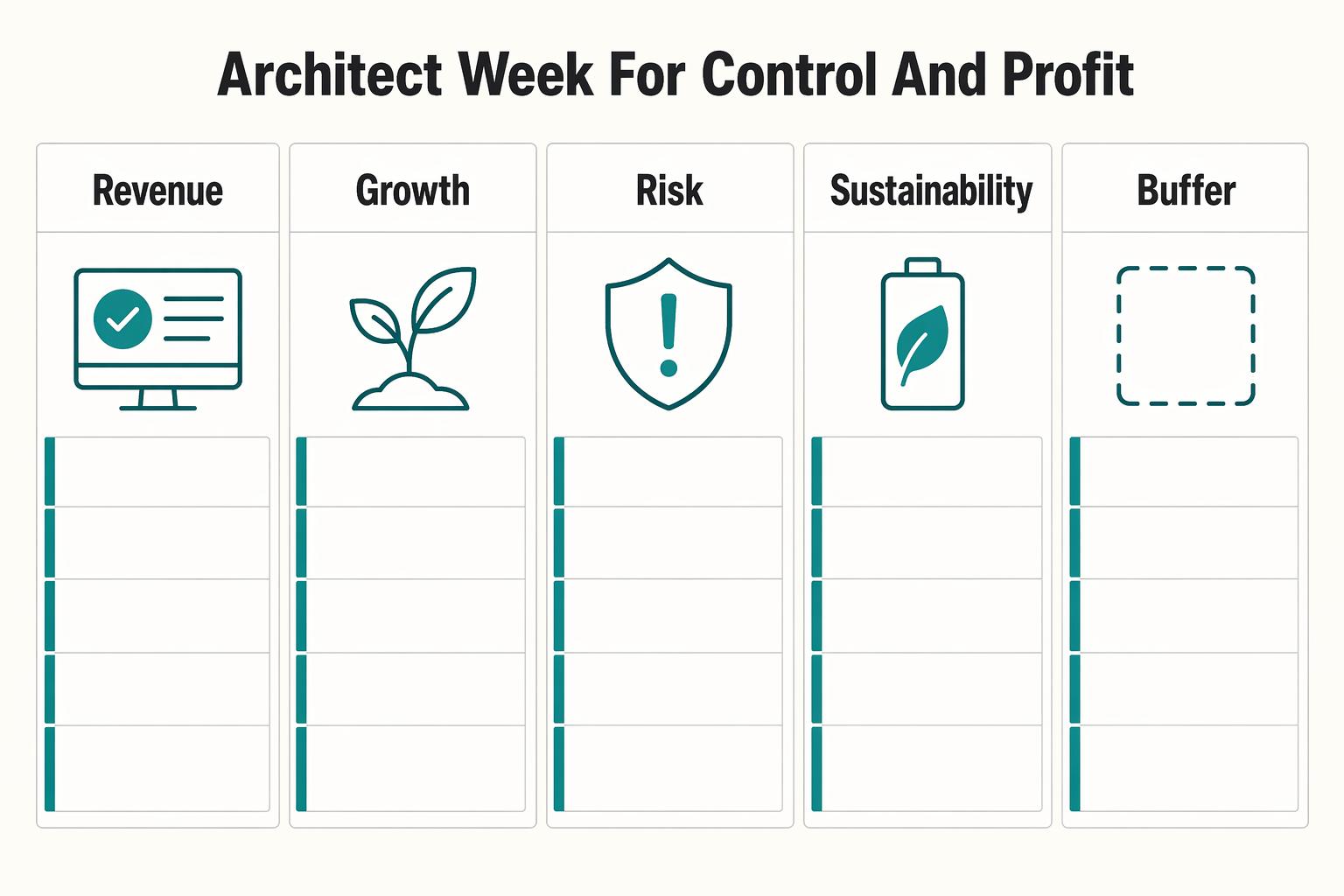
- Revenue: client delivery, billable production, near-close proposals
- Growth: outreach, portfolio updates, relationship building, pipeline work
- Risk: invoices, contract review, records, deadline-sensitive admin, compliance checks
- Sustainability: planning, maintenance, recovery, process cleanup, capacity protection
When these all sit in one undifferentiated queue, they look interchangeable. They are not. Each category protects a different part of your business.
| Trigger | Urgency-driven behavior | Outcome-based block behavior | Downstream consequence |
|---|---|---|---|
| Client message arrives mid-morning | Drop current work and react immediately | Route it to a message window unless it is truly time-critical | Less fragmentation and fewer switching costs |
| "Send invoice" looks quick | Squeeze it between larger tasks | Schedule a Risk block with prep time | Fewer errors and less follow-up churn |
| Proposal/portfolio task has no immediate deadline | Keep pushing it down the list | Reserve a Growth block before the week starts | Pipeline work actually gets done |
Run a readiness check before "small" admin tasks#
Most short admin tasks are under-scoped, not small. Before you schedule one, check:
| Readiness check | What to verify | If not ready |
|---|---|---|
| Controlling document | Open the contract, invoice draft, approval, receipt folder, deadline notice, or account record now | Split it into prep and execution, or move it |
| Required work | Confirm what must be checked, matched, or attached | Split it into prep and execution, or move it |
| Current requirement | Verify the current requirement from the official source, not memory or an old template | Verify first, then schedule it |
| Support files | Keep support files together so you can substantiate entries later | Split it into prep and execution, or move it |
If that prep is missing, the task is not ready for a short block. Split it into prep and execution, or move it.
The bottleneck is not your app. It is allocation discipline. Next, use the 4-quadrant system to place Revenue, Growth, Risk, and Sustainability into a week that survives real interruptions.
We covered this in detail in How to Use Harvest for Time Tracking and Invoicing in a Small Agency.
Classify Each Task Before You Block It on the Calendar#
Classify first, then block it on your calendar. Skip classification and urgency will choose your week for you.
Sort by business outcome before you schedule#
Use the same four buckets: Revenue, Growth, Risk, and Sustainability. This is not theory. It is a fast decision rule that keeps your calendar tied to business outcomes instead of noise.
Use Eisenhower logic as a bridge, not as a separate system. Urgent + important work usually maps to Revenue or Risk because delay has near-term consequences. Important + not urgent work usually maps to Growth or Sustainability, which is why you must schedule it before the week fills up. Urgent but low-value items go into a contained reactive window, get declined, or get removed.
| Quadrant | Objective | Typical examples | Failure mode | Calendar-block rule |
|---|---|---|---|---|
| Revenue | Deliver current paid work | Drafting, design, coding, agreed revisions, delivery QA | Letting messages and quick asks break delivery blocks | Block first in peak-focus hours; protect from interruption |
| Growth | Create future revenue | Proposals, follow-ups, outreach, referral asks, sales-relevant portfolio updates | Calling random browsing "marketing" | Give each block one named target and one next action |
| Risk | Prevent avoidable operational problems | Invoicing, contract review, payment follow-up, records cleanup, deadline-sensitive admin | Treating everything as generic admin and under-scoping prep | Batch similar tasks; start only when required documents are open |
| Sustainability | Protect capacity and reduce repeat friction | Weekly planning, recovery, tool maintenance, learning tied to your services | Treating it as optional cleanup | Pre-book it before client work expands |
Time blocking works because you make these rules in advance instead of renegotiating them in the moment. It also helps reduce task switching, which matters because switching tasks costs time and tends to cost more as work gets more complex.
Use boundary tests so tasks do not drift into the wrong bucket#
Revenue belongs here only when the task directly completes signed client scope now.
| Bucket | Belongs here when | Not here when |
|---|---|---|
| Revenue | The task directly completes signed client scope now | It is mostly scheduling, selling, status updates, or information chasing |
| Growth | It improves future revenue, even without a deadline today | It only ships work already sold |
| Risk | Delay creates clear consequences around payment, terms, records, or obligations | It just feels administrative |
| Sustainability | It protects your ability to deliver next week | It is avoidance dressed up as improvement |
Growth belongs here when it improves future revenue, even without a deadline today.
Risk belongs here when delay creates clear consequences around payment, terms, records, or obligations. Before you block execution, open the contract, invoice draft, approval email, receipt folder, or account record. If inputs are missing, block prep first.
Sustainability belongs here when it protects your ability to deliver next week, not when it is avoidance dressed up as improvement.
Handoff before weekly architecture#
Before you architect the week, do this handoff:
- Classify each task into Revenue, Growth, Risk, or Sustainability.
- Label block intent in plain language (for example, "Revenue: draft client homepage" or "Risk: send invoice with attachments checked").
- Prep required inputs now: brief, terms, invoice details, approvals, receipts, and account records.
If a task does not fit a quadrant yet, it is still too vague to schedule. Once each item has a quadrant, clear block intent, and ready inputs, you can build your week around deliberate blocks instead of urgency spikes.
For a step-by-step walkthrough, see The Best Calendar Apps for Freelancers Who Juggle Multiple Projects.
How to Architect Your Week for Control and Profit#
Architect your week before requests start steering it. Your goal is not to cram in more tasks. It is to choose the right work, block it in a clear order, and confirm each block is actually ready.
| Block type | Scheduling order | Proof |
|---|---|---|
| Revenue | First, in your highest-focus windows | Brief, assets, latest feedback, and scope notes are ready |
| Growth | Second, one concrete pipeline action per slot | Block title includes the target and next action |
| Risk | Third, near real due points | Contract terms, invoice draft, approvals, receipts, or client record are prepared |
| Sustainability | Fourth, before the calendar fills | It is scheduled as a real appointment |
| Buffer | By rule, keep visible open capacity | Calendar shows the buffer block using your verified buffer rule |
Without a fixed 9-to-5 structure, it is easy to drift: one urgent email, one quick reply, one social check, then the day is gone and planned client work did not move. This weekly setup helps you catch that pattern early instead of repeating it.
Step 1. Sequence your week, and block only ready work. Run one planning session before the week starts, then place blocks in this order:
- Revenue first: Block current paid delivery in your highest-focus windows. Proof: brief, assets, latest feedback, and scope notes are ready.
- Growth second: Block one concrete pipeline action per slot (proposal draft, follow-up, referral ask, or sales-relevant portfolio update). Proof: block title includes the target and next action.
- Risk third: Block payment, terms, records, and deadline-sensitive admin near real due points. Proof: contract terms, invoice draft, approvals, receipts, or client record are prepared.
- Sustainability fourth: Block planning, recovery, and maintenance before the calendar fills. Proof: it is scheduled as a real appointment.
- Buffer by rule: Keep visible open capacity. Proof: the calendar shows the buffer block using your verified buffer rule.
If inputs are missing, the block is not ready. Schedule prep first.
Step 2. Pre-decide urgent-request handling (protect, defer, reroute). Use this as your default decision template so you do not renegotiate boundaries mid-day:
| Current block | Urgent request type | Default action | Readiness check |
|---|---|---|---|
| Revenue deep work | Does not affect current delivery, scope, payment, or a real deadline | Protect | Leave block intact; move request to next reactive window |
| Revenue deep work | Affects current delivery, agreed scope, payment, or a real deadline | Reroute | Update calendar immediately so the tradeoff is visible |
| Reactive window | Same-day request, not critical to delivery or payment | Defer from deep work and handle here | Keep triage, replies, and coordination inside this window |
| Risk block | Needs terms, records, or payment clarification | Reroute to risk/admin | Open supporting documents before starting |
Step 3. Run a short operator review each week. Review at week-end, or at 6 PM on any day that felt busy but left planned delivery untouched, and look for recurring drift:
- Pattern: What repeatedly slipped or expanded?
- Evidence: Which block moved, disappeared, or started late?
- Cause: Missing inputs, overpacked schedule, weak boundaries, or too many "quick" requests?
- Next-week adjustment: Make one concrete change (prep earlier, move Growth earlier, batch Risk tighter, or widen reactive space).
Step 4. Use a minimum viable stack. Keep tools simple: one calendar for committed and reactive blocks, one task list for block outputs, and one lightweight record of what actually happened (time tracker, daily note, or calendar edits). If planned work, actual work, and readiness checks live in disconnected systems, control gets harder.
Treat this as an operating rhythm. You are not rebuilding your week from scratch each time; you are refining the same structure until planned and actual work match more often.
If you want a deeper dive, read How to Manage Multiple Freelance Projects Without Losing Your Mind.
Conclusion: Decide Your Week Before Incoming Requests Do#
The point is simple: your calendar should decide your week before incoming requests do. You do not need a more motivational to-do list. You need an explicit agenda, set in advance, so the important work is already spoken for when the week gets noisy.
- Step 1: Book your planning block first.
Set a recurring planning block and sort upcoming work by priority. Then place that work on the calendar, with short breaks or transitions so one late task does not wreck the rest of the day. Verification point: when you finish planning, every important task should have a time on the calendar, not just a place on a list.
- Step 2: Protect focus blocks for your highest-priority work.
Put your most important delivery work into dedicated blocks, and keep reactive work in separate windows. If it helps, use a timer during the block. The label should tell you exactly what can start, such as a specific draft, revision, or analysis, not just "client work." Verification point: before the block starts, open the brief, files, approval notes, or research you need so the time is actually usable.
- Step 3: Pre-book important but non-urgent work before the week fills up.
Schedule pipeline and business-maintenance work before they become leftovers. This might include outreach, proposals, follow-up, invoices, receipts, contract checks, or client admin. Failure mode to watch: if you leave these for "later," louder demands will take precedence and the most important non-urgent work will keep slipping.
- Step 4: Run a planned-versus-actual review.
After a few weeks, review your calendar and compare what you planned with what actually happened. Purge blocks that were not priorities, resize blocks that were too small, and move recurring work to better times of day if it keeps getting skipped or interrupted. Verification point: look for repeated drift by work type. If your most important blocks keep being interrupted, your reactive windows are probably too loose. If non-urgent work never happens, those blocks were not protected early enough.
If this breaks, respond fast instead of rebuilding everything. If client load overflows the week, cut low-value commitments and add reactive time. If admin keeps getting skipped, make it recurring and protect it like client work. If there is no pipeline time, book it before delivery claims your best hours.
Your next move is simple: schedule your next planning block and build one real week on the calendar. If you need help handling the daily execution side, read How to Manage Your Time Effectively as a Freelancer.
You might also find this useful: Deep Work for Freelancers Who Run a Business of One. Want help adapting this to your setup? Talk to Gruv.
Frequently Asked Questions
How do you block non-billable work without letting it slide?
Put Risk and Sustainability on the calendar as recurring blocks, not on a hopeful to-do list. A repeating event works well because you can set the repeat pattern and end condition up front. Before the block starts, open the invoice draft, contract, receipts, or client record you need so the time is actually usable. What to do first: create one weekly recurring admin block.
What if clients interrupt you all day?
Protect Revenue blocks and contain messages inside reactive windows. Task switching on complex work has a measurable time cost, and extra prep time reduces that cost but does not remove it. If your Google Calendar account supports Focus time, use it for deep work and turn on auto decline meetings when that fits your day. What to do first: add one reactive window tomorrow and keep it separate from delivery time.
What should you label your blocks?
Use the four operating categories from this article: Revenue, Growth, Risk, and Sustainability. Keep labels specific enough to verify readiness, such as "Revenue: Client A draft revision" or "Risk: send invoice and file receipt." Vague labels like "work" or "admin" can hide what keeps slipping. What to do first: rename next week's blocks by category and outcome.
How is a calendar block different from a to do list?
A list captures inventory. A block makes the timing decision before your day gets noisy. | Checkpoint | To do list | Calendar block | | --- | --- | --- | | Decision timing | You decide in the moment | You decide before work starts | | Execution reliability | Easy to reshuffle forever | Often easier to protect and complete | | Common breakdown | Important work stays untimed | You overpack the day and forget buffer | What to do first: move one important task from your list onto tomorrow's calendar.
How often should you adjust your schedule?
Use a weekly baseline, then make light daily corrections instead of rebuilding everything every morning. Put the review on your calendar and keep the cadence consistent. David Allen suggests booking the next four Fridays, but Friday is only a suggestion. If you want more help with the day-to-day part, read How to Manage Your Time Effectively as a Freelancer. What to do first: schedule your next four review blocks.
Try a related tool
Researched and edited by the Gruv editorial team. Gruv builds cross-border billing, payouts, and finance-operations software for global businesses.
Sources
Includes 4 external sources outside the trusted-domain allowlist.
- irs.gov/businesses/small-businesses-self-employed/re...trusted
- irs.gov/businesses/small-businesses-self-employed/fo...trusted
- sps.columbia.edu/sites/default/files/2023-08/Eisenhower%20Mat...trusted
- users.wfu.edu/masicaej/MasicampoBaumeister2011JPSP.pdftrusted
- apa.org/topics/research/multitaskingexternal
- apa.org/research/action/multitaskexternal
- asana.com/resources/eisenhower-matrixexternal
- asana.com/resources/what-is-time-blockingexternal
Educational content only. Not legal, tax, or financial advice.
Related Posts
How to Manage Your Time Effectively as a Freelancer
Most freelancers struggle not because they work too few hours, but because they misallocate the hours they have—treating time as an infinite resource rather than a finite business asset with a real cost per unit. The solution is a three-layer operating system: a Time Budget Framework that commits hours to four categories before any client work is booked, a Weekly Operating Template that assigns those categories to specific calendar windows, and a monthly Admin Audit Checklist that reconciles invoicing, bookkeeping, and compliance records. Multi-client orchestration requires a WIP limit, dedicated client windows, and a capacity decision rule run before accepting new engagements. Together, these systems replace reactive decision-making with a repeatable structure that keeps delivery quality consistent, records audit-ready, and the freelance practice operationally durable.

How to Manage Multiple Freelance Projects Without Losing Your Mind
If this feels hard, the issue is often not your craft. It is a lack of operating control: too many open commitments, a calendar filled with delivery blocks, an inbox setting priorities, and tasks that feel urgent because no clear next action exists.

The Best Productivity Systems for Freelancers: GTD, PARA, and Second Brain
**Treat productivity as a system you can run under load, not a vibe you summon on demand.** Client work is messy by default: requests scattered across Gmail and Slack, scope shifting midstream, and the annoying truth that "done" does not always mean "paid."