
Quick Answer
Start with Inbox capture, then clarify each entry into a next action and route it into `[CLIENTS]`, `[FINANCE]`, `[MARKETING & SALES]`, or `[OPERATIONS]`. Use a small label set such as `@deep_work`, `@client_comms`, `@admin`, and a waiting label for dependencies with follow-up dates. Keep legal and reporting items in a Compliance sub-project under `[FINANCE]` with owner and evidence links. For gtd with todoist to stay useful, run a recurring Weekly Review so blocked tasks, invoice follow-ups, and pipeline work do not go stale.
Turn a Reminder List into a Clearer Execution Workflow#
Step 1 Recognize the real bottleneck#
If your Todoist mixes "send invoice," "file tax reminder," "reply to client," and "buy printer ink" in one flat list, the problem is usually not just volume. It is that everything competes in the same visual space, so it gets harder to decide what to do first.
That is the gap GTD is built to close. It gives you a trusted five-step method for getting commitments out of your head and into a system you can actually use. In Todoist, that starts with the Inbox as the default landing zone for new tasks, then moves into projects and review habits that keep the list current.
Quick checkpoint: open your current list and ask, "Can I quickly tell what needs action first?" If not, the setup is not ready to support decisions.
Step 2 Build the right definition of "system"#
Here, "system" simply means a GTD setup in Todoist that lets you capture work quickly, sort it with projects, labels, filters, and Todoist's four priorities, and review it often enough that you trust what you see. That is what turns the app from a reminder list into a clearer execution workflow.
The tradeoff is straightforward. A bit more structure up front means much less ambiguity later. The failure mode is easy to spot: you keep dumping tasks into Inbox, but never process them into projects or review them consistently. At that point, Todoist becomes storage, not control.
| Generic task list | Structured Todoist system |
|---|---|
| One mixed list of everything | Inbox for capture, then tasks moved into projects |
| Priorities guessed in the moment | Priorities, labels, and filters create clearer execution views |
| Easy to forget stale commitments | Daily or weekly processing keeps the list current |
| Work feels equally urgent | Important work is easier to separate |
The next step is to make that structure practical: business-function projects, a few execution labels, and a review rhythm you can maintain. If you want a deeper dive, read Value-Based Pricing: A Freelancer's Guide.
Set Up Business-Function Projects and Mode Labels in Todoist#
Use a simple business-function structure first, then refine it. For most solo operators, four top-level projects are enough to separate delivery, cash, pipeline, and internal upkeep without creating a system you will not maintain.
Step 1 Set up the core structure. Create four top-level projects in Todoist: [CLIENTS], [FINANCE], [MARKETING & SALES], and [OPERATIONS]. Treat this as a practical starting point, not a rule from GTD or Todoist. Before moving tasks, jot down your current frustrations, then roll this out one workflow at a time if a full rebuild feels heavy.
Run a quick test: sort ten existing tasks into these four projects. If most tasks are not sortable in about 10 seconds, your buckets are too vague or too many. Also avoid forcing area-of-focus tags onto everything if they become maintenance overhead.
Step 2 Use one placement rule for ambiguous tasks. Put each task where the consequence of delay appears first.
- Delay hurts client delivery:
[CLIENTS] - Delay affects invoicing, expenses, tax, renewals, or payment follow-up:
[FINANCE] - Delay hurts lead flow, proposals, or visibility:
[MARKETING & SALES] - Delay hurts internal process quality or business upkeep:
[OPERATIONS]
If you get stuck, ask: what gets hurt first in two weeks, delivery, cash, pipeline, or internal capacity?
Under [CLIENTS], keep one sub-project per active client or signed engagement. Keep prospects and proposal follow-ups in a Pipeline sub-project under [MARKETING & SALES] (or separate prospect sub-projects for longer cycles), then move work into [CLIENTS] once signed.
Step 3 Prefer mode labels when location is not the real constraint. If most work can happen anywhere, mode-based labels are usually more practical than place-based labels because they help you batch by thinking style. Start with @deep_work, @client_comms, @admin, and @planning.
| Work type | Location label example | When it helps | Where it breaks down | Mode label |
|---|---|---|---|---|
| Writing, analysis, complex delivery | @office | You truly need a fixed setup | Everything becomes "office" | @deep_work |
| Email, calls, client updates | @home / @office | Comms only happen in one place | Hard to batch communication windows | @client_comms |
| Invoicing, filing, expense logging | @office / @errands | Some steps are physical | Digital admin gets mixed with errands | @admin |
Keep location labels where location genuinely matters, for example physical errands. If a label does not improve next-action decisions, remove it.
Minimum viable setup checklist
- Create
[CLIENTS],[FINANCE],[MARKETING & SALES],[OPERATIONS]. - Add one sub-project per active client under
[CLIENTS]. - Add
Pipelineunder[MARKETING & SALES]. - Add labels:
@deep_work,@client_comms,@admin,@planning. - Once or twice daily, empty Inbox: assign project, add one label only if useful, and rewrite vague tasks into clear next actions.
If Inbox stays mostly clear and each active commitment has an obvious home, your structure is ready for the GTD workflow layer.
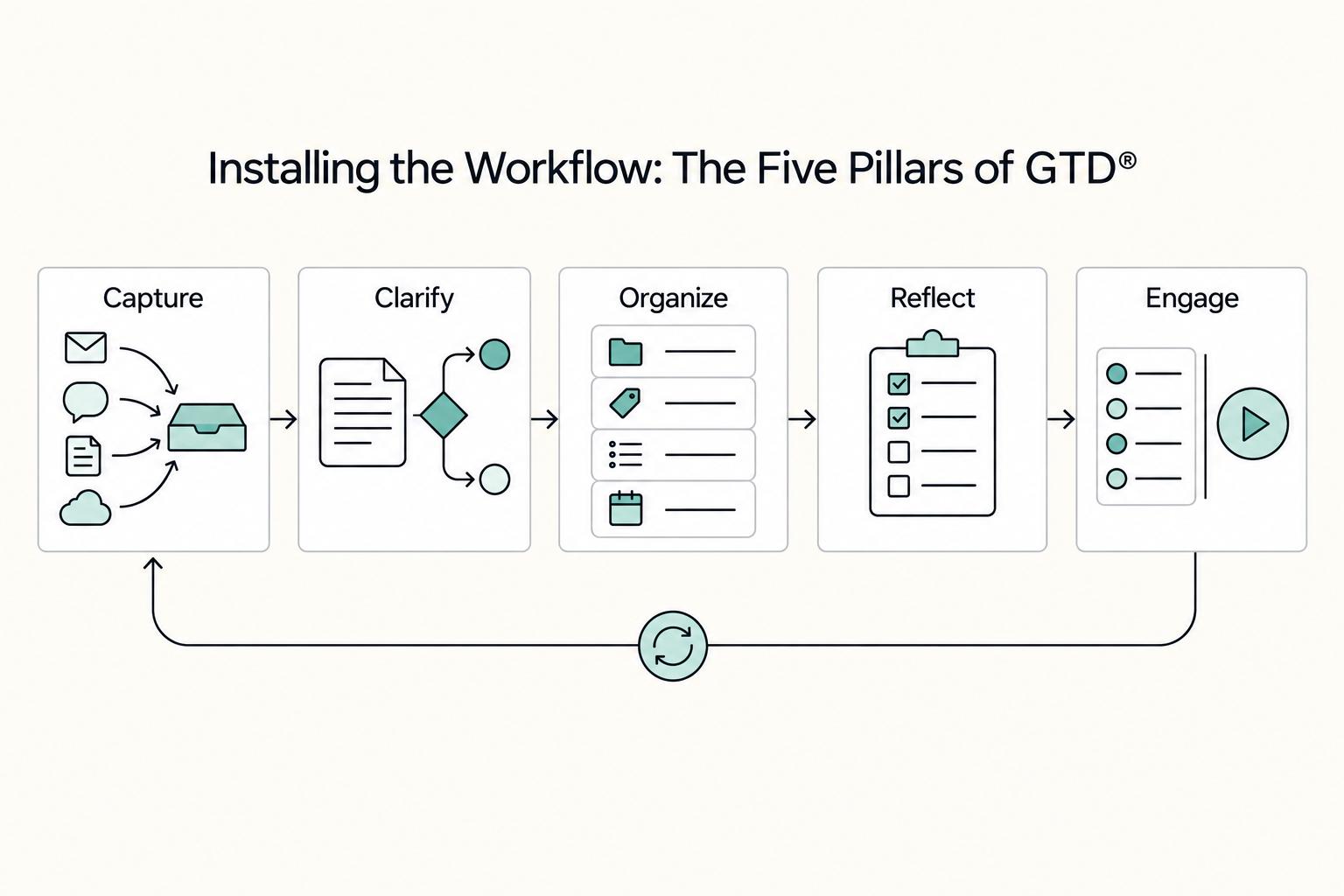
Installing the Workflow: The Five Pillars of GTD®#
Once your projects and labels are set, run every task through the same five-step path: capture in Inbox, clarify into a real next action, organize into the right project, reflect on a recurring rhythm, and engage from focused execution views.
| Pillar | Common failure pattern | Recommended behavior in Todoist |
|---|---|---|
| Capture | Tasks are scattered across notes, email, and memory | Capture every new item in Todoist Inbox, unless you already know the destination project |
| Clarify | Tasks stay vague ("taxes," "client stuff") | Rewrite each item as a concrete next action, do it immediately if it takes less than 2 minutes, or delete it if it is not practical |
| Organize | Tasks are grouped by mood or inconsistent lists | Route each clarified task into [CLIENTS], [FINANCE], [MARKETING & SALES], or [OPERATIONS], and add labels only when they improve batching |
| Reflect | The system is left unchecked until it drifts | Review Inbox plus current, upcoming, and completed tasks on a recurring rhythm |
| Engage | Work is picked from one giant list or only Today | Use Filters by project, label, priority, and date to choose tasks by time, energy, and urgency |
Step 1: Capture. Use the Inbox as your default intake. If you already know where a task belongs, assign it to the right project during entry; otherwise capture first and route it during triage. The rule is simple: no side channels.
Step 2: Clarify. Process Inbox on a daily or weekly rhythm. Make each task practical, do it now if it takes less than 2 minutes, and delete anything that is not practical. If a task name does not tell you the next move, rewrite it.
Step 3: Organize. Move clarified tasks into the business-function project where delay hurts first: delivery in [CLIENTS], money tasks in [FINANCE], pipeline in [MARKETING & SALES], internal upkeep in [OPERATIONS]. Keep structure shallow; Todoist supports three indent levels for personal projects, which is enough for this model.
Step 4: Reflect. Create a recurring Weekly Review task so the system stays trustworthy. Review Inbox, current, upcoming, and completed tasks, then scan each business-function project for stalled items. If the cadence is not confirmed yet, mark it as Current review cadence pending workflow verification rather than guessing.
Step 5: Engage. Execute from Filters, not from the raw project tree. Build only the views you actually use, such as communication work, deep work due today, finance due soon, or high-priority client tasks. Keep labels and filters lean so each one answers a real "what should I do now?" question.
Related: The Best Personal Productivity Systems for Freelancers (GTD).
Track Compliance Obligations in One Dedicated Sub-Project#
Once your capture and routing habits are stable, move compliance out of the background. Create a dedicated Compliance sub-project inside [FINANCE] and use it only for obligations tied to fiscal health and legal standing, not general admin.
Step 1 Create the Compliance sub-project#
Set up Compliance under [FINANCE], then sort active obligations into four reviewable buckets: tax filings, residency or immigration obligations, entity or reporting obligations, and banking or reporting checks. Keep these separate from routine tasks like expense logging or inbox cleanup.
Use a simple checkpoint: when you open this sub-project, you should immediately see every active obligation that could cause issues if missed. If items are still sitting in Inbox, notes, or email, risk is not centralized yet.
Do not mix high-stakes obligations with minor errands in one long list. Give each obligation its own task, a clear owner, and a due rule verified from the source.
Step 2 Separate high-risk obligations from routine admin#
Use priority and review triggers so tasks with real downside stay visible before they become urgent.
| Obligation type | Risk level | Recommended priority | Owner field | Review trigger |
|---|---|---|---|---|
| Tax filing or payment deadline | High | P1 | Assigned owner | Weekly Review and overdue status |
| Residency or immigration renewal or day-count check | High | P1 | Assigned owner | Weekly Review and upcoming due items |
| Entity or reporting obligation | High | P1 | Assigned owner | Weekly Review and missing evidence |
| Banking or reporting threshold check | High when threshold-based | Set once the threshold is confirmed | Assigned owner | Weekly Review and relevant account/report change |
| Routine bookkeeping admin | Routine | P2 or P3 | Assigned owner | Weekly Review |
Reserve P1 for true deadlines, renewals, and threshold checks. If everything is P1, nothing stands out.
Step 3 Write reusable task templates#
Write recurring compliance tasks so future-you can execute without reinterpretation. Each task should include jurisdiction, obligation type, due rule, owner, and proof location.
| Obligation | Task template |
|---|---|
| Tax filing | Tax filing | jurisdiction pending source verification | obligation type pending source verification | due: current filing cadence pending source verification | owner pending assignment | evidence link pending source verification |
| Residency or immigration check | Residency or immigration check | jurisdiction pending source verification | permit, renewal, or day-count pending source verification | due: current filing cadence pending source verification | owner pending assignment | evidence link pending source verification |
| Entity reporting | Entity reporting | jurisdiction pending source verification | report or renewal pending source verification | due: current filing cadence pending source verification | owner pending assignment | evidence link pending source verification |
| Banking or reporting check | Banking or reporting check | jurisdiction pending source verification | threshold or statement review pending source verification | due: current review threshold pending source verification | owner pending assignment | evidence link pending source verification |
The key field is the evidence link. Use the official portal, adviser thread, filed PDF, or working spreadsheet you will check during review. If a task has no source, no owner, or no verified due rule, it is not ready to trust. You might also find this useful: The Best To-Do List Apps for Freelancers.
From Tasks to Cash Flow: Managing the Full Revenue Lifecycle#
Treat each client project as a revenue workflow, not just a delivery checklist. Keep delivery execution in [CLIENTS], and keep billing visibility in [FINANCE] so cash risk is not hidden inside project tasks.
Step 1 Use one repeatable workflow per client project#
Inside [CLIENTS], create one sub-project per engagement (for example, Acme Corp - Q4 Deliverables) and run it through the same practical path each time: scope, delivery, approval, invoicing, collection. This sequence is an operating choice, not a GTD rule, but it keeps work-to-cash progress visible.
| Stage | Track in |
|---|---|
| Scope | [CLIENTS] client sub-project |
| Delivery | [CLIENTS] client sub-project |
| Approval | [CLIENTS] client sub-project |
| Invoicing | [FINANCE] finance task |
| Collection | [FINANCE] finance task |
Keep scope, delivery, and approval in the client sub-project. Mirror invoicing and collection as finance tasks in [FINANCE] so you can track cash status separately from delivery progress.
Checkpoint: for every active engagement, you should be able to see the current delivery status in [CLIENTS] and the current billing status in [FINANCE].
Step 2 Apply @waiting_for as a dependency signal#
Use @waiting_for only when someone else must act before progress can continue. Attach a follow-up due date so each waiting item has an active next check, not a parked reminder.
Also separate dependency types by where they belong:
- Client-input dependencies (feedback, approvals, files) stay in the client sub-project.
- Payment dependencies stay in
[FINANCE].
| Bottleneck | Recommended task state | Owner | Follow-up trigger |
|---|---|---|---|
| Waiting on client scope/kickoff input | Client sub-project + @waiting_for | You | Follow-up date arrives and no response |
| Waiting on client feedback or approval | Client sub-project + @waiting_for | You | Work is blocked or review date arrives |
| Waiting on invoice payment | [FINANCE] + @waiting_for | You or bookkeeper | Payment status is still unresolved at follow-up |
| Delivery approved but invoice not sent | Active task in [FINANCE] (not waiting) | You | Approval is complete and billing step is still open |
Step 3 Build simple revenue views and check them weekly#
Create three views so bottlenecks are obvious:
- Awaiting payment (finance-side waiting items)
- Awaiting client input (client-side waiting items)
- At-risk follow-up (waiting items at or past their follow-up date)
During your weekly CEO review, ask: what can be invoiced now, what cash is waiting on others, and which projects are stalled without a clear next move. We covered this in detail in How to Use Wise to Pay International Invoices with a US Credit Card.
Run the Weekly Review in the Same Sequence Each Time#
Your weekly review is the control point: in one pass, confirm what is blocked, what needs follow-up, and what gets scheduled next. Run the same sequence each time in Todoist: @waiting_for -> [FINANCE] -> compliance sub-project -> [CLIENTS] -> [MARKETING & SALES].
Make the review itself a recurring task so it consistently appears in Today and Upcoming.
| Review area | Standard GTD weekly review | Business review in this setup | Output before you move on |
|---|---|---|---|
@waiting_for | Revisit stalled commitments | Confirm what depends on someone else and what follow-up is due | Follow-up sent, next check date set, or task converted to an active next action |
[FINANCE] | Close open loops | Confirm invoice/payment/expense follow-ups are explicit | Clear next finance action with a due date |
| Compliance sub-project | Review calendar commitments | Confirm filing/renewal/document tasks due before next review | Prep task scheduled, reminder updated, or document request created |
[CLIENTS] | Review projects and next actions | Confirm each active engagement has one visible current action and visible blockers | One current action per active client, plus any needed waiting follow-up |
[MARKETING & SALES] | Reconnect with longer-term priorities | Protect next week's pipeline work before delivery fills the week | Outreach/proposal/content task scheduled or intentionally deferred |
Step 1: Review @waiting_for#
Start with dependencies. For each item, confirm three things: owner, exact dependency, and next follow-up date.
If anything is missing, fix it now. Add the supporting context you will need next week, such as the email thread, invoice reference, proposal, or portal link. If you need to gather related items quickly, keyword search is usually faster than digging project by project.
Checkpoint: every waiting item ends this pass in one of three states: follow-up sent, next check date assigned, or converted to an active next action.
Step 2: Scan [FINANCE] and the compliance sub-project#
In [FINANCE], verify that money tasks are explicit and current: what has been sent, what is still outstanding, and what follow-up is due next week.
For outstanding invoices, confirm each one has a visible status task. If your past-due threshold is not verified yet, mark it as Current past-due threshold pending workflow verification; after it is verified, schedule specific follow-up actions instead of leaving vague reminders.
Then review the compliance sub-project. Check for tasks due before the next review window, such as a filing date pending source verification, renewal date pending source verification, or document expiry pending source verification, and schedule prep work, not just final deadlines.
Checkpoint: you can answer, without searching, what money is still pending and what compliance prep must happen next.
Step 3: Review [CLIENTS]#
Go project by project in [CLIENTS]. Each active engagement should have one clear current action, and any blocker should be visible.
Keep next actions out of project-support clutter. If work is stalled, either define the next physical action you can take or create a waiting task with a follow-up date.
Checkpoint: for every active client, you can point to the next delivery action and any approval, file, or payment dependency.
Step 4: Plan [MARKETING & SALES] for next week#
Finish by choosing a small set of concrete pipeline actions for next week in [MARKETING & SALES] (for example outreach, proposal follow-up, content drafting, or referral asks).
Assign due dates so they appear in Upcoming and Today. Do not leave this as an unscheduled wish list.
Checkpoint: next week already contains at least one scheduled marketing or sales action.
Conclusion: You Are Now in Command#
Step 1. Keep the system visible. You now have a clearer way to see the work that matters, not just a longer list. In this setup, your Projects, Next Actions, Waiting For, and Reference lists give you one place to review commitments instead of hoping you remember them. A simple verification point is this: during your Weekly Review, you should be able to see every active commitment with either a clear next action or a real calendar commitment.
Step 2. Keep follow-up visible. Your follow-up process is stronger when waiting items are not buried in email. If you use a dedicated Waiting For list, open loops and blocked handoffs should appear in one visible place with a next follow-up decision. If something is overdue but not showing up there, your capture habit has slipped. Fix that first.
Step 3. Keep planning separate from promises. This is where many setups drift. Preserve the GTD split between Next Actions, Waiting For, Projects, and Reference, and keep the calendar for real commitments, not wishful timing. Once you start assigning dates to tasks that are only intentions, Todoist gets noisy and you stop trusting it.
Step 4. Run the review every week and simplify when needed. The Weekly Review is what keeps the setup reliable. Each week, clear Inbox, review your key lists, update next actions, and remove labels, sections, or projects you are no longer using. If the setup only works when you are unusually focused, it is too complex. The goal is not to build a clever task manager. It is to keep a dependable operating rhythm you can maintain.
Frequently Asked Questions
How should you structure Todoist for GTD?
Capture first in Inbox, then clarify each item into a real next action before filing it anywhere else. Use containers like [CLIENTS], [FINANCE], [MARKETING & SALES], and [OPERATIONS] if they match how you run your business, then split active work into separate projects or sections as needed. If you are on Todoist Beginner, note the limit of 5 personal projects and 3 filter views before you overbuild. | Todoist feature | Use it for | Good example | Common mistake | |---|---|---|---| | Projects | A dedicated container for related tasks | [CLIENTS] or one client engagement | Using projects for every task type | | Sections | Smaller parts or phases inside one project | Lead, Active, Awaiting Client inside one client project | Using sections across unrelated work | | Labels | Batching similar tasks quickly | @deep_work, @admin, @client_comms, @waiting | Using labels as folders | | Filters | Saved custom views from query syntax | 7 days & @waiting | Treating filters like storage instead of views |
How do you set up recurring compliance tasks without hard-coding the wrong schedule?
Create the task in your compliance sub-project and use Todoist's recurring date input, because it recognizes repeat patterns directly in the task field. Write the task name so the action and evidence are obvious, such as Prepare filing packet | Current filing cadence pending source verification or Review threshold | Current review threshold pending source verification. If timing should reset from when you finish the task, use every!; if it should stay tied to the calendar, use every.
How should you track unpaid invoices?
When you send an invoice, create one task with a naming pattern you can scan quickly, such as Invoice 123 follow-up | Client X. Then add your @waiting label and a due date for the next check. Put the invoice number, payment link, sent date, and thread URL in the task comments or description so you are not hunting later. A useful checkpoint is simple: every open invoice should appear either in [FINANCE] with a follow-up date or in a filter that combines your waiting label with a due window.
What labels are worth keeping?
Use labels for mode or state, not for ownership. @deep_work, @client_comms, @admin, and @planning are enough for most people, and @waiting earns its place because it cuts across all projects. If a label does not help you batch tasks or surface blocked work, delete it.
Can sections manage your client workflow?
Yes, but keep them inside the client project where the phases actually mean something. A simple rule works well: move a task into Awaiting Client only when the next move belongs to the client, and add @waiting plus a follow-up date at the same time. Also remember the current limit is 20 sections per project, so if your board starts turning into a maze, simplify the phases instead of adding more lanes.
Try a related tool
Researched and edited by the Gruv editorial team. Gruv builds cross-border billing, payouts, and finance-operations software for global businesses.
Sources
Includes 7 external sources outside the trusted-domain allowlist.
- coursehero.com/file/p3h2935l/APPLYING-GTD-TO-TODOIST-18-201...external
- forum.gettingthingsdone.com/threads/folder-structure-for-projects.17861external
- gettingthingsdone.com/what-is-gtdexternal
- gruv.ai/blog/how-to-use-the-getting-things-done-gtd-...external
- store.gettingthingsdone.com/wp-content/uploads/2023/12/GTD_Todoist_SAMPL...external
- todoist.com/help/articles/getting-things-done-gtd-with-t...external
- todoist.com/productivity-methods/getting-things-doneexternal
Educational content only. Not legal, tax, or financial advice.
Related Posts

Value-Based Pricing for Freelancers Under Real Payment Risk
Value-based pricing works when you and the client can name the business result before kickoff and agree on how progress will be judged. If that link is weak, use a tighter model first. This is not about defending one pricing philosophy over another. It is about avoiding surprises by keeping pricing, scope, delivery, and payment aligned from day one.

The Best Productivity Systems for Freelancers: GTD, PARA, and Second Brain
**Treat productivity as a system you can run under load, not a vibe you summon on demand.** Client work is messy by default: requests scattered across Gmail and Slack, scope shifting midstream, and the annoying truth that "done" does not always mean "paid."
Best To-Do List Apps for Freelancers Who Need Operational Control
Your to-do setup becomes a single point of failure when it tracks activity but not reliable status, follow-ups, and checkpoints. In practice, that means you can stay busy and still miss important moves because they are not visible in one trusted system.