
Quick Answer
In Stripe Dashboard, open Payment Links, select +New, choose or add the product and price, configure checkout and create the link. Test a sandbox link with Stripe test values, then verify the live link’s amount, currency and settings before sharing it. Payment Links are reusable checkout pages; use Stripe Invoicing for customer-specific invoices, due dates and reminders. Confirm successful payment rather than just a completed checkout or a visible payment record.
Stop Chasing Late Payments and Run a Get Paid System#
Use Stripe Payment Links for shareable checkout and Stripe Invoicing for customer-specific billing. Verify the actual payment state before releasing work at the agreed milestone.
Late payments often come from operational drift. Scope lives in one thread, approval in another, and payment status somewhere else. That gap can create avoidable disputes, slow billing, and turn delivery into a status-chasing job.
Give one person responsibility for the billing record, even if the same freelancer also handles delivery.
Stripe compares the two products: anyone with a Payment Link can use it, while an invoice is issued to a specific customer. Both can collect recurring payments. Choose based on the billing record, approval path and collection controls you need, rather than assuming an invoice eliminates payment risk.
| Step | Action | Verification point |
|---|---|---|
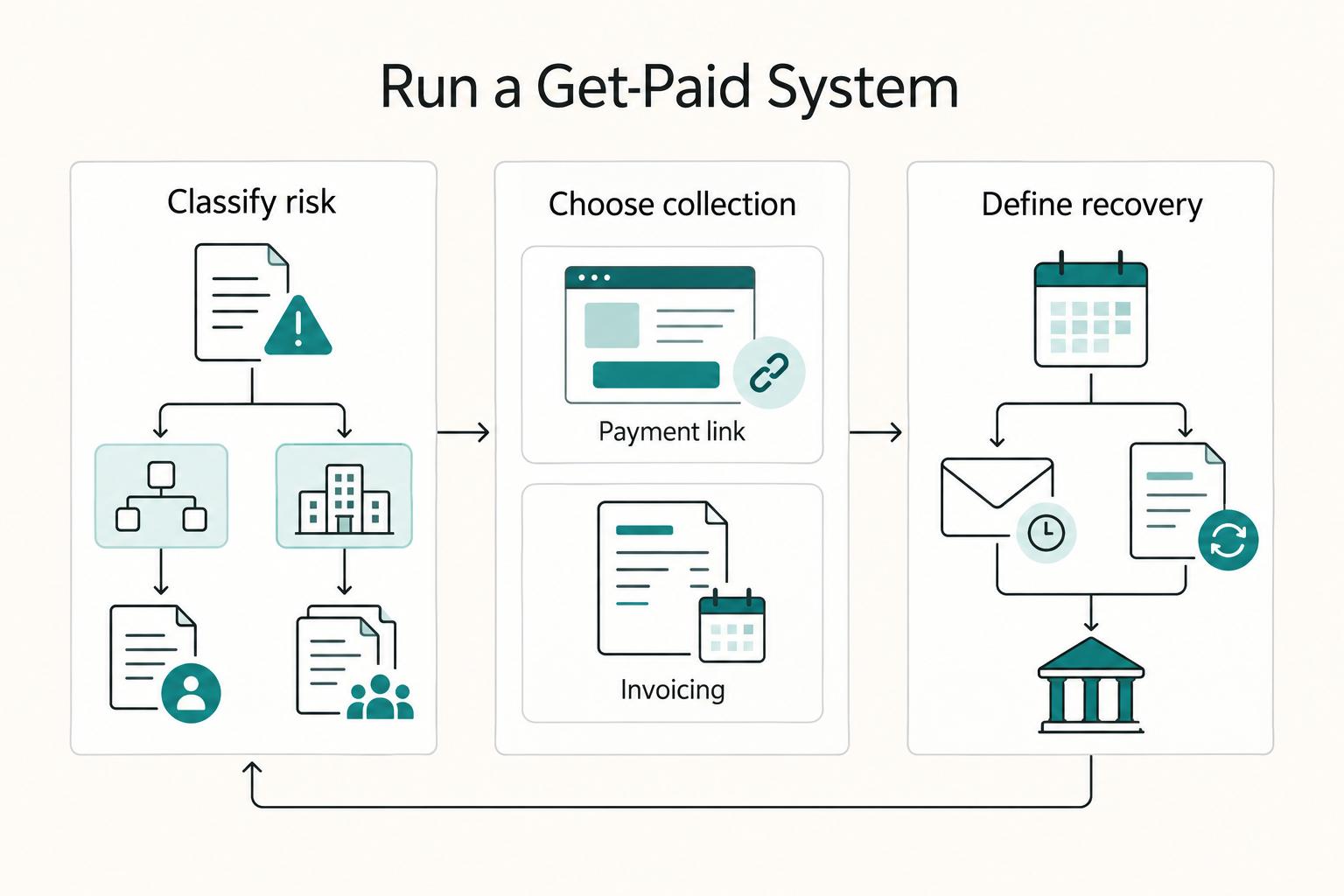
| Step 1 | Classify the job risk (simple approval path or complex procurement path). | You can name who approves and how payment gets authorized. |
| Step 2 | Choose collection: reusable Payment Link for straightforward checkout, or Stripe Invoicing for a named customer’s invoice and follow-up. | Your payment method matches the client process before work starts. |
| Step 3 | Define stall recovery before sending: reminder cadence, escalation owner, and dispute evidence checklist. | You know exactly what to do if payment is delayed or challenged. |
Picture a common scenario. You finish a milestone, the client says payment is "in process," and nobody can confirm the next action. With a system, you do not improvise. You move to the pre-set recovery path, track status in Stripe, and if a dispute appears, you submit evidence instead of rebuilding the timeline from memory.
This is how small teams get paid with fewer surprises. One workflow owns collection, follow-up, and recovery from start to finish.
Trust guardrails matter. Before rollout, confirm exact fees, compliance coverage, and regional feature behavior in Stripe Dashboard and current Stripe docs for your account. Do not promise terms you have not verified.
What You Need Before You Create Your First Payment Link#
Set up a billing kit, choose your pricing model, and verify Stripe settings before you send a hosted checkout link.
A payment link is not the system. Your setup is the system. Lock this in once, then reuse it so every client starts with the same operating baseline.
Before you start#
Create one billing operating kit and reuse it for every client:
| Kit item | What to define |
|---|---|
| Service scope | What you will deliver and what stays out of scope. |
| Due dates | Payment timing for deposit, milestone, and final handoff. |
| Cancellation terms | What happens if the client pauses or exits. |
| Fallback collection path | If collection stalls, check pending attempts and outstanding balance before replacing the route; deactivate the old link when appropriate to avoid two payable routes. |
| Evidence rule | Map every paid milestone to a deliverable, payment status, and recon note. |
If your terms still feel loose, tighten them before setup with The Complete Guide to Invoicing as a Freelancer.
Configure your first link setup#
| Step | Action | Verification point |
|---|---|---|
| Step 1 | In Dashboard, open Payment Links and select +New. Choose an existing product or +Add a new product, set the price/currency and create the link. Use a recurring price for a subscription. | You can state the billing model before you create the link. |
| Step 2 | Use a fixed price for an agreed deposit. Customer-chosen pricing is for variable amounts and does not support recurring payments; verify permitted minimum/maximum values. | Your amount rules match the engagement, and you avoid promising recurring behavior this model cannot run. |
| Step 3 | Confirm checkout surface and link format. Stripe sends customers to a Stripe-hosted payment page, and your link can use buy.stripe.com or your custom subdomain. | You test the exact URL format you plan to send. |
| Step 4 | Check enabled methods and their eligibility for the currency, amount, customer and device. Dynamic checkout displays compatible methods; a wallet is not shown on every device. | You document expected methods and explain why checkout options vary by currency and restrictions. |
Hypothetical: a client asks for a monthly retainer. Use a recurring price with clear renewal/cancellation terms, or create the appropriate subscription invoice flow. A one-time deposit link does not create that recurring agreement.
Should You Use Stripe Payment Links or Stripe Invoicing for This Client?#
Use Payment Links for fast, simple collection and use Stripe Invoicing when you need tighter customer-specific billing control.
| Engagement | Recommended flow | When it fits |
|---|---|---|
| Project deposit | Payment Links | When scope and amount are clear and you need no-code payments fast. |
| Milestone billing | Stripe Invoicing | When each milestone needs explicit customer-level tracking. |
| Subscription retainer | Stripe Invoicing or link-led flow | Use Stripe Invoicing for stronger lifecycle control, or a link-led flow when the subscription setup is simple and standardized. |
| Donation or tip flow | Payment Links | Stripe supports donation collection in that flow. |
Make the tool choice before you send anything. This helps reduce drift between chat, email, your project tracker, and whatever becomes the unofficial source of truth. Run this quick framework for each client:
| Step | Ask this question | Default choice | Verification point |
|---|---|---|---|
| Step 1 | Do you need a reusable link for quick acceptance? | Payment Links | You can share one hosted payment page URL across your client channels. |
| Step 2 | Do you need invoice lifecycle controls for a specific customer? | Stripe Invoicing | You need reminders, retries, or tighter invoice follow-up. |
| Step 3 | Is checkout speed the blocker? | Keep tool choice, then use Link by Stripe at checkout when available | You treat Link by Stripe as saved payment details for faster checkout, not as your invoice system. |
| Step 4 | Is risk high because procurement is unclear or payment friction already happened? | Consider Stripe Invoicing with approval checkpoints | You document approver, due date, and escalation path before work continues. |
Use these starting points, then check the actual approval and invoice requirements:
- Project deposit: start with a checkout link when scope and amount are clear and you need no-code payments fast.
- Milestone billing: default to Stripe Invoicing when each milestone needs explicit customer-level tracking.
- Subscription retainer: choose Stripe Invoicing for stronger lifecycle control, or a link-led flow when the subscription setup is simple and standardized.
- Donation or tip flow: use Payment Links, since Stripe supports donation collection in that flow.
Stripe Payment Links creates the shareable checkout page. Link is Stripe’s saved-payment-details experience; it is not a customer invoice or a separate proof that a charge succeeded.
Hypothetical example: a new client asks for a deposit today but warns you that finance approvals often stall later. Take the fast first payment with a hosted checkout page only if approval is clear, then move future milestones into Stripe Invoicing with documented checkpoints.
If you need tighter invoice process language, use The Complete Guide to Invoicing as a Freelancer.
How Do You Build a Payment Link That Protects Cashflow#
Build a hosted checkout link with tight scope, clear amount logic, trust cues, and a full test pass before you share the URL.
Once you choose Payment Links, the goal is simple. Make the payment object hard to misunderstand and easy to reconcile later.
Build it in four controlled steps#
| Step | Action | Verification point |
|---|---|---|
| Step 1 | Name the product clearly and map it to the engagement. Use a non-sensitive client_reference_id in the shared URL, or a separate per-engagement link, to support reconciliation. | Match customer, amount, currency, reference and payment ID; a URL reference is an identifier, not authentication or proof of approval. |
| Step 2 | Choose amount model in Stripe Dashboard before sending. Pick a fixed amount or customer-chosen amount, then lock the amount logic. | You can explain the amount rule in one sentence. If you use customer-chosen amount, confirm it does not support recurring payments and validate the amount range you plan to allow. |
| Step 3 | Apply checkout trust settings. Customize checkout appearance and confirmation behavior so clients see a consistent brand path from payment to receipt or confirmation page. | The payment page looks recognizable and the post-payment message tells the client what happens next. |
| Step 4 | Simulate success, failure and any delayed-method flow with a sandbox/test link and Stripe test values. Separately inspect the live URL and configuration before sharing; do not run fictitious payments in live mode. | Sandbox transactions move no real funds. Sandbox and live links/settings are separate; record the correct live URL, amount and currency. |
Keep card data out of messages and project documents. Send the hosted checkout URL through the agreed channel and retain transaction references instead of card details. A recognizable domain and branding help the client identify the page, but do not prove the payment is settled.
Imagine a client who approves fast but questions checkout legitimacy at the last minute. A clearly branded payment page and predictable confirmation flow closes the gap without a long thread of reassurance.
Use this send gate before every launch:
- Confirm naming and metadata map to deliverables.
- Confirm amount model and logic match the engagement.
- Confirm checkout branding and confirmation messaging.
- Confirm test results and final production URL.
Use the free invoice generator if you need a separate invoice document, then reconcile its reference with the collection record.
How Do You Send the Link and Track Payment Without Losing Control#
Send a Stripe Payment Link through your normal client channel, then track outcomes in Stripe Dashboard and Checkout session events.
Build and test is half the work. The other half is running a tight send loop so you do not let chat become your payment ledger.
Run the send and tracking loop#
| Step | Action | Verification point |
|---|---|---|
| Step 1 | Send a standard payment message with amount, your payment deadline (if you set one), expected checkout experience, and the official Stripe Payment Link URL. | The client can repeat back what they will pay, by when, and where. |
| Step 2 | Send through your normal client channel, then separate communication from payment records immediately. | Your team treats chat or email as delivery only, not payment proof. |
| Step 3 | Check the matched payment in Stripe Dashboard: customer, amount, currency and successful versus processing/failed status. | A visible record alone is insufficient; the agreed payment milestone must be met. |
| Step 4 | For automation, verify events and current payment state, record the Checkout Session/payment IDs and make each fulfillment action safe to repeat. | Repeated event delivery does not release work or create an invoice twice. |
Use operational states such as sent, processing, paid and exception, with an owner and next action. Checkout completion can precede successful payment for delayed methods. For automation, Stripe’s fulfillment guide explains checking payment_status and handling checkout.session.async_payment_succeeded or checkout.session.async_payment_failed. Do not rely only on a redirect page or checkout.session.completed. Keep refund/dispute states and later bank payouts in the ledger separately.
Keep terminology precise in client communication. Link by Stripe helps customers save and reuse payment details for faster checkout. It does not replace Stripe Invoicing, and it does not act as your invoice lifecycle tool.
Use this send script every time#
- Step 1. State the amount and payment deadline.
- Step 2. State what the payer should see on the hosted checkout page.
- Step 3. Share the official payment link and ask for a confirmation reply after payment.
- Step 4. Match the customer, reference, amount and currency and confirm successful payment in Dashboard before the agreed payment-dependent action.
Hypothetical: a client replies “Paid” before handoff. If Stripe shows processing, acknowledge the attempt and explain the pending state. Mark paid only when the matched payment succeeds, or proceed under a separately agreed credit milestone.
What Breaks Most Payment Link Workflows and How to Recover Fast#
Common failures in a link-led checkout flow come from missing recovery rules, and you fix them by pairing fast checkout with invoice controls, payout checks, country checks, and dispute evidence discipline.
A payment link workflow often fails for boring reasons: unclear fallback, premature completion, country assumptions, and zero dispute hygiene. Fix those and exceptions stop derailing delivery.
Run this recovery matrix#
| Step | What breaks | Recovery action | Verification point |
|---|---|---|---|
| Step 1 | You send a link without fallback terms. | Check for an existing successful or processing attempt before switching. Resolve pending attempts, deactivate the old link where appropriate, then create one customer invoice for the outstanding amount with agreed due date and reminders. | One active collection route remains and no successful amount is billed again. |
| Step 2 | You treat checkout success as full completion. | Verify successful payment before the agreed work-release action. Track balance availability and bank payout reconciliation separately; do not tell a client they are unpaid merely because your payout is pending. | Payment status and payout status have separate records; neither prevents later refunds or disputes. |
| Step 3 | You make cross-border assumptions. | Verify country-specific behavior before promising method or timing. Payment method availability changes by customer country, so confirm the actual checkout options first. | Your client message matches available methods for that customer context. |
| Step 4 | You run without a dispute playbook. | Start a proof package from first payment contact and maintain it through final resolution. Keep scope proof, delivery proof, communication logs, and escalation notes organized. | You can submit a complete evidence file quickly if a dispute opens. |
Payment method availability depends on the merchant account, supported product, currency, amount and customer context. Check the actual options for the intended transaction; a payer’s country alone does not guarantee a particular bank rail or wallet.
Hypothetical: a client requests immediate delivery after checkout. Match the payment and confirm it succeeded. A bank payout may occur later; the contract’s release condition should say whether successful collection or an expressly agreed credit milestone is sufficient.
If a delayed attempt is still processing, investigate that attempt before asking the client to pay again. Keep the customer informed and assign an owner to the next status check.
Keep checkout, tax and reconciliation records together#
A Payment Link does not determine your tax obligations. Keep the billing record and tax treatment consistent with the actual seller, customer, supply and jurisdiction.
| Record | Purpose | Check |
|---|---|---|
| Invoice or receipt | Explain the billed or collected amount | Meet the actual customer and jurisdiction requirements |
| Payment and Checkout Session IDs | Match attempts and outcomes | Separate successful, processing, failed and refunded amounts |
| Fees, FX and net payout | Reconcile cash received | Explain the difference between gross collection and bank deposit |
| Tax treatment and supporting details | Apply the correct seller/buyer/supply rules | Tax calculation is not itself registration, filing or remittance |
Stripe Invoicing gives you a customer-specific billing record. A Payment Link is the collection page; decide whether a separate invoice or other required document is needed before sending it. Enable receipts as appropriate, without assuming a receipt supplies every legally required invoice field.
Before You Start#
- Create one restricted workspace for payment evidence, tax references, and reconciliation notes.
- Separate operational records from sensitive identity data, and mask fields you do not need for day-to-day work.
- Assign one owner for monthly checks so your freelance tools support consistency instead of ad hoc cleanup.
Run the four-step checkpoint#
| Step | Action | Why it matters | Verification point |
|---|---|---|---|
| Step 1 | Identify the actual seller, supply, buyer location/status and applicable tax treatment. | Cross-border collection does not automatically make a transaction tax-free or create a foreign-account filing obligation. | An adviser or relevant authority resolves unclear treatment; the record states what was applied. |
| Step 2 | Configure tax-inclusive/exclusive pricing and required billing details before checkout. | Stripe Tax can calculate and collect configured tax, but ordinary tax calculation does not by itself transfer all seller registration, filing and remittance duties. | Checkout amount and invoice/receipt presentation agree with the intended treatment. |
| Step 3 | State currency, possible conversion/charges and expected payment timing. | Actual methods and timing depend on account and transaction eligibility. | Terms match the confirmed checkout options, with no blanket country promise. |
| Step 4 | Store limited payment references, transaction documents and reconciliation notes securely. | Keep gross amount, refunds, taxes, fees, FX and net payout traceable; avoid unnecessary identity/card data. | Owner and retention rules are defined and a payment record can be retrieved without exposing secrets. |
Hypothetical: two clients use different methods and currencies. Keep the same record structure, document each transaction’s actual checkout currency and method, and reconcile each net payout to gross collection, fees and any conversion.
If you need a stronger policy baseline, align this checklist with your invoicing SOP in The Complete Guide to Invoicing as a Freelancer. If you want a deeper dive, read Value-Based Pricing: A Freelancer's Guide.
Pick the flow, send, track, recover, and keep records#
Use one collection record from approved scope through successful payment, recovery and bank reconciliation.
Choose the appropriate billing flow, configure it against the agreed terms and give each exception an owner. Keep a client’s payment obligation separate from the timing of your later bank payout.
Run the same six steps on every client#
- Step 1. Pick the flow in 60 seconds. Use
Stripe Payment Linksfor fast, no-code payments on a shareable hosted page. UseStripe Invoicingwhen a specific customer needs tighter invoice controls. Verification point: log the chosen flow and your fallback path before you send anything. - Step 2. Configure and test checkout. Simulate payments using the sandbox/test link and Stripe test values. Separately inspect the live URL, amount, currency and settings without fictitious live transactions. Verification: record the correct production URL.
- Step 3. Send clear terms with the link. State amount, due date, what the client should see, and what status updates you will provide. Share through your normal channel, then use
Stripe Dashboardto monitor payment operations. Verification point: get written client acknowledgment. - Step 4. Verify payment and reconcile payout separately. Confirm the matched payment succeeded before the agreed payment-dependent action, or follow an approved credit milestone. Track balance and bank payout timing separately. Verification: record payment ID/status and the later payout reconciliation without charging again.
- Step 5. Recover exceptions without duplicate collection. Investigate failed or processing attempts and assign an owner/next action. Before moving to an invoice, resolve pending attempts and close the obsolete link. Verification: one active collection route and no already-paid amount billed again.
- Step 6. Maintain billing and tax records. Keep the required invoice/receipt, payment references, tax treatment, fees/FX and payout reconciliation with privacy controls. Assess other filings only if your actual circumstances require them. Verification: run a monthly record review and track applicable deadlines.
Hypothetical example: a new client asks for fast checkout and same-day start. You still run the full loop, confirm status in Dashboard, and only release final deliverables after your verification points pass.
Copy and paste checklist#
- Pick flow in 60 seconds using Payment Links vs Stripe Invoicing
- Simulate sandbox payments and separately verify the live URL, amount, currency and settings
- Send client message with amount, due date, and status expectations
- Verify successful payment at the agreed milestone; reconcile bank payout separately
- Investigate pending attempts and prevent duplicate collection before switching routes
- Store required invoice/receipt, tax treatment, transaction references, fees/FX and reconciliation records
Frequently Asked Questions
What is the difference between `Stripe Payment Links` and `Link by Stripe`?
Stripe Payment Links are shareable URLs to hosted checkout. Link saves eligible customer payment details for reuse at checkout. An invoice bills a specific customer; none of these labels replaces checking the actual payment state.
Can I use `Stripe Payment Links` instead of `Stripe Invoicing` for client work?
Use a Payment Link for straightforward reusable checkout when that suits the client’s billing process. Use Stripe Invoicing for a named customer’s invoice, due dates and configured reminders or collection controls. A link is not automatically a customer invoice; determine required billing documents separately.
How do I send a payment link and confirm status in `Stripe Dashboard`?
Send the amount, currency, agreed due date and official link. In Dashboard, match the payment to the customer/reference and verify successful versus processing/failed status. A completed checkout, redirect or visible payment record is not enough for every method.
Are `Stripe Payment Links` suitable for one-off projects, retainers, and deposits?
Use a fixed one-time price for an agreed deposit or project charge, and a recurring price for a subscription retainer with clear terms. Customer-chosen pricing does not support recurring payments. A deposit link is a separate collection object, not an automatic partial-payment schedule for an invoice.
What should I verify before sharing a `Stripe Payment Link` with a new client?
Check the active live link, amount, currency, product, terms and eligible methods. Run simulated payments only on a sandbox/test link, then inspect the separate live configuration. Configure a purchase limit or deactivate the link when appropriate; a prefilled email or client reference is not identity verification.
How should I handle failed or delayed payments when using `Stripe Payment Links`?
Check whether the attempt failed or is still processing before asking for another payment. Resolve pending attempts and close the old route before issuing a replacement invoice for the unpaid amount. Keep paid, refunded/disputed and bank payout states distinct.
What is unknown that I should confirm in docs before rollout?
Check current account-country eligibility, currencies/methods, applicable fees and paid add-ons, invoice requirements, subscription behavior and delayed-payment handling. Verify tax settings and legal obligations separately. This guide explains the process; it has not executed a transaction on your account.
Watch
Stripe Payment Links for Easy Invoicing
Try a related tool
Researched and edited by the Gruv editorial team. Gruv builds cross-border billing, payouts, and finance-operations software for global businesses.
Sources
Educational content only. Not legal, tax, or financial advice.
Related Posts

Value-Based Pricing for Freelancers Under Real Payment Risk
Value-based pricing starts with the client’s expected benefit and willingness to pay. It still needs a deliverable, scope and payment agreement you can perform. Use a discovery phase when the benefit or effort is too uncertain to support a defensible quote.
How to Invoice as a Freelancer Without Chasing Late Payments
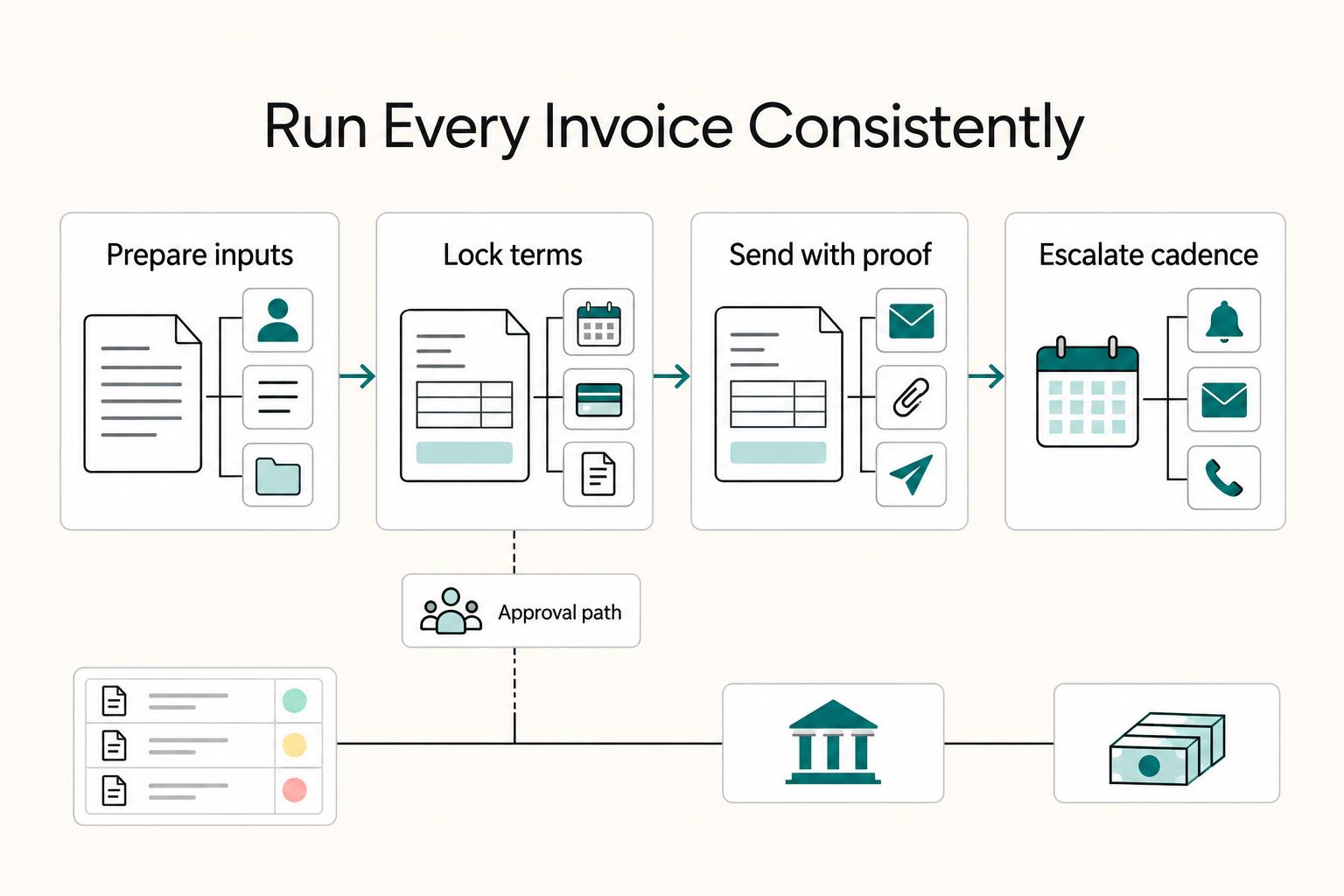
Set one standard from the start: every freelance invoice should identify the client, itemize the work, state agreed terms, and be tracked until funds settle. That habit helps prevent avoidable payment delays and keeps cash flow more predictable.

The Freelance Payment Penalty: A Modeled Audit of Platform Fees, FX Spreads, and Payout Delays
The money rarely disappears through a single, easy-to-spot fee. The real loss is stacked. A marketplace takes its commission, a processor adds a charge for international cards, a bank or payment company converts the currency at a spread, a platform holds the funds before release, and a wire sheds a little to intermediaries on the way in. Each layer looks defensible on its own, but the worker feels the combined result as a smaller deposit and a later payday.