
Quick Answer
Choose the charge flow and account responsibilities before building seller onboarding. New Accounts v2 integrations configure Dashboard access, fees and loss liability; legacy Standard, Express and Custom tables describe existing typed accounts. Gate transfers and payouts on actual capabilities, and budget platform refunds and disputes for indirect charges.
Define account responsibilities and payment flows first#
Treat Stripe Connect as risk infrastructure first and payment processing second. It can take meaningful compliance and operations work off your team, but you still own fraud controls, PCI duties, and cashflow risk. The practical test is simple: what does Stripe handle, and what still sits with your platform?
| Risk Area | Handled by Stripe | Still on Your Platform | Why It Matters to Cash Flow |
|---|---|---|---|
| Identity verification | Stripe-hosted or embedded onboarding can collect business and identity details and update flows when requirements change | Monitor connected-account requirement status, prevent fraud, and handle follow-up actions | Missing or overdue requirements can slow onboarding or payouts |
| Payouts | Stripe provides payout infrastructure; in some setups, account holders manage payout accounts while you schedule payouts | Set payout expectations, confirm cross-border eligibility, and manage payout policy | Timing gaps and unsupported routes can create payout friction |
| Card-data security | PCI responsibilities are shared between Stripe and your business | Maintain PCI-compliant operations, attest annually, and ensure card data is not captured in your tools | Wider PCI scope increases security effort and breach exposure |
| Split fund flows | Connect supports multiparty flows, including separate charges and transfers | Reconcile fees, refunds, chargebacks, and transfer timing | Your balance can be debited for Stripe fees, refunds, and chargebacks |
Use hosted onboarding unless you have a strong reason not to#
Hosted onboarding is usually the lower-maintenance default for seller verification. Stripe says these onboarding options automatically update as requirements change, which reduces maintenance as rules and document needs shift.
That does not remove the operating work. You still need fraud monitoring and requirement tracking, and Stripe is explicit that verification does not replace your duty to monitor for and prevent fraud. If you choose API onboarding, your team must collect required KYC details and submit them through the Accounts and Persons APIs. You also need to track requirement changes fast enough to avoid payout delays.
Model payout reality before you promise seller speed#
Payout design is where compliance, seller trust, and cashflow meet. Connect supports payout scheduling, and some configurations split control between the connected account holder, who manages external payout accounts, and your platform, which manages the schedule.
| Payout item | Current note | Verification detail |
|---|---|---|
| Initial availability | Commonly 7–14 days; exceptions apply | Use the account’s actual eligibility, schedule and arrival estimate |
| Transfer versus payout | A transfer moves funds between Stripe balances; a payout sends funds to a bank or debit card | Store both IDs and reconcile both stages |
| Cross-border route | Self-serve regions: U.S., U.K., EEA, Canada, Switzerland | Supported destination/separate flows exclude on_behalf_of; recipient service-agreement accounts are excluded |
| Cross-border fee | Public U.S. pricing starts at 0.25%; recipient location affects it | Model separately from standard payout, routing and FX charges |
Separate initial availability, transfer to a connected Stripe balance, and payout to an external bank. Stripe support describes an initial payout delay commonly around 7–14 days, with country and industry exceptions; it is not a bank-arrival guarantee. Current self-serve Connect cross-border transfers cover platforms and connected accounts in the U.S., U.K., EEA, Canada and Switzerland, subject to supported flows and service agreements. Use recipient-specific pricing rather than treating 0.25% as a universal tariff.
Keep card data out of your stack#
If you can avoid touching raw card data, do it. Directly handling sensitive card data can require more than 300 PCI DSS controls.
Reduced scope is not zero scope. PCI remains a shared responsibility, and your business still has to operate in a PCI-compliant way and attest annually.
A practical risk to check is card data leaking into app logs, analytics events, admin tools, or support workflows. Validate those paths early.
Treat split payments as a balance-risk decision, not just an API feature#
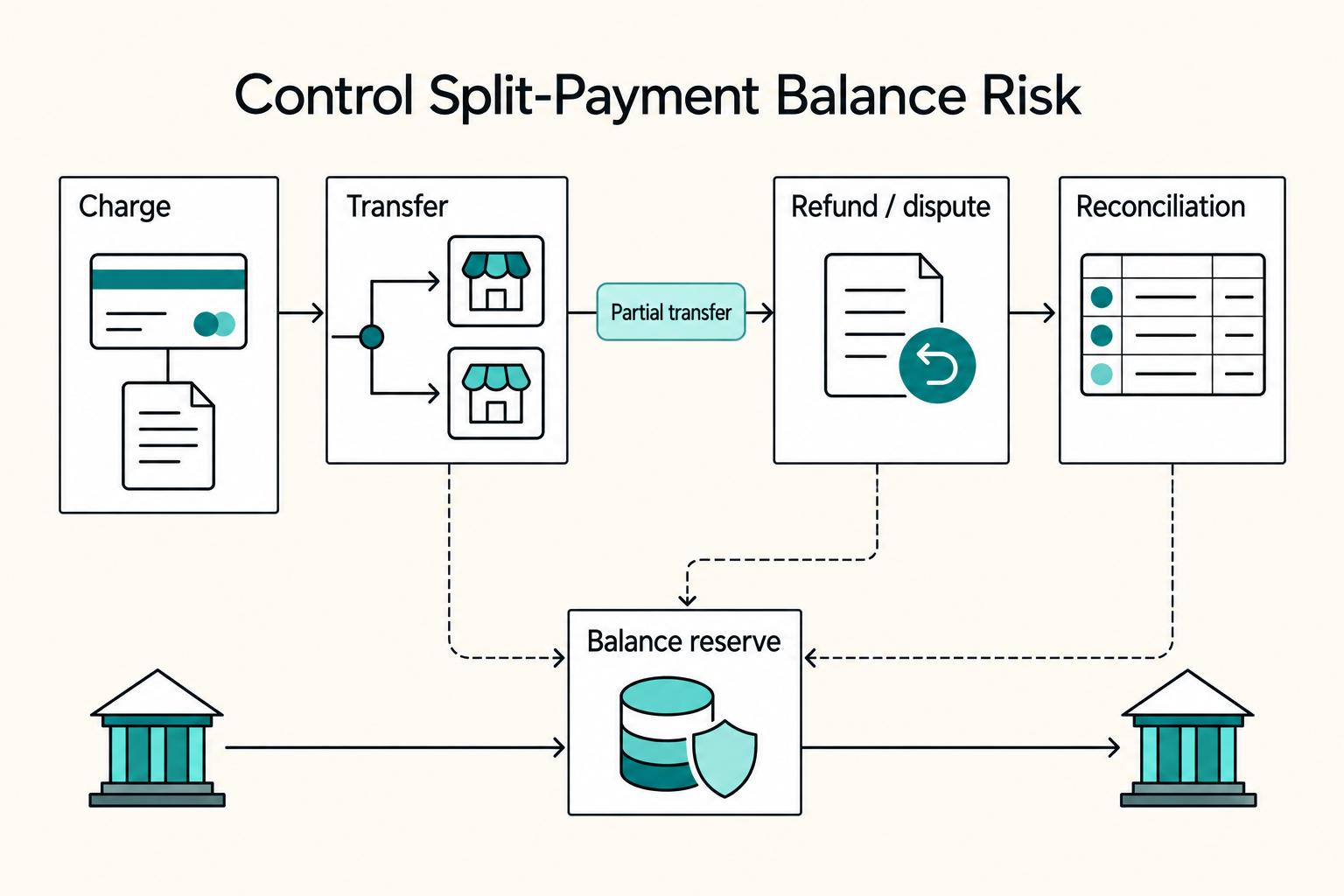
Split fund flows are useful, but they are also a balance-risk model. Connect supports multiparty flows, including separate charges and transfers, which is central for marketplace payouts.
The tradeoff is straightforward. Stripe states your account balance is debited for Stripe fees, refunds, and chargebacks in this flow. If transfers go out too quickly and reversals arrive later, your balance can tighten fast. Build payout and reconciliation logic around refunds, disputes, and partial transfer cases before you scale automation.
Consider a hypothetical separate-charge order: a $100 customer charge, $3 processing cost and $80 seller transfer leave $17 on the platform before other activity. A $20 customer refund then reduces that contribution to −$3; it does not reverse the seller transfer. If the seller owes $16 under your contract and a $16 transfer reversal succeeds, the contribution becomes $13. If recovery fails, the platform still funds the refund and records the $16 seller receivable separately. These are transaction-level movements, not a prediction of the account’s total available balance.
- Save the charge, refund, transfer, reversal, payout and balance-transaction IDs under the same order and seller. Never infer that a customer refund recovered seller funds.
- For an asynchronous payment method, confirm successful collection before transferring unless you deliberately fund the risk; a later payment failure does not automatically reverse separate transfers.
- If a reversal fails, inspect the connected balance and reserve configuration, retain the receivable and use the agreed recovery path. Do not mark recovery complete without the actual balance movement.
- If a transfer or payout request times out, retrieve its actual state before submitting another operation. For a bank failure, correct the disabled external account and reconcile returned funds before an eligible replacement payout.
Once you map what Stripe handles and what your team still owns, the next decision gets clearer. Choose the connected-account and onboarding model that fits your risk tolerance, support capacity, and seller experience goals.
You might also find What is a Merchant of Record (MoR) and How Does It Work? useful.
Choose the configuration your team can operate#
Separate the API configuration from the operating experience. Standard, Express, and Custom are legacy Accounts v1 types, and an existing account’s type cannot be changed. New Accounts v2 integrations configure Dashboard access, fee collection, loss liability and capabilities separately. The legacy tables help explain support and interface tradeoffs, but they are not an Accounts v2 request schema.
Choose your operating burden first#
Start with the break point: when onboarding or payouts fail, who handles it?
| Account type | Relationship and responsibility pattern | Onboarding control | Seller dashboard access | Support and operations burden | Implementation complexity |
|---|---|---|---|---|---|
| Standard | Seller has a direct Stripe relationship | Seller completes onboarding directly with Stripe | Full Stripe Dashboard | Typically lower day-to-day burden on your team | Generally lower |
| Express | Platform-managed setup; confirm exact responsibilities for your setup | Platform-managed setup with hosted onboarding steps | Lighter Express Dashboard | Medium; expect more seller support and document follow-up | Moderate |
| Custom | Platform-driven model; confirm exact Stripe policy boundaries for your design | Most embedded, platform-driven control | Platform-defined experience instead of full seller dashboard access | Highest; plan for internal tooling and ongoing ops | Highest |
For a new integration, use Accounts v2 configuration rather than sending Standard, Express, or Custom as a type to /v2/core/accounts. Set dashboard and the Merchant configuration’s defaults.responsibilities.fees_collector and losses_collector. Those responsibilities cannot be updated later. The requirements_collector value is derived from your configuration. Existing Accounts v1 integrations can use controller properties; the legacy comparison below remains useful for maintaining existing typed accounts.
Match the model to your real constraints#
Choose by constraints, not preference.
Standard makes sense when you need the lightest operating footprint and your sellers can work with a direct Stripe relationship. It is a poor fit if your product requires tightly controlled onboarding and a more native in-product finance experience.
Express provides Stripe-hosted onboarding and a lighter seller Dashboard. Your team still needs requirement follow-up and payout support, but it need not collect identity documents itself when Stripe handles collection.
Custom legacy accounts suit teams that can own seller communication and build finance surfaces. They can still use hosted or embedded onboarding; the label does not require hand-building every verification form.
Pressure-test likely failure modes#
Each model has a predictable weak point. Design around it before launch.
| Model | Common weak point | What it looks like |
|---|---|---|
| Standard | Experience drift | Sellers work in Stripe directly, which can feel less integrated in your product |
| Express | Follow-up overhead | Document collection and requirement follow-up can still slow activation |
| Custom | Operational gap | A polished front end breaks down quickly if support workflows are weak |
With Standard, a common issue is experience drift. Sellers work in Stripe directly, which lowers friction for you but can feel less integrated in your product.
With Express, a common weak point is follow-up overhead. Prefill can simplify onboarding, but document collection and requirement follow-up can still slow activation.
With Custom, a common risk is the operational gap. A polished front end breaks down quickly if support workflows are weak.
If you collect requirements incrementally, gate each action on the actual requested capability and outstanding requirements. Creating an account or returning from onboarding does not establish permission to charge, transfer or pay out. Keep held amounts attributable to the seller and observe applicable holding limits. Activating verification does not automatically migrate existing payments to destination charges; choose the charge flow deliberately and retain the original payment and transfer IDs.
Run a final fit check before committing#
Before you commit, run a practical fit check:
- Choose the Accounts API generation, Dashboard access, fee payer, loss responsibility and required capabilities before creating connected accounts.
- For hosted onboarding, use the Account Links endpoint for your API generation and test expired-link refresh and incomplete return paths.
- Define which seller fields you prefill versus collect during onboarding.
- Map your internal handling process for refunds, disputes, payout failures, and negative-balance scenarios for your exact setup.
- For incremental onboarding, document capability gates, held-fund ownership, holding limits and the action permitted after verification.
- Verify your target country, currency, and payout footprint and whether your support team can sustain it.
The Overlooked Asset: How Your Choice Impacts Seller Trust#
Account type is not just an implementation choice. It sets the trust baseline for sellers because it defines who owns onboarding, dashboard access, and key risk responsibilities. In the legacy Standard, Express, and Custom model, account type cannot be changed after creation, so trust friction introduced early is hard to unwind.
Build onboarding confidence#
Trust is won or lost during first verification. Clear Stripe-hosted onboarding usually feels safer to sellers sharing identity and bank details than a confusing custom flow.
Give an Account Link only to the authenticated account holder inside your application. It is temporary and single-use; the refresh handler creates a replacement with the same onboarding parameters. Returning through return_url can mean the seller chose Save for later. Retrieve requirements and capability status before enabling money movement, and keep that state current through the relevant account events. For Accounts v2, use /v2/core/account_links; use the v1 endpoint for a v1 integration.
Make payout status obvious#
If sellers cannot quickly see money status and what to do next, trust drops fast. The practical check is whether they can understand status, next steps, and ownership without opening a support ticket.
| Account type | Onboarding friction | Dashboard clarity | Support ownership signal to seller | Dispute experience |
|---|---|---|---|---|
| Standard | Lowest, Stripe-led | Full Stripe Dashboard | Mostly Stripe-led connected-account experience | Depends on charge setup; liability handling differs by charge type |
| Express | Low to moderate, Stripe-hosted | Express Dashboard shows balances and payouts; refund and dispute management must be enabled by the platform. | Stripe-hosted account experience; platform still owns loss responsibility | Seller refund/dispute tools are optional; enabling them does not transfer the platform’s loss liability. |
| Custom | Depends on hosted/embedded versus API onboarding | No default Stripe dashboard | Seller trust depends directly on your product UX and support quality | Entire flow depends on what your team builds and explains |
Keep sellers informed as requirements change#
Compliance requests are ongoing, not a one-time event. Requirements can change over time, so sellers need clear messaging when new information is requested.
Hosted or embedded onboarding reduces maintenance risk because those flows are updated as requirements change. In Custom, your team owns seller interactions and data collection. Trust depends on how clearly you explain what is required, why it is needed, and what happens while review is pending. If you run fully custom onboarding, plan to review and update requirements at least every six months.
Audit trust risks now#
Use this checklist to find trust breaks in your current flow:
- Can sellers complete onboarding without opening a support ticket to understand document requests?
- Can they see current balance state and upcoming payout information in one place?
- Do you provide a reliable recovery path when a single-use onboarding link is reused or otherwise fails?
- Do your messages clearly explain what happens if verification is incomplete or new requirements appear later?
- Is it obvious to sellers who handles disputes, refunds, and payout failures?
These trust decisions also shape support load and operating cost. Before you model fees, quantify your own activation drop-off, document follow-up volume, and payout-status ticket volume.
Related: How to Open a Stripe Account for a Non-US Business.
Beyond the Transaction Fee: Calculating the True Cost#
You are choosing a cost model, not just a processing fee. In a marketplace setup, total cost depends on pricing ownership, payout behavior, cross-border and payment-method mix, and how much support and engineering work your team carries.
Pricing ownership changes the fee stack. On Stripe’s public U.S. Connect page, Stripe handles pricing excludes additional platform account, payout-volume and per-payout charges under that model. You handle pricing lists $2 per monthly active account and 0.25% + $0.25 per payout. The detailed table also lists a separate 0.25% funds-routing/platform-management charge on payout volume. Payment processing, cross-border, FX and optional products remain separate; use your actual country and agreement.
Set pricing ownership first, then compare account types#
Define pricing ownership before you compare Standard, Express, or Custom. Otherwise, your spreadsheet can look precise and still be directionally wrong.
Two definitions drive the model:
- A monthly active account is an account that receives payouts in that month.
- A payout is each transfer of funds to a user's bank account or debit card.
| Cost area | Stripe handles pricing | You handle pricing | Operating input |
|---|---|---|---|
| Active accounts | No additional platform account fee | $2 per active account/month on public U.S. page | Count sellers receiving bank/debit-card payouts, not signups |
| Standard payout | No additional platform per-payout fee | 0.25% of payout volume + $0.25 per payout | Track amount and number of external payouts |
| Funds routing/platform management | No additional payout-volume fee | Detailed U.S. table lists 0.25% of payout volume separately | Include this line when it applies to your agreement |
| Processing and optional products | Processing charged to users; other product fees can apply | Processing plus applicable FX, cross-border, instant payout and reporting fees | Use a separate line for each relevant service |
| Support, disputes and engineering | More managed experience can reduce internal work | Cost follows your configuration and charge flow | Budget document follow-up, evidence deadlines, reconciliation and maintenance |
Build assumptions from real operating behavior#
Build the model from actual operating behavior, in this order:
| Assumption area | Inputs to model |
|---|---|
| Seller mix | Paid sellers per month, volume distribution, concentration |
| Payout behavior | Payout cadence, payout size, faster-payout usage |
| Geography and payment mix | Domestic versus international cards, conversion exposure, ACH or bank debit share |
For an illustrative U.S. month with 100 active sellers, 400 standard payouts and $80,000 payout volume, the published You handle pricing lines yield $200 active-account fees, $300 payout fees ($200 percentage + $100 fixed), and $200 routing/platform-management fees if that separate line applies: $700 before processing, cross-border, FX, optional products and internal costs. Weekly versus monthly payout cadence changes the fixed payout count, not the number of onboarded accounts. Confirm the stack against your signed schedule before using it as a budget.
Then test margin sensitivity:
- Run base, growth, and stress cases.
- In stress, raise international mix, payout frequency, and faster-payout demand.
- If margins only hold under low-support, low-exception assumptions, the model is fragile.
Validate the choice against trust and resilience#
Before you implement, use this final cost check:
- Confirm pricing ownership and save the pricing snapshot used.
- Recalculate monthly active accounts from sellers actually paid, not total onboarded.
- Count payout events, not only payout volume.
- Model cross-border and conversion effects separately using current verified pricing.
- Decide whether faster payouts are funded by you, charged, or unavailable.
- Confirm your team can clearly explain verification, payout timing, and dispute paths.
- Compare higher-control setups against realistic long-term maintenance capacity, not launch optimism.
If an option looks cheaper on fees but creates support debt, payout confusion, or dispute friction, count that as real cost. The better choice is the one that stays profitable while keeping money movement clear and reliable for sellers.
We covered this in detail in How to Reduce Stripe Processing Fees.
Use the payment fee comparison tool for basic per-payment percentage, fixed-fee and FX scenarios. Keep active-account charges, payout counts, routing fees, reserves and support costs in a separate monthly Connect model; the tool does not calculate that full stack.
What to Decide and Own Before You Build#
The core decision is ownership: what you will own, what you will delegate, and what payment operations your team can reliably run after launch.
Write down the platform and seller jurisdictions, customer contract, permitted funds flow and responsible operators before implementation. Then test one complete payment-to-transfer-to-bank-payout path, including missing verification, refund, dispute and bank-return cases. Keep the IDs and balance transactions that explain each movement.
Final decision checklist before launch#
| Lens | What you decide | What to confirm now |
|---|---|---|
| Compliance Liability | How much onboarding and verification responsibility you keep versus delegate | Name one owner for onboarding risk, verification updates, payout exceptions, and disputes |
| Seller Experience | What support experience you can actually operate day to day | Define response paths for stalled onboarding, failed payouts, and incomplete seller info |
| Brand Control | How much of the seller flow must stay inside your product | Confirm whether a managed or co-branded flow is acceptable, or whether custom control is worth ongoing upkeep |
If your team is small, defaulting to more managed flows usually protects bandwidth better than building every step in-house.
Stage path (validate current fit before committing)#
- Early launch: Start with the lightest operating model your team can support, and confirm legal and technical requirements before you build.
- Active growth: Re-check whether your current model still fits support load and product needs as volume increases.
- Mature platform: Evaluate deeper customization only when added flow ownership and tighter brand control clearly outweigh added maintenance.
Before implementation, put four items in writing: risk owner, onboarding path, payout operations, and dispute workflow, plus the exact MVP you will test before rollout. If any of these is still vague, pause and resolve it before you scale.
If you evaluate Merchant of Record options, compare the seller-of-record contract and tax scope with your marketplace model. A Connect configuration does not by itself make Stripe your merchant of record.
Frequently Asked Questions
Which connected account type fits, Standard, Express, or Custom?
Pick the type based on what you want to own in seller experience and payment risk, not just interface preference. This choice is permanent for each connected account, so confirm it before live onboarding. In Stripe docs, Standard, Express, and Custom are legacy account types, so use this comparison when you are working within that legacy model.
What is the real cost of Connect?
Model processing, active accounts, external payout counts and volume, routing, cross-border/FX, optional services and internal operations separately. Public U.S. rates provide a starting example; your region and agreement determine the applicable fees. An application fee is platform revenue, not evidence that Stripe costs or seller obligations disappear.
How does KYC and seller verification work?
Standard and Express legacy accounts use Stripe-led verification collection. Custom accounts can use hosted or embedded onboarding instead of collecting every field themselves. In Accounts v2, inspect the derived defaults.responsibilities.requirements_collector; platform collection applies when loss responsibility is application and Dashboard access is none. Required information follows country, business and capabilities. Stripe verification does not replace your fraud controls or legal duties arising from your actual role.
Is Connect good for paying international sellers?
Connect can pay international sellers through eligible routes; a supported payment presentment currency does not establish payout-country eligibility. Current self-serve cross-border regions are the U.S., U.K., EEA, Canada and Switzerland. Other destinations require a separately supported arrangement or product. Confirm platform and seller countries, service agreement, settlement currency and charge flow before promising access.
Who handles chargebacks and negative balances?
The charge type determines the balance debited: direct-charge refunds and disputes reduce the connected account’s balance; destination-charge and separate-charge refunds and disputes reduce the platform’s balance. Fee payer and responsibility for a connected account’s unrecovered negative balance are separate configuration choices. Stripe taking connected-account loss liability does not cover a negative platform balance. Document who submits dispute evidence, who funds refunds, and how seller recovery is recorded.
How much compliance risk does Connect really remove?
Connect can reduce operating burden, but it does not remove your obligation to manage your own legal duties. Standard and Express shift more onboarding operations to Stripe, while Custom shifts more collection, updates, and seller communication to your team. Document what Stripe handles, document what you own, and verify current requirements before launch.
What should I finalize first before I scale?
Choose the API generation and funds flow, then fix account responsibilities, onboarding gates, payout policy and negative-balance recovery. Legacy account types and Accounts v2 Merchant responsibilities have creation-time constraints. Test refunds, disputes, incomplete verification and failed payouts before scaling onboarding.
Try a related tool
Researched and edited by the Gruv editorial team. Gruv builds cross-border billing, payouts, and finance-operations software for global businesses.
Sources
- docs.stripe.com/connect/accountstrusted
- docs.stripe.com/connect/payouts-connected-accountstrusted
- stripe.com/connect/pricingtrusted
- stripe.com/pricingtrusted
- support.stripe.com/questions/connect-platforms-manage-onboardin...trusted
- support.stripe.com/express/questions/waiting-period-for-first-p...trusted
Educational content only. Not legal, tax, or financial advice.
Related Posts

How to Open a Stripe Account for a Non-US Business
**Treat your Stripe setup as a system for cashflow, not a quick signup, so your first payouts are more predictable.** If you run a small business, this is one of those setup decisions where "close enough" gets expensive later. If you are a nonresident operator, the pain usually shows up in a few places: payout delays, avoidable verification loops, and uncertainty about which path actually fits your business. If you guess early, you usually create rework later, especially when invoices are already waiting.

What is a Merchant of Record (MoR) and How Does It Work?
**A merchant of record is the merchant responsible for the customer transaction in the payment system. An outsourced MoR service can take on that role so your business can sell eligible products through its checkout.**

The Freelance Payment Penalty: A Modeled Audit of Platform Fees, FX Spreads, and Payout Delays
The money rarely disappears through a single, easy-to-spot fee. The real loss is stacked. A marketplace takes its commission, a processor adds a charge for international cards, a bank or payment company converts the currency at a spread, a platform holds the funds before release, and a wire sheds a little to intermediaries on the way in. Each layer looks defensible on its own, but the worker feels the combined result as a smaller deposit and a later payday.