
Quick Answer
Enable quickbooks online multi-currency only after your invoicing process is stable and documented. Check plan eligibility in Account and settings, confirm you are not relying on QuickBooks Commerce or cash flow planner, and treat activation as irreversible. Then run one customer-side test and one supplier-side test before sending live invoices. Set a written rule for when to bill in home currency versus client currency, and review exceptions weekly so mismatches do not pile up into month-end cleanup.
How to use QuickBooks Online multi-currency without creating payment chaos#
Treat quickbooks online multi-currency as an operations decision, not a settings exercise. The real benefit is cleaner client invoices, fewer manual conversions, and less month-end repair work when exchange rates move or a payment settles differently than expected.
Multicurrency lets your business transact in more than one currency. That sounds simple, but the day-to-day impact is bigger than one toggle. Without clear billing and collection habits, you can still end up back in spreadsheets, manual conversions, and guesswork. For freelancers and small teams, that is where payment chaos starts. The invoice goes out in one currency, the client pays through a different rail, and someone has to explain the variance later.
Before you start#
Use this guide to tighten how you bill and collect, not just how you configure QuickBooks Online. The goal is simple. Enable Multicurrency, then use the same payment path every time so FX surprises and bookkeeping rework become exceptions instead of a weekly pattern.
One caveat belongs up front. Verify what is actually available in your own Account and settings before you roll anything out to live clients. Do not assume screenshots, forum posts, or third-party tutorials match your account exactly.
Step 1. Define the operating goal before you touch any setting#
Define the operating goal before you touch any setting. The goal is not "send invoices internationally." It is to send an invoice, collect payment, record it in the right currency, and keep reporting readable without manual cleanup. That distinction matters because currency volatility can quietly eat margin, muddy reports, and slow month-end if the payment side is not thought through.
A practical rule is this. If a new process would force you to keep a side spreadsheet just to remember what happened, it is not ready yet. You want one repeatable path from invoice to payment to bookkeeping entry, even if you only have a few overseas clients today.
Step 2. Map the payment path before you turn anything on#
Map the payment path you expect clients to follow before you turn anything on. Decide which currencies you will actually use, which payment rails are acceptable, and who checks differences between the invoice amount and the settled amount. If you skip that, the feature may handle the basics but still create manual work, especially when settlement details differ from what the invoice assumed.
Your first red flag is inconsistency. If one team member invoices in client currency, another invoices in home currency, and no one records why, the bookkeeping mess is already forming.
Step 3. Verify the process with one controlled test before full rollout. Send one test invoice, record one matching payment, and confirm you can trace the transaction without outside notes or manual conversion patches. Keep a short evidence pack for that test: the invoice, payment confirmation, and a screenshot or note of the setting you used.
If that single path is messy, stop there and fix the payment process first. Multicurrency can reduce manual effort, but only when your invoicing and collection habits are consistent enough to support it.
Decide if you should enable Multicurrency now or later#
For quickbooks online multi-currency, enable it only after your invoicing process is stable. If your invoice-to-payment flow still needs frequent exceptions, wait, because this setting is not reversible.
Step 1. Confirm your plan supports Multicurrency#
Confirm your plan first. If you are on QuickBooks Online Simple Start, stop: Multicurrency is not available there. This feature guidance applies to Essentials, Plus, and Advanced, so verify what your own account and edition actually show before you design a workflow around it.
Step 2. Treat enabling Multicurrency as a permanent decision#
Treat this as a permanent decision. Once Multicurrency is enabled in QuickBooks Online, you cannot turn it off. If you are still changing invoice currency rules, payment methods, or who resolves payment mismatches, delay activation until those rules are consistent.
Step 3. Check feature conflicts before you commit#
Check conflicts before you commit. If QuickBooks Commerce is connected, Multicurrency will not work, and turning Multicurrency on inactivates the cash flow planner. If either feature is more important right now, postpone and solve that priority first.
If late payment is your bigger issue, stabilize terms first: tighten due dates, accepted payment methods, and follow-up rules, then enable Multicurrency once billing behavior is steady.
Gather the minimum setup pack before touching settings#
Before enabling quickbooks online multi-currency, lock in a small setup pack so you do not create cleanup work later. This matters because once Multicurrency is on, you cannot turn it off.
| Setup item | Include | Article note |
|---|---|---|
| One-page currency policy | Home currency, foreign currencies you will accept, and who can approve exceptions | Create this before enabling Multicurrency |
| Customer and supplier list review | Active records, standardized names, and likely duplicates | Do this before setup so activity does not get split across near-identical profiles |
| Invoice rule | When to bill in client currency vs home currency and how to handle exchange-rate movement before payment | Do not leave room for ad hoc 1:1 assumptions |
| Test invoice and payment | One test invoice and one test payment | Use this as your internal go-live checkpoint |
-
Write a one-page currency policy. List your home currency, the foreign currencies you will accept, and who can approve exceptions for foreign-currency transactions.
-
Clean your customer and supplier lists. Review active records, standardize names, and flag likely duplicates before setup so activity does not get split across near-identical profiles.
-
Set one invoice rule before live billing. Decide when to bill in client currency vs home currency, and decide how you will handle exchange-rate movement before payment. Do not leave room for ad hoc 1:1 assumptions.
-
Run one test invoice and one test payment. Use this as your internal go-live checkpoint: if that path does not reconcile cleanly in your workflow, fix the rule or record data first.
Enable Multicurrency in QuickBooks Online and run first-pass checks#
Enable this only after you confirm plan fit and side effects in your own account, because once quickbooks online multi-currency is on, you cannot turn it off.
| Plan | Availability | Article note |
|---|---|---|
| Simple Start | Not available | Article says to stop and confirm the plan first |
| Essentials | Available | Article says Multicurrency guidance applies here |
| Plus | Available | Article says Multicurrency guidance applies here |
| Advanced | Available | Article says Multicurrency guidance applies here |
- Confirm your plan supports Multicurrency before you change anything.
Intuit scopes Multicurrency to QuickBooks Online Essentials, QuickBooks Online Plus, and QuickBooks Online Advanced, and notes it is not available on Simple Start. If your account surfaces conflicting guidance, resolve that in-account first.
- Check feature conflicts before activation.
Turning on Multicurrency inactivates cash flow planner. If you connect QuickBooks Commerce with QuickBooks Online, Multicurrency will not work, so treat that as a stop-and-decide checkpoint.
- Record approval details as part of the change.
Before saving, log who approved the change, your home currency, and a short note that activation is irreversible. This prevents rollback requests that are not technically possible later.
- Run one customer-side test and one supplier-side test before live use.
Use only the currencies you actually plan to transact in now, then run a small test transaction on both sides. Proceed to live invoicing only if the transactions post the way you expect across currency views.
- If you are unsure, pause and get accounting input.
Intuit recommends talking to an accountant when you are uncertain about enabling Multicurrency.
For a step-by-step walkthrough, see QuickBooks Self-Employed vs. Wave: Which is Better?.
Set invoice currency rules that protect margin and cash timing#
Use one default rule: invoice in your home currency when payment timing is uncertain, and use client currency only when required with pre-set FX review points. This keeps margin risk explicit and avoids case-by-case guesswork.
Step 1. Set one default rule before anyone sends a live invoice#
Start with payment behavior, not client convenience.
- If payment timing is uncertain, invoice in your home currency. This limits exposure to rate moves while invoices are unpaid and keeps reporting cleaner in your base currency.
- If the client mandates local currency, invoice in that currency and set FX review points in advance. Review at draft time and again near expected settlement; add a follow-up check if delays are common.
Before sending, verify the customer profile currency, invoice currency, payment rail, expected settlement date, and your fallback if payment is short. The common avoidable error is a profile currency mismatch that only appears during reconciliation.
Step 2. Match the rule to the client situation#
| Scenario | Preferred invoice currency | Why choose it | Main tradeoff | Pre-send checklist | Recovery action if paid amount differs |
|---|---|---|---|---|---|
| One-off project | Home currency if terms are uncertain; client currency only if required | Protects margin when a single payment may be delayed | Home currency can add client friction; client currency improves clarity but adds FX exposure | Confirm customer profile currency, invoice currency, payment rail, expected settlement date, and fallback if short | Compare expected vs received in both currencies, identify whether variance came from FX movement or fees, then request the balance or document an approved write-off |
| Monthly retainer | Usually client currency when payment behavior is stable | Cleaner recurring client experience | More reconciliation effort if rates shift between invoice and receipt | Same five checks, plus next FX review date | Log the variance, recover underpayment quickly, and update next cycle pricing rules if slippage repeats |
| Pass-through costs | Match underlying cost currency where practical, or bill in home currency with clear markup | Makes reimbursements easier to explain when vendor costs are foreign currency | Source-currency transparency increases exchange-rate sensitivity | Same five checks, plus retain vendor support before send | Reconcile to vendor support first, then separate reimbursement gaps from FX/fee gaps before requesting the remainder |
| Mixed-currency vendor expenses | Prefer home currency unless contract terms require otherwise | Keeps client billing simpler when your costs span currencies | Simpler client UX can shift FX risk to you and blur margin | Same five checks, plus confirm fixed vs estimated vendor costs | Review settled vendor charges against payment, isolate variance, then absorb, rebill, or adjust forward pricing |
Step 3. Write the fallback rule into your invoice approval note#
For any foreign-currency invoice, attach a short fallback note: who absorbs short payment, when FX is reviewed, and what happens if settlement is late. This reduces back-and-forth when reconciliation slows and cash flow visibility gets noisy.
If you are using quickbooks online multi-currency, keep this decision policy outside the tool as well. A multi-currency accounting setup can track activity across currencies and still consolidate reporting into your base currency, but it does not choose your commercial risk policy for you.
Related reading: How to Handle Billable Expenses in QuickBooks.
Enter and match foreign transactions without year-end cleanup pain#
Use a consistent entry-and-match sequence, and treat reconciliation as a check, not a repair step. If payment application is inconsistent, the numbers can look right at first while underlying mismatches surface later during reconciliation.
Step 1. Create the invoice first, then apply payment#
Create the invoice first, then apply payment only when the currency setup and payment details are aligned. Before applying the receipt, verify the customer setup, invoice currency, and payment confirmation all point to the same transaction context.
If one element does not match, pause and correct the setup first. Posting to the right client with the wrong currency context is a common path to reconciliation drift later.
Step 2. Record the payment, confirm the match, then reconcile#
Record the payment correctly, confirm the match, then reconcile the bank line. Do not rely on reconciliation to sort out unclear entries after the fact.
Avoid forced "make it clear now, fix it later" matching decisions. Short-term convenience can hide weak accounting logic, and those gaps often take much longer to unwind.
Step 3. Keep an exception queue and review it regularly#
Keep an exception queue and review it on a regular schedule. At minimum, track:
- unmatched payments
- delayed settlements
- partial payments
Log each case while the trail is fresh, including invoice number, payment date, amount received, expected amount, and follow-up owner. Poor historical matching is one of the fastest ways to break reconciliation accuracy later.
Step 4. Keep a traceable handoff for payments outside QuickBooks Online#
Keep a traceable handoff when payment happens outside QuickBooks Online. If you use external rails, assign clear ownership for moving from payment confirmation to posting, and retain the rail reference with the accounting entry.
Use duplicate control on every external settlement: one payment confirmation, one QuickBooks Online posting, and one bank-feed match. If duplicates appear, fix them promptly before they become quarter-end cleanup.
Related: How to Manage Bookkeeping for Your Freelance Business.
Fix mistakes quickly when customer or supplier currency is wrong#
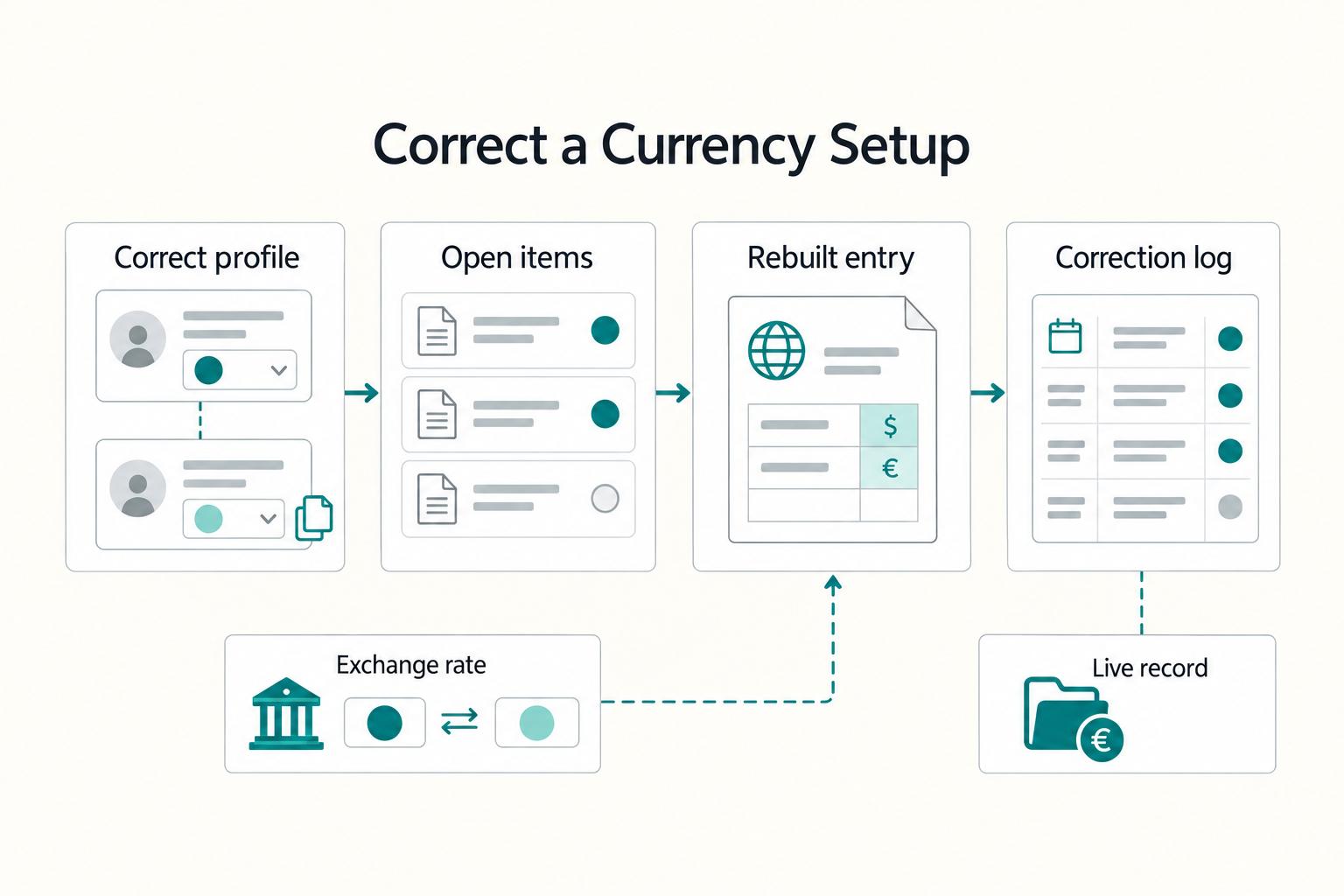
When a customer or supplier is set up in the wrong currency, fix the profile path first instead of forcing a mixed-currency journal entry. In QuickBooks Online, customer and vendor transactions must use the currency assigned to that customer or vendor, and mixed-currency customer/vendor journal entries are blocked for A/R and A/P workflows.
Step 1. Create a duplicate customer or vendor record with the correct currency and a slightly different display name, then use that record for new activity. Keep the old record for closeout and history.
Step 2. Before switching to the new record, clear open items on the old one and confirm your team knows which profile is live. This reduces duplicate posting risk when two similar records exist.
Step 3. If an entry was posted under the wrong currency setup, recreate it so the transaction currency, the A/R or A/P currency, and the customer or vendor currency all match. If you rebuild a journal entry, use the deleted entry's exchange rate for manual conversion when needed, and note the actual currency received in the Memo field.
Step 4. Keep a correction log for each case: old profile ID/display name, new profile ID/display name, affected open items, and reconciliation notes. This is the audit trail that makes later review and cleanup straightforward.
Use this copy-paste operating checklist for every international client#
Use the same checklist for every international client: set currency rules before onboarding, verify invoices before send, reconcile in the same currency path, clear exceptions monthly, and run an annual records check where relevant.
| Stage | Checks | Stop point or note |
|---|---|---|
| Pre-onboarding | Confirm client billing currency, payment terms, and one approved fallback currency | Make sure the customer profile matches the agreed currency and your team has one written exception note |
| Pre-invoice | Check customer currency, invoice currency, and expected payment timing | If profile currency and invoice currency do not match, stop and fix it before send |
| Post-payment | Confirm currency matching, reconcile the payment to the intended invoice, and log any FX variance that still needs follow-up | If there is a short pay, delayed conversion, or bank-side adjustment, record it immediately with payment proof and owner |
| Month-end | Review unmatched payments, duplicate profiles, and unresolved foreign-currency items | Escalate anything that blocks collection or leaves reconciliation uncertain |
| Annual records check | Review whether Form 8938 applies where relevant and check the FinCEN FBAR page each year | Align this with tax prep when relevant |
- Pre-onboarding: confirm the billing rule. Confirm the client billing currency, your payment terms, and one approved fallback currency before the first live invoice. Make sure the customer profile matches the agreed currency and your team has one written exception note.
- Pre-invoice: verify record vs invoice. Before sending, check customer currency, invoice currency, and expected payment timing in your payment workflow. If profile currency and invoice currency do not match, stop and fix it before send.
- Post-payment: reconcile in the same currency path. Confirm currency matching, reconcile the payment to the intended invoice, and log any FX variance that still needs follow-up. If there is a short pay, delayed conversion, or bank-side adjustment, record it immediately with payment proof and owner.
- Month-end: clear the exception queue. Review unmatched payments, duplicate profiles, and unresolved foreign-currency items that can delay cashflow. Escalate anything that blocks collection or leaves reconciliation uncertain.
- Annual records check: align with tax prep when relevant. If U.S. foreign-asset reporting is in scope, review whether Form 8938 applies based on the applicable threshold, noting that higher thresholds can apply for joint filers or taxpayers abroad. IRS guidance also cites aggregate value exceeding $50,000 for certain U.S. taxpayers, and instructions cite $50,000 on the last day of the tax year or $75,000 at any time during the tax year for certain specified domestic entities. Form 8938 is attached to the income tax return, and if no income tax return is required for that year, IRS guidance says Form 8938 is not required. If FBAR may apply, check the FinCEN FBAR page each year for current due-date and extension notices.
Build once and run it the same way every client cycle#
The payoff is consistency, not the feature toggle itself. In quickbooks online multi-currency, a repeatable cycle for invoice currency, verification, and exception handling is what keeps cross-border invoicing predictable.
Step 1. Lock the rule set before you draft#
Set three decisions up front for each cycle: invoice currency, pre-send verification, and exception owner. Keep that standard fixed so team members are not improvising mid-cycle.
Step 2. Keep invoice-to-payment matching traceable#
Use the same record pattern every time (invoice, currency path, payment confirmation, settlement details, and short variance note). This reduces manual matching risk; one AR integration source notes teams can spend 2 to 4 hours every day matching payments to invoices when links are unclear.
Step 3. Review exceptions on a fixed cadence#
Do not wait for month-end to review unmatched or odd items. A tighter reconciliation rhythm, such as 1-2x per week, helps catch feed or posting issues before they become multi-day cleanup.
Step 4. Add controls as volume and headcount grow#
As more people touch invoicing and settlements, split responsibilities and make approvals explicit. Intuit comparison content highlights setups with access for up to 40 users; in practice, success comes down to clear ownership and one consistent handoff back into QuickBooks for reconciliation.
For teams scaling cross-border volume, pair this foundation with stronger payout and reconciliation controls where supported.
Frequently Asked Questions
Can I turn off Multicurrency after I enable it in QuickBooks Online?
The FAQ excerpt used here does not state whether Multicurrency can be turned off after enablement. Treat activation as a high-impact setting and confirm your workflow and account setup before enabling it.
Which QuickBooks Online plans support Multicurrency today?
The guidance here explicitly scopes Multicurrency to QuickBooks Online Essentials and QuickBooks Online Plus. If you are on Simple Start, Intuit says you need to upgrade to use it.
What should I do if Multicurrency will not enable in my account?
If you see the error "Something's not quite right," start with browser troubleshooting, then retry. If it still fails, capture the exact error text, your plan name, and the screen you were on before you contact support.
Can I change the currency on an existing customer or supplier profile?
Not by editing the active profile directly. Intuit's documented fix is to make the existing customer or supplier inactive first, then create a new record with the correct currency.
Should freelancers invoice in home currency or client currency?
This QuickBooks multicurrency FAQ excerpt does not set a rule for invoicing in home currency versus client currency. Set a written policy for your business and apply it consistently.
What is the fastest way to catch multi-currency mistakes before month-end?
There is no specific month-end checklist for catching multicurrency mistakes to hand you here. Use your internal close controls and verify currency settings before reconciliation.
Try a related tool
Researched and edited by the Gruv editorial team. Gruv builds cross-border billing, payouts, and finance-operations software for global businesses.
Sources
- accountingfiles.delaware.gov/docs/Annual-Recovery-Plan-July-2024.pdftrusted
- fcc.gov/sites/default/files/foia-consumer-complaints...trusted
- fincen.gov/report-foreign-bank-and-financial-accountstrusted
- hr.media.uconn.edu/wp-content/uploads/sites/1421/2024/03/CT-In-...trusted
- irs.gov/businesses/corporations/do-i-need-to-file-fo...trusted
- irs.gov/forms-pubs/about-form-8938trusted
- schreiner.edu/wp-content/uploads/Departments/Registrar/Aca...trusted
- utah.gov/pmn/files/1337167.pdftrusted
Educational content only. Not legal, tax, or financial advice.
Related Posts

Value-Based Pricing for Freelancers Under Real Payment Risk
Value-based pricing works when you and the client can name the business result before kickoff and agree on how progress will be judged. If that link is weak, use a tighter model first. This is not about defending one pricing philosophy over another. It is about avoiding surprises by keeping pricing, scope, delivery, and payment aligned from day one.

Freelance Bookkeeping for Faster, Safer Client Payments
Control over cash starts with records you trust. When entries are current, categorized, and easy to trace, you spot risk earlier and make calmer decisions about follow-up, spending, and month close.

A Guide to QuickBooks Self-Employed for Freelancers
**QuickBooks Self-Employed can support basic bookkeeping, but predictable cashflow comes from your payment controls, not invoicing alone.**