
Quick Answer
Start by treating parkinson's law for freelancers as an operations boundary issue: run one fixed back-office block, close each task with proof, and park exceptions in a dated follow-up list. Use tangible end states like an invoice marked sent, a reconciliation line marked matched, and a saved compliance note. Then hand off only the work whose owner, scope, and check-in timing are written and retrievable.
Parkinson's Law Isn't About Your Client Work - It's About Your Business#
For freelancers, Parkinson's Law often shows up more on the business side than in client delivery. Client work usually has clearer boundaries: a brief, a scope, a reviewer, and a due date. Back-office work has looser edges, so it expands to fill open time.
Treat this as a practical framing, not a quantified finding. The risk is simple: recurring business tasks stay open longer than expected. Invoicing waits on missing details, follow-ups slip, and payment records stay unresolved longer than planned. Each item looks small on its own, but the pileup creates friction and constant context switching.
Call this the Admin Tax. It is the time and mental overhead you pay to keep the business clean, documented, and defensible. For a business of one, that can include sending invoices, tracking key dates, matching incoming payments to open invoices, and keeping records you can actually find later.
A simple checkpoint helps: every admin task should end with an artifact you can point to. That might be an invoice marked sent, a reconciliation line marked matched, a dated note saved, or a folder containing the source documents for one transaction. If you cannot tell what the finished state looks like, the task has no real boundary, so it keeps expanding.
The common failure mode is partial completion. You draft the invoice but do not confirm key details. You glance at a reminder but do not log the follow-up. You match most payments but leave the exceptions for later. That feels harmless in the moment, but it pushes uncertainty into next week and makes every later review slower because you have to reload context before you can act.
So the right diagnosis is not "I need to work faster on everything." It is "I need tighter operating constraints on the work that has no natural boundary." From there, the job is straightforward: constrain admin scope, turn recurring checks into repeatable controls, and assign ownership so business upkeep stops bleeding into your best hours.
If you want a deeper dive, read How to Manage Your Time Effectively as a Freelancer.
The True Cost of the "Admin Tax"#
The real cost is not just time. In your week, admin sprawl shows up as lost billable capacity, slower decisions, and lingering compliance anxiety when tasks stay half-closed.
What this looks like in a real week#
It usually does not show up as one clean admin block. It shows up as repeated re-entry into unfinished items: an invoice drafted but entity details still pending, invoicing language with the current rule or threshold still unverified, residency tracking with the current rule or threshold still unverified, or a payment that still does not match the invoice trail.
That re-entry is the problem. You are not only doing the task; you are reloading context, rechecking records, and deciding whether the item is safe to close. That is a systems issue, not a personal-discipline failure.
Use one checkpoint: if an admin task does not end in a clear artifact, treat it as still open. Artifacts include sent invoices, completed entity checks, dated compliance notes, and matched reconciliation lines.
Calculate your opportunity cost with your own inputs#
Use your numbers, not generic benchmarks:
- Billable rate: what you can realistically sell in that time
- Admin hours per week: invoicing, checks, tracking, reconciliation, follow-up
- Active weeks per year: after planned downtime
Formula: Opportunity cost = billable rate x admin hours per week x active weeks per year
Keep this honest by using your typical sold rate and counting repeat handling, not just first touch.
| Dimension | Controlled admin | Uncontrolled admin |
|---|---|---|
| Time | Batched work with clear finish states | Fragmented re-entry across the week |
| Revenue impact | Predictable and easier to price around | Hidden opportunity cost accumulates |
| Risk exposure | Open items are visible and reviewable | Exceptions stay half-finished and easy to miss |
| Mental load | Lower because status is explicit | Higher because unresolved items carry forward |
Use productivity tactics, but don't stop there#
Productivity methods are useful. Timers, checklists, and focused review blocks can help you move faster through defined work.
But they do a different job than operating controls. By themselves, they do not confirm correct billing entity details, resolve invoicing requirements whose current rule or threshold is still unverified, resolve residency checks whose current rule or threshold is still unverified, or resolve unmatched payments.
If your admin keeps expanding, the fix is tighter operating constraints: clear finish states, required artifacts, and explicit follow-up ownership. That sets up the next step, where you contain this work instead of carrying it into every week.
You might also find this useful: The Best Personal Productivity Systems for Freelancers (GTD).
Step 1: Isolate & Constrain Your Back Office#
Use one recurring admin block to contain back-office work, or it will keep expanding into client time. Set the block length based on your workload, lock a clear start and end time on your calendar, and treat it as non-negotiable.
Lock the block#
Create a weekly appointment for back-office tasks only. Add three visible constraints from day one:
- A clear decision window: routine admin gets handled in this block, not scattered across the week
- A WIP limit: process one queue at a time
- A stop rule: when time ends, processing ends
When something is unresolved, move it to a tracked follow-up list with a next action and review date. Do not keep it half-open in email or chat.
Run the queues in order#
Work this sequence each week so you reduce re-deciding and spot exceptions faster.
| Queue | Done when |
|---|---|
| Invoice queue | Invoice is issued, client legal/billing details are checked against your current records, and the send status is logged. |
| Compliance check queue | Each recurring check has a current status and next review date, including items whose current rule or threshold is pending source, advisor, or business verification. |
| Reconciliation queue | Each payment is matched to an issued invoice, status is updated, and exceptions include a note. |
| Cash and pipeline check | You can clearly state what should collect next, what needs follow-up, and whether upcoming workload looks thin or overloaded. |
- Invoice queue
Done = invoice is issued, client legal/billing details are checked against your current records, and the send status is logged. If key details are missing, move it to follow-up.
- Compliance check queue
Done = each recurring check has a current status and next review date, including items whose current rule or threshold is pending source, advisor, or business verification. If a check needs deeper research or advice, log it and move on.
- Reconciliation queue
Done = each payment is matched to an issued invoice, status is updated, and exceptions include a note. If there is no matched line or exception note, treat it as open.
- Cash and pipeline check
Done = you can clearly state what should collect next, what needs follow-up, and whether upcoming workload looks thin or overloaded.
Protect the boundary#
Keep this block narrow so it stays useful.
- In scope: invoicing, recurring compliance reviews, reconciliation, cash review, follow-up logging
- Out of scope: client delivery, proposal writing, deep research, tool shopping, inbox cleanup, backfilling old filing history
This constraint gives you cleaner focus now and creates the foundation for Step 2 automation.
For a step-by-step walkthrough, see A guide to 'Parkinson's Law of Triviality' (bikeshedding) in client meetings.
Step 2: Build Your "Compliance Engine" to Automate Risk#
Build this as a risk-control system, not a productivity hack. Your engine should catch bad inputs, stale rules, and missed triggers before they become invoice fixes, reporting issues, or evidence gaps.
Use one control model for every recurring check#
For each check, define four fields: inputs, rules, alerts, review owner.
- Inputs: the raw facts (client billing details, location days, account balances, transaction dates)
- Rules: what you apply to those facts, with unresolved items labeled as current jurisdiction rule pending source or advisor verification or current threshold pending source, advisor, or business verification
- Alerts: reminders before deadlines or trigger points
- Review owner: the person who closes or escalates the alert (if you work solo, explicitly assign it to yourself)
Before any rule goes live, require evidence: official source, saved URL, and retained artifact. For U.S. checks, treat a .gov domain as an official-source signal, and confirm the https/lock indicator before relying on the page. For legislative checks, use official bill-search workflows, for example pages with fields like Bill Number and Bill Keyword, instead of secondary summaries.
| Control outcome | Manual workflow | Compliance engine |
|---|---|---|
| Error risk | Higher: rules stay in memory and notes drift | Lower: inputs, rules, alerts, and owner are explicit |
| Decision speed | Slower: you re-check the same issue repeatedly | Faster: alerts point to pre-verified rule notes |
| Audit readiness | Weaker: proof is scattered across tabs/email | Stronger: source links, check dates, and artifacts are retained |
Apply the model to the three high-risk areas#
| Area | Automate | Verify manually | Retain evidence |
|---|---|---|---|
| Invoicing compliance | Client-data intake, tax-treatment flags for cross-border scenarios, invoice sequencing, and alerts for incomplete profiles. | Legal entity name, billing country, tax ID, and any current cross-border rule still pending source or advisor verification. | Issued invoice, client tax-data record, rule note, and saved source page/PDF. |
| Residency tracking | Day logs from calendar/travel records, rolling totals, warnings for verified thresholds, and notes for any current threshold still pending source, advisor, or business verification. | Partial-day edge cases, plan changes, and overlapping jurisdiction tests. | Itinerary, calendar entries, passport/entry records when available, rule note, and last-checked date. |
| Financial reporting monitoring | Balance imports, account aggregation views, alerts for verified triggers, and notes for any current threshold still pending source, advisor, or business verification. | Account ownership, account classification, and whether a trigger applies in the current period. | Statements, balance screenshots on relevant dates, and source artifacts. If a federal publication matters, keep issue metadata and the downloadable PDF when available; if a viewer shows access friction (such as a password prompt), keep the issue page record too. |
The tool is only part of the control. You still need verified rules, clear ownership, and retrievable evidence.
Once these controls are stable, move to Step 3 and decide which liabilities should remain with you and which can be contractually delegated to an external partner.
We covered this in detail in How to use a 'Decision Journal' for your freelance business.
Step 3: Delegate the Risk, Not Just the Task#
Delegate risk only when responsibility is explicit in writing. Your job here is to separate workload relief from true responsibility transfer and document the boundary clearly.
A Merchant-of-Record can be a useful operating model, but only after contract verification. Before you sign, confirm who contracts with the customer, who invoices, who remits, who handles disputes, and who carries compliance responsibility for each transaction stage. If any point is unclear, track it as a current requirement pending contract, source, advisor, or business verification in your internal control list.
When you verify policy or regulatory statements during this review, keep Step 2 source checks in place: confirm official U.S. government pages through .gov plus the HTTPS lock indicator, and do not treat third-party indexing as endorsement.
| Model | Liability ownership (verify in contract) | Control tradeoff | Expansion readiness | Operational burden |
|---|---|---|---|---|
| Keep it in house | Stays with your entity unless reassigned by contract | Highest direct control | Depends on your internal coverage and review capacity | Highest internal review load |
| Delegate tasks (assistant/contractor) | Usually unchanged unless duties are explicitly reassigned | High control, ongoing supervision required | Can scale tasks, but accountability mapping must stay clear | Lower execution load, similar oversight burden |
| Merchant-of-Record model | Must be stated explicitly, point by point | Less direct control in delegated transaction layers | Can support expansion if coverage and scope are contractually clear | Lower internal handling if reporting and exception flow are usable |
Partner selection checklist (operational, not assumptions)#
| Checkpoint | What to verify |
|---|---|
| Contract scope | Included duties, exclusions, and shared duties. For rule-specific points, mark any unresolved item as a current requirement pending contract, source, advisor, or business verification. |
| Jurisdiction coverage | Covered locations now, excluded locations, and change process. |
| Dispute handling | Ownership of refunds, chargebacks, notices, and evidence handling. |
| Payout terms | Timing, holds/reserves, and delay triggers. |
| Data/reporting access | What records you can export, format, frequency, and retention access. |
| Evidence file | Signed agreement, current terms, support confirmations, and dated verification notes. |
Keep residual risk visible. Any responsibility not clearly assigned in the agreement stays with your business process until verified otherwise, and entity-level legal boundaries should stay in the control list as current requirements pending contract, source, advisor, or business verification.
Treat this as an operating model decision, not a one-off outsourcing task. Related: How to Manage Multiple Freelance Projects Without Losing Your Mind.
Shift your operating model: constrain admin, add checkpoints, delegate risk#
If admin keeps leaking across your week, make an operating model shift: isolate and constrain the work, build clear compliance checkpoints, and delegate risk with explicit ownership.
Step 1. Isolate and constrain. Put back-office work into one defined admin block with a deadline. Track your time so you can see whether the block stays contained or keeps expanding. Before each block, list tasks in order and define what "done" means for each one.
Step 2. Build a compliance engine. Keep this simple and explicit: what must be reviewed, what record must exist, who responds, and what completion looks like. Use written completion criteria so tasks do not sit in "almost done." This is how you reduce ineffective busyness and keep outcomes visible.
Step 3. Delegate the risk. When you hand off sensitive work, document owner, scope, and check-in timing in writing. Keep the current terms or scope and the proof of handoff together. If you cannot state who owns the next decision, what record proves it, and when you verify results, the handoff is incomplete.
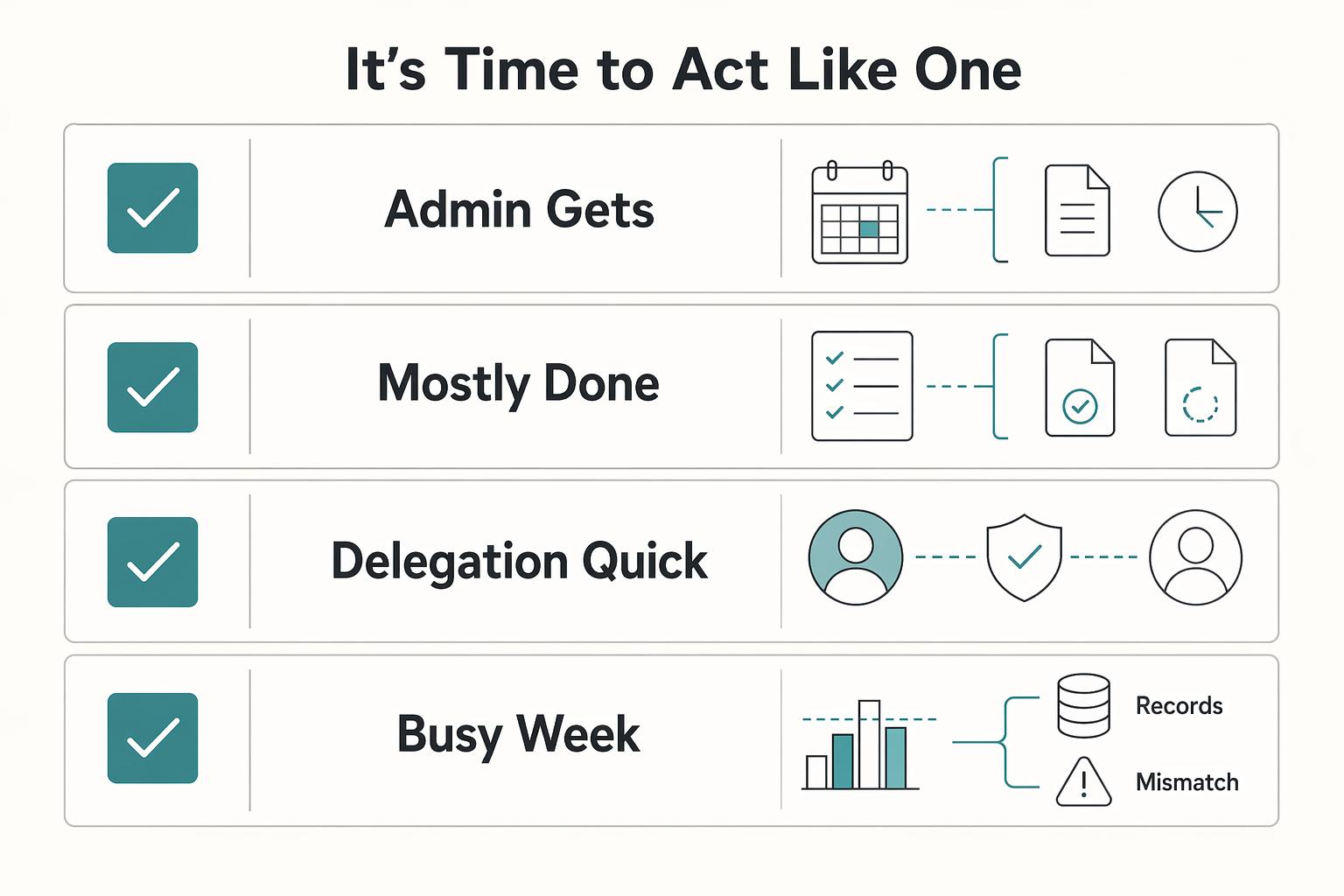
| Reactive freelancer mode | CEO operating mode |
|---|---|
| Admin gets handled whenever it becomes urgent | Admin runs inside a defined block with a deadline |
| "Mostly done" is accepted | Completion criteria are written and checked |
| Delegation is a quick forward | Delegation includes owner, scope, evidence, and check-in |
| Busy week is treated as a good week | Tracked time and visible outcomes determine what worked |
This week, set your admin block, write three compliance checkpoints, and assign external risk ownership for each delegated task. For any requirement you have not verified yet, label it as current requirement pending contract, source, advisor, or business verification.
This pairs well with our guide on A Guide to 'Deep Work' for Freelancers.
Frequently Asked Questions
What is the biggest hidden time drain in your business?
One common hidden drain is repeatedly reopening unfinished admin work: checking something, rechecking it later, then stopping because a requirement is unclear. If you cannot define the requirements and list the tasks from start to finish, the work is still too vague and can keep expanding.
How does that hit your revenue if you are still getting client work done?
It can reduce the time and attention you can give to billable work, selling, and recovery. You do not need a benchmark to see it. Compare a week where admin stayed contained with a week where it leaked across several days, then note what moved, slipped, or did not get sold.
How do you set internal deadlines that actually hold?
Start with a self-imposed deadline for the whole admin block, then turn the work into a short project outline with goals, tasks, timeline, and required resources. If any step depends on someone else, add a check-in before your own cutoff. A common failure mode is waiting until the last minute and then discovering gaps.
Are standard productivity methods enough on their own?
Not on their own. A timer or focus sprint can help you finish a known task, but it does not replace defining requirements, mapping dependencies, and scheduling check-ins. Use task tactics for focus, and planning controls for work that involves multiple steps or collaborators. | Approach | Works when | Fails when | |---|---|---| | Task timer or focus sprint | You already know the task, inputs, and finish line | The task is unclear or blocked by someone else | | Self-imposed deadline plus project outline | You can list tasks, resources, and dependencies up front | You skip check-ins and discover gaps late | | Self-imposed deadline plus clear requirements and check-ins | The work repeats and collaboration needs are planned in advance | Requirements stay vague and dependencies surface at the last minute |
What should you automate first if your admin is sprawling?
Automate the repeatable parts with clear inputs and a clear finish line, not just the parts that feel annoying. In practice, start with recurring triggers, status tracking, and reminders that keep your self-imposed deadlines visible. If a step depends on someone else, automate the reminder and keep a check-in before your cutoff.
What should you keep manual for now?
Keep exception handling manual until requirements are clear and you can verify the result. That includes any handoff where tasks or dependencies are still unclear. If you cannot define the task and who needs to check in, do not automate it yet.
Try a related tool
Researched and edited by the Gruv editorial team. Gruv builds cross-border billing, payouts, and finance-operations software for global businesses.
Sources
- app.leg.wa.gov/documents/laws/wsr/2008/15/08-15PROP.pdftrusted
- artsandsciences.osu.edu/arts-and-research/research-and-creative-acti...trusted
- cdn.bcm.edu/sites/default/files/caring-and-coping.pdftrusted
- courts.ca.gov/sites/default/files/courts/default/2024-12/h...trusted
- doit.uw.edu/disability-in-the-newstrusted
- extension.harvard.edu/2024-2025-extension-course-archivetrusted
- hfs.illinois.gov/content/dam/soi/en/web/hfs/sitecollectiondoc...trusted
- in.gov/fssa/ompp/files/503ANTHEM25PATHWAYS_82034.pdftrusted
Educational content only. Not legal, tax, or financial advice.
Related Posts
How to Manage Your Time Effectively as a Freelancer
Most freelancers struggle not because they work too few hours, but because they misallocate the hours they have—treating time as an infinite resource rather than a finite business asset with a real cost per unit. The solution is a three-layer operating system: a Time Budget Framework that commits hours to four categories before any client work is booked, a Weekly Operating Template that assigns those categories to specific calendar windows, and a monthly Admin Audit Checklist that reconciles invoicing, bookkeeping, and compliance records. Multi-client orchestration requires a WIP limit, dedicated client windows, and a capacity decision rule run before accepting new engagements. Together, these systems replace reactive decision-making with a repeatable structure that keeps delivery quality consistent, records audit-ready, and the freelance practice operationally durable.

How to Manage Multiple Freelance Projects Without Losing Your Mind
If this feels hard, the issue is often not your craft. It is a lack of operating control: too many open commitments, a calendar filled with delivery blocks, an inbox setting priorities, and tasks that feel urgent because no clear next action exists.

The Best Productivity Systems for Freelancers: GTD, PARA, and Second Brain
**Treat productivity as a system you can run under load, not a vibe you summon on demand.** Client work is messy by default: requests scattered across Gmail and Slack, scope shifting midstream, and the annoying truth that "done" does not always mean "paid."