
Quick Answer
Start by using Notion as the single record for client work, then apply notion ai for productivity to that documented context. Keep meeting notes, proposals, signed SOWs, approvals, and status updates linked so responses come from current project evidence instead of memory. Use one practical checkpoint from the article: pick an active client and verify in under two minutes what was promised, what changed, what is due next, and the latest approval.
Where Notion AI Helps, and What Your Workspace Must Hold#
A Business-of-One system is your operating model, not a product you buy. One trusted workspace holds the facts of the business, and your AI assistant works from those facts instead of whatever you happen to paste into a prompt.
That distinction matters because solo work often breaks down in small, expensive ways. You forget what a client approved, reuse an old proposal line, or lose a decision in an email thread. If you are evaluating notion ai for productivity, the real question is not "Can it write?" It is "Can it work from the same record I use to run the business?"
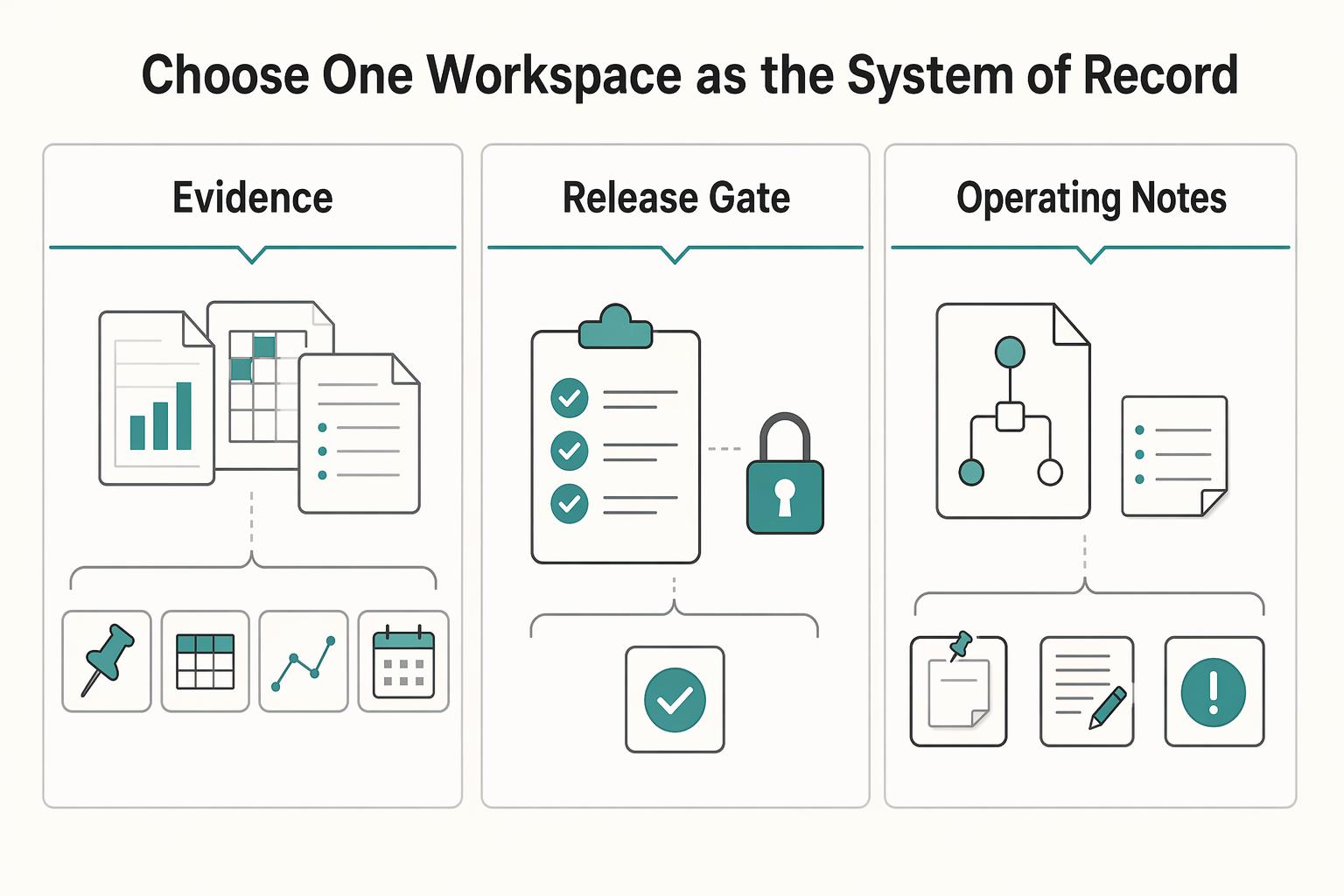
Choose one workspace as the System of Record#
Start here, because everything else depends on it. Decide where the authoritative version of your business lives. Notion describes Notion AI as a "helpful assistant right inside your workspace" that can help you "discover answers, bring information together, and automate tedious tasks." That only works when the right material is actually in the workspace.
In practice, keep these four categories together:
| Category | Includes |
|---|---|
| Client communication records | meeting notes, call summaries, decision follow-ups, and copied highlights from important emails |
| Delivery documents | proposals, scopes, briefs, timelines, status notes, and final deliverables |
| Decisions and approvals | what changed, who approved it, and when |
| Operating notes | templates, checklists, pricing assumptions, retrospective notes, and reusable research |
What should not be spread across tools is the authoritative version of those records. Email, calendar, and cloud storage can still exist. The problem starts when the current scope is in one tool, the approval is in another, and your working notes live somewhere else. At that point, both you and the AI are rebuilding the truth from fragments.
Checkpoint: pick one active client and try to answer these four questions in under two minutes without hunting across apps. What was promised? What changed? What is due next? What did the client last approve? If that is hard, your System of Record is not in place yet.
Use AI where workspace context is available#
This is the practical dividing line. Notion positions Notion AI as a workspace assistant, so its usefulness depends on what is actually documented there.
| Workflow need | What you need to maintain | What Notion AI can use | Main tradeoff |
|---|---|---|---|
| Keep context across tasks | Clear, current pages and databases | Existing notes, pages, and databases in the workspace | Workspace quality matters more than prompt quality alone |
| Draft a handoff or client update | Up-to-date status notes and decisions | Current project notes and prior decisions if they live together | Weak records produce weak summaries |
| Repeat a recurring task | Initial setup of templates/processes | Templates, recurring pages, and Custom Agents | Setup takes effort before it pays off |
| Work from current information | Timely updates to your records and tools | Internal workspace context, plus MCP-connected external context where configured | You still need to validate outputs against your current reality |
The common failure mode is simple. Messy inputs produce thin outputs. If your notes are incomplete, page titles are vague, or approvals exist only in email, the assistant cannot invent a missing record. Whether this improves speed or quality in your case is something you need to test in your own workflow.
Be honest about when Notion AI is the wrong fit#
Notion AI is the wrong fit if you do not want one workspace at the center of operations. It is also the wrong fit if most of your critical material has to stay in specialist tools, or if your work rarely repeats. It is a weak fit if you mainly want an answer engine but do not want to maintain pages, databases, and clear document ownership.
It becomes more useful when you handle recurring client work, reuse similar documents, and need answers from your own records. Notion also supports Custom Agents for recurring tasks, and Notion says MCP integrations can connect those agents to external tools and bring live context into Notion.
Once that base is in place, the next three systems get easier to run. Acquisition becomes easier to track, delivery becomes easier to control, and past work becomes reusable knowledge instead of buried notes.
Related: A Guide to Notion for Freelance Business Management.
System 1: Build Your Client Acquisition Engine#
If your workspace is the system of record, your acquisition workflow should live there too. Keep one pipeline where every lead has a clear next action and every won project links back to the same client record.
Capture every lead in one database#
Start with one CRM database and run it as an operating workflow, not a storage bin. Notion databases support custom properties and can handle large operational lists in one place, so a single table is enough to begin: Lead Name, Status, Potential Value, Last Contact Date, Next Action, Source, Proposal, and SOW.
Your core rule is simple: every open lead must have one specific next action. "Follow up on budget question" works. "Check in later" does not. Create an active-leads view (Status is not Won or Lost) and sort by Last Contact Date so stalled deals surface fast.
Keep one control view for quality: active leads where Next Action is empty. Keep that view at zero. If it grows, your CRM is no longer helping you make decisions.
Plan-fit note: Free ($0 per member/month) and Plus ($10 per member/month) are described as including trial AI capabilities like generating docs or autofilling databases, which is usually enough to test this system. If you later need Notion Agent or row-level database permissions for collaborators, Business ($20 per member/month) is the relevant tier.
Avoid the common trap here: do not over-design properties and views before you enter and manage real leads.
Turn discovery notes into an outcome-led proposal#
Your proposal should reflect discovery evidence, not memory. Draft from your actual notes so the buyer can evaluate the result you are recommending and the scope required to get there.
| Proposal style | Buyer clarity | Scope alignment | Decision friction |
|---|---|---|---|
| Hourly-style proposal | Emphasizes time and tasks more than business result | Scope can drift because effort is the reference point | Buyer may compare rate first |
| Outcome-led proposal | Emphasizes current problem, target result, and approach | Scope is tied to stated result and assumptions | Buyer can decide from a clearer business case |
Use prompts that create reusable assets you can verify before sending:
- "Draft a discovery summary for [CLIENT] using these notes. Include current situation, desired outcome, constraints, decision timeline, and missing information that still needs confirmation."
- "Draft a proposal for [CLIENT] based on this summary. Include target outcome, recommended scope, assumptions [ASSUMPTIONS], timeline [TIMELINE], and client responsibilities [CLIENT INPUTS]. Put any unverified item in brackets."
- "Create objection-handling notes for likely concerns about price, timing, approval, and scope, using [OUTCOME] and [RISK OF DELAY]."
Checkpoint: replace every bracketed placeholder, then confirm the proposal still matches your actual capacity.
Lock boundaries in the SOW before work starts#
Treat the SOW as your risk-control document before delivery starts. Draft it from the approved proposal, then compare it manually with your discovery summary and CRM notes.
| SOW check | What to confirm |
|---|---|
| Deliverables | named plainly, including final format or destination |
| Assumptions | explicit, including what the client must provide |
| Change-request path | defined so extra asks do not become included work by default |
| Communication rules | clear, including where requests and approvals are recorded |
| Exclusions | explicit so out-of-scope requests are visible early |
Before you mark a project as won, confirm each item in that table.
A common breakdown is misalignment: the proposal says one thing, approvals happen in email, and the SOW never catches up. Keep the approved proposal and final SOW linked to the same client record so handoff into delivery is cleaner and easier to control in the next system.
If you want a deeper dive, read Value-Based Pricing: A Freelancer's Guide.
System 2: Engineer Your Project Delivery Machine#
Once the SOW is signed, the job is delivery control: keep scope, sequence, and communication in one connected workspace so progress does not depend on memory. Use Notion AI to work from the full project record, not to run the project without you.
When project information is scattered, management becomes guesswork. A stronger setup keeps docs, decisions, tasks, and meeting notes connected so updates and risk checks reflect what is actually happening.
Run every project from one template tied to the signed SOW#
Run every project from the same template in the same workspace where the client record and final SOW already live. Your project page should include five linked parts: task board, decisions log, dependencies tracker, client-visible update area, and a scoped repository for project assets and notes.
Keep the structure plain and reviewable. The task board should include Task, Status, Owner, Due Date, Dependency, and SOW Reference. The decisions log should track Decision, Date, Owner, Impact, and Source Note. The dependencies tracker should show what is waiting on whom and the risk if delayed. Keep the SOW linked on the project homepage so delivery can always be traced back to agreed scope.
Before work starts, confirm two checks: every promised deliverable appears as a task, milestone, or repository item, and every active task has an owner.
| Delivery risk | What usually causes it | Control in your workspace | Verification checkpoint |
|---|---|---|---|
| Missed tasks | Action items stay buried in meeting notes | Ask AI to scan recent notes and draft candidate tasks for approval | No active task with empty Status or empty Owner |
| Unclear ownership | Two people assume the other person is handling it | Use required Owner fields on tasks and blockers in updates | Group active work by Owner and look for blanks |
| Weak communication | Updates are written from memory at the end of the week | Keep a client-visible update area linked to tasks, decisions, and blockers | Last update date matches your reporting cadence |
| Messy closeout | Assets and support terms are handled ad hoc | Build a closeout page tied to repository, open items, and support notes | Final handover checklist is complete before sign-off |
Generate status updates from project context, then verify them#
Use AI-assisted updates to improve consistency and completeness, then verify every concrete detail before sending. This works best when your task board, decisions log, and notes are current.
Use a prompt like: "Draft this week's client update for [PROJECT]. Use tasks, decisions, dependencies, and meeting notes from this project only. Include: accomplishments completed this period, current blockers, owner for each blocker, next action, and any change requests or scope questions. Put any unverified detail in brackets, including dates, approvals, and client responsibilities."
Then check the draft against your project records. If task statuses are stale, the summary can sound confident and still be wrong.
| Criteria | Manual update | AI-assisted update |
|---|---|---|
| Consistency | Depends on who writes it and what they remember | More consistent when it pulls from the same project records each cycle |
| Completeness | Easy to omit decisions, blockers, or dependencies | Better at pulling from tasks, notes, and decisions in one place |
| Stakeholder clarity | Can drift into narrative without clear owners or next actions | Easier to structure around accomplishments, blockers, owner, and next action |
| Rework risk | Higher when updates miss a scope issue or unresolved dependency | Lower only when bracketed details are verified before sending |
Close the project with a formal handover#
Closeout should be a documented handover, not "files sent." Create a closeout page in the project, use AI to draft it from repository items, notes, and completed tasks, then manually confirm ownership, access, and support boundaries.
| Closeout item | What to document |
|---|---|
| Delivered assets | final format and storage location |
| Open items | owner and expected next action |
| Operating instructions | anything the client now needs to maintain |
| Ownership and access transfer | files, pages, and accounts |
| Support boundaries | what is no longer included |
Before you mark the project complete, confirm each item above.
Final check: the client can find what was delivered, see what remains open, and understand where support ends. If questions come up later, the handover page should answer them without reopening scope by accident.
For a step-by-step walkthrough, see Using Notion Rollups and Relations for a Smarter Freelance Dashboard.
System 3: Construct Your Personal Knowledge Vault#
Use this system so each finished project improves the next one. The value is not storing more notes. It is finding what matters quickly, making better decisions, and reusing proven insight in client work.
| Dimension | Raw notes library | Structured knowledge vault |
|---|---|---|
| Retrieval speed | You rely on memory, page titles, and luck in search | You capture in one Knowledge Hub with clear tags and storage rules, so search is more reliable |
| Decision quality | Past context is easy to miss, so you re-decide familiar problems | Synthesized entries keep the insight, service relevance, and next action together |
| Reuse in client work | Useful ideas stay trapped in old docs and bookmarks | You can pull validated insights into proposals, delivery pages, and messaging with less rework |
| Risk of repeating mistakes | Project lessons stay buried in handover files | Decisions and lessons are archived back into the same workspace for future use |
Capture and synthesize research into usable guidance#
Start with one central Knowledge Hub, not a maze of subpages. Notion's guidance emphasizes a centralized repository, intuitive organization, and strong search, so keep one database with fields you will actually maintain: Topic, Source, Service Relevance, Status, Next Action, and Storage Location.
Run the same workflow each time: capture, tag, synthesize, apply, archive. Use a prompt like: "Review this source and return 1) key insight, 2) why it matters to my service, 3) the next action I should take this month, and 4) where this should live in my workspace." Including storage location keeps good summaries from getting lost.
Use one quality check before you move on: every saved item needs either a clear next action or a clear archive reason. If neither exists, you are collecting, not compounding. Keep the structure lean, because too many layers and subpages hurt retrieval, and heavy widget use can clutter pages and slow them down.
Extract your IP from completed projects#
After each project, turn your records into reusable method assets. Have the assistant review notes, final deliverables, feedback, and the decisions log, then draft a first pass in this format: recurring patterns, differentiators, reusable steps, and messaging angle. Require placeholders when validation is still needed, such as "[needs validation from client feedback]" or "[verify against final deliverable]."
Then operationalize it. Archive the validated version in your IP database and link it to the source project. If the pattern changes how you sell or deliver, log that decision on the related page so your next proposal or project template reflects it.
Use this ongoing checklist:
- Capture each useful source or post-project lesson in the same Knowledge Hub.
- Tag by topic and service relevance before moving on.
- Request synthesis with insight, relevance, next action, and storage location.
- Apply one idea in live client work, messaging, or delivery this month.
- Archive the decision in Notion so you can find both the lesson and what changed.
We covered this in detail in How to Create a Project Timeline in Notion.
Conclusion: Make These Three Systems Visible and Reviewable in Daily Work#
The guardrails are set. The next move is not to chase more tools. It is to make these three systems visible, reviewable, and hard to ignore in your day-to-day work.
Step 1. Tighten your client acquisition records. Use one place to track leads, proposal drafts, pricing assumptions, and signed scope documents. The goal is not abstract productivity metrics. It is a clearer view of what is in your pipeline, what is waiting on you, and what you have actually promised. Verify this by checking that every live opportunity has a stage, a last contact date, and one next action. If scope or pricing still lives only in email threads, that is your first red flag.
Step 2. Standardize your delivery evidence. For each active project, keep the kickoff note, signed SOW, decision log, status notes, and any change requests together. This makes scope and delivery decisions easier when work gets busy. The check is simple: before doing extra work, you should be able to point to the original scope and the "not included" section. If you cannot, "one small extra" can keep turning into unpaid work.
Step 3. Capture what you learn before it disappears. Save research notes, final deliverables, reusable snippets, and post-project lessons in a form you can search later. This helps you build reusable knowledge assets instead of starting from zero each time. A good test is whether you can quickly find one past example, one reusable block, and one lesson learned. If not, the knowledge is not really stored yet.
Step 4. Put the cadence on your calendar. Run a short weekly review for pipeline, delivery risks, and loose notes. Run a monthly refinement pass to clean stale records, improve templates, and sharpen prompt design so your prompts expose ambiguity instead of hiding it. Keep this action-oriented: awareness alone is not the same as meaningful action. If you are using Notion AI for productivity, give it clean records, a steady review habit, and your own judgment.
You might also find this useful: The Best AI Writing Assistants for Freelance Content Creators.
Frequently Asked Questions
How do you use Notion AI for productivity without creating review risk?
Start with internal work, not client copy. Notion Q&A is often strongest when you ask about material already in your workspace, and you can open it from the sparkle icon in the bottom right or from search. Treat the first answer as a starting point, then check the underlying pages and latest notes before you reuse it outside your workspace.
How should you draft a proposal so it stays specific and defensible?
Build it from workspace records, not a blank page. Use a prompt like: Role: proposal writer for [service]. Context: client goals, constraints, timeline, budget range, discovery notes, known exclusions. Output: problem summary, recommended approach, scope table, assumptions, next step. Verification: mark missing facts as [confirm], and list 3 claims to check before sending. If a sentence cannot be tied back to discovery notes, rewrite it or remove it.
How do you use AI to control scope before work starts?
Turn your SOW into a checklist. Include deliverables, revision rounds, communication channels, dependencies, assumptions, and an “explicitly not included” section. Lock the signed version plus any change request fields, review it at kickoff, and review it again when a client asks for "one small extra." If you have internal policies like [confirm current revision limit] or [confirm response-time standard], leave placeholders until you verify them.
What makes prompts reliable enough for client-facing use?
Give the assistant role, context, output format, and a verification step every time. Ask for structured output such as decisions, open questions, risks, and next actions, then require flags like [needs source check] where it is inferring. That can keep delivery work cleaner and reduce quiet errors.
When should you use Notion AI instead of a standalone assistant?
Use Notion when the answer depends on your workspace context and a single system of record. Use a standalone assistant when you want broader brainstorming or rough drafting, then move validated output back into Notion. If the result affects scope, pricing, or a client promise, finalize it in your workspace and verify it against your own records.
Try a related tool
Researched and edited by the Gruv editorial team. Gruv builds cross-border billing, payouts, and finance-operations software for global businesses.
Sources
Includes 1 external source outside the trusted-domain allowlist.
- 19january2021snapshot.epa.gov/sites/static/files/2017-04/documents/red_hil...trusted
- academia.edu/6725688/Knowledge_management_systemstrusted
- anl.gov/sites/www/files/2023-06/AI4SESReport-2023-v6...trusted
- energy.gov/sites/default/files/2023-11/NEPDG-s59-pages-...trusted
- grants-neubauercollegium.uchicago.edu/public/Resources/index.jsp/youtube%20automat...trusted
- registrar.umd.edu/sites/default/files/2025-02/Courses%20in%202...trusted
- scholarship.law.missouri.edu/cgi/viewcontent.cgitrusted
- maray.ai/posts/life-osexternal
Educational content only. Not legal, tax, or financial advice.
Related Posts

Value-Based Pricing for Freelancers Under Real Payment Risk
Value-based pricing works when you and the client can name the business result before kickoff and agree on how progress will be judged. If that link is weak, use a tighter model first. This is not about defending one pricing philosophy over another. It is about avoiding surprises by keeping pricing, scope, delivery, and payment aligned from day one.

A Guide to Notion for Freelance Business Management
If your workspace feels busy but fragile, you do not need more pages. You need one connected system. Treat your freelance business like a business-of-one and use Notion as the control layer that connects client decisions, delivery, and billing in one place.
The Best AI Writing Assistants for Freelancers
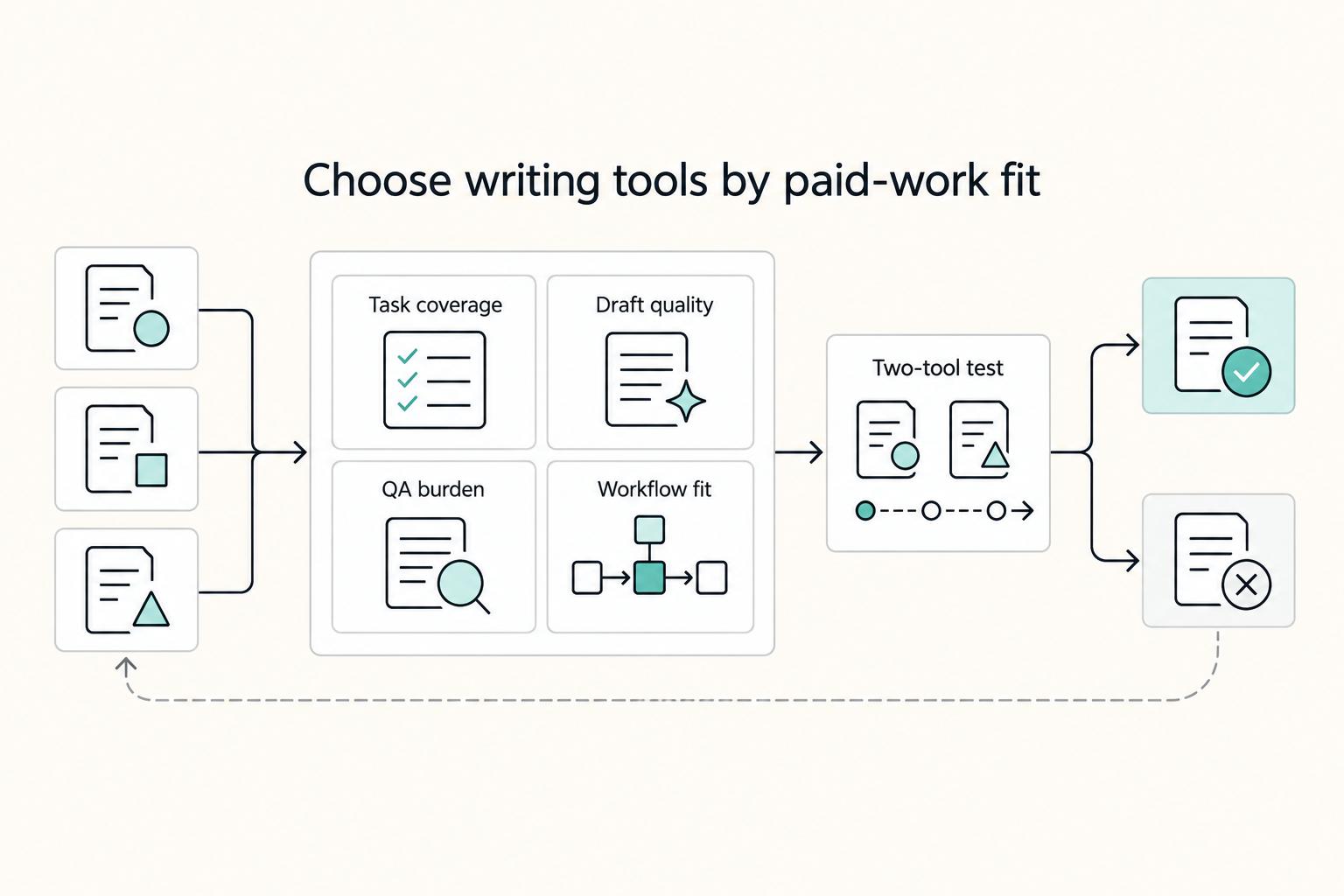
Pick for fit, not hype. There is no universal winner in AI writing tools for freelancers, and broad roundups do not change that. One review covered 29 tools across six categories. Another listed 27 tools for 2026. Useful context, but your real decision is narrower: which pair helps you deliver paid client work with less rework this month?