
Quick Answer
Start with one master map for mind mapping for freelancers, then organize it around project delivery, cash flow visibility, contract workflow, and compliance tracking. Keep each node focused on status, the next decision, and a proof link, and move deep task detail into sub-maps. Run a short weekly executive review to update blockers, owners, dates, and missing evidence so you are managing a business system rather than reacting to isolated tasks.
Build one map view that shows what needs a decision#
You do not need a bigger idea board. You need one view that shows what is moving, what is stuck, what is waiting on a document or signature, and what needs a decision next. That is the real job of mind mapping when your ambition outruns your time and attention.
Build your top map as an initiative pipeline#
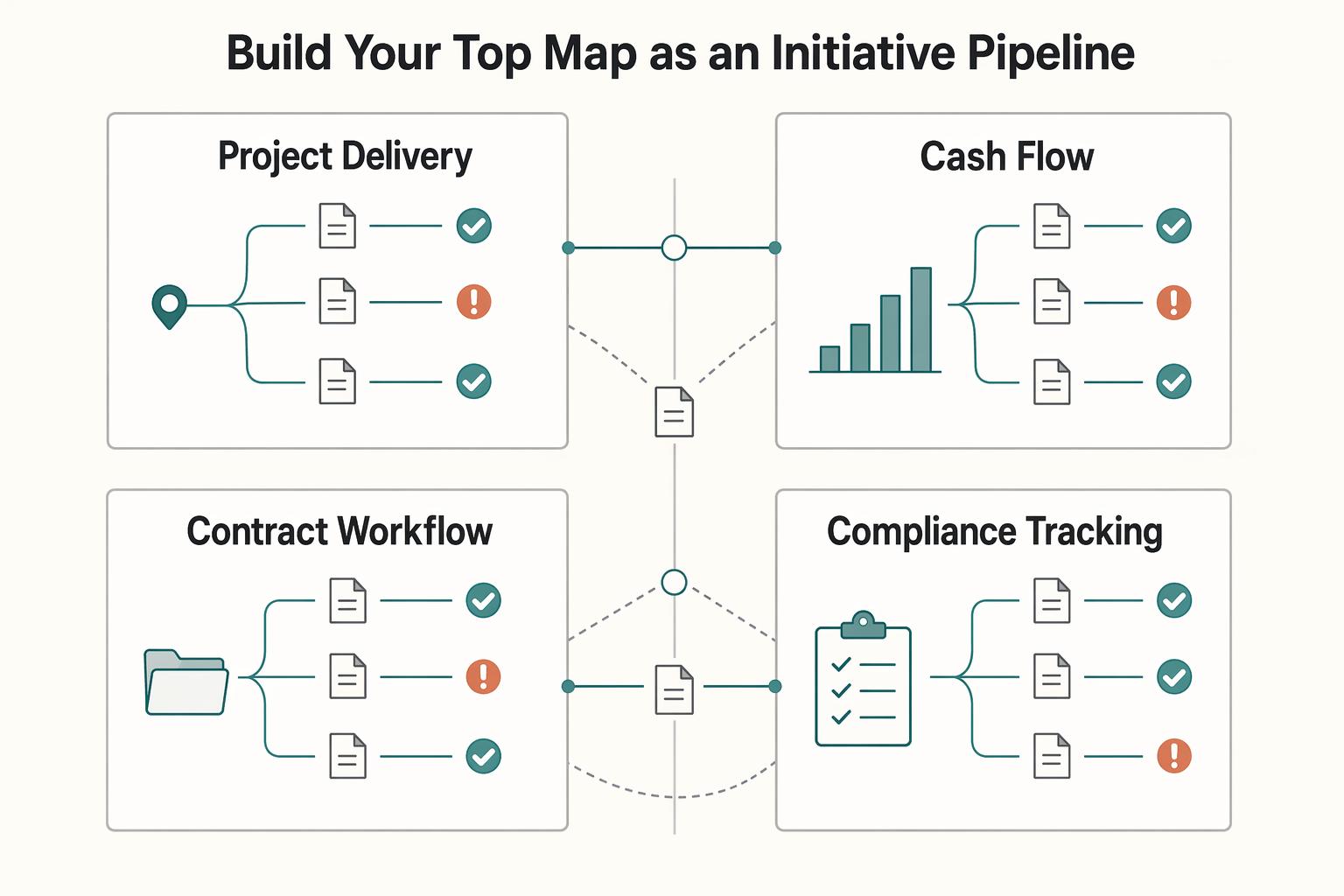
Treat the main map as a portfolio view of constrained work, not a place to capture every thought. Start with four branches that cover project delivery, cash flow visibility, contract workflow, and compliance tracking. You are not asking, "What could I do?" You are asking, "What needs a decision first, and what does that decision affect next?"
| Branch | What the top map should show | Verification check |
|---|---|---|
| Project delivery | Live projects, next milestone, current block, link to project sub-map | Can you spot the one delivery risk in under a minute? |
| Cash flow visibility | Sent invoices, unpaid items, expected payment dates, buffer note | Do the dates and amounts match your accounting record? |
| Contract workflow | Proposal sent, redlines pending, signature status, renewal point | Is the current draft or signed file attached or linked? |
| Compliance tracking | Next filing or review date, required document, policy check; confirm current specifics against the official source | Do you have the official requirement reference or only a reminder? |
Map decisions and actions, not just tasks#
Model each branch as a sequence: judgment first, action second. "Invoice overdue" is not enough. A useful node is "invoice overdue, decide whether to follow up today, then send reminder and log reply." That keeps your weekly review short and makes handoffs into detailed sub-maps cleaner.
The main failure mode is overloading the top map. If you spread attention across too many marginal efforts, you lose the point of the dashboard. Keep the main view shallow. If a node needs more than status, next decision, and proof, move it to a sub-map. That structure turns a map from a brainstorm into an operating view.
If you want a deeper dive, read A Guide to Business Process Mapping for a Small Agency.
Set up the master map and keep execution detail separate#
Give each branch one clear job. When the structure is fuzzy, ownership and follow-through get fuzzy too. Use one master map for decisions, and separate linked maps for execution detail.
Before you start#
Choose a tool you can open quickly and trust for stable links. Then decide where proof lives: attached in-map, linked from storage, or referenced by file name.
That choice keeps your map verifiable. You should be able to confirm whether a contract is signed, an invoice was sent, or a compliance reminder points to a real document.
Step 1 Define your central node. Name the center after the business, not a project. Use a plain label like your name + "HQ," your studio name, or "Business Command Center." Every branch should answer: what needs a decision, what happens next, and where is proof?
Step 2 Create the four core branches. Use names that make sense to you, but keep the same four functions so the top level stays complete but usable.
Your client pipeline should show decision stages, not task detail: lead, proposal sent, contract pending, active delivery, renewal watch. If you cannot see who needs a decision today, simplify it.
Your cash-flow view should show sent invoices, unpaid items, expected payment dates, and holdback notes. If a date or amount appears here, it should match your accounting record.
Your compliance tracker should show next filing/review date, required document, and the reference you will verify against. If a threshold is unresolved, label it: "Current threshold pending official or advisor verification."
Your growth priorities branch should hold a short list of real business decisions (for example: pricing review, service experiment, skill development, next QBR note). Move "interesting ideas" out unless a next decision is attached.
Step 3 Set one naming convention and use it everywhere. Keep labels repeatable: item | current status | next decision. Add proof as a fourth element or link when needed.
Examples: "Client A | proposal sent | follow up Friday" and "Quarterly filing | due date pending source verification | confirm document set." If ten nodes are not understandable on one scan, tighten labels.
Keep the master map light#
The master map should stay readable in under a minute. Once execution detail spills into it, it stops being a decision tool.
Step 4 Split decision view from execution detail. Use this operating rule: master map for decisions, dates, blockers, and proof links; project maps for tasks, notes, drafts, and delivery detail. Add an explicit cross-link from each live client or major initiative to its project map.
| Item type | Keep in master map | Move to linked sub-map |
|---|---|---|
| Client work | Stage, next milestone, current blocker, contract status | Task lists, meeting notes, scope details, deliverable checklist |
| Cash flow | Invoice status, amount due, expected payment date | Draft history, bookkeeping notes, reconciliation detail |
| Compliance | Next filing date, required document, source reference, and current threshold to confirm with the official source or advisor | Full document pack, correspondence, research notes |
| Growth priority | Decision to make, review date, owner | Research, brainstorming, experiments, long notes |
Step 5 Run a first pass, then review weekly. Use this setup checklist:
- Pick a tool with linked maps, proof links/attachments, and fast search.
- Set map hygiene rules: one owner, one next decision, one proof link where needed, one naming pattern.
- For unresolved thresholds, use "Current threshold pending official or advisor verification" instead of guessing.
- Cross-link every active client and major initiative to its own project map.
- Review weekly, archive stale nodes, and fix anything that no longer matches the source record.
This keeps the dashboard usable as your business grows. If one branch starts creating low-grade stress, it is usually compliance, so tighten that next. You might also find this useful: How to Use OKRs for Freelance Goal Setting and Performance Tracking.
Use the compliance branch as an early-warning system#
Use this branch as an early-warning system: you should be able to see risk, ownership, and the next move in one scan.
| Tracker | Status | Source link | Owner | Next action |
|---|---|---|---|---|
| Travel or residency status | on track / review / at risk | travel log + official rule page | you | confirm current eligibility rule from the official source; reconcile day count with travel log |
| Foreign-account reporting watchlist | below watch level / review / at risk | current account records + official reporting guidance | you or tax adviser | confirm the current threshold from the official source or advisor; update aggregate balance from current records |
| Tax obligations | scheduled / waiting on docs / filed / late risk | filing portal, adviser message, or filing calendar | you, bookkeeper, or preparer | confirm filing deadline from current source; attach submission receipt |
Step 1 Build every compliance node from one repeatable template. Use: item | status | source link | owner | next action | proof (if verified).
Keep each node tied to a verification checkpoint. In practice, every item should have an owner, and every claim should be checkable against a source.
Use these three tracker templates:
- Travel or residency status
status: on track / review / at risk source link: travel log + official rule page owner: you next action: "confirm current eligibility rule from the official source" or "reconcile day count with travel log"
- Foreign-account reporting watchlist
status: below watch level / review / at risk source link: current account records + official reporting guidance owner: you or tax adviser next action: "confirm the current threshold from the official source or advisor" or "update aggregate balance from current records"
- Tax obligations
status: scheduled / waiting on docs / filed / late risk source link: filing portal, adviser message, or filing calendar owner: you, bookkeeper, or preparer next action: "confirm filing deadline from current source" or "attach submission receipt." If relevant, include state filings, federal tax obligations, and payroll reports.
Verification rule: if a node says "filed," attach proof. If it says "on track," make sure dates and amounts match the linked record.
| Workflow area | Unstructured tracking | Dashboard-based tracking |
|---|---|---|
| Deadline control | Deadlines sit across inboxes and notes, so misses are easier | Due items and source links are in one place, so misses are easier to catch earlier |
| Handoffs | Ownership is implied, so handoffs blur | Owner field is explicit, so handoffs are clearer |
| Weekly decisions | Review starts with searching for context | Review starts with current status + next action, so decisions are faster |
Step 2 Run a lightweight review cadence. Do a short weekly review. Check for missing source links, items marked pending verification, and mismatches between node text and source records.
Step 3 Escalate when risk appears. Mark a node at risk when a due item is near, proof is missing, a rule is still unverified, or the node conflicts with the source. Move it into this week's plan the same day. If it stays unresolved for two reviews, hand it to a specialist.
For a step-by-step walkthrough, see A guide to 'Bullet Journaling' for freelancers.
From Onboarding to QBRs: Bulletproofing Your Operations#
Run one project map from onboarding through review so decisions stay visible instead of living in memory. Reuse the same structure each time, then only rename the parts that change.
Build a reusable onboarding map#
Start each engagement with the same core branches: scope tree, stakeholders and communication plan, payment milestones, risk register, and a separate change-request branch. A standard template saves setup time and makes planning easier to manage.
| Area | What to map | Owner to name in the node | Decision it supports |
|---|---|---|---|
| Scope tree | Phases, deliverables, acceptance points, and what is out of scope | You | Is this included now, deferred, or excluded? |
| Stakeholders and comms | Contacts, approval role, channel, and meeting rhythm | You + one client contact | Who must respond before work moves? |
| Payment milestones | Milestones tied to delivery stages and source docs | You | Invoice now, continue, or pause? |
| Risk register | Risk category, name, probability, impact, rating, owner, mitigation, review date, comments | One named owner per risk | What needs mitigation now, and who owns it? |
| Change requests | Out-of-scope requests, source note, and next decision | You | Approve, defer, or re-scope? |
Before kickoff, check each branch for three basics: current status, one named owner, and one source link (proposal, contract, SOW, or approval email). If a node says "approved," attach the approval. If it says "ready," make sure it matches signed scope.
Handle changes deliberately. When a new request appears, log it in the change-request branch first, then decide whether it becomes a new milestone, a later phase, or a no.
Run a lightweight client reporting routine#
Use the map as your working reference, then send a short update built from it. Keep each update to four items:
| Update item | What to include | Check before sending |
|---|---|---|
| Status | complete, active, waiting | If a milestone is marked done, make sure the linked asset or signoff exists. |
| Blockers | what is slowing work now | verify the update against deliverables, notes, and approvals |
| Dependencies | what you need from the client or third parties | If a client-owned dependency is late, state it clearly. |
| Next actions | the next move for each side | verify the update against deliverables, notes, and approvals |
Before sending, verify the update against deliverables, notes, and approvals. If a milestone is marked done, make sure the linked asset or signoff exists. If a client-owned dependency is late, state it clearly.
Turn each QBR into a short action list#
Use your QBR to produce decisions for the next cycle, not a long recap. In your Strategic Growth branch, review delivery outcomes, profitability patterns, and process bottlenecks from the project maps you already maintain.
| Pattern seen | Action to take |
|---|---|
| Tighter approvals correlated with smoother delivery | update your stakeholder template |
| The same risk repeats | add it earlier in onboarding |
| Change requests keep turning into unpaid work | tighten scope language and pricing assumptions, or revisit your packaging |
Then convert that review into a short action list in the same branch. If tighter approvals correlated with smoother delivery, update your stakeholder template. If the same risk repeats, add it earlier in onboarding. If change requests keep turning into unpaid work, tighten scope language and pricing assumptions, or revisit your packaging with Value-Based Pricing: A Freelancer's Guide.
Related: Microsoft 365 for Freelancers Who Need Client-Ready Operations.
Your Business Isn't a To-Do List - It's an Enterprise. Map it Accordingly.#
Use your mind map as your operating view for decisions, not just a place to park tasks. A to-do list shows the next action; your map can also show timing, dependencies, responsibilities, and what evidence is still missing.
| Area | To-do list behavior | Enterprise map behavior |
|---|---|---|
| Planning | A task sits on its own | The node connects timeline, owner, dependencies, and supporting notes |
| Risk tracking | Risks stay in your head until they surface | Risks live on the related branch with blockers, approvals, or missing docs |
| Review cadence | You check overdue items | You review branches to see what is active, blocked, or waiting |
| Decision quality | You pick what feels urgent | You decide with timing, ownership, and downstream impact visible |
Keep your four core branches visible: Clients & Projects, Financial Command, Compliance & Legal, and Strategic Growth. Under each one, add only details that change decisions.
Use simple checkpoints so gaps are obvious:
- In Clients & Projects, track approvals, scope changes, and delivery dependencies.
- In Financial Command, attach the invoice, receipt, or accountant question tied to each key number.
- In Compliance & Legal, label unresolved thresholds as "Current threshold pending official or advisor verification" instead of guessing.
- In Strategic Growth, keep strategy at branch level (why/what) and planning in calendar-style nodes (when/where).
Open or create your map now, then run a short weekly executive review. Update priorities, blockers, responsibilities, dates, and missing evidence so you are not rebuilding your process each time work gets busy. We covered this in detail in A Guide to 'Deep Work' for Freelancers.
Frequently Asked Questions
Can you use this for financial planning and tax prep?
Yes, as an organizing layer. In your financial branch, keep separate branches for income, expenses, tax items, and retirement planning, then label allocation guidance as pending advisor verification instead of hard-coding a percentage. If a node affects money, keep a clear note on what document or question you still need to resolve.
How should you choose a digital tool for this approach?
Start with criteria, not brand names. Decide whether you need collaboration, easy sharing, and a structure you can keep clear as the map grows. XMind and MindMeister are reasonable examples to test, but neither should be treated as the default winner. Before you commit, build one real project map and confirm you can organize major branches, revise nodes, and share the result in a way another person can follow.
How do you keep the map useful without turning it into upkeep for its own sake?
Put it on a recurring review you will actually keep, then update what changed and rearrange nodes when clarity drops or gaps appear. Ignore cosmetic tidying unless the layout has become unclear enough that it hides missing pieces. A map that looks neat but is not current is less useful than a rough one with accurate nodes.
What is this dashboard for, and what still needs accountant or legal review?
Use the map for planning, brainstorming, project tracking, and as a dynamic checklist so you can see connections and missing pieces in one place. Do not use it as a substitute for accountant review, tax filing decisions, contract interpretation, or jurisdiction-specific legal compliance. If a branch starts driving a filing, a legal position, or a contract change, keep the note in the map, but get qualified review outside it.
Try a related tool
Researched and edited by the Gruv editorial team. Gruv builds cross-border billing, payouts, and finance-operations software for global businesses.
Sources
Includes 5 external sources outside the trusted-domain allowlist.
- clame.nyu.edu/Resources/E06C4H/312039/The%20Seven%20Cs%20O...trusted
- irs.gov/irm/part4/irm_04-070-012trusted
- pmc.ncbi.nlm.nih.gov/articles/PMC11252567trusted
- 99designs.com/blog/creative-thinking/mind-mappingexternal
- bittelbooks.com/compliance-servicesexternal
- consultingquest.com/insights/strategic-consulting-utilizationexternal
- creators.spotify.com/pod/profile/beyonduxdesignpod/episodes/A-Scr...external
- dscout.com/people-nerds-categories/guides-templatesexternal
Educational content only. Not legal, tax, or financial advice.
Related Posts

Value-Based Pricing for Freelancers Under Real Payment Risk
Value-based pricing works when you and the client can name the business result before kickoff and agree on how progress will be judged. If that link is weak, use a tighter model first. This is not about defending one pricing philosophy over another. It is about avoiding surprises by keeping pricing, scope, delivery, and payment aligned from day one.
Business Process Mapping for a Small Agency That Runs Day to Day
If your agency is shipping work but still depends on memory, Slack threads, and founder rescue, the near-term job is straightforward: use the next few weeks to build an **SOP** baseline for the few processes that keep revenue moving and delivery stable. Timelines vary by team, but a short first cycle is often enough to start replacing ad hoc execution with something your team can repeat.

The Freelance Payment Penalty: A Modeled Audit of Platform Fees, FX Spreads, and Payout Delays
The money rarely disappears through a single, easy-to-spot fee. The real loss is stacked. A marketplace takes its commission, a processor adds a charge for international cards, a bank or payment company converts the currency at a spread, a platform holds the funds before release, and a wire sheds a little to intermediaries on the way in. Each layer looks defensible on its own, but the worker feels the combined result as a smaller deposit and a later payday.