
Quick Answer
Start by using linkedin sales navigator for freelancers as a month-long test with one ICP, one saved search, and a simple CRM log. Build Lead and Account Lists, review Alerts before outreach, and message only when you can explain fit and timing. Use connection requests when access is open, reserve InMail for priority cases, and route replies into discovery notes, scope, and SOW workflow.
You don't need "more leads"-you need a freelancer-grade Sales Navigator system#
The useful way to think about Sales Navigator as a freelancer is not as a bigger outreach cannon. Think of it as a small operating setup you can keep running during a busy client week. When lead flow feels uneven, the issue is often not raw volume. It is usually that you are rebuilding targeting from scratch, losing track of who matters, and reaching out without a reason.
Give yourself a short pilot. Build three simple assets: a Saved Search, a set of Lists, and Alerts you will actually review. Sales Navigator is strongest as a targeting and filtering tool, so the goal is consistent, qualified conversations, not maximum sends.
| Component | Purpose | Minimum setup | Common failure mode | Practical fix |
|---|---|---|---|---|
| Saved Search | Reuse targeting instead of starting over each week | One baseline search per persona using core ICP filters | Too many filters too early, which kills volume | Start broad enough to review results, then add one signal at a time |
| Lead or Account List | Turn search results into a working target list | A few lists tied to pipeline reality (for example: New, Warm, In conversation) | One giant list with no next step | Add status and next action in your CRM or sheet before outreach |
| Alerts | Surface reasons to contact people with context | Enable alerts only for saved searches and lists you check regularly | Alert overload, then you ignore all of it | Treat alerts like a budget and keep only the ones you act on |
Start with one saved search#
Start with one Saved Search you can explain in a sentence. Use only the filters that match your actual ICP rules: who you serve, at what company size, in which geography, and in what role. Do not add extra constraints just because the filter exists.
Verification checkpoint: every lead pulled from that search should have three things logged in your CRM or sheet before you message them: ICP fit, trigger context, and next action. If you cannot fill those in quickly, your search is still too loose.
Build lists around how you sell#
Build Lists around how you sell, not how LinkedIn displays results. A solo freelancer usually needs only a small set: a target list, an engaged list, and an active conversation list. That is enough to prevent duplicate outreach and keep follow-up sane.
Failure mode: people save leads but never decide what happens next. Fix that by requiring a status, last touch date, and next touch date for every saved lead.
Work alerts before outreach#
Start with Alerts. They can give you the trigger that makes outreach feel timely instead of random, such as visible activity, role movement, or company change. If an alert does not create a plausible reason to contact the person, skip it.
Verification checkpoint: before sending any message, make sure you can answer three questions: why this lead, why now, and what happens next if they reply?
Keep the setup human and low risk#
Keep the setup human and low risk. Some tools promise scaled automation, but the tradeoff is more complexity, more pitfalls, and possible damage to pipeline quality. Keep your process conservative, and review compliance requirements for the countries where you operate.
Once someone replies, move them into a standard handoff: discovery notes, draft scope, then SOW. That bridge from prospecting to delivery is what makes the system durable.
You might also find this useful: Build a Freelance Sales Funnel You Can Run in One Hour a Week.
Is LinkedIn Sales Navigator worth it for freelancers?#
Sales Navigator is worth it only if you can run the same ICP -> outreach -> CRM loop every week. If you cannot protect that time, it is usually just a recurring cost with a learning curve.
Used well, it can improve targeting through advanced filters and give you timely outreach triggers through lead/account updates. Used inconsistently, costs accumulate, setup effort is wasted, and overly aggressive LinkedIn activity can lead to account limits.
Check the break-even point#
Run this with your own numbers before subscribing. The decision question is not "Could this help?" It is "What must happen for one month to pay for itself?"
| Input | What to enter | Decision use |
|---|---|---|
| Subscription cost | Confirm the current monthly price with the provider; one source cites a starting point of $79.99/month | Sets your minimum revenue hurdle |
| Qualified-conversation rate | % of contacted prospects who become real sales conversations; set your target from your own campaign data | Tests whether targeting and messaging are working |
| Close rate | % of qualified conversations that become paid work; set your target from your own campaign data | Converts conversations into expected wins |
| Average deal value | Your typical project value (not best case) | Keeps ROI tied to real offers |
| Time to first win | Expected weeks from first outreach to signed work | Prevents judging too early or too late |
If one typical project can cover multiple months of subscription cost, the economics may be workable. If you need unusually high reply quality or several fast wins just to break even, pause.
Make sure you're ready to use it#
Do a go/no-go readiness check first. More filters only help when your offer and execution are already clear.
- Defined ICP you can state in one sentence
- Clear offer scope and minimum engagement size
- Protected weekly block for prospecting and follow-up
- Tracking system (CRM or sheet) with status, last touch, and next touch
- Follow-up process you will actually run every week
If even one item is missing, the common failure mode is false precision: detailed searches, saved leads, inconsistent outreach, and weak learning.
Score the first 30 days#
Use a 30-day scorecard so you can keep or cancel based on evidence.
| Metric | Type |
|---|---|
| Qualified leads added per week | Activity |
| Messages sent per week | Activity |
| Follow-ups completed on schedule | Activity |
| Reply rate from matched prospects | Outcome |
| Qualified conversations booked per month | Outcome |
| Proposal requests or closed-won deals | Outcome |
Week 4 check: at least one ICP segment should show repeatable reply quality, not just profile views or impressions.
If it is not worth it yet, stay with baseline LinkedIn, run manual outreach, and validate message-market fit first. Re-evaluate Sales Navigator once your weekly targeting and follow-up habit is consistent.
We covered this in detail in How to Build a Sales Pipeline for Your Freelance Business.
Which Sales Navigator plan is best for freelancers (Core vs Advanced vs Advanced Plus)?#
Start with the lowest tier that supports your weekly prospecting loop, then upgrade only when a specific workflow breaks. For most freelancers, that means starting with the entry tier and moving up only for a real CRM sync or collaboration gap.
One 2026 comparison describes three Sales Navigator versions (Professional, Team, Enterprise) and frames Professional as the fit for freelancers or small businesses. Treat that as directional, not a guaranteed one-to-one map to Core, Advanced, and Advanced Plus in every region. Verify current plan names and feature availability before you buy.
Quick decision path#
- If you run solo, save leads into lists, and can track
last touch/next touch/outcomein a sheet or lightweight CRM: start on Core or your entry tier. - If weekly handoffs, duplicate records, or manual copy-paste are causing misses: test Advanced or middle tier.
- If your CRM process explicitly requires advanced sync or you work in a larger team setup: evaluate Advanced Plus or highest tier.
| Tier to evaluate | Required workflow | Operational benefit | Hidden cost | Clear upgrade trigger |
|---|---|---|---|---|
| Core or entry tier | You run searches, save leads into lists, and track outreach manually | Strong enough for disciplined solo prospecting | Follow-up quality still depends on your process | Team coordination or CRM handoff starts failing weekly |
| Advanced or middle tier | You need tighter collaboration or CRM-connected execution | Can reduce record drift and manual transfer steps | More setup and feature sprawl; no guaranteed outcome lift | A recurring weekly task cannot be handled cleanly in your current tier |
| Advanced Plus or highest tier | You rely on advanced CRM sync or heavier team collaboration | Better fit for larger sales operations | Pricing may not be publicly displayed; easy to overbuy as a solo operator | Your CRM integration path explicitly requires this tier |
Use CRM integration as the upgrade test#
If you can keep your pipeline clean in a spreadsheet or lightweight CRM, native sync is optional. If missed follow-ups, duplicate records, or handoff failures are recurring, native sync becomes operationally important.
Verify current integration requirements for your CRM before you decide. The Team plan includes integrations with Salesforce, Microsoft 365, and HubSpot.
Run this renewal checklist before paying again#
- Account admin access belongs to you, not a client.
- Renewal date and billing type are documented.
- Pre-renewal review covers feature usage and pipeline impact.
- If your plan includes Lead IQ or Account IQ, use them as research aids, then verify outputs against the actual profile and account context before outreach.
A simple 30-day rule: if you cannot tie a paid feature to a recurring weekly task, downgrade or cancel.
Related: Best Lead Generation Tools for B2B SaaS Operators.
Prerequisites: what to prepare before you touch Sales Navigator#
Before you open Sales Navigator, complete this preflight checklist so your first searches turn into qualified conversations instead of cleanup work.
| Item | Key detail |
|---|---|
| Define ICP as filter-ready rules | Use criteria you can apply directly in Sales Navigator filters: industry, company profile, buyer role, geography, and trigger events; add one reject rule you can apply quickly. |
| Prepare a proof kit | Have one portfolio proof asset, one clear offer statement, one outcome-focused line, and one boundary line for what you do not provide. |
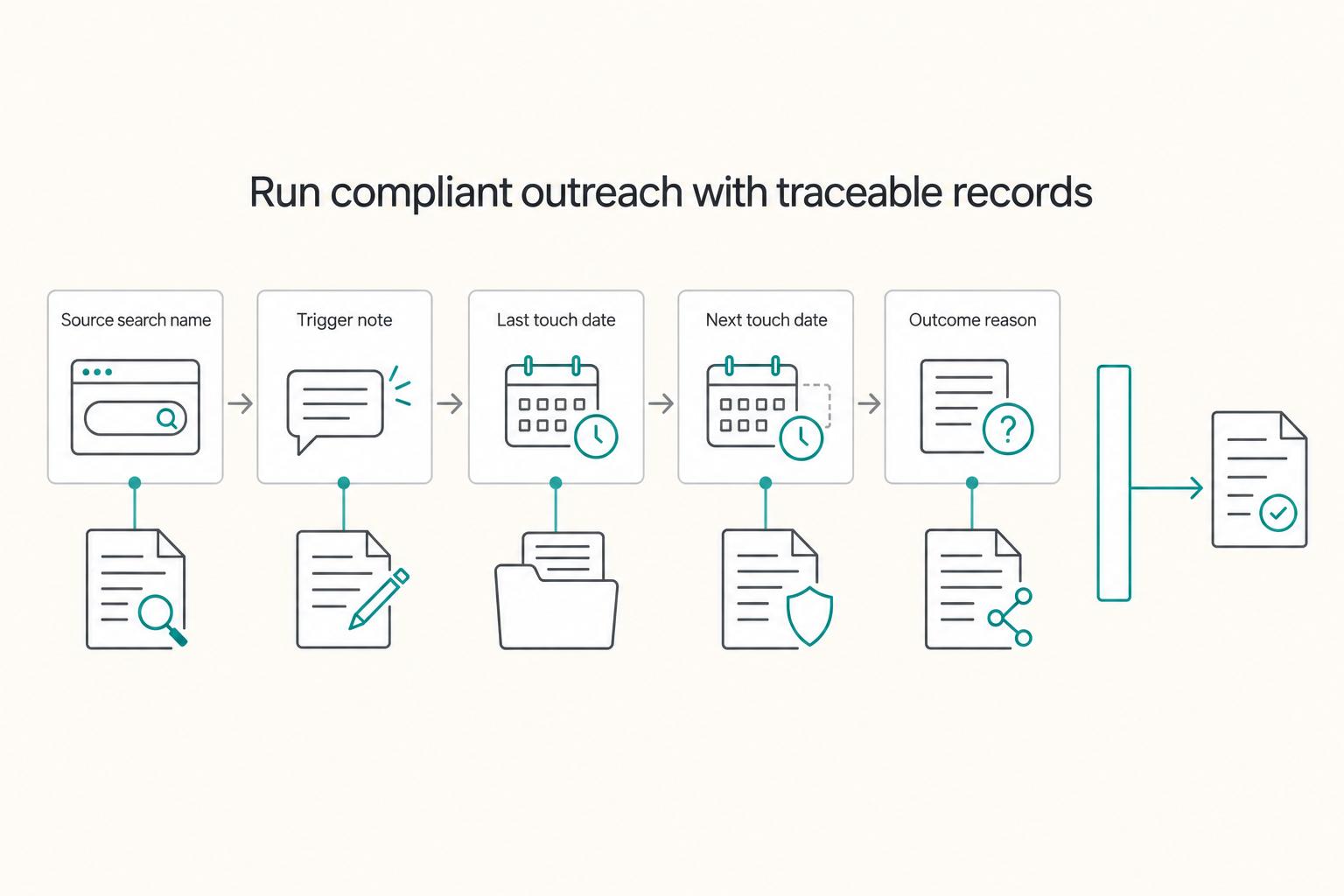
| Set up minimal tracking fields | Use source search, last touch date, next touch date, status, and outcome reason; add account name and buyer role if you can. |
| Plan for LinkedIn-native contact paths | Do not build your workflow around finding email addresses inside Sales Navigator; design your process to work through LinkedIn-first outreach. |
| Prepare handoff and compliance | Draft discovery notes, a scope draft, and your SOW workflow now; store only the data you need, and avoid scraping or automation shortcuts. |
- Define your ICP as filter-ready rules.
Write your target in a sheet or CRM using criteria you can apply directly in Sales Navigator filters: industry, company profile, buyer role, geography, and trigger events. Add one reject rule you can apply quickly (for example, clear mismatch on geography, company fit, or role fit) so weak leads do not enter your CRM or outreach queue.
- Prepare a proof kit before the first search.
Have these ready: one portfolio proof asset, one clear offer statement, one outcome-focused line, and one boundary line for what you do not provide. This keeps your outreach credible and reduces mismatch after a prospect replies. If you want to tighten your profile positioning first, read A Freelancer's Guide to LinkedIn Marketing.
- Set up minimal tracking fields before outreach.
Use a lightweight CRM or sheet, but keep the fields consistent: source search, last touch date, next touch date, status, and outcome reason. Add account name and buyer role if you can. This gives you source attribution, follow-up control, and clear outcome tagging from day one.
- Plan for LinkedIn-native contact paths.
Do not build your workflow around finding email addresses inside Sales Navigator. Treat email as secondary, and design your process to work through LinkedIn-first outreach.
- Prepare handoff and compliance before messages go out.
Draft discovery notes, a scope draft, and your SOW workflow now so replies can move forward without improvisation. Keep your compliance stance simple: store only the data you need, and avoid scraping or automation shortcuts. If client data processing applies, keep the legal/process requirement as a pending verification item in your ops notes before outreach.
This also pairs well with A Guide to Local SEO for Freelancers.
The 10-minute Sales Navigator setup that makes the rest of the week easy#
Set this up once, then run it the same way each week. The goal is a reusable workflow: lists, baseline filters, saved searches, alerts, then a quick pass/fail check before you message anyone.
1) Create your list structure before you search#
Keep companies and people separate from day one so your tracking stays clean.
| List type | Use it when | Naming rule tied to pipeline stage | Maintenance cadence |
|---|---|---|---|
| Account list | You are tracking target companies before picking contacts | `Target Accounts \ | ICP \ |
| Lead list | You are tracking specific people you may contact or disqualify | `Persona \ | Stage \ |
Next action: create your core account lists first, then create lead lists that map to your active outreach stages.
2) Build one minimum viable search first#
Start with a defensible baseline: geography, industry, company size, function, and seniority. Sales Navigator gives you many filters, but adding too many early usually kills useful volume.
If quality is weak, expand one step at a time:
- If fit is off, add one account-side filter (for example, revenue or headcount growth).
- If fit is fine but timing is weak, add one lead-side signal (for example, years in current role or recent job changes).
- If results get thin or repetitive, remove the last filter you added.
Next action: change only one filter per iteration so you can see what actually improved or hurt results.
3) Save only searches you will actively monitor#
Treat saved searches as limited slots and keep one per real persona or segment, not one per idea. Use names that let you trace every lead back to the exact segment that produced it.
Next action: save your top segments first, and skip anything you will not review weekly.
4) Turn on alerts you will actually use#
Enable alerts for the saved searches, accounts, and leads you review on schedule. Prioritize signals you can use in a real message, such as job changes and relevant company updates.
Sales Navigator supports targeting and message context, but it does not automate outreach or follow-up. Next action: block manual review time on your calendar so alerts turn into actions.
5) Run a pass/fail check before outreach#
Use this checklist before you send anything:
- Pass: you can state company context, buyer role, and likely problem fit.
- Pass: the lead is traceable to a saved search or list in your tracker.
- Fail: fit is based on title only, with no clear "why this person at this company now."
- Fail: you would be guessing the problem from scratch.
Fallback action: do not message yet. Save the lead, wait for stronger alerts, or move up to the account level and choose a better-fit contact.
If you want optional deeper alignment on profile and content positioning, read A Freelancer's Guide to LinkedIn Marketing. Need the full breakdown? Read How to Create a Sales Playbook for Your SaaS Team.
What filters should freelancers actually use (without over-filtering yourself into zero results)?#
Use the smallest filter set you can defend in your weekly workflow, then expand only when results stay usable.
Start with one reusable baseline per persona#
Build one baseline search per persona using both company and people filters, then duplicate that baseline when you want to test a variant instead of rebuilding from scratch.
Choose your path quickly:
- Choose company-first when company traits (industry, size, geography) change fit, pricing, or delivery.
- Choose person-first when one stakeholder's role, seniority, or activity drives the buying motion.
Verification prompt: after opening All filters, can you explain this search in one sentence?
Separate always-on filters from test filters#
| Filter | Type | Use case | Over-filter risk | Remove when |
|---|---|---|---|---|
| Geography | Core (always-on) | Keep market and time-zone fit | Low | Your market is too narrow to keep results workable |
| Industry | Core (always-on) | Keep vertical relevance | Medium | Strong-fit accounts keep appearing outside the selected industry |
| Company size | Core (always-on) | Match likely budget/complexity | Medium | You keep excluding companies that still buy your service |
| Seniority or job title | Core (always-on) | Focus on likely decision-makers | High if too specific | Title patterns vary too much to stay reliable |
| Recent job change | Signal (test-only) | Add timing context for outreach | High | Relevance improves but list volume becomes too thin |
| Years in current role | Signal (test-only) | Test tenure-based timing | High | It does not improve conversation quality |
Verification prompt: for each saved lead, can you state a clear reason they belong beyond "matched filters"?
Add filters one at a time and log impact#
Apply one filter, review results, then decide whether to keep it. Track what changed in your CRM or sheet: lead quality, reply quality, and conversation outcomes.
Treat intent-like signals as indicators, not proof. If a signal helps message relevance, keep it. If it makes your search fragile or less useful week to week, remove it and return to baseline.
Should you use InMail or a connection request (and what should you send)?#
Use the lowest-friction channel for each lead, and write your reason in one sentence before you send. If you cannot clearly answer why this person, why now, and why this channel, pause and fix your ICP or list quality first.
Pick the channel based on access and context#
For people you are not connected with, your two official options are a connection request or InMail. Free LinkedIn messages apply after you are connected.
| Channel | Best use case | Tradeoff | Resource constraint | When to switch channels |
|---|---|---|---|---|
| Connection request | You have a credible context signal (for example, a recent post, job change, or clear fit signal) | The note can add context, but it is not directly replyable | One short note and one first impression | If they accept, continue in your main LinkedIn inbox |
| InMail | You need direct access to a non-connection with clear fit | Easy to waste on weak-fit leads; switching between LinkedIn and Sales Navigator can split thread history across inboxes | Confirm the current InMail credit policy with the provider | If they reply or connect, keep the conversation in one mailbox |
| No outreach yet | You do not have a credible trigger or fit signal | Slower activity now, better lead quality later | Spend time tightening filters and saved searches | Reach out after you have a clear context signal |
Keep the first message short#
Your first message should do two things: show relevance and ask for one small next step.
Use this send checklist:
- Name one specific context point you actually observed.
- Add one brief proof of relevance (client type, use case, or result category).
- Make one low-friction ask.
- Remove anything that reads like a pitch-heavy summary.
Set a stop rule before follow-up#
Set a stop rule before you send follow-ups. If there is no reply, no new signal, and no better reason to re-contact than your first message, stop. Log each touch in your CRM (date, channel, context, next action) so you do not duplicate outreach across lists.
If reply quality is weak for a segment, do not default to more InMail. Revise targeting before retrying, because weak context is usually a list-quality problem, not a channel problem.
Related reading: How to Use LinkedIn Ads to Target Your Ideal Clients.
The weekly cadence that turns Sales Navigator into a pipeline machine (without automation spam)#
Run one repeatable weekly loop: refresh inputs, work trigger alerts, send only relevance-based outreach, and close the week with clean CRM updates. The goal is not more activity. It is defensible activity.
Refresh inputs before you message anyone#
Before outreach, review Saved Searches, Lead Lists, and Account Lists against your ICP. Keep searches that produced relevant conversations, tighten filters that drifted broad, and mute alerts you do not act on. For every new lead or account, log one reason for inclusion (for example: job title fit, industry fit, engagement activity, or a specific trigger). If you cannot explain why a record belongs, remove it.
Treat alerts and credits as limited resources; confirm current alert and credit limits before you build a weekly cadence.
| Weekly step | Sales Navigator action | Required CRM field |
|---|---|---|
| Refresh inputs | Review Saved Searches and Lists | Source search name |
| Build warmth | Check Alerts for posts, role changes, or hiring signals | Trigger note |
| Send outreach | Connection request first; InMail only when connection is blocked and target is priority | Channel used |
| Close the week | Update outcome and next step | Last touch, next touch date, status |
Work alerts first#
Start with alerts, not cold list volume. Engage on a real trigger first, then message only when you can write one credible relevance line. If you cannot state why this person and why now, wait and keep refining your list quality.
Send outreach in controlled batches#
Send outreach in small, controlled batches. Use connection requests when the path is open and you have context. Reserve InMail for priority targets when connection is blocked. Avoid automation-first sequencing here because tool safety and policy risk are not uniform across LinkedIn automation options.
Close the week in your CRM#
End the week with a quick quality check: source quality, trigger quality, and follow-up hygiene. By your weekly close, each touched lead should have a source, a trigger note, a last-touch date, and a clear next action.
Compliance-first guardrails + what to do when things go wrong (account risk, data risk, reputation risk)#
Your system stays durable when you keep outreach human-paced, data minimal, and every touch documented. In practice, use native LinkedIn actions, avoid automation that acts for you, and keep a clean contact log you can audit later.
Prefer in-platform actions#
Use tools to support your decisions, not to replace your judgment in messaging. People-data tooling is more powerful in 2025 and 2026, but tool choices still affect outreach quality, legal exposure, and pipeline quality.
| Outreach workflow | Use for durable operations | Avoid | Risk reduced |
|---|---|---|---|
| Lead discovery | Saved Searches, Lead Lists, Account Lists, manual profile/activity review | Scraping profiles, bulk exporting people data | Account and data risk |
| Warm-up | Review alerts, check recent posts, note one real trigger, engage manually if relevant | Auto-visits, auto-likes, auto-comments | Reputation and context risk |
| First outreach | Manual connection request or manual InMail with one clear relevance line | Auto-DMs, bulk sends, sequences that message for you | Low-trust outreach and platform-risk behavior |
| Follow-up | Send next touch only after updating your log | Repeated pings across tools with no shared record | Duplicate outreach and weak follow-through |
Verification point: before you send, you should be able to state the trigger, the source list, and why this person fits now.
Keep only business-relevant CRM data#
Keep only the minimum fields you need to run follow-up well: full name, company, role, LinkedIn URL, source search name, trigger note, last touch date, next touch date, status, and outcome reason. This is enough to segment by fit/interest, track behavior, and schedule follow-ups.
Do not store sensitive personal notes, private phone numbers from unclear sources, family details, health information, financial details, or speculation.
If you start handling client-provided lead data or personal data beyond your own prospecting notes, pause and confirm the appropriate contract/process paperwork before continuing.
| Contact-log field | Failure it helps prevent |
|---|---|
| Source search name | Duplicate outreach |
| Trigger note | Poor context in messages |
| Last touch date + channel | Awkward repeat messages |
| Next touch date + status | Orphaned leads and audit gaps |
| Outcome reason | Weak follow-through decisions |
Contain first, then diagnose#
When something breaks, contain first, then restart with a smaller, safer workflow.
| Issue | First step | Focus |
|---|---|---|
| Replies drop | Pause new volume; check source quality, trigger quality, message relevance, and data accuracy. | Restart with one ICP segment, one trigger type, and fully manual sends. |
| Account warning or unusual restriction | Stop outreach immediately; remove questionable tooling and review recent behavior for patterns that were too repetitive or too fast. | Restart only with native in-platform actions and smaller manual batches. |
| Deals stall after calls | Review discovery notes, tighten proposal scope, and confirm the next document in sequence before the next follow-up. | Treat this as a handoff issue before a top-of-funnel issue. |
Replies drop#
Pause new volume. Check source quality, trigger quality, message relevance, and data accuracy. Restart with one ICP segment, one trigger type, and fully manual sends.
Account warning or unusual restriction#
Stop outreach immediately. Remove questionable tooling and review recent behavior for patterns that were too repetitive or too fast. Restart only with native in-platform actions and smaller manual batches.
Deals stall after calls#
Treat this as a handoff issue before a top-of-funnel issue. Review discovery notes, tighten proposal scope, and confirm the next document in sequence before the next follow-up.
Conclusion: run this for 30 days, then decide-here's the copy/paste checklist#
Treat this as a 30-day pilot, not a new identity. You are not trying to prove that Sales Navigator always works. You are trying to prove that your version of it produces qualified conversations you can convert and service without creating admin drag.
Run the pilot in one straight line#
- Lock one ICP, one offer, and one cadence.
Choose one buyer type, one service offer, and one weekly rhythm before you add extra filters, personas, or channels. Your checkpoint is simple: can you reject a bad fit quickly using written rules like industry, geography, role, company size, and trigger event? If not, your search is still too loose.
- Execute the same sourcing and outreach pattern for the full 30 days.
Keep one search setup, one lead-source naming rule, and one CRM path long enough to see signal. If your account is eligible for a 30-day Sales Navigator free trial, use that window deliberately. Some signup flows require an active LinkedIn account and credit card verification, so confirm the terms shown to you before you start. Your verification point is traceability: every person you contact should map back to a specific search setup and a specific reason they fit now.
- Read profiles and write from observed context, not merge tags.
This is the part most people skip when time gets tight. Real personalization starts with actually reading the profile, and the failure mode is easy to spot: recipients can tell when the message is just a dressed-up template. If you find yourself sending notes that could go to anyone in the segment, stop adding volume and tighten the trigger, proof, or ask.
- Turn replies into a clean client handoff immediately.
Once someone responds, move into a practical sequence: capture discovery notes, send a written scope document, add your agreement layer if needed, set billing details, and include privacy documents when applicable. The checkpoint here is handoff readiness: can you move from reply to a scoped next step without rebuilding documents from scratch or improvising payment terms over email?
A useful red flag at the end of the month is not "low volume." It is confusion. If you cannot explain which search setup, trigger type, or message angle produced your best replies, you did not really run a test. You just stayed busy.
Decide with your own tracked signals#
Use your CRM notes, not your mood, to make the keep or pause call.
| Decision | Choose this when your notes show | What to do next |
|---|---|---|
| Keep current system | Prospect fit is consistently relevant, replies contain real buying context, and handoffs into discovery and scope feel smooth | Keep the same ICP and cadence for another 30 days, and document the parts you will not change |
| Adjust targeting or workflow | You are getting opens or polite replies but weak fit, vague interest, or repeated friction in follow-up and handoff | Change one variable only: ICP slice, trigger type, channel choice, or handoff sequence |
| Pause | You cannot protect weekly execution time, prospect relevance stays weak, or the admin burden outweighs the quality of conversations | Stop paying for noise, return to a simpler outbound motion, and restart only after rewriting ICP and offer |
Paste this into your operating note#
Owner: Start date: End date: Plan/trial status: Renewal or cancel date: Review threshold:

ICP [ ] Define industry: [ ] Define geography: [ ] Define company size: [ ] Define buyer role: [ ] Define trigger event: [ ] Write one-sentence fit rule: Owner: Status:

SOURCING [ ] Build search name: [ ] Create prospect list name: [ ] Confirm every lead can be tied to source search + trigger note Owner: Status:

OUTREACH [ ] Write connection request version [ ] Write direct-message version only if direct access is required [ ] Read each profile before sending [ ] Log date, channel, trigger, last touch, next touch, status, outcome reason Owner: Status:

REVIEW [ ] Check prospect relevance [ ] Check reply quality [ ] Check booked next-step quality [ ] Note best search, best trigger, best message angle Owner: Status:

HANDOFF [ ] Save discovery notes [ ] Send scope doc [ ] Send agreement layer if needed [ ] Set billing method and payment terms [ ] Send privacy/confidentiality document when applicable Owner: Status:

DECISION [ ] Keep current system [ ] Adjust targeting/workflow [ ] Pause Decision note: Next 30-day change: ```

If you want a broader organic setup around this outreach motion, [A Freelancer's Guide to LinkedIn Marketing](/blog/linkedin-marketing-for-freelancers) is the natural next read. For a step-by-step walkthrough, see [Building a Personal Website That Converts for Freelancers](/blog/freelancer-website-guide).
Frequently Asked Questions
Is Sales Navigator still worth it in 2026 if you only have 3 to 5 hours a week?
Yes, if you can protect one weekly block and stay narrow. The tool works best when you use it for targeted, signal-based outreach, not random browsing. Without a clear strategy, it can become an expensive tool you barely open. Run a short pilot with one ICP, one saved search, and one CRM outcome metric such as qualified replies or booked next steps.
What is the minimum viable CRM setup before you send your first connection request?
Keep it simple, but not loose. A practical starter setup is to log full name, company, role, LinkedIn URL, source search name, trigger note, last touch date, next touch date, status, and outcome reason. Before you send anything, make sure you can name the saved search the lead came from and the reason this person fits now.
When should you upgrade from Core to Advanced or Advanced Plus?
Start with Core unless a real weekly task breaks without an upgrade. Higher tiers make sense when solo prospecting turns into shared account coverage, team coordination, or CRM-connected work, not because you want better reply rates. Map each paid feature to a weekly task you already do, then verify current feature availability and limits in-product before upgrading. | If your need is | Best starting choice | Why | |---|---|---| | Solo prospecting with saved searches, lists, alerts, and manual outreach | Core | Can be enough for a freelancer running their own pipeline | | Shared visibility across accounts or team handoffs | Advanced | Useful when working alone starts creating silos | | A verified CRM or admin dependency | Higher tier only if the dependency is verified | Treat it as a stack decision, not a prospecting-quality upgrade |
Should you use InMail or a connection request?
Use the lowest-friction channel first. Send a connection request when you have real context such as a recent post, role change, or shared community, and use InMail when direct access matters and your reason to interrupt is strong. Write the trigger line before you send, and if you cannot explain your channel choice in one sentence, wait.
How many follow-ups are reasonable before you stop outreach to one lead?
Use a documented cap, not endless nudges. There is no universal safe number, and repeated pings without new context are a reputation problem before they become a pipeline problem. Set your cap in CRM, stop when you have no fresh reason to re-engage, and mark the lead as no response instead of switching channels just to keep touching it.
What should you do first if reply rates drop for two straight weeks?
Pause added volume first. Low replies usually mean source quality, message relevance, or timing is off, and buyer-intent signals are indicators, not proof someone wants to buy now. Review one ICP segment, one trigger type, and one saved search, then restart with fully manual sends only after you find the break.
Can you export leads or automate outreach safely?
Treat scraping, auto-export, and auto-messaging tools as potentially high risk. The safer default is human-led outreach, minimal data capture, and a CRM log for every touch. Keep only business-relevant fields, log date, channel, trigger, and next action, and be careful with any tool that collects or messages profile data automatically.
Try a related tool
Researched and edited by the Gruv editorial team. Gruv builds cross-border billing, payouts, and finance-operations software for global businesses.
Sources
Includes 5 external sources outside the trusted-domain allowlist.
- cvtc.edu/sites/default/files/documents/about-cvtc/pub...trusted
- nwicc.edu/wp-content/uploads/2024/04/catalog23-24.pdftrusted
- townofsurfsidefl.gov/docs/default-source/default-document-library...trusted
- capsulecrm.com/blog/is-linkedin-sales-navigator-worth-itexternal
- cclarity.io/blog/linkedin-sales-navigator-is-it-worth-itexternal
- dealcode.ai/blog/the-ultimate-guide-to-linkedin-sales-na...external
- emailchaser.com/learn/linkedin-inmail-vs-connection-requestexternal
- evaboot.com/blog/linkedin-sales-navigator-enterpriseexternal
Educational content only. Not legal, tax, or financial advice.
Related Posts

LinkedIn for Freelancers Who Want a Predictable Client Pipeline
Treat LinkedIn as two jobs you run at the same time: a credibility check and a conversation engine. If you only chase attention, you can get noise. If you only send messages, prospects may click through to a thin profile and hesitate.

Registered Agent vs Virtual Mailbox and How to Split Mail Correctly
If you want a setup that still works once filings, notices, and everyday mail all start arriving at once, split the job now. Put legal notice intake in one channel and routine correspondence in another. Name a primary owner and a backup for each before your first filing, and decide how escalation works the moment a legal notice arrives.

The Freelance Payment Penalty: A Modeled Audit of Platform Fees, FX Spreads, and Payout Delays
The money rarely disappears through a single, easy-to-spot fee. The real loss is stacked. A marketplace takes its commission, a processor adds a charge for international cards, a bank or payment company converts the currency at a spread, a platform holds the funds before release, and a wire sheds a little to intermediaries on the way in. Each layer looks defensible on its own, but the worker feels the combined result as a smaller deposit and a later payday.