
Quick Answer
Use LinkedIn ads for freelancers as a controlled operating system, not a one-off tactic. Start only after you can define your buyer, prove messaging manually, and run reliable follow-up. Launch with one clear objective and tight targeting, then track qualified outcomes through your pipeline. If lead quality drops, tighten qualification and make one deliberate change per week instead of random edits.
You don't need "better LinkedIn Ads tips" - you need a low-risk operating system#
You are not here for vibes; you're here for a repeatable system you can run.
Run LinkedIn ads like an operator: gate readiness, launch conservatively, handle leads fast, and optimize weekly, so you never spend money without a clear decision rule. The goal is not another LinkedIn ads tutorial that teaches button-clicking. The goal is a system that protects your calendar, your cash, and your reputation while you learn what actually works for your client targeting.
Before you start: the "low-risk" definition (and what it is not)#
Low-risk does not mean "cheap" or "guaranteed." It means you control downside with clear inputs, guardrails, and follow-through. LinkedIn ads can put your message in front of people "actively learning, evaluating vendors, and making buying decisions," but attention without a process creates chaos fast. Use this system as your safe default:
| Element | What it means |
|---|---|
| Go/no-go gate | Only spend once you can describe your buyer in plain language (Job Title, Industry, problem) and you can disqualify bad fits |
| Conservative launch plan | Choose one objective, one audience hypothesis, one offer, and one ad format; document stop rules before you spend |
| Lead-handling SOP | Treat follow-up like fulfillment: fast response, consistent questions, clean records |
| Weekly optimization loop | Make one change at a time and log decisions so you do not random-walk your budget |
Step-by-step: your minimal system (copy, paste, run)#
Step 1: Choose the simplest ad format that matches your risk tolerance. Start with formats you can fulfill reliably. Sponsored Content promotes posts in the feed (case studies, articles). Sponsored Messaging (Message Ads) contacts prospects via LinkedIn Messaging, and it lands in the primary inbox, so it can feel intense. Message Ads also demand high perceived value and strong copywriting to avoid being seen as spam.
| Format | What it's best for | Main risk | Safe default for freelancers |
|---|---|---|---|
| Sponsored Content | Educating, warming up, proof-first B2B marketing | Paying for clicks from curious, not qualified | Use when you need context before a call |
| Sponsored Messaging (Message Ads) | Direct outreach | Spam perception if the message lacks clear value | Use only when your offer qualifies fast |
Step 2: Set up one single-thread workflow in Campaign Manager. Campaign Manager is LinkedIn's ads interface (log in, click "Advertise" in the top navigation). Build one campaign, one audience, one creative. You want clean learning, not a maze of variables.
Step 3: Write a lead-handling SOP before the first impression. If you plan lead generation, decide who replies, how fast, and what questions you ask. Hypothetical: you run Sponsored Content to a simple call offer, but you reply two days late. You did not buy leads. You bought interruptions.
Verification: If you cannot describe your next action for every lead status (Qualified, Not qualified, Maybe later), you are not ready to pay for attention yet.
Are LinkedIn Ads worth it for freelancers - or are you buying expensive ambiguity?#
LinkedIn Ads can be worth it, but there is no universal benchmark you can trust. Plan on controlled testing and clear unit economics, or you will mostly be paying to scale uncertainty.
If your inputs are fuzzy, ads do not fix it. They scale it. Use the tests below before you touch an ad platform budget slider.
Before you start (prerequisites): you need (1) a buyer you can describe in plain language, (2) a close process you actually follow, and (3) a single outcome you plan to buy.
Step 1: Run the "value-of-attention" test (identity first)#
Write down your target using only hard nouns: Job Title + Industry + problem. Title-based targeting is easiest when the title reliably signals budget and authority, and the industry tells you the problem repeats.
| Checklist item | Requirement |
|---|---|
| Job Title variants | List 10 real Job Title variants your buyer uses (not aspirational titles) |
| Industry scope | Name 2 to 3 Industries where your offer works, and exclude the rest |
| Disqualifiers | Write 3 disqualifiers (wrong role, wrong industry, wrong use case) |
| Budget or KPI link | Explain why that title controls budget or owns the KPI |
If you cannot do that, LinkedIn Ads may not find your audience. They may just scale your uncertainty.
Step 2: Define unit economics before you optimize lead generation#
Decide what you actually need from lead generation: profit-per-client and time-to-close, not clicks or impressions.
Freelancer pricing already varies wildly, so you need your own math. A Google Ads freelancer-cost write-up put it bluntly: "But freelancer pricing? It is all over the place." Another line in the same piece gives you a practical anchor: "Hourly billing is the most transparent model." Transparent or not, pick a model, then calculate what a new client is worth after delivery time and costs.
Hypothetical: you sell a RevOps setup. If your close process requires multiple stakeholder calls and you hate follow-up, ads can still generate interest, but your CAC can feel random because your conversion depends on inconsistent execution.
Step 3: Choose the outcome you're buying (and the proof you will track)#
Pick one outcome and one success signal you can verify weekly.
| Outcome type | What you're trying to buy | Consider it when you already have | Your operator metric (not vanity) |
|---|---|---|---|
| Awareness | Repeat exposure to a clear message | Clear positioning and proof assets | Qualified conversations that mention the message later |
| Lead capture | Contact details + permission to follow up | Fast response SOP and qualification questions | Qualified lead rate, then calls booked |
| Event sign-ups | Commitment to attend something scheduled | A real event and reminders you will send | Attendance rate, then follow-up replies |
Step 4: Set expectations like a pro (test, do not trust screenshots)#
Treat benchmarks you find in search results as marketing, not operating data. Case studies and social screenshots can inspire ideas, but they cannot set your budget guardrails.
Safe default: run a controlled test with one audience hypothesis, one offer, and written stop rules. If the results confuse you, pause and tighten the buyer definition before you spend more.
The go/no-go readiness gate: when should a freelancer start LinkedIn Ads?#
As a conservative rule, start LinkedIn Ads only after you can clearly describe who you help, prove the message works manually on LinkedIn, and run a tight follow-up and tracking loop.
This gate is here to prevent paid panic. The goal is to keep LinkedIn ads behaving like controlled lead generation, not expensive guessing.
Step 1: Prove you have something worth scaling (clarity + manual proof)#
- Write your 1-sentence offer (no wiggle words).
Use: I help [Job Function] at [Industry] do [outcome] without [pain]. Positioning matters here. As Freelance Cake puts it: "Your positioning is the spot you occupy in your market." If you cannot say your spot in one sentence, ads will not rescue you.
- Add 3 qualifying statements tied to Job Function and Industry.
Think of these as your "this is for you if..." lines. Include at least one disqualifier. If you can't disqualify, it's hard to target. Client targeting needs edges.
- Win a few real conversations via manual outreach on LinkedIn.
You do not need perfection. You need proof that your message earns replies from the right people. A marketing guide aimed at new freelancers frames the priority clearly: "your first priority should be getting your first few clients under your belt." Use outreach as your cheapest substitute for paid learning. And once you've got a tried-and-tested offer and some client feedback, you can justify investing more time, money, and effort into marketing: "Once you've got a tried and tested product and some client feedback, you can start investing more time, money, and effort into your marketing."
Here's the readiness snapshot:
| Gate | You pass when | What fails look like |
|---|---|---|
| Offer Clarity | You can say "who, where, outcome" in one line + 3 qualifiers | Everyone feels "kind of" relevant |
| Manual Proof | Your outreach earns replies from your intended buyer | Only peers, recruiters, or random roles respond |
| Audience Edges | You can name exclusions confidently | You avoid saying "not for" |
Step 2: Install the ops controls (process, risk, tracking)#
- Define a simple sales process and a response rule you can keep.
Do not over-engineer. Write your stages (from new lead to paid client) and a realistic response promise you can hit consistently. If you cannot follow up reliably, it gets harder to learn what's working.
- Write stop/continue rules before you launch.
Do not wait for emotions. Decide what "not good enough" means (for example, leads consistently fail your qualifiers) and what you will change first (targeting or offer, not both).
- Set tracking hygiene like a ledger (campaign → lead → call → invoice).
Track each lead's source and outcome in one place. Hypothetical: you run ads to a lead form, book calls, then realize you cannot tell which campaign produced the one great client. That's not a marketing problem. That's an audit trail problem.
LinkedIn Ads vs cold outreach (or Google Ads): which channel should you prioritize first?#
Prioritize the channel that lets you learn fastest with the least operational risk.
Add paid only when you can run a tight pipeline and follow-up loop. Channel choice is not about "getting leads." It is about creating repeatable signal about who responds, why they respond, and what converts into paid work.
Step 1: Use conversations (cold outreach) to lock your message before you pay for reach#
Start with cold outreach because it forces reality. Alex Berman puts it bluntly: "people spend weeks perfecting their website when they should be spending that time in conversations with potential clients." Conversations give you fast feedback on positioning, objections, and qualification.
Run it like a test:
- Send targeted messages to the exact persona you plan to reach with paid.
- Track replies by persona, pain, and objection.
- Verify you can earn replies and book calls without bribing with discounts or over-explaining.
Verification point: If you cannot consistently start qualified conversations manually, paid media will not fix the message. It will scale confusion.
Step 2: Choose the first paid channel based on targeting control and your follow-up capacity#
When you add paid, match the channel to how your buyers behave and how you operate.
| Channel | What you control | When it fits early | What can break it fast |
|---|---|---|---|
| Cold outreach (LinkedIn) | List quality, message, follow-up | Message validation, early B2B marketing learnings | Inconsistent sending, weak targeting discipline |
| LinkedIn Ads (Sponsored Content, Lead Generation) | Tight targeting and offer framing | B2B demand capture, event registrations, demos, and other high-consideration offers | Slow follow-up, vague qualification, "everyone" targeting |
| Google Ads | Your offer and lead-handling system | When you can support a clear, repeatable conversion and follow-up flow | Weak conversion flow, unclear offer, slow response |
AdSpyder's guidance maps to the operational reality: "LinkedIn ads for lead generation work best when the campaign is treated like a pipeline system, not a single ad." Design for "low friction + high relevance: tight targeting, a clear value exchange, and a lead flow that gets fast follow-up."
Hypothetical: you launch a LinkedIn lead gen campaign, then you answer leads two days later because client work took over. You did not get bad leads. You ran a broken lead-handling system. Fix response consistency first, then scale.
What to prepare before you launch (so you don't pay for preventable mistakes)#
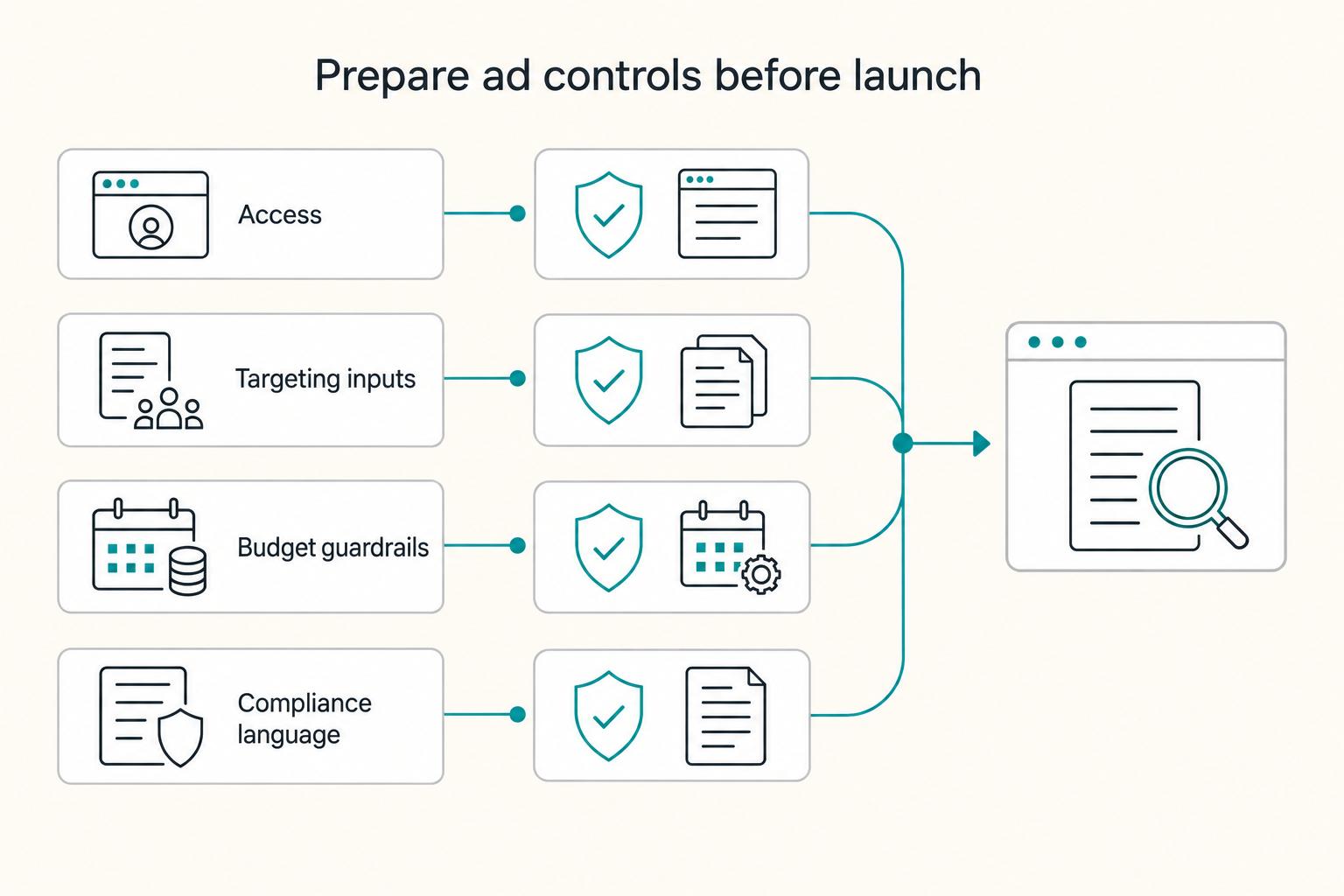
Prepare your assets, access, targeting inputs, budget guardrails, and compliance language before you click "Launch," because improvisation is expensive.
This pre-flight checklist removes avoidable failure modes for freelancers running LinkedIn ads.
Before you start: minimum viable assets mapped to lead generation#
You only need a minimum viable stack to run lead gen ads. You do need alignment. Each asset should answer one question: what happens before the click, after the click, and after the form fill?
| Asset | Your "minimum viable" version | Where it fits in the campaign | Verification point (you can test this today) |
|---|---|---|---|
| Conversion path | One landing page or a native lead form flow | Lead gen | You can describe the exact next step (thank-you message, calendar link, or reply) in one sentence |
| Offer | Lead magnet or call offer (choose one) | Ad copy + form/landing page | A stranger can tell what they get and who it's for in 10 seconds |
| Proof | One case study or proof asset | Landing page, PDF follow-up, or "proof" bullet in ad | The proof matches the persona (same Industry, same kind of problem) |
Hypothetical: you sell RevOps consulting, but your only case study highlights "general marketing results." Expect low-quality lead generation, even with perfect targeting, because buyers cannot see themselves in the outcome.
Operational guardrails: access, targeting, budget, and compliance#
1) Document your account structure like an ops runbook. Confirm you have access to the ads platform, the correct account, billing, and the permissions you need. Write down who owns what, where invoices go, and how you will request fixes. This prevents last-minute permission drama that stalls a live test.
| Area | What to prepare |
|---|---|
| Access | Confirm access to the ads platform, the correct account, billing, and the permissions you need |
| Targeting inputs | Pre-write Job Title variants, a short Industry list, and exclusions you know you do not want |
| Budget guardrails | Set a fixed test window and a hard cap, then add stop and continue rules |
| Compliance language | Keep claims factual, avoid inflated outcomes, and disclose material relationships and connections when they apply |
2) Pre-write targeting inputs so you do not spray and pray. Build a written targeting sheet before your first campaign:
- Job Title variants your buyers actually use (include common abbreviations).
- A short, acceptable Industry list (and a clear "not our buyer" list).
- Exclusions you know you do not want (for example, students or entry-level roles).
3) Set a fixed test window and a hard cap, then add stop and continue rules. Pick a short, controlled window and define decision rules you can follow even when you feel emotional about results. Put the rules next to the budget line in your runbook or campaign notes so you cannot forget them later.
4) Use conservative, audit-ready language. The FTC was re-evaluating online advertising disclosure guidelines known as "Dot Com Disclosures," and it ties better disclosure compliance to reduced (or eliminated) legal risk. Keep claims factual, avoid inflated outcomes, and disclose material relationships and connections when they apply because they can affect trust and fair competition.
Launch the campaign as a controlled experiment, one variable at a time#
LinkedIn can generate high-quality leads, but only if you treat it like a controlled experiment. Lock the goal, change one variable at a time, and qualify leads before they ever touch your calendar.
With your pre-flight work done (assets, access, targeting inputs, basic guardrails), you can launch without turning your account into a guessing machine.
Step-by-step launch (with operator checks)#
Step 1. Pick the goal like an operator (not a gambler). Name the outcome you want to buy, in plain language, then align your campaign setup to that outcome.
- Credibility outcome: "More of the right buyers recognize my name."
- Pipeline outcome: "Qualified calls booked."
- Attendance outcome: "Right people register and show up."
Check: Can you write your success signal as one sentence before you launch (example: "Qualified calls booked from the right roles in the right accounts")?
Step 2. Build a targeting sequence (broad-to-specific, not random). Start broad, then tighten with deliberate layers so you can explain results without guessing. RedactAI describes standard LinkedIn search "as a fishing net; you'll catch something, but it's mostly random." Treat your targeting the opposite way: deliberate layers, not vibes. Where you use LinkedIn Sales Navigator, it lets you layer dozens of specific filters to pinpoint targets. Check: For every filter, can you answer: "How does this predict budget, authority, and need?"
Step 3. Choose your flow and friction level. Pick the path that matches how much context your buyer needs before they raise their hand.
- If you need more explanation and proof: send people to a page that gives them the full story.
- If you need a faster hand-raise: use a shorter, lower-friction path (including on-platform options when enabled).
Check: Does the flow block obvious bad fits (wrong industry, wrong role, no authority)?
Step 4. Write copy that pre-qualifies (and repels the wrong people). Use Job Title language in the first line, then add a "not for" line. Example: "For RevOps leaders cleaning up handoffs. Not for early-stage teams without a CRM owner." This is designed to discourage bad-fit responses, not maximize clicks. Check: If a bad-fit lead reads this, will they self-select out?
Step 5. Set test rules (what you'll change, and in what order). Decide in advance what you'll judge results on, and what you'll change first if lead quality is off. Hypothetical: you see responses coming from the right industry but the wrong seniority. You do not rewrite everything. You tighten one layer and rerun the test. Check: If results look messy, do you know exactly what you'll change first (goal, targeting, offer, or friction), and only one at a time?
What happens after the form fill? Your lead-handling SOP (the part competitors skip)#
Treat every LinkedIn lead like a perishable asset: capture the data cleanly, qualify quickly, and route only real fits to a call.
If you cannot handle leads well, LinkedIn Ads will happily sell you more leads you cannot handle. This is where most "tutorial" advice fails. It focuses on ads, not operations.
Before you start (set your "work mode" assumptions)#
InsightAdv's LinkedIn Ads guide describes the platform clearly: "When a user opens LinkedIn, they're in 'work' mode. They're ready to learn, to connect, to solve business problems." When someone raises their hand through lead generation, respond like an operator: fast, clear, and consistent.
Step-by-step SOP (copy, ship, iterate)#
Step 1. Build a simple flow and name the stages. For example: LinkedIn lead forms → quick screen → booked call. Keep a single source of truth (CRM or spreadsheet) and store enough context to understand fit and patterns, not just volume.
| Field | What you store | Why it matters for client targeting |
|---|---|---|
| Campaign name | Exact campaign | Links lead quality back to LinkedIn Campaign Manager decisions |
| Industry | From form or manual check | Spots "wrong Industry" patterns fast |
| Job Title | As submitted | Helps you gauge relevance and seniority |
| Job Function | What they actually do | Prevents title-only misreads |
| Status | New / Qualified / Not qualified / Maybe later | Keeps your pipeline sane |
| Disqualifier reason | Short text | Feeds optimization and exclusions |
Step 2. Set a response SLA you can actually keep. Pick a "respond fast" standard you can reliably hit, then protect it with a template. Keep one templated reply plus one calendar link, and personalize the first line.
SourceGeek puts it bluntly: "A tailored, thoughtful message stands out like a beacon in a sea of spam." They also report LinkedIn found InMails personalized to a candidate's profile earned 15% higher response rates than bulk sends. You want that advantage without writing every reply from scratch.
Step 3. Run a quick screen before you offer time. Use a couple of simple gates in-message (or on the form next iteration) to confirm they are a fit (for example: relevant industry, relevant role, and whether they are the right person to talk to). Hypothetical: a lead comes in from the right industry but a coordinator title. You tag "Not qualified: no authority," reply politely with a resource, and keep your calendar clean.
Step 4. Use a simple first-call question set. On the call, ask:
- What sits in your job function today (responsibilities and KPIs)?
- What problem triggered this request?
- Who owns budget and approval?
- What timeline forces a decision?
- What does success look like (measurable outcome)?
Step 5. Close the loop with consistent labeling. Track each lead through your stages with consistent names and statuses. Then label every lead Qualified / Not qualified / Maybe later, including why (wrong industry, wrong job title, no authority). Those labels give you a feedback loop for what to adjust in LinkedIn Campaign Manager.
Why are my LinkedIn leads low quality - and how do I fix that with a weekly optimization loop?#
Fix low-quality LinkedIn leads by tracking real outcomes (not just clicks), then using those signals to make changes you can actually explain.
LinkedIn conversion tracking is meant to connect ad spend to outcomes like demo requests, trials, pricing-page visits, purchases, and pipeline events, not just traffic.
Step-by-step: run a simple optimization loop (without the "random walk")#
Step 1. Stop treating clicks as the scoreboard. Clicks and cheap leads can lie. AdSpyder puts it clearly: "If you're running LinkedIn ads and still 'measuring' success with clicks, you're flying blind." Use clicks as context, but judge performance by downstream outcomes.
Step 2. Install and verify conversion tracking (so your data is about outcomes). If you want to fix lead quality, you need the tracking foundation in place first. AdSpyder's guide covers installing the LinkedIn Pixel, setting up conversions in Campaign Manager, implementing via Google Tag Manager, QA validation, and server-side options (Conversions API).
Step 3. Define what "quality" means in your business, then track it as a conversion outcome. Pick the outcomes that actually matter to you (for example: demo requests, trials, pricing-page visits, or pipeline events). If "qualified lead" is your north star, make sure you can reliably label it and tie it back to campaigns.
Step 4. Use conversion data to diagnose what's working (and what's not). Once you can see outcomes inside Campaign Manager, you can compare performance across the inputs you control (campaigns, creatives, offers, and the pages or flows you send people to). Your goal is to find what produces real intent, not just form fills.
Step 5. Remember B2B is multi-touch and full of "dark funnels." AdSpyder notes that B2B journeys are "multi-touch, often self-serve, and full of dark funnels (PDF views, product pages, demo intent, sales cycles)." That's exactly why outcome-based tracking matters: it helps you connect spend to what happens after the click.
Decision log: keep your experiments explainable#
Track each change like an operator.
| Date | Hypothesis | Change made | Expected outcome | Actual outcome | Next action |
|---|---|---|---|---|---|
This log prevents the sloppy pattern most LinkedIn Ads tutorial advice creates: constant tweaks, no learning, and no dependable B2B marketing engine.
Related: How to Price a Digital Product.
Common mistakes (and how to recover without torching your budget)#
Recover from LinkedIn Ads mistakes by resetting the objective, tightening targeting, and enforcing qualification, then measuring the change on qualified leads.
Use this as your break-glass protocol when results go sideways, so you fix the actual constraint instead of panic-editing everything at once.
Quick recovery protocol (safe defaults)#
Step 1. Freeze variables you do not need to touch. Keep the same ad creative and the same follow-up SOP for one cycle so you can attribute improvements to the specific fix you make.
Step 2. Reconfirm what you actually want. Client acquisition stays "top priority, and potentially the biggest challenge you'll face," as TOG Marketing puts it. Translate that priority into a single success signal you can log (qualified lead, call booked, proposal sent), then align everything in your LinkedIn Ads setup around it.
Step 3. Respect LinkedIn context. An Insight Advertising guide notes, "When a user opens LinkedIn, they're in 'work' mode... ready to learn, to connect, to solve business problems." That means your B2B marketing can work well here, but only if your offer and targeting match real business needs. If you misalign, you fund professional-looking noise.
Mistake-to-fix map (do this, then verify)#
Use this table as your troubleshooting sheet.
| Mistake | What it looks like | Recovery move | Verification check |
|---|---|---|---|
| Wrong objective (ex: optimizing for visibility when you need conversations) | Plenty of impressions, no usable pipeline | Rebuild your goal → objective map. Relaunch with an objective that's designed to produce the action you actually need (leads, booked calls, inquiries), and keep creative steady so you can isolate the impact | Qualified lead rate improves, not just lead volume |
| Targeting based on a single signal | Leads look random, wrong seniority, wrong team | Anchor targeting on the few signals that consistently correlate with your buyer. Use one signal as an anchor and treat everything else as a refinement | Fewer "wrong role" disqualifications in your labels |
| "Optimize" too early | You keep resetting results so nothing stabilizes | Commit to the test window you wrote down. Evaluate changes on qualified leads, not early click data | You can explain what changed and why results moved |
| Low-quality leads hit your calendar | You spend time declining calls | Add hard qualification questions in your intake flow (authority, fit, timeline). Route "maybe later" to a nurture touch, not a call | Calendar shows fewer bad-fit bookings |
| Never compare channel alternatives | You force LinkedIn to do every job | Run a small parallel test elsewhere or return to outreach if you need faster feedback loops. Treat channel choice as an operator decision, not a brand preference | One channel clearly wins on qualified conversations |
Hypothetical: you target too broadly and drown in junior titles. You add tighter signals that better match your real buyer, and your lead volume drops, but your follow-up SOP finally produces real sales conversations.
The professional way to run LinkedIn Ads: controlled tests, clean follow-up, weekly iteration#
Run LinkedIn ads as controlled experimentation - structured tests you can measure and iterate - rather than a one-time "turn it on and hope" channel.
That mindset matters because paid social is volatile by nature: results can shift due to a mix of audience signals, creative fatigue, bidding pressure, and timing. If you build a simple operating rhythm, you stay steady when the chart wiggles, and you make decisions you can explain and repeat.
Before you start: treat paid social as a system, not an "ad"#
Paid social media advertising is paying social platforms to show your message to specific people. You are buying distribution, not certainty, so your job is to design tests that teach you something even when early performance is noisy.
Controlled experimentation is a structured approach where you test and adjust (creative angles, bids, conversion paths) instead of treating ads like an on/off switch. LinkedIn also differs meaningfully from other social channels in targeting, bidding, formats, and reporting, so copy/pasting playbooks from elsewhere can create false confidence.
Use these operator defaults:
- Define the experiment. "At its core, paid social is controlled experimentation." Write a one-line hypothesis (who it's for, what you're offering, what action you want).
- Prioritize creative and relevance. Creative "carries the campaign," and on LinkedIn your messaging and design need to feel highly relevant, not generic.
- Measure real outcomes. Where you can, link ad analytics to CRM outcomes, pipeline influence, and revenue, not just lead counts.
- Expect early wobble. "Early data lies. Campaigns wobble before they stabilize." Do not overreact to the first signals.
- Don't scale fast just because you got a quick win. Scaling too fast can wreck something that was working fine at lower spend.
Here's the checklist I want you to run before you spend again (use it as an operator's safeguard, not a "LinkedIn requirement" list):
[ ] Offer clarity: 1-sentence offer + clear "not a fit if..." lines [ ] Persona defined: audience criteria + exclusions you're willing to pay to avoid [ ] Messaging proof: you've seen the message work in conversations (e.g., outreach) [ ] Objective chosen: campaign objective mapped to the real business goal [ ] Conversion path ready: a clear next step + proof/context to support the offer [ ] Access & billing confirmed: you can launch and you know who owns the account [ ] Budget guardrails: a fixed test budget + a defined test window + written stop/continue rules [ ] Lead handling plan: response expectations + qualification steps + tracking fields [ ] Testing plan: which single variable you'll test first (usually creative or message) [ ] Recovery plan: pause triggers + a fallback acquisition plan ```

### Weekly iteration: one clean decision, logged, tied to pipeline

Early performance will try to bait you into random edits. Do not let it. "Early data lies. Campaigns wobble before they stabilize," and strong messaging can beat hyper-narrow audiences, so your first job is to learn, not to thrash.

Pick one intentional change at a time, often a creative variant: headline, imagery, video, or copy. Log it, then review the impact using outcomes you actually care about. If you can, tie the review back to CRM outcomes, pipeline influence, and revenue, not just lead counts.

Hypothetical example: you're generating lots of leads, but the resulting conversations are not qualified. Instead of rewriting everything, tighten one variable. Add a clearer disqualifier line to the ad copy, or adjust a single question in your intake. Next review, judge the change by pipeline quality, because clicks do not pay you.

*Optional next reads (to reduce channel risk and diversify acquisition):*

- The Best Paid Advertising Channels for Freelancers (Google Ads, LinkedIn Ads, Facebook Ads...)
- [How to Create Your Own Online Course](/blog/how-to-create-your-own-online-course) (if you want an "Event Registrations → course sale" funnel)
- [How to Price a Digital Product](/blog/how-to-price-a-digital-product) (if you're using ads to validate pricing, not just generate leads)

If you want a deeper dive, read [The Best Paid Advertising Channels for Freelancers (Google Ads, LinkedIn Ads, Facebook Ads...)](/blog/google-ads-linkedin-ads-facebook-ads-paid-acquisition-freelance-marketing).
Frequently Asked Questions
Are LinkedIn ads worth it for freelancers?
They can be, when you sell a clear B2B outcome to a defined buyer persona. The platform has a large user base, so the usual constraint is not “no audience.” It is “wrong offer and sloppy targeting.” One freelancer shared, “I’ve used paid Linked ads for the awareness side of my marketing strategy,” which matches a sane early posture: controlled awareness plus small experiments, not a magic faucet.
When should a freelancer start LinkedIn ads?
Start when you have a clear offer and a follow-up process you can actually run without chaos. Treat LinkedIn as infrastructure first: “LinkedIn is your digital storefront, portfolio, and networking hub rolled into one.” If your storefront confuses people, ads will just buy faster confusion.
How much should a freelancer budget for LinkedIn ads to start?
Skip “recommended starting budgets” and set a test budget you can afford to lose while you learn. Give yourself clear limits and a simple review cadence so you can stop or adjust based on what you’re seeing. If you feel pressure to make it back this week, you will optimize emotionally instead of operationally.
How do I target ideal B2B clients on LinkedIn as a freelancer?
Keep targeting focused on the kinds of roles and companies that can realistically need (and buy) what you do, then narrow from there. Write exclusions up front so you do not pay to re-learn basics. Verification rule: you should be able to explain, in one sentence, why your targeting predicts need and budget.
LinkedIn Ads vs cold outreach for freelancers: which should I do first?
If you are still unsure what message lands, outreach can give you faster qualitative feedback to refine your offer. One freelancer also noted, “Historically, my inbound leads have just been much lower quality than the people I find in outbound marketing efforts,” which is a good reminder that outbound and paid can behave differently. Use ads as a way to create additional inbound opportunities, not as a replacement for fundamentals.
Why are my LinkedIn leads low quality, and how do I fix that?
Low-quality leads usually come from offer mismatch, broad targeting, or weak qualification. One freelancer noted, “Historically, my inbound leads have just been much lower quality than the people I find in outbound marketing efforts,” so treat quality as a system problem, not bad luck. Fix it by clarifying who you are for, filtering harder, and adding basic qualification before you book calls.
Should I use LinkedIn lead forms or send people to a landing page?
LinkedIn lead forms can bring in inquiries directly on-platform. One freelancer said, “Over the last couple of months I’ve been getting people filling out my lead forms,” but lead quality can vary. If you feel unsure, run a controlled test and judge by qualified conversations, not just form fills.
Try a related tool
Researched and edited by the Gruv editorial team. Gruv builds cross-border billing, payouts, and finance-operations software for global businesses.
Sources
Includes 7 external sources outside the trusted-domain allowlist.
- ftc.gov/sites/default/files/documents/public_comment...trusted
- blackfreelance.com/how-i-use-linkedin-ads-as-a-freelancerexternal
- business.linkedin.com/advertise/adsexternal
- factors.ai/blog/linkedin-ads-targeting-best-practicesexternal
- learn.microsoft.com/en-us/linkedin/marketing/integrations/ads/ad...external
- learn.microsoft.com/en-us/linkedin/marketing/integrations/ads/ac...external
- linkedin.com/top-content/career/freelance-opportunities-i...external
- wordstream.com/blog/linkedin-campaign-objectivesexternal
Educational content only. Not legal, tax, or financial advice.
Related Posts

The Best Paid Advertising Channels for Freelancers (Google Ads
**Treat paid advertising as a cashflow system you can run weekly, not a one-off "channel test" you hope works.** If you are starting from zero, or dealing with inconsistent referrals, your real job is to choose and operate channels that do not break your follow-up, your measurement, or your bank balance. Judge channels by execution reliability, not hype.

How to Create Your Own Online Course
If you want this to become a real revenue line, treat it like a product decision, not a content project. This guide helps you make the important calls in the right order: define the offer, choose the platform that fits it, and move from outline to published course without avoidable rework.
How to Price a Digital Product
If you are figuring out **how to price a digital product**, do not start with a random number. Start with where your pricing method and implementation are most likely to break.