
Quick Answer
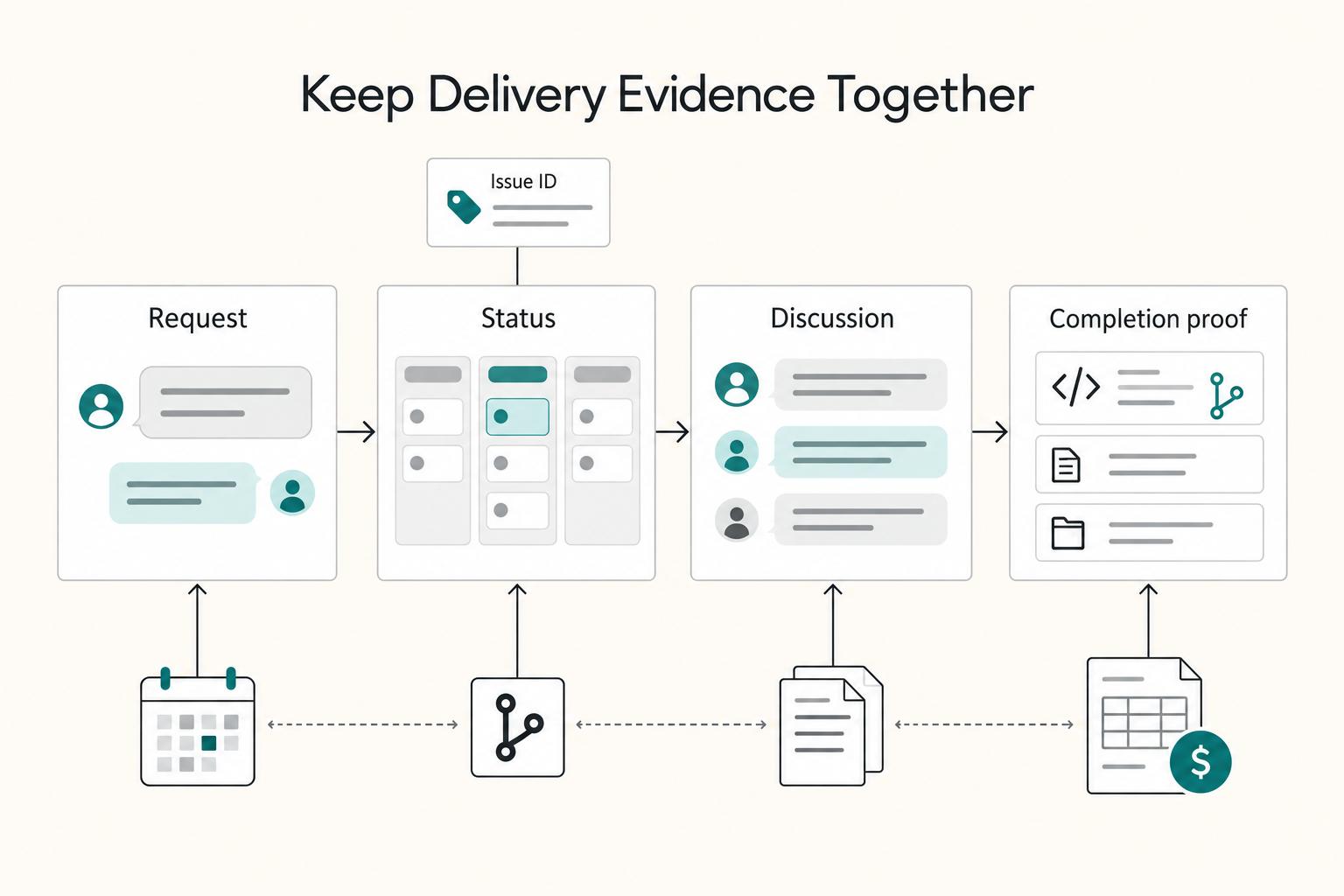
Freelance developers use Linear as a single delivery record: every contract promise, client request, approval, and shipped output maps to an issue that can later support an invoice line. That makes scope decisions traceable, reduces rework from scattered chat and email, and helps separate done work from invoice-ready work with explicit review and approval gates.
Why Your Disconnected Workflow is a Hidden Tax on Your Profitability#
If your delivery record is split across email, chat, docs, and a separate tracker, you are likely giving up margin in ways you can verify this week. The loss usually shows up in three places on a normal project: admin overhead, rework from misalignment, and scope ambiguity.
You do not need a full process overhaul to prove it. Start with one finished project and follow the record from contract to invoice.
Step 1 Audit one finished project instead of guessing#
Pick a project you invoiced in the last 30 to 90 days. Do not use your hardest client or your easiest one. Use a normal engagement, then trace four things from contract to invoice:
| Audit step | What to review | Evidence/examples |
|---|---|---|
| Find the original promise | Open the signed proposal, statement of work, or milestone note | Mark each deliverable that should have produced a visible output, approval, or code change |
| Reconstruct what actually shipped | Count how many places you need to open to prove delivery | Chat, email, a doc, GitHub, and a status sheet |
| Locate every change after kickoff | Note where requests arrived and where decisions were recorded | The ask lives in one channel, your estimate lives in another, and the final decision lives nowhere you can point to later |
| Build the invoice support pack | Gather the evidence for each billed line | Signed scope, issue or task record, approval message, and shipped output such as a pull request, commit, or accepted deliverable |
- Find the original promise
Open the signed proposal, statement of work, or milestone note. Mark each deliverable that should have produced a visible output, approval, or code change.
- Reconstruct what actually shipped
Count how many places you have to open to prove delivery. If you have to jump between chat, email, a doc, GitHub, and a status sheet, that is not just annoying admin. It is work about work: time spent on coordination instead of core delivery.
- Locate every change after kickoff
Note where requests arrived and where decisions were recorded. The failure mode is simple: the ask lives in one channel, your estimate lives in another, and the final decision lives nowhere you can point to later.
- Build the invoice support pack
For each billed line, gather the evidence you would send if a client asked, "What exactly am I paying for?" Your pack should be easy to assemble: signed scope, issue or task record, approval message, and shipped output such as a pull request, commit, or accepted deliverable.
Time is the clearest checkpoint. If it takes real digging to defend one invoice line with confidence, your recordkeeping is already taxing profitability. It also creates compliance risk later, because tax authorities expect you to keep records long enough to prove income or deductions, and HMRC similarly expects accurate records that identify business transactions.
Step 2 Pressure test the three risks where they actually hurt#
These costs usually hide in plain sight because they look like normal project coordination. Admin overhead is the easiest to miss because it looks like "just staying organized." You feel it when a client request arrives in chat, gets acknowledged in email, then gets copied into a tracker before any real work starts. The APA notes that people lose time when they switch tasks, and that is exactly what channel-hopping forces you to do.
Rework from misalignment shows up when the latest instruction is not where execution happens. You build from the tracker, but the decisive comment was buried in a message thread. The cost is not only the correction. It also contaminates future estimates because planned work and avoidable redo are mixed together.
Scope ambiguity is where margin and client trust both get squeezed. A "small tweak" is harmless until you cannot show whether it was approved, swapped against existing scope, deferred, or treated as new work. When that decision is undocumented, you are left arguing from memory.
| Operational outcome | Disconnected record | Single delivery record |
|---|---|---|
| Handoff latency | You restate work across channels before anyone can act | One record carries the request, current status, and next action |
| Approval traceability | Acceptance is buried in chat or email and hard to retrieve | Approval sits with the work item or linked discussion |
| Scope decision clarity | New asks become informal promises | Each request gets an explicit outcome before work expands |
| Invoice defensibility | You rebuild support from memory and scattered evidence | Completed work is easier to map to billed lines |
Step 3 Choose one system of record for delivery evidence#
The real decision is not which tool looks cleaner. It is whether one place will hold the request, the status, the discussion, and the proof of completion.
If you are evaluating linear for freelance developers, that usually means turning every client ask into an issue, and giving every issue a unique ID such as ENG-123. You can find it later by ID or discussion text. That matters because evidence usually breaks at the handoff points. If scope text gets edited, Linear keeps issue description history available after modification. If your code work is tied to GitHub, issue status can update from PR or commit activity, and review state can sync back into the issue.
Those details are not extras. They are what make a disputed scope decision or invoice line easier to explain without digging through five tools.
The tradeoff is discipline. Logging every request takes a little longer up front, and it can feel slower than replying in chat. But once you choose one system of record for delivery evidence, you stop making judgment calls from memory. That is what the next section turns into: a clean contract-to-invoice sequence. For the ROI side, see How to Calculate ROI on Your Freelance Marketing Efforts.
Map Every Contract Promise to an Issue and an Invoice Line#
Map each billed line to the agreed contract or change request, its billing trigger and supporting records. Acceptance-based milestones need the agreed acceptance evidence; deposits, hourly charges and recurring retainers may be invoiceable before work is closed.
Step 1 Rewrite the SOW into checkpoints you can prove#
Vague deliverables create vague billing, so rewrite each SOW line into a checkpoint you can defend. Make each checkpoint pass this rewrite test:
| Checkpoint part | Question it answers | Article detail |
|---|---|---|
| Verifiable deliverable | What shipped? | A third party can tell what shipped without your interpretation |
| Acceptance signal | What counts as acceptance? | Approved issue comment, email reply, PR signoff, or completed review step |
| Billing trigger | When is it invoiceable? | Add payment structure after client-specific verification |
- Verifiable deliverable
A third party can tell what shipped without your interpretation.
- Acceptance signal
Define what counts as acceptance, for example an approved issue comment, email reply, PR signoff, or completed review step.
- Billing trigger
Define the contractual billing trigger: a deposit date, approved hours for a period, a recurring retainer date or accepted milestone. Record the evidence required for that trigger.
Before work starts, ask yourself: if someone outside the project read this checkpoint and linked evidence, could they assess completion? If not, rewrite it.
Step 2 Build billable issues with explicit done criteria#
Linear issues are intentionally lightweight, so add your own controls to every billable issue. Use required fields, for example via a form template, and require:
- linked scope text from the contract or milestone note
- acceptance criteria
- single owner
- dependency/blocker relation
- handoff state for review or client approval
This keeps execution and billing aligned: ownership is explicit, blockers are visible, and handoffs are documented. If you use GitHub, link issues to PRs, but treat automation as helpful rather than final proof; verify the link before review.
| Control state | Required evidence | Common failure mode |
|---|---|---|
| Not billable | Internal/admin note or explicit non-charge agreement | Unpaid effort gets mixed into billable milestone totals |
| Billable in active milestone | Linked scope text and matching milestone | Useful work is done but not clearly tied to signed scope |
| Approved to invoice | Contractual billing trigger and any acceptance or approval required for that line | Item is marked done but has no approval artifact |
| Invoiced or paid | Sent invoice reference and payment status recorded | Follow-up starts without a clean audit trail |
Step 3 Gate review and verify before sending the invoice#
Keep delivery completion separate from billing readiness. Done is not the same as invoice-ready.
Linear workflows are team-specific, so define explicit review gates and enforce entry/exit criteria:
| Review status | Enter when | Exit when |
|---|---|---|
| To review | Acceptance criteria are met and review artifact is attached | Reviewer responds with approval or requested changes |
| Waiting | Your review is complete and another party must act | Required party responds and next action is clear |
| Approved | Written client acceptance (or equivalent linked approval) is recorded | Item is moved to invoice prep with evidence intact |
Before you send the invoice, confirm each billed line has:
- a scope or change reference, linked time record or agreed recurring period appropriate to the line
- the contractual billing trigger and any required approval
- the deposit, billing period, retainer date or milestone that triggers invoicing
- required tax wording and ID checks added after jurisdiction verification
For cross-border work, keep wording neutral until jurisdiction checks are complete. EU B2B invoicing has an EU-wide baseline with member-state variation, so do not reuse tax wording from a previous invoice unless the same jurisdiction conditions still apply. If you want a deeper dive, read Value-Based Pricing: A Freelancer's Guide.
Your First Line of Defense: Using Linear to Eliminate Scope Creep#
Protect your baseline with one client-facing rule: log every new request as a Linear issue before discussing effort, priority, or pricing. This keeps scope decisions auditable instead of buried in chat threads.
Scope creep usually happens through steady extensions, not one dramatic change, so capture-first discipline matters most when requests feel small.
Step 1 Capture the request before you evaluate it#
Create the issue first, then evaluate it. If you estimate from chat and document later, you lose context and decision history.
Use Linear Triage for intake, or Linear Asks when requests come through Slack or email. Apply the same issue template each time so the records stay comparable. At minimum, require: request source, linked SOW item, impact tag, owner, and decision deadline.
Before you estimate or approve work, confirm the issue and required intake fields exist. Keep a separate dated approval comment or linked signed change record; an editable issue property is not a substitute for client consent.
| Approach | Decision latency | Approval traceability | Invoice defensibility |
|---|---|---|---|
| Chat or email only | Quick initial response, but slower final decisions | Split across tools and threads | Low; hard to reconstruct |
| Plain issue without intake fields | Moderate | Partial; key context may be missing | Medium; inconsistent support |
| Triage + issue template | Slightly slower upfront | Clear owner, fields, and decision trail | High; easier to defend billed work |
Step 2 Triage each request through one decision path#
Use one fixed decision path so scope calls stay consistent. Route every new request to one of four outcomes, with evidence attached on the issue:
| Outcome | Use when | Record on the issue |
|---|---|---|
| In scope | Request matches signed SOW text and current milestone | Linked scope text and acceptance note |
| Swap | Request is added only by removing comparable work | Issue ID being removed and written client approval |
| Defer | Request is valid but not for this milestone | Move to backlog, note reason, and set a review date or deadline |
| Change request | Request changes scope, timeline, or price | Written scope delta and approval before work starts |
Step 3 Turn project updates into the audit trail#
Use updates as decision records, not just status messages. Send a standard block on a weekly or biweekly cadence with Linear project updates:
- completed items
- pending approvals
- new scope issues
- next client decision needed
Tie each line to issue IDs. You keep a running record of status, challenges, and next steps, which is easier to defend later than rebuilding history from memory.
You might also find this useful: How to use a 'Decision Journal' for your freelance business.
Conclusion: From Issue Tracker to Autonomy Engine#
The payoff is not a prettier board. It is one record for scope, approvals, and billing support, so you are not rebuilding project history from chat, email, and memory.
| Checkpoint | Reactive result | Issue-centered result |
|---|---|---|
| Decision clarity on new requests | You answer in chat and revisit scope later | Every request is logged as an issue and gets an explicit triage decision (accept, duplicate, decline, or snooze) before normal workflow |
| Approval traceability | Feedback sits across calls, inboxes, and DMs | Review state and status changes stay attached to the issue, with history visible in the Activity feed |
| Invoice readiness | You reconstruct the month from timers and screenshots | Each invoice line maps to its contractual billing trigger, required approval and supporting records |
-
Map the SOW into issues before work starts. Rewrite each deliverable into something a third party could verify, then attach notes or specs as issue documents. The test is simple: every signed commitment should have an issue ID and one owner at a time.
-
Route every new ask through Linear Triage before you discuss effort. Triage is a dedicated inbox, and it gives you explicit handling decisions before work enters normal statuses. If you use form templates, require the context you always need up front instead of chasing it later.
-
Keep review states strict. Move an item into review when the relevant code or change reference is attached. Record approval in a dated comment or linked approval artifact from the authorised reviewer, and preserve the signed scope separately from editable issue descriptions.
-
Check invoice evidence before billing. For each billed line, confirm the agreed trigger, any required approval and supporting records. Sample five client requests each week; if any changed delivery without an issue or scope decision, repair that trail before the next invoice.
Start with one active project, not a full business overhaul. If you want a simple habit to keep this clean, use a weekly review like the one in How to Conduct a Weekly Review for Your Freelance Business.
For a step-by-step walkthrough, see Limitation of Liability Clause for Freelance Software Developers.
Frequently Asked Questions
How should you use Linear with clients?
Use one intake channel and require a work-item ID before you estimate, schedule, or approve anything. Convert ideas and briefs into trackable work items, then keep approvals, rejections, and scope changes on that same record. Ask how the client makes money and who their customers are before you commit.
Is the free plan enough?
Do not decide from screenshots, old pricing pages, or third-party summaries. Verify current plan limits in official docs, then compare them with your real needs for collaborator access, approval visibility, and integrations. The real test is whether your client process works without side channels or manual patching.
How should you track billable time?
Put the work-item ID in every timer entry and keep time records linked to the agreed hourly rate, reporting period and any approval the contract requires. Reconcile billed hours each week. A monthly hourly invoice need not wait for the underlying issue to close; acceptance-based milestones follow their separate trigger.
How should you compare Linear, Jira, and Trello as a solo developer?
Compare them on traceability, not familiarity or unverified feature lists. Check whether you can keep one intake channel, show approvals on the work item, and support an invoice without rebuilding history from chat. Verify current plan limits, client access rules, and integration details in official docs before deciding.
Can Linear replace Trello for a freelancer?
Maybe, but use a decision checklist instead of assuming a migration is better. Ask whether you can trace each request to a work item, show approvals without searching multiple tools, and support an invoice from that record. Moving cards without changing your habits leaves the same scope ambiguity in a different interface.
What should you do when a client keeps sending requests in chat anyway?
Redirect each request back into the agreed intake path every time, even when it looks small. A short reply is enough: ask the client to add it to the issue thread or intake channel so you can review scope and timing. The final decision and client approval should live on the work item, not in chat.
Try a related tool
Researched and edited by the Gruv editorial team. Gruv builds cross-border billing, payouts, and finance-operations software for global businesses.
Sources
Includes 3 external sources outside the trusted-domain allowlist.
- ecfr.gov/current/title-48/chapter-1/subchapter-F/part...trusted
- irs.gov/businesses/small-businesses-self-employed/wh...trusted
- irs.gov/businesses/small-businesses-self-employed/re...trusted
- legislation.gov.uk/eudr/2006/112/article/226/adoptedtrusted
- taxation-customs.ec.europa.eu/taxation/vat/vat-businesses/invoicing_entrusted
- apa.org/topics/research/multitaskingexternal
- asana.com/resources/why-work-about-work-is-badexternal
- gov.uk/invoicing-and-taking-payment-from-customers/...external
Educational content only. Not legal, tax, or financial advice.
Related Posts

Value-Based Pricing for Freelancers Under Real Payment Risk
Value-based pricing starts with the client’s expected benefit and willingness to pay. It still needs a deliverable, scope and payment agreement you can perform. Use a discovery phase when the benefit or effort is too uncertain to support a defensible quote.
The Best Project Management Tools for Freelance Developers
Freelance delivery gets more predictable when planning and client updates follow one clear setup instead of improvised tickets and scattered chat threads. In practice, project management for developers means planning, scheduling, and organizing software work so scope, time, quality, and stakeholder expectations stay aligned.
How to Calculate ROI on Your Freelance Marketing Efforts
If you want ROI to help you decide what to keep, fix, or pause, stop treating it like a one-off formula. You need a repeatable habit you trust because the stakes are practical. Cash flow, calendar capacity, and client quality all sit downstream of these numbers.