
Quick Answer
Use Deel as a payment rail, not your business headquarters. If you get paid through Deel, keep your own invoice as the primary record, maintain a separate ledger, reconcile every payout to the bank deposit, and track tax and residency obligations outside the platform. That gives you control over costs, records, and compliance even when the client controls approvals inside the platform.
Where the Platform's Job Ends and Your Records Begin#
Treat the client platform as a payment rail, not your business headquarters. If you use Deel as your source of truth for paying global contractors, you risk losing control of records and decisions you still own as a self-employed contractor. Start with clear definitions.
- A payment gateway intermediates electronic transactions. It helps move payments, but it is not a full business management system.
- An independent contractor is self-employed, not an employee.
- Compliance ownership means your tax responsibilities stay with you. They are not fully outsourced to a hiring workflow. As a self-employed person, you generally owe income tax and self-employment tax, and net earnings of $400 or more can trigger self-employment tax.
Run a quick diagnostic before you rely on the platform. If your default answer is "the platform handles it," you likely have a control gap:
- Where is your master invoice record?
- Where do you reconcile approved invoice amounts against what actually arrived?
- Where do you keep your own contracts and tax documents?
Deel is built for hiring, paying, and managing teams in 150+ countries. That helps with execution, but it is not full control. Deel's own guidance still reflects contractor realities: invoicing is the typical payment pattern, and payout timing varies by contract type and whether the client paid on time. Your baseline control is simple: you should be able to match each invoice, payout notice, and bank receipt without depending on one dashboard.
| Decision area | Client-centric platform role | Your independent finance stack role |
|---|---|---|
| Payment movement | Routes payouts | Verifies amount received and timing |
| Invoice record | Stores platform-side invoice data | Maintains your master invoice ledger |
| Contracts and tax docs | Can support onboarding workflows | Keeps your signed agreements and filing records |
| Compliance | Supports hiring-process compliance | You own personal tax reporting |
Use this rule for the rest of the article: the platform processes payments, while your own system is the source of truth. That distinction matters most in three places: cost leakage, compliance exposure, and day-to-day operating control.
If you want a deeper dive, read How to Manage and Pay a Global Team of Contractors Compliantly.
The Client-Centric Trap: Why Your Payment Platform Works Against You#
A client-controlled platform can make payment admin easier for the client while quietly weakening your position as an independent B2B operator. The problem is not whether the tool works. It is who controls the workflow when something changes, stalls, or gets disputed.
Step 1. Define what the platform is actually doing#
A client-centric platform is one where core payment-workflow controls are configured by the client organization, not by you. On Deel, submission permission can be controlled from the client side, and milestones are paid only after completion and approval. A payment rail is the infrastructure that moves money between parties. An independent B2B operator is a self-employed contractor providing services on a project basis.
Before you accept a contract, confirm three controls: who can submit work, who approves hours or milestones, and what happens if an adjustment is disputed. Those are not minor settings. They determine how much leverage you have once work is done.
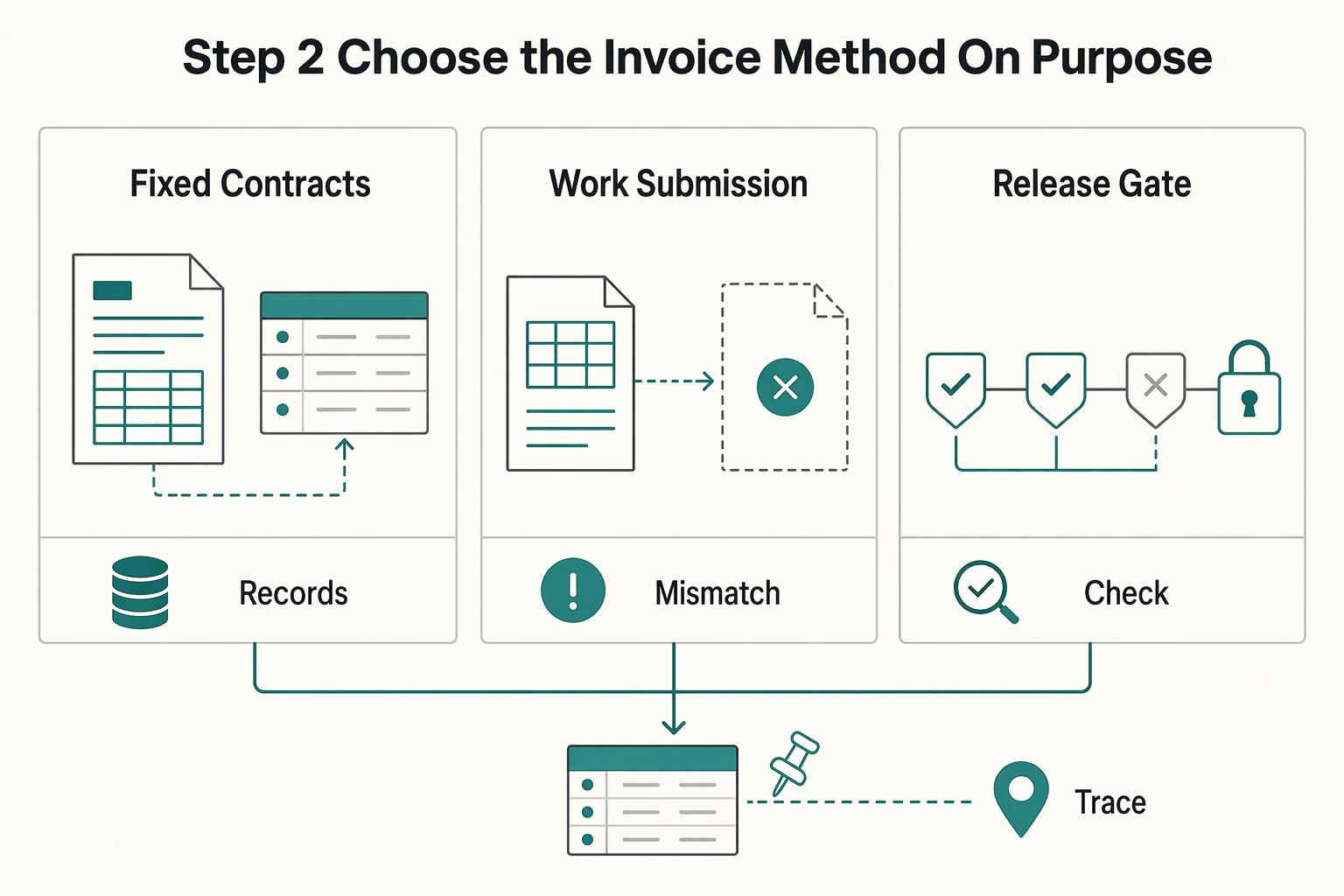
Step 2. Choose the invoice method on purpose#
Do not let the default invoice flow make this choice for you. Deel supports both platform-generated invoices and contractor-uploaded invoices. Use the platform template when the engagement is straightforward and your own ledger already tracks invoice ID, service period, and amount. If you need tighter record control, issue your own invoice and upload it instead.
The main risk with auto-created invoices is process ownership. Edits, credits, and disputes may have to move through the client approval flow. Deel workflows can include multiple approval levels, and one rejection can deny an adjustment item. For each payment, keep your own record set: signed contract, invoice copy, approved milestone or timesheet evidence, and payout receipt.
| Platform default behavior | Contractor-controlled alternative | Action before accepting |
|---|---|---|
| For fixed contracts, invoice auto-generated from contract details | Upload your own invoice and maintain your master ledger | Confirm uploaded invoices are allowed |
| Work-submission permission set by client account | Define contact owner and escalation path | Capture this in writing |
| Timesheet and adjustment requests move through client approval levels | Prefer milestone-based acceptance where practical | Define deliverables and approval timing upfront |
Step 3. Screen for control signals, not just convenience#
Convenience can hide classification and payment risk. IRS Topic No. 762 evaluates classification facts across three categories: behavioral control, financial control, and relationship of the parties. No single workflow feature decides status, but repeated signals should make you more cautious: manager-style approval chains, timesheet-driven workflows, and client-controlled submission rights.
When those signals show up, tighten scope language, define deliverables clearly, and keep independent records outside the platform. The goal is not to reject every managed workflow. It is to avoid drifting into a relationship that looks different in practice than it does on paper. For a side-by-side freelancer view, see Deel vs. Remote: A Comparison from the Freelancer's Perspective.
The Withdrawal Penalty: Uncovering the Hidden Costs of Getting Paid#
Your real payout is what is left after the full cost stack, not the headline amount on the withdrawal screen. In practice, your net can shrink through exchange-rate margin, method fees, and timing friction before the funds are actually usable.
Step 1. Map your payout cost stack#
Treat every withdrawal as a calculation, not a click. An FX spread is the margin between the rate you get and the current interbank rate. It can reduce your payout even when no separate "FX fee" line appears.
A transfer fee is the direct fee charged to move funds. Deel states fees vary by method, including $5 USD for cross-border withdrawals and SWIFT at a variable $5 USD fee capped at $10 USD.
A settlement delay is the time from withdrawal initiation until funds are available in your account. ETA depends on method and currency. Weekends, public holidays, processing, or compliance checks can add 1 to 2 business days. Before you submit, save one record with gross amount, currency, selected method, displayed fee, and ETA so you can reconcile later.
| Cost stack line | What to enter for this invoice | Where it usually appears |
|---|---|---|
| Gross amount approved for payout | Approved payout amount from the platform payout screen | Platform payout screen |
| Less direct transfer fee | Confirm the current transfer fee with the provider before release | Withdrawal method fee display |
| Less FX spread impact | Confirm the current FX spread with the provider before release | Quoted exchange rate vs market reference |
| Less recipient/intermediary bank charges | Confirm the actual bank deductions from your bank statement | Bank statement or credit advice |
| Expected landed amount | Gross payout minus expected transfer, FX, and bank deductions | Your payout log |
| Actual amount received | Credited amount from the bank statement | Bank statement |
| Variance | Expected landed amount minus actual credited amount | Reconciliation sheet |
Step 2. Choose the method by landed amount and operating friction#
Choose your method using four criteria: total landed amount, fee predictability, payout speed, and reconciliation effort. Headline fees alone are not enough.
Start with the method constraints. Deel lists $10 USD minimum for local bank transfer and $100 USD minimum for SWIFT, and not all methods are available in all jurisdictions. For SWIFT, plan for uncertainty: intermediary deductions can reduce the final amount, and not all fees are predictable upfront. If two methods are close on expected net, choose the one with clearer records and fewer unexplained adjustments.
Step 3. Reconcile the payout and escalate gaps quickly#
If you do not reconcile each payout cycle, small losses and timing issues get harder to unwind later. Reconciliation means matching your payout record, accounting record, and bank credit to confirm they agree.
Keep a compact evidence set: pre-withdrawal fee and ETA capture, payout receipt, bank credit amount and date, and any bank deduction notice. If the expected amount or timing does not match what posted, escalate immediately while the records are still easy to trace.
For your next payout cycle, do four things:
- Capture the gross payout before withdrawal
- Log each deduction as a separate line item
- Compare expected vs actual amount and arrival timing
- Escalate mismatches with payout and bank evidence attached
We covered this in detail in A Deep Dive into Deel's Pricing and Fees for Contractors.
Before you lock in a payout method, run your own side-by-side cost check with the payment fee comparison tool.
The Compliance Blind Spot: Your Untouched Tax Residency Nightmare#
Client-side compliance is not the same as your personal tax compliance. Deel can support form collection and client filing workflows. It should not be treated as determining your tax residency, tracking your cross-border day counts, or replacing your filing duties as a self-employed contractor.
The bigger risk is usually not the onboarding form. It is your facts changing while your recordkeeping stays static. If you travel while working or keep funds in foreign accounts, you need controls outside the platform.
Step 1. Define what you still own#
Keep these as separate control areas, not one blurry "tax admin" bucket.
Tax residency risk means your filing duties and tax exposure can change based on jurisdiction-specific residency rules. Authorities may assess day counts, ties, intent, continuity, and permanent-home factors.
Physical presence tracking means maintaining a day-count log by jurisdiction. This is your control process, and those records are often important evidence in residency analysis.
Personal filing obligations are the returns, estimated payments, and reports you must handle yourself. For U.S. self-employed individuals, filing is generally required at $400 net self-employment earnings. Estimated tax payments are generally required if you expect to owe $1,000 or more. If you cannot show where you were, what you earned, and which accounts you held, your compliance file is incomplete.
Step 2. Verify rule types instead of assuming one global threshold#
Do not run your compliance on a single "183-day rule" assumption. Different jurisdictions use different rule types, so verify each one:
| Rule area | Rule type | Article details |
|---|---|---|
| U.S. federal | Substantial presence test; FEIE physical presence test | 31 days in the current year; 183 days under a 3-year weighted test; 330 full days in 12 consecutive months |
| UK | Statutory Residence Test | Uses day-count tests and other criteria; confirm the current thresholds with the relevant tax authority |
| Canada | Fact-specific residency analysis | Uses ties, time, purpose, intent, and continuity; confirm the current factors with the relevant tax authority or a qualified adviser |
| U.S. state | Domicile plus statutory residency concepts | New York may treat you as a resident even if you are not domiciled there; confirm the current abode and day-count thresholds with the relevant state tax authority |
The U.S. federal row above includes two different tests, and the UK, Canada, and U.S. state examples use different rule frameworks. That is why you should verify the rule type first, then the current thresholds and factors that apply to you. Common errors are treating contract location or platform location as decisive, or tracking invoice dates instead of physical work location. Rule type comes first. Thresholds and filing positions come after that.
Step 3. Build personal controls around platform outputs#
Treat platform outputs as inputs, not a complete compliance system. Deel states it can collect a W-9 during onboarding and that clients can file Form 1099 through the platform. Its tax-form guidance says users should consult a professional advisor.
| Area | Platform compliance outputs | Your personal compliance controls | Where to record and when to escalate |
|---|---|---|---|
| Client tax forms | W-9/W-8BEN workflows and client 1099 support | Confirm form version, legal name, taxpayer ID, treaty position (if relevant) | Keep signed forms in a tax folder; escalate if your facts change or form choice is unclear |
| Residency analysis | No platform determination of your personal status | Track day counts, ties, work location, domicile facts, travel purpose | Maintain a jurisdiction log; escalate before any verified day-count or tie trigger |
| Income reporting | Tax-form and payment-related platform outputs | Reconcile contractor income to your books and return totals | Record in your ledger; escalate if totals, FX treatment, or year-end records do not align |
| Foreign account reporting | No substitute for personal reporting | Check whether foreign accounts exceeded $10,000 aggregate value for FBAR | Maintain an account register; escalate before April 15 (automatic extension to October 15) |
| Evidence retention | Contracts and tax-form records | Keep receipts, statements, travel records, invoices, and deduction support | Store by tax year; retain FBAR-related records for 5 years from the due date |
Step 4. Run a monthly compliance check#
A regular monthly review helps catch moving facts before they turn into filing problems. Use the same checklist each time so your playbook stays current:
- Update your travel log and reconcile it with your calendar and travel records.
- Review reporting triggers, especially foreign-account balances and year-to-date self-employment income.
- Retain support documents: invoices, payout receipts, bank statements, contracts, and deduction records.
- Schedule pre-filing advisor review when facts change (new country, long stay, new state ties, or inconsistent form data).
You might also find this useful: How to Offer Competitive Benefits to a Global Team of Contractors.
Build the Record and Decision Layer You Control#
Your Business-of-One system is the record-and-decision layer you control: invoice source, ledger, payout reconciliation, compliance dashboard, and contract terms. Keep it outside any client-owned platform so your records, filing controls, and payment rules stay consistent even when tools or workflows change. Deel can support both on-platform and off-platform payment management. That flexibility is useful, but it also means you need your own source of truth.
Step 1. Build your source of truth#
If you only change one thing after reading this, make it this: build a record chain you control from contract to bank deposit. Deel can auto-create invoices, accept contractor-uploaded invoices, and support External Invoices for clients who do not pay through Deel. Define your process first and apply it consistently.
Set up these four controls in the same order each time:
- Invoice source: Choose your primary invoice record. If you issue your own invoices, keep numbering and legal details consistent. If a platform invoice also exists, keep both and label your accounting record clearly.
- Ledger: Maintain your own recordkeeping system that clearly shows income and expenses.
- Payout reconciliation: Match each payment to invoice, platform payout history, and bank receipt. If an issued invoice changes, keep the original, credit note, and replacement together.
- Document storage: Store signed contracts, tax forms, invoices, payout receipts, bank statements, and deduction support by tax year.
Quick control test: for any payment, you should be able to trace signed agreement to invoice to payout record to bank deposit to ledger entry.
| Client platform default | Your controlled workflow |
|---|---|
| Auto-generated invoice is the default billing record | You keep a contractor-issued or uploaded invoice as the primary record, with your numbering |
| Payout history acts as the accounting file | You reconcile payout history to your ledger and bank records |
| Invoice edits stay inside platform flows | You retain original invoice, credit note, and replacement invoice as one evidence pack |
| Documents remain spread across tools | You export and store contracts, forms, receipts, and statements in your own year-based archive |
Step 2. Build a dashboard that triggers action#
A useful dashboard is not just a display. It tells you when to act. Track three views, and give each one a trigger and response.
| Tracker | What to track | Trigger or timing |
|---|---|---|
| Residency tracker | Jurisdiction-by-jurisdiction day counts and tie factors; each jurisdiction's rule type | If you are a U.S. taxpayer assessing FEIE eligibility, track 330 full days in 12 consecutive months; escalate before filing assumptions harden if counts or ties move toward a verified trigger |
| Reporting trigger monitor | Filing thresholds and deadlines | FBAR can be triggered if foreign accounts exceed $10,000 aggregate value at any time in the year; FBAR is due April 15 with an automatic extension to October 15; many individuals generally need estimated tax payments if they expect to owe $1,000 or more, with due dates on April 15, June 15, Sept. 15, and Jan. 15 |
| Tax set-aside tracker | Gross income received, tax paid to date, reserve balance, and next due date | If reserves are short versus expected near-term obligations, increase reserves immediately |
Use the dashboard to force action, not just display data. Track day counts and rule types, monitor filing thresholds and dates, and compare your reserve balance against the next due date. When a signal turns risky, do not improvise. Act with a preset response:
- If account movements could break clean reporting, consider pausing non-essential withdrawals or transfers while you document balances and confirm treatment.
- If contract terms, invoice language, and real working practices no longer align, update them together.
- If worker status is genuinely unclear, escalate to an advisor and consider Form SS-8; this guide on misclassification is a practical next step.
Step 3. Write the contract so your controls are enforceable#
Your contract should reflect how you actually operate: invoice ownership, payment rails, timing, and independent-business posture. On Deel, contracts activate only after both parties sign, so keep the signed version as your operative record. Keep the limit in mind: contract language is evidence, but classification analysis looks at the full control-and-independence relationship.
Use this clause checklist when you review or negotiate terms:
| Must-have terms | Negotiable terms |
|---|---|
| Your legal business entity is named as invoice issuer | Whether payment is on-platform or off-platform |
| Accepted payment rails are explicitly listed | Which accepted rail is used on a specific invoice |
| Payment timing is stated clearly | Exact net-term length if the client needs a different cycle |
| Both parties sign current terms before work starts or scope changes | Whether you also send a client-formatted invoice copy |
The core test is consistency. Your contract terms, day-to-day workflow, and records should all match. That is what preserves control when a client changes platform settings, payment habits, or process.
This pairs well with our guide on How to Pay US-Based Contractors from Australia.
Turn These Controls Into a Repeatable Operating Posture#
If a client uses Deel to pay global contractors, treat Deel as a payment workflow gateway, not your business headquarters. Keep your own system as the source of truth so you can track cash flow, reconcile payments, and spot compliance risk early.
The earlier sections showed where control breaks. This section turns those controls into a repeatable operating posture.
Step 1. Own the records that matter most#
The practical difference between a reactive contractor and an operator is record ownership. Build your Business-of-One OS around four records you control:
| Record | Role | Article detail |
|---|---|---|
| Invoicing control | Formal payment request between seller and buyer | Keep your invoice as the base record even if Deel auto-generates one for the payment cycle; where supported, upload your own invoice so your format, numbering, and terms stay consistent |
| Ledger ownership | Master record of transactions by account | Keep this outside the client platform, whether in accounting software or a disciplined spreadsheet |
| Payout reconciliation | Match invoice, platform payout status, and bank deposit | Deel's Payment Tracker helps, but it is supporting evidence, not your final accounting record |
| Compliance tracking | Maintain tax forms, day counts, balances, and filing calendar | Include items like Form W-8BEN when relevant and FinCEN Form 114 (FBAR) when applicable |
Use one verification test: for any payment, you should be able to pull a complete chain quickly. That means the contract, your invoice, platform invoice (if any), payout confirmation, and bank receipt.
Step 2. Use this mindset table to make decisions#
When choices are close, use a control lens. The table below is less about personality and more about operating posture.
| Reactive payee | CEO of your business |
|---|---|
| Accepts the client platform invoice as the main record. | Issues or uploads your own invoice first, then maps any platform-generated invoice to it. |
| Treats the platform dashboard as bookkeeping. | Posts every payment into your own ledger and keeps platform records as supporting evidence. |
| Uses the default payout rail because it is available. | Uses a rail you can explain end to end: invoice amount, deductions, payout status, and bank receipt. |
| Accepts vague billing and payment language in contracts. | Defines invoice process, payment timing, and required documents in the service agreement. |
| Reviews tax/compliance items only when prompted. | Maintains W-8BEN status, payer-reporting checks, jurisdiction tracking, and FBAR checks on a calendar. |
The tradeoff is convenience versus control. Platform-only workflows can feel faster up front, but they can make reconciliation and compliance review harder later.
Step 3. Turn platform features into evidence, not dependence#
Use Deel for what it does well: invoicing workflows, approvals, payout tracking, and optional invoice/expense sync to QuickBooks. Keep one red line in place. Sync can move data, but you still need to confirm that deposits match invoices and that withholding documentation is correct.
Watch two failure modes. First, an auto-generated platform invoice can fail to match your numbering or service period, which creates reconciliation friction. Second, you rely on platform status screens and miss obligations outside the platform. If your setup is Paid Outside of Deel, keep the same evidence pack and ledger discipline.
Step 4. Do these actions this week#
If you want this article to turn into a working system, start with this short build list:
- Create one master folder per client with contract, your invoice, platform invoice, payout proof, and bank receipt.
- Add a ledger template with invoice date, amount, currency, payout method, deposit date, and variance notes.
- Upload your own invoice where supported, or map each platform invoice to your invoice number.
- Add compliance reminders for W-8BEN review, payer-reporting checks against current IRS thresholds, and FBAR review if aggregate foreign accounts exceed $10,000 during the year.
- Put April 15 and October 15 on your calendar for FBAR timing if it applies.
- Update service agreements so billing terms follow your invoicing process, not only the client's platform flow.
For a step-by-step walkthrough, see The Best Way to Pay a Team of Contractors in Latin America.
To keep your Business-of-One system audit-ready between client payments, track location-driven tax exposure in the tax residency tracker.
Frequently Asked Questions
What costs should you check before you accept a payout method?
Check the full path from invoice amount to bank deposit, not just the payout screen. Your real cost can include exchange-rate spread, withdrawal fees, and additional bank or intermediary charges. Reconcile the invoice, payout record, and bank receipt each time.
Is Deel enough on its own for a solo contractor business?
Usually not if you want clean books and defensible records across clients. Treat Deel as a payment workflow, then keep your own invoice record, ledger, archive, and reconciliation process outside the client platform.
Can you use your own invoice if your client pays through Deel?
Yes. Keep your own invoice as the primary accounting record. Deel auto-creates contractor-cycle invoices, and it also supports External Invoices, so map both records to the same payment.
What is the difference between a contractor payment platform, COR, and EOR?
A contractor payment platform supports paying you as an independent contractor. COR is positioned as client-side protection against misclassification risk. EOR is a different model where the provider is the legal employer and provides statutory benefits in-country.
Does the platform handle your personal tax residency, FBAR, or estimated taxes?
No. That remains your responsibility even when the client uses platform compliance features. You still need your own system for estimated taxes, substantial presence day counts, FBAR timing, and filing deadlines.
What should you track in your own system so nothing gets missed?
Track one complete chain for every payment: signed contract and scope, your invoice plus any platform invoice, payout confirmation, bank deposit, and ledger entry. Also track tax forms, account statements, jurisdiction day counts, and any reporting trigger so you can verify current-year rules before filing.
When should you move off the default payout route?
Move off the default route when your take-home is hard to predict, reconciliation keeps breaking, or you are forced into avoidable currency conversions. If you cannot explain the total cost and expected receipt path clearly before money is sent, switch to a cleaner route or keep a documented backup rail.
Try a related tool
Researched and edited by the Gruv editorial team. Gruv builds cross-border billing, payouts, and finance-operations software for global businesses.
Sources
Educational content only. Not legal, tax, or financial advice.
Related Posts

What to Do If You've Been Misclassified as an Independent Contractor
Treat this as a protection problem first, not a label debate. If your work was treated as an independent contractor arrangement even though the relationship functioned differently, your first goal is to protect pay, rights, and records while you choose the least risky escalation path. You can do that without making accusations on day one, which often keeps communication open while you document what happened.
How to Pay International Contractors With Fewer Delays and Disputes
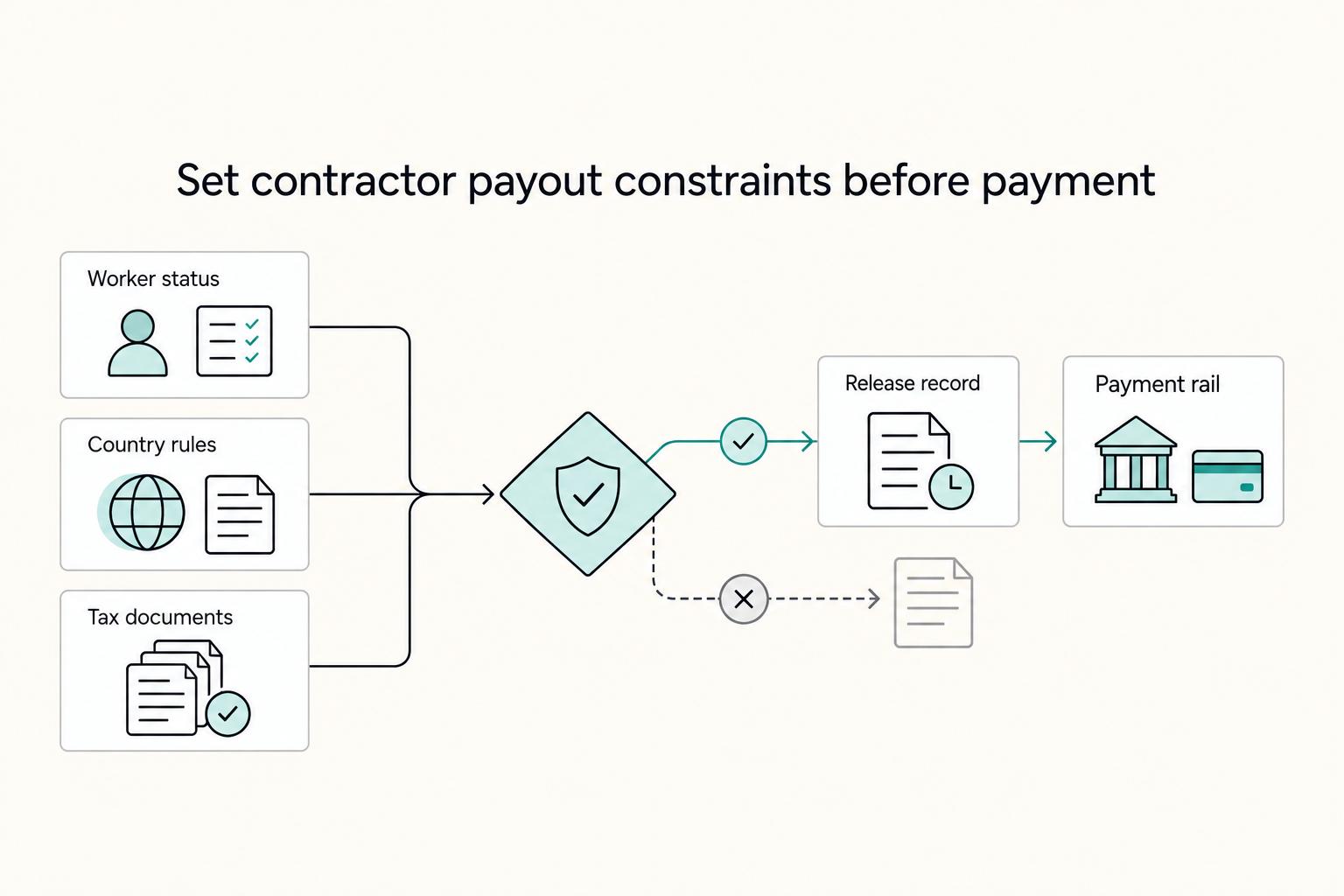
Paying international contractors reliably starts with compliance setup before the first invoice. Missed registration or filing steps turn routine payouts into delays and penalties.
Deel vs Remote for Freelancers Who Need a Clear First-Payout Decision
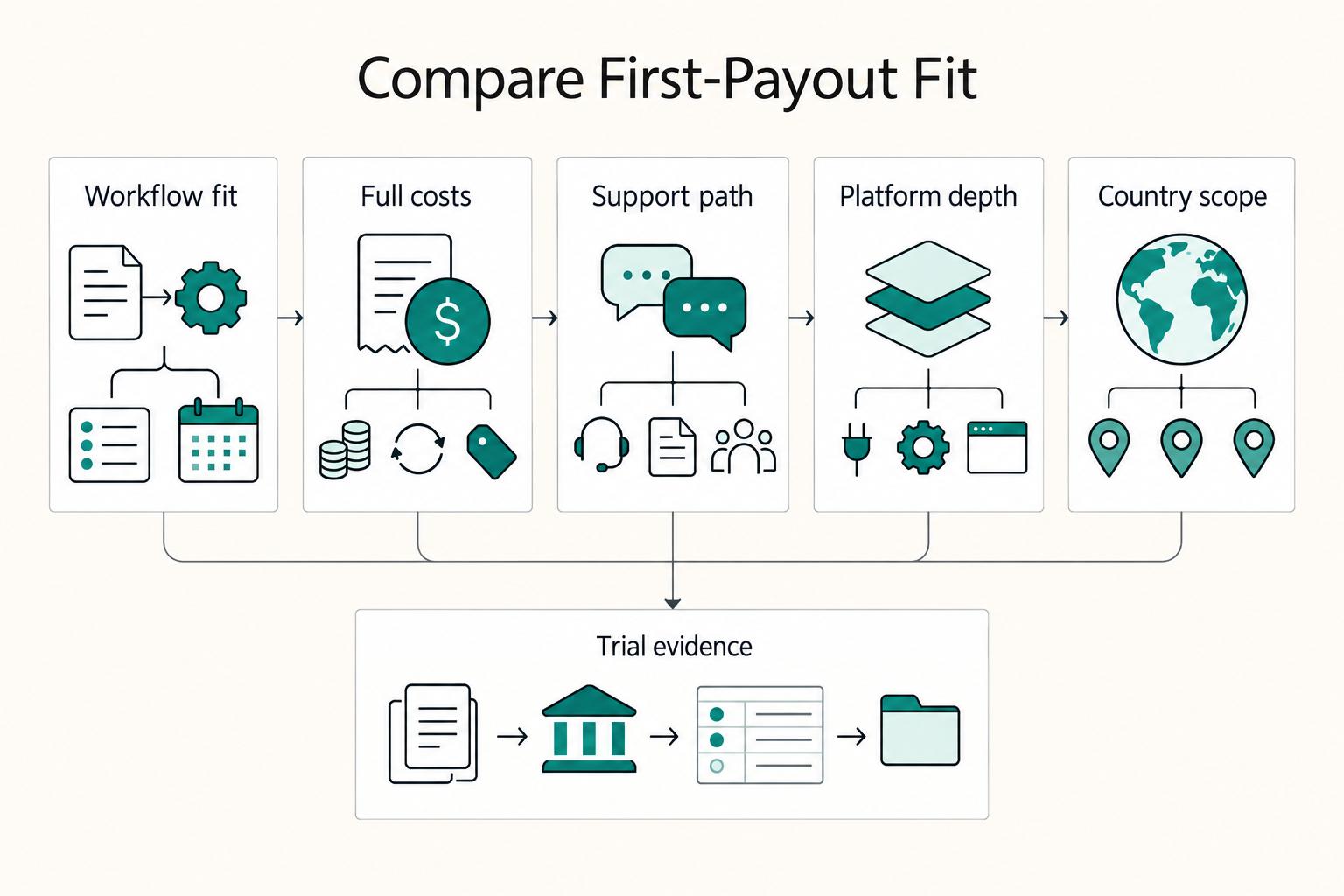
Choose the platform that makes your first payout cycle predictable and your contracts easier to defend. This is an operating decision, not a brand contest.