
Quick Answer
Build one Asana master portfolio, then run three views: `Project Budget (Hours)` vs `Actual Hours Logged`, a per-client `Client Temperature` signal in Progress updates, and a single Workload view for staffing. Start with two or three active projects to verify field setup, status posting, and Workload access before rollout. Review weekly, sort risk first, and assign one owner plus one next action for every flagged project.
What Asana Portfolios Do, and What to Set Up First#
If you manage several client projects at once, activity is rarely the problem. The real issue is usable visibility. Tasks move, people stay busy, yet you still make staffing calls too late, spot client risk only after a rough meeting, or notice a project drifting when the budget is already under pressure.
Start with the portfolio basics#
Treat a Portfolio as an oversight layer, not a replacement for project management. In Asana, a portfolio is a high-level collection of projects, while projects hold the task-level work. That distinction matters. A portfolio helps you make better cross-project decisions, but it does not natively calculate true profitability, predict churn, or remove the need to inspect project details.
| Element | What it does |
|---|---|
| Portfolios | High-level collection of projects; an oversight layer, not a replacement for project management |
| Custom fields | Structured data added from the portfolio Customize menu so projects can be compared consistently |
| Status updates | Progress tab updates that record how portfolio projects are performing; portfolio members receive them in their Asana inbox |
| Workload | Visual snapshot of capacity across projects that can be measured by task count or effort |
Before you build anything, check two things first:
- Your plan supports Portfolios and any related features you intend to use, such as Workload. Asana documents portfolio availability on Advanced, Enterprise, and Enterprise+ tiers, plus some legacy tiers.
- Your client projects already have enough structure to roll up cleanly. At minimum, each project should have an owner, current dates, and shared custom fields for the data you want compared.
If that structure is missing, the portfolio can look organized while still sending weak signals. The table above covers the core roles: portfolios for oversight, custom fields for comparability, status updates for context, and Workload for capacity.
Use a simple checkpoint before you go further. Create one test portfolio, add two or three active client projects, then confirm you can add a field, set a status, and open Workload. If any one of those breaks, fix access or plan issues before you design your views.
Set up the three-pillar model#
Use the three-pillar model as an operating lens, not as proof that Asana does this for you automatically. In the next sections, you will set up one view for profitability signals, one for client health signals, and one for team capacity. The payoff is earlier warning signs, cleaner review meetings, and more confident resourcing. The tradeoff is simple: your data has to be maintained consistently, especially custom fields and project status.
Keep this checklist in front of you before moving on:
- Decide which active client projects belong in the master portfolio
- Standardize the custom fields you want compared across those projects
- Confirm who updates project status and how often your team will review it
- Choose whether Workload should use task count or effort for capacity planning
If you want a deeper dive, read The Best CRMs for Freelancers to Manage Client Relationships.
Pillar 1: The Real-Time Profitability Dashboard#
Treat this dashboard as a weekly decision tool, not a static report. If your inputs are stale or inconsistent, your profitability signal is not trustworthy.
Before you start#
Use one portfolio for all active billable client projects, and keep the same financial fields in every project. Asana organizes work into projects, but a 2026 comparison notes no native time tracking or invoicing, so Actual Hours Logged will often need to come from your time tool or export.
| Field | Type | Update approach |
|---|---|---|
| Project Budget (Hours) | Manual source input | Keep manual and update when scope changes |
| Actual Hours Logged | Manual source input | Keep manual and update from the latest time report each week |
| Margin View or Margin Status | Derived value or manual status | Use reliable formulas for derived values if supported; otherwise update it from your estimate sheet or time report |
Step 1. Create only the fields you will actually maintain. Set up shared custom fields for Project Budget (Hours), Actual Hours Logged, and Margin View or Margin Status. Reuse the same field definitions across projects instead of creating near-duplicates. Quick check: open two client projects and confirm field names and values are consistent.
Step 2. Split calculated vs manual inputs. If your setup supports reliable formulas, use them for derived values only. Keep source inputs manual: Project Budget (Hours) and Actual Hours Logged. If formulas are unavailable or brittle, keep Margin View as a manual status field updated from your estimate sheet or time report.
Step 3. Set ownership and cadence. This works only when ownership is clear. In practice, a workable split is:
- Account lead updates
Project Budget (Hours)when scope changes. - PM or ops lead updates
Actual Hours Loggedfrom the latest time report each week.
Run one validation check in your weekly review: compare the time export, current scope note, and portfolio values. If they do not align, pause decisions until corrected.
| Signal state | What you see in the fields | Recommended action |
|---|---|---|
| Healthy | Actual hours track reasonably against budget for the current phase, and margin view is stable | Continue weekly monitoring |
| Watch | Actual hours rise faster than expected, or margin view worsens since last review | Review open tasks, upcoming deliverables, and recent client asks before the next status meeting |
| At risk | Actual hours are close to or above phase budget, or margin view shows clear erosion | Escalate now, classify the cause, and choose the corrective action |
Step 4. Sort by margin, then triage the lowest-margin projects first. Use the lowest-margin projects as your at-risk queue, then classify the cause before you act:
- Scope issue: New work was accepted without budget change.
Next action: document added requests, update the brief, and take a change request to the client.
- Estimation issue: Original sold hours were unrealistic.
Next action: update your estimate model and log variance to avoid repeat underpricing. If useful, review Value-Based Pricing: A Freelancer's Guide.
- Delivery-efficiency issue: Scope is reasonable, but execution is slow.
Next action: inspect handoffs, rework, and approval delays, then reassign or simplify work.
Use this weekly operating checklist:
- Refresh
Actual Hours Loggedfrom your time source. - Confirm approved scope changes updated
Project Budget (Hours). - Sort by margin and review lowest projects first.
- Label each at-risk project as scope, estimate, or delivery.
- Assign one owner and one next action per at-risk project.
Related: A Freelancer's Guide to Sales Qualifying.
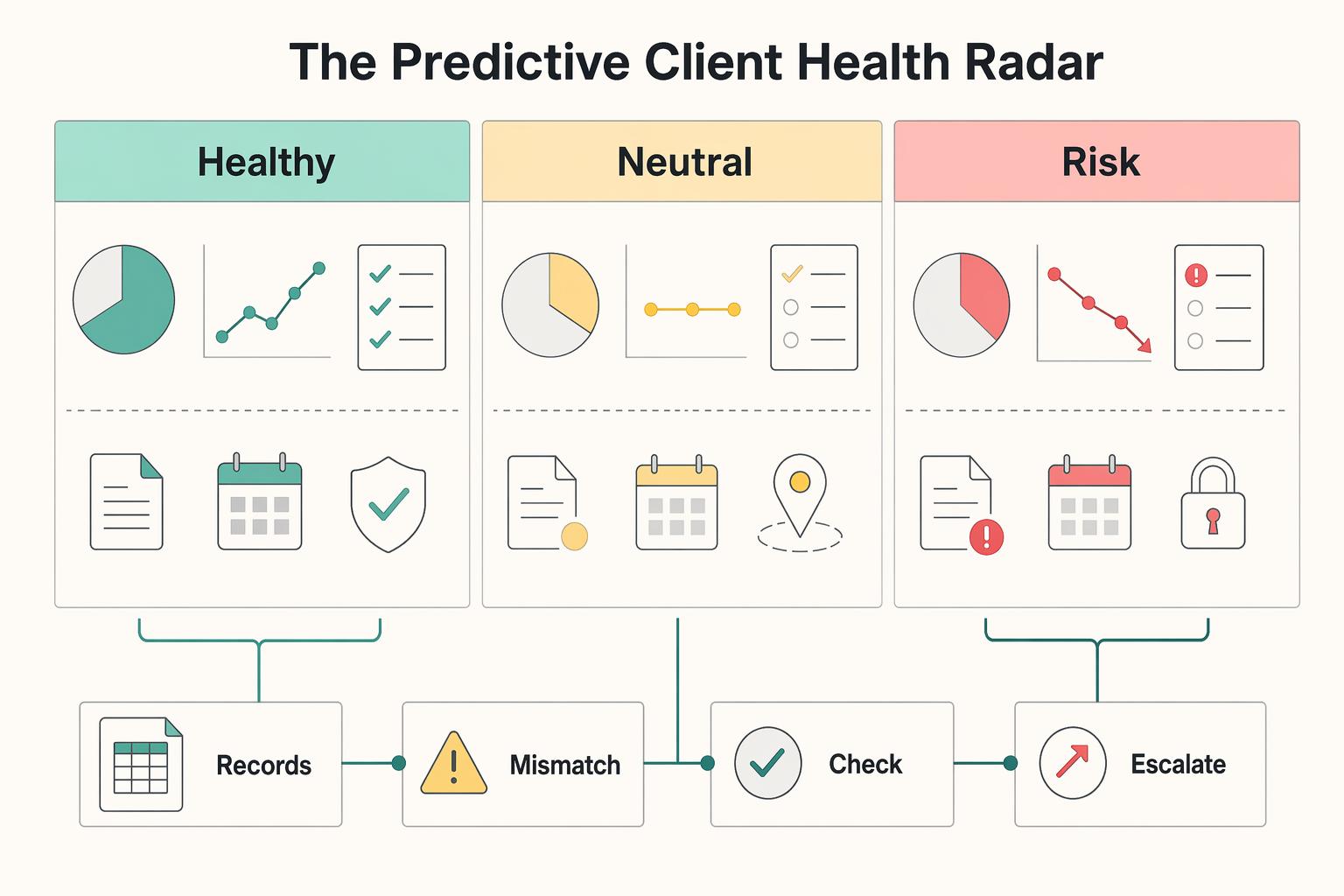
Pillar 2: The Predictive Client Health Radar#
Margin tells you where delivery is slipping; client health tells you whether the relationship is slipping. To make that usable, run one portfolio per key client, use the same Client Temperature field everywhere, and require evidence-backed weekly updates in the portfolio's Progress tab.
Step 1. Set up one client portfolio and shared ownership rules. Create one portfolio for each client you actively manage as an account, then add that client's active projects. In Customize, add a single-select custom field named Client Temperature with the same options in every client portfolio: Healthy, Neutral, At Risk.
Assign clear roles so scoring stays consistent:
- Account lead: owns the temperature decision
- Project manager or delivery lead: provides delivery evidence
- Finance/invoicing owner: flags payment behavior
Checkpoint: open two client portfolios and verify the field name and options are identical.
Step 2. Score health from observable signals, not intuition. Use the same five evidence groups each week: communication pattern, decision speed, feedback quality, payment behavior, and stakeholder stability.
| Client Temperature | Risk signal you can observe | Likely root cause | Immediate next action |
|---|---|---|---|
Healthy | Communication is early, decisions arrive in time, feedback is specific, payments follow normal pattern, stakeholders remain stable | Clear expectations and stable approval path | Keep delivery steady; capture expansion ideas, but only pursue them if service quality remains strong |
Neutral | Communication becomes reactive, approvals slow, feedback is thin or conflicting, payment follow-up increases, or a key stakeholder changes | Bandwidth pressure, unclear ownership, or decision-transition friction | Stabilize first: confirm priorities, refresh stakeholder map, tighten next check-in |
At Risk | Repeated silence or missed meetings, decision lag threatens milestones, feedback is persistently negative or vague, invoice friction grows, or sponsor disengages | Trust erosion, expectation mismatch, procurement strain, or org change | Escalate internally this week and prepare a recovery plan before next client touchpoint |
Payment behavior should stay in the model even when finance data lives outside Asana. A May 28, 2025 Intuit survey reported 47% of businesses had some invoices overdue by more than 30 days, which is a practical reminder to treat payment drift as a risk signal, not background noise.
Step 3. Log a weekly status update in the Progress tab. Use the client portfolio's Progress tab as the account-health record. Post updates on a fixed weekly cadence, and set reminders so they happen on schedule.
Use one repeatable template:
- Signal:
Healthy,Neutral, orAt Risk - Evidence: one line each for communication, decisions, feedback, payment, stakeholder changes
- Action owner: one named person
- Next check-in: exact date or meeting
Asana requires a status and written content to post an update, and it preserves update structure, which makes this template easy to maintain week to week.
Step 4. Use temperature for account planning, not just labeling. When an account is Healthy, plan expansion only if delivery quality is holding. When it is Neutral, stabilize before you discuss added scope. When it is At Risk, escalate internally before renewal risk compounds.
For escalation, align the account lead, delivery lead, and commercial owner on the likely issue: scope, stakeholder change, payment friction, or service quality. Record the decision path in the portfolio update trail.
Calibration note: because customer health has no fixed formula, run a short monthly review across leads using one example each of Healthy, Neutral, and At Risk to keep scoring standards aligned.
For a step-by-step walkthrough, see How to Use Harvest for Time Tracking and Invoicing in a Small Agency.
Pillar 3: The Team Capacity & Growth Engine#
Capacity is your delivery reality check. If you cannot see it in one place, staffing decisions slow down and quality risk rises as work spreads. Set up one operating view, use one effort model, and review it on a fixed cadence.
Set up one operating view first#
Create one operations portfolio for all active delivery work you plan to staff. Use Workload in that portfolio if it is available in your Asana setup, so you can review effort across projects without jumping between boards.
Use one rule across the team: keep capacity planning in one place. Splitting capacity planning across tools creates visibility gaps and slower decisions.
Choose one effort model and enforce consistency#
Pick one model for the full portfolio: hours or a simpler task-effort unit. Then stick with it.
- Use hours if you already estimate, budget, and track in hours.
- Use task effort if your estimates are broader and hour-level upkeep will not stay consistent.
Whatever you pick, keep it consistent: capacity tasks should use the same effort field, one owner, and current dates. If different teams estimate in different units, your workload signal is no longer comparable.
Define your utilization states before staffing changes#
Document your internal cutoffs for Underloaded, Balanced, and Overloaded before you start moving work. Then use the same definitions every week.
| Utilization state | Risk indicators to watch in Workload and delivery | Likely business impact | Immediate management action |
|---|---|---|---|
| Underloaded | Repeated open capacity, light forward assignments, or specialists staying idle while pipeline work is expected | Margin pressure and missed growth opportunities | Confirm whether this is a real gap or a planning gap, then pull forward internal priorities or align near-term pipeline decisions |
| Balanced | Work is spread realistically, near-term delivery is staffed, and people still have room for reviews/admin | More predictable delivery and steadier pace | Keep assignments stable, check upcoming starts, and protect focus time |
| Overloaded | The same people stay heavy, deadlines stack, or critical tasks concentrate in one role | Burnout risk, slower delivery, quality drift, and client friction | Rebalance immediately, decide what moves now, and escalate if the same pattern repeats |
Run a weekly capacity ritual (short and explicit)#
Run a 20-30 minute weekly review with a clear owner, team leads, and whoever approves staffing spend when needed.
| Decision type | What to check | Owner | Next action |
|---|---|---|---|
| Rebalance work | Where effort is concentrated in Workload and whether reassignment is possible without quality loss | Assign one delivery decision-maker for the move | Reassign tasks, split scope, or pair support, then confirm completion |
| Forecast new work | Upcoming starts against visible capacity, then sanity-check training and administrative overhead before committing | Assign one person to approve capacity assumptions | Confirm start timing or hold intake until capacity is credible |
| Trigger hiring/contractor planning | Whether overload repeats across reviews | Assign one person to open staffing planning | Use the decision log plus recent workload evidence and a 12-24 month view to plan for expected scale |
Use this agenda every time:
- Review current-week overload and underuse.
- Look ahead two to four weeks for upcoming delivery pressure.
- Log decisions: date, issue, affected person or role, action, owner, and next review date.
That decision log keeps workload changes intentional instead of ad hoc.
End each review with an owner and a next move#
Keep the same three decision types from the weekly ritual so every review ends with a clear next move:
- Rebalance work
In Workload, check where effort is concentrated and whether reassignment is possible without quality loss. Owner: assign one delivery decision-maker for the move. Next action: reassign tasks, split scope, or pair support, then confirm completion.
- Forecast new work
Check upcoming starts against visible capacity, then sanity-check training and administrative overhead before you commit. Owner: assign one person to approve capacity assumptions. Next action: confirm start timing or hold intake until capacity is credible.
- Trigger hiring/contractor planning
If overload repeats across reviews, stop treating it as temporary. Owner: assign one person to open staffing planning. Next action: use your decision log plus recent workload evidence and a 12-24 month view to plan for expected scale.
Use this escalation checklist when overload does not clear after rebalancing:
- Confirm whether scope can be reduced.
- Decide whether timeline commitments need to move.
- Trigger hiring pipeline review once your own threshold is met.
Keep threshold language explicit: "If overload persists beyond the period your team defines across the affected roles or projects, escalate to headcount review."
We covered this in detail in How to Use Notion AI for Productivity as a Solo Operator.
Conclusion: Make Portfolios a Recurring Checkpoint That Ends in Decisions#
Make portfolios part of your operating rhythm#
Treat your portfolios as an operating checkpoint, not a place you visit only when something feels wrong. The shift is simple. Stop asking, "What is everyone busy with?" Start asking, "Where is profit getting squeezed, which client looks unstable, and where is capacity tightening?" That is the difference between reacting to activity and managing the business with evidence.
Start with visibility you can verify. Open each portfolio and confirm the indicators you rely on are current enough to support a decision. If a number or status is stale, the conclusion is stale too. If you need a reporting layer outside Asana, portfolio data can be synced to Google Sheets. Check who controls app integrations in your organization first, because those connections are managed at the organization level.
Turn the weekly review into decisions#
If you run a weekly review, make it end in decisions, not just observation. Pick one recurring review block and use the same sequence each time: profit visibility first, client risk visibility second, capacity visibility third. Escalation signals should be obvious enough that you act on them the same day, such as a project slipping financially, a key client showing repeated concern, or delivery work piling onto the same people.
A common failure mode is building a portfolio setup that looks complete but cannot be trusted. A third-party review notes that free plans can hit limits when teams need custom fields, timeline view, or automation, so verify whether the fields and reporting you depend on are actually available before you promise this as your main client dashboard.
Make one concrete improvement today#
Keep the next action small and concrete. Open your portfolios now, review the health indicators you already have, and define one improvement to implement today. Refresh one stale status rule, remove one misleading project, or tighten one review note your team must update before the next check-in.
You might also find this useful: Managing a Six-Figure Consulting Project in Asana: A Step-by-Step Guide. If you want to confirm what's supported for your setup, Talk to Gruv.
Frequently Asked Questions
How do you track agency profitability in Asana Portfolios?
Do not assume there is an official Asana method for profitability tracking. The clearest setup signal from the community thread is to separate internal work from client or external work before you compare project performance. If your numbers still feel noisy after that split, treat pricing as a separate problem and pressure-test that directly; Value-Based Pricing: A Freelancer's Guide can help with that side.
What portfolio setup should you build first?
Start with the setup decisions you can verify, then expand. | Decision point | What this research set confirms | Practical takeaway | | --- | --- | --- | | Internal vs client structure | A community user explicitly asks how to manage internal versus client or external projects | Separate those categories in your setup before you standardize reporting | | Team-per-client structure | The same post asks whether to create a new team for each client and raises inactive-team cleanup concerns | Treat this as an operational choice to test in your workspace, not a universal rule | A community question posted on Jan 22 raised both issues directly, with follow-up activity on Jan 23. Use that as a signal of common setup friction, not official product policy.
Can you use portfolios for client reporting?
A related thread is explicitly referenced: "Using Portfolios to Manage Client Projects Where some are Private & others are Client Facing." That supports the idea that teams often split private and client-facing views. Validate visibility and sharing in your own workspace before you promise a client-facing portfolio.
How do you manage team capacity for an agency?
Keep your method consistent across active projects and validate the workflow in your workspace before you treat it as a team standard.
Are portfolios, reporting, and permissions included in every plan?
This guide does not verify plan availability, reporting access, or permission behavior for every Asana plan. Verify current access in your own workspace before you promise a client dashboard or restructure teams around a feature assumption.
Try a related tool
Researched and edited by the Gruv editorial team. Gruv builds cross-border billing, payouts, and finance-operations software for global businesses.
Sources
Includes 7 external sources outside the trusted-domain allowlist.
- montreat.edu/wp-content/uploads/2025/07/catalog-2015-16.pdftrusted
- asana.com/features/goals-reporting/portfoliosexternal
- asana.com/features/project-management/status-updatesexternal
- easyagile.com/category/agile-best-practiceexternal
- forum.asana.com/t/portfolio-projects-and-teams-setup-client-...external
- help.asana.com/s/article/portfolio-managementexternal
- help.asana.com/s/article/portfolio-progress-and-reportingexternal
- investors.asana.com/node/7916/htmlexternal
Educational content only. Not legal, tax, or financial advice.
Related Posts

Value-Based Pricing for Freelancers Under Real Payment Risk
Value-based pricing works when you and the client can name the business result before kickoff and agree on how progress will be judged. If that link is weak, use a tighter model first. This is not about defending one pricing philosophy over another. It is about avoiding surprises by keeping pricing, scope, delivery, and payment aligned from day one.

Best CRM for Freelancers Who Need Reliable Client Follow-Up
If your client work is solid but your admin lives across email, notes, calendar alerts, and a spreadsheet, your CRM choice will succeed or fail on operations, not features. That is why so much advice on the **best crm for freelancers** misses the real issue. The main risk is not choosing a tool with too few buttons. It is choosing one that looks polished in a demo but still lets follow-ups slip when work gets busy.

Freelance Sales Qualifying That Protects Your Time and Pipeline
You do not need to become more persuasive to stop bad-fit projects from taking over your week. You need a repeatable way to decide who gets your time, who gets a proposal, and who gets a polite no. That's what freelance sales qualifying is for. It protects your calendar and pipeline value by stopping low-fit leads earlier.