
Quick Answer
Choose Tier 2 first for most client-facing dashboards, then move to Tier 3 only when required logic or integrations cannot be verified in a portal layer. For an airtable api client dashboard, keep Airtable as your source of truth, test client-by-client visibility with real user accounts, and document who owns access changes after offboarding. If you still rely on shared links, repeated file-version clarifications, or chained automations, stabilize those operations before expanding scope.
The Hidden Risks in Your Current Client Reporting#
If your reporting still runs through emailed PDFs, shared spreadsheets, or hand-built views, the real problem is usually not a dramatic breach. It is the steady accumulation of ordinary mistakes until you lose confidence in who can see what, which version is current, or how long it takes to keep clients informed.
That is the thread through the rest of this piece: check access first, then version control, then scale, then cost. Once you know where the pressure is coming from, the next step becomes much clearer.
How secure is access right now?#
Start by proving that each client can see only their own records, files, and comments. Do not trust a quick glance at a filtered or locked view. Community reports note that view restrictions can become security theater if a user with commenter or editor access can duplicate a view and expose fields you assumed were hidden.
The common failure modes are easy to miss. Community examples include offboarding breakdowns, including a removed person regaining access after an active user re-shared access. That kind of issue can happen when access control depends on people consistently following manual rules.
Checkpoint: Pick one client account and trace access end to end. Verify who can open the file, who can duplicate it, who can re-share it, and how you would prove access was removed after offboarding.
Is the client experience creating support work?#
Next, treat the client experience as an operational signal, not just a branding issue. If a client has to search an email thread for "latest_v7_final_final.pdf" or ask which link is current, your reporting process is already creating avoidable support work.
Version confusion creates its own risk. A client comments on the wrong report, you reply using older numbers, and now you are repairing trust instead of moving the project forward. Even when no sensitive data leaks, a messy handoff makes your work feel less controlled than it probably is.
A portal helps because it gives clients one place to check status, one login path, and one current record. That can reduce repeated "is this the latest file?" messages.
| Decision area | Ad hoc reporting | Client portal |
|---|---|---|
| Access control model | File links, shared folders, or collaborator permissions that need manual review | Account-based access and role rules; verify exact record-level controls with the vendor |
| Client experience | Multiple links, inbox search, version confusion | One destination for current status, files, and updates |
| Operational load | Manual exports, handoffs, permission cleanup, repeated client questions | Ongoing setup and maintenance, but less repeated handoff work |
| Failure recovery | Hard to trace who saw what and which version was current | Easier to standardize recovery steps; verify audit visibility and restore options |
Will the process hold under load?#
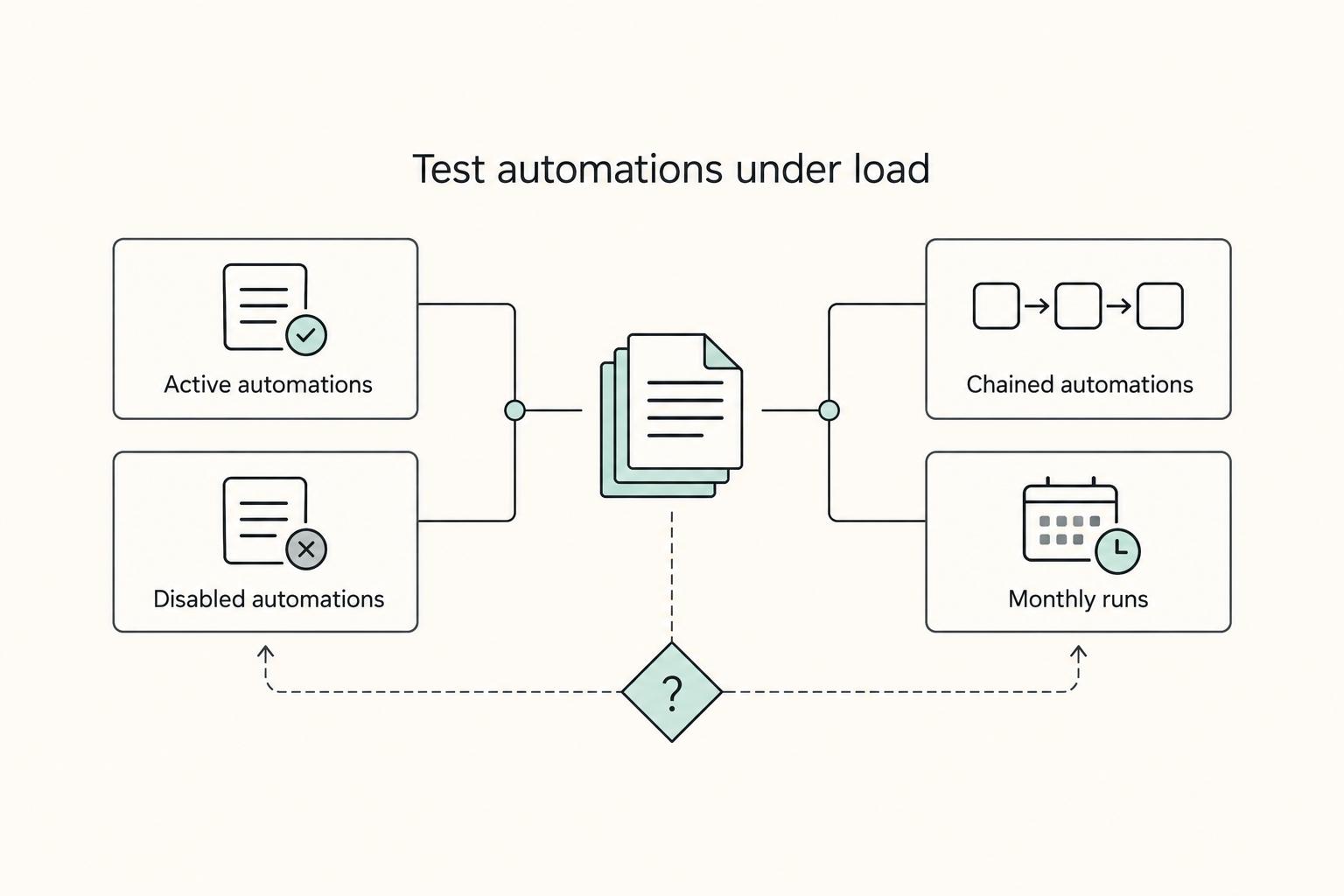
If client count is rising, test whether the current method still holds together. The warning sign is not just the time spent updating reports. It is automation sprawl and fragile dependency chains creeping in to patch a process that was never built for external delivery.
| Load signal | Example in article | Checkpoint |
|---|---|---|
| Active automations | "50+ active automations" by month 12 | Count your active automations. |
| Disabled automations | "another 20 disabled ones" by month 12 | Count your disabled automations. |
| Chained automations | Automation A triggers B and then C | Assume one upstream failure can create bad downstream data or leave records missing. |
| Monthly runs | 50,000 runs on a Team plan or 100,000 on a Business plan from the cited example | Treat that as a verify-now moment. |
One cited example treats "50+ active automations, plus another 20 disabled ones" by month 12 as a clear maintenance warning. Another notes that when automation A triggers B and then C, one upstream failure can still create bad downstream data or leave records missing. If your reporting depends on chained automations to copy statuses, send summaries, attach files, and notify clients, treat manual exception handling as a likely part of the job.
Checkpoint: Count your active automations, disabled automations, and monthly runs. If you are nearing thresholds such as 50,000 runs on a Team plan or 100,000 on a Business plan from the cited example, treat that as a verify-now moment, not a future problem.
Finally, calculate cost with a repeatable formula instead of guessing from subscription prices. For your current setup, add four numbers:
- Time cost: Hours you spend exporting, formatting, sending, and permission-checking each month.
- Rework cost: Hours spent fixing wrong links, wrong versions, or missing data after automation or handoff errors.
- Trust risk: The time and discounting pressure created when clients stop trusting the reporting process.
- Tool cost: Software subscriptions, plus any maintenance work you still carry yourself.
This is where "free" tools usually stop looking free. A SaaS portal may add subscription cost, but one practical advantage is shifting software and hardware maintenance away from you. If clients or procurement ask for diligence evidence, ask vendors for concrete checkpoints such as certification status, expiry date, and access-control documentation instead of accepting vague security language.
The decision rule is straightforward. Your current setup can still be acceptable if you have a small client count, low reporting frequency, no client self-serve access, and you can manually verify permissions and versions every time. Plan a portal transition when clients need ongoing visibility, you are managing repeated access changes, or your reporting now depends on enough manual handoffs and automations that one broken step can confuse a client.
Related: How to Write a Follow-Up Email That Closes the Deal.
The Airtable Dashboard Maturity Model: A Strategic Framework#
Choose the tier that matches your current client load, risk tolerance, and delivery model, not the one that sounds most advanced. The right fit is the one you can govern consistently while keeping Airtable as your central source of truth.
Step 1. Place your setup in the right tier now. Use the simplest honest description of what you run today.
Tier 1 is an internal dashboard for fast internal tracking in one place. Its strength is speed and proximity to your base. Its hard limit is that external client access may not be segregated deeply enough for your use case unless you can verify it.
Tier 2 is a dedicated portal layer over your data. Its job is to give clients a controlled place to check status, files, or updates without exposing your internal workspace. Its strength is better operational maturity for external delivery. Its hard limit is platform constraints, so you must verify RBAC depth, SSO options, and audit logging by vendor and plan.
Tier 3 is a custom build with the Airtable API. Its job is to support specialized workflows, deeper logic, and API-first extensibility when off-the-shelf constraints block you. Its strength is control. Its hard limit is that you own more maintenance, testing, and failure recovery.
| Criteria | Tier 1 internal dashboard | Tier 2 portal layer | Tier 3 custom build |
|---|---|---|---|
| Data segregation approach | Base/view design; verify client-by-client isolation | Layered platform rules; verify exact model | Custom model and logic |
| Authentication options | Verify | Verify (including SSO needs) | Defined by your implementation; verify |
| Permission depth | Verify | Verify RBAC depth | Designed by you; verify against requirements |
| Audit logging | Verify availability, retention, exportability | Verify availability, retention, exportability | Defined by your implementation; verify |
| Implementation effort | Lower | Medium | Higher |
| Maintenance ownership | Mostly you | Shared between you and platform | Mostly you or your developer |
| Customization ceiling | Lower | Medium | Higher |
Step 2. Use governance questions to decide if you need to move up. If clients, partners, or procurement ask for named roles, single sign-on, or proof of access history, treat that as a decision filter. Collect evidence for each option: permission settings, plan name, and written confirmation for required controls.
Step 3. Treat automation sprawl as an upgrade trigger. If your reporting depends on long automation chains, risk is already visible. One cited pattern is month 12 with 50+ active automations and 20 disabled ones; each added automation increases maintenance burden, and upstream failures can create bad or missing downstream data. If you are nearing third-party-reported thresholds like 50,000 monthly runs on Team plans or 100,000 on Business plans, verify current limits directly and treat that as a move-up signal.
Step 4. Score your position before you build a client dashboard on the Airtable API. Use this checklist:
- Choose Tier 1 if clients do not need self-serve access and you can manually verify permissions each time.
- Choose Tier 2 if clients need ongoing portal access and you need cleaner separation between internal operations and client delivery.
- Choose Tier 3 if you need custom logic, deeper integrations, or controls a portal layer cannot confirm.
- Move up one tier when you answer no to any of these: Can I prove client-by-client access control? Can I name maintenance ownership? Can I verify RBAC, SSO, and audit logging for this setup? Can I reduce automations instead of adding another patch?
For a step-by-step walkthrough, see Choosing Airtable Interfaces for Client Portals Without Access Risk.
Tier 1 Reality Check: Why Airtable Interfaces Fall Short for Clients#
Treat Airtable Interfaces as an internal system by default, and only make it client-facing after you verify your access controls. It is strong for team visibility, but client delivery needs proof of separation and predictable access behavior.
When do Interfaces work best?#
Interfaces are a strong Tier 1 fit for internal coordination. Airtable describes project tracking as a centralized workspace for tasks, timelines, owners, progress, and status, with views like Gantt charts, Kanban boards, calendars, and custom dashboards. It also aligns with operator workflows such as real-time progress reporting, automated status updates, and KPI monitoring.
The risk is not that Interfaces are automatically wrong for every external case. The risk is using an internal-first setup for client access when you cannot clearly verify who can see what after routine changes. If confidentiality is part of your promise, uncertainty here is avoidable exposure.
A third-party Airtable guide explicitly lists companies that need a client portal as a weak-fit case. A separate review (December 11, 2025) gives Airtable security measures an 8/10 and also says it found no discovered security concerns. Take that as a mixed signal: this is less about a blanket security verdict and more about whether the access model fits client-facing delivery.
| Control layer | Airtable Interfaces | Tier 2 portal layer | Tier 3 custom build |
|---|---|---|---|
| Identity model | [verify] external authentication behavior for your exact setup | Usually client-user accounts; [verify] by vendor and plan | Defined by your implementation |
| Permission granularity | [verify] practical restrictions for your use case | [verify] role depth and record rules vendor by vendor | Designed and tested by you |
| Tenant separation pattern | Base design plus display rules; [verify] client-by-client separation | Often designed for user-to-data matching; [verify] exact model | Defined by your data model and code |
| Audit visibility | [verify] what activity evidence you can produce | [verify] logs, exports, and plan limits | Defined by your logging design |
| Incident-response readiness | [verify] your own operating process and evidence trail | Shared with vendor capabilities; [verify] support workflow | Mostly owned by you or your developer |
Where is Tier 1 still safe?#
Use Tier 1 when the Interface stays internal: project tracking, team status, delivery operations, and KPI monitoring. It can also work when you keep Airtable internal and send client updates yourself.
Treat these as red lines for direct client access:
- Clients need self-serve access to their own records or files.
- Multiple clients are in the same base and you cannot prove separation client by client.
- A client asks for named roles, SSO, or access activity evidence and your answer is still
[verify].
When should you move up a tier?#
Move up when proving access becomes manual, inconsistent, or slow. Before go-live, run a simple test with sample client users and keep evidence of what each user can and cannot see; if you cannot produce that evidence cleanly, move to a portal layer. Also move up when key controls remain [verify] for identity, role rules, or activity evidence, or when reporting changes are frequent enough that manual oversight is not scalable.
You might also find this useful: How to Create a Client Portal in Notion.
The Strategic Choice: Tier 2 vs. Tier 3#
Once Tier 1 fails the client-access test, start with Tier 2 by default and move to Tier 3 only when you can name a requirement a portal layer cannot handle. Typical Tier 3 triggers are custom API orchestration across tools, custom business logic, and deep interoperability with systems you already run.
Why start with Tier 2?#
Start with Tier 2 when your goal is straightforward client visibility: status, files, updates, and simple reporting. You get faster launch, lower build complexity, and less operational ownership, which is usually the better tradeoff if your main work is client delivery.
| Plan | Portals note | Named price or feature |
|---|---|---|
| Team | Paid add-on | Starts at $120 for 15 guests/month |
| Business | Paid add-on | Starts at $150 for 15 guests/month; SAML-based single sign-on |
| Enterprise Scale | Documented as an add-on | Audit logs, DLP, and Enterprise API |
Use verified requirements, not assumptions. Airtable lists Portals as a paid add-on, starting at $120 for 15 guests/month on Team and $150 for 15 guests/month on Business. Airtable also lists SAML-based single sign-on on Business, and audit logs, DLP, and Enterprise API on Enterprise Scale. Those plan details are your first filter for identity, governance, and integration fit.
Before you commit, lock four practical inputs:
- Tier 2 budget range for your expected guest count and plan
- Tier 3 build budget range for the scope you actually need
- Tier 2 launch window based on portal setup and access testing
- Tier 3 build window based on development, QA, and rollout ownership
Who owns what after launch?#
After go-live, the key difference is ownership: who handles access rules, integration changes, and break/fix work as your Airtable base evolves.
| Decision dimension | Tier 2 portal layer | Tier 3 custom build |
|---|---|---|
| Integration depth | Usually suitable for standard Airtable connections and common app links; verify connector/auth limits. | Better fit when workflows require deeper API orchestration across multiple systems. |
| Workflow complexity | Better when flows stay mostly standard (views, updates, approvals). | Better when logic is highly conditional, client-specific, or heavily branched. |
| Security ownership | Shared more with the platform; you still need to verify role controls and exported evidence. | Mostly your team or developer's responsibility, including auth design, logs, and incident handling. |
| Change velocity | Faster for frequent UI/reporting adjustments without full dev cycles. | Slower when changes require scoped development, testing, and deployment. |
| Vendor dependency | Higher dependency on product roadmap, limits, and pricing. | Lower product dependency, higher dependency on your developer/agency capacity. |
| Total maintenance accountability | Lower ongoing burden, but you still own base quality and access testing. | Highest ongoing burden: bug fixes, API-change handling, monitoring, and upkeep costs. |
Two risks apply to both tiers. Poor Airtable structure still causes confusion, duplication, and errors. At larger scale, performance and governance can also become harder to manage. In either tier, your client experience depends on the quality of the underlying data model.
Ask for evidence before choosing:
- Tier 2: sample role views, access matrix, and proof of exportable activity/audit evidence.
- Tier 3: written spec for login method, record-matching logic, error handling, and maintenance ownership when Airtable fields or APIs change.
Which path fits your operating context?#
Make a provisional choice now, then validate it with quotes, test accounts, and a planning checkpoint. Airtable describes planning as ongoing and checkpoint-based, and this decision benefits from the same approach.
- Need a client-facing reporting layer live soon with moderate complexity: choose Tier 2 provisionally.
- Need stronger identity/governance controls: choose Tier 2 first only if required controls are explicitly supported on your target plan.
- Need cross-system API orchestration or custom interoperability: choose Tier 3 provisionally.
- Need heavily customized, evolving client-specific logic that portal tools cannot express: choose Tier 3 provisionally.
If you want a deeper dive, read Value-Based Pricing: A Freelancer's Guide.
Scaling with Intent: From Secure Portal to Custom System#
Scale in phases: harden Tier 2 first, then move to a custom build only when it solves a requirement your portal cannot handle cleanly.
| Readiness check | Required state |
|---|---|
| Data model hygiene | Documented and used consistently |
| Permission design | Written and repeatable |
| Client-facing workflows | Documented step by step |
| Role mapping | Explicit for Owners, Creators, and external non-members at assigned permission levels |
Step 1. Stabilize Tier 2 before you scope custom work. A custom layer will inherit your current structure and access habits, so treat Tier 2 as your readiness test. If you use Airtable Portals, confirm you are on an eligible plan first: Portals is documented as an add-on for Team, Business, and Enterprise Scale, and the Airtable support page (updated Jan 6, 2026) describes setup on self-serve Business as Admin > Billing > Plan details > edit add-ons > select a package > Change plan.
Before you discuss a custom client dashboard on the Airtable API, verify that your operating basics are stable:
- Data model hygiene is documented and used consistently.
- Permission design is written and repeatable.
- Client-facing workflows are documented step by step.
- Role mapping is explicit for Owners, Creators, and external non-members at assigned permission levels.
If client visibility still depends on manual per-client view setup, treat that as operational debt to fix before migration.
Step 2. Lock integration boundaries and API behavior. Define what the custom layer reads, writes, and leaves inside Airtable or your portal. Capture that as an API contract (record types, required fields, status values, triggers, and invalid-data behavior) before build work starts.
Use a simple rule for the Tier 2 vs Tier 3 decision: if you still need branded access to a subset of work-relevant data, stay in Tier 2. Move when you need logic or integrations the portal layer cannot express reliably. Also resolve one uncertainty early: Airtable documentation describes a Portals add-on, while a competitor source claims Airtable lacks native portal functionality. Treat that as a verification gate, not an assumption.
Step 3. Run migration as a controlled transition. Keep Airtable as source of truth at first, pilot in parallel, and pre-approve rollback.
| Migration area | Minimum decision before pilot |
|---|---|
| Architecture choice | Airtable remains source of truth initially; move client interactions in controlled slices. |
| Parallel run strategy | Pilot with a small client cohort and compare records, statuses, and permissions between old and new experiences. |
| Rollback plan | Define exact rollback triggers, owners, and timing before pilot. |
| Ownership handoff | Ops owns access matrix, test scripts, and release approvals; development owns environment separation, observability, and implementation changes. |
Step 4. Apply a go/no-go gate.
- Plan eligibility and current portal configuration verified.
- Data model and permission matrix completed.
- API contract approved by ops and development.
- Integration boundaries documented.
- Parallel-run pilot passed.
- Rollback owner named.
- Client release communication process documented.
- Reliability target approved before rollout.
If multiple items are still unresolved, call no-go and continue hardening Tier 2. For adjacent process design, see Use Notion API for Freelance Tools With Better Record Control.
Conclusion: Your Dashboard is a Strategic Asset. Invest Wisely.#
Treat your dashboard choice as an operating decision, not a design exercise. It shapes what users can answer on their own and how much manual work your team carries later.
-
Start from the user question, not the chart. Define the dashboard goals and audience first. If you cannot state who the view is for and what decision it should support, you are not ready to build it. A common failure mode is a dashboard that looks polished but does not drive action, so make every metric answer a real question and cut anything decorative.
-
Keep the experience role-based and practical. Professionalism comes from clarity and consistency: views should reflect each role, the layout should match how people think and work, and data should stay current. As a checkpoint, test each role against real scenarios, not admin assumptions. Confirm filters actually help users explore data, and plan automated refresh so stale updates do not quietly erode trust.
-
Choose your next step based on complexity you have already proven. If you mainly need clear, role-specific reporting, keep the build path simple and maintainable. If you have validated the need for custom logic and deeper workflows, move toward a more customized implementation. If those items are still fuzzy, do not force a custom build yet.
-
Set a near-term implementation milestone. Pick one date and one output: approved goals and audience, role-based test results, selected build path, or pilot launch criteria. Keep the audience note, role matrix, and milestone in the same working document so decisions do not drift. Immediate checklist:
- Confirm dashboard requirements by audience and question
- Validate role-based views with real usage scenarios
- Choose the build path based on proven needs
- Set the next implementation milestone and owner
That is how you treat the dashboard as a strategic asset: clear boundaries, useful decisions, and growth you can actually support. We covered this in detail in How to Use Airtable Automations to Simplify Your Agency Workflow.
Frequently Asked Questions
How secure is access right now?
Start by proving that each client can see only their own records, files, and comments. Do not trust a quick glance at a filtered or locked view. Community reports note that view restrictions can become security theater if a user with commenter or editor access can duplicate a view and expose fields you assumed were hidden. The common failure modes are easy to miss. Community examples include offboarding breakdowns, including a removed person regaining access after an active user re-shared access. That kind of issue can happen when access control depends on people consistently following manual rules. Checkpoint: Pick one client account and trace access end to end. Verify who can open the file, who can duplicate it, who can re-share it, and how you would prove access was removed after offboarding.
Is the client experience creating support work?
Next, treat the client experience as an operational signal, not just a branding issue. If a client has to search an email thread for "latestv7final_final.pdf" or ask which link is current, your reporting process is already creating avoidable support work. Version confusion creates its own risk. A client comments on the wrong report, you reply using older numbers, and now you are repairing trust instead of moving the project forward. Even when no sensitive data leaks, a messy handoff makes your work feel less controlled than it probably is. A portal helps because it gives clients one place to check status, one login path, and one current record. That can reduce repeated "is this the latest file?" messages. Decision area; Ad hoc reporting; Client portal Decision area: Access control model; Ad hoc reporting: File links, shared folders, or collaborator permissions that need manual review; Client portal: Account-based access and role rules; verify exact record-level controls with the vendor Decision area: Client experience; Ad hoc reporting: Multiple links, inbox search, version confusion; Client portal: One destination for current status, files, and updates Decision area: Operational load; Ad hoc reporting: Manual exports, handoffs, permission cleanup, repeated client questions; Client portal: Ongoing setup and maintenance, but less repeated handoff work Decision area: Failure recovery; Ad hoc reporting: Hard to trace who saw what and which version was current; Client portal: Easier to standardize recovery steps; verify audit visibility and restore options
Will the process hold under load?
If client count is rising, test whether the current method still holds together. The warning sign is not just the time spent updating reports. It is automation sprawl and fragile dependency chains creeping in to patch a process that was never built for external delivery. Load signal; Example in article; Checkpoint Load signal: Active automations; Example in article: "50+ active automations" by month 12; Checkpoint: Count your active automations. Load signal: Disabled automations; Example in article: "another 20 disabled ones" by month 12; Checkpoint: Count your disabled automations. Load signal: Chained automations; Example in article: Automation A triggers B and then C; Checkpoint: Assume one upstream failure can create bad downstream data or leave records missing. Load signal: Monthly runs; Example in article: 50,000 runs on a Team plan or 100,000 on a Business plan from the cited example; Checkpoint: Treat that as a verify-now moment. One cited example treats "50+ active automations, plus another 20 disabled ones" by month 12 as a clear maintenance warning. Another notes that when automation A triggers B and then C, one upstream failure can still create bad downstream data or leave records missing. If your reporting depends on chained automations to copy statuses, send summaries, attach files, and notify clients, treat manual exception handling as a likely part of the job. Checkpoint: Count your active automations, disabled automations, and monthly runs. If you are nearing thresholds such as 50,000 runs on a Team plan or 100,000 on a Business plan from the cited example, treat that as a verify-now moment, not a future problem. Finally, calculate cost with a repeatable formula instead of guessing from subscription prices. For your current setup, add four numbers: Time cost: Hours you spend exporting, formatting, sending, and permission-checking each month. Rework cost: Hours spent fixing wrong links, wrong versions, or missing data after automation or handoff errors. Trust risk: The time and discounting pressure created when clients stop trusting the reporting process. Tool cost: Software subscriptions, plus any maintenance work you still carry yourself. This is where "free" tools usually stop looking free. A SaaS portal may add subscription cost, but one practical advantage is shifting software and hardware maintenance away from you. If clients or procurement ask for diligence evidence, ask vendors for concrete checkpoints such as certification status, expiry date, and access-control documentation instead of accepting vague security language. The decision rule is straightforward. Your current setup can still be acceptable if you have a small client count, low reporting frequency, no client self-serve access, and you can manually verify permissions and versions every time. Plan a portal transition when clients need ongoing visibility, you are managing repeated access changes, or your reporting now depends on enough manual handoffs and automations that one broken step can confuse a client. Related: How to Write a Follow-Up Email That Closes the Deal.
When do Interfaces work best?
Interfaces are a strong Tier 1 fit for internal coordination. Airtable describes project tracking as a centralized workspace for tasks, timelines, owners, progress, and status, with views like Gantt charts, Kanban boards, calendars, and custom dashboards. It also aligns with operator workflows such as real-time progress reporting, automated status updates, and KPI monitoring. The risk is not that Interfaces are automatically wrong for every external case. The risk is using an internal-first setup for client access when you cannot clearly verify who can see what after routine changes. If confidentiality is part of your promise, uncertainty here is avoidable exposure. A third-party Airtable guide explicitly lists companies that need a client portal as a weak-fit case. A separate review (December 11, 2025) gives Airtable security measures an 8/10 and also says it found no discovered security concerns. Take that as a mixed signal: this is less about a blanket security verdict and more about whether the access model fits client-facing delivery. Control layer; Airtable Interfaces; Tier 2 portal layer; Tier 3 custom build Control layer: Identity model; Airtable Interfaces: [verify] external authentication behavior for your exact setup; Tier 2 portal layer: Usually client-user accounts; [verify] by vendor and plan; Tier 3 custom build: Defined by your implementation Control layer: Permission granularity; Airtable Interfaces: [verify] practical restrictions for your use case; Tier 2 portal layer: [verify] role depth and record rules vendor by vendor; Tier 3 custom build: Designed and tested by you Control layer: Tenant separation pattern; Airtable Interfaces: Base design plus display rules; [verify] client-by-client separation; Tier 2 portal layer: Often designed for user-to-data matching; [verify] exact model; Tier 3 custom build: Defined by your data model and code Control layer: Audit visibility; Airtable Interfaces: [verify] what activity evidence you can produce; Tier 2 portal layer: [verify] logs, exports, and plan limits; Tier 3 custom build: Defined by your logging design Control layer: Incident-response readiness; Airtable Interfaces: [verify] your own operating process and evidence trail; Tier 2 portal layer: Shared with vendor capabilities; [verify] support workflow; Tier 3 custom build: Mostly owned by you or your developer
Where is Tier 1 still safe?
Use Tier 1 when the Interface stays internal: project tracking, team status, delivery operations, and KPI monitoring. It can also work when you keep Airtable internal and send client updates yourself. Treat these as red lines for direct client access: Clients need self-serve access to their own records or files. Multiple clients are in the same base and you cannot prove separation client by client. A client asks for named roles, SSO, or access activity evidence and your answer is still unverified.
When should you move up a tier?
Move up when proving access becomes manual, inconsistent, or slow. Before go-live, run a simple test with sample client users and keep evidence of what each user can and cannot see; if you cannot produce that evidence cleanly, move to a portal layer. Also move up when key controls remain [verify] for identity, role rules, or activity evidence, or when reporting changes are frequent enough that manual oversight is not scalable. You might also find this useful: How to Create a Client Portal in Notion.
Why start with Tier 2?
Start with Tier 2 when your goal is straightforward client visibility: status, files, updates, and simple reporting. You get faster launch, lower build complexity, and less operational ownership, which is usually the better tradeoff if your main work is client delivery. Use vendor pricing and plan requirements as the first filter, then confirm budget range, launch window, identity controls, and audit evidence before you commit.
Who owns what after launch?
After go-live, the key difference is ownership: who handles access rules, integration changes, and break/fix work as your Airtable base evolves. Decision dimension; Tier 2 portal layer; Tier 3 custom build Decision dimension: Integration depth; Tier 2 portal layer: Usually suitable for standard Airtable connections and common app links; verify connector/auth limits.; Tier 3 custom build: Better fit when workflows require deeper API orchestration across multiple systems. Decision dimension: Workflow complexity; Tier 2 portal layer: Better when flows stay mostly standard (views, updates, approvals).; Tier 3 custom build: Better when logic is highly conditional, client-specific, or heavily branched. Decision dimension: Security ownership; Tier 2 portal layer: Shared more with the platform; you still need to verify role controls and exported evidence.; Tier 3 custom build: Mostly your team or developer's responsibility, including auth design, logs, and incident handling. Decision dimension: Change velocity; Tier 2 portal layer: Faster for frequent UI/reporting adjustments without full dev cycles.; Tier 3 custom build: Slower when changes require scoped development, testing, and deployment. Decision dimension: Vendor dependency; Tier 2 portal layer: Higher dependency on product roadmap, limits, and pricing.; Tier 3 custom build: Lower product dependency, higher dependency on your developer/agency capacity. Decision dimension: Total maintenance accountability; Tier 2 portal layer: Lower ongoing burden, but you still own base quality and access testing.; Tier 3 custom build: Highest ongoing burden: bug fixes, API-change handling, monitoring, and upkeep costs. Two risks apply to both tiers. Poor Airtable structure still causes confusion, duplication, and errors. At larger scale, performance and governance can also become harder to manage. In either tier, your client experience depends on the quality of the underlying data model. Ask for evidence before choosing: Tier 2: sample role views, access matrix, and proof of exportable activity/audit evidence. Tier 3: written spec for login method, record-matching logic, error handling, and maintenance ownership when Airtable fields or APIs change.
Which path fits your operating context?
Make a provisional choice now, then validate it with quotes, test accounts, and a planning checkpoint. Airtable describes planning as ongoing and checkpoint-based, and this decision benefits from the same approach. Need a client-facing reporting layer live soon with moderate complexity: choose Tier 2 provisionally. Need stronger identity/governance controls: choose Tier 2 first only if required controls are explicitly supported on your target plan. Need cross-system API orchestration or custom interoperability: choose Tier 3 provisionally. Need heavily customized, evolving client-specific logic that portal tools cannot express: choose Tier 3 provisionally. If you want a deeper dive, read Value-Based Pricing: A Freelancer's Guide.
Try a related tool
Researched and edited by the Gruv editorial team. Gruv builds cross-border billing, payouts, and finance-operations software for global businesses.
Sources
Includes 6 external sources outside the trusted-domain allowlist.
- berkeleyca.gov/sites/default/files/legislative-body-meeting...trusted
- tiffin.edu/wp-content/uploads/AI-Tools-with-Description...trusted
- airtable.com/pricingexternal
- airtable.com/articles/project-trackerexternal
- blog.boldtech.dev/what-is-airtableexternal
- blog.coupler.io/how-to-design-action-oriented-marketing-dash...external
- community.airtable.com/other-questions-13/is-it-possible-to-keep-so...external
- community.airtable.com/legacy-product-ideas-75/major-security-hole-...external
Educational content only. Not legal, tax, or financial advice.
Related Posts

Value-Based Pricing for Freelancers Under Real Payment Risk
Value-based pricing works when you and the client can name the business result before kickoff and agree on how progress will be judged. If that link is weak, use a tighter model first. This is not about defending one pricing philosophy over another. It is about avoiding surprises by keeping pricing, scope, delivery, and payment aligned from day one.
How to Write a Follow-Up Email That Closes the Deal
**Run every freelance follow-up email like a mini sales process that turns uncertainty into one clear next step.** As the CEO of a business-of-one, your job is to turn messy inbox threads into clean decisions you can actually plan around.
How to Create a Client Portal in Notion
Start with control rules before you design anything. A polished portal helps, but the real win is client confidence without giving up operator control. The main risks are simple: permission drift, unclear ownership, and internal material leaking into a shared view.