
Quick Answer
Use Airtable automations to simplify your agency workflow by making one client record your source of truth and triggering each handoff from status changes. Start with intake and onboarding, block work until required client, agreement, and billing fields are complete, then automate kickoff, delivery updates, and invoice reminders from linked records. This reduces manual follow-up, duplicate entry, and missed steps.
Turn scattered client records into one repeatable operating model#
Step 1. Name the friction you are actually feeling#
The friction is usually a repeatability problem, not an effort problem. Look at your operations as one working model, not a pile of reminders, inbox threads, and half-updated tools.
If client records are scattered, onboarding starts before key details are confirmed, invoices depend on copy-paste, and follow-ups happen only when you remember, the issue is not effort. It is a repeatability gap. Airtable notes that only one in three product teams say their workflows are truly efficient and repeatable. That kind of gap can show up quickly in agency work too.
Step 2. Build around one record, then automate the handoffs#
the operating model is simple: one base becomes your single source of truth, and status changes trigger the next action instead of relying on memory. The goal is fewer manual handoffs, clearer ownership, and less rework when a client asks, "What happens next?"
Use this checkpoint early. If you cannot point to one current record that shows the client, project status, required documents, and billing state, you do not yet have a trustworthy source of truth. A common failure mode is automating messy inputs, so the wrong record keeps moving downstream.
Step 3. Leave with a real-world deliverable#
By the end of the article, you should have a setup you can actually use, not just a list of ideas. You will leave with:
- a single source of truth for client and project data
- trigger-based handoffs for onboarding, delivery, and follow-up
- required-document and billing checkpoints that reduce missed steps and gaps
That is the real CEO shift. You are not trying to look more organized. You are making execution cleaner, client confidence easier to earn, and your day less dependent on constant checking.
You might also find this useful: How to Use Harvest for Time Tracking and Invoicing in a Small Agency.
Build the agency operating model on one shared client record#
Your workflow gets more reliable when every team action points to one shared client record instead of separate versions of the same client across tools. When records drift between CRM, delivery notes, and invoicing, you get preventable issues: duplicate entry, mismatched billing details, and missed handoffs.
Step 1. Replace scattered records with one shared client record#
Start by making one Airtable client record the reference point for project and finance work. Keep the details you should not retype in that record, then link downstream work to it.
Use the Clients & Compliance Hub as the source of truth for project and financial data. Quick check: open an active project and a draft invoice. If they do not both link to the same client record, your setup is still fragile.
Step 2. Use connected hubs so handoffs do not depend on memory#
A practical setup is a shared client record plus connected hubs for compliance, delivery, and finance. Treat this as an operating model: assign ownership, define required fields, and keep every hub linked back to the same client record.
A compact example:
| Area | Disconnected stack | Agency OS |
|---|---|---|
| Workflow reliability | Status updates depend on manual sync across tools | Status changes can trigger the next action from linked records |
| Compliance exposure | Contract, tax-form, and billing details are easy to miss or version-confuse | A compliance-first onboarding flow can require key documents before work starts |
| Operational visibility | Context is fragmented across inboxes, folders, chats, and even "12 tabs" of spreadsheet sprawl | Client, project, and invoice state are visible together through linked records |
That is the difference between reacting to surprises and running a system you can trust every day.
Step 3. Build the data model before you automate it#
Inside Airtable, build in this order: shared client record, linked project and finance tables, then automations. That order helps you avoid automating bad or incomplete inputs.
Prioritize one safeguard early: onboarding should not move work forward until contract and required form statuses are complete. Then add handoff automations for events like deal won, kickoff, review ready, and invoice creation.
We covered this in detail in How to use Airtable's API to Build a Custom Client Dashboard.
Automating the Client Lifecycle: Intake, Onboarding, and Compliance#
Automate the client lifecycle first, because this is where small data mistakes turn into execution and payment risk. If your intake, onboarding, and invoicing all read from one client record, you reduce handoff errors and make blockers visible earlier.
Before you automate, define the fields your workflow will check: client legal entity, tax status, jurisdiction, signed agreement status, plus a simple internal field for any billing-rule verification you still need to confirm. Set these as control fields in your base so automations can route work and block incomplete handoffs.
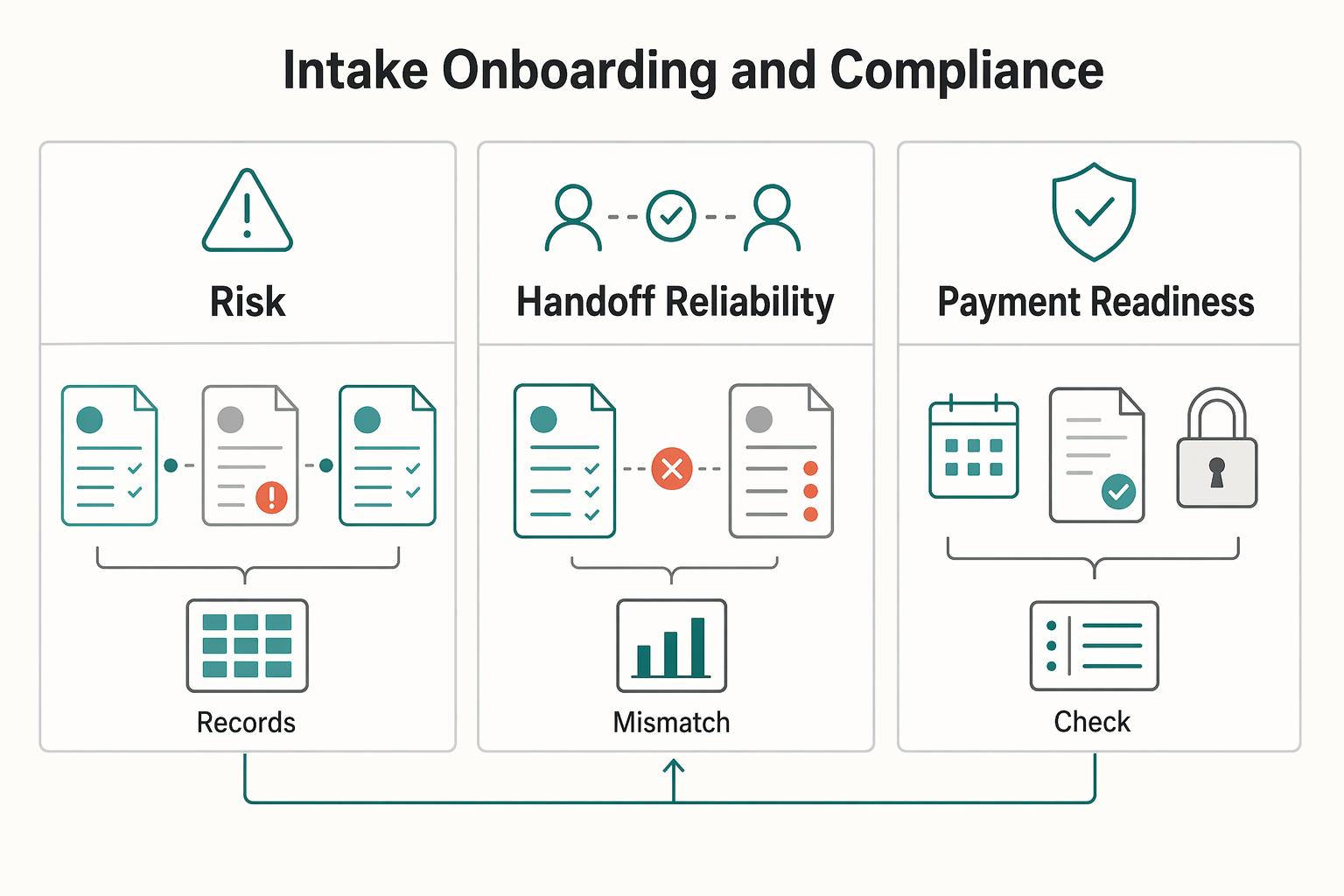
| Area | Manual lifecycle handling | Automated lifecycle handling |
|---|---|---|
| Error risk | Details are retyped across email, projects, and invoices | Client details are pulled from one linked record |
| Handoff reliability | Next steps rely on memory and inbox follow-up | Status changes trigger the next task automatically |
| Payment readiness | Invoices can go out with missing fields or inconsistent follow-up | Verified billing fields and status-based reminder branches are checked before send/follow-up |
Step 1. Trigger onboarding from a deal-stage change#
Use a deal-stage change (for example, Won) to start onboarding, then keep the sequence explicit: send required document requests, create the internal onboarding checklist, set onboarding to in progress, and hold work start until required fields are complete.
Keep the core logic in native automations. If you need e-signature, billing, or another external system, extend that step with webhooks. Checkpoint: one stage change should create one linked onboarding checklist and one outbound request, both tied to the same client record.
Step 2. Gate work until required fields are complete#
Set a hard work-start gate: no kickoff until required fields are complete. In practice, keep the project on hold until signed agreement status is complete, legal entity is filled, tax status is filled, jurisdiction is filled, and your internal billing-rule verification field is complete.
Test the gate directly. If someone can move a project to Active while required fields are blank, the control is not working. Also confirm project and invoice records pull client billing/legal data from the linked client record instead of relying on local re-entry.
Step 3. Branch payment follow-ups by invoice status#
Run reminders by invoice status, not ad hoc follow-up. Use a structured sequence (pre-due, due-date, overdue), then branch based on status:
- Paid: stop reminders and record the payment date.
- Disputed: pause reminders, create an internal follow-up task, and require a dispute note.
- Overdue: continue the next reminder step and flag for review.
This keeps communication consistent and reduces manual chasing. It also gives you real-time visibility into who is ready to start, who is blocked, and which invoices need attention.
For a step-by-step walkthrough, see A guide to creating 'Interfaces' in Airtable for client portals.
Automate project delivery with a clear trigger and action flow#
After onboarding is gated, delivery should run the same way every time. Build a clear trigger-and-action flow so kickoff, ownership, and client updates do not depend on memory.
Step 1. Build kickoff as a trigger-action map. Use a record matches criteria trigger so kickoff runs only when signed agreement status = complete and the client record is verified. Then run the actions in order:
- Create project record
- Link the task template
- Assign the delivery owner
- Run connected setup steps in Airtable, Google Workspace, and Slack
Checkpoint: one signed project should create one project record, one linked task set, and one setup trail tied to the same client. If you see duplicates, the trigger is probably firing on repeated edits instead of one locked condition.
Step 2. Add guardrails before status-based updates. Delivery drift usually starts when core fields are missing. Require internal status, project owner, due date, and a dependency check (for example, brief received or asset pack complete) before downstream automations run.
Because trigger invocations still count as runs even if later actions fail, test your criteria before enabling deadline nudges and chat notifications. On the Free plan, you get 100 runs/month and 2 weeks of history, and limits reset on the first day of each month.
| Area | Manual delivery management | Automated command-center flow |
|---|---|---|
| Handoff reliability | Kickoff depends on memory and inbox follow-up | Signed criteria create the project and next actions from one record |
| Missed-deadline risk | Due dates sit in scattered notes or calendars | Reminder actions fire from record dates and owner fields |
| Visibility | Status is split across chat, email, and memory | Project, task, and update state stay on one shared record |
Step 3. Separate internal progress from client-ready updates. Keep separate fields for internal status, client-facing status, approval state, and delivery link source. Trigger client updates only when approval state is ready and the delivery link source is populated, so you do not send incomplete or draft-only deliverables.
If you plan to use Airtable's send-email action, account for Free-plan limits early: it can email base collaborators, not arbitrary external client addresses.
Step 4. Archive for reuse, not disappearance. When a project reaches Complete, archive operational noise but keep the core record searchable. Archive closed tasks, chat references, and working files, while keeping the project record, client link, dates, owner, approval state, and final delivery links live for reporting and future reference.
This pairs well with How to Use Asana's 'Portfolio' Feature to Manage Multiple Agency Clients.
Your First Automation in 10 Minutes: A Step-by-Step Guide#
Your fastest first win is a simple lead-to-onboarding handoff: when a lead is truly qualified, Airtable creates the onboarding record and marks the lead as handed off. Keep version one linear. Automations are built around one trigger and one or more actions, and simple paths are easier to trust.
Before you start#
Use one table for the first build (for example, Leads) and confirm you can configure automations. Airtable supports automations across plan types, but limits vary. On Free, you get 100 runs/month and 2 weeks of history, runs reset on the first day of each month, and a run is counted every time the trigger fires even if an action fails.
Step 1. Set up fields so the handoff is unambiguous#
Set up fields so the handoff is unambiguous, then treat key inputs as required before a record can move forward.
- Lead name
- Lead email
- Service interest
- Intake status
- Qualified by
- Onboarding owner
- Onboarding handoff ready (yes/no)
Define Intake status values clearly before you automate (for example: New, Reviewing, Qualified, Not a fit, Handoff complete). If required handoff data is missing, keep the record in Reviewing and send it to a Needs info view for manual cleanup.
Step 2. Create a trigger that fires when the lead is ready#
Create the automation with a trigger that fires only when the lead is ready for onboarding. In practice, use a record-matches-conditions trigger with rules such as:
- Intake status = Qualified
- Onboarding owner is not empty
- Lead email is not empty
In this workflow, the trigger is the event that starts the run, and the action is what happens next. Test the trigger on one realistic sample record before you add more logic.
Step 3. Add the minimum actions for a reliable first handoff#
Add only the minimum actions needed for a reliable first handoff.
- Create a record in your Onboarding table with name, email, service interest, owner, and lead link.
- Update the original lead to Intake status = Handoff complete.
This prevents the same qualified record from repeatedly matching later edits and consuming additional runs.
Step 4. Dry run with a sample record you control#
Test like production, not like a demo, and do a dry run with a sample record you control.
- Record quality: Confirm the sample contains every field your actions need.
- Dry-run behavior: Confirm only the intended record runs, not older matching records.
- Error destination: Decide who checks failed runs and where they will check.
- Off switch: If it misfires, turn the automation Off and manually reverse created records or status changes.
If behavior is inconsistent, use Airtable troubleshooting guidance before activation.
Step 5. Turn it on after two clean test passes#
Turn it on only after two clean test passes, then monitor early live runs closely, especially if other automations in the same base can interact.
Your next build should be the onboarding-to-delivery gate: signed agreement complete and verified client record, then project creation. Add conditional logic only after this first handoff is stable. If your flow starts needing heavy branching or multi-source reasoning, consider moving that layer to Make.com. For commercial context after ops are stable, review Value-Based Pricing: A Freelancer's Guide.
Let automations control how work enters, moves, and gets billed#
You move into CEO mode when automations stop handling isolated tasks and start controlling how work enters, moves, and gets billed. Check this weekly: are compliance gates holding, is client communication consistent, and have you protected time for strategic decisions?
Step 1. Anchor handoffs to your source of truth#
Keep client, project, and finance activity tied to one Clients and Compliance hub so downstream work uses verified client data, not copied text. That is what makes compliance confidence operational, not theoretical.
When a deal is marked won, run a compliance-first onboarding sequence before delivery starts: signed contract and required tax forms first, then project execution. In your weekly review, sample newly won deals and confirm that no active work bypassed that gate.
Step 2. Use status-triggered actions for consistent delivery#
Client-facing consistency comes from status-triggered actions, not memory. When a project status changes, trigger the next operational step and the matching client update from that same event.
This can include moving delivery forward, sending a prewritten review update, and routing invoice preparation from verified client details. If relationship data is scattered, the failure pattern is predictable: duplicate outreach, uneven follow-through, and stale billing details.
| Dimension | Operator mode | CEO mode |
|---|---|---|
| Decision focus | Reacting task by task | Reviewing exceptions and priorities |
| Error exposure | Manual re-entry and missed steps | Lower exposure through status-triggered actions |
| Response speed | Driven by inbox and memory | Driven by record status changes |
| Time allocation | Admin-heavy week | More time for pricing, planning, and growth decisions |
Step 3. Validate before expanding automation#
Do not add a new automation until the current one is producing reliable outcomes. Use guardrails such as approvals, logs, and a clear boundary between what runs automatically and what still needs human review.
For your next review cycle:
- Identify one recurring manual task.
- Connect it to your source-of-truth workflow.
- Define the owner and the status trigger.
- Validate results on test records before expanding automation.
Frequently Asked Questions
How do you automate client onboarding in Airtable?
Use a record-matches-conditions trigger on a Leads or Deals table when a won deal is ready for onboarding. Then create records in Clients and Projects and send notifications for the next steps. If you need e-signature or file creation, add an external integration. Test with one record so each downstream step runs once.
How should you handle invoices that depend on client details or location?
Use an Invoices table linked to Clients and route steps with trigger conditions and actions based on client details or location. If invoice generation or payment collection happens in another app, hand it off through an integration or API. Airtable can apply your rules consistently, but it does not confirm that your tax wording or compliance logic is correct.
Can you track project profitability inside Airtable?
Yes, if Projects, Tasks, Expenses, and Invoices are structured so automations can keep data in sync. That gives you a live view of margin without exporting everything to spreadsheets first. Watch for bad input hygiene, because late time entries, missing expense links, or unapproved invoices can distort the numbers.
Should you start from a template or build your own base?
Start from a template when you need a faster starting point and your process is still settling. Choose a base close to your sales or delivery flow, then standardize statuses, field names, and linked tables before adding automations. If the template includes clutter, untrusted fields, or ignored statuses, fix the structure first.
How do you create a real single source of truth for client data?
Use Clients as the source of truth and link Projects, Invoices, and Tasks back to it instead of copying client details into multiple tables. Reference names, addresses, and contact details from that one place. Watch for duplicate client records, because automations can route work and billing to different places without an obvious error.
What is the right way to connect Airtable to other tools?
Start with native Airtable automations when the process begins with an Airtable event and mostly ends there. Build from a trigger like a new record or a record that matches criteria, then choose native actions, a third-party integration layer, or the API if you need more control. Long chains across tools can introduce delays and make failures harder to trace. Implement onboarding first, lock down Clients as your source of truth, and add invoice or profitability logic after that.
Try a related tool
Researched and edited by the Gruv editorial team. Gruv builds cross-border billing, payouts, and finance-operations software for global businesses.
Sources
Includes 6 external sources outside the trusted-domain allowlist.
- egrove.olemiss.edu/cgi/viewcontent.cgitrusted
- justiceinnovation.law.stanford.edu/category/class-blogtrusted
- airtable.com/guides/customize/save-time-with-automationsexternal
- airtable.com/videos/explore-airtable-automationsexternal
- cotera.co/articles/automate-airtable-workflows-guideexternal
- github.com/viktorbezdek/awesome-github-projectsexternal
- gruv.ai/blog/how-to-use-airtable-automations-to-stre...external
- instagram.com/reel/DPeokxxDtgWexternal
Educational content only. Not legal, tax, or financial advice.
Related Posts

Value-Based Pricing for Freelancers Under Real Payment Risk
Value-based pricing works when you and the client can name the business result before kickoff and agree on how progress will be judged. If that link is weak, use a tighter model first. This is not about defending one pricing philosophy over another. It is about avoiding surprises by keeping pricing, scope, delivery, and payment aligned from day one.
How to Write a Follow-Up Email That Closes the Deal
**Run every freelance follow-up email like a mini sales process that turns uncertainty into one clear next step.** As the CEO of a business-of-one, your job is to turn messy inbox threads into clean decisions you can actually plan around.
How to Use Make.com to Automate Onboarding, Compliance, and Cash Flow for Your Freelance Agency
If you judge automation by minutes saved, you will choose the wrong projects. In Make, the real win is not shaving ten minutes off admin. It is preventing the expensive miss: a client dispute, a missing approval before delivery, or a filing gap that becomes a problem later. Faster is nice. Correct, provable, and repeatable is what protects revenue.