
Quick Answer
Identify a client need outside the agreed work, distinguish an upsell from a complementary cross-sell or rate change, and recommend a bounded offer. Define deliverables, price, dependencies, acceptance, revisions, and exclusions. Check budget, signer, procurement, and invoice requirements, then obtain the recognized scope approval before kickoff. Review delivery and outcomes, and link the agreement, invoice, customer payment, fees, payout, and bank receipt.
Offer existing clients a useful, clearly scoped next step#
An upsell gives an existing client a more substantial version of the service they already buy. A cross-sell adds a complementary service. Start with a genuine client need, explain the added work and price, and obtain the required approval before delivering it. The five offers below give you practical ways to do that without turning every request into an informal side deal.
For example, a client who bought landing-page copy may also need a three-email onboarding sequence. Check whether it serves their current goal, whether you can deliver it, and whether the original contract already includes it. Additional revenue is useful only when the added work fits your capacity and the client can make an informed choice.
Use current project evidence: agreed goals, recent feedback, delivery status, remaining budget, and the client's approval process. Do not rely on an old conversation as authorization to charge for new work.
The four checks that make an offer usable#
Use these four checks before you pitch anything. They are workflow checks, not legal or compliance requirements.
| Readiness check | What "yes" looks like | Fix first if "no" |
|---|---|---|
| Named offer | You can describe the added work in one plain sentence with a clear outcome | Rewrite the offer until the outcome is obvious |
| Current inputs | You are using current project context, not old notes or memory | Refresh the inputs before proposing the add-on |
| Repeatable steps | You can explain the steps in order from request to delivery | Simplify the flow until the sequence is clear |
| Consistent evaluation | You can compare offers with the same criteria each time | Define a small scoring rubric and reuse it |
The checkpoint that matters most is input quality: are you working from current, inspectable information? If the answer is "it is somewhere in chat" or "I remember discussing it," you likely have an information problem before you have a sales problem.
A practical verification step is to open one recent client file and test whether a third party could follow what changed and what was proposed without asking you questions. If not, the process still depends too much on you.
Who this list is actually for#
This article is for you if you want repeatable account growth. You want to expand client work through offers that can be scoped and delivered through a consistent process, not through improvised "while we are here" selling.
If these patterns sound familiar, fix them before proposing more work:
- You pitch extra work whenever a call feels warm, then figure out the details later.
- You use add-ons to rescue a weak base project instead of fixing the underlying delivery issues.
The rest of this article assumes you want objective decisions, not guesswork. Think of it like a scoring model for your own offers: do not ask "could I sell this?" first. Ask "can I define it, evaluate it consistently, and run it as a repeatable process?" From there, the sequence is straightforward: Diagnose, Design, De-risk, Deliver. Related: How to Raise Freelance Rates Without Losing the Right Clients.
Upsell vs. Cross-sell vs. Rate Increase: What Actually Changes?#
Your first step is to classify the move correctly, because that choice drives your scope record, approvals, invoicing, and delivery risk controls.
Upsell#
Plain-language outcome: you expand the same core service into a higher-tier version. Example: monthly reporting becomes monthly reporting plus implementation support, with one added KPI and updated acceptance criteria. Operational consequence: when scope changes, update the scope record (for example, an SOW addendum or change order) so deliverables, definition of done, and line-item invoicing stay aligned.
Cross-sell#
Plain-language outcome: you add a complementary service alongside the original service. Example: landing page copy stays in place, and you add a three-email onboarding sequence with two revision rounds and final delivery in Google Docs. Operational consequence: keep the original scope intact, document the add-on separately, set acceptance criteria for it, and itemize it on the invoice.
Rate increase#
Plain-language outcome: you change price without adding a new deliverable. Example: the same monthly design retainer renews at a higher fee with the same deliverables and response times. Operational consequence: treat this as a pricing update path, not a scope expansion; confirm with the client (and procurement, if involved) whether they need a pricing notice, renewal update, or agreement update.
| Move | What changes | What stays the same | Documentation to agree | Main delivery risk |
|---|---|---|---|---|
| Upsell | Scope, deliverables, and usually price | Core service type and client goal | Scope-change record (for example, SOW addendum or change order), updated acceptance criteria, line-item invoicing | Expanded scope without clear boundaries |
| Cross-sell | A complementary add-on, and usually price | Original deliverable; check approval requirements for the added service | Separate add-on scope record, add-on acceptance criteria, line-item invoicing | Add-on feels random and hurts client experience |
| Rate increase | Price | Service scope and deliverables | Pricing update record the client accepts (for example, pricing notice, renewal update, or agreement update) | Client reads it as hidden scope change |
Before you send any proposal, confirm four things in one sentence each: what changed, where it is documented, how acceptance will be checked, and how it will appear as a line item.
For a step-by-step walkthrough, see A Freelance Designer's Guide to Presenting Work to Clients.
A four-step process: diagnose, design, confirm approval, deliver#
Use this four-step loop when you want expansion revenue without scope chaos: diagnose fit, design the package, de-risk approvals, then deliver proof. The goal is collaborative progress, not a win-lose pitch.
Run the steps in order. Each one removes a different risk before you move on.
Diagnose#
Before you pitch anything, confirm three inputs: the KPI the client wants to move, the constraints that could block progress, and the definition of done in plain language. If one is unclear, pause and clarify first. What you produce: a short diagnosis note (or recap email) that states what should change, what could block it, and what "finished" means.
Design#
Turn that diagnosis into a bounded offer by mapping the work type to a pricing model and scope controls. Define acceptance criteria and revision limits so delivery does not drift after kickoff. What you produce: a scoped proposal or updated SOW section with deliverables, pricing basis, acceptance criteria, and revision boundaries.
De-risk#
Confirm the approval path before you send documents. In practice, that means checking who controls budget, who signs, whether procurement or a PO is needed, and which contract update format the client expects (for example, addendum, amendment, or change order). What you produce: an approval-ready document pack aligned to the client's process.
Deliver#
Review what was delivered against the agreed acceptance criteria. When business outcomes can be measured, report the observed change and the comparison period; separate your contribution from other changes that may explain it. Use a delivery or adoption signal while outcomes are still developing, then agree the next review date. Do not promise ROI you cannot substantiate.
| Step | Step goal | Required inputs | Output document | Common failure mode |
|---|---|---|---|---|
| Diagnose | Confirm client-fit before proposing | KPI, constraints, definition of done | Diagnosis note or recap email | Pitching before the problem is clearly agreed |
| Design | Package work for clean delivery | Work type, pricing model, acceptance criteria, revision limits | Scoped proposal or updated SOW section | Vague scope that expands during delivery |
| De-risk | Align approvals and paperwork to money ops | Budget owner, signer, procurement/PO requirement, contract update path | Approval-ready document pack | Sending the right offer through the wrong approval path |
| Deliver | Review delivery and observed outcomes | Acceptance evidence, observed outcomes or leading indicators, limitations, and next review date | Results review | No clear proof, so the next decision stalls |
Related reading: Create a Freelance Lead Magnet That Filters for Ideal Clients.
What Should You Offer Next (Without Guessing)?#
Offer the next service only when it makes the current engagement more valuable. If it does not clearly improve the work the client already bought, do not pitch it yet.
Run this sequence every time: map value, score options, block unsafe pitches, then choose the format. This keeps relevance and execution quality ahead of sales momentum.
Map value across 3 stages#
Build a simple Client Value Map for before, during, and after the current work. For each stage, define one target KPI, one dependency, and one proof-of-value signal. In practice: one outcome to move, one condition that must hold, and one signal you can point to later. Use this map to keep your recommendation tied to the client's current decision, not bolted on.
Prioritize with ICE for consistency#
ICE means impact, confidence, and ease. For this article's proposed adaptation, score each from 1 to 10, where higher ease means less delivery effort, and average them: (impact + confidence + ease) / 3. A hypothetical email add-on scored 8, 6, and 7 averages 7; a diagnostic scored 6, 8, and 9 averages 7.67. Keep notes on the evidence and assumptions, and screen for capacity and approval constraints before choosing. A score ranks your estimates; it does not predict revenue. GrowthHackers' ICE documentation describes the averaging approach.
Apply a do-not-pitch-yet filter#
Before starting paid added work, confirm acceptance criteria, signer or procurement requirements, and invoice details. You can ask about interest or send a diagnostic proposal while questions remain, but mark assumptions clearly and resolve authorization before kickoff. A request to receive a proposal is not approval to perform and bill the work.
Match certainty to the offer format#
Once an option passes the filter, pick the format that fits the situation.
| Situation | Offer format | Paperwork trigger |
|---|---|---|
| Outcome is still unclear | Diagnostic | New proposal or its own SOW |
| Scope is clear and bounded | Scoped add-on | Change order or SOW update |
| Need is ongoing | Retainer | Addendum with recurring scope rules |
| Approval path is slow or complex | Option memo | Written options first, formal paperwork after selection |
Let offer type follow certainty and approvals, not enthusiasm.
We covered this in detail in Build a Freelance Customer Journey Map You Can Run Every Week.
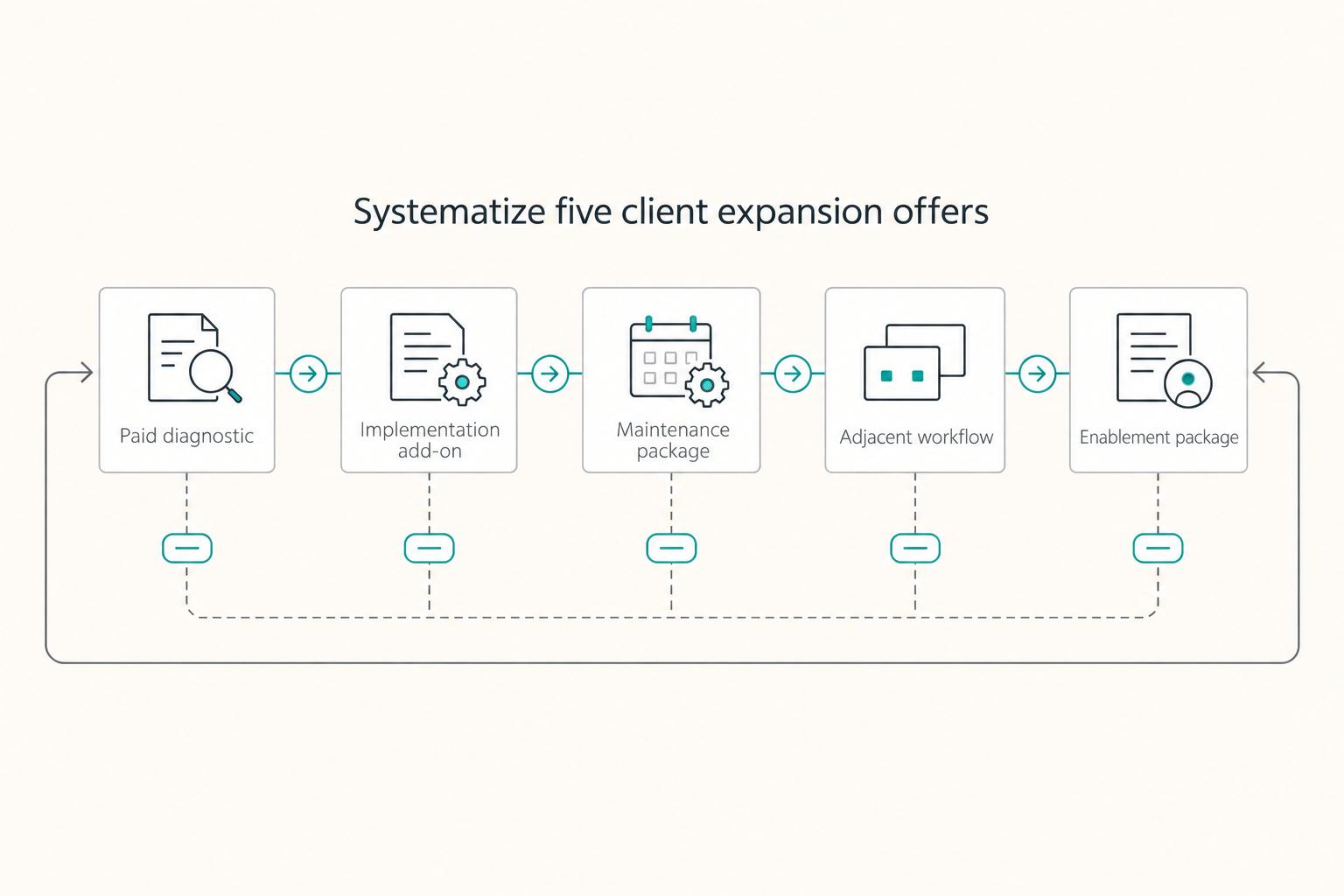
The Best Ways to Upsell and Cross-Sell Existing Clients (5 Offers You Can Run Like a System)#
Use a short, repeatable offer menu and route each offer to the right document before you pitch it. That is how you keep scope clear, approvals clean, and invoicing traceable.
Use this practical routing default: a new SOW when the work stands alone, a change order or SOW addendum when it modifies active scope, and a retainer (or retainer addendum) when the work repeats on a cadence. Before sending anything, confirm the KPI, signer, procurement/PO path, and the acceptance event that triggers invoicing.
| Offer type | Best-fit scenario | Potential delivery concern | Approval requirements to check | Primary scope-control lever | Default documentation route |
|---|---|---|---|---|---|
| Paid diagnostic | Outcome is clear, but inputs are not | Discovery expands beyond the agreed artifacts or interview limit | Check this client's signer, budget, and procurement requirements | Fixed artifacts + written acceptance criteria | New SOW |
| Implementation add-on | Direction is chosen and execution is next | Dependencies or revisions expand implementation scope | Check this client's signer, budget, and procurement requirements | Dependencies, milestones, revision limits | Change order or SOW addendum |
| Optimization retainer | Asset is live and needs ongoing tuning | Small recurring requests exceed the agreed capacity | Check this client's signer, budget, and procurement requirements | In-scope list, cadence, ticket/hour cap | Retainer or retainer addendum |
| Adjacent workflow cross-sell | A complementary service helps the client use the original purchase | The adjacent service exceeds your expertise or delivery ownership | Check this client's signer, budget, and procurement requirements | Tight deliverables, role boundaries, contract coordination notes | Usually addendum/change order; new SOW if fully separate |
| Enablement package | Adoption and handoff are the bottleneck | Training attendance or adoption differs from the agreed plan | Check this client's signer, budget, and procurement requirements | Named handoff assets, attendee limits, sign-off | Usually SOW addendum |
Paid diagnostic#
Use this when the client wants better results but cannot define the work yet. Include fixed outputs (for example: KPI definition, current-state findings, prioritized recommendations), required inputs, and interview limits. The main failure mode is turning discovery into open-ended consulting. Done looks like delivery and acceptance of the named artifacts.
Implementation add-on#
Use this when the plan is chosen and the client wants build or execution support. Include exact deliverables, dependencies, revision limits, and milestone approvals, then attach it to the active paperwork route. The failure mode is silent expansion after initial approval. Done looks like each deliverable accepted against a clear checkpoint tied to the target KPI.
Maintenance and optimization retainer#
Use this after launch when performance needs regular improvement, not one-off fixes. Include recurring scope, reporting cadence, response window, explicit out-of-scope items, and unused-work rules. The failure mode is "quick asks" turning into unlimited support. Done looks like a monthly package of completed work, KPI observations, and next-cycle priorities.
Adjacent workflow cross-sell#
Use this when a complementary service can help the client use the current purchase more effectively. For example, add an onboarding email sequence to an approved landing page, with its own deliverables and fee. If data access is needed, identify the systems, permissions, handling responsibilities, and any required client or legal review before kickoff. Do not sell a paid add-on to repair a defect already covered by your original scope.
Enablement package#
Use this when adoption is the gap, not production. Include training sessions, SOPs, recorded walkthroughs, office-hours limits, and named attendees. The failure mode is selling "docs" without operational uptake. Done looks like agreed handoff assets delivered and a visible capability marker in the client team.
If two offers are still close, pick the one with lower approval friction and cleaner proof of done. Next, decide timing so the offer lands when buying resistance is lower and the value fit is obvious; for relationship context, see The Psychology of Freelance Client Retention for Long-Term Relationships.
When Is the Best Time to Upsell a Client (So It Doesn't Feel Pushy)?#
Upsell when the next step clearly helps the goal the client already hired you for, and when you can show that need in writing. If you cannot connect the offer to the current KPI, acceptance criteria, or definition of done, wait.
| Timing window | Client signal to confirm first | Use this when | Recommended action | Update this artifact | Risk if you skip paperwork |
|---|---|---|---|---|---|
| Before delivery | A useful additional outcome lies outside the current scope | The client can benefit from additional work beyond what was already promised | Explain the separate opportunity; correct any defect covered by the original scope before proposing paid extras | SOW addendum | Extra work is treated as already included |
| At delivery | Current acceptance criteria are met and a new constraint is now visible | The first scope is done, and there is a separate next decision to make | Close the base work, then present the next step with clear pricing and scope | change order | Client reads it as unfinished work from the original scope |
| After delivery | Need is recurring, not a one-off favor | Ongoing optimization or support is needed over time | Move ad hoc requests into a recurring package with a review cadence | retainer agreement | Small requests turn into unpaid support |
| Trigger event | A real change creates a related need | A new need is directly connected to the original service | Run a quick diagnosis, then offer the smallest relevant package | change order or SOW addendum | The offer feels opportunistic instead of useful |
| Async decision | The buyer responds in writing but scheduling is slow | You can get a clear yes/no without a live call | Send two scoped options with price and explicit approval path | documented approval note | Interest stays verbal and scope stays unapproved |
Keep the offer closely related to the original service, and keep upgrade pricing transparent. That is usually the difference between value-focused upselling and pushy selling.
Wait if these are still unresolved#
Resolve these issues before starting an add-on. An exploratory proposal can identify assumptions, but should not imply the work is already authorized:
- Current scope is still unstable.
- Approval owner is unclear; resolve this before work starts.
- Acceptance criteria are unresolved or undocumented.
- You cannot show the expected KPI impact or updated definition of done.
- New requests are coming in, but support vs. new scope is not separated.
Choose a timing window when the client can assess the need and the approval route is clear. Allow the actual review time; a same-day decision is not a requirement.
Package and price added work with clear boundaries#
To reduce scope creep, package the work before you price it and make approval points explicit. Before you send any upsell, define what you will deliver, how "done" is judged, how revisions work, and what is not included.
Good/Better/Best can compare different outputs or defined service levels. Name what changes at each tier so the client can compare the cost with the work or response commitment. Jobber's service-business guide illustrates tiered quotes; the freelance packages here are proposed examples rather than proven sales benchmarks.
| Tier | Deliverables you must name | Definition of done | Acceptance criteria | Revision policy | Explicit out of scope |
|---|---|---|---|---|---|
| Good | One core deliverable | Delivered in the agreed format after required inputs are received | Checked against the list in the SOW addendum or change order, then signed off in writing | State the revision window and what counts as a revision vs. a new request | Net-new assets, extra stakeholder rounds, ongoing support |
| Better | Core deliverable plus one supporting asset | Both listed items are complete and ready for handoff | Each item is reviewed against its own checklist | Define revisions per deliverable so one item does not consume the full package | Extra variants, launch support, channel expansion unless listed |
| Best | Full package plus rollout or enablement asset | All listed items are delivered, approved, and handed off with final files | Use sign-off gates by stage, or one final sign-off tied to named artifacts | Tie revisions to stages and name who can request changes | Post-handoff maintenance, reporting, training, or advisory access unless included |
Estimate delivery hours, software or external costs, overhead, capacity, and margin. For the hypothetical USD 900 email package, 10 hours at an internal USD 50 cost rate plus USD 100 allocated costs gives a USD 600 delivery cost and USD 300 contribution before any omitted expenses or income tax. Two unplanned hours at that rate reduce the contribution to USD 200. This is a pricing check, not a rate recommendation; revision limits and dependencies protect the estimate.
Use this billing-model matrix to match packaging and risk:
| Billing model | Best fit | Required approvals to define up front | Scope-creep risk if omitted |
|---|---|---|---|
| Fixed-scope addendum | Deliverables and acceptance criteria are already stable | Written SOW addendum or change order before work starts | Add-on work gets treated as part of the original scope |
| Milestone billing | Work unfolds in stages and later phases depend on earlier outputs | Sign-off gate per milestone before next phase/invoice | Late feedback forces rework across phases |
| Retainer | Recurring support where service level and access must be explicit | Signed retainer with included work, service level, and response-time expectations | "No real deliverable" ambiguity turns small asks into unpaid work |
If response speed distinguishes retainer tiers, specify business days, the applicable timezone, service hours, request channel, and whether the commitment covers acknowledgement or completed work. For example, 4, 3, and 2 business days can be hypothetical acknowledgement targets; price them only if your capacity supports them.
Documentation minimum for every upsell package:
- assumptions and dependencies
- client responsibilities and review windows
- response-time expectations
- handoff artifacts
- payment incentive terms confirmed in the signed agreement
This pairs well with Build a Freelance FAQ Page That Pre-Qualifies Clients.
Paperwork, Approvals, and Money Ops: Make Every Upsell Traceable (Even Cross-Border)#
After the client says yes, your job is to make the change easy to approve, easy to process, and easy to reconcile. Use one decision-ready proposal, one clear approval route, and one traceable payment record.
Send a one-page proposal first#
Keep it to operational inputs only so someone can approve quickly and you can govern delivery later:
| Element | What it covers |
|---|---|
| Problem | the bottleneck or risk you are addressing |
| KPI impact | the one outcome you expect to improve |
| Bounded scope | what is included and what is out |
| Assumptions | access, assets, dependencies, response times |
| Acceptance | how "done" is judged and who signs off |
| Price | one approvable line item |
Before sending, do one alignment check: the scope label and price line in the proposal should match the contract update wording.
Route approval before work starts#
Map the roles early so approvals do not stall:
| Role | Responsibility |
|---|---|
| Economic buyer | budget owner |
| Authorized signer | paperwork approver |
| Procurement | purchasing workflow contact (if applicable) |
| PO owner | internal PO/contact reference owner (if applicable) |
Use this short routing checklist in your first approval thread:
- Who owns budget approval for this change?
- Who can sign the contract update?
- Does procurement review apply before start?
- Does any PO or internal reference need to appear on the invoice?
- Which contact and email should receive the invoice for processing?
Keep a ready-to-send packet and a clean audit trail#
Keep a ready-to-send packet with the billing identity, contact, agreed scope and fee, currency, payment instructions, and any actual onboarding requirements. Record missing items with an owner and next step. Tax forms depend on the parties and transaction, so request the applicable documents securely through the client's approved process rather than treating an unverified generic packet as complete.
Include a unique invoice number, issue date, client details, contact, itemized services, currency, tax details where applicable, and a calendar due date. For a hypothetical invoice issued May 29, 2026, Net 30 measured as 30 calendar days after issue gives June 28, 2026. If the contract instead starts the clock at acceptance or specifies business days or holiday handling, use that agreed trigger and date.
| Stage | Owner | Required record | Failure risk if missing |
|---|---|---|---|
| Proposal | You | One-page proposal with problem, KPI impact, scope, assumptions, acceptance, and one price line | Approval is slow or scope is remembered differently later |
| Contract update | You + client signer | Signed amendment that matches approved scope and price | Work starts informally and is later treated as part of prior scope |
| Invoice | You | Invoice number (for example, 0001), issue date, specific due date, client details, primary contact, itemized services | Payment is delayed, misrouted, or disputed |
| Payment confirmation | You | Customer payment reference and amount matched to the invoice, plus fees, conversion, provider payout reference, and bank-credit reconciliation where applicable | Cross-border reconciliation becomes unclear |
Before sending, match the proposal, accepted contract update, and invoice on client identity, scope label, amount, currency, and acceptance reference. If the sender is an authorized paying agent rather than the contracting client, retain that explanation. Match the customer payment to the invoice and separately trace provider fees, conversion, payout, and bank receipt; a provider hold after the client has paid is not permission to collect the invoice again.
You might also find this useful: How to use 'Commitment and Consistency' to retain clients.
Prepare one offer for the next suitable opportunity#
Your next upsell should feel routine to approve, document, and invoice. Keep it relevant and simple, and run the same Diagnose → Design → De-risk → Deliver loop each time instead of improvising.
Reuse one five-part Value Map#
Before you pitch, fill in the same five fields every time:
| Field | What to note |
|---|---|
| Client goal | the outcome they already care about |
| Current constraint | what the current scope is not solving |
| Bounded next step | the smallest paid addition worth approving |
| Proof signal | what you will show when the work is complete |
| Required approval artifact | what this client accepts as approval (for example, written yes, addendum, or change order) |
The map should let the client understand the recommendation, expected proof, and approval needed. Use a benchmark only when you can verify its source, relevant population, date, and meaning. Otherwise explain the proposed outcome and assumptions without adding a number that looks like evidence.
Standardize one offer and the three defaults around it#
Pick one default offer, then standardize the admin around it.
| Default | What you standardize | Failure it is designed to prevent |
|---|---|---|
| Scope template | Included work, exclusions, acceptance criteria, timeline | Scope creep and "I thought that was included" disputes |
| Approval path | Signer, procurement check, PO need, and where approval is recorded | Approval delays and wrong-person signoff |
| Invoicing model | One default per offer (for example, fixed fee or monthly retainer) | Payment follow-up drift and invoice confusion |
Keep the record trail together: proposal, approval message, invoice, and proof signal in one thread or folder. If your pricing still feels improvised, review How to Calculate Your Billable Rate as a Freelancer. On your next opportunity, confirm your default offer, document the approval route, and run the same workflow again.
Frequently Asked Questions
What is the difference between upselling and cross-selling as a freelancer?
An upsell usually expands the work you already do for that client by adding depth, coverage, or a higher-service variant. A cross-sell usually adds a related service alongside the original one. In either case, put the added scope and price in writing.
Is upselling the same as raising your rates?
No. A rate increase can be only a pricing change, while an upsell changes what you deliver or how much of it you deliver. If the client gets the same outputs, treat it as a pricing update. If scope changes too, treat it as added work. For more on pricing itself, see How to Calculate Your Billable Rate as a Freelancer.
How do you make an offer without sounding pushy?
Only pitch when you can name three things clearly: the client goal, the current constraint, and the bounded next step you recommend. If you cannot do that, hold the pitch and keep diagnosing. Never create a problem by leaving something broken so you can sell the fix later.
When is the best time to suggest more work to an existing client?
The cleanest moment is when you can point to a real gap between the client's goal and the current scope, not when you simply want more revenue. Existing clients already spare you some of the overhead of finding and onboarding new work, but that does not mean every extra idea is a fit. If you cannot clearly define what the add-on will improve before you pitch it, wait.
How should you pitch an add-on by email if there is no call?
Ask permission to send the scoped offer, then obtain the required work authorization separately. For example: "Your landing page is approved. You mentioned that new subscribers do not receive an onboarding sequence. I can propose three emails in Google Docs, two revision rounds, for a fixed USD 900; implementation and list migration would be excluded. Would you like the one-page proposal? The current project and price stay as agreed if you decline." These are illustrative terms, not a market rate. A yes to receiving the proposal is interest, not a signed scope change.
How should you price an add-on or upsell, and should you discount it?
Price the added scope against delivery effort, overhead, capacity, risk, and the value the client expects. Fixed fees can suit bounded outputs; hourly or capped work can suit unresolved requirements if tracking and approvals are clear. Do not discount by default. If you offer a discount, define the reduced scope or explicit commercial reason and show the actual price, rather than making unsupported claims about savings.
Do you need a new contract, or is a change order enough?
Check the amendment or change-control clause in the existing agreement and the client's approval requirements. For an active-scope change, prepare the recognized addendum or change order with named deliverables, price and currency, dependencies, acceptance, revisions, timetable, and payment terms. State which original terms remain in effect and obtain approval from the authorized parties. Standalone work may use a new SOW; recurring work needs explicit retainer rules. Ask about a specific unresolved requirement before starting, rather than assuming an email from any contact is sufficient.
Try a related tool
Researched and edited by the Gruv editorial team. Gruv builds cross-border billing, payouts, and finance-operations software for global businesses.
Sources
Includes 3 external sources outside the trusted-domain allowlist.
Educational content only. Not legal, tax, or financial advice.
Related Posts
How to Calculate a Freelance Rate You Can Actually Get Paid On
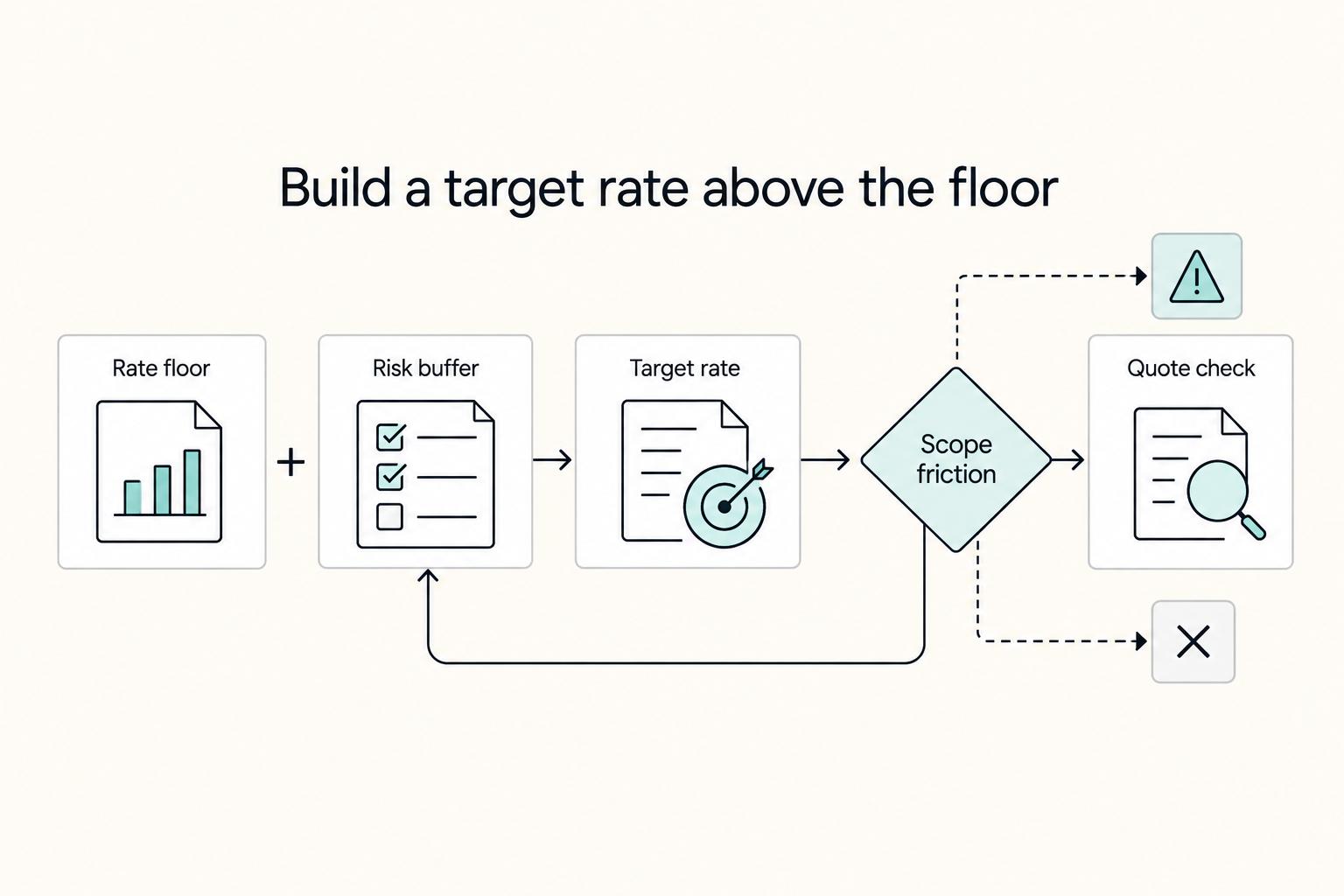
A workable rate is not the neat number a calculator produces. It is the number that still works after you account for real billable capacity, non-client time, scope drift, and the gap between sending an invoice and receiving cleared cash. Start with hourly math even if you do not plan to bill hourly, then turn that number into a quote with clear `payment terms`.

The Freelance Payment Penalty: A Modeled Audit of Platform Fees, FX Spreads, and Payout Delays
The money rarely disappears through a single, easy-to-spot fee. The real loss is stacked. A marketplace takes its commission, a processor adds a charge for international cards, a bank or payment company converts the currency at a spread, a platform holds the funds before release, and a wire sheds a little to intermediaries on the way in. Each layer looks defensible on its own, but the worker feels the combined result as a smaller deposit and a later payday.

How to Respond to a Subpoena for Business Records
Move fast, but do not produce records on instinct. If you need to **respond to a subpoena for business records**, your immediate job is to control deadlines, preserve records, and make any later production defensible.