
Quick Answer
Teach your kids about online privacy by combining parental controls with coaching and a simple family privacy plan. Start with a quick audit of your current rules, then create a one-page charter for posting, app downloads, permissions, and reporting mistakes. Use every new app to teach what it gives, what it takes, and when to pause before sharing.
What Parental Controls Cover and What They Miss#
If you want to teach kids about online privacy well, treat your child's digital identity as something you actively manage, not just something parental controls can lock down. Controls still matter, but they mainly help with immediate device and app boundaries. Long-term privacy risk is different. It involves data collection, persistent identifiers, profiling, and a digital record that can affect identity and reputation long after a screen-time limit ends.
In practical terms, updates, privacy settings, content filters, and purchase limits can reduce immediate harms like unauthorized access and data breaches. But your child's online risk also includes privacy, identity, and reputation, so controls need to be paired with ongoing parent involvement and app awareness. Tools can set boundaries, but they may not build judgment on their own.
| Approach | Scope | Strengths | Blind spots | Likely outcome |
|---|---|---|---|---|
| Parental controls only | Device settings, content limits, screen time, purchases | Useful first layer for immediate safety and boundaries | Limited coverage of profiling, long-term data trails, and choices made outside controlled settings | Better short-term control, with less support for long-term decision-making |
| Family digital risk management | Devices, apps, data sharing, posting habits, family rules, response steps | Combines controls with coaching and a family online safety plan | Requires more parent time and consistent conversations | Clearer habits and response steps over time |
There is a real tradeoff. The American Academy of Pediatrics notes that restrictive monitoring can make it harder for teens to build autonomy, and that rules alone may not reduce exposure to online risks. If you only monitor, you may get compliance in the moment without better judgment over time.
Start by assessing your family's exposure. Then create a short family online safety plan for apps, sharing, and what to report immediately. Then teach your child to question permissions and remember that posts, comments, and images can last. By the end, you will have a practical plan and checklist you can use at home.
Step 1: Conduct a Digital Risk Assessment#
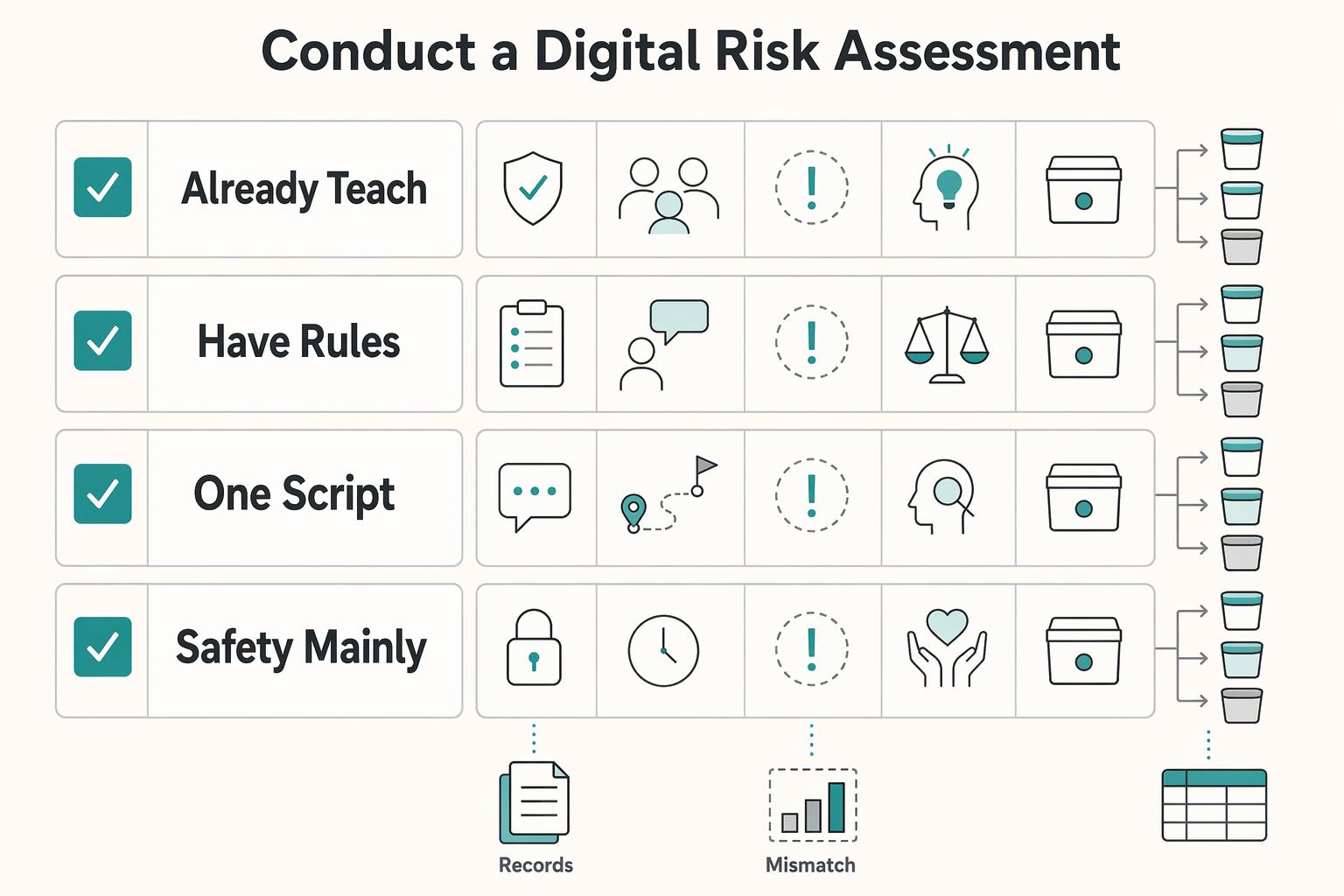
Do not start by adding new rules. Start with a baseline audit of how internet safety is currently taught at home. Your goal is to document where your approach is rule-only, where it already builds judgment, and which gaps need follow-up before Step 2. Use one note or spreadsheet and track each finding with: current guidance, real-world situation, rule-only gap, critical-thinking skill needed, and Step 2 rule bucket.
| Common parent assumption | What your audit may reveal | Immediate corrective action |
|---|---|---|
| "We already teach internet safety, so we're covered." | Your guidance is mostly dos-and-don'ts, but many real situations are detailed and require judgment. | Split current guidance into two lists: fixed rules and judgment skills to teach. Carry both into Step 2. |
| "If we have rules, we don't need to revisit them." | Some rules work for simple cases but do not fully cover more complex online dilemmas. | For each rule, note where it works and where a child still needs a decision process. |
| "One script works in every online situation." | Different situations may need context-based choices, not one memorized response. | Add a short decision checklist your child can use when a situation does not fit a clear rule. |
| "Safety is mainly about blocking bad behavior." | Gaps often appear where a child needs decision-making, not just compliance with rules. | Add those gaps to a training list so Step 2 includes how to think through gray-area choices. |
1. Inventory your current internet-safety guidance#
Gather your existing household rules, reminders, and scripts. Mark each item as either fixed rule or judgment-based skill, and note where you currently teach or reinforce it.
2. Test rules against nuanced situations#
Pick recent or likely online dilemmas and check whether each can be handled by a rule alone. If not, record what additional judgment is needed so you can address it in Step 2.
3. Identify critical-thinking gaps#
Create a gap list for moments where a child must evaluate context, not just follow a memorized instruction. Assign each gap an owner and next action.
4. Map recurring decision points#
List the situations that come up repeatedly and mark whether your current approach is rule-only or judgment-building. Prioritize the items that appear most often.
The checkpoint is simple: older internet-safety teaching often emphasized dos-and-don'ts, but today's challenges are more detailed. Your plan should build critical-thinking habits too.
As a practical benchmark, Common Sense Education's August 26, 2025 roundup includes 30 lesson plans for grades K-12. That reinforces this shift from memorized rules to decision skills.
End Step 1 by turning your findings into a Step 2 register with three buckets: clear rule, judgment skill, and parent escalation.
Step 2: Draft Your Family's Digital Privacy Charter#
Now turn the audit into rules your family can actually use. Build the charter with your child so daily decisions feel consistent, not arbitrary. Run this as a calm working session, not during an argument, and revisit it through regular conversations as apps and habits change. Keep the charter simple: one page of rules plus one app-intake checklist.
Write the Family PII table#
Start by defining what your family treats as sensitive information, then set the default privacy position for each category. Start from private unless there is a clear reason to share.
| Data category | Where it can be shared | Approval required | Default privacy setting |
|---|---|---|---|
| Direct identifiers such as full name, home address, phone number, school name, passwords | Never on public profiles or open posts | Always | Private or not entered unless necessary |
| Photos or videos that reveal face, location, school logo, bedroom, routine, or geotag | Only with known people in limited audiences | Parent approval before posting | Audience limited, location sharing off |
| Contact graph such as friends' names, contacts, followers, group memberships, usernames | Only when needed for a specific app function | Parent approval before syncing or importing contacts | Contacts sharing off |
| General interests and low-risk content such as hobbies, favorite books, non-personal opinions | Allowed more broadly if it does not identify child, school, routine, or location | Child can decide within agreed limits | Most restrictive setting that still allows intended use |
As you fill this out, use one quick check for each post: what it says, who can see it, and what happens if it is reshared.
Run every new app through the same intake checklist#
Consistency matters more than perfect judgment in the moment. Use the same intake every time instead of deciding from scratch:
| Question | Review focus |
|---|---|
| What is the app for, and is there a real need? | Purpose and real need |
| What data access does it request? | Requested data access |
| Does it expose your child to unknown accounts or unwanted contacts? | Exposure to unknown accounts or unwanted contacts |
| Does it use location, and is that necessary for core use? | Location use and core need |
| Does it rely on ad tracking or broad data collection? | Ad tracking or broad data collection |
| Can you find the account deletion path before sign-up? | Deletion path before sign-up |
End each review with one outcome: approve, approve with restrictions, or decline. Before approval, confirm three things together: the permissions screen, the privacy settings page, and the deletion path. If you cannot find them quickly, treat that as a warning sign.
Set enforcement before exceptions#
Rules break down when nobody owns the decision. Make responsibility explicit so the charter holds up in real life. For example, your child can decide low-risk sharing already covered by the table. You decide anything involving public posting, location, contacts, or messaging with people not known offline.
For exceptions, write down four things: what is allowed, why, how long, and when it expires. Review the charter on a routine cadence and any time a new app, device, or posting habit appears.
Rehearse a no-blame incident flow#
Speed matters when something goes wrong, especially when problems can spread quickly across social or messaging accounts. Use a no-blame process so problems get reported quickly.
| Step | What to do |
|---|---|
| Report | Your child tells you right away if they clicked, posted, replied, or received something suspicious. |
| Pause | Stop posting, replying, paying, or deleting until you review together. |
| Document | Capture username, time, screenshots, link, and what happened. |
| Recover | Block or restrict contact, adjust settings, remove content if needed, and reclassify the app as keep, restrict, or remove. |
Say this clearly ahead of time: reporting a problem does not automatically mean losing device access. This can help keep communication open so you can respond quickly.
For more on cyberbullying, see A Guide to Cyberbullying and How to Protect Your Kids.
Step 3: Teach Judgment About What to Share and What to Trust#
Once the charter is in place, the real job is teaching judgment. The goal is not perfect compliance. It's helping your child make small, repeatable decisions about what to share, what to trust, and when to say no.
Step 3.1 Ask what the platform gives and what it takes#
This is a useful default question for a new app, account, quiz, or trend tool: What do I get, and what do I give up? Have your child name all three costs: data, attention, and time.
| Example | What it gives | What it takes | Approve or decline rule |
|---|---|---|---|
| Ad-supported video or game app | Entertainment, connection, convenience | Ads, watch time, behavior signals | Approve only if settings can be tightened and benefit is clear |
| App requesting contacts, precise location, camera, and notifications before core use | Features, but often more access than needed | Personal data, friend data, location history, interruptions | Decline or restrict when permissions are not necessary for core use |
| School, club, or team communication app | Coordination with known people | Basic account data, some time, possible notifications | Approve with limits if audience is known and permissions stay narrow |
| Trend quiz, face filter, giveaway, or "find your celebrity twin" tool | Novelty | Photos, profile info, engagement, possible broad reuse rights | Usually decline unless the tradeoff is clearly worth it |
Use one checkpoint before install: your child should be able to explain in one sentence what the app does and what it takes in return. If they cannot, pause.
If your child is under 13, keep COPPA in view. It applies to services directed to children under 13 and to services with actual knowledge they collect personal information online from a child under 13. The amended rule took effect June 23, 2025, with a general compliance date of April 22, 2026. Use that as context, not as a substitute for reviewing permissions, audience, and posting habits.
Step 3.2 Run short phishing drills and debrief them calmly#
Do this before a real incident, not after. Short scenario drills help your child recognize patterns early. Practice examples like a "school admin" password reset email, a DM from a "friend" asking for a code, or a giveaway text pushing a link.
Phishing works by impersonating trusted people or organizations and pushing quick action. After each drill, use the same debrief:
- Spot the pattern: Who is pretending to be trusted? What pressure tactic is being used? Is there a link, attachment, code request, or urgent deadline?
- Practice the response: Don't click, don't reply, verify through another channel, screenshot, tell you.
- Build confidence: Name what they caught correctly and one next step they handled well.
Checkpoint: they can identify at least two red flags and one safe response. Keep drills no-blame so reporting stays easy.
Step 3.3 Make source verification a repeatable routine#
If you want better decisions online, make source-checking a habit. Use the same three questions each time: Who's behind the information? What's the evidence? What do other sources say?
| Step | What to do |
|---|---|
| Open the source profile or page | Check who is behind the information. |
| Look for evidence, not confidence | Focus on evidence before believing, buying, reposting, or acting on a claim. |
| Cross-check with independent sources | See what other sources say. |
| Identify intent | Decide whether the goal is to inform, entertain, persuade, or sell. |
When a claim matters enough to believe, buy, repost, or act on, run the routine above.
Checkpoint: before sharing, your child can name the source and one reason to trust or doubt it. Watch for fake cross-checking, where multiple posts repeat the same original claim.
Step 3.4 Explain profile building and tie it to habits they control#
Abstract privacy warnings are easy to tune out. Make profile building concrete. Data brokers collect, aggregate, and share consumer information, including from websites, apps, and retailers. That data can be used to build detailed profiles for marketing and other downstream decisions.
Then connect that to choices your child controls: public posts, synced contacts, always-on location, broad app permissions, and overshared profile details can add to that profile. The FTC's December 3, 2024 Mobilewalla action is a reminder that location data can reveal highly sensitive patterns, including a private home.
Give your child a short control checklist they can run on their own:
- Deny permissions not needed for core use.
- Keep location off unless a feature truly requires it.
- Avoid posting personal info or photos publicly.
- Keep audiences limited.
- Recheck account settings after sign-up, not just before.
Private settings help, but they do not stop screenshots, resharing, or leaks. So "pause before posting" still applies.
Conclusion: Your Role as Chief Trust Officer#
Your role at home is to lead trust, not just monitor devices. That means setting clear expectations, making reporting safe, and following through consistently.
- Risk assessment in real life: Review your family's current exposure points: public posts, app permissions, location access, synced contacts, school tools, and what you have shared about your child. In practice, check what is already visible and reduce obvious overexposure before the next download.
- Family charter your child can repeat: Write the rules down so they are usable before conflict: what needs approval, what is never posted, and what to do after suspicious messages. The NTIA Kids Online Health and Safety Task Force report includes Best Practices for Parents and Caregivers, and Appendix E conversation cards can help you run short check-ins.
- Practical coaching, not one-time lectures: Use small moments to ask what an app gives and what it takes, recheck settings after sign-up, and pause before posting. Keep a no-blame reporting rule so mistakes are reported early and handled together.
Reactive enforcement starts after something goes wrong and may center on punishment. Trust-based governance sets expectations up front, reviews decisions with your child, and treats incidents as reportable problems to solve together. This approach can be easier to sustain because digital media can benefit kids, and the harms are real.
Do these three things today: review your current family rules, align expectations with your child in one short conversation, and schedule a recurring privacy check-in. Use this checkpoint at the first check-in: your child can explain the rules back to you and say exactly how they would ask for help.
You might also find this useful: How to Set Up Parental Controls on Your Kids' Devices.
Frequently Asked Questions
What is a family digital privacy charter?
A family digital privacy charter is a short written agreement you create with your child before problems happen. It should cover what your family treats as private, what needs approval before posting or installing, who your child can talk with online, and what to do after a suspicious message or mistake. If your child is under 13, use sign-up moments to explain that covered services need parental consent before collecting, using, or disclosing personal information.
How do you explain data brokers to a teenager?
Explain it simply: some companies collect, combine, and sell signals like location and app activity, even when an app seems harmless. The point is not that every broker acts illegally or that one post decides your teen's future. The point is that a larger profile can reveal more than they intended, so review location permissions together and turn off precise or always-on access when it is not clearly needed.
What is an age-appropriate privacy conversation for a 7-year-old vs. a 14-year-old?
Start early and match the conversation to how your child uses technology now. For younger children, focus on keeping private details like full name, address, school, birthday, and live location private unless they check first. For ages 10 to 13, teach them to question permissions before tapping Allow. For teens, explain that posts, likes, follows, and location trails can build a digital footprint that is hard to erase.
How do you conduct a digital footprint audit for your child?
Do the audit with your child so you reduce exposure and build judgment at the same time. Search their full name, nickname, and usernames, then review each social, gaming, and messaging account for profile visibility, location sharing, and exposed details. Check device and app permissions on every device they use, and review your own posts and shared albums for information your child would not choose to publish. Repeat the audit regularly because settings can change after updates or new installs.
What are the long-term risks of sharenting?
Sharenting can create a cumulative record your child did not choose, and online activity can be hard to erase. In the short term, oversharing can expose routines, school details, and identity clues. Over time, it can also strain trust if your child feels their story was published without their input.
Try a related tool
Researched and edited by the Gruv editorial team. Gruv builds cross-border billing, payouts, and finance-operations software for global businesses.
Sources
- cisa.gov/news-events/news/avoiding-social-engineering...trusted
- cisa.gov/secure-our-world/recognize-and-report-phishingtrusted
- consumer.ftc.gov/articles/how-recognize-avoid-phishing-scamstrusted
- consumer.ftc.gov/consumer-alerts/2025/04/how-use-parental-con...trusted
- ecfr.gov/current/title-16/chapter-I/subchapter-C/part...trusted
- federalregister.gov/documents/2025/04/22/2025-05904/childrens-on...trusted
- files.consumerfinance.gov/f/documents/cfpb_fcra-nprm-fact-sheet_2024-1...trusted
- ftc.gov/legal-library/browse/rules/childrens-online-...trusted
Educational content only. Not legal, tax, or financial advice.
Related Posts

Value-Based Pricing for Freelancers Under Real Payment Risk
Value-based pricing works when you and the client can name the business result before kickoff and agree on how progress will be judged. If that link is weak, use a tighter model first. This is not about defending one pricing philosophy over another. It is about avoiding surprises by keeping pricing, scope, delivery, and payment aligned from day one.

Cybersecurity for Freelancers Who Need Reliable Client Delivery
If you want reliable delivery, start with continuity, not tools. In practice, that means protecting the accounts, devices, files, and payment paths you need to deliver work, communicate with clients, and recover without making the disruption worse. Incidents often hit operations before they look like an IT problem.
How to Set Up Parental Controls on Your Kids' Devices
If your work and family life run on the same home network, parental controls are not just about screen time. They are part of basic risk management. A stray click, a bad download, or a weak shared-device setup can spill from family tech into client work faster than most people expect.