
Quick Answer
Choose a mode first, then run a structured handoff and return sequence. To answer how to take vacation as freelancer: decide between Working Vacation and Real Vacation, set Internal Deadlines, communicate one intake path in your OOO Message, and assign backup ownership in a Handoff Matrix. Before leaving, make each task Done, Delegated, or Deferred. On day one back, triage priority queues before reopening normal availability.
Stop Losing Revenue Every Time You Take Time Off#
You protect cash flow by replacing ad hoc time-off behavior with a repeatable absence plan, not by staying always available. The goal is simple: your business can keep moving, client expectations stay clear, and your break does not turn into extra cleanup on the other side.
| Step | Output | Verify |
|---|---|---|
| Define the continuity outcome | Written away window and a short list of what continues | You can explain, in one message, what clients should expect and what will pause |
| Set the control points | Away message, calendar blocks, and one intake path that can still collect information while you are gone | A new inquiry or client intake can arrive without needing you to check messages |
| Run the method early | Pre-leave checklist and a blocked first day back for reentry | If you disappear for the full window, you know what happens next and where follow-up will land |
A Real Vacation means you fully disconnect from work systems and communication channels. A Working Vacation means you still do limited work, but only inside predefined hours.
| Approach | Operating pattern | Likely failure signal | Impact on delivery | Control you apply |
|---|---|---|---|---|
| Ad hoc time off | Late notice, phone checking, unclear ownership | Work spikes right before departure | Higher risk of deadline drift and client uncertainty | None beyond reactive replies |
| Working Vacation | Light work in set hours | Hours expand because boundaries were never defined | Partial continuity, but slower responses and less real rest | Fixed work window, limited scope, clear away-window message |
| Real Vacation with readiness controls | Full disconnect | Work piles up if no intake or reentry plan exists | Strong recovery potential if prep is in place | Advance notice, continuity path, first day back blocked for reentry |
-
Define the continuity outcome. Decide what must still happen while you are away: client updates, intake, urgent issue routing, or nothing except emergencies. Output: a written away window and a short list of what continues. Verify: you can explain, in one message, what clients should expect and what will pause.
-
Set the control points. Pick your mode, set response boundaries, and name one path for urgent contact. Output: your away message, calendar blocks, and one intake path that can still collect information while you are gone. Verify: a new inquiry or client intake can arrive without needing you to check messages.
-
Run the method early. Plan your break weeks or even months in advance, because work often ramps up right before you leave. Output: a pre-leave checklist and a blocked first day back for reentry. Verify: if you disappear for the full window, you know what happens next and where follow-up will land.
If you cannot hold boundaries even while planning time off, read How to Create a Work-Life Balance as a Freelancer before you book the dates. For a step-by-step walkthrough, see A Freelancer's Guide to Dealing with Burnout.
What You Need Before You Start#
Complete this setup before you go off duty. If these five controls are not in place, delay your vacation window and finish them first so you are not improvising while away.
Before You Start
Set one planning session, review every active client commitment, and finish this checklist in one pass. The target outcome is clear: communication continues, project status stays visible, and routine decisions do not depend on you being online.
| Prerequisite | Artifact to create | Failure risk if missing | Quick verification |
|---|---|---|---|
| Single source of truth | One board that tracks each active deliverable, owner, due work, and dependencies | Status gets scattered across inboxes and chats, and ownership becomes unclear | You can open one view and explain what is active, blocked, or done |
| Protected calendar blocks | Reserved blocks for execution, review, and buffer before departure | Work compresses right before leave and deadline risk rises | Every active commitment has time blocked to complete and review it |
| Ready-to-send messages | One out-of-office message and one client update template | Updates are rushed, inconsistent, or unclear | Both messages are ready to send with only light edits |
| Centralized decision log | One running log for approvals, changes, exceptions, and next actions | Key decisions get lost and create avoidable rework later | You can find the latest decision for each active project in one place |
| Written urgency rules | A short routing doc with primary owner, backup owner, and escalation contact | Everything starts being treated as urgent while you are away | Another person can apply the rules without asking you for interpretation |
-
Build one board and use it as your only status source. Add active work, dependencies, and clear role coverage for each item: primary owner, backup owner, and escalation contact. Keep those roles documented on the board itself.
-
Lock your pre-leave calendar early. Reserve focused time for completion, review, and a small buffer. Work often ramps up right before time off, so unprotected time usually turns into last-minute pressure.
-
Prepare your communication templates now. Your OOO message should state your away window, what pauses, and how escalation works. Your client update template should state current status, next milestone, and what to expect while you are offline.
-
Keep a centralized decision log tied to delivery. Record approvals, timeline changes, exceptions, and next actions as they happen. This keeps project momentum visible while you are away.
-
Write narrow urgency rules that protect your break. Define what counts as urgent, what does not, who reviews first, and when escalation is triggered. If coverage is limited, make that explicit and keep the escalation path strict.
This pairs well with our guide on How Global Inflation Changes Freelancer Rates and Real Earnings.
Should You Choose a Working Vacation or a Real Vacation?#
Choose based on operational risk, not preference or guilt. Pick a Working Vacation only if you can deliberately lighten workload and handle a limited set of assignments while away; pick a Real Vacation when you need full disengagement from email, Slack, your project system, and other work channels.
Make the decision from current work conditions, not theory. Look at what is already in motion and test whether delivery, communication, and handoffs can keep moving without your judgment in the loop.
- Run triage in your project system. On your main board, tag each active item for delivery dependency and communication volatility (low/medium/high), then flag anything with a blocked dependency and anything that requires my judgment.
Checkpoint: you should be able to sort and immediately see what would stall or trigger message volume while you are away. If you cannot, you are still deciding blind.
| Decision gate | Working Vacation is supportable when... | Real Vacation is safer when... |
|---|---|---|
| Delivery dependency | Only a small set of deliverables stays open, and they can move with light support | Work will pause without your direct input, so disconnect or move scope/timing |
| Communication volatility | Check-ins are limited and mostly predictable | Clients need frequent interpretation, approvals, or reassurance |
| Handoff maturity | Ownership, decision logs, and escalation contacts are already clear | Handoffs are incomplete or still in your head |
| Recovery need | You can work lightly and still recover | You need full off-duty time to reduce overwork and burnout risk |
-
Use one hard checkpoint. If any critical gate fails, default to a Real Vacation or narrow scope until a working mode is genuinely supportable. A strong readiness signal is routine continuity happening without you, such as intake progressing while you are away.
-
Pressure-test one live scenario before finalizing travel. Use a real case, for example a launch plus an active retainer, and produce a mode-specific boundary plan: response window, channel rules, escalation owner, and deferred-work list. If you cannot produce that plan cleanly, the mode decision is not finished.
We covered this in detail in How an AI Co-Pilot Can Prevent Freelancer Burnout.
Run a Pre-Close Sprint That Removes Deadline Risk#
This sprint is your final control window before you go offline. Use it to leave every open item in a known state so you get fewer surprise requests, a cleaner handoff, and less re-entry cleanup.
| Sprint action | What to do |
|---|---|
| Set your internal cutoff | Put a hard stop on active edits before your unavailable window and keep space for review and cleanup before anything client-facing is due |
| Prioritize advance delivery | Send the items most likely to create follow-up questions while you are away, especially anything that unblocks someone else |
| Run the status sweep | Go task by task and force a status: Done, Delegated, or Deferred; do not leave items ownerless or floating in a vague "in progress" |
| Document approvals and changes | Keep short written records of what changed, who approved it, and what shifted in timing or scope |
| Publish exception paths | For unresolved blockers, note the trigger, likely impact, responsible person, and escalation route |
Keep the closeout simple: list what still needs action, then close each item as Done, Delegated, or Deferred. If work stays vague, risk stays vague too.
| Closeout status | Required owner signal | Client-visible implication | Next-action clarity |
|---|---|---|---|
| Done | A named reviewer confirms completion, or you record that no further action is needed | The item is delivered or ready for review | Log what was sent, when it was sent, and what response, if any, is needed |
| Delegated | One named person owns the next step during your absence | Work can continue without you in the loop | Record owner, next action, and target timing if one is already agreed |
| Deferred | You remain owner after return, and the delay is intentional | Timeline expectations must be reset | Record the new target window and where the change was acknowledged in writing |
-
Set your internal cutoff. Put a hard stop on active edits before your unavailable window. Keep space for review and cleanup before anything client-facing is due.
-
Prioritize advance delivery. Send the items most likely to create follow-up questions while you are away, especially anything that unblocks someone else.
-
Run the status sweep. Go task by task and force a status: Done, Delegated, or Deferred. Do not leave items ownerless or floating in a vague "in progress."
-
Document approvals and changes. Keep short written records of what changed, who approved it, and what shifted in timing or scope. Documentation prevents first-day-back reconstruction.
-
Publish exception paths. For unresolved blockers, note the trigger, likely impact, responsible person, and escalation route so issues stay contained without pulling you back in.
Release-readiness check before you disconnect:
- No task is ownerless.
- No date change is undocumented.
- No blocker lacks an escalation path.
If any one of these fails, your pre-close sprint is not finished. If you are also tightening the business side of your setup, see How to Incorporate a Business in Canada as a Freelancer.
How Far in Advance Should You Tell Clients You Will Be Away?#
Tell clients once your dates are stable, then send notices in dependency order after you pick your mode and before final closeout. That reduces last-minute deadline pressure and gives people time to adjust while you are still available.
| Client tier | Trigger to send | Message objective | Risk if skipped |
|---|---|---|---|
| High-dependency clients | Your dates are confirmed and their work overlaps your away window | Align on timeline impact, ownership, and any date shifts before you go offline | Surprise changes, compressed timelines, and urgent requests during your absence |
| Active but lower-risk clients | Your away window is set and current milestones are unlikely to move | Set response expectations and next review timing | Extra follow-ups, side-channel requests, and avoidable confusion |
| Low-touch clients or new inquiries | Before your out-of-office window starts | Set clear availability expectations for replies and intake | Assumptions that you are available when you are not |
Dependency matters more than revenue alone. If a client has approval chains, live deliverables, or no backup contact, treat notice timing as higher risk.
Use one short out-of-office format per tier and match it to your mode: your away window, expected response pattern, where urgent issues should go, and what can wait. If you are fully offline, say so plainly; if you are on a working vacation, define what you will still handle.
Before you disconnect, run a quick consistency check so your calendar blocks, project timelines, and client messages do not conflict. Consistent boundaries are what make your communication clear, predictable, and repeatable. For related workflows, see How to Handle Sales Objections as a Freelancer and browse Gruv tools.
Build Continuity Systems So Work Moves Without You#
To keep work moving while you are away, define continuity before you leave: where work lives, who owns each item, where routine updates go, and where decisions are recorded.
Your out-of-office message sets expectations, but this setup prevents routine questions from turning into interruptions.
| System element | What you must define | Failure risk if missing |
|---|---|---|
| Project Management System | One place that shows active projects, current status, next action, and what must be finished before your break. Definition check: you can open one view and immediately see what is still live. | Tasks stay in inboxes or memory, and work is missed or duplicated while you are away. |
| Handoff Matrix | For each active workstream, document the primary owner, current status, next action, and fallback contact. Definition check: no live item depends on "ask me when needed." | Ownership confusion, stalled work, and requests routed to the wrong person. |
| Single async channel | One agreed channel for routine updates during your absence, for example a PM thread, email thread, or chat space, plus what belongs there. Definition check: collaborators give the same answer to "where does this update go?" | Updates fragment across tools, duplicate requests increase, and urgency gets overstated. |
| Audit-friendly records | One consistent place to log approvals, timeline changes, and exceptions. Definition check: you can trace what changed, who confirmed it, and what happens next. | You return to unclear history and avoidable disputes. |
- Consolidate active work in your Project Management System. List active projects, mark what must be finished before departure, and work backward from your leave date.
Verification check: one view shows every active workstream with a next action and no hidden tasks in chat or email.
- Assign coverage in your Handoff Matrix. For each live item, name who owns it during your break, what stage it is in, and who steps in if needed.
Verification check: no active item is ownerless, and urgent work does not default back to you.
- Choose one async intake path for this vacation window. Repeat that channel in client notes, team instructions, and your out-of-office message so routine updates follow one route.
Verification check: the intake path is clear and consistent across all messages.
- Set an exception mini-framework and log location. For likely blockers, define: trigger, primary owner, fallback owner, logging location.
Verification check: coverage can act without waiting for you, and each action is recorded in the same place.
If you can point to these four pieces before you leave, you can disconnect without turning your vacation into inbox patrol.
What Common Vacation Failures Should You Plan For and How Do You Recover?#
When a handover breaks, run a fast sequence: stabilize the task, route communication, assign ownership, and lock the record. These are the four failure modes to triage first.
| Failure mode | What you will notice first | What you do now | How you confirm recovery |
|---|---|---|---|
| Silent deadline drift | Dates changed quietly, or priority is missing in a live task | Reset the item against the original Internal Deadline, then update affected clients | Each affected task has one current date, one next action, and priority stored in the task |
| Communication overload | Requests are split across email, chat, and side messages | Enforce your Client Communication Protocol and restate the active contact person | New requests land in one channel and duplicate side-thread replies stop |
| Unclear ownership | Work stalls, or multiple people answer the same request | Update the Handoff Matrix with one primary owner and one fallback in the Escalation Path | Every live item shows primary owner, fallback, and current status |
| Fragmented evidence | Approvals or scope/timeline changes are buried in scattered messages | Move decisions into Audit-Friendly Records before more delivery work continues | One record shows what changed, who confirmed it, and the next action |
- Fix deadline drift first.
Action: reopen the task and re-baseline it to the original Internal Deadline. Escalation trigger: a client-facing date changed, or the task has no stored priority. Verification check: the task now shows a confirmed date, next action, and priority label.
- Collapse message sprawl into one channel.
Action: redirect routine updates to your Client Communication Protocol and repeat the current contact person while you are away. Escalation trigger: the same request appears in more than one tool, or clients are unclear about who to contact. Verification check: new requests come through the agreed channel instead of parallel threads.
- Resolve ownership before more work moves.
Action: assign one primary owner in the Handoff Matrix and one fallback in the Escalation Path. Escalation trigger: two people think the other owns it, or both reply at once without clear ownership. Verification check: no live item routes to you by default, and no task is effectively "ask me later."
- Rebuild the decision trail.
Action: log approvals, timeline changes, and exceptions in Audit-Friendly Records before execution continues. Escalation trigger: "I thought that was approved," or any scope/timing dispute. Verification check: you can trace the decision, confirmer, and next action in one place.
After the incident is stable, harden your next break. Start handover earlier, with a practical benchmark of about two weeks in advance. Avoid last-minute handoff, for example not Sunday evening before a Monday vacation, repeat reminders, avoid overloading your substitute, and define your return plan before leave starts. If incidents repeat when you stay half-available, switch vacation mode next time. For boundary drift, tighten your system with How to Set Boundaries with Clients as a Freelancer. You might also find this useful: How to build 'Authority' as a freelancer.
How Do You Return Without Coming Back to Chaos?#
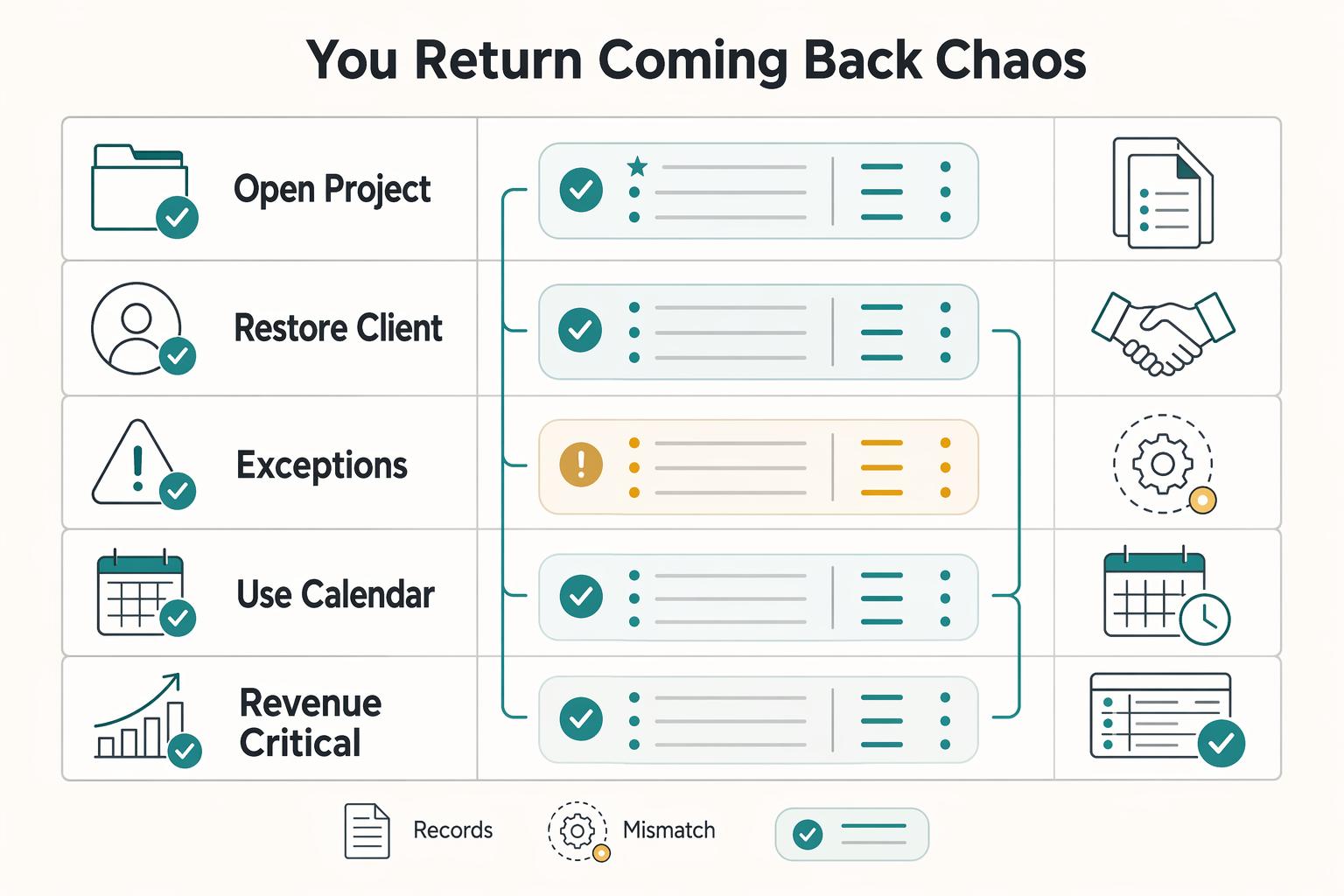
Start your first day back by restoring control, not clearing your inbox. Re-entry friction is normal and predictable, especially if time off stirred concerns about lost momentum, money, or relevance. Use this first-day checklist to stabilize operations before you make yourself fully available again.
| Re-entry step | What to do | Recovery check |
|---|---|---|
| Open your Project Management System before your inbox | Sort each live item into revenue-critical, deadline-critical, or relationship-critical | You can see one prioritized task list with current dates before you start replying |
| Restore your Client Communication Protocol before full availability | Send a short back-online update, restate your response window, route requests into one intake channel, and only then turn off your OOO message | New requests arrive in one place, not across parallel email, chat, and text threads |
| Run Exception Handling while details are fresh | Review escalations, stalls, and unclear approvals or ownership, then record each exception and assign one concrete fix | Each exception has a current owner, a recorded decision, and one prevention rule for next time |
| Use Calendar Blocking for recovery capacity before new commitments | Protect catch-up time for backlog cleanup, follow-ups, and delayed admin, then accept new dates or scope only after that buffer is cleared | Backlog items are converted to dated next actions, catch-up blocks are on calendar, and you can state your real availability clearly |
| Queue | What to do first | What not to do yet | Recovery check |
|---|---|---|---|
| Revenue-critical | Confirm deliverables tied to near-term cash flow and assign the next action in your Project Management System | Do not answer general check-ins before these items have owners and dates | Every cash-linked item has one owner, one next step, and one current date |
| Deadline-critical | Reconfirm due dates, dependencies, and any item that moved while you were away | Do not trust memory or scattered chat updates | No live deadline item is missing a current date or status |
| Relationship-critical | Send short status updates to priority clients and restate your normal contact path | Do not reopen every channel or reply everywhere at once | Priority clients know you are back, what happens next, and where to message you |
- Open your Project Management System before your inbox.
Sort each live item into one queue: revenue-critical, deadline-critical, or relationship-critical. Verification checkpoint: you can see one prioritized task list with current dates before you start replying.
- Restore your Client Communication Protocol before full availability.
Send a short back-online update, restate your response window, and route requests into one intake channel. Only then turn off your OOO message. Until that path is live, keep your return date and urgent-contact instructions in it. Verification checkpoint: new requests arrive in one place, not across parallel email, chat, and text threads; expect that at least one client may forget the plan.
- Run Exception Handling while details are fresh.
Review escalations, stalls, and unclear approvals or ownership, then record each exception and assign one concrete fix. Verification checkpoint: each exception has a current owner, a recorded decision, and one prevention rule for next time.
- Use Calendar Blocking for recovery capacity before new commitments.
Protect catch-up time for backlog cleanup, follow-ups, and delayed admin, then accept new dates or scope only after that buffer is cleared. Verification checkpoint: backlog items are converted to dated next actions, your catch-up blocks are on calendar, and you can state your real availability clearly. If this pattern repeats after time off, tighten boundaries with How to Create a Work-Life Balance as a Freelancer. Related: Setting Boundaries With Clients as a Freelancer.
Turn This Into Your Repeatable Vacation SOP#
Use this checklist in the same order every time so your time off does not depend on last-minute judgment.
| Step | Owner | Output | Ready-to-move-on check |
|---|---|---|---|
| 1. Choose mode | You | Working Vacation or Real Vacation decision | You can state your availability boundary in one sentence |
| 2. Set Internal Deadline | You | Pulled-forward schedule for active work | Every live item is Done, Delegated, or Deferred |
| 3. Send client notice | You | Client Communication Protocol in writing | Clients have your closed dates and exact return date |
| 4. Turn on OOO Message | You | OOO Message with Escalation Path | Test email shows the right dates and contact path |
| 5. Finalize handoff | You plus backup if used | Handoff Matrix | Each active project shows owner, fallback, next action |
| 6. Run return triage | You | Re-entry Plan | Every active item has a dated next action after you return |
-
Choose your mode. Decide between a Working Vacation and a Real Vacation before you lock travel or promise deliverables. Check: your boundary is explicit about what you will handle while away and what will wait.
-
Set your Internal Deadline. Pull work forward before departure week, since pre-vacation workload often spikes. Check: every active item is marked Done, Delegated, or Deferred in your project tracker.
-
Send your client notice. Email clients several days prior with your closed dates and exact return date. Check: the same dates appear in your calendar and project records.
-
Turn on your OOO Message and Escalation Path. Publish an OOO Message with unavailable dates, return date, and backup contact when you use one. Check: a test email routes urgent issues through one clear path.
-
Finalize your Handoff Matrix. Record current status, owner, fallback, and next action for each live project in one place. Check: someone else can open the record and continue work without reconstructing context from scattered messages.
-
Run your Re-entry Plan. On return, triage revenue-critical, deadline-critical, and relationship-critical work before accepting new commitments. Check: each active item has a dated next action by the end of your first work block back.
After each break, run a short debrief. Log one process fix for each failure pattern you saw, then update this SOP before your next planned time-off window.
Optional next actions after this SOP is running: tighten your boundaries with How to Create a Work-Life Balance as a Freelancer, or plan longer breaks with How to Create a Financial Plan for a Sabbatical.
Frequently Asked Questions
How far in advance should freelancers announce vacation to clients?
Tell clients once your dates, delivery plan, and handoffs are stable enough that you can answer follow-up questions clearly. Give earlier notice to clients with live deadlines or approvals likely to land during your absence, then send a short final confirmation when your out-of-office plan goes live. Mark every active project with a clear current status and next step before you send the notice.
Can freelancers fully disconnect without losing clients?
It can work, but only if you have real continuity in place instead of hoping people will wait quietly. A real vacation means leaving work behind for days. A working vacation means you still handle communications, so choose full disconnect only when handoffs, escalation ownership, and a clear intake path can carry the load without your judgment in the loop. Before you leave, stress-test your out-of-office plan and check whether a client can still follow the right path without messaging you everywhere. If that feels shaky, tighten your rules with How to Create a Work-Life Balance as a Freelancer.
What should be included in an out-of-office plan for freelancers?
Keep your out-of-office plan short enough that clients will actually read it. Include your unavailable window, return date, response policy, a preferred intake channel, and a clear escalation path for urgent issues. Then add project-specific handoffs or current status where work is still moving. Mirror those same details in your project management system so your autoresponder, task records, and handoff notes do not contradict each other.
How do I choose between a working vacation and a real vacation?
Choose based on how much active judgment your work needs while you are away, not on guilt or client pressure. If projects can keep moving through systems, software, automations, and clear handoffs, a real vacation may be workable. If approvals, exceptions, or client communication still depend on you, a working vacation with fixed check windows is usually more realistic. Make the decision by reviewing each live project for likely escalations, then write that mode into your out-of-office plan so clients get one consistent expectation.
How do I avoid a backlog when I return?
Protect your return before you leave, because the pile-up starts long before day one back. Use reentry triage instead of reactive replying. Open your project management system first, sort work by priority, and do not accept new commitments until each active item has a clear next action. Block recovery time on your calendar before the trip, since backlog can worsen fast when catch-up work has no place to go.
What should I do if a client escalates something while I am away?
Route every escalation through the path you named before you left, and make one person own first response if you are offline. If you are on a working vacation, handle only issues that match the boundary you set, such as a true time-sensitive blocker. If you are on a real vacation, your backup should confirm status, assign the next action, and send one consolidated update through the normal client communication channel. Before you leave, verify that each active project has explicit escalation ownership and that the urgent contact method actually reaches the right person.
How can I document timeline changes so there are no disputes later?
Record every timeline change in one written place and confirm it in the same channel where the client normally approves work. You want a simple evidence pack: what changed, when it changed, who agreed, the new date, and who owns the next step. Then make sure the same update appears in your project management system so handoffs and reentry triage stay accurate. Send a short confirmation note as soon as dates move, because vague verbal updates can break down once work starts ramping up before time off.
Try a related tool
Researched and edited by the Gruv editorial team. Gruv builds cross-border billing, payouts, and finance-operations software for global businesses.
Sources
Includes 2 external sources outside the trusted-domain allowlist.
- dutchessny.gov/Departments/County-Legislature/Docs/CLMeetin...trusted
- leg.wa.gov/media/q1lg52iu/hj_25_086.pdftrusted
- ocsheriff.gov/sites/ocsd/files/2024-08/Department%20Manual...trusted
- osuit.edu/academics/files/25-26-catalog-osuit-11-13.pdftrusted
- swlaw.edu/sites/default/files/2024-06/30.1%20-%20Combi...trusted
- uat.edu/business-innovation-feedtrusted
- ariel-lim.com/blog/freelancing-tipsexternal
- ashleygainer.com/how-to-take-a-vacation-when-youre-a-freelancerexternal
Educational content only. Not legal, tax, or financial advice.
Related Posts

Freelance Work-Life Balance That Holds Up in Real Weeks
Freelance work-life balance breaks down when boundaries stay implied instead of written. Once that happens, your week gets rebuilt one message at a time, delivery becomes less stable, stress goes up, and you spend more energy renegotiating expectations than doing focused work.
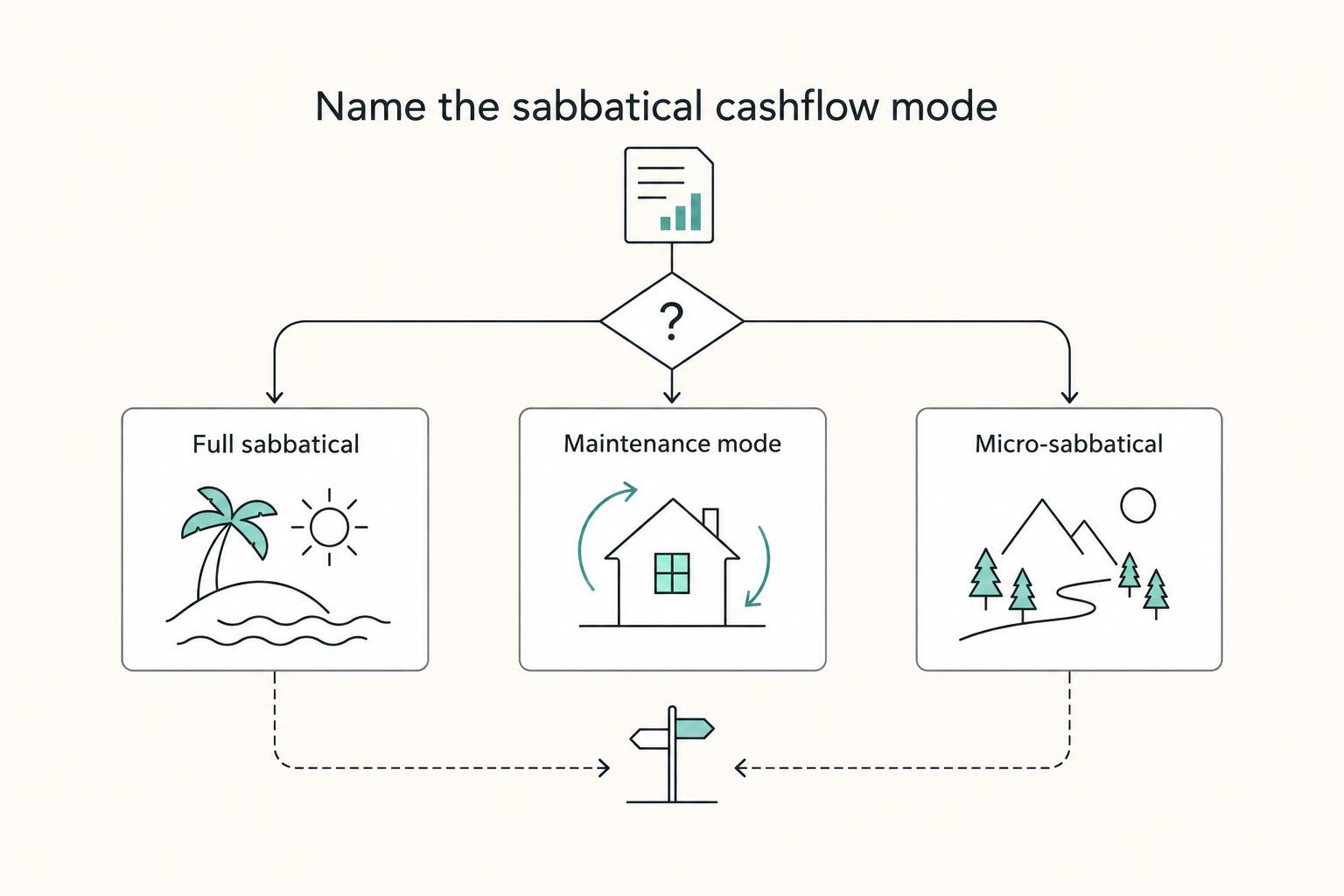
How to Create a Financial Plan for a Sabbatical
**Treat your sabbatical like an operating decision you can fund and defend, not a mood you can manifest.** As the CEO of a business-of-one, you do not get to outsource coverage, timing, or follow-through. Start from zero assumptions (no "someone will cover me"). Build a plan that survives late payments, uneven income, and real-world friction so the rest stays mechanical, not emotional.

The Freelance Payment Penalty: A Modeled Audit of Platform Fees, FX Spreads, and Payout Delays
The money rarely disappears through a single, easy-to-spot fee. The real loss is stacked. A marketplace takes its commission, a processor adds a charge for international cards, a bank or payment company converts the currency at a spread, a platform holds the funds before release, and a wire sheds a little to intermediaries on the way in. Each layer looks defensible on its own, but the worker feels the combined result as a smaller deposit and a later payday.