
Quick Answer
To avoid phishing scams when payments or account access are involved, use a repeatable sequence: prevent, verify, respond, and recover. Do not act from links in unexpected messages, especially ones asking for money, credentials, or sensitive data. Start from saved official destinations, verify sender details and the true destination through a trusted channel, and pause any request that creates urgency or changes payment instructions.
How to spot phishing fast without slowing down your business#
You do not need perfect detection to reduce phishing risk. You need a repeatable sequence you can run quickly when a message asks for money, credentials, or sensitive information. The sequence is simple: prevent, verify, respond, and recover.
A phishing message is built to look legitimate so you act before you verify. It often arrives through email or text and tries to pull personal or financial details that can be used to access your accounts. Attackers launch these attempts at high volume every day, and they are often successful, so the hard part is not spotting rare edge cases. The hard part is making clean decisions when your inbox is full and client work is waiting.
Keep this practical and fast. You are not trying to inspect every message forever or become a full-time security analyst. You are building a response pattern you can apply in minutes while still delivering work, collecting payments, and protecting client trust. If a message is real, these checks add a short delay. If it is malicious, the same checks can prevent a serious mistake. Use the structure below as your default response pattern.
- Prevent easy entry. Do not process account recovery, password reset, or payment-change requests from links inside unexpected messages.
- Verify before you trust. For money, credentials, or urgent requests, validate sender details and destination first through a channel you control.
- Respond quickly to possible exposure. If you clicked or shared data, stop, secure affected accounts, and record what happened.
- Recover with follow-through. Reset exposed access, review account activity, and notify relevant contacts if your account may have been misused.
By the end, you will have concrete decision rules, message checks, immediate response steps, and a checklist you can copy into payment and account decision points.
One practical way to think about this is pressure testing. When a message sounds urgent, your process should not change. If your standard breaks as soon as someone asks for immediate action, the standard is not usable yet. The goal is to keep your response stable even when the tone is designed to make you rush.
What to prepare before you start#
Preparation makes fast decisions possible. When pressure is high, you should not be figuring out where to log in, which contact is real, or whether a domain is expected. You want those answers already documented.
A short prep pass helps you compare each request against known references instead of reacting to tone, urgency, or branding. This matters most when a message asks for credentials, account numbers, Social Security numbers, payment action, or account recovery.
- Build an account and channel inventory. List accounts tied to money, identity, and client communication. Include where each account is normally accessed and which channels are normally used for support. This gives you an immediate reality check when a message claims to be related to an account you rarely use or do not use at all.
- Keep a trusted destination list. Save official sign-in and support pages you use often. If a message asks you to act, start from your own list, not the incoming link. In practice, this habit can reduce risky clicks.
- Apply federal-site checks when relevant. For U.S. federal contexts, confirm
.govor.milandhttps://before submitting sensitive data. Do this before entering any personal details, not after. - Set one verification default. If a message creates urgency around credentials, account access, or payment changes, pause and verify using contact details already in your records.
Treat this as front-loaded time savings. When your references are clean, the next decision is faster, and your response quality is less likely to depend on mood, workload, or time pressure.
A practical way to keep this usable is to store your inventory and trusted destinations in one place you can open quickly. Keep it short, keep it current, and remove items you no longer use so your checks stay clear under pressure.
Include one more item in that same note: who can validate high-impact requests when you are unavailable. If you work with a partner, assistant, or collaborator, this avoids handoff confusion when a suspicious request arrives during meetings or travel. Fast verification requires clear ownership, not just good intentions.
Before moving on, test your setup with one harmless message from your inbox. Ask yourself whether you can classify the request, find the trusted destination, and choose the right verification path within minutes. If that quick test feels clumsy, simplify the prep document until it does not. If you want a deeper dive, read The Best Password Managers for Freelancers and Teams and keep your checklist templates in Gruv tools.
Put five non-negotiable rules in writing#
Written rules reduce ambiguity when you are rushed. If the rule is already defined, you do not negotiate with urgency or persuasive language in the moment. Use these five rules as fixed standards. They are simple on purpose, and each rule is meant to protect against a common failure mode.
- Never resolve account or payment issues from the incoming message. Start from a saved official destination you open yourself.
- Do not send sensitive information by reply. Share data only on official, secure websites.
- Treat urgency as a prompt to verify first. Pause and confirm you are on an official, secure site before you act.
- Apply extra checks to money and identity risk. Most scams have two main goals: stealing your money and your identity.
- Use domain and security cues every time. In U.S. federal scenarios,
.govor.milplushttps://is a minimum check before data entry.
The point is consistency, not complexity. If you follow these rules every time, your risk can go down because your process does not drift with context.
When you work with clients, share these rules with anyone who can approve payments, submit forms, or update account settings. A single weak approval path can undermine careful behavior elsewhere. For high-trust client actions, align approval language with International Freelance Contract Clauses.
Keep the language direct and operational. Avoid long policy wording that sounds formal but leaves room for interpretation. A rule should tell someone exactly what to do when a suspicious request appears. If people read it and still ask what to do next, rewrite until the next action is obvious.
It also helps to define what escalation means in your own context. For example, escalation can mean pausing and verifying that you are on an official, secure website before entering sensitive information. That keeps escalation practical instead of vague.
Check sender, domain, and destination before any click#
Phishing messages can look believable enough to pass at a glance. The fix is a short pre-click check that separates visual trust signals from verifiable details.
- Flag urgency first. If a message pushes immediate action, treat urgency itself as a risk indicator. Pause before opening attachments, clicking links, or calling numbers in the message.
- Inspect sender signals, not display name alone. A first-time, infrequent, or externally flagged sender can be a phishing warning sign.
- Inspect destination before interaction. Hover links without clicking to reveal the actual destination URL, then check for slight domain changes that mimic trusted sites.
- Reuse the same check in chat. Email and Microsoft Teams messages can use the same urgency tactic to push immediate action. Apply the same sender and destination checks before you act.
This is where speed and discipline meet. You are not trying to evaluate everything in depth. You are running a brief gate that catches obvious mismatches and forces independent verification when details do not align.
If one element fails, stop and verify through a channel you initiate. Do not let partial confidence push you forward. A message can look polished and still be malicious.
Before you click, answer three questions clearly: who is asking, where will this action send me, and what exactly is being requested. If any answer is vague, do not proceed from the message.
One avoidable mistake is checking sender signals but skipping destination checks because the request sounds familiar. Keep both checks together. If only one is verified, risk remains.
Another useful habit is to read requests in plain terms before acting. Strip out the branding and ask what action the message is trying to trigger. That short reframing can reveal whether urgency is driving the decision more than evidence. Related: How to Write International Freelance Contract Clauses.
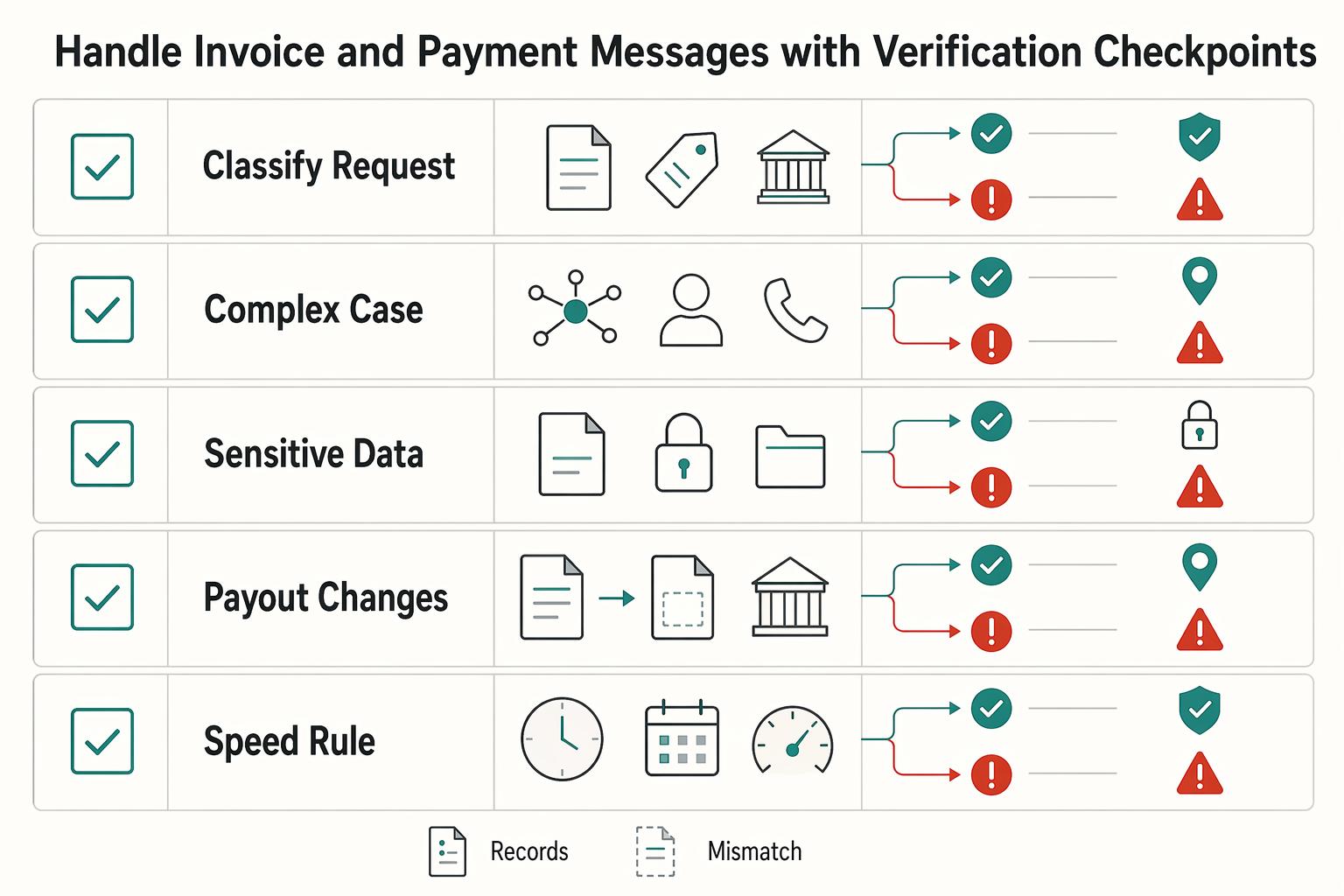
Handle invoice and payment messages with verification checkpoints#
Invoice and payout requests deserve strict handling because impersonation scams can target both money and personal information. SSA scam guidance warns that criminals impersonate government agencies and may contact people by call, email, text, mail, or social media. Treat every payment-related request as a verification exercise, not a routine inbox task.
| Checkpoint | Action | Detail |
|---|---|---|
| Classify the request | Treat updated bank details, failed payments, urgent remittance, or personal-data requests as high risk until verified | Do this before opening links or files |
| Verify identity | Use contact details from prior agreements, established client records, or your own address book | Do not use numbers or links provided only in the incoming message |
| Sensitive data | Share sensitive information only on official, secure websites | For U.S. government pages, confirm the .gov domain and https/lock indicator before submitting data |
| Payout changes | Record what changed, who verified it, and when the approval happened | Use traceable approval for payout changes |
| Speed rule | Routine, unchanged requests can move after standard checks | Destination changes, timing pressure, or new account instructions require escalation and a hold until verification is complete |
- Classify the request before opening links or files. Requests about updated bank details, failed payments, urgent remittance, or personal-data requests should be treated as high risk until verified.
- Verify identity through known records. Use contact details from prior agreements, established client records, or your own address book. Do not use numbers or links provided only in the incoming message.
- Block sensitive data sharing until checks pass. Share sensitive information only on official, secure websites. For U.S. government pages, confirm the
.govdomain andhttps/lock indicator before submitting data. - Use traceable approval for payout changes. Record what changed, who verified it, and when the approval happened. This creates accountability and reduces the chance that one inbound message drives a high-impact transfer.
- Use a risk-based speed rule. Routine, unchanged requests can move after standard checks. Destination changes, timing pressure, or new account instructions require escalation and a hold until verification is complete.
Use scenario contrast to keep your judgment clear. If the invoice details match prior patterns and verification succeeds through a trusted contact path, proceed. If payout instructions change suddenly and urgency is high, treat it as high risk even if the wording appears normal.
A common failure mode is partial verification. For example, you confirm the sender name but skip destination checks because you are busy. Do not split the process. High-impact requests need both identity verification and destination verification before approval.
Keep your decision record simple. A short note with the request type, verification method, and approval outcome is enough to support later review.
When a request includes both payment changes and personal-data requests, treat that combination as a stronger warning signal. Those requests should not move until verification is complete through a trusted path you initiated.
If you receive repeat urgency messages about the same payment item, avoid replying in the same thread to resolve it quickly. Move to your known contact path and complete verification there. If a message comes from an unmonitored mailbox, do not use reply as your follow-up path.
Apply channel-specific rules for email, text, chat, and QR codes#
Different channels change the surface, not the core risk. The same principle applies everywhere: an inbound message is not proof of identity when the request touches money, credentials, or personal data.
| Channel | Risk cue | Rule |
|---|---|---|
| Unexpected requests are unverified | Validate sender details and destination before action; do not approve payment updates or account changes from email alone | |
| Chat | Urgent approvals in chat threads | Keep urgent approvals out of chat threads until identity is confirmed through a separate trusted path |
| Text messages | Unsolicited account alerts, debt notices, and urgent payment prompts | Open official destinations yourself on a trusted device |
| QR codes in messages | Unsolicited QR codes asking for login, payment, or identity confirmation | Stop and verify through known channels first |
| Physical QR codes | Codes in public places can be replaced or altered | Verify destination details before submitting any information |
- Email: Treat unexpected requests as unverified. Validate sender details and destination before action. Do not approve payment updates or account changes from email alone.
- Chat: Keep urgent approvals out of chat threads until identity is confirmed through a separate trusted path. Fast chat does not equal trusted chat.
- Text messages: Assume lower trust for unsolicited account alerts, debt notices, and urgent payment prompts. Open official destinations yourself on a trusted device.
- QR codes in messages: Treat unsolicited QR codes as untrusted links. If a code asks for login, payment, or identity confirmation, stop and verify through known channels first. For Social Security-related messages, SSA scam guidance says it will not send QR codes by text or email to confirm information, will never request payment through a QR code, and legitimate QR codes should lead to secure
ssa.govpages. - Physical QR codes: Use caution in public places where codes can be replaced or altered. If the action is sensitive, verify destination details before submitting any information.
Channel switching is a useful defensive move. If an email asks for payment changes, verify by a contact method already tied to your records. If a chat request looks urgent, move verification to a known destination before doing anything high impact. For team playbooks, use CISA phishing guidance.
Keep your response language short and consistent across channels. A simple message like "I will verify this through our standard contact path and confirm after checks" keeps the process consistent under pressure. When impact is high and channel trust is low, move the decision to a verified path you control.
Apply the same standard even when the sender is familiar. Familiarity should not lower your verification discipline for high-impact actions.
For teams, consistency matters more than wording style. Agree on one shared response pattern so everyone handles suspicious requests the same way.
Do this in the first 5 minutes after a bad click or reply#
When exposure is possible, focus on containment first. Investigate details later.
- Stop interacting with the message. No more clicks, replies, downloads, approvals, or file opens.
- Treat it as phishing until proven otherwise. That mindset helps you avoid adding more clicks, replies, or disclosures while you assess what happened.
- Use official response guidance if you already acted. Follow FTC phishing response guidance.
- Report the attempt through official channels. File reports at ReportFraud.ftc.gov and document the confirmation ID.
- Escalate quickly in organizational environments. If infection is suspected in an organization, use urgent-steps guidance for organizations that are already infected.
In this moment, sequence matters: stop interacting, move to trusted response guidance, and report through official channels. For organizational incidents with suspected infection, prioritize urgent incident steps over continued interaction with the original message.
Do this in the first 24 hours to contain and recover#
The first day is for closing open risk and hardening your decision process so the same mistake does not repeat. Treat this window as both containment and correction.
- File reports while details are fresh. Use FTC phishing reporting when relevant and retain confirmation details in your incident record.
- Review exposed accounts for unauthorized activity. Start with email and bank accounts, then expand to other connected accounts.
- Follow verified official guidance. In U.S. federal contexts, confirm
.govor.milandhttps://before you submit any follow-up details. - Tighten the control that failed. Update urgent-request verification rules and require independent confirmation for high-impact changes.
- Close with a short written record. Capture timeline, affected accounts, actions completed, and outstanding risks.
The available guidance here supports phishing reporting, account-risk checks, and official-site verification. For account-specific recovery steps, use your providers' official channels.
Recovery is not complete when the panic drops. Aim to close this phase when exposure is reduced and your process has been corrected.
Use the incident record as a practical tool, not paperwork. It gives you a reference for future decisions and can help you communicate clearly with clients or providers if questions come later.
If you work with collaborators, use this first-day review to align approval standards. Clarify who can approve high-impact changes, what requires second confirmation, and how verification is documented.
By the end of the first 24 hours, aim for three outcomes: reports filed where needed, account checks completed, and updated verification rules in place.
During this first-day review, look for the exact step where the decision went off track. Did urgency bypass classification, did a destination check get skipped, or did approval happen without second confirmation? Fixing the precise step can be more effective than adding broad reminders.
If client communication is needed, keep updates factual and concise. State what was observed, what actions are complete, and what checks remain open.
Avoid common mistakes that make phishing damage worse#
Phishing damage often grows through predictable judgment errors. The goal is not to avoid every suspicious message forever. The goal is to avoid avoidable escalation after the first warning sign.
| Mistake | Recovery |
|---|---|
| Trusting a familiar logo or name alone | Verify full sender identity and destination through an independent path before action |
| Treating MFA as complete protection | Keep MFA enabled, then still verify links and domains before action |
| Letting urgency override checks | Pause when pressure is high and run the full verification sequence |
| Assuming phishing only happens in email | Apply the same verification checks to texts, social DMs, and other direct messages |
| Ignoring first-time or external senders | Treat unexpected first-time or external contacts as higher risk and verify through a trusted channel you initiate |
- Mistake: trusting a familiar logo or name alone.
Recovery: verify full sender identity and destination through an independent path before action. Branding can be copied, and display names can be imitated.
- Mistake: treating MFA as complete protection.
Recovery: keep MFA enabled, then still verify links and domains before action. MFA lowers risk, but it does not validate message legitimacy.
- Mistake: letting urgency override checks.
Recovery: pause when pressure is high and run the full verification sequence. If urgency is real, a short verification delay is still preferable to a mistaken payment or credential leak.
- Mistake: assuming phishing only happens in email.
Recovery: apply the same verification checks to texts, social DMs, and other direct messages.
- Mistake: ignoring first-time or external senders.
Recovery: treat unexpected first-time or external contacts as higher risk and verify through a trusted channel you initiate.
These mistakes are common because phishing relies on social-engineering pressure, especially urgency and familiar-looking identities. Your recovery habits should be equally practical: independent verification and consistent checks across channels.
Use this section as a periodic self-audit. If one mistake appears repeatedly, fix that step directly instead of adding broad policy language. Small procedural fixes can be easier to follow than long rules.
A strong warning sign is inconsistency. If you run strict checks for some clients but skip them for others under pressure, risk can rise quickly. Apply the same standards across accounts and channels.
Another warning sign is treating near misses as success. If a request looked suspicious only after a late check, that is still a process gap worth fixing. Near misses can be useful data when you capture why the close call happened.
Copy and paste phishing triage checklist#
Use this checklist before you click, reply, or share sensitive information. Keep it visible where you make payment and account decisions so it is used in real time.
- Classify the request first. Identify whether it asks for credentials, payment action, account recovery, attachments, or personal data.
- Verify the destination independently. Open the official site directly (for example, from a bookmark or manual entry), not from the incoming message.
- Check official-site signals. For U.S. federal pages, confirm
.govandhttps://(or the lock indicator) before entering data. - Confirm through the right channel. If a message says replies go to an unmonitored mailbox, use a separate trusted channel for verification.
- Share sensitive information only after checks pass. Share sensitive information only on official, secure websites. If any check fails or remains unclear, pause and escalate.
- 100% sender check before approval. Confirm full sender identity on every high-impact request.
- 100% destination check before data entry. Verify the exact domain before login or payment action.
- 0% exceptions for payout-detail changes. Release $0 until independent verification is complete.
- If confidence is below 100%, hold and escalate. 90% confidence is not enough for payout or credential changes.
- $0 transfer policy for unresolved flags. Keep funds paused until all checks pass.
How you use this checklist matters as much as the checklist itself. Treat it as a gate, not a suggestion. If steps are skipped, the action waits. This keeps your standards stable when a request feels urgent or familiar.
A useful habit is to log one line when a high-risk request is reviewed: request type, verification method, and final decision. This can help you spot patterns and keep decisions consistent without adding heavy admin work. A simple template in Gruv tools keeps this easy to repeat.
If you work with others, agree on one rule before sensitive actions: checklist complete or no approval.
You can also mark checklist results as pass, fail, or escalate. That small label keeps records clean and may make review faster after incidents. The goal is not extra paperwork. The goal is preserving decision quality when multiple urgent requests arrive at once.
Build a system you can follow under pressure#
Under pressure, consistency beats perfect detection. Your goal is to make the same high-quality decision each time so one urgent message does not trigger a chain of avoidable mistakes.
- Step 1, classify before action.
Label each message as routine or high risk before you click. Requests for personal data, credentials, or payment changes should default to high risk until verification is complete.
- Step 2, verify independently.
Use trusted destinations and known contact details you control, not information embedded in the message. In federal contexts, include .gov or .mil checks before sharing sensitive data.
- Step 3, enforce one red-flag rule.
If urgency pushes you to skip checks, pause and escalate. No payment, sensitive disclosure, or account-change approval should proceed without independent verification.
- Step 4, document and report.
If exposure happened, record what occurred and file reports quickly, including FTC reporting when relevant. Keep a short incident note with timeline, affected accounts, and actions taken.
Run these steps in the same order every time so you move quickly without lowering your trust standard.
If you want one immediate next action, place your checklist where payment or account decisions are made and use it on the next unexpected request. Consistent repetition is what turns good advice into reliable behavior. You can pair this with The Best Password Managers for Freelancers and Teams so verification and credential handling live in one workflow.
To make this durable, review one recent message each week and check whether your steps were followed in full. If a step was skipped, adjust your process while the details are still fresh. Small corrections made often are easier than large corrections made after a serious incident.
Your goal is boring reliability. When suspicious messages arrive, you should not need a new strategy each time. You should need the same clear sequence, applied without shortcuts, even when the request feels urgent or familiar.
Frequently Asked Questions
What are the first signs of phishing?
Urgency is one of the clearest early signs. Requests for passwords, account numbers, or Social Security numbers are high risk. First-time or unfamiliar senders also deserve extra scrutiny. If a message makes you feel rushed and asks for sensitive data, run full verification before acting.
How do I verify a sender safely without clicking links?
Start outside the message with a saved bookmark, a manual URL entry, or contact details already in your records. Check the full sender address, not just the display name. For U.S. government claims, confirm .gov or .mil and https:// before sharing sensitive information. If verification is unclear, stop.
What should I do immediately if I clicked a phishing link?
Stop interacting with the page and do not enter more information. Move to known good account pages, secure potentially exposed access, and review recent activity. Preserve the original message details, write a short incident note, and report through the relevant platform or official route when relevant.
Can `Multi-factor authentication (MFA)` stop phishing completely?
No. MFA is one layer of protection, but it does not prove that a message or destination is legitimate. Keep MFA enabled and still verify sender identity and destination before acting. Use layered control instead of relying on MFA alone.
Are `Microsoft Teams` messages safer than email for urgent requests?
Not by default. Urgency and sender-identity red flags can appear in both Teams and email. Treat urgent requests for money, credentials, or sensitive data the same way across both channels and verify independently. If identity is unclear, move the decision to a trusted channel you initiate.
How can I tell if a URL is fake when it looks almost right?
Check the exact domain, not the branding, logos, or page design. Similar-looking addresses can still send you to the wrong destination. Treat https:// as necessary but not sufficient. In U.S. federal contexts, apply the .gov or .mil check before submitting sensitive information.
Should freelancers report phishing attempts even if no money was lost?
Yes, if a reporting route is available. Save the message, note the channel and timing, and file a report through the relevant platform or official route. Even without immediate loss, a clear record makes follow-through easier if similar attempts happen again.
Watch
How to Avoid Phishing Scams: 3-Layer Defense
Try a related tool
Researched and edited by the Gruv editorial team. Gruv builds cross-border billing, payouts, and finance-operations software for global businesses.
Sources
- cisa.gov/secure-our-world/recognize-and-report-phishingtrusted
- cisa.gov/resources-tools/resources/phishing-resistant...trusted
- consumer.ftc.gov/articles/how-recognize-and-avoid-phishing-scamstrusted
- consumer.ftc.gov/articles/how-recognize-avoid-phishing-scamstrusted
- fbi.gov/how-we-can-help-you/scams-and-safety/common-...trusted
- fdic.gov/consumer-resource-center/2021-10/avoiding-sc...trusted
- ftc.gov/news-events/topics/identity-theft/phishing-s...trusted
- ssa.gov/scamtrusted
Educational content only. Not legal, tax, or financial advice.
Related Posts

The Best Password Managers for Freelancers and Teams
A client asks for an urgent file, you open their portal, and the login fails. Ten minutes later your invoicing app wants a reset too. That is why your password setup is a business risk, not just a nuisance. Weak credential habits can turn one mistake into wider account access problems, then into delivery delays and cleanup work.

The Best Gear for a Portable Home Office
Portable-office gear decisions are not directly tested in this guide, so use this as a practical framework rather than a proven standard.
Dating as a Digital Nomad Without Calendar Chaos
Start by treating dating friction like a logistics problem. If your stay window, housing, transport habits, and work blocks are still moving, keep things light. Trouble starts when emotional commitments sit on top of unstable travel math. Use three phase gates and make one decision at each. Anything that depends on certainty gets pushed to the next gate.