
Quick Answer
To set up your first Google Ads campaign, decide your primary conversion goal first, then choose the campaign objective and type that match it. Build a simple, auditable structure with tightly themed ad groups, intent-led keywords, and clear landing-page alignment. Set a budget you can hold steady, verify conversion tracking before optimization, and run a weekly review loop for search terms, negatives, spend, and conversions.
You're not "bad at Google Ads" - you're missing an operator-grade launch system#
Google Ads doesn't "punish beginners" so much as it punishes ambiguity. If you build a campaign by clicking through prompts without making a few foundational choices first, you feed the system messy signals. Then you spend your first week "optimizing" noise.
If you are the CEO of a business-of-one, this is not a marketing task. It is a system you run.
One Google Ads audit firm summarized the real issue like this: "the issue is rarely the platform itself, it's the structure, signals, and strategy behind the campaigns." That framing matters because modern Google Ads rewards clarity, intent alignment, and strong measurement.
The same firm also calls Google Ads "an AI-driven system that rewards clarity, intent alignment, and strong measurement." Treat that as your operating constraint.
What changes when you think like an operator (not a clicker)#
Here's the shift you want in your Google Ads account from day one:
| Area | Click-first setup | Operator-grade setup |
|---|---|---|
| Goal | "Get traffic" | One conversion event tied to a clear goal |
| Build | Many ad groups, mixed themes | Tight structure you can explain and audit |
| Keyword targeting | Broad guesses | Intent-led terms, reviewed by a human |
| Budget | "Let it run and see" | Written loss limit plus pause rules |
| Google AI | "It will figure it out" | You work to send clear signals it can learn from |
A quick hypothetical: you run freelance marketing for a consultant. If you optimize for page views because it feels safe, Google AI can send cheap clicks that never book calls. If you define "book a call" as the conversion, you create better alignment between keyword intent, ad copy, landing page, and follow-up.
The operator-grade launch system (safe defaults)#
Use this as your map before you touch campaigns. The goal is to lock decisions first, then build once, then run a weekly loop you can sustain.
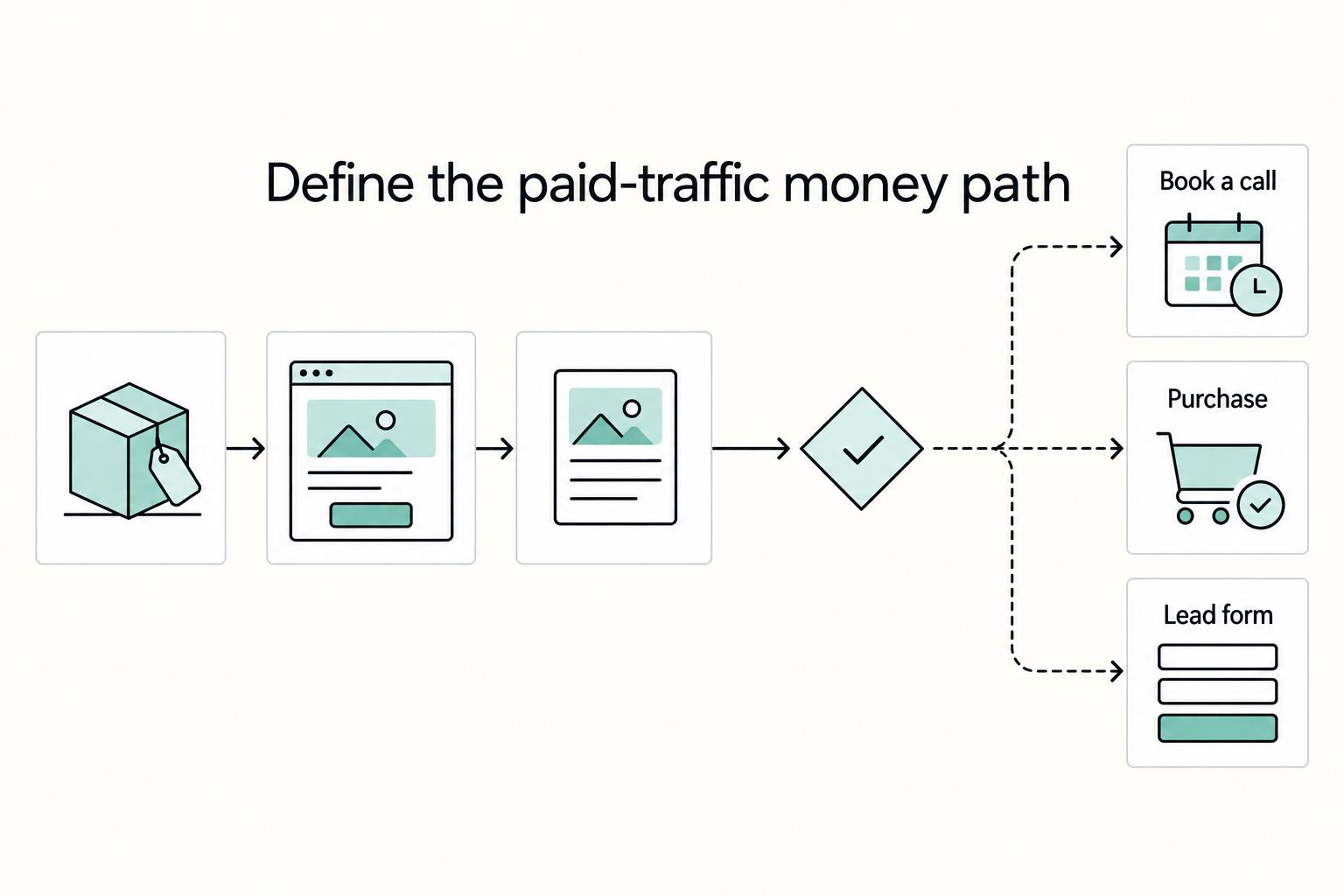
Step 1: Run a pre-launch decision gate. Decide your money path (offer to landing page to lead capture to follow-up), pick one primary conversion, and write down budget guardrails you can tolerate.
Step 2: Execute a build sequence in one sitting. Start with a single campaign with a clear objective and campaign type, keep ad groups tightly themed, and make keyword targeting explainable.
Step 3: Install a weekly control loop. Review search terms, add negatives, check spend versus conversions, and log every change with a reason. Verification point: you can answer, "Why did we spend money yesterday, and what did it produce?"
The game is simple: control, traceability, and clean signals. You can improve anything you can audit.
What should you decide before you click "New campaign" in Google Ads?#
Decide what you're trying to achieve, then pick the campaign type that matches. Google Ads starts new campaign setup by having you choose an advertising objective, then guiding you to choose your goals, which helps determine the best campaign type.
Step 1: Define the money path and get clear on your goal#
Write the money path as hard nouns, in order: offer → landing page (or destination) → lead capture → follow-up. If you cannot explain how a click becomes revenue, do not open Google Ads yet. Your setup and your early results are only interpretable if the "what happens after the click" part is real.
Next, pick a clear goal you actually want the campaign to support.
| Goal example | Best fit from article |
|---|---|
| Book a call | service businesses, consulting, freelance marketing |
| Purchase | ecommerce or paid digital products |
| Lead form | quote requests, demos, applications |
Then, when you create the campaign, choose the objective first and follow the flow to select the goals that match what you want. If your goal and your destination don't line up, your reporting gets messy and it's harder to learn what's working.
Hypothetical: you sell "CFO support for agencies." If your landing page pushes "download a checklist" but your sales process relies on booked calls, you're choosing between two different outcomes. Pick one and operate it on purpose.
Step 2: Choose the campaign type that matches your objective (and the time you can invest)#
You'll choose a campaign type based on your advertising objective, brand strategy, and how much time you can invest. Different campaign types come with different targeting and ad formats. For example:
- A Search campaign lets you place text ads on search results
- A Video campaign lets you advertise video ads on YouTube
Step 3: Quick prereq check (including the website question)#
- You don't have to have a website to create a Google ad, but it's a good idea.
- Make sure you know what you're sending people to (a page, a form, a call flow, etc.) and how you'll judge whether it worked.
- Keep a simple 1-page brief so you can audit changes later (objective, goals, campaign type, who you're targeting, where you're sending traffic, and what "success" means).
If you want a deeper dive, read The Best Paid Advertising Channels for Freelancers (Google Ads).
Which campaign objective and campaign type should you choose for a first campaign?#
Choose the campaign objective that matches your primary conversion goal, then pick a campaign type that fits your marketing goals, brand strategy, and the time you can invest. The goal is consistency: one primary outcome you care about, and a setup you can keep up with.
Step 1: Match your conversion event to the right campaign objective (no vibes)#
Start inside Google Ads exactly where Google starts you. Google Ads Help puts it plainly: "Google Ads begins with a goal and a campaign." In the setup flow, Google will prompt you to choose your objective, tied to a primary conversion goal like driving sales, generating new leads, or building brand awareness.
A quick UI note: for new campaigns, "Awareness and consideration" may show up as "YouTube reach, views, and engagements," but Google says the objective's features are the same.
Verification point: after you pick the objective, double-check that it matches the primary conversion goal you actually want the campaign to optimize toward, not a proxy you don't care about.
Step 2: Pick a campaign type you can manage with your time and evidence needs#
Google's guidance on campaign type selection gives you the right operator lens: "You'll choose a campaign type based on your marketing goals, brand strategy, and how much time you can invest." Pick something you can review consistently, using the signals you trust.
One example Google highlights is Performance Max, a goal-based campaign type that can access all channels from a single campaign with Google AI optimization.
Decision gate: if you can't confidently measure the primary conversion goal you chose, fix that first before scaling spend.
Related: The Best Platforms for Selling Digital Products.
Build your first campaign like a system: account structure, naming, and control points#
Build a simple, auditable Google Ads campaign structure first, because structure helps you control targeting and understand why results happen. This is the part many beginners skip, then pay for later.
Step-by-step build (structure, names, governance, networks)#
Step 1: Organize your campaign around one clear "why." LeadsBridge frames the payoff clearly: "A well-designed structure ensures your ad shows up in front of the right audience at the right time." Put differently, if you can't explain the intent you're targeting, you can't run effective search ads.
If different goals, budgets, or targeting choices would change your decisions, consider splitting your work into separate campaigns. Keep ad groups tightly themed so each one maps to a clear intent and message.
Operator rule: if an ad group needs two very different messages or pages, split it.
Step 2: Use names that survive growth and audits. Do not chase a "perfect" naming convention. Pick one and stick to it so Future You can filter, compare, and roll up results fast. Include a few consistent ingredients every time.
| Asset | Include in the name | Example (human-readable) |
|---|---|---|
| Campaigns | A couple consistent descriptors (for example: location, service, network, goal) | "Austin Bookkeeping Search Leads" |
| Ad groups | Theme (what the group is about) | "Shopify bookkeeping" |
Step 3: Keep access and changes operable. Treat your Google Ads account like financial software. If more than one person touches it, keep access and major changes organized so you can trace results back to what actually changed.
Step 4: Choose networks and targeting methods intentionally so you can explain every click. Prioritize explainability early. Review your settings and keep your setup understandable until you validate what is working. Mystery traffic destroys early learning in keyword targeting.
Hypothetical: If you sell freelance marketing services, you want to trace "query" to "ad" to "landing page" to "lead." If you cannot trace it, you cannot improve it.
Verification: you built a campaign you can operate weekly#
Step 5: Run the 30-second explainability test before you move on. You should be able to point to:
- A campaign purpose you can describe in one sentence.
- Ad groups with clear themes (no "everything bucket").
- A primary conversion goal or event that matches the campaign objective you chose (for example: sales, leads, or brand awareness).
How do you pick keywords and audience targeting without buying junk traffic?#
Pick keywords that filter for real intent, segment them tightly in your ad groups, and use audience targeting first to learn what's working before you rely on it to narrow reach. A clean structure still fails if the inputs are sloppy.
Step-by-step: keyword targeting and negatives (operator-safe)#
Step 1: Start with "problem-aware" searches, not vanity terms. In Google Search, prioritize queries that clearly signal someone is looking for help, not just browsing. You do not need fancy keyword targeting to start. You need honest intent. A simple rule: if the search does not suggest someone wants help now, skip it for your first Search campaign.
Use keyword research tools to expand from your seed terms. Then human-review every keyword before it enters campaigns. Tools generate options. Operators choose.
Step 2: Segment keywords into focused ad groups. Defined Digital Academy puts it plainly: "Keywords should be segmented into different campaigns and ad groups to keep your campaigns focused and effective." Treat each ad group like a promise: one theme, one landing page, one job to do.
Step 3: Treat "too broad" keyword targeting as a lead-quality risk. KeywordMe names a common root cause of bad leads: "It stems from specific, fixable issues... keyword targeting that's too broad." If you're seeing junk, tighten your targeting, your filtering, and your review process. If you need more reach, expand deliberately and watch what it does to query quality.
| Match approach | What you gain | What you risk | Safe use case |
|---|---|---|---|
| Tighter targeting | Cleaner queries, clearer learnings | Lower volume | New search ads, new offer, new account |
| Broader targeting | More reach, faster data | More junk traffic | When you can confidently filter and assess query quality |
Step 4: Build negatives early (and keep building them). Do not wait for junk traffic to teach you. Add negatives for intent you don't serve and queries that consistently produce the wrong kind of lead. Review your Search terms regularly and add negatives as a weekly habit.
Hypothetical: If you sell freelance marketing services, you might keep "marketing agency" queries but exclude student-style queries. Your landing page sells outcomes, not homework help.
Practical check (non-negotiable)#
Step 5: Use audiences for insight before you use them for restriction. Jyll Saskin Gales (Inside Google Ads podcast) warns, "Audience targeting in Google Ads is complicated." Add audience targeting in a way that helps you learn first. Tighten only when you can explain the tradeoff in plain English.
Verification: If you cannot explain why a keyword should lead to that landing page, it does not belong in your ad groups yet.
What budget and bidding settings keep you safe while Google AI "learns"?#
Set a stable budget you can live with, then choose the simplest bidding strategy your conversion tracking can actually support. The goal is a calm test you can read, not a roller coaster you react to.
Step-by-step: set a test budget you can run without flinching#
Step 1: Time-box your test and fund it like training, not rent money. Pick a test window you can complete without "checking every hour" behavior. Treat that budget as a learning expense for your PPC system, not a promise of immediate ROI.
Step 2: Use budget defaults that reduce surprises. In your Google Ads account, keep the daily budget modest and intentional. Google Ads Help documents budget concepts under "About Budgets," including "About spending limits," so you have a reference point for how limits work inside the platform.
Step 3: Decide upfront how you'll evaluate and what would trigger a review. Do not wait until you feel stressed. Write down what you'll look at, and when, and keep notes in a change log so you do not renegotiate with yourself mid-flight.
Hypothetical: If you run freelance marketing for local services, you might start with a budget you can sustain and only expand once you see outcomes that matter to you, not just clicks.
Step-by-step: choose bidding based on data maturity (not vibes)#
Step 4: Match bidding to what you can measure today. Google Ads Help lists bid strategies like Smart Bidding, Target CPA bidding, Target ROAS bidding, Manual CPC bidding, Maximize conversions, and Maximize Clicks. Use that menu, but pick based on tracking reality.
| Your current state | Safer starting point | What you optimize for | Verification before changing |
|---|---|---|---|
| Conversions not reliable yet | Manual CPC bidding or Maximize Clicks | More controlled traffic while you validate measurement | You can see your primary conversion recording correctly |
| Conversions reliable and meaningful | Consider Smart Bidding (for example, Target CPA bidding) | Conversion-focused automation | You validated tracking end-to-end (click to conversion) |
Step 5: Hold your strategy steady long enough to evaluate it. If you switch approaches too often, results get harder to interpret because you keep changing the rules mid-test. Change one variable at a time (budget, bids, or targeting), document why, and compare performance across consistent time windows.
Step 6: Allocate budget so the results are readable. If you run multiple Campaigns, prioritize the one with the clearest intent first so you can learn from a cleaner signal. If you spread a very small budget across too many Campaigns, it gets harder to tell what's working.
Write ads and set measurement so you can prove what's working (not just "get clicks")#
Write ads that mirror the exact intent in each Ad group, then wire measurement so your Google Ads account optimizes for outcomes you actually value. This is where "it got clicks" turns into "it produced leads."
Step-by-step: write Text ads that match the keyword promise#
Step 1: Lock one Ad group to one landing page angle. Pick a single promise per Ad group (who it's for, what problem it solves) and send that traffic to one matching page. When you mix angles in one Ad group, you force generic copy, and generic copy costs you. One service copywriting guide warns that generic ad copy can trigger "low click-through rates and wasted ad spend."
Step 2: Repeat the user's intent using hard nouns. Use the same nouns your customer types. If the query sounds like "Bookkeeping for Shopify stores," put "Shopify bookkeeping" in your headlines and descriptions. Then add one differentiator and one call to action.
| Ad group theme (keyword intent) | Text ad must repeat | Add one differentiator | Add one CTA |
|---|---|---|---|
| "Shopify bookkeeping" | "Shopify bookkeeping" | "Ecommerce-ready reporting" | "Book a consult" |
| "CPA for freelancers" | "CPA for freelancers" | "Fast turnaround" | "Get a quote" |
Step 3: Pre-qualify on purpose. If you only want a specific customer profile, say so in the ad. You reduce junk clicks and keep your test readable.
Hypothetical: If you run freelance marketing for a niche B2B service, you can name the niche directly in the headline so you stop paying for broad "marketing agency" curiosity clicks.
Step-by-step: add trust assets and measurement you can audit#
Step 4: Add Extensions (assets) as trust infrastructure. Cemoh's setup flow explicitly includes "Step 7: Add Extensions." Add sitelinks (Pricing, Case Studies), callouts (Response time, No long-term contract), and structured snippets (Services) where they fit. The point is simple: give searchers more context and more paths to the right next step.
| Asset | Examples in article | Why add it |
|---|---|---|
| Sitelinks | Pricing; Case Studies | Give searchers more context and more paths to the right next step |
| Callouts | Response time; No long-term contract | Give searchers more context and more paths to the right next step |
| Structured snippets | Services | Give searchers more context and more paths to the right next step |
Step 5: Link Google Analytics to Google Ads so you can see post-click reality. A small-business Google Ads guide explains that linking analytics lets you see what happens after the click. It can show "whether they bounce immediately or convert into a customer." Do this before you interpret early results.
Step 6: Define conversions like an operator, not a button-counter. Choose conversion actions that reflect business value (lead, booked call, purchase), not "visited a page" or "clicked a button" by default.
Then run this practical check: Can you explain, in one minute, where a lead will appear, which system records it, and how you will confirm it came from your ads? If you cannot, fix measurement before you touch bids.
Launch day → first 30 days: the control loop that keeps your campaign from drifting#
Run a simple control loop: capture a clean baseline on launch, audit early query reality before you "optimize," then make one intentional change per review cycle. Drift usually comes from untracked changes and premature "fixes" while automation is still learning.
Step-by-step: launch baseline + early reality check#
Step 1: Freeze a baseline you can debug later. In your Google Ads account, record the choices that can silently break performance: Campaign goal, Campaign type (confirm what you actually launched, like a Search campaign if that's the intent), location targeting, ad schedule, networks, and Bid and budget settings. Take screenshots or write notes in a change log. When results wobble later, you will have receipts.
Verification point: you can answer, "What did I launch, exactly?" without opening five tabs.
Step 2: Do an early mismatch sweep (then avoid thrashing). Early on, review Search terms and look for obvious mismatches: wrong intent, wrong brand association, "research mode" queries, or geography leaks. Make conservative exclusions where you're confident, then give the system time to collect signal.
Lunio puts it bluntly: "Sounds great, but that's not how it plays out in real accounts," and their framing matters because guardrails and rules "stop budget leaking quietly in the background." Your job is to stop leaks, not chase noise.
Hypothetical: You run freelance marketing for a niche service. You notice Google Search queries that ask for "jobs" and "templates." You add those exclusions, keep your core targeting intact, and let data accumulate before rewriting ads.
Step-by-step: recurring operator review + calm recovery moves#
Step 3: Run a recurring operator review (same order every time). Treat this like maintenance, not reinvention.
| Review area | What to check |
|---|---|
| Search terms | Relevance, waste, and new patterns worth testing later |
| Budget pacing | Compare Bid and budget against real conversions, not clicks |
| Account structure | Keep Ad groups and targeting aligned to clear intent |
| Landing page sanity | Confirm the page matches your highest-spend queries and your Text ads |
Online Labs captures the right posture for automation: "AI is not about replacing your expertise. It's about amplifying it." Let Google AI optimize inside your guardrails, not instead of them.
Step 4: Diagnose failure modes with recovery moves you can defend.
| Failure mode you see in Google Ads | What it usually means | Recovery move you can defend |
|---|---|---|
| Spend, zero leads | Intent mismatch or a broken conversion signal | Verify conversion tracking, then reassess targeting and query relevance before making bigger changes |
| Leads feel low quality | You optimized for the wrong "conversion" | Revisit what you count as a conversion and adjust messaging/offer to pre-qualify |
| Clicks from irrelevant areas | Targeting settings drift | Re-check location and network settings against what you intended to run |
| "Google AI took over" feeling | Too many moving parts too early | Reduce simultaneous changes and tighten your guardrails so the system optimizes within clear boundaries |
Your first Google Ads campaign, run like a professional: safe defaults + copy/paste checklist#
Lock a few high-leverage choices, build a tight Search campaign, then execute a weekly review loop you can sustain. This is the audit-ready version: stable structure, documented decisions, and fewer random tweaks that blur cause and effect.
Safe defaults that keep you out of trouble#
Step 1: Switch to control mode. New accounts can default to Smart Mode. Hello Digital warns that many owners follow Smart Mode suggestions and "end up paying for clicks that never convert," and they advise switching to Expert Mode to "see actual data and control your costs." Do this before you touch keyword targeting or bidding so your account tells the truth.
Step 2: Default to Search ads and narrow intent first. Google Ads can put your website or product at the top of Google search results, and Search campaigns keep PPC legible. WeDevs frames PPC plainly: "You only pay when someone clicks on your ad." Protect that spend by starting with tighter match types. Hello Digital explicitly recommends phrase and exact match so you "only pay for customers searching for exactly what you sell."
Step 3: Make it audit-ready. Keep naming stable, log changes (date, change, reason), and tie tracking to one primary conversion action. When you later ask "what changed?", you will actually know.
| Decision | Safe default | Why it protects you |
|---|---|---|
| Account mode | Expert Mode | More visibility and control over settings and data |
| Campaign type | Search campaign | Clear intent, clearer debugging for a first campaign |
| Keyword targeting | Phrase + Exact | Reduces irrelevant queries while you learn |
Hypothetical scenario: you run freelance marketing for a niche service. If you keep one campaign, two ad groups, and phrase/exact keywords, you can read search terms weekly and add negatives without tearing apart your whole account.
Copy/paste launch checklist#
- One clear offer + landing page + lead capture path
- One primary conversion action defined (and used consistently)
- Campaign type chosen intentionally (default: Search campaign)
- Ad schedule set
- Location and language set
- Daily budget calculated and set
- Bid strategy chosen intentionally
- Clean structure: 1 campaign → 1-3 ad groups → tight keyword themes
- Phrase + Exact keywords only (at first)
- Negative keyword starter list added
- Budget cap set + pause rules written (bid and budget guardrails)
- Text ads written to match each ad group's intent + trust assets added
- Tracking parameters standardized (if you use UTMs) and conversion tracking verified
- Weekly review block on calendar (search terms, negatives, spend, conversions)
Optional next step: if you sell a course or product, tighten the funnel before you scale PPC spend with How to Create Your Own Online Course.
Frequently Asked Questions
What are the exact first decisions before creating a Google Ads campaign?
Start by adding your business name and website, then choose your primary conversion goal (your Campaign goal). After that, make sure your “money path” is coherent: offer, landing page, lead capture, and follow-up. Pick one primary conversion event, set a budget you can stick to, and decide in advance what would make you pause or adjust.
How do I choose the right campaign objective and type for a first campaign?
Match your Campaign goal to the conversion you actually want, using Google’s goal framing (like generating new leads or driving sales). Then choose an approach that gives you a clean feedback loop for that goal. If you’re relying on search intent, keep it simple: build around keywords that match what people search for and a landing page that clearly fulfills that intent.
What should my minimum setup checklist include so I don’t miss critical details?
Have your business name and website ready, since Google’s setup flow starts there. Make sure you have one conversion event you can reliably track, plus a clear goal, a defined budget, and ad assets ready to upload. Draft keywords that capture customers searching in different ways, and choose keyword matching on purpose (Google says keyword matching uses 3 match types). Keep your landing pages and ad messaging aligned to the intent behind each keyword theme.
How do I set budget and audience without overcommitting early?
Use a budget you can hold steady long enough to learn, not one you will panic-edit. Google’s guide describes choosing an audience and budget, then letting Google’s AI find the most effective ad combinations. Start broad enough to collect useful signal, then narrow once you see what’s actually happening.
What should I review after launch to know if setup was correct?
Check whether the searches you’re matching align with your offer intent, and adjust your keywords and matching if they don’t. Confirm your conversion action records consistently, and fix tracking before changing ads or bids. Also verify the landing page experience matches the intent behind the searches that are spending.
How long should I wait before making changes to a new Google Ads campaign?
Wait long enough to separate signal from noise. Do an early check for obvious mismatches (especially in the searches you’re matching), then resist the urge to rewrite everything. If you change targeting, ads, and bidding at the same time, you lose your baseline and you stop learning what actually worked.
Try a related tool
Researched and edited by the Gruv editorial team. Gruv builds cross-border billing, payouts, and finance-operations software for global businesses.
Sources
Includes 7 external sources outside the trusted-domain allowlist.
- appliancemarketingpros.com/blog/google-ads-into-booked-appointmentsexternal
- appliancemarketingpros.com/blog/google-ads-into-booked-appointmentsexternal
- business.google.com/us/google-ads/how-ads-workexternal
- business.google.com/us/google-ads/how-ads-workexternal
- instagram.com/p/DVRQIWzk3yPexternal
- support.google.com/google-ads/answer/6324971external
- youtube.com/watchexternal
Educational content only. Not legal, tax, or financial advice.
Related Posts

The Best Paid Advertising Channels for Freelancers (Google Ads
**Treat paid advertising as a cashflow system you can run weekly, not a one-off "channel test" you hope works.** If you are starting from zero, or dealing with inconsistent referrals, your real job is to choose and operate channels that do not break your follow-up, your measurement, or your bank balance. Judge channels by execution reliability, not hype.

How to Create Your Own Online Course
If you want this to become a real revenue line, treat it like a product decision, not a content project. This guide helps you make the important calls in the right order: define the offer, choose the platform that fits it, and move from outline to published course without avoidable rework.

The Best Platforms for Selling Digital Products
For an independent seller, platform choice is not a feature comparison first. It is an operating-risk filter. Run it in this order: compliance ownership, money access, then portability. If a platform fails any one of those checks, it is not right for your business, no matter how polished the storefront looks.