
Quick Answer
Set up your first sales call funnel by qualifying prospects in Typeform before they ever see your Calendly link. Ask only routing questions about decision authority, readiness, and problem maturity, then send people to proceed, hold, or redirect paths. After qualification, collect the onboarding and billing details you will reuse, show the correct booking option, and test every route, fallback, and calendar handoff before launch.
The conventional sales advice aimed at high-value professionals is not just dated. It can actively work against you. The standard sales funnel was built for a volume game you should not be playing. It is designed to catch as many leads as possible, which fills your calendar with weak prospects and drags you into unnecessary admin. When your time is your inventory, every bad-fit call has a real cost.
The better move is to design intake on purpose. Instead of reacting to whoever books time, you build a process that protects your value, screens for fit, and removes avoidable risk. Done well, your intake stops acting like an open net and starts acting like a gate.
That matters because intake is the first real product your client experiences. A loose, generic process tells people you are interchangeable. A clear, thoughtful one signals something else entirely: you run an organized business, you know what you need, and you take the work seriously. That framing starts before the first call.
This guide walks through how to build that kind of intake. The goal is a low-risk funnel that filters for quality, brings compliance forward, and removes administrative clutter so you spend time only with serious, qualified prospects.
Step 1: Architect Your Typeform Quiz as an Elite Gatekeeper#
Protect your calendar first. In a calendly typeform sales funnel, the form decides who gets your attention now, who needs more education first, and who should not see a booking link yet.
A weak intake form can create three problems at once: it clogs your schedule with low-signal calls, interrupts delivery work, and gives serious prospects a messy first impression. The fix is simple: ask only what changes the route.
Ask routing questions, not "nice to know" questions#
Start with three routing dimensions: decision authority, readiness, and problem maturity.
| Dimension | Format | Prompt or answer examples | Routing use |
|---|---|---|---|
| Decision authority | Single-select multiple choice | "I can approve this myself"; "I share approval with someone else"; "I'm researching or gathering options" | Move forward, ask for approver context, or do not unlock the calendar |
| Readiness | Single-select with time bands | "ready now"; "this quarter"; "later this year"; "just exploring" | Sort into active sales, a follow-up queue, or a resource path |
| Problem maturity | Short text or long text | What they have already tried and what is still not working | Concrete answers can signal a lead you can help; vague answers often belong in an education path before a call |
For decision authority, consider a single-select multiple choice question. Give explicit options such as "I can approve this myself," "I share approval with someone else," and "I'm researching or gathering options." Single-select is often easier to route than open text because you need a clean routing rule, not interpretation. A direct decision-maker can move forward. Shared authority may still be workable, but you can ask for the other approver's role or route them to a "bring the decision-maker" path. Research-only answers usually should not get you on the calendar.
For readiness, consider another single-select question with time bands instead of a free-date field. Options like "ready now," "this quarter," "later this year," or "just exploring" are usually easier to sort than a date someone picks casually. This answer can help you decide whether the lead belongs in active sales, a follow-up queue, or a resource path. If the start window does not fit how you sell and schedule, avoid converting interest into a live call by default.
For problem maturity, use a short text or long text question that asks what they have already tried and what is still not working. This is where you can learn whether the prospect can describe the issue in business terms or is still at the "tell me what I need" stage. A concrete answer with prior attempts, constraints, and a desired outcome can signal a lead you can help. A vague answer is not always a hard no, but it often belongs in an education path before a call.
One practical tradeoff: do not make problem maturity your only gate. Some buyers are early but still serious. Decision authority and readiness are often cleaner hard-routing signals.
Map answers to clear routes#
In practice, build a decision tree with three clear endpoints: proceed, hold, or redirect. Use conditional paths between questions and separate end states when available. If native branching is too limited for your setup, keep one final submission state, send every response to a review or workflow integration layer, and expose the booking page only after a qualified status is confirmed.
| Answer pattern | Qualification status | Next step |
|---|---|---|
| Final decision-maker + active start window + clear prior attempts/problem statement | Qualified now | Show booking instructions or booking page |
| Shared decision-maker + active start window + clear problem | Conditional | Ask for approver context or invite them to return with decision-maker |
| Final decision-maker + later timeline | Not now | Send to helpful resource page and optional light nurture |
| Research-only + vague problem or "just exploring" | Not qualified for a call | Thank them, share education resources, no calendar access |
Even your disqualification path should be useful. Route non-fit submissions to a confirmation page with a relevant article, case study, or "start here" resource, plus an optional low-pressure nurture choice such as updates or future availability. The rule is simple: if someone is not qualified for a call, that path should not reveal your scheduling link.
Verify the gate before you publish#
A common failure point is routing, not wording. Test every answer path with dummy submissions and confirm the right end screen appears every time. Also plan for interruption. Sessions can be interrupted and may require a reload before users continue, so your confirmation copy should clearly explain what happened, what comes next, and how to restart if progress was lost. Before you publish, check these points:
- Your form includes only fields that affect routing or follow-up.
- Each qualification dimension has an explicit route attached to every answer.
- Non-qualified paths end on a resource or nurture option, never on a booking page.
- Qualified paths show clear next-step copy, not a generic thank-you message.
- You have completed a full test pass for every branch, including interruption and reload scenarios.
- You have one simple log of expected answer patterns so future edits do not break the gate.
If you want a deeper dive, read A Guide to Calendly for Freelance Scheduling.
Step 2: Collect Onboarding and Compliance Details Before Booking#
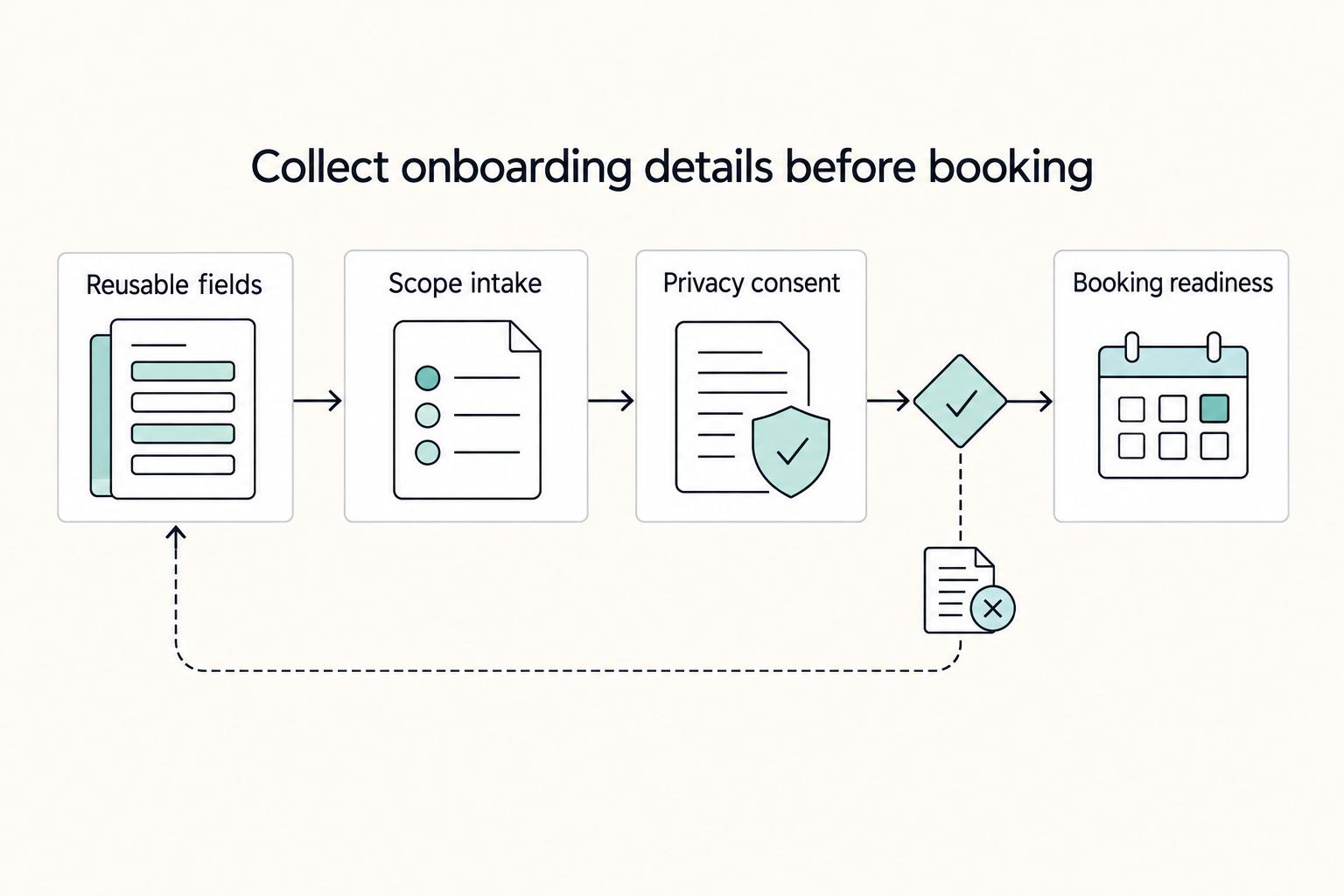
Collect onboarding and compliance details before you show a booking page. That keeps scheduling efficient without pushing risk and cleanup into invoicing, contracts, and delivery setup.
Treat this as a required step between qualification and scheduling. Link-based booking reduces back-and-forth, but you still need clean, reusable records so you do not get stuck in fragmented admin work later.
Capture only fields you will reuse#
Ask for data only when it has a clear next use. If it does not map to billing, contract drafting, or your client record, remove it.
| Required field | Why it matters | Where it is used next |
|---|---|---|
| Legal business name | Identifies the correct entity for formal records | Invoice, contract draft, CRM/project record |
| Registered business address | Supports billing and formal documentation | Invoice, contract draft, CRM/project record |
| Billing contact name | Gives you a clear owner for approvals and payment follow-up | Invoice, CRM/project record |
| Invoicing email | Reduces missed or misrouted invoices | Invoice, CRM/project record |
| Country/jurisdiction selector | Flags location-dependent contract and billing handling | Invoice, contract draft, CRM/project record |
| Tax treatment selector | Routes tax handling correctly; confirm the current tax threshold with the relevant tax authority | Invoice, contract draft |
| Tax ID/VAT ID | Captures tax identifier when applicable to client billing records | Invoice, CRM/project record |
Avoid a single "company details" free-text field. Separate required fields are easier to validate, easier to map, and easier to reuse downstream.
Turn scope intake into a reusable discovery block#
Instead of asking only for a "main goal," collect three short fields you can reuse in proposals and statement-of-work language:
| Field | What to capture | Later use |
|---|---|---|
| Primary outcome | What they need to achieve | Reusable in proposals and statement-of-work language |
| Success criteria | How they will decide this worked | Helps separate core scope from extra work |
| Constraints | Timeline, stakeholders, budget boundaries, approvals, or technical limits | Gives cleaner scope control later |
Those three fields give you cleaner scope control later. If a new request does not support the stated outcome or success criteria, you have a clear basis to separate core scope from extra work. For pricing alignment, see Value-Based Pricing: A Freelancer's Guide.
Add a short privacy and consent micro-step#
Before submission, explain three points in plain language: why you collect this data, where you store it, and who can access it. Keep it practical: this information supports scheduling prep, billing setup, and contract drafting, and is handled in your intake and business systems by people involved in delivery and administration.
Readiness check before you expose booking#
- Required fields validate correctly.
- Any routing logic for jurisdiction/tax handling is tested end-to-end.
- Every captured field is mapped to its downstream record (invoice, contract draft, CRM/project record).
- Your scheduling handoff is confirmed with your active calendar system (Google Calendar, Outlook, Office 365, or Microsoft Exchange).
- You are not trading speed for security/compliance in your final setup.
Related: How to Get a National Insurance Number (NINO) in the UK.
Step 3: The Mechanics of a Seamless, High-Signal Connection#
Your goal here is simple: move a qualified person from submitted Typeform to a confirmed Calendly booking without confusion or extra back-and-forth. Keep the handoff fast, but make the logic clear enough that it does not break when your offers change.
1. Make the handoff immediate and unambiguous#
Treat this as one continuous flow:
- The person submits the final Typeform step.
- Their answers are checked against your routing rules.
- They see the right booking path immediately.
- They book the right call type.
- They get a confirmation that matches the booking, and you get the same context for prep.
This works best when intake answers drive the booking path instead of sending everyone through one generic route. Keep the booking step visually and verbally close to submission so nobody wonders whether they are done, pending review, or supposed to email you.
For event types, separate only what is materially different. If call purpose, owner, or duration changes the outcome, use different event types. If the call is functionally the same, keep one event type and avoid unnecessary branches.
For availability and timing, align each event type with the real owner calendar for that route. Then test at least two time zones and confirm the booked time is consistent across the invite, confirmation page, and follow-up message.
2. Pick the lightest routing model that still fits your flow#
Start simple, then add automation only when your routing rules require it.
| Path | Setup effort | Routing flexibility | Maintenance burden | Best fit |
|---|---|---|---|---|
| Native handoff (single booking path) | Low | Low | Low | Most qualified leads book the same call |
| Native handoff (small set of event types) | Low to medium | Medium | Medium | A few clearly separated call purposes |
| Automation layer (Zapier/Make + rules) | Medium to higher | High | Higher | Multiple offers, owners, or rule-based assignment needs |
Use this routing framework when logic matters: intake signal -> routing rule -> Calendly event type -> fallback path.
Keep a safe default route for ambiguous answers. If responses conflict or are incomplete, send the person to a short triage event or a manual review path, not your longest premium consultation by default.
3. Add safeguards before going live#
Put guardrails in place before you publish:
| Safeguard | Grounded detail | Fallback or result |
|---|---|---|
| Duplicate booking prevention | Check for an existing booking signal such as the same submission reference or email | Do not offer another live slot |
| Owner notifications | Include contact identity, selected event type, primary outcome, and constraints | Send only the details needed to run a good call |
| Failure handling | Cover booking-step errors or temporary integration downtime | Show a clear fallback message to the user and trigger an internal alert |
In practice, that means checking for duplicate bookings before you offer another live slot, sending the owner only the details needed to run a good call, and defining a fallback message plus internal alert for booking-step errors or temporary integration downtime.
Run this QA checklist before launch:
- Test every route, including one ambiguous-response case.
- Verify invite payload quality (meeting type, time, and intake context).
- Verify calendar sync with the calendar you actually work from.
- Verify confirmation messaging stays consistent across all routes and fallback paths.
We covered this in detail in How to Integrate Calendly with Your Website.
Step 4: Beyond the Funnel: Connecting Your Intake to Your Business OS#
Treat a confirmed booking as the start of operations, not the finish line. Your goal is a reliable chain that moves one booking into clean records, the right actions, and a clear handoff with minimal manual re-entry: booking event -> data normalization -> system actions -> owner notification.
You have plenty of integration choices. Whippy advertises 7274 integrations, and Arahi claims 1500+ app connections. The practical risk is not tool count, but failure handling: public scheduling-tool reviews include reports of manual cross-calendar cleanup after meeting changes. Build this layer so failed steps are visible and recoverable.
| Automation path | Required inputs from Typeform | Output artifact | Fallback if action fails |
|---|---|---|---|
| Create or update CRM lead/client record | Full name, email, company, primary need | Canonical contact record | Route to exception queue for manual create/update |
| Draft contract or proposal file | Legal name, address, billing details, service interest | Draft document in your docs tool or folder | Create review task and pause send |
| Create project shell | Client name, service type, outcome, owner | PM project or task template | Create one manual setup task |
Decide your source of truth before you automate. If the CRM owns client status, write there first and mirror to PM/docs. If signed documents are your anchor, push that document link back into CRM and PM so you do not end up with conflicting records.
Use email plus a booking reference as your deduplication key. Make project/task creation idempotent so retries update existing items instead of creating duplicates. If key fields are missing, send the booking to an exception queue and apply policy checks only after the relevant rule or threshold has been verified from source records.
Launch-readiness checklist for this layer:
- Test trigger payloads with a normal booking and a reschedule case.
- Verify all field mappings, especially legal and billing fields.
- Confirm owner notifications include the record link you actually use.
- Validate manual recovery steps for automation downtime.
You might also find this useful: Building a Client Acquisition Funnel with ConvertKit and Calendly.
Conclusion: You Are the Architect of Your Business#
Your intake either protects your time or creates more admin. This setup earns its place only if it gives you better-fit calls, a cleaner handoff into onboarding, and fewer loose ends after someone books.
That is the real operational gain. Your focus stays protected when qualification rules filter poor fits before they ever see your calendar. Your handoff quality improves when you collect the business details you actually need at the right point in intake instead of chasing them later. Your professionalism shows up in small but visible choices, like routing qualified leads to the right Calendly event instead of exposing one open booking link to everyone.
| Old workflow | Designed workflow |
|---|---|
| Anyone can reach your calendar | Booking appears only after qualification |
| Business details are chased by email later | Key details are collected during intake or onboarding prep |
| Booking and follow-up depend on memory | Calendar, records, and next-step data move together |
| Admin problems show up after the call | Routing issues are caught in testing before they waste calls |
In 2026, generic one-size-fits-all funnels age badly. Your version should match how you sell, what you need to verify, and how onboarding begins from the first serious inquiry.
- Test one qualified path, one disqualified path, and one reschedule path.
- Check that the landing page, lead capture form, calendar handoff, and record creation still match your current questions and field names.
- Review the data regularly. If invites, notes, or follow-ups start slipping through the cracks, adjust the rules before small leaks turn into missed opportunities.
Treat your intake as a living part of the business, not a one-time setup. For a step-by-step walkthrough, see Build a Freelance Sales Funnel You Can Run in One Hour a Week.
Frequently Asked Questions
What questions should I ask in a Typeform to qualify serious consulting clients?
Ask questions that reveal decision authority, readiness, current situation, and desired outcome. Useful examples include who can approve the work, when they want to start, what they have already tried, and what result they want. Put likely disqualifiers early so non-fit leads do not reach scheduling.
How do I use a Typeform funnel to filter out bad-fit clients?
Place one clear dealbreaker near the top of the form and route from that answer before the scheduling step. If someone does not meet your criteria, send them to a polite exit screen or a lower-commitment next step instead of a booking option. Test at least one qualified and one disqualified path before publishing.
How can I automate client onboarding after a Calendly booking?
Start with one booking trigger and one dependable action, such as creating or updating the contact record in your source of truth. If you connect Calendly to Kit or a similar tool, approve permissions and check sync preferences so the right contacts import and sync. Verify plan limits first, because ongoing sync of new contacts in Kit's Calendly app is available only on Calendly paid plans.
How do I use Typeform to capture client VAT or tax information for invoicing?
Ask for legal business name, billing address, and tax ID after qualification and before scheduling. Keep the wording neutral so it feels like standard intake. Because tax, VAT, and invoice rules depend on your jurisdiction and the client's, verify local requirements and confirm any current tax threshold from official tax guidance or an adviser before you use it.
Should I embed Calendly in Typeform or link to it on the thank you page?
The article does not establish a universal winner between embedding Calendly and linking to it on the thank-you page. Choose based on your current setup, then validate the flow with live tests before standardizing. A link can be easier to branch, swap, and debug, while an embedded scheduler can feel smoother when loading and handoff are working well.
What should I check if routing, field mapping, or the booking handoff breaks?
Start with controlled tests, such as one qualified and one disqualified submission. Then check exact field names and answer mappings, confirm the app connection is still authorized, and verify sync preferences. If Typeform reaches the thank-you step but no booking record appears downstream, treat it as a handoff issue and send submissions to manual review until the connection is fixed.
Try a related tool
Researched and edited by the Gruv editorial team. Gruv builds cross-border billing, payouts, and finance-operations software for global businesses.
Sources
Includes 7 external sources outside the trusted-domain allowlist.
- seattle.gov/Documents/Departments/Council/Committees/Eco...trusted
- aakashg.com/customer-onboarding-best-practicesexternal
- arahi.ai/integrationsexternal
- aussiemarketers.com.au/7-marketing-funnels-that-actually-work-for-c...external
- cal.com/rateexternal
- calendly.com/blog/enterprise-scheduling-platformexternal
- chargebee.com/resources/guides/self-service-saas-revenue-g...external
- cypherlearning.com/marketplaceexternal
Educational content only. Not legal, tax, or financial advice.
Related Posts

Value-Based Pricing for Freelancers Under Real Payment Risk
Value-based pricing works when you and the client can name the business result before kickoff and agree on how progress will be judged. If that link is weak, use a tighter model first. This is not about defending one pricing philosophy over another. It is about avoiding surprises by keeping pricing, scope, delivery, and payment aligned from day one.

Calendly for Freelancers Who Want Reliable Booking-to-Payment Handoffs
Treat **calendly for freelancers** as your scheduling layer, not as full business control. The practical win is simple. You stop trading emails about times, protect your week with [real-time availability](https://calendly.com/blog/online-booking-system), and give clients one booking page that reflects the calendars you actually use. The limit matters just as much. Booking is only the front end of operations.

How to Get a National Insurance Number (NINO) in the UK
Start with a simple sequence: check whether you already have a National Insurance number, submit one first application only if you need it, then keep your NINO, UTR, and share code in separate lanes. Many setup problems come from document mix-ups rather than difficult legal edge cases.